JavaScript Testing Strategies: Unit, Integration, and E2E
ava, cypress, jest, tape, and vitest are all tools used to verify code correctness, but they target different layers of the application stack. jest and vitest are comprehensive test runners focused on unit and integration testing, with vitest being optimized for Vite projects. ava is a Node.js test runner known for parallel execution and explicit async handling. tape is a minimalist, production-ready harness that produces TAP output. cypress stands apart as an end-to-end (E2E) testing framework that runs in the browser to test real user interactions.
Npm Package Weekly Downloads Trend
Github Stars Ranking
Stat Detail


JavaScript Testing Strategies: Unit, Integration, and E2E
When building robust applications, selecting the right testing tool depends on what you are testing: isolated logic, component rendering, or full user flows. jest, vitest, ava, and tape primarily handle unit and integration testing within the Node runtime, while cypress operates in the browser for end-to-end validation. Let's compare how they handle core testing challenges.
⚡ Execution Model: Parallel vs Serial
How tests run affects speed and isolation. Some runners execute tests in parallel by default, while others run sequentially to prevent state leakage.
jest runs tests in parallel by default across workers.
- It isolates test files automatically.
- Shared state between files is reset, but globals can sometimes leak if not managed.
// jest: Parallel execution default
// __tests__/sum.test.js
test('adds 1 + 2 to equal 3', () => {
  expect(sum(1, 2)).toBe(3);
});
vitest also runs tests in parallel using threads.
- It leverages Vite's module graph for speed.
- Offers a
--pooloption to switch to forks or threads.
// vitest: Parallel execution default
// src/sum.test.ts
import { test, expect } from 'vitest';

test('adds 1 + 2 to equal 3', () => {
  expect(sum(1, 2)).toBe(3);
});
ava runs tests in parallel by default.
- It treats every test file as a separate process.
- Requires explicit handling for concurrent resources (like database connections).
// ava: Parallel execution default
// test.js
import test from 'ava';

test('adds 1 + 2 to equal 3', t => {
  t.is(sum(1, 2), 3);
});
tape runs tests strictly in serial (one after another).
- This prevents race conditions but is slower for large suites.
- Ideal for environments where parallelism is hard to manage.
// tape: Serial execution default
// test.js
var test = require('tape');

test('adds 1 + 2 to equal 3', function (t) {
  t.plan(1);
  t.equal(sum(1, 2), 3);
  t.end();
});
cypress runs specs in isolation but commands within a spec run serially.
- Each
itblock is a new browser context. - Parallelization requires the Cypress Dashboard or custom CI setup.
// cypress: Serial commands within spec
// cypress/e2e/spec.cy.js
describe('Calculator', () => {
  it('adds 1 + 2 to equal 3', () => {
    cy.visit('/calculator');
    cy.get('#result').should('have.text', '3');
  });
});
📦 Dependency Mocking: Auto vs Manual
Mocking external dependencies is crucial for unit testing. Tools differ in how much magic they apply.
jest provides an auto-mocking system.
- You can mock entire modules with
jest.mock(). - Hoists mocks to the top of the file automatically.
// jest: Auto-mocking
jest.mock('axios');

test('fetches data', async () => {
  axios.get.mockResolvedValue({ data: 'test' });
  // ... test logic
});
vitest uses a similar API to Jest but relies on Vite's transformer.
- Uses
vi.mock()instead ofjest.mock(). - Supports hoisting in ESM contexts effectively.
// vitest: Vi mocking
import { vi, test } from 'vitest';
vi.mock('axios');

test('fetches data', async () => {
  axios.get.mockResolvedValue({ data: 'test' });
  // ... test logic
});
ava does not have a built-in mock registry.
- You typically use
sinonortestdoublealongside it. - Gives you full control but requires more setup.
// ava: Manual mocking with sinon
import test from 'ava';
import sinon from 'sinon';

test('fetches data', t => {
  const stub = sinon.stub(axios, 'get').resolves({ data: 'test' });
  // ... test logic
  stub.restore();
});
tape has no built-in mocking.
- You must inject dependencies or use external libraries like
proxyquire. - Encourages dependency injection patterns over magic mocking.
// tape: Dependency injection
var test = require('tape');

test('fetches data', function (t) {
  const mockClient = { get: () => Promise.resolve('test') };
  const result = await myFunction(mockClient);
  t.equal(result, 'test');
  t.end();
});
cypress mocks network requests at the HTTP layer.
- Uses
cy.intercept()to stub API calls before they reach the app. - Does not mock Node modules directly.
// cypress: Network interception
cy.intercept('GET', '/api/data', { fixture: 'data.json' });
cy.visit('/dashboard');
// App fetches /api/data, Cypress serves fixture
📸 Snapshot Testing: Built-in vs External
Snapshot testing ensures UI or output doesn't change unexpectedly.
jest popularized snapshot testing.
- Built-in
toMatchSnapshot()API. - Stores
.snapfiles alongside tests.
// jest: Built-in snapshots
test('renders correctly', () => {
  const tree = renderer.create(<Link />).toJSON();
  expect(tree).toMatchSnapshot();
});
vitest supports snapshots out of the box.
- Compatible with Jest snapshot format.
- Uses
toMatchInlineSnapshot()for code-embedded snapshots.
// vitest: Built-in snapshots
import { expect, test } from 'vitest';

test('renders correctly', () => {
  const tree = render(<Link />);
  expect(tree).toMatchSnapshot();
});
ava requires a plugin for snapshots.
avaitself does not include snapshot logic.ava-snapshotsor similar plugins are needed.
// ava: Plugin-based snapshots
import test from 'ava';
import snapshot from 'ava-snapshots';

test('renders correctly', t => {
  const tree = render(<Link />);
  snapshot(t, tree);
});
tape does not support snapshots natively.
- You would need to manually compare strings or use a TAP reporter.
- Not recommended for UI component testing.
// tape: Manual comparison
var test = require('tape');

test('output matches', function (t) {
  const output = generateString();
  t.equal(output, 'expected string literal');
  t.end();
});
cypress focuses on visual regression via plugins.
- Core Cypress does not do DOM snapshots.
cypress-image-snapshotis used for visual pixel comparison.
// cypress: Visual snapshots
import { compareSnapshot } from 'cypress-image-snapshot';

cy.visit('/page');
cy.compareSnapshot('home-page');
🌐 Environment: Node vs Browser
Where the tests run determines what APIs are available.
jest runs in a Node environment (jsdom for DOM).
- Simulates browser APIs like
windowanddocument. - Can feel disconnected from real browser behavior.
// jest: JSDOM environment
// jest.config.js
// testEnvironment: 'jsdom'

test('clicks button', () => {
  document.body.innerHTML = '<button id="btn"></button>';
  // ... simulate click
});
vitest runs in Node but supports jsdom or happy-dom.
- Configured via
vitest.config.ts. - Faster than JSDOM when using
happy-dom.
// vitest: Happy-dom environment
// vitest.config.ts
// environment: 'happy-dom'

test('clicks button', () => {
  document.body.innerHTML = '<button id="btn"></button>';
  // ... simulate click
});
ava runs strictly in Node.js.
- No DOM APIs unless you install
jsdommanually. - Best for backend logic, utilities, and API testing.
// ava: Node environment
import test from 'ava';

test('calculates tax', t => {
  // Pure JS logic, no DOM needed
  t.is(calculateTax(100), 10);
});
tape runs in Node or Browser.
- Works without a build step in browsers via script tags.
- Very lightweight environment requirements.
// tape: Universal
var test = require('tape');

test('works everywhere', function (t) {
  t.ok(true);
  t.end();
});
cypress runs in a real browser (Chrome, Firefox, etc.).
- Executes code inside the browser context.
- Access to real network, cookies, and local storage.
// cypress: Real Browser
cy.visit('https://example.com');
cy.get('button').click();
// Runs in actual Chrome/Firefox instance
🛠️ Configuration: Zero-Config vs Explicit
Setup time varies significantly between these tools.
jest aims for zero-config.
- Works immediately in many React setups.
jest.config.jsallows deep customization.
// jest: jest.config.js
module.exports = {
  testMatch: ['**/__tests__/**/*.js'],
  collectCoverage: true
};
vitest uses Vite config.
- Defined in
vite.config.tsundertestkey. - Inherits Vite plugins and aliases automatically.
// vitest: vite.config.ts
export default defineConfig({
  test: {
    globals: true,
    environment: 'jsdom'
  }
});
ava uses ava.config.js.
- Requires explicit definition of file patterns.
- Configures concurrency and timeouts explicitly.
// ava: ava.config.js
export default {
  files: ['tests/**/*.js'],
  timeout: '10s'
};
tape requires no config file.
- Run via CLI command
node test.js. - Configuration is done via command flags or code.
# tape: CLI execution
node test.js | tap-spec
cypress uses cypress.config.js.
- Defines base URL, viewport, and support files.
- More complex setup due to browser management.
// cypress: cypress.config.js
module.exports = {
  e2e: {
    baseUrl: 'http://localhost:3000',
    supportFile: 'cypress/support/e2e.js'
  }
};
🤝 Similarities: Shared Ground
Despite their differences, these tools share common goals and patterns.
1. 🧪 Assertion Libraries
- All provide ways to assert expected outcomes.
jest/vitestuseexpect().toBe().ava/tapeuset.is().cypressusesshould().
// jest/vitest
expect(value).toBe(1);

// ava/tape
t.is(value, 1);

// cypress
cy.get('#id').should('have.text', '1');
2. 🔁 Async Support
- All handle Promises and async/await natively.
- Tests wait for promises to resolve before finishing.
// All support async/await
async test('fetches data', async () => {
  const data = await api.fetch();
  // assertions...
});
3. 📂 File-Based Discovery
- Tests are organized in files matching specific patterns.
- Runners automatically find and execute these files.
// Common patterns
// *.test.js
// *.spec.js
// test/**/*.js
📊 Summary: Key Differences
| Feature | jest | vitest | ava | tape | cypress |
|---|---|---|---|---|---|
| Primary Use | Unit/Integration | Unit/Integration (Vite) | Unit/Node | Unit/Minimalist | E2E/Browser |
| Execution | Parallel | Parallel | Parallel | Serial | Serial (Commands) |
| Mocking | Built-in | Built-in (vi) | External (sinon) | Manual/Inject | Network (intercept) |
| Snapshots | Built-in | Built-in | Plugin | No | Visual Plugin |
| Environment | Node (jsdom) | Node (jsdom/happy) | Node | Node/Browser | Real Browser |
| Config | jest.config | vite.config | ava.config | None | cypress.config |
💡 The Big Picture
jest remains the reliable workhorse 🐴 for general-purpose testing, especially in React ecosystems where its snapshot and mocking features save time.
vitest is the modern speedster 🏎️ for Vite projects, offering near-instant feedback with a familiar API.
ava is the Node specialist 🔧 for backend libraries where concurrency and explicit async control matter most.
tape is the minimalist anchor ⚓ for stable, dependency-light projects that value simplicity over features.
cypress is the browser simulator 🌐 for ensuring your application works for real users in real environments.
Final Thought: Most professional teams use a combination. Use vitest or jest for unit tests, and cypress for critical user flows. Don't try to force one tool to do everything.
How to Choose: ava vs cypress vs jest vs tape vs vitest
- ava:
Choose
avaif you are testing Node.js libraries or backend services where parallel test execution is critical for speed. It is ideal for teams that prefer explicit async handling and minimal configuration without global state pollution. Avoid it for frontend component testing where browser DOM APIs are required. - cypress:
Choose
cypressif you need to test the full application flow in a real browser environment. It is the best fit for end-to-end (E2E) testing, visual regression, and scenarios requiring interaction with the DOM, network stubbing, or time travel debugging. Do not use it for pure unit testing of logic functions. - jest:
Choose
jestif you are working in a React ecosystem or need a batteries-included solution with built-in mocking, snapshot testing, and code coverage. It is the industry standard for unit and integration testing in Node and frontend projects not using Vite. It is less suitable for E2E browser testing. - tape:
Choose
tapeif you need a zero-dependency, stable testing harness that works in both Node and browsers without a build step. It is suitable for small libraries or legacy projects where simplicity and TAP output are priorities. Avoid it for large-scale applications needing advanced features like snapshots or parallelism. - vitest:
Choose
vitestif your project is built on Vite and you want fast, native ESM support with a Jest-compatible API. It is the modern alternative to Jest for frontend projects, offering seamless integration with vite config and faster watch mode. It is not designed for E2E browser automation like Cypress.
Popular Comparisons
README for ava
Please support our friend Vadim Demedes and the people in Ukraine.

AVA is a test runner for Node.js with a concise API, detailed error output, embrace of new language features and thread isolation that lets you develop with confidence 🚀
Watch this repository and follow the Discussions for updates.
Read our contributing guide if you're looking to contribute (issues / PRs / etc).
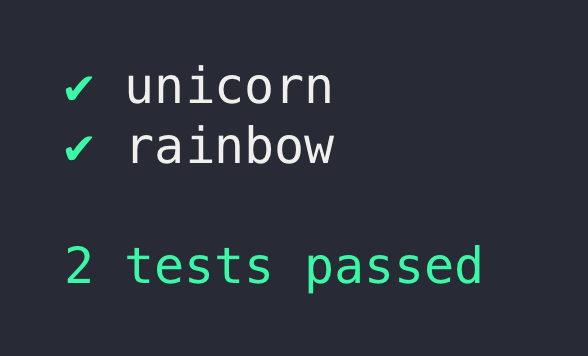
Translations: Español, Français, Italiano, 日本語, 한국어, Português, Русский, 简体中文
Why AVA?
- Minimal and fast
- Simple test syntax
- Runs tests concurrently
- Enforces writing atomic tests
- No implicit globals
- Includes TypeScript definitions
- Magic assert
- Isolated environment for each test file
- Promise support
- Async function support
- Observable support
- Enhanced assertion messages
- Automatic parallel test runs in CI
- TAP reporter
Usage
To install and set up AVA, run:
npm init ava
Your package.json will then look like this (exact version notwithstanding):
{
	"name": "awesome-package",
	"type": "module",
	"scripts": {
		"test": "ava"
	},
	"devDependencies": {
		"ava": "^5.0.0"
	}
}
Or if you prefer using Yarn:
yarn add ava --dev
Alternatively you can install ava manually:
npm install --save-dev ava
Make sure to install AVA locally. AVA cannot be run globally.
Don't forget to configure the test script in your package.json as per above.
Create your test file
Create a file named test.js in the project root directory.
Note that AVA's documentation assumes you're using ES modules.
import test from 'ava';

test('foo', t => {
	t.pass();
});

test('bar', async t => {
	const bar = Promise.resolve('bar');
	t.is(await bar, 'bar');
});
Running your tests
npm test
Or with npx:
npx ava
Run with the --watch flag to enable AVA's watch mode:
npx ava --watch
Supported Node.js versions
AVA supports the latest release of any major version that is supported by Node.js itself. Read more in our support statement.
Highlights
Magic assert
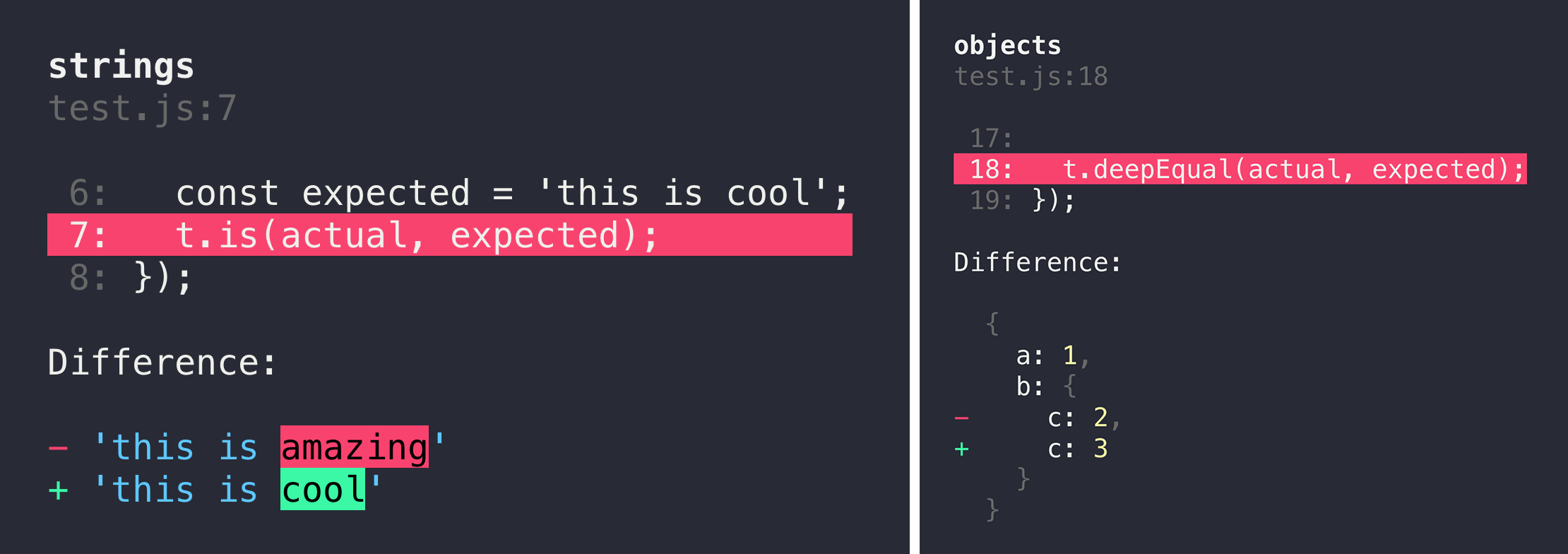
AVA adds code excerpts and clean diffs for actual and expected values. If values in the assertion are objects or arrays, only a diff is displayed, to remove the noise and focus on the problem. The diff is syntax-highlighted too! If you are comparing strings, both single and multi line, AVA displays a different kind of output, highlighting the added or missing characters.
Clean stack traces
AVA automatically removes unrelated lines in stack traces, allowing you to find the source of an error much faster, as seen above.
Parallel runs in CI
AVA automatically detects whether your CI environment supports parallel builds. Each build will run a subset of all test files, while still making sure all tests get executed. See the ci-parallel-vars package for a list of supported CI environments.
Documentation
Please see the files in the docs directory:
- Writing tests
- Execution context
- Assertions
- Snapshot testing
- Command line (CLI)
- Configuration
- Test timeouts
Common pitfalls
We have a growing list of common pitfalls you may experience while using AVA. If you encounter any issues you think are common, comment in this issue.
Recipes
- Test setup
- TypeScript
- Shared workers
- Watch mode
- When to use
t.plan() - Passing arguments to your test files
- Splitting tests in CI
- Code coverage
- Endpoint testing
- Browser testing
- Testing Vue.js components
- Debugging tests with Chrome DevTools
- Debugging tests with VSCode
- Debugging tests with WebStorm
- Isolated MongoDB integration tests
- Testing web apps using Puppeteer
- Testing web apps using Selenium WebDriverJS
FAQ
How is the name written and pronounced?
AVA, not Ava or ava. Pronounced /ˈeɪvə/: Ay (face, made) V (vie, have) A (comma, ago)
What is the header background?
It's the Andromeda galaxy.
What is the difference between concurrency and parallelism?
Concurrency is not parallelism. It enables parallelism.
Support
Related
- eslint-plugin-ava — Lint rules for AVA tests
- @ava/typescript — Test TypeScript projects
- @ava/cooperate — Low-level primitives to enable cooperation between test files
- @ava/get-port — Reserve a port while testing
Links
Team
 |  |
|---|---|
| Mark Wubben | Sindre Sorhus |
Former