File Upload Solutions in React Applications
filepond is a robust JavaScript library that provides a complete file uploading interface with built-in preview, validation, and processing capabilities, often paired with react-filepond for React projects. react-dropzone is a lightweight, hook-based React component that offers a flexible drop zone without imposing UI styles or upload logic. react-dropzone-component and react-dropzone-uploader are community-built wrappers around react-dropzone that add pre-built UI features like image previews and upload progress bars to speed up implementation.
Npm Package Weekly Downloads Trend
Github Stars Ranking
Stat Detail


File Upload Solutions in React: Architecture and Implementation Compared
When adding file uploads to a React application, you generally face a choice between building a custom solution on top of a primitive hook or adopting a full-featured library that handles the UI and logic for you. filepond, react-dropzone, react-dropzone-component, and react-dropzone-uploader represent different points on this spectrum. Let's compare how they handle common engineering challenges.
🎨 UI and Styling: Custom vs Pre-built
filepond comes with a complete, opinionated UI that looks consistent across browsers.
- You get drag-and-drop, file previews, and progress bars by default.
- Customizing the look requires overriding specific CSS variables or classes.
// filepond (via react-filepond)
import { FilePond } from 'react-filepond';

<FilePond
  allowMultiple={true}
  server="/api/upload"
  stylePanelLayout="compact circle"
/>
react-dropzone provides a blank canvas with no default styles.
- You must build the drop zone UI, active states, and file list yourself.
- This gives total control but increases initial development time.
// react-dropzone
import { useDropzone } from 'react-dropzone';

function BasicDropzone() {
  const { getRootProps, getInputProps } = useDropzone();
  return (
    <div {...getRootProps()}>
      <input {...getInputProps()} />
      <p>Drag and drop files here</p>
    </div>
  );
}
react-dropzone-component adds a pre-built file list and preview on top of the core hook.
- It renders thumbnails and file names automatically.
- You still have some control over the container but less than the raw hook.
// react-dropzone-component
import { DndProvider } from 'react-dnd';
import { HTML5Backend } from 'react-dnd-html5-backend';
import { Dropzone, DropzoneProvider } from 'react-dropzone-component';

<DropzoneProvider>
  <Dropzone
    config={{ allowedFileTypes: ['image/*'] }}
    eventHandlers={{ drop: handleDrop }}
  />
</DropzoneProvider>
react-dropzone-uploader focuses on the upload form UI with progress indicators.
- It includes a file input, preview, and progress bar in one component.
- Styling is simpler than
filepondbut more structured thanreact-dropzone.
// react-dropzone-uploader
import Dropzone from 'react-dropzone-uploader';

<Dropzone
  accept="image/*,audio/*,video/*"
  getUploadParams={getUploadParams}
  onChangeStatus={handleChangeStatus}
/>
📡 Upload Logic: Managed vs Manual
filepond manages the entire upload lifecycle internally.
- You configure a server endpoint, and it handles the POST request.
- It supports chunking and retry logic without extra code.
// filepond
<FilePond
  server={{
    process: '/api/upload',
    revert: '/api/revert',
  }}
/>
react-dropzone leaves network logic entirely to you.
- You must write the
fetchoraxioscalls inside theonDrophandler. - This is better for complex APIs that need custom headers or auth tokens.
// react-dropzone
const onDrop = async (acceptedFiles) => {
  const formData = new FormData();
  acceptedFiles.forEach(file => formData.append('file', file));

  await fetch('/api/upload', {
    method: 'POST',
    body: formData,
  });
};

const { getRootProps, getInputProps } = useDropzone({ onDrop });
react-dropzone-component expects you to handle the upload via event handlers.
- It provides the file objects but does not send them automatically.
- You hook into
droporsubmitevents to trigger your own API calls.
// react-dropzone-component
const eventHandlers = {
  drop: (files) => {
    // Manually trigger upload logic here
    uploadFiles(files);
  }
};

<Dropzone eventHandlers={eventHandlers} />
react-dropzone-uploader uses a getUploadParams function to configure requests.
- You return the URL and method, and the library handles the
fetch. - It strikes a balance between control and automation.
// react-dropzone-uploader
const getUploadParams = ({ meta }) => {
  return {
    url: '/api/upload',
    method: 'POST',
    headers: { Authorization: 'Bearer token' }
  };
};

<Dropzone getUploadParams={getUploadParams} />
🖼️ File Previews: Built-in vs Custom
filepond generates thumbnails and previews automatically for images and videos.
- It handles image resizing and cropping on the client side.
- No extra code is needed to show the user what they selected.
// filepond
<FilePond
  imagePreviewHeight={170}
  imageCropAspectRatio="1:1"
  imageTransformOutputQuality={90}
/>
react-dropzone requires you to create object URLs for previews.
- You must manage the state of accepted files and render
<img>tags. - Remember to revoke object URLs to avoid memory leaks.
// react-dropzone
const thumbs = files.map(file => (
  <div key={file.name}>
    <img
      src={URL.createObjectURL(file)}
      onLoad={() => URL.revokeObjectURL(file)}
    />
  </div>
));

return <aside>{thumbs}</aside>;
react-dropzone-component renders file previews as part of its default file list.
- It shows icons or thumbnails based on file type.
- You can customize the view but the structure is predefined.
// react-dropzone-component
<Dropzone
  view={{
    fileIcon: () => <span>📄</span>,
    fileImagePreview: true
  }}
/>
react-dropzone-uploader shows a preview card for each file in the queue.
- It includes a remove button and status indicator by default.
- Good for forms where users need to verify files before submitting.
// react-dropzone-uploader
<Dropzone
  styles={{
    previewContainer: { padding: '10px', border: '1px solid #ccc' }
  }}
/>
⚠️ Maintenance and Ecosystem Health
filepond is actively maintained with a dedicated team and regular updates.
- It has a large ecosystem of plugins for different frameworks.
- It is a safe choice for long-term enterprise projects.
react-dropzone is the industry standard for React drop zones.
- It is maintained by the React Dropzone organization.
- High stability and frequent compatibility updates with new React versions.
react-dropzone-component has seen slower update cycles compared to the core library.
- Check the repository for recent commits before adopting.
- May require forks or patches if breaking changes occur in
react-dropzone.
react-dropzone-uploader is a community project with moderate activity.
- Suitable for smaller projects but verify issue resolution times.
- Consider if the convenience outweighs the risk of relying on a smaller maintainer base.
📊 Summary: Key Differences
| Feature | filepond | react-dropzone | react-dropzone-component | react-dropzone-uploader |
|---|---|---|---|---|
| UI Style | 🎨 Opinionated & Polished | 🧱 Blank Canvas | 🧩 Semi-Structured | 📋 Form-Focused |
| Upload Logic | 📡 Automatic | 🛠️ Manual | 🛠️ Manual | ⚙️ Configurable |
| Previews | ✅ Built-in & Advanced | ❌ Custom Implementation | ✅ Built-in List | ✅ Built-in Cards |
| Flexibility | 📉 Lower (Harder to override) | 📈 Highest | 📊 Medium | 📊 Medium |
| Setup Effort | 🚀 Fast | 🐢 Slower | 🚀 Fast | 🚀 Fast |
💡 The Big Picture
filepond is like a premium appliance 🍳 — it works beautifully out of the box and handles complex tasks like image cropping, but it takes up more space and has a specific look. Choose this for customer-facing apps where upload experience is critical.
react-dropzone is like a set of raw ingredients 🥬 — you have to cook the meal yourself, but you can make exactly what you want. Choose this for design systems or apps with unique interaction requirements.
react-dropzone-component and react-dropzone-uploader are like meal kits 🥘 — they provide the pre-chopped veggies and recipe to speed things up without losing all control. Choose these for internal tools or when you need a balance between speed and customization.
Final Thought: All four tools can get the job done, but they shift the burden differently. filepond shifts burden to configuration, react-dropzone shifts burden to implementation, and the wrappers sit in the middle. Match the tool to your team's capacity for custom UI development.
How to Choose: filepond vs react-dropzone vs react-dropzone-component vs react-dropzone-uploader
- filepond:
Choose
filepond(withreact-filepond) if you need a polished, feature-rich uploader out of the box with minimal custom code. It is ideal for projects requiring image transformation, validation, and a consistent UI without building these features from scratch. Be aware it brings a heavier dependency and a distinct visual style that may require CSS overrides to match your design system. - react-dropzone:
Choose
react-dropzoneif you want full control over the UI and upload logic while relying on a stable, widely-adopted standard. It is best for teams that prefer to build custom drag-and-drop interactions and manage server communication manually. This approach offers the most flexibility but requires more initial development effort to handle previews and progress states. - react-dropzone-component:
Choose
react-dropzone-componentif you want the flexibility ofreact-dropzonebut need quick access to image previews and a file list without writing extra code. It is suitable for internal tools or prototypes where development speed matters more than long-term maintenance of a custom solution. Verify its maintenance status before committing, as community wrappers can lag behind core library updates. - react-dropzone-uploader:
Choose
react-dropzone-uploaderif your primary need is a simple file input with built-in upload progress bars and basic validation. It works well for straightforward forms where you need to show users the status of their upload without implementing a custom state machine. Like other wrappers, ensure it is actively maintained to avoid security or compatibility issues in the future.
Popular Comparisons
README for filepond

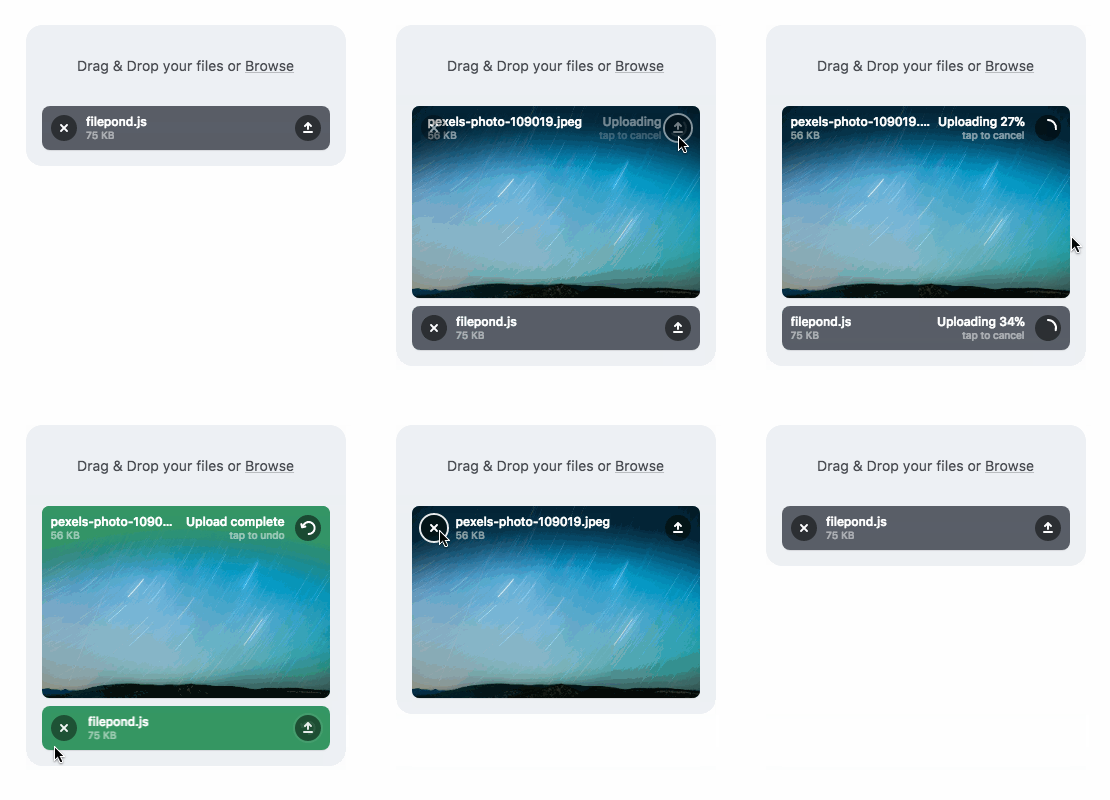
A JavaScript library that can upload anything you throw at it, optimizes images for faster uploads, and offers a great, accessible, silky smooth user experience.





FilePond adapters are available for React, Vue, Angular, Svelte, and jQuery
FilePond v5 Alpha version now available for testing
Documentation • Discord • Examples

Buy me a Coffee • Use FilePond with Pintura • Dev updates
Core Features
- Accepts directories, files, blobs, local URLs, remote URLs and Data URIs.
- Drop files, select on filesystem, copy and paste files, or add files using the API.
- Async uploads with AJAX, supports chunk uploads, can encode files as base64 data and send along form post.
- Accessible, tested with AT software like VoiceOver and JAWS, navigable by Keyboard.
- Image optimization, automatic image resizing, cropping, filtering, and fixes EXIF orientation.
- Responsive, automatically scales to available space, is functional on both mobile and desktop devices.
Also need Image Editing?
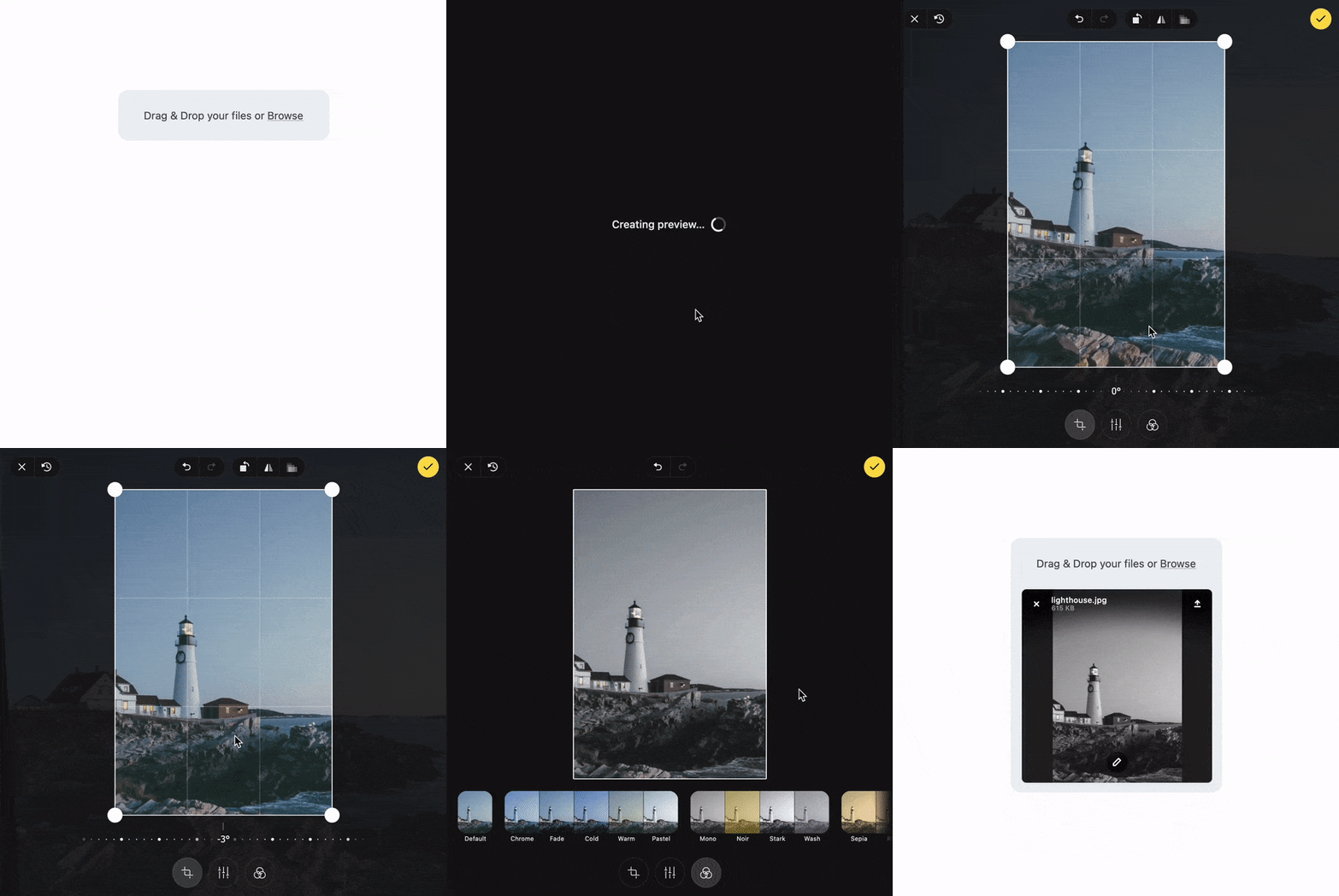
Pintura the modern JavaScript Image Editor is what you're looking for. Pintura supports setting crop aspect ratios, resizing, rotating, cropping, and flipping images. Above all, it integrates beautifully with FilePond.
Live Demos
Plugins
- File encode
- File rename
- File size validation
- File type validation
- File metadata
- File poster
- Image editor
- Image size validation
- Image preview
- Image crop
- Image filter
- Image resize
- Image transform
- Image EXIF orientation
- Image overlay (nielsboogaard/filepond-plugin-image-overlay)
- Media preview (nielsboogaard/filepond-plugin-media-preview)
- Media preview + PDF preview (ErnestBrandi/filepond-plugin-media-preview)
- Get file (nielsboogaard/filepond-plugin-get-file)
- Zip Directory Uploads (tzsk/filepond-plugin-zipper)
- PDF Preview (Adri-Glez/filepond-plugin-pdf-preview)
- PDF Convert (alexandreDavid/filepond-plugin-pdf-convert)
Adapters
- React
- Vue
- Svelte
- jQuery
- Angular
- Angular 1 (johnnyasantoss/angularjs-filepond)
- Blazor (soenneker/soenneker.blazor.filepond)
- Ember (alexdiliberto/ember-filepond)
Backend
- PHP
- Django (ImperialCollegeLondon/django-drf-filepond)
- Laravel (Sopamo/laravel-filepond)
- Laravel (Albert221/laravel-filepond)
- SilverStripe (lekoala/silverstripe-filepond)
- Ruby on Rails (Code-With-Rails/filepond-rails)
Quick Start
Install using npm:
npm install filepond
Then import in your project:
import * as FilePond from 'filepond';

// Create a multi file upload component
const pond = FilePond.create({
    multiple: true,
    name: 'filepond',
});

// Add it to the DOM
document.body.appendChild(pond.element);
Or get it from a CDN:
<!DOCTYPE html>
<html>
    <head>
        <title>FilePond from CDN</title>

        <!-- Filepond stylesheet -->
        <link href="https://unpkg.com/filepond/dist/filepond.css" rel="stylesheet" />
    </head>
    <body>
        <!-- We'll transform this input into a pond -->
        <input type="file" class="filepond" />

        <!-- Load FilePond library -->
        <script src="https://unpkg.com/filepond/dist/filepond.js"></script>

        <!-- Turn all file input elements into ponds -->
        <script>
            FilePond.parse(document.body);
        </script>
    </body>
</html>
Internationalization
The locale folder contains different language files, PR's are welcome, you can use locale files like this:
import pt_BR from 'filepond/locale/pt-br.js';

FilePond.setOptions(pt_BR);
Contributing
At the moment test coverage is not great, it's around 65%. To accept pull requests the tests need to be better, any help to improve them is very much appreciated.
Tests are based on Jest and can be run with npm run test
To build the library run npm run build
Publications
- Using FilePond with NodeJS
- Applying Watermarks to Images with FilePond
- Generating Image Thumbnails in the Browser using JavaScript and FilePond
- How to upload files with Vue and FilePond
- Smooth file uploading with React and FilePond
- 5 interesting technical challenges I faced while building FilePond
- Image uploads with Laravel and FilePond
- Integrating FilePond with Ember
- FilePond launch day post-mortem
- FilePond on ProductHunt
Browser Compatibility
FilePond is compatible with a wide range of desktop and mobile browsers, the oldest explicitly supported browser is IE11, for best cross browser support add FilePond Polyfill and Babel polyfill to your project.
FilePond uses BrowserStack for compatibility testing.

License
Please don't remove or change the disclaimers in the source files
MIT License
Copyright (c) 2020 PQINA | Rik Schennink
Permission is hereby granted, free of charge, to any person obtaining a copy of this software and associated documentation files (the "Software"), to deal in the Software without restriction, including without limitation the rights to use, copy, modify, merge, publish, distribute, sublicense, and/or sell copies of the Software, and to permit persons to whom the Software is furnished to do so, subject to the following conditions:
The above copyright notice and this permission notice shall be included in all copies or substantial portions of the Software.
THE SOFTWARE IS PROVIDED "AS IS", WITHOUT WARRANTY OF ANY KIND, EXPRESS OR IMPLIED, INCLUDING BUT NOT LIMITED TO THE WARRANTIES OF MERCHANTABILITY, FITNESS FOR A PARTICULAR PURPOSE AND NONINFRINGEMENT. IN NO EVENT SHALL THE AUTHORS OR COPYRIGHT HOLDERS BE LIABLE FOR ANY CLAIM, DAMAGES OR OTHER LIABILITY, WHETHER IN AN ACTION OF CONTRACT, TORT OR OTHERWISE, ARISING FROM, OUT OF OR IN CONNECTION WITH THE SOFTWARE OR THE USE OR OTHER DEALINGS IN THE SOFTWARE.