react-beautiful-dnd vs react-dnd vs react-draggable vs react-sortable-hoc vs sortablejs
ドラッグ&ドロップ
react-beautiful-dndreact-dndreact-draggablereact-sortable-hocsortablejs

ドラッグ&ドロップ

ドラッグ&ドロップ(DnD)ライブラリは、ユーザーが画面上の要素をクリックしてドラッグし、別の場所にドロップできるようにするインタラクティブな機能を提供します。これらのライブラリは、リストの並べ替え、アイテムの移動、カスタムDnDインターフェースの作成など、さまざまな用途に利用されます。これにより、ユーザーは視覚的に要素を操作でき、より直感的でインタラクティブな体験を提供します。

npmのダウンロードトレンド

3 年

GitHub Starsランキング

統計詳細

パッケージ
ダウンロード数
Stars
サイズ
Issues
公開日時
ライセンス
react-beautiful-dnd034,0481.39 MB644-Apache-2.0
react-dnd021,637231 kB475-MIT
react-draggable09,295243 kB2138ヶ月前MIT
react-sortable-hoc010,901-2915年前MIT
sortablejs031,022640 kB51425日前MIT

機能比較: react-beautiful-dnd vs react-dnd vs react-draggable vs react-sortable-hoc vs sortablejs

カスタマイズ性

  • react-beautiful-dnd:

    react-beautiful-dndは、主にリストやグリッドの並べ替えに特化しており、カスタマイズは可能ですが、react-dndほど柔軟ではありません。特定のスタイルやアニメーションを簡単に変更できますが、複雑なドラッグ&ドロップインターフェースを構築するには限界があります。

  • react-dnd:

    react-dndは、非常に高いカスタマイズ性を提供します。ドラッグソースやドロップターゲットを自由に定義でき、複雑なインターフェースや独自のドラッグ&ドロップロジックを実装することができます。特に、異なるコンポーネント間でのアイテム移動や、複数のドラッグソースを持つアプリケーションに適しています。

  • react-draggable:

    react-draggableは、ドラッグ可能な要素の位置を簡単に変更できるライブラリですが、カスタマイズ性は限られています。ドラッグの動作やスタイルを変更することはできますが、並べ替えや複雑なDnD機能は提供していません。シンプルなドラッグインターフェースには適していますが、複雑なカスタマイズには向いていません。

  • react-sortable-hoc:

    react-sortable-hocは、リストやグリッドの並べ替えに特化しており、高いカスタマイズ性を持っています。並べ替え可能なコンポーネントを簡単に作成でき、ドラッグ中のスタイルやアニメーションを自由に設定できます。特に、並べ替え操作に関するカスタマイズが豊富で、アクセシビリティにも配慮されています。

  • sortablejs:

    sortablejsは、非常に高いカスタマイズ性を提供する軽量ライブラリです。ドラッグ&ドロップ、並べ替え、移動などの操作を自由にカスタマイズでき、複数のリスト間でのアイテム移動もサポートしています。シンプルなAPIながら、詳細な設定が可能で、さまざまな用途に対応できます。特に、カスタムドラッグハンドラーやアニメーションの設定が容易です。

アクセシビリティ

  • react-beautiful-dnd:

    react-beautiful-dndは、アクセシビリティに配慮して設計されており、キーボード操作やスクリーンリーダーに対応しています。ドラッグ&ドロップ操作を視覚的にわかりやすくするためのアニメーションやインジケーターが用意されており、すべてのユーザーが利用しやすいインターフェースを提供します。

  • react-dnd:

    react-dndは、アクセシビリティに関する機能は提供していますが、デフォルトではあまり強化されていません。開発者が独自にアクセシビリティ機能を実装する必要があります。カスタマイズ性が高いため、アクセシビリティを考慮したインターフェースを構築することは可能ですが、追加の作業が必要です。

  • react-draggable:

    react-draggableは、ドラッグ操作に特化したライブラリですが、アクセシビリティに関する機能は限られています。ドラッグ可能な要素に対してアクセシビリティ属性を手動で追加する必要があります。シンプルなドラッグインターフェースには適していますが、アクセシビリティを強化するためには追加の実装が必要です。

  • react-sortable-hoc:

    react-sortable-hocは、並べ替え操作に特化しており、アクセシビリティに配慮した設計がされています。リストの並べ替えが視覚的にわかりやすく、キーボード操作にも対応しています。ただし、アクセシビリティ機能はデフォルトでは限られているため、必要に応じて追加の実装が推奨されます。

  • sortablejs:

    sortablejsは、アクセシビリティに関する機能は提供していませんが、カスタマイズが容易なため、開発者が独自にアクセシビリティ機能を追加することができます。シンプルで高速なライブラリですが、アクセシビリティを考慮したインターフェースを構築するには、追加の作業が必要です。

パフォーマンス

  • react-beautiful-dnd:

    react-beautiful-dndは、アニメーションやアクセシビリティに配慮しながらも、比較的高いパフォーマンスを維持しています。ただし、大規模なリストや複雑なドラッグ操作では、パフォーマンスに影響が出ることがあります。最適化が必要な場合がありますが、一般的な用途には十分な性能を提供します。

  • react-dnd:

    react-dndは、カスタマイズ性が高い分、複雑なドラッグ&ドロップインターフェースではパフォーマンスに影響を与えることがあります。特に、ドラッグ操作中に多くの状態更新が発生する場合、パフォーマンスが低下する可能性があります。適切な最適化が必要ですが、柔軟性とパフォーマンスのバランスを取ることができます。

  • react-draggable:

    react-draggableは、シンプルなドラッグ操作に特化しているため、非常に高いパフォーマンスを発揮します。ドラッグ操作中の状態更新が少なく、リソースをほとんど消費しません。大規模なアプリケーションでもスムーズに動作しますが、複雑なドラッグ&ドロップ機能を必要とする場合は、他のライブラリの方が適しています。

  • react-sortable-hoc:

    react-sortable-hocは、並べ替え操作に特化しており、比較的高いパフォーマンスを提供します。ただし、大規模なリストや複雑な並べ替え操作では、パフォーマンスに影響が出ることがあります。リストのサイズや並べ替えの複雑さに応じて最適化が必要ですが、一般的な用途には十分な性能を提供します。

  • sortablejs:

    sortablejsは、非常に軽量で高速なライブラリであり、大規模なリストや複数のリスト間でのドラッグ&ドロップ操作でも高いパフォーマンスを発揮します。リソースの消費が少なく、スムーズな操作が可能です。パフォーマンスを重視するアプリケーションに最適で、特にモバイルデバイスでも快適に動作します。

Ease of Use: Code Examples

  • react-beautiful-dnd:

    react-beautiful-dndを使用したシンプルなリストの並べ替え例

    import React from 'react';
    import { DragDropContext, Droppable, Draggable } from 'react-beautiful-dnd';
    
    const items = [
      { id: '1', content: 'アイテム 1' },
      { id: '2', content: 'アイテム 2' },
      { id: '3', content: 'アイテム 3' },
    ];
    
    const App = () => {
      const onDragEnd = (result) => {
        // ドラッグ終了時の処理
      };
    
      return (
        <DragDropContext onDragEnd={onDragEnd}>
          <Droppable droppableId="droppable">
            {(provided) => (
              <div ref={provided.innerRef} {...provided.droppableProps}>
                {items.map((item, index) => (
                  <Draggable key={item.id} draggableId={item.id} index={index}>
                    {(provided) => (
                      <div ref={provided.innerRef} {...provided.draggableProps} {...provided.dragHandleProps}>
                        {item.content}
                      </div>
                    )}
                  </Draggable>
                ))}
                {provided.placeholder}
              </div>
            )}
          </Droppable>
        </DragDropContext>
      );
    };
    
    export default App;
    
  • react-dnd:

    react-dndを使用したカスタムドラッグ&ドロップの例

    import React from 'react';
    import { DndProvider, useDrag, useDrop } from 'react-dnd';
    import { HTML5Backend } from 'react-dnd-html5-backend';
    
    const ItemType = 'ITEM';
    
    const DraggableItem = () => {
      const [{ isDragging }, drag] = useDrag({
        type: ItemType,
        item: { id: 1 },
        collect: (monitor) => ({ isDragging: monitor.isDragging() }),
      });
    
      return (
        <div ref={drag} style={{ opacity: isDragging ? 0.5 : 1 }}>
          ドラッグ可能なアイテム
        </div>
      );
    };
    
    const DropZone = () => {
      const [{ isOver }, drop] = useDrop({
        accept: ItemType,
        drop: (item) => console.log(`アイテムがドロップされました: ${item.id}`),
        collect: (monitor) => ({ isOver: monitor.isOver() }),
      });
    
      return (
        <div ref={drop} style={{ border: '1px solid black', padding: '20px', backgroundColor: isOver ? '#f0f0f0' : '#fff' }}>
          ドロップゾーン
        </div>
      );
    };
    
    const App = () => {
      return (
        <DndProvider backend={HTML5Backend}>
          <DraggableItem />
          <DropZone />
        </DndProvider>
      );
    };
    
    export default App;
    
  • react-draggable:

    react-draggableを使用したシンプルなドラッグ例

    import React from 'react';
    import { Draggable } from 'react-draggable';
    
    const App = () => {
      return (
        <div>
          <Draggable>
            <div style={{ width: '100px', height: '100px', background: 'lightblue', cursor: 'move' }}>
              ドラッグ可能な要素
            </div>
          </Draggable>
        </div>
      );
    };
    
    export default App;
    
  • react-sortable-hoc:

    react-sortable-hocを使用したリストの並べ替え例

    import React from 'react';
    import { SortableContainer, SortableElement } from 'react-sortable-hoc';
    
    const SortableItem = SortableElement(({ value }) => <div>{value}</div>);
    const SortableList = SortableContainer(({ items }) => (
      <div>
        {items.map((value, index) => (
          <SortableItem key={`item-${index}`} index={index} value={value} />
        ))}
      </div>
    ));
    
    const App = () => {
      const items = ['アイテム 1', 'アイテム 2', 'アイテム 3'];
    
      return <SortableList items={items} onSortEnd={({ oldIndex, newIndex }) => console.log(`並べ替え: ${oldIndex} -> ${newIndex}`)} />;
    };
    
    export default App;
    
  • sortablejs:

    sortablejsを使用したシンプルな並べ替え例

    <!DOCTYPE html>
    <html lang="ja">
    <head>
      <meta charset="UTF-8">
      <meta name="viewport" content="width=device-width, initial-scale=1.0">
      <title>Sortable.js Example</title>
      <script src="https://cdn.jsdelivr.net/npm/sortablejs@latest"></script>
      <style>
        .sortable {
          list-style: none;
          padding: 0;
          margin: 0;
        }
        .sortable li {
          padding: 10px;
          margin: 5px;
          background: #f0f0f0;
          border: 1px solid #ccc;
          cursor: move;
        }
      </style>
    </head>
    <body>
      <ul id="sortable" class="sortable">
        <li>アイテム 1</li>
        <li>アイテム 2</li>
        <li>アイテム 3</li>
      </ul>
      <script>
        new Sortable(document.getElementById('sortable'), {
          animation: 150,
          onEnd: (evt) => {
            console.log(`並べ替え: ${evt.oldIndex} -> ${evt.newIndex}`);
          },
        });
      </script>
    </body>
    </html>
    

選び方: react-beautiful-dnd vs react-dnd vs react-draggable vs react-sortable-hoc vs sortablejs

  • react-beautiful-dnd:

    react-beautiful-dndは、リストの並べ替えやドラッグ&ドロップ操作を簡単に実装できるライブラリです。特に、アクセシビリティやアニメーションに配慮されており、ユーザー体験を向上させるための機能が豊富です。リストやグリッドの並べ替えが主な用途で、シンプルなAPIで使いやすいのが特徴です。

  • react-dnd:

    react-dndは、より柔軟でカスタマイズ可能なドラッグ&ドロップ機能を提供するライブラリです。複雑なDnDインターフェースを構築するためのツールを提供しており、リストの並べ替えだけでなく、異なるコンポーネント間でのアイテムの移動やカスタムドラッグ操作を実現できます。特に、複数のドラッグソースやドロップターゲットを持つアプリケーションに適しています。

  • react-draggable:

    react-draggableは、要素を自由にドラッグできるようにするシンプルなライブラリです。特定の要素をドラッグ可能にし、位置を変更することができます。ドラッグ操作に特化しており、並べ替えや複雑なDnD機能は提供していませんが、簡単なドラッグインターフェースを実装するのに適しています。

  • react-sortable-hoc:

    react-sortable-hocは、リストやグリッドの並べ替えを簡単に実装できるライブラリです。高いカスタマイズ性を持ち、並べ替え可能なコンポーネントを簡単に作成できます。特に、並べ替え操作に特化しており、アクセシビリティやアニメーションのサポートもあります。リストの並べ替えに特化した機能が豊富です。

  • sortablejs:

    sortablejsは、軽量で高速な並べ替えライブラリで、ドラッグ&ドロップ、並べ替え、移動などの操作をサポートします。リストやグリッドの並べ替えに加え、複数のリスト間でのアイテム移動も可能です。シンプルなAPIと高いパフォーマンスが特徴で、カスタマイズ性も高く、さまざまな用途に対応できます。

react-beautiful-dnd のREADME

⚠️ Maintenance & support

This library continues to be relied upon heavily by Atlassian products, but we are focused on other priorities right now and have no current plans for further feature development or improvements.

It will continue to be here on GitHub and we will still make critical updates (e.g. security fixes, if any) as required, but will not be actively monitoring or replying to issues and pull requests.

We recommend that you don’t raise issues or pull requests, as they will not be reviewed or actioned until further notice.


react beautiful dnd logo

react-beautiful-dnd (rbd)

Beautiful and accessible drag and drop for lists with React

CircleCI branch npm

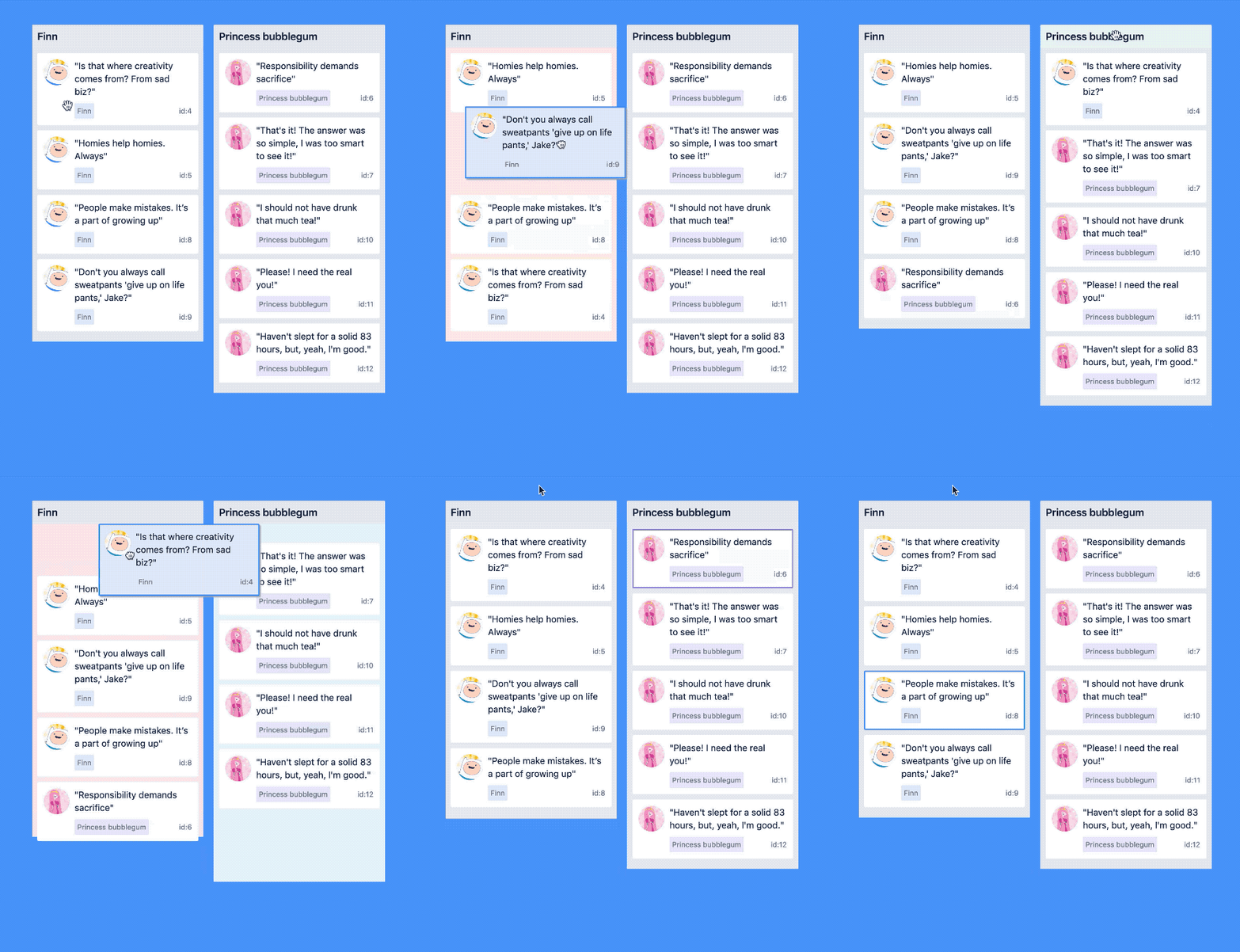
quote application example

Play with this example if you want!

Core characteristics

  • Beautiful and natural movement of items 💐
  • Accessible: powerful keyboard and screen reader support ♿️
  • Extremely performant 🚀
  • Clean and powerful api which is simple to get started with
  • Plays extremely well with standard browser interactions
  • Unopinionated styling
  • No creation of additional wrapper dom nodes - flexbox and focus management friendly!

Get started 👩‍🏫

We have created a free course on egghead.io 🥚 to help you get started with react-beautiful-dnd as quickly as possible.

course-logo

Currently supported feature set ✅

  • Vertical lists ↕
  • Horizontal lists ↔
  • Movement between lists (▤ ↔ ▤)
  • Virtual list support 👾 - unlocking 10,000 items @ 60fps
  • Combining items
  • Mouse 🐭, keyboard 🎹♿️ and touch 👉📱 (mobile, tablet and so on) support
  • Multi drag support
  • Incredible screen reader support ♿️ - we provide an amazing experience for english screen readers out of the box 📦. We also provide complete customisation control and internationalisation support for those who need it 💖
  • Conditional dragging and conditional dropping
  • Multiple independent lists on the one page
  • Flexible item sizes - the draggable items can have different heights (vertical lists) or widths (horizontal lists)
  • Add and remove items during a drag
  • Compatible with semantic <table> reordering - table pattern
  • Auto scrolling - automatically scroll containers and the window as required during a drag (even with keyboard 🔥)
  • Custom drag handles - you can drag a whole item by just a part of it
  • Able to move the dragging item to another element while dragging (clone, portal) - Reparenting your <Draggable />
  • Create scripted drag and drop experiences 🎮
  • Allows extensions to support for any input type you like 🕹
  • 🌲 Tree support through the @atlaskit/tree package
  • A <Droppable /> list can be a scroll container (without a scrollable parent) or be the child of a scroll container (that also does not have a scrollable parent)
  • Independent nested lists - a list can be a child of another list, but you cannot drag items from the parent list into a child list
  • Server side rendering (SSR) compatible - see resetServerContext()
  • Plays well with nested interactive elements by default

Motivation 🤔

react-beautiful-dnd exists to create beautiful drag and drop for lists that anyone can use - even people who cannot see. For a good overview of the history and motivations of the project you can take a look at these external resources:

Not for everyone ✌️

There are a lot of libraries out there that allow for drag and drop interactions within React. Most notable of these is the amazing react-dnd. It does an incredible job at providing a great set of drag and drop primitives which work especially well with the wildly inconsistent html5 drag and drop feature. react-beautiful-dnd is a higher level abstraction specifically built for lists (vertical, horizontal, movement between lists, nested lists and so on). Within that subset of functionality react-beautiful-dnd offers a powerful, natural and beautiful drag and drop experience. However, it does not provide the breadth of functionality offered by react-dnd. So react-beautiful-dnd might not be for you depending on what your use case is.

Documentation 📖

About 👋

Sensors 🔉

The ways in which somebody can start and control a drag

API 🏋️‍

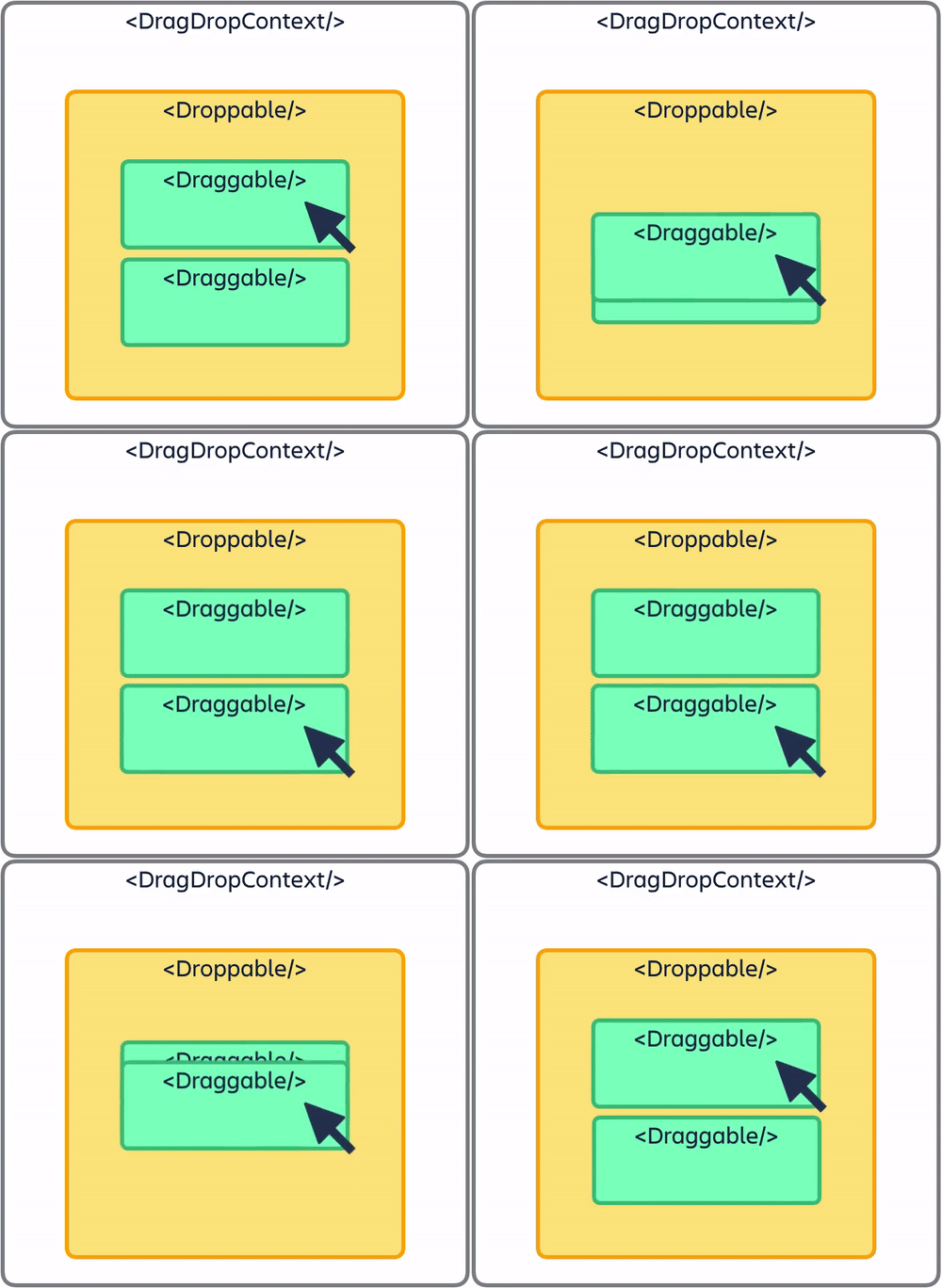
diagram

Guides 🗺

Patterns 👷‍

Support 👩‍⚕️

Read this in other languages 🌎

Creator ✍️

Alex Reardon @alexandereardon

Alex is no longer personally maintaning this project. The other wonderful maintainers are carrying this project forward.

Maintainers

Collaborators 🤝