Building Data-Heavy Tables and Spreadsheets in Web Apps
ag-grid and handsontable are powerful JavaScript components for handling tabular data. ag-grid is designed for high-performance data grids, focusing on sorting, filtering, and aggregating large datasets efficiently. handsontable provides a spreadsheet-like interface, emphasizing data editing, formulas, and Excel compatibility for input-heavy workflows.
Npm Package Weekly Downloads Trend
Github Stars Ranking
Stat Detail


AG Grid vs Handsontable: Performance, Editing, and Licensing Compared
Both ag-grid and handsontable are mature solutions for displaying tabular data in web applications, but they solve different problems. ag-grid acts as a high-performance data grid for viewing and analyzing information, while handsontable mimics a spreadsheet for heavy data entry. Let's compare how they handle real-world engineering challenges.
💰 Licensing & Cost: Free Core vs Commercial Focus
ag-grid offers a robust Community version under the MIT license.
- You can use most features for free in commercial projects.
- Enterprise features (like row grouping) require a paid license key.
// ag-grid: Community version needs no key
import { AgGridReact } from 'ag-grid-react';
// 'ag-grid-community' package is free

// ag-grid: Enterprise version requires key
import { LicenseManager } from 'ag-grid-enterprise';
LicenseManager.setLicenseKey('your_license_key');
handsontable requires a license key for most commercial use cases.
- The free version is limited to non-commercial or GPL projects.
- Commercial apps must purchase a license to remove watermarks and restrictions.
// handsontable: License key required for commercial use
import { HotTable } from '@handsontable/react';

const settings = {
  data: myData,
  licenseKey: 'your_license_key' // Required for production
};

<HotTable settings={settings} />
⚡ Rendering & Performance: Virtualization Strategies
ag-grid uses row virtualization by default.
- It only renders rows visible in the viewport.
- Handles 100k+ rows smoothly without lag.
// ag-grid: Handles large datasets automatically
const gridOptions = {
  rowData: largeDataset, // 100,000 rows
  columnDefs: columns,
  // Virtualization is on by default
};

<AgGridReact {...gridOptions} />
handsontable also supports virtualization but can be heavier.
- Performance drops if you enable complex features like formulas.
- Best for moderate datasets (thousands, not hundreds of thousands).
// handsontable: Virtualization settings
const settings = {
  data: largeDataset,
  rowHeights: 23, // Fixed heights help performance
  viewportRowRenderingRatio: 1.5 // Controls buffer
};

<HotTable settings={settings} />
✏️ Data Editing: Grid Cells vs Spreadsheet Logic
ag-grid focuses on structured cell editing.
- You define editors per column (dropdown, text, date).
- Great for validated data entry but not free-form calculation.
// ag-grid: Column-specific editors
const columnDefs = [
  {
    field: 'status',
    cellEditor: 'agSelectCellEditor',
    cellEditorParams: { values: ['Active', 'Inactive'] }
  }
];

<AgGridReact columnDefs={columnDefs} rowData={rowData} />
handsontable supports Excel-like editing out of the box.
- Users can type formulas, merge cells, and copy-paste ranges.
- Ideal for financial models where users calculate values directly.
// handsontable: Spreadsheet features
const settings = {
  data: myData,
  formulas: { engine: HyperFormula }, // Enable formulas
  mergeCells: true, // Allow cell merging
  copyPaste: true // Excel-compatible copy/paste
};

<HotTable settings={settings} />
🧩 Framework Integration: React, Angular, Vue
ag-grid provides dedicated packages for each framework.
- Uses native framework components for rendering cells.
- Tight integration with React hooks and Angular change detection.
// ag-grid: React specific package
import { AgGridReact } from 'ag-grid-react';

function MyGrid() {
  return <AgGridReact columnDefs={cols} rowData={rows} />;
}
handsontable wraps the core JS library in framework components.
- Works well but sometimes feels like a wrapper over a DOM element.
- React integration uses
HotTableorHotColumncomponents.
// handsontable: React specific package
import { HotTable } from '@handsontable/react';

function MySheet() {
  return <HotTable settings={{ data: rows }} />;
}
🎨 Customization & Theming
ag-grid uses CSS variables and built-in themes.
- Switch between 'balham', 'alpine', or 'material' themes easily.
- Custom cell renderers are simple React components.
// ag-grid: Applying themes
import 'ag-grid/styles/ag-grid.css';
import 'ag-grid/styles/ag-theme-alpine.css';

<div className="ag-theme-alpine">
  <AgGridReact {...props} />
</div>
handsontable relies on CSS classes and custom renderers.
- You can style cells using custom rendering functions.
- Theming requires more manual CSS work compared to AG Grid.
// handsontable: Custom cell renderer
const settings = {
  data: myData,
  cells: function (row, col) {
    const cellProperties = {};
    if (row === 0) {
      cellProperties.renderer = boldRenderer; // Custom function
    }
    return cellProperties;
  }
};

<HotTable settings={settings} />
🤝 Similarities: Shared Ground Between AG Grid and Handsontable
While their goals differ, both libraries share core capabilities for tabular data.
1. 📊 Data Binding & Updates
- Both support dynamic data updates via props or API calls.
- Changes in the data array reflect in the UI.
// ag-grid: Updating row data
gridApi.setRowData(newData);

// handsontable: Updating data
hotInstance.loadData(newData);
2. 🔍 Sorting & Filtering
- Both offer built-in column sorting and filtering UI.
- Users can click headers to sort or filter values.
// ag-grid: Enable filtering
const colDef = { field: 'name', filter: true };

// handsontable: Enable filtering
const settings = { filters: true, dropdownMenu: true };
3. 📱 Touch & Mobile Support
- Both libraries support touch interactions for tablets.
- Scrolling and selection work on mobile devices.
// ag-grid: Touch support enabled by default
// No extra config needed for basic touch

// handsontable: Touch support
const settings = {
  touchScrollSpeed: 100 // Adjust scroll speed
};
4. 🛡️ TypeScript Support
- Both provide strong TypeScript definitions.
- Helps catch errors during development.
// ag-grid: Typed column definitions
const cols: ColDef[] = [{ field: 'name' }];

// handsontable: Typed settings
const settings: Handsontable.settings = { data: [] };
5. 🌐 Community & Ecosystem
- Both have active communities and regular updates.
- Extensive documentation and examples available.
// ag-grid: Community modules
import { StatusCellRenderer } from './custom-renderers';

// handsontable: Community plugins
import { HyperFormula } from 'hyperformula';
📊 Summary: Key Similarities
| Feature | Shared by AG Grid and Handsontable |
|---|---|
| Core Tech | 📊 JavaScript/TypeScript |
| Rendering | ⚡ Virtualization support |
| Interaction | 🔍 Sorting, Filtering, Selection |
| Frameworks | 🧩 React, Angular, Vue wrappers |
| Mobile | 📱 Touch interaction support |
| Types | 🛡️ Strong TypeScript definitions |
🆚 Summary: Key Differences
| Feature | ag-grid | handsontable |
|---|---|---|
| License | 💰 Free Community / Paid Enterprise | 💰 Commercial License Required |
| Primary Use | 📈 Data Display & Analysis | 📝 Data Entry & Spreadsheets |
| Editing | ✏️ Structured Cell Editors | 🧮 Formulas & Excel-like Editing |
| Performance | 🚀 Optimized for 100k+ rows | 🐢 Better for smaller datasets |
| Features | 🌲 Row Grouping (Enterprise) | 🔗 Cell Merging & Formulas |
| Theming | 🎨 Built-in Themes | 🖌️ Manual CSS Customization |
💡 The Big Picture
ag-grid is like a high-speed data viewer 📈 — perfect for dashboards, admin panels, and reporting tools where you need to process large amounts of information quickly. The free Community version makes it accessible for almost any project.
handsontable is like a web-based Excel sheet 📝 — ideal for applications where users need to calculate, merge cells, and manipulate data directly. It shines in financial tools or configuration screens where editing is the main goal.
Final Thought: If your users need to read data, pick ag-grid. If your users need to calculate and edit data like a spreadsheet, pick handsontable. Both are robust choices — just match them to your workflow.
How to Choose: ag-grid vs handsontable
- ag-grid:
Choose
ag-gridif you need to display large volumes of data with advanced filtering and sorting without licensing costs. It is ideal for analytics dashboards, reporting tools, and read-heavy interfaces where performance is critical. - handsontable:
Choose
handsontableif your application requires complex data entry with spreadsheet features like formulas, cell merging, and copy-paste from Excel. It is best for financial models, configuration tools, and apps where users expect an Excel-like experience.
Popular Comparisons
README for ag-grid




ag-Grid
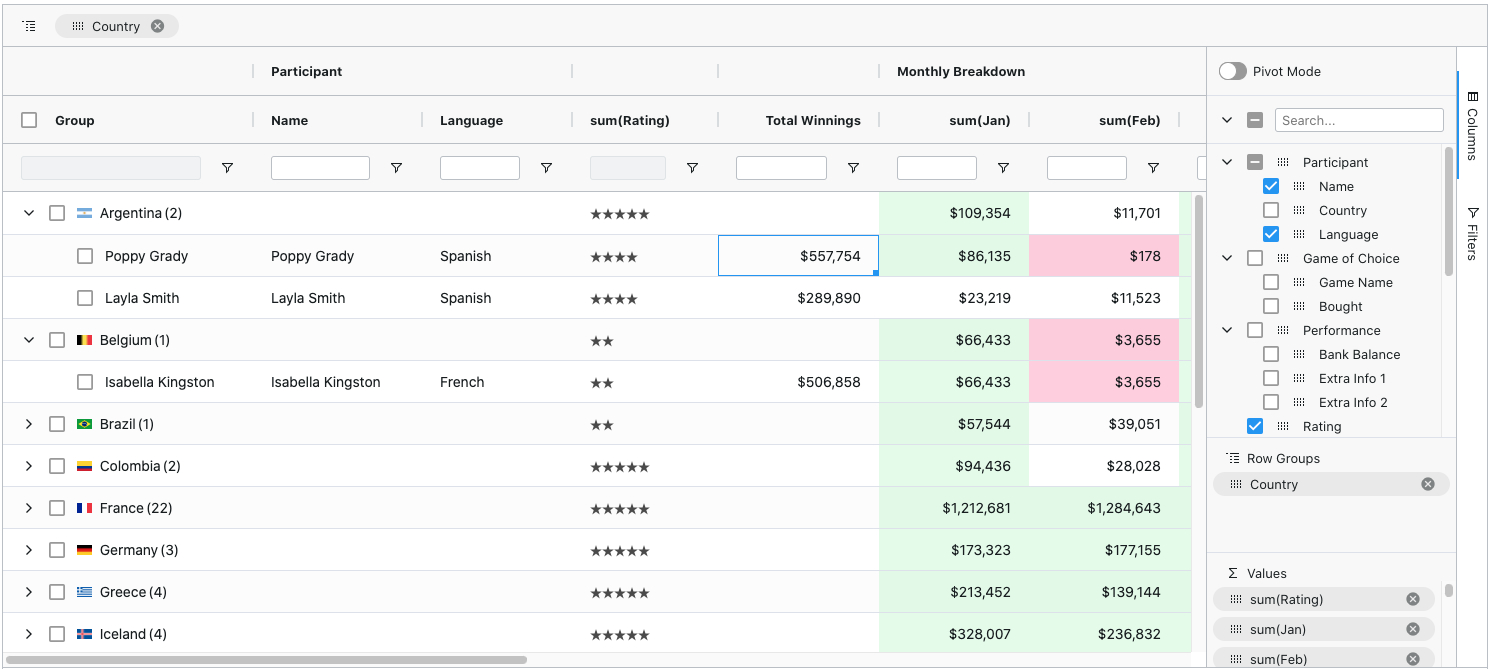
ag-Grid is a fully-featured and highly customizable JavaScript data grid. It delivers outstanding performance, has no 3rd party dependencies and integrates smoothly with all major JavaScript frameworks. Here's how our grid looks like with multiple filters and grouping enabled:
Features
Besides the standard set of features you'd expect from any grid:
- Column Interactions (resize, reorder, and pin columns)
- Pagination
- Sorting
- Row Selection
Here are some of the features that make ag-Grid stand out:
- Grouping / Aggregation*
- Custom Filtering
- In-place Cell Editing
- Records Lazy Loading *
- Server-Side Records Operations *
- Live Stream Updates
- Hierarchical Data Support & Tree View *
- Customizable Appearance
- Customizable Cell Contents
- Excel-like Pivoting *
- State Persistence
- Keyboard navigation
- Data Export to CSV
- Data Export to Excel *
- Row Reordering
- Copy / Paste
- Column Spanning
- Pinned Rows
- Full Width Rows
* The features marked with an asterisk are available in the enterprise version only.
Check out developers documentation for a complete list of features or visit our official docs for tutorials and feature demos.
Looking for a framework specific solution?
- Get Started with AngularJS
- Get Started with Angular
- Get Started with React
- Get Started with Vue
- Get Started with WebComponents
Usage Overview
Install dependencies
$ npm i --save ag-grid
Add a placeholder to HTML
<div id="myGrid" style="height: 150px;width: 600px" class="ag-theme-balham"></div>
Import the grid and styles
import {Grid} from "ag-grid/main";

import "ag-grid/dist/styles/ag-grid.css";
import "ag-grid/dist/styles/ag-theme-balham.css";
Set configuration
const gridOptions = {
	columnDefs: [
		{headerName: 'Make', field: 'make'},
		{headerName: 'Model', field: 'model'},
		{headerName: 'Price', field: 'price'}
	],
	rowData: [
		{make: 'Toyota', model: 'Celica', price: 35000},
		{make: 'Ford', model: 'Mondeo', price: 32000},
		{make: 'Porsche', model: 'Boxter', price: 72000}
	]
};
Initialize the grid
let eGridDiv = document.querySelector('#myGrid');
new Grid(eGridDiv, this.gridOptions);
For more information on how to integrate the grid into your project see TypeScript - Building with Webpack 2.
Issue Reporting
If you have found a bug, please report them at this repository issues section. If you're using Enterprise version please use the private ticketing system to do that. For more information on support check out our dedicated page.
Asking Questions
Look for similar problems on StackOverflow using the ag-grid tag. If nothing seems related, post a new message there. Do not use GitHub issues to ask questions.
Contributing
ag-Grid is developed by a team of co-located developers in London. If you want to join the team check out our jobs listing or send your application to info@ag-grid.com.
License
This project is licensed under the MIT license. See the LICENSE file for more info.