Building High-Performance Data Grids in React
ag-grid, handsontable, and react-data-grid are leading solutions for displaying and editing large datasets in React applications. ag-grid is known for its enterprise-grade features and performance with massive datasets. handsontable provides a spreadsheet-like experience with built-in formulas and Excel compatibility. react-data-grid offers a lightweight, highly customizable grid focused on React integration without heavy licensing constraints.
Npm Package Weekly Downloads Trend
Github Stars Ranking
Stat Detail


Building High-Performance Data Grids in React
Displaying large datasets in a web application is harder than it looks. You need virtualization to keep the DOM light, sorting and filtering for usability, and editing capabilities for interaction. ag-grid, handsontable, and react-data-grid are the top contenders in the React ecosystem. Each takes a different approach to solving these problems. Let's compare how they handle licensing, features, performance, and customization.
💰 Licensing and Cost Structure
Licensing is often the first technical blocker in enterprise projects. The three libraries have very different models.
ag-grid splits features between Community and Enterprise.
- The Community version is free under MIT license.
- Advanced features like Row Grouping, Pivoting, and Excel Export require a commercial license.
- You can start free and upgrade later if needs grow.
// ag-grid: Community features work out of the box
// Enterprise modules require a license key registration
import { AgGridReact } from 'ag-grid-react';

// No key needed for basic grid
<AgGridReact rowData={data} columnDefs={cols} />
handsontable uses a dual-license model.
- Free for non-commercial, educational, and evaluation purposes.
- Commercial use in production requires a paid license key.
- Using it without a key in a commercial app violates terms.
// handsontable: License key required for commercial production
import { HotTable } from '@handsontable/react';
import { registerAllModules } from 'handsontable/registry';

registerAllModules();

<HotTable
  settings={{
    licenseKey: 'non-commercial-and-evaluation', // Or paid key
    data: rowData
  }}
/>
react-data-grid is fully open source.
- Uses the MIT license with no feature gating.
- No license keys or enterprise upsells.
- Safe for any commercial project without legal review.
// react-data-grid: No license keys needed
import DataGrid from 'react-data-grid';

<DataGrid columns={columns} rows={rows} />
📊 Feature Depth: Spreadsheet vs. Grid
The line between a data grid and a spreadsheet is blurry. handsontable leans into spreadsheet behavior, while ag-grid focuses on data management.
ag-grid focuses on data analysis.
- Built-in filtering, sorting, and aggregation.
- Enterprise version adds pivot tables and chart integration.
- Best for viewing and analyzing structured data.
// ag-grid: Built-in filtering and sorting
const columnDefs = [
  { field: 'make', filter: true },
  { field: 'price', aggFunc: 'sum' } // Aggregation
];

<AgGridReact columnDefs={columnDefs} rowData={rowData} />
handsontable mimics Excel.
- Supports formulas (e.g.,
=SUM(A1:A10)). - Allows copy-paste directly from Excel sheets.
- Best for data entry and manipulation tasks.
// handsontable: Formula support
const settings = {
  data: rowData,
  formulas: { engine: HyperFormula }, // Requires plugin
  copyPaste: true
};

<HotTable settings={settings} />
react-data-grid focuses on customization.
- Provides basic sorting and filtering.
- Expects you to build complex features yourself.
- Best for custom UIs where standard grid features are too rigid.
// react-data-grid: Custom cell rendering
const columns = [
  {
    key: 'price',
    name: 'Price',
    renderCell: ({ row }) => <strong>${row.price}</strong>
  }
];

<DataGrid columns={columns} rows={rows} />
⚡ Performance and Virtualization
All three libraries use virtualization to render only visible rows. However, their performance ceilings differ.
ag-grid handles massive datasets best.
- Optimized for 100,000+ rows.
- Row buffering and block loading keep memory low.
- Minimal lag when scrolling quickly.
// ag-grid: Row buffering for performance
<AgGridReact
  rowData={largeDataset}
  bufferRows={10} // Keep extra rows ready
  cacheBlockSize={100} // Load data in blocks
/>
handsontable performs well with moderate data.
- Slower than AG Grid with very large datasets.
- Formula calculations can impact render speed.
- Best for datasets under 10,000 rows.
// handsontable: Performance settings
const settings = {
  data: moderateDataset,
  renderAllRows: false // Ensure virtualization is on
};
react-data-grid is efficient for standard use.
- Uses React virtualization internally.
- Performance depends on how complex your cell components are.
- Best for datasets under 50,000 rows.
// react-data-grid: Standard virtualization
// Handled automatically by the component
<DataGrid rows={rows} columns={columns} />
🎨 Customization and React Integration
How well does the grid feel like a native React app?
ag-grid uses a hybrid approach.
- Configuration is mostly object-based (not pure React props).
- Cell renderers can be React components.
- Can feel slightly disconnected from React state flow.
// ag-grid: React Cell Renderer
class PriceRenderer extends React.Component {
  render() { return <span>${this.props.value}</span>; }
}

const columnDefs = [{ field: 'price', cellRenderer: PriceRenderer }];
handsontable is config-heavy.
- Settings are passed in a large object.
- React hooks are not always directly usable inside cells.
- Requires careful binding to sync with React state.
// handsontable: Syncing with React state
const [data, setData] = useState(initialData);

const settings = {
  data: data,
  afterChange: (changes) => {
    // Manually update React state
    setData(updatedData);
  }
};
react-data-grid feels like native React.
- Uses standard props and state.
- Cell renderers are simple functional components.
- Easier to manage with modern hooks.
// react-data-grid: Native React hooks
function PriceCell({ row }) {
  const [editing, setEditing] = useState(false);
  return <div onClick={() => setEditing(true)}>{row.price}</div>;
}
🛠️ Editing and Data Mutation
Editing data is where these libraries diverge significantly.
ag-grid has robust built-in editors.
- Text, number, date, and select editors included.
- Custom editors supported via React components.
- Handles validation and error states well.
// ag-grid: Built-in editor
const columnDefs = [
  { field: 'country', editable: true }, // Default text editor
  { field: 'year', editable: true, cellEditor: 'agNumberCellEditor' }
];
handsontable excels at bulk editing.
- Drag-to-fill handles (like Excel).
- Context menus for row insertion and deletion.
- Ideal for power users entering data quickly.
// handsontable: Context menu enabled
const settings = {
  contextMenu: true,
  fillHandle: true // Drag to fill cells
};
react-data-grid requires manual setup for editing.
- No built-in editors out of the box in recent versions.
- You must build the edit logic and UI.
- Gives full control but requires more code.
// react-data-grid: Manual edit implementation
const [rows, setRows] = useState(initialRows);

<DataGrid
  rows={rows}
  columns={columns}
  onRowsChange={setRows} // You handle the update
/>
📌 Summary Table
| Feature | ag-grid | handsontable | react-data-grid |
|---|---|---|---|
| License | MIT (Community) / Commercial (Ent) | Commercial (Free for non-profit) | MIT |
| Max Rows | 100,000+ | ~10,000 recommended | ~50,000 |
| Excel Feel | Low | High (Formulas, Copy/Paste) | Low |
| React Integration | Hybrid (Config + Components) | Config-heavy | Native React |
| Built-in Editors | Yes (Rich set) | Yes (Spreadsheet style) | No (Build your own) |
| Customization | High (via API) | Medium (via Config) | Very High (via Code) |
💡 The Big Picture
ag-grid is the heavy-duty choice 🏋️. It handles massive data and complex enterprise requirements with ease. If you need pivoting, aggregation, or guaranteed performance at scale, this is the standard. Just budget for the enterprise license if you need advanced features.
handsontable is the spreadsheet replacement 📑. It is unmatched for users who want Excel-like behavior in the browser. Choose this for data entry tools, but be strict about licensing compliance.
react-data-grid is the developer-friendly option 🛠️. It gives you a clean slate to build exactly what you need without licensing headaches. It is perfect for custom apps where you want full control over the rendering and logic.
Final Thought: All three libraries solve the hard problem of rendering data. The choice comes down to licensing budget, data volume, and how much control you need over the UI.
How to Choose: ag-grid vs handsontable vs react-data-grid
- ag-grid:
Choose
ag-gridif you need a robust, enterprise-ready grid capable of handling hundreds of thousands of rows with features like pivoting, aggregation, and Excel export. It is ideal for financial dashboards or admin panels where performance and advanced data manipulation are critical. Be aware that advanced features require a commercial license, though the community version is free. - handsontable:
Choose
handsontableif your users expect a spreadsheet-like interface with familiar keyboard shortcuts, formula support, and copy-paste functionality from Excel. It is best for data entry tools or migration utilities where spreadsheet behavior is required. Note that commercial use requires a paid license, so verify budget constraints before selecting. - react-data-grid:
Choose
react-data-gridif you need a lightweight, MIT-licensed grid that integrates deeply with React patterns and allows full control over cell rendering. It is suitable for custom applications where you need specific behavior without the overhead of a massive library. This is a strong choice for teams wanting to avoid licensing fees while maintaining high customization.
Popular Comparisons
README for ag-grid




ag-Grid
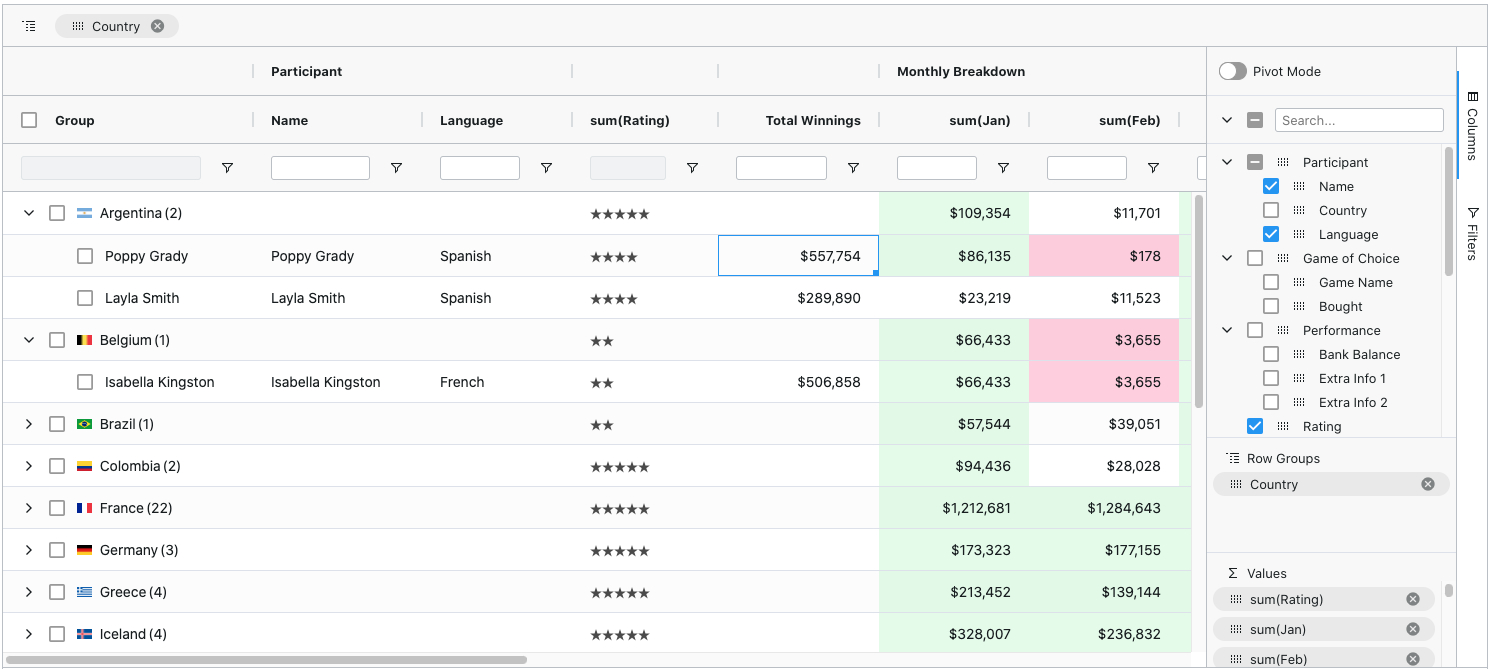
ag-Grid is a fully-featured and highly customizable JavaScript data grid. It delivers outstanding performance, has no 3rd party dependencies and integrates smoothly with all major JavaScript frameworks. Here's how our grid looks like with multiple filters and grouping enabled:
Features
Besides the standard set of features you'd expect from any grid:
- Column Interactions (resize, reorder, and pin columns)
- Pagination
- Sorting
- Row Selection
Here are some of the features that make ag-Grid stand out:
- Grouping / Aggregation*
- Custom Filtering
- In-place Cell Editing
- Records Lazy Loading *
- Server-Side Records Operations *
- Live Stream Updates
- Hierarchical Data Support & Tree View *
- Customizable Appearance
- Customizable Cell Contents
- Excel-like Pivoting *
- State Persistence
- Keyboard navigation
- Data Export to CSV
- Data Export to Excel *
- Row Reordering
- Copy / Paste
- Column Spanning
- Pinned Rows
- Full Width Rows
* The features marked with an asterisk are available in the enterprise version only.
Check out developers documentation for a complete list of features or visit our official docs for tutorials and feature demos.
Looking for a framework specific solution?
- Get Started with AngularJS
- Get Started with Angular
- Get Started with React
- Get Started with Vue
- Get Started with WebComponents
Usage Overview
Install dependencies
$ npm i --save ag-grid
Add a placeholder to HTML
<div id="myGrid" style="height: 150px;width: 600px" class="ag-theme-balham"></div>
Import the grid and styles
import {Grid} from "ag-grid/main";

import "ag-grid/dist/styles/ag-grid.css";
import "ag-grid/dist/styles/ag-theme-balham.css";
Set configuration
const gridOptions = {
	columnDefs: [
		{headerName: 'Make', field: 'make'},
		{headerName: 'Model', field: 'model'},
		{headerName: 'Price', field: 'price'}
	],
	rowData: [
		{make: 'Toyota', model: 'Celica', price: 35000},
		{make: 'Ford', model: 'Mondeo', price: 32000},
		{make: 'Porsche', model: 'Boxter', price: 72000}
	]
};
Initialize the grid
let eGridDiv = document.querySelector('#myGrid');
new Grid(eGridDiv, this.gridOptions);
For more information on how to integrate the grid into your project see TypeScript - Building with Webpack 2.
Issue Reporting
If you have found a bug, please report them at this repository issues section. If you're using Enterprise version please use the private ticketing system to do that. For more information on support check out our dedicated page.
Asking Questions
Look for similar problems on StackOverflow using the ag-grid tag. If nothing seems related, post a new message there. Do not use GitHub issues to ask questions.
Contributing
ag-Grid is developed by a team of co-located developers in London. If you want to join the team check out our jobs listing or send your application to info@ag-grid.com.
License
This project is licensed under the MIT license. See the LICENSE file for more info.