Selecting a JavaScript Test Runner for Modern Frontend Architecture
ava, jest, mocha, and mocha-parallel-tests are tools used to verify code correctness in JavaScript projects. jest is an all-in-one platform providing test running, assertions, and mocking out of the box. ava focuses on simplicity and runs tests in parallel by default without heavy configuration. mocha offers maximum flexibility, allowing developers to pick their own assertion and mocking libraries. mocha-parallel-tests was created to add parallel execution to older versions of mocha, but native support now exists in mocha itself.
Npm Package Weekly Downloads Trend
Github Stars Ranking
Stat Detail


JavaScript Test Runners: Ava vs Jest vs Mocha vs Mocha-Parallel-Tests
Choosing a test runner affects how fast your CI pipeline runs and how easy it is to maintain tests. ava, jest, mocha, and mocha-parallel-tests all run JavaScript tests, but they handle execution, setup, and features differently. Let's compare how they tackle common engineering problems.
⚡ Execution Model: Parallel vs Sequential
Speed matters when you have hundreds of tests. Running tests in parallel cuts down wait time significantly.
jest runs tests in parallel by default.
- It isolates test files automatically.
- You do not need to configure anything to get speed benefits.
// jest: Parallel by default
// test sum.test.js
test('adds 1 + 2 to equal 3', () => {
  expect(sum(1, 2)).toBe(3);
});
ava also runs tests in parallel by default.
- Each test file runs in a separate process.
- This prevents state leakage between tests without extra work.
// ava: Parallel by default
// test sum.js
import test from 'ava';

test('adds 1 + 2 to equal 3', t => {
  t.is(sum(1, 2), 3);
});
mocha runs tests sequentially by default.
- You must add the
--parallelflag to enable concurrent execution. - This feature was added in version 8, so older guides might not mention it.
// mocha: Sequential by default, parallel with flag
// test sum.js
it('adds 1 + 2 to equal 3', () => {
  assert.equal(sum(1, 2), 3);
});
// Run with: mocha --parallel
mocha-parallel-tests forces parallel execution on older mocha versions.
- It wraps the standard
mocharunner. - Using this today is redundant if you are on
mochav8 or higher.
// mocha-parallel-tests: Legacy parallel wrapper
// test sum.js
it('adds 1 + 2 to equal 3', () => {
  assert.equal(sum(1, 2), 3);
});
// Run with: mocha-parallel-tests
🛠️ Configuration: Zero-Config vs Flexible
Some teams want tools to work immediately. Others want to control every setting.
jest aims for zero configuration.
- It finds tests automatically based on file names like
.test.js. - Most projects need no config file at all.
// jest: No config needed usually
// package.json
{
  "scripts": {
    "test": "jest"
  }
}
ava needs minimal configuration.
- It also finds tests automatically.
- You only configure it if you need custom babel transforms or timeouts.
// ava: Minimal config
// package.json
{
  "scripts": {
    "test": "ava"
  }
}
mocha requires more setup.
- You often need to specify test file locations.
- You must install assertion libraries separately.
// mocha: Explicit config
// package.json
{
  "scripts": {
    "test": "mocha 'test/**/*.js'"
  }
}
mocha-parallel-tests inherits mocha setup.
- It requires the same configuration as
mocha. - Adds an extra dependency without adding new configuration options.
// mocha-parallel-tests: Same as mocha
// package.json
{
  "scripts": {
    "test": "mocha-parallel-tests 'test/**/*.js'"
  }
}
✅ Assertions: Built-In vs External
Assertions check if your code behaves as expected. Some runners include them; others do not.
jest includes a powerful assertion library.
- You use
expecteverywhere. - It supports deep equality and complex checks out of the box.
// jest: Built-in assertions
expect(user.name).toBe('Alice');
expect(obj).toEqual({ id: 1 });
ava includes its own assertion library.
- You use the
tobject passed to the test function. - It is concise and designed for clarity.
// ava: Built-in assertions
import test from 'ava';

test(t => {
  t.is(user.name, 'Alice');
  t.deepEqual(obj, { id: 1 });
});
mocha does not include assertions.
- You must install
chaior use Node's built-inassert. - This adds flexibility but also more dependencies.
// mocha: External assertions (Chai)
import { expect } from 'chai';

expect(user.name).to.equal('Alice');
expect(obj).to.deep.equal({ id: 1 });
mocha-parallel-tests relies on mocha assertion setup.
- You use the same external libraries as standard
mocha. - No added benefit for assertions.
// mocha-parallel-tests: External assertions
import { expect } from 'chai';

expect(user.name).to.equal('Alice');
🎭 Mocking: Integrated vs Manual
Mocking isolates units of code by replacing dependencies with fake versions.
jest has a robust mocking system built-in.
- You can mock functions, modules, and timers easily.
jest.fn()creates a mock function instantly.
// jest: Built-in mocking
const mockFn = jest.fn();
mockFn('hello');
expect(mockFn).toHaveBeenCalledWith('hello');
ava does not include mocking tools.
- You need to install
sinonortestdouble. - This keeps the core lightweight but requires extra setup.
// ava: External mocking (Sinon)
import sinon from 'sinon';

const mockFn = sinon.fake();
mockFn('hello');
// Assert using sinon assertions
mocha does not include mocking tools.
- Like
ava, you typically pair it withsinon. - Gives you freedom to choose the best tool for your case.
// mocha: External mocking (Sinon)
import sinon from 'sinon';

const mockFn = sinon.fake();
mockFn('hello');
mocha-parallel-tests uses the same mocking as mocha.
- No integrated mocking features.
- Depends entirely on external libraries.
// mocha-parallel-tests: External mocking
import sinon from 'sinon';

const mockFn = sinon.fake();
📸 Snapshot Testing: Native vs Plugin
Snapshot testing saves output to a file and compares it later to detect changes.
jest popularized snapshot testing.
- It is built-in and requires one line of code.
- Great for React components or large objects.
// jest: Native snapshots
expect(component.render()).toMatchSnapshot();
ava supports snapshots via plugin.
- You need to enable it in config or use specific assertions.
- Works well but is not as seamless as
jest.
// ava: Snapshot support
import test from 'ava';

test(t => {
  t.snapshot(component.render());
});
mocha does not support snapshots natively.
- You must install
jest-snapshotor similar libraries. - Adds complexity to the setup.
// mocha: External snapshots
import { toMatchSnapshot } from 'jest-snapshot';

expect(component.render()).toMatchSnapshot();
mocha-parallel-tests has no snapshot features.
- Relies on the same external plugins as
mocha. - No advantage here.
// mocha-parallel-tests: External snapshots
import { toMatchSnapshot } from 'jest-snapshot';

expect(component.render()).toMatchSnapshot();
⚠️ Maintenance Status: Active vs Legacy
Using maintained tools ensures security and compatibility with new JavaScript features.
jest is actively maintained by Meta.
- Regular updates support new ECMAScript features.
- Large community ensures bugs are fixed quickly.
ava is actively maintained.
- Focuses on stability and modern JavaScript support.
- Good choice for long-term projects.
mocha is actively maintained.
- Stable and reliable for enterprise use.
- Native parallel mode makes it competitive again.
mocha-parallel-tests is effectively legacy.
- Since
mochaadded native parallel support, this wrapper is redundant. - It may not keep up with newer
mochafeatures. - Recommendation: Do not use for new projects.
📊 Summary: Key Differences
| Feature | jest | ava | mocha | mocha-parallel-tests |
|---|---|---|---|---|
| Parallelism | ✅ Default | ✅ Default | ⚠️ Flag (--parallel) | ✅ Default (Wrapper) |
| Assertions | ✅ Built-in | ✅ Built-in | ❌ External Needed | ❌ External Needed |
| Mocking | ✅ Built-in | ❌ External Needed | ❌ External Needed | ❌ External Needed |
| Snapshots | ✅ Built-in | ⚠️ Plugin | ❌ External Needed | ❌ External Needed |
| Status | 🟢 Active | 🟢 Active | 🟢 Active | 🟡 Legacy/Redundant |
💡 The Big Picture
jest is the complete package 📦 — best for teams who want everything working out of the box. Ideal for React apps and large codebases needing snapshots and mocking.
ava is the simple choice 🥑 — best for teams who want parallel tests without heavy configuration. Great for Node.js libraries and straightforward frontend logic.
mocha is the flexible tool 🧰 — best for teams who want to choose their own assertion and mocking libraries. Suitable for legacy systems or specific architectural needs.
mocha-parallel-tests is the legacy patch 🩹 — do not use in new projects. Modern mocha handles parallel tests natively, making this wrapper unnecessary.
Final Thought: For most modern frontend teams, jest offers the best balance of features and speed. If you prefer simplicity and ES modules, ava is a strong contender. Stick with native mocha if you need flexibility, but skip the parallel wrapper.
How to Choose: ava vs jest vs mocha vs mocha-parallel-tests
- ava:
Choose
avaif you want a test runner that is parallel by default without complex setup. It is ideal for projects that value simplicity and use ES modules heavily. Avoid it if you need built-in snapshot testing or advanced mocking features without adding extra plugins. - jest:
Choose
jestif you want a complete testing solution with zero configuration. It is best for teams that need built-in snapshot testing, code coverage, and mocking tools. It works well for large applications where consistency and speed are critical. - mocha:
Choose
mochaif you need full control over your testing stack and prefer picking your own assertion and mocking libraries. It is suitable for legacy projects or teams that want a flexible structure without enforced conventions. - mocha-parallel-tests:
Do not choose
mocha-parallel-testsfor new projects. It was designed to add parallel testing to older versions ofmochabefore native support existed. Modernmochaincludes parallel execution built-in, making this package unnecessary and potentially unmaintained.
Popular Comparisons
README for ava
Please support our friend Vadim Demedes and the people in Ukraine.

AVA is a test runner for Node.js with a concise API, detailed error output, embrace of new language features and thread isolation that lets you develop with confidence 🚀
Watch this repository and follow the Discussions for updates.
Read our contributing guide if you're looking to contribute (issues / PRs / etc).
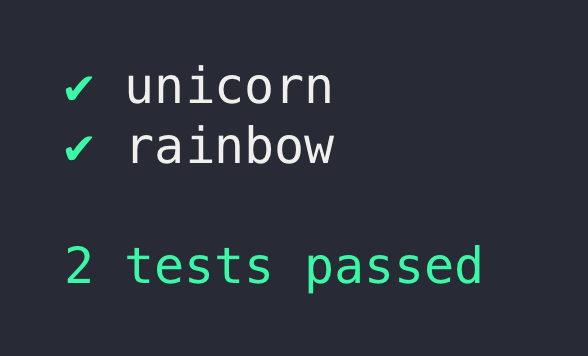
Translations: Español, Français, Italiano, 日本語, 한국어, Português, Русский, 简体中文
Why AVA?
- Minimal and fast
- Simple test syntax
- Runs tests concurrently
- Enforces writing atomic tests
- No implicit globals
- Includes TypeScript definitions
- Magic assert
- Isolated environment for each test file
- Promise support
- Async function support
- Observable support
- Enhanced assertion messages
- Automatic parallel test runs in CI
- TAP reporter
Usage
To install and set up AVA, run:
npm init ava
Your package.json will then look like this (exact version notwithstanding):
{
	"name": "awesome-package",
	"type": "module",
	"scripts": {
		"test": "ava"
	},
	"devDependencies": {
		"ava": "^5.0.0"
	}
}
Or if you prefer using Yarn:
yarn add ava --dev
Alternatively you can install ava manually:
npm install --save-dev ava
Make sure to install AVA locally. AVA cannot be run globally.
Don't forget to configure the test script in your package.json as per above.
Create your test file
Create a file named test.js in the project root directory.
Note that AVA's documentation assumes you're using ES modules.
import test from 'ava';

test('foo', t => {
	t.pass();
});

test('bar', async t => {
	const bar = Promise.resolve('bar');
	t.is(await bar, 'bar');
});
Running your tests
npm test
Or with npx:
npx ava
Run with the --watch flag to enable AVA's watch mode:
npx ava --watch
Supported Node.js versions
AVA supports the latest release of any major version that is supported by Node.js itself. Read more in our support statement.
Highlights
Magic assert
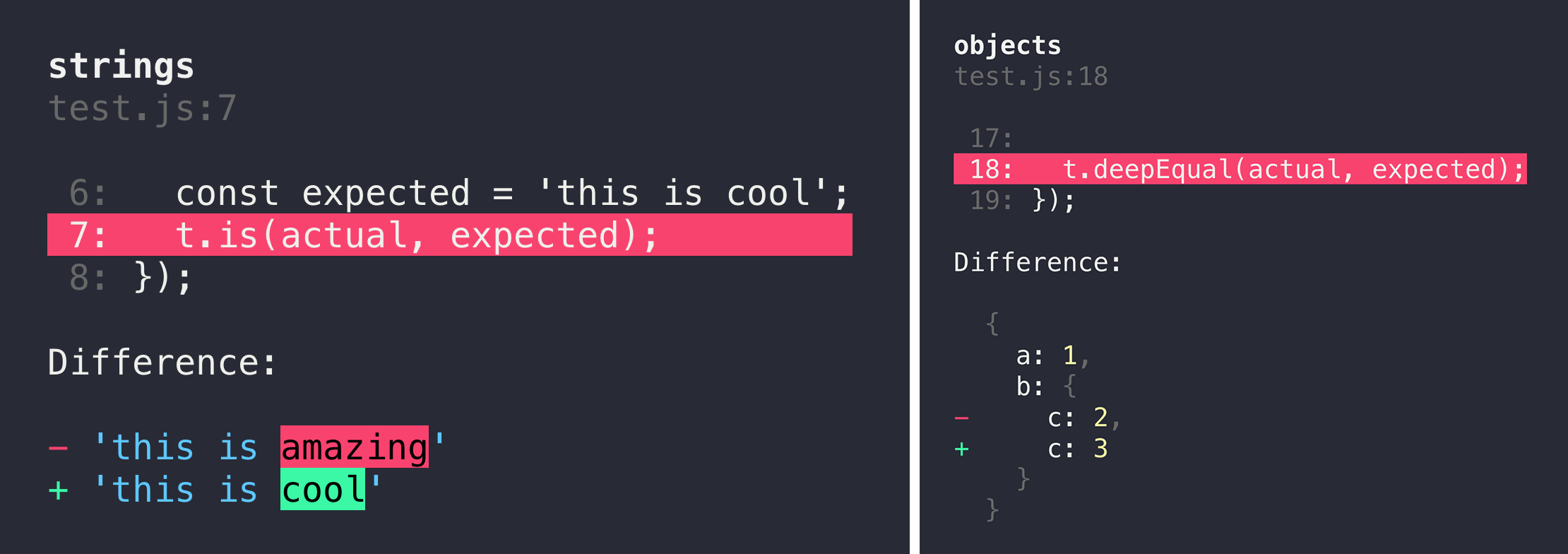
AVA adds code excerpts and clean diffs for actual and expected values. If values in the assertion are objects or arrays, only a diff is displayed, to remove the noise and focus on the problem. The diff is syntax-highlighted too! If you are comparing strings, both single and multi line, AVA displays a different kind of output, highlighting the added or missing characters.
Clean stack traces
AVA automatically removes unrelated lines in stack traces, allowing you to find the source of an error much faster, as seen above.
Parallel runs in CI
AVA automatically detects whether your CI environment supports parallel builds. Each build will run a subset of all test files, while still making sure all tests get executed. See the ci-parallel-vars package for a list of supported CI environments.
Documentation
Please see the files in the docs directory:
- Writing tests
- Execution context
- Assertions
- Snapshot testing
- Command line (CLI)
- Configuration
- Test timeouts
Common pitfalls
We have a growing list of common pitfalls you may experience while using AVA. If you encounter any issues you think are common, comment in this issue.
Recipes
- Test setup
- TypeScript
- Shared workers
- Watch mode
- When to use
t.plan() - Passing arguments to your test files
- Splitting tests in CI
- Code coverage
- Endpoint testing
- Browser testing
- Testing Vue.js components
- Debugging tests with Chrome DevTools
- Debugging tests with VSCode
- Debugging tests with WebStorm
- Isolated MongoDB integration tests
- Testing web apps using Puppeteer
- Testing web apps using Selenium WebDriverJS
FAQ
How is the name written and pronounced?
AVA, not Ava or ava. Pronounced /ˈeɪvə/: Ay (face, made) V (vie, have) A (comma, ago)
What is the header background?
It's the Andromeda galaxy.
What is the difference between concurrency and parallelism?
Concurrency is not parallelism. It enables parallelism.
Support
Related
- eslint-plugin-ava — Lint rules for AVA tests
- @ava/typescript — Test TypeScript projects
- @ava/cooperate — Low-level primitives to enable cooperation between test files
- @ava/get-port — Reserve a port while testing
Links
Team
 |  |
|---|---|
| Mark Wubben | Sindre Sorhus |
Former