graphql-request vs urql vs apollo-client vs react-apollo
GraphQL Client Bibliotheken
graphql-requesturqlapollo-clientreact-apolloPaquetes similares:

GraphQL Client Bibliotheken

GraphQL-Client-Bibliotheken sind essentielle Werkzeuge für die Interaktion mit GraphQL-APIs. Sie ermöglichen Entwicklern, Abfragen und Mutationen zu erstellen, Daten zu verwalten und den Zustand von Anwendungen effizient zu steuern. Diese Bibliotheken bieten verschiedene Ansätze zur Integration von GraphQL in React-Anwendungen und variieren in Bezug auf Funktionalität, Flexibilität und Benutzerfreundlichkeit.

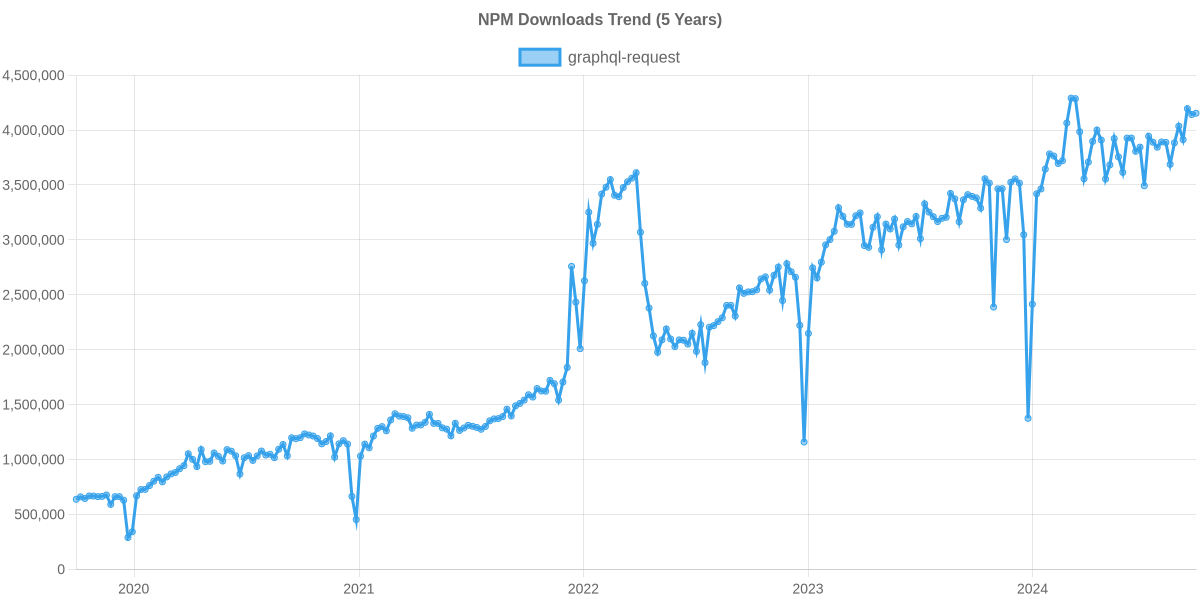
Tendencia de descargas de npm

3 Años

Ranking de GitHub Stars

Detalle de estadísticas

Paquete
Descargas
Stars
Tamaño
Issues
Publicación
Licencia
graphql-request13,112,8486,121420 kB60hace un añoMIT
urql1,518,1508,985140 kB33hace 2 mesesMIT
apollo-client583,95619,781-410hace 6 añosMIT
react-apollo167,0586,790-205hace 7 añosMIT

Comparación de características: graphql-request vs urql vs apollo-client vs react-apollo

Caching

  • graphql-request:

    graphql-request bietet kein integriertes Caching, was bedeutet, dass jede Anfrage direkt an den Server gesendet wird. Dies kann in einfachen Anwendungen ausreichend sein, ist jedoch nicht optimal für komplexe Anwendungen, die häufige Datenabrufe erfordern.

  • urql:

    urql bietet ein einfaches Caching-System, das jedoch nicht so umfangreich ist wie das von Apollo Client. Es ermöglicht Entwicklern, ihre eigenen Cache-Strategien zu implementieren, was Flexibilität und Anpassungsfähigkeit an spezifische Anwendungsanforderungen bietet.

  • apollo-client:

    Apollo Client bietet ein leistungsstarkes Caching-System, das die Leistung durch das Speichern von Abfrageergebnissen verbessert. Es verwendet ein normalisiertes Cache-Modell, das es ermöglicht, Daten effizient zu aktualisieren und zu synchronisieren, wodurch die Anzahl der Netzwerkaufrufe reduziert wird.

  • react-apollo:

    React Apollo nutzt die Caching-Fähigkeiten von Apollo Client und ermöglicht eine nahtlose Integration des Caches in React-Komponenten. Dies ermöglicht eine reaktive Datenverwaltung und reduziert die Anzahl der Netzwerkaufrufe durch die Wiederverwendung von zwischengespeicherten Ergebnissen.

Integration mit React

  • graphql-request:

    graphql-request ist nicht speziell für React konzipiert und erfordert manuelle Integration in React-Komponenten. Es ist einfach zu verwenden, aber es fehlen die Vorteile einer tiefen Integration.

  • urql:

    urql bietet eine hervorragende Integration mit React durch Hooks und Komponenten, die eine reaktive Datenverwaltung ermöglichen. Es ist einfach zu verwenden und bietet eine modulare Architektur, die sich gut in bestehende React-Anwendungen einfügt.

  • apollo-client:

    Apollo Client kann in React-Anwendungen integriert werden, erfordert jedoch zusätzliche Konfiguration. Es bietet keine speziellen Hooks oder Komponenten, die die Integration vereinfachen, was zu einer steileren Lernkurve führen kann.

  • react-apollo:

    React Apollo bietet eine umfassende Integration mit React, einschließlich Hooks wie useQuery und useMutation, die die Verwendung von GraphQL in React-Komponenten erheblich vereinfachen und die Entwicklung beschleunigen.

Flexibilität

  • graphql-request:

    graphql-request ist extrem flexibel und einfach zu verwenden, da es eine minimalistische API bietet. Es eignet sich hervorragend für einfache Anwendungen, bei denen keine umfangreiche Funktionalität erforderlich ist.

  • urql:

    urql ist sehr flexibel und anpassbar, da es Entwicklern ermöglicht, ihre eigenen Plugins und Erweiterungen zu erstellen. Es ist ideal für Projekte, die eine maßgeschneiderte Lösung benötigen.

  • apollo-client:

    Apollo Client ist sehr flexibel und kann in verschiedenen Umgebungen eingesetzt werden, jedoch kann die Konfiguration komplex sein. Es bietet viele Funktionen, die jedoch nicht immer benötigt werden, was zu einer Überlastung führen kann.

  • react-apollo:

    React Apollo bietet Flexibilität durch die Verwendung von Apollo Client, kann jedoch in komplexen Anwendungen überdimensioniert sein. Es ist ideal für Projekte, die eine vollständige Lösung benötigen, aber möglicherweise nicht die beste Wahl für kleinere Anwendungen sind.

Lernkurve

  • graphql-request:

    graphql-request hat eine flache Lernkurve, da es eine einfache API bietet, die leicht zu verstehen ist. Entwickler können schnell mit der Arbeit beginnen, ohne sich mit komplexen Konzepten auseinandersetzen zu müssen.

  • urql:

    urql hat eine moderate Lernkurve, da es eine einfache API bietet, aber auch erweiterte Funktionen für erfahrene Entwickler bereitstellt. Die Modularität ermöglicht es Entwicklern, nur die benötigten Teile zu verwenden.

  • apollo-client:

    Apollo Client hat eine steilere Lernkurve aufgrund seiner umfangreichen Funktionen und der Notwendigkeit einer gründlichen Konfiguration. Entwickler müssen sich mit den Konzepten des Caching und der Datenverwaltung vertraut machen.

  • react-apollo:

    React Apollo hat eine moderate Lernkurve, da es die Konzepte von Apollo Client in die React-Welt integriert. Entwickler, die bereits mit React vertraut sind, werden die Integration schnell verstehen.

Community und Unterstützung

  • graphql-request:

    graphql-request hat eine kleinere Community, bietet jedoch ausreichende Dokumentation. Es kann schwieriger sein, Unterstützung für spezifische Probleme zu finden.

  • urql:

    urql hat eine wachsende Community und bietet gute Dokumentation, aber nicht so viel Unterstützung wie Apollo. Es ist jedoch einfach, Hilfe in den gängigen Foren und auf GitHub zu finden.

  • apollo-client:

    Apollo Client hat eine große und aktive Community sowie umfangreiche Dokumentation und Unterstützung. Dies erleichtert die Fehlersuche und den Zugang zu Ressourcen.

  • react-apollo:

    React Apollo profitiert von der großen Apollo-Community und hat eine umfangreiche Dokumentation, die Entwicklern hilft, die Integration zu verstehen und Probleme zu lösen.

Cómo elegir: graphql-request vs urql vs apollo-client vs react-apollo

  • graphql-request:

    Wählen Sie graphql-request, wenn Sie eine einfache und leichtgewichtige Lösung benötigen, um GraphQL-Anfragen zu stellen. Es ist ideal für kleinere Projekte oder wenn Sie eine minimalistische API-Client-Bibliothek ohne zusätzliche Funktionen wünschen.

  • urql:

    Wählen Sie urql, wenn Sie eine flexible und anpassbare Lösung suchen, die sich leicht in verschiedene Frameworks integrieren lässt. Es bietet eine modulare Architektur und ist ideal für Entwickler, die eine leichtgewichtige und anpassbare GraphQL-Client-Lösung benötigen.

  • apollo-client:

    Wählen Sie Apollo Client, wenn Sie eine umfassende Lösung benötigen, die eine vollständige Integration von GraphQL in Ihre Anwendung bietet. Es ist ideal für komplexe Anwendungen mit umfangreichen Datenanforderungen und bietet Funktionen wie Caching, Optimistic UI und Unterstützung für lokale Zustände.

  • react-apollo:

    Wählen Sie React Apollo, wenn Sie eine enge Integration von Apollo Client mit React benötigen. Es bietet eine deklarative API für die Verwendung von GraphQL in React-Komponenten und ist ideal für Entwickler, die bereits Apollo Client verwenden und von den Vorteilen der React-Integration profitieren möchten.

README para graphql-request

graphql-request

Minimal GraphQL client supporting Node and browsers for scripts or simple apps.

GitHub Action npm version

Highlights

  • Most simple & lightweight GraphQL client
  • Promise-based API (works with async / await)
  • Pure ESM package
  • First class TypeScript support
    • Including TypedDocumentNode
  • Isomorphic (works in both Node and Browsers)

Install

npm add graphql-request graphql

TypeScript Setup

This package uses package.exports. Therefore if you are a TypeScript user you must:

  1. have your tsconfig.json moduleResolution set to "bundler" or "node16"/"nodenext".
  2. Have your package.json type set to "module".

Quick Start

Send a GraphQL document using a static request function:

import { gql, request } from 'graphql-request'

const document = gql`
  {
    company {
      ceo
    }
  }
`
await request('https://api.spacex.land/graphql/', document)

The function can be passed a configuration object for more complex cases:

await request({
  url,
  document,
  variables,
  requestHeaders,
})

A class is available for constructing your own instances:

import { gql, GraphQLClient } from 'graphql-request'

const document = gql`
  {
    company {
      ceo
    }
  }
`
const endpoint = 'https://api.spacex.land/graphql/'
const client = new GraphQLClient(endpoint)
await client.request(document)

Examples

Node Version Support

We only (officially) support versions of Nodejs of the following status:

  • Current
  • LTS
  • Maintenance and end of life not yet reached

So for example on Oct 24 2023 that would mean these versions: 18, 20, 21.

Any issue that exists solely for an unsupported version of Nodejs will be rejected (not worked on).

Reference

⚠️ This reference is incomplete. Check out the examples for more reference material.

Configuration

ErrorPolicy

By default GraphQLClient will throw when an error is received. However, sometimes you still want to resolve the (partial) data you received. You can define errorPolicy in the GraphQLClient constructor.

const client = new GraphQLClient(endpoint, { errorPolicy: 'all' })
None (default)

Allow no errors at all. If you receive a GraphQL error the client will throw.

Ignore

Ignore incoming errors and resolve like no errors occurred

All

Return both the errors and data, only works with rawRequest.

IgnoreOperationName

OperationName has been introduced to address issues reported here Support operation name, However, on certain occasions this information may not be needed in requests. In such cases, you might consider ignoring operationName to avoid the extraction steps currently performed by a parsing operation when the document is provided in string format.

By default the GraphQLClient tries to extract the operationName from the document. You can define excludeOperationName in the constructor of GraphQLClient to avoid the extraction process if it is not needed. This can be useful if you don't use operationName and want to optimise queries by reducing the amount of computation as much as possible, especially if we are in a context where we are using documents in string format to reduce bundle size.

// example where the operation name is not ignored
const client = new GraphQLClient(endpoint, {
  method: 'POST',
})
// example in which the operation name is ignored
const client = new GraphQLClient(endpoint, {
  method: 'POST',
  excludeOperationName: true,
})

Knowledge Base

Why was the file upload feature taken away? Will it return?

In this issue we decided to make this library more stable and maintainable. In principal the feature is still in scope of this library and will make a return when we find time to do the feature right.

Why do I have to install graphql?

graphql-request uses methods exposed by the graphql package to handle some internal logic. On top of that, for TypeScript users, some types are used from the graphql package to provide better typings.

Do I need to wrap my GraphQL documents inside the gql template exported by graphql-request?

No. It is there for convenience so that you can get the tooling support like automatic formatting and syntax highlighting. You can use gql from graphql-tag if you need it for some reason too.

What sets graphql-request apart from other clients like Apollo, Relay, etc.?

graphql-request is the most minimal and simplest to use GraphQL client. It's perfect for small scripts or simple apps.

Compared to GraphQL clients like Apollo or Relay, graphql-request doesn't have a built-in cache and has no integrations for frontend frameworks. The goal is to keep the package and API as minimal as possible.

Project Stats

Package Installs

NPM Usage Trend of graphql-request

Repo Beats

Alt