Generating and Visualizing Code Diffs in JavaScript Applications
The diff package is the industry standard for generating text differences in pure JavaScript. diff2html takes those differences and renders them into rich, interactive HTML. diff2html-cli provides a command-line interface for the renderer, useful for CI/CD pipelines. git-diff is often used for parsing existing git diff output or wrapping git commands, though it is less universally maintained than diff. Together, these tools cover the entire lifecycle of change detection and presentation.
Npm Package Weekly Downloads Trend
Github Stars Ranking
Stat Detail


Generating and Visualizing Code Diffs: diff vs diff2html vs git-diff
Building code review tools, migration scripts, or visual regression tests requires reliable diffing and rendering. The JavaScript ecosystem offers several tools for this, but they serve distinct purposes. diff handles the logic of finding changes. diff2html handles the visual presentation. diff2html-cli brings that presentation to the terminal. git-diff often sits in a niche for parsing git-specific output. Let's break down how they work and when to use each.
🧠 Core Diff Generation: Pure JS vs Git Wrappers
diff is a pure JavaScript implementation. It does not require git to be installed. It works on strings, arrays, or objects.
// diff: Generate diff in pure JS
import { diffLines } from 'diff';

const oldText = 'line 1\nline 2';
const newText = 'line 1\nline 3';

const changes = diffLines(oldText, newText);
changes.forEach(part => {
  console.log(part.added ? 'added' : part.removed ? 'removed' : 'unchanged', part.value);
});
git-diff packages often wrap the system git command or parse git output. This means they depend on the environment having git installed.
// git-diff: Often wraps system git or parses git output
import gitDiff from 'git-diff';

// Usage varies by specific package version, often requires file paths
// This example represents a typical wrapper pattern
const output = await gitDiff({
  oldPath: './src/file.js',
  newPath: './src/file-new.js'
});
console.log(output); // Returns git-formatted string
Trade-off: diff is portable and works in browsers. git-diff is tied to Node.js environments with git installed but respects .gitignore and binary handling better if wrapping the binary.
🎨 Rendering Diffs: HTML Generation
diff2html specializes in turning diff data (usually unified diff strings) into HTML. It handles syntax highlighting and line numbers.
// diff2html: Render diff string to HTML
import { Diff2HtmlUI } from 'diff2html';

const diffString = '--- a/file.js\n+++ b/file.js\n@@ -1 +1 @@\n-old\n+new';

const targetElement = document.getElementById('myDiff');
const configuration = { drawFileList: true, matching: 'lines' };

const diff2htmlUi = new Diff2HtmlUI(targetElement, diffString, configuration);
diff2htmlUi.draw();
diff does not render HTML. You would have to build the UI yourself from the change objects it returns.
// diff: No built-in HTML rendering
// You must map the 'changes' array to DOM elements manually
const html = changes.map(part =>
  `<div class="${part.added ? 'add' : part.removed ? 'rem' : ''}">${part.value}</div>`
).join('');
git-diff typically returns a string. It does not render HTML either.
// git-diff: Returns raw string, no rendering
// You must pass the output to a renderer like diff2html
const rawDiff = await gitDiff({ oldPath, newPath });
// Pass rawDiff to diff2html for visualization
💻 Command Line Usage
diff2html-cli allows you to generate HTML files from diffs directly in your terminal. This is useful for CI artifacts.
# diff2html-cli: Generate HTML from stdin or file
cat my-changes.diff | diff2html -i stdin -o file -o my-diff.html

# Or compare two files directly
diff2html -i file -f old.js new.js -o file -o report.html
diff is a library, not a CLI tool. You must write a script to use it.
// diff: No CLI, requires custom script
// node script.js
import { diffLines } from 'diff';
// ... logic to read files and print output
git-diff is also primarily a library, though some versions might expose binaries. It is not a standard reporting tool like diff2html-cli.
// git-diff: Library usage in scripts
// Not typically used as a standalone CLI reporter
🔍 Parsing and Compatibility
diff2html includes a parser. It can take the output from diff or git-diff and render it.
// diff2html: Can parse unified diff strings
import { parse } from 'diff2html';

const diffInput = '--- a.txt\n+++ b.txt\n@@ -1 +1 @@\n-old\n+new';
const jsonOutput = parse(diffInput);
// Returns structured JSON of files and changes
diff outputs a structured array of change objects, not a unified diff string by default (though it can generate patches).
// diff: Create a unified patch string
import { createTwoFilesPatch } from 'diff';

const patch = createTwoFilesPatch('old.txt', 'new.txt', oldText, newText);
console.log(patch); // Unified diff format compatible with diff2html
git-diff outputs git-style unified diffs. This is compatible with diff2html.
// git-diff: Output is usually git-compatible unified diff
// Directly compatible with diff2html input
const gitOutput = await gitDiff({ oldPath, newPath });
// Pass gitOutput directly to diff2html
🛠️ Integration Patterns
Pattern 1: In-Browser Code Review
Use diff to generate the change set and diff2html to show it.
// Browser Integration
import { createTwoFilesPatch } from 'diff';
import { Diff2HtmlUI } from 'diff2html';

const patch = createTwoFilesPatch('a.js', 'b.js', oldCode, newCode);
new Diff2HtmlUI(document.getElementById('diff'), patch, {}).draw();
Pattern 2: CI/CD Report Generation
Use diff2html-cli to create an artifact from a git diff.
# CI Script
git diff HEAD~1 HEAD > changes.diff
diff2html -i file -f changes.diff -o file -o report.html
# Upload report.html as artifact
Pattern 3: Legacy Git Parsing
Use git-diff if you are reading existing git logs or patches.
// Legacy Parsing
import gitDiff from 'git-diff';
// Use only if you need specific git binary flags
const result = await gitDiff({ path: './repo', flags: ['--stat'] });
⚠️ Maintenance and Stability
diff is highly stable and widely used by tools like Jest and Mocha. It is safe for production.
diff2html is actively maintained and regularly updated for security and features.
git-diff packages on npm vary widely in quality. Many are unmaintained or deprecated. Relying on them introduces risk compared to diff.
diff2html-cli tracks the diff2html library and is stable for CLI usage.
📊 Summary Table
| Feature | diff | diff2html | diff2html-cli | git-diff |
|---|---|---|---|---|
| Primary Role | Generate diffs | Render HTML | CLI Reporter | Parse/Wrap Git |
| Environment | Browser & Node | Browser & Node | CLI / Node | Node (Git required) |
| Output | JS Objects / Patch | HTML String / UI | HTML File | Git String |
| Dependencies | None | None | Node.js | Git Binary (often) |
| Maintenance | ✅ High | ✅ High | ✅ High | ⚠️ Variable |
💡 Final Recommendation
For most frontend architectures, combine diff and diff2html.
Use diff to calculate changes in your application state or text content. It is dependency-free and works everywhere.
Use diff2html to present those changes to the user. It saves weeks of UI development time.
Use diff2html-cli for automation scripts where you need a quick HTML report without writing Node.js code.
Avoid git-diff unless you have a specific requirement to parse existing git patch files or wrap git commands. The diff package handles text comparison more reliably for general application logic, and diff2html can parse the git output if you really need it.
How to Choose: diff vs diff2html vs diff2html-cli vs git-diff
- diff:
Choose
diffwhen you need to generate differences between two strings or objects directly within your JavaScript code. It is the most robust and actively maintained option for in-browser or Node.js diffing logic without relying on external git binaries. - diff2html:
Choose
diff2htmlwhen you need to display generated diffs to users in a web interface. It supports multiple output formats, syntax highlighting, and interactive features like collapsing unchanged lines, making it ideal for code review tools. - diff2html-cli:
Choose
diff2html-cliwhen you need to generate HTML diff reports from the command line, such as in CI/CD pipelines or automated scripts where a browser environment is not available. - git-diff:
Choose
git-diffonly if you specifically need to parse existing git-formatted diff strings or wrap git commands in a legacy system. For new projects, preferdifffor generation anddiff2htmlfor parsing and rendering due to better maintenance.
Popular Comparisons
README for diff
jsdiff
A JavaScript text differencing implementation. Try it out in the online demo.
Based on the algorithm proposed in "An O(ND) Difference Algorithm and its Variations" (Myers, 1986).
Installation
npm install diff --save
Getting started
Imports
In an environment where you can use imports, everything you need can be imported directly from diff. e.g.
ESM:
import {diffChars, createPatch} from 'diff';
CommonJS
const {diffChars, createPatch} = require('diff');
If you want to serve jsdiff to a web page without using a module system, you can use dist/diff.js or dist/diff.min.js. These create a global called Diff that contains the entire JsDiff API as its properties.
Usage
jsdiff's diff functions all take an old text and a new text and perform three steps:
-
Split both texts into arrays of "tokens". What constitutes a token varies; in
diffChars, each character is a token, while indiffLines, each line is a token. -
Find the smallest set of single-token insertions and deletions needed to transform the first array of tokens into the second.
This step depends upon having some notion of a token from the old array being "equal" to one from the new array, and this notion of equality affects the results. Usually two tokens are equal if
===considers them equal, but some of the diff functions use an alternative notion of equality or have options to configure it. For instance, by defaultdiffChars("Foo", "FOOD")will require two deletions (o,o) and three insertions (O,O,D), butdiffChars("Foo", "FOOD", {ignoreCase: true})will require just one insertion (of aD), sinceignoreCasecausesoandOto be considered equal. -
Return an array representing the transformation computed in the previous step as a series of change objects. The array is ordered from the start of the input to the end, and each change object represents inserting one or more tokens, deleting one or more tokens, or keeping one or more tokens.
API
-
diffChars(oldStr, newStr[, options])- diffs two blocks of text, treating each character as a token.("Characters" here means Unicode code points - the elements you get when you loop over a string with a
for ... of ...loop.)Returns a list of change objects.
Options
ignoreCase: Iftrue, the uppercase and lowercase forms of a character are considered equal. Defaults tofalse.
-
diffWords(oldStr, newStr[, options])- diffs two blocks of text, treating each word and each punctuation mark as a token. Whitespace is ignored when computing the diff (but preserved as far as possible in the final change objects).Returns a list of change objects.
Options
-
ignoreCase: Same as indiffChars. Defaults to false. -
intlSegmenter: An optionalIntl.Segmenterobject (which must have agranularityof'word') fordiffWordsto use to split the text into words.By default,
diffWordsdoes not use anIntl.Segmenter, just some regexes for splitting text into words. This will tend to give worse results thanIntl.Segmenterwould, but ensures the results are consistent across environments;Intl.Segmenterbehaviour is only loosely specced and the implementations in browsers could in principle change dramatically in future. If you want to usediffWordswith anIntl.Segmenterbut ensure it behaves the same whatever environment you run it in, use anIntl.Segmenterpolyfill instead of the JavaScript engine's nativeIntl.Segmenterimplementation.Using an
Intl.Segmentershould allow better word-level diffing of non-English text than the default behaviour. For instance,Intl.Segmenters can generally identify via built-in dictionaries which sequences of adjacent Chinese characters form words, allowing word-level diffing of Chinese. By specifying a language when instantiating the segmenter (e.g.new Intl.Segmenter('sv', {granularity: 'word'})) you can also support language-specific rules, like treating Swedish's colon separated contractions (like k:a for kyrka) as single words; by default this would be seen as two words separated by a colon.
-
-
diffWordsWithSpace(oldStr, newStr[, options])- diffs two blocks of text, treating each word, punctuation mark, newline, or run of (non-newline) whitespace as a token. -
diffLines(oldStr, newStr[, options])- diffs two blocks of text, treating each line as a token.Options
ignoreWhitespace:trueto ignore leading and trailing whitespace characters when checking if two lines are equal. Defaults tofalse.ignoreNewlineAtEof:trueto ignore a missing newline character at the end of the last line when comparing it to other lines. (By default, the line'b\n'in text'a\nb\nc'is not considered equal to the line'b'in text'a\nb'; this option makes them be considered equal.) Ignored ifignoreWhitespaceornewlineIsTokenare also true.stripTrailingCr:trueto remove all trailing CR (\r) characters before performing the diff. Defaults tofalse. This helps to get a useful diff when diffing UNIX text files against Windows text files.newlineIsToken:trueto treat the newline character at the end of each line as its own token. This allows for changes to the newline structure to occur independently of the line content and to be treated as such. In general this is the more human friendly form ofdiffLines; the default behavior with this option turned off is better suited for patches and other computer friendly output. Defaults tofalse.
Note that while using
ignoreWhitespacein combination withnewlineIsTokenis not an error, results may not be as expected. WithignoreWhitespace: trueandnewlineIsToken: false, changing a completely empty line to contain some spaces is treated as a non-change, but withignoreWhitespace: trueandnewlineIsToken: true, it is treated as an insertion. This is because the content of a completely blank line is not a token at all innewlineIsTokenmode.Returns a list of change objects.
-
diffSentences(oldStr, newStr[, options])- diffs two blocks of text, treating each sentence, and the whitespace between each pair of sentences, as a token. The characters.,!, and?, when followed by whitespace, are treated as marking the end of a sentence; nothing else besides the end of the string is considered to mark a sentence end.(For more sophisticated detection of sentence breaks, including support for non-English punctuation, consider instead tokenizing with an
Intl.Segmenterwithgranularity: 'sentence'and passing the result todiffArrays.)Returns a list of change objects.
-
diffCss(oldStr, newStr[, options])- diffs two blocks of text, comparing CSS tokens.Returns a list of change objects.
-
diffJson(oldObj, newObj[, options])- diffs two JSON-serializable objects by first serializing them to prettily-formatted JSON and then treating each line of the JSON as a token. Object properties are ordered alphabetically in the serialized JSON, so the order of properties in the objects being compared doesn't affect the result.Returns a list of change objects.
Options
stringifyReplacer: A custom replacer function. Operates similarly to thereplacerparameter toJSON.stringify(), but must be a function.undefinedReplacement: A value to replaceundefinedwith. Ignored if astringifyReplaceris provided.
-
diffArrays(oldArr, newArr[, options])- diffs two arrays of tokens, comparing each item for strict equality (===).Options
comparator:function(left, right)for custom equality checks
Returns a list of change objects.
-
createTwoFilesPatch(oldFileName, newFileName, oldStr, newStr[, oldHeader[, newHeader[, options]]])- creates a unified diff patch by first computing a diff withdiffLinesand then serializing it to unified diff format.Parameters:
oldFileName: String to be output in the filename section of the patch for the removalsnewFileName: String to be output in the filename section of the patch for the additionsoldStr: Original string valuenewStr: New string valueoldHeader: Optional additional information to include in the old file header. Default:undefined.newHeader: Optional additional information to include in the new file header. Default:undefined.options: An object with options.-
context: describes how many lines of context should be included. You can set this toNumber.MAX_SAFE_INTEGERorInfinityto include the entire file content in one hunk. -
ignoreWhitespace: Same as indiffLines. Defaults tofalse. -
stripTrailingCr: Same as indiffLines. Defaults tofalse. -
headerOptions: Configures the format of patch headers in the returned patch. (Note these are distinct from hunk headers, which are a mandatory part of the unified diff format and not configurable.) Has three subfields (all default totrue):includeIndex: whether to include a line likeIndex: filename.txtat the start of the patch header. (Even if this istrue, this line will be omitted ifoldFileNameandnewFileNameare not identical.)includeUnderline: whether to include===================================================================.includeFileHeaders: whether to include two lines indicating the old and new filename, formatted like--- old.txtand+++ new.txt.
Note further that jsdiff exports three top-level constants that can be used as
headerOptionsvalues, namedINCLUDE_HEADERS(the default),FILE_HEADERS_ONLY, andOMIT_HEADERS.(Note that in the case where
includeIndexandincludeFileHeadersare both false, theoldFileNameandnewFileNameparameters are ignored entirely.)The GNU
patchutil will accept patches produced with any configuration of these header options (and refers to patch headers as "leading garbage", which in typical usage it makes no attempt to parse or use in any way). However, other tools for working with unified diff format patches may be less liberal (and are not unambiguously wrong to be so, since the format has no real standard). Tinkering with theheaderOptionssetting thus provides a way to help make patches produced by jsdiff compatible with other tools.
-
-
createPatch(fileName, oldStr, newStr[, oldHeader[, newHeader[, options]]])- creates a unified diff patch.Just like createTwoFilesPatch, but with oldFileName being equal to newFileName.
-
formatPatch(patch[, headerOptions])- creates a unified diff patch.patchmay be either a single structured patch object (as returned bystructuredPatch) or an array of them (as returned byparsePatch). The optionalheaderOptionsargument behaves the same as theheaderOptionsoption ofcreateTwoFilesPatch, except that it is ignored for Git patches (i.e. patches whereisGitistrue).When a patch has
isGit: true,formatPatchoutput is changed to more closely match Git's output: it emits adiff --githeader, emits Git extended headers as appropriate based on properties likeisRename,isCreate,newMode, etc, and always emits---/+++file headers when hunks are present but omits them when there are no hunks (e.g. renames without content changes). TheheaderOptionsparameter has no effect on Git patches since the header format is fully determined by the Git extended header properties. -
structuredPatch(oldFileName, newFileName, oldStr, newStr[, oldHeader[, newHeader[, options]]])- returns an object with an array of hunk objects.This method is similar to createTwoFilesPatch, but returns a data structure suitable for further processing. Parameters are the same as createTwoFilesPatch. The data structure returned may look like this:
{ oldFileName: 'oldfile', newFileName: 'newfile', oldHeader: 'header1', newHeader: 'header2', hunks: [{ oldStart: 1, oldLines: 3, newStart: 1, newLines: 3, lines: [' line2', ' line3', '-line4', '+line5', '\\ No newline at end of file'], }] } -
applyPatch(source, patch[, options])- attempts to apply a unified diff patch.Hunks are applied first to last.
applyPatchfirst tries to apply the first hunk at the line number specified in the hunk header, and with all context lines matching exactly. If that fails, it tries scanning backwards and forwards, one line at a time, to find a place to apply the hunk where the context lines match exactly. If that still fails, andfuzzFactoris greater than zero, it increments the maximum number of mismatches (missing, extra, or changed context lines) that there can be between the hunk context and a region where we are trying to apply the patch such that the hunk will still be considered to match. Regardless offuzzFactor, lines to be deleted in the hunk must be present for a hunk to match, and the context lines immediately before and after an insertion must match exactly.Once a hunk is successfully fitted, the process begins again with the next hunk. Regardless of
fuzzFactor, later hunks must be applied later in the file than earlier hunks.If a hunk cannot be successfully fitted anywhere with fewer than
fuzzFactormismatches,applyPatchfails and returnsfalse.If a hunk is successfully fitted but not at the line number specified by the hunk header, all subsequent hunks have their target line number adjusted accordingly. (e.g. if the first hunk is applied 10 lines below where the hunk header said it should fit,
applyPatchwill start looking for somewhere to apply the second hunk 10 lines below where its hunk header says it goes.)If the patch was applied successfully, returns a string containing the patched text. If the patch could not be applied (because some hunks in the patch couldn't be fitted to the text in
source),applyPatchreturns false.patchmay be a string diff or the output from theparsePatchorstructuredPatchmethods.The optional
optionsobject may have the following keys:fuzzFactor: Maximum Levenshtein distance (in lines deleted, added, or subtituted) between the context shown in a patch hunk and the lines found in the file. Defaults to 0.autoConvertLineEndings: Iftrue, and if the file to be patched consistently uses different line endings to the patch (i.e. either the file always uses Unix line endings while the patch uses Windows ones, or vice versa), thenapplyPatchwill behave as if the line endings in the patch were the same as those in the source file. (Iffalse, the patch will usually fail to apply in such circumstances since lines deleted in the patch won't be considered to match those in the source file.) Defaults totrue.compareLine(lineNumber, line, operation, patchContent): Callback used to compare to given lines to determine if they should be considered equal when patching. Defaults to strict equality but may be overridden to provide fuzzier comparison. Should return false if the lines should be rejected.
-
applyPatches(patch, options)- applies one or more patches.patchmay be either an array of structured patch objects, or a string representing a patch in unified diff format (which may patch one or more files).This method will iterate over the contents of the patch and apply to data provided through callbacks. The general flow for each patch index is:
options.loadFile(index, callback)is called. The caller should then load the contents of the file and then pass that to thecallback(err, data)callback. Passing anerrwill terminate further patch execution.options.patched(index, content, callback)is called once the patch has been applied.contentwill be the return value fromapplyPatch. When it's ready, the caller should callcallback(err)callback. Passing anerrwill terminate further patch execution.
Once all patches have been applied or an error occurs, the
options.complete(err)callback is made. -
parsePatch(diffStr)- Parses a unified diff format patch into a structured patch object.Returns a JSON object representation of the patch, suitable for use with the
applyPatchmethod. This parses to the same structure returned bystructuredPatch, except thatoldFileNameandnewFileNamemay beundefinedif the patch doesn't contain enough information to determine them (e.g. a hunk-only patch with no file headers).parsePatchhas some understanding of Git's particular dialect of unified diff format. When parsing a Git patch, each index in the result may contain the following additional fields not included in the data structure returned bystructuredPatch:isGit- set totruewhen parsing from a Git-style patch.isRename- set totruewhen parsing a Git diff that includesrename from/rename toextended headers, indicating the file was renamed (and the old file no longer exists). Consumers applying the patch should delete the old file.isCopy- set totruewhen parsing a Git diff that includescopy from/copy toextended headers, indicating the file was copied (and the old file still exists). Consumers applying the patch should NOT delete the old file.isCreate- set totruewhen parsing a Git diff that includes anew file modeextended header, indicating the file was newly created.isDelete- set totruewhen parsing a Git diff that includes adeleted file modeextended header, indicating the file was deleted.oldMode- the file mode (e.g.'100644','100755') of the old file, parsed from Git extended headers (old modeordeleted file mode).newMode- the file mode (e.g.'100644','100755') of the new file, parsed from Git extended headers (new modeornew file mode).isBinary- set totruewhen parsing a Git diff that includes aBinary files ... differline, indicating a binary file change. Binary patches have no hunks, so the patch content alone is not sufficient to apply the change; consumers should handle this case specially (e.g. by warning the user or fetching the binary content separately).
-
reversePatch(patch)- Returns a new structured patch which when applied will undo the originalpatch.patchmay be either a single structured patch object (as returned bystructuredPatch) or an array of them (as returned byparsePatch).When
patchis a Git-style patch,reversePatchhandles extended header information (relating to renames, file modes, etc.) to the extent that doing so is possible, but note one fundamental limitation: the correct inverse of a patch featuringcopy from/copy toheaders cannot, in general, be determined based on the information contained in the patch alone, and soreversePatch's output when passed such a patch will usually be rejected bygit apply. (The correct inverse would be a patch that deletes the newly-created file, but for Git to apply such a patch, the patch must explicitly delete every line of content in the file too, and that content cannot be determined from the original patch on its own.reversePatchtherefore does the only vaguely reasonable thing it can do in this scenario: it outputs a patch with adeleted file modeheader - indicating that the file should be deleted - but no hunks.) -
convertChangesToXML(changes)- converts a list of change objects to a serialized XML format -
convertChangesToDMP(changes)- converts a list of change objects to the format returned by Google's diff-match-patch library
Universal options
Certain options can be provided in the options object of any method that calculates a diff (including diffChars, diffLines etc. as well as structuredPatch, createPatch, and createTwoFilesPatch):
-
callback: if provided, the diff will be computed in async mode to avoid blocking the event loop while the diff is calculated. The value of thecallbackoption should be a function and will be passed the computed diff or patch as its first argument.(Note that if the ONLY option you want to provide is a callback, you can pass the callback function directly as the
optionsparameter instead of passing an object with acallbackproperty.) -
maxEditLength: a number specifying the maximum edit distance to consider between the old and new texts. You can use this to limit the computational cost of diffing large, very different texts by giving up early if the cost will be huge. This option can be passed either to diffing functions (diffLines,diffChars, etc) or to patch-creation function (structuredPatch,createPatch, etc), all of which will indicate that the max edit length was reached by returningundefinedinstead of whatever they'd normally return. -
timeout: a number of milliseconds after which the diffing algorithm will abort and returnundefined. Supported by the same functions asmaxEditLength. -
oneChangePerToken: iftrue, the array of change objects returned will contain one change object per token (e.g. one per line if callingdiffLines), instead of runs of consecutive tokens that are all added / all removed / all conserved being combined into a single change object.
Defining custom diffing behaviors
If you need behavior a little different to what any of the text diffing functions above offer, you can roll your own by customizing both the tokenization behavior used and the notion of equality used to determine if two tokens are equal.
The simplest way to customize tokenization behavior is to simply tokenize the texts you want to diff yourself, with your own code, then pass the arrays of tokens to diffArrays. For instance, if you wanted a semantically-aware diff of some code, you could try tokenizing it using a parser specific to the programming language the code is in, then passing the arrays of tokens to diffArrays.
To customize the notion of token equality used, use the comparator option to diffArrays.
For even more customisation of the diffing behavior, you can extend the Diff() class, override its castInput, tokenize, removeEmpty, equals, and join properties with your own functions, then call its diff(oldString, newString[, options]) method. The methods you can override are used as follows:
castInput(value, options): used to transform theoldStringandnewStringbefore any other steps in the diffing algorithm happen. For instance,diffJsonusescastInputto serialize the objects being diffed to JSON. Defaults to a no-op.tokenize(value, options): used to convert each ofoldStringandnewString(after they've gone throughcastInput) to an array of tokens. Defaults to returningvalue.split('')(returning an array of individual characters).removeEmpty(array): called on the arrays of tokens returned bytokenizeand can be used to modify them. Defaults to stripping out falsey tokens, such as empty strings.diffArraysoverrides this to simply return thearray, which means that falsey values like empty strings can be handled like any other token bydiffArrays.equals(left, right, options): called to determine if two tokens (one from the old string, one from the new string) should be considered equal. Defaults to comparing them with===.join(tokens): gets called with an array of consecutive tokens that have either all been added, all been removed, or are all common. Needs to join them into a single value that can be used as thevalueproperty of the change object for these tokens. Defaults to simply returningtokens.join('')(and therefore by default will error out if your tokens are not strings; differs that support non-string tokens likediffArraysshould override it to be a no-op to fix this).postProcess(changeObjects, options): gets called at the end of the algorithm with the change objects produced, and can do final cleanups on them. Defaults to simply returningchangeObjectsunchanged.
Change Objects
Many of the methods above return change objects. These objects consist of the following fields:
value: The concatenated content of all the tokens represented by this change object - i.e. generally the text that is either added, deleted, or common, as a single string. In cases where tokens are considered common but are non-identical (e.g. because an option likeignoreCaseor a customcomparatorwas used), the value from the new string will be provided here.added: true if the value was inserted into the new string, otherwise falseremoved: true if the value was removed from the old string, otherwise falsecount: How many tokens (e.g. chars fordiffChars, lines fordiffLines) the value in the change object consists of
(Change objects where added and removed are both false represent content that is common to the old and new strings.)
Examples
Basic example in Node
require('colors');
const {diffChars} = require('diff');

const one = 'beep boop';
const other = 'beep boob blah';

const diff = diffChars(one, other);

diff.forEach((part) => {
  // green for additions, red for deletions
  let text = part.added ? part.value.bgGreen :
             part.removed ? part.value.bgRed :
                            part.value;
  process.stderr.write(text);
});

console.log();
Running the above program should yield

Basic example in a web page
<pre id="display"></pre>
<script src="diff.js"></script>
<script>
const one = 'beep boop',
    other = 'beep boob blah',
    color = '';

let span = null;

const diff = Diff.diffChars(one, other),
    display = document.getElementById('display'),
    fragment = document.createDocumentFragment();

diff.forEach((part) => {
  // green for additions, red for deletions
  // grey for common parts
  const color = part.added ? 'green' :
    part.removed ? 'red' : 'grey';
  span = document.createElement('span');
  span.style.color = color;
  span.appendChild(document
    .createTextNode(part.value));
  fragment.appendChild(span);
});

display.appendChild(fragment);
</script>
Open the above .html file in a browser and you should see
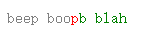
Example of generating a patch from Node
The code below is roughly equivalent to the Unix command diff -u file1.txt file2.txt > mydiff.patch:
const {createTwoFilesPatch} = require('diff');
const file1Contents = fs.readFileSync("file1.txt").toString();
const file2Contents = fs.readFileSync("file2.txt").toString();
const patch = createTwoFilesPatch("file1.txt", "file2.txt", file1Contents, file2Contents);
fs.writeFileSync("mydiff.patch", patch);
Examples of parsing and applying a patch from Node
Applying a patch to a specified file
The code below is roughly equivalent to the Unix command patch file1.txt mydiff.patch:
const {applyPatch} = require('diff');
const file1Contents = fs.readFileSync("file1.txt").toString();
const patch = fs.readFileSync("mydiff.patch").toString();
const patchedFile = applyPatch(file1Contents, patch);
fs.writeFileSync("file1.txt", patchedFile);
Applying a multi-file patch to the files specified by the patch file itself
The code below is roughly equivalent to the Unix command patch < mydiff.patch:
const {applyPatches} = require('diff');
const patch = fs.readFileSync("mydiff.patch").toString();
applyPatches(patch, {
    loadFile: (patch, callback) => {
        let fileContents;
        try {
            fileContents = fs.readFileSync(patch.oldFileName).toString();
        } catch (e) {
            callback(`No such file: ${patch.oldFileName}`);
            return;
        }
        callback(undefined, fileContents);
    },
    patched: (patch, patchedContent, callback) => {
        if (patchedContent === false) {
            callback(`Failed to apply patch to ${patch.oldFileName}`)
            return;
        }
        fs.writeFileSync(patch.oldFileName, patchedContent);
        callback();
    },
    complete: (err) => {
        if (err) {
            console.log("Failed with error:", err);
        }
    }
});
Applying a multi-file Git patch that may include renames and mode changes
Git patches can include file renames and copies (with or without content changes), which need to be handled in the callbacks you provide to applyPatches. parsePatch sets isRename or isCopy on the structured patch object so you can distinguish these cases. Patches can also potentially include file swaps (renaming a → b and b → a), in which case it is incorrect to simply apply each change atomically in sequence. The pattern with the pendingWrites Map below handles all of these nuances:
const {applyPatches} = require('diff');
const patch = fs.readFileSync("git-diff.patch").toString();
const DELETE = Symbol('delete');
const pendingWrites = new Map(); // filePath → {content, mode} or DELETE sentinel
applyPatches(patch, {
    loadFile: (patch, callback) => {
        if (patch.isCreate) {
            // Newly created file — no old content to load
            callback(undefined, '');
            return;
        }
        try {
            // Git diffs use a/ and b/ prefixes; strip them to get the real path
            const filePath = patch.oldFileName.replace(/^a\//, '');
            callback(undefined, fs.readFileSync(filePath).toString());
        } catch (e) {
            callback(`No such file: ${patch.oldFileName}`);
        }
    },
    patched: (patch, patchedContent, callback) => {
        if (patchedContent === false) {
            callback(`Failed to apply patch to ${patch.oldFileName}`);
            return;
        }
        const oldPath = patch.oldFileName.replace(/^a\//, '');
        const newPath = patch.newFileName.replace(/^b\//, '');
        if (patch.isDelete) {
            if (!pendingWrites.has(oldPath)) {
                pendingWrites.set(oldPath, DELETE);
            }
        } else {
            pendingWrites.set(newPath, {content: patchedContent, mode: patch.newMode});
            // For renames, delete the old file (but not for copies,
            // where the old file should be kept)
            if (patch.isRename && !pendingWrites.has(oldPath)) {
                pendingWrites.set(oldPath, DELETE);
            }
        }
        callback();
    },
    complete: (err) => {
        if (err) {
            console.log("Failed with error:", err);
            return;
        }
        for (const [filePath, entry] of pendingWrites) {
            if (entry === DELETE) {
                fs.unlinkSync(filePath);
            } else {
                fs.writeFileSync(filePath, entry.content);
                if (entry.mode) {
                    fs.chmodSync(filePath, entry.mode.slice(-3));
                }
            }
        }
    }
});
Compatibility
Version 8 of jsdiff supported ES5.
Starting from version 9, at the point of release, each jsdiff release should fully support the latest LTS version of Node plus all Baseline "core browser" releases that are at least 30 months old. (That is: jsdiff only uses JavaScript features that are deemed "widely available" by Baseline.) If you find one that it doesn't support, please open an issue.
TypeScript
As of version 8, JsDiff ships with type definitions. From version 8 onwards, you should not depend on the @types/diff package.
One tricky pattern pervades the type definitions and is worth explaining here. Most diff-generating and patch-generating functions (diffChars, diffWords, structuredPatch, etc) can be run in async mode (by providing a callback option), in abortable mode (by passing a timeout or maxEditLength property), or both. This is awkward for typing, because these modes have different call signatures:
- in abortable mode, the result might be
undefined, and - in async mode, the result (which might be allowed to be
undefined, depending upon whether we're in abortable mode) is passed to the provide callback instead of being returned, and the return value is alwaysundefined
Our type definitions handle this as best they can by declaring different types for multiple overload signatures for each such function - and also by declaring different types for abortable and nonabortable options objects. For instance, an object of type DiffCharsOptionsAbortable is valid to pass as the options argument to diffChars and represents an abortable call (whose result may be undefined) since it necessarily contains either the timeout or maxEditLength property.
This approach, while probably the least bad way available to add types to JsDiff without radically refactoring the library's API, does not yield perfect results. As long as TypeScript is able to statically determine the type of your options, and therefore which overload signature is appropriate, everything should work fine. This should always be the case if you are passing an object literal as the options argument and inlining the definition of any callback function within that literal. But in cases where TypeScript cannot manage to do this - as may often be the case if you, say, define an options: any = {} object, build up your options programmatically, and then pass the result to a JsDiff function - then it is likely to fail to match the correct overload signature (probably defaulting to assuming you are calling the function in non-abortable, non-async mode), potentially causing type errors. You can either ignore (e.g. with @ts-expect-error) any such errors, or try to avoid them by refactoring your code so that TypeScript can always statically determine the type of the options you pass.
License
See LICENSE.
Deviations from the published Myers diff algorithm
jsdiff deviates from the published algorithm in a couple of ways that don't affect results but do affect performance:
- jsdiff keeps track of the diff for each diagonal using a linked list of change objects for each diagonal, rather than the historical array of furthest-reaching D-paths on each diagonal contemplated on page 8 of Myers's paper.
- jsdiff skips considering diagonals where the furthest-reaching D-path would go off the edge of the edit graph. This dramatically reduces the time cost (from quadratic to linear) in cases where the new text just appends or truncates content at the end of the old text.