Building Interactive Command-Line Interfaces in Node.js
inquirer, prompt-sync, and readline-sync are Node.js libraries designed to handle user input from the command line, but they serve different architectural needs. inquirer is the industry standard for building interactive, promise-based CLI interfaces with rich UI elements like lists, checkboxes, and auto-complete. prompt-sync offers a simpler, synchronous approach for basic text input without the complexity of async/await. readline-sync provides synchronous readline capabilities, often used in legacy scripts where blocking the event loop is acceptable or required for linear flow control. Choosing the right tool depends on whether you need a polished user experience (inquirer) or a quick, blocking input solution for simple scripts (prompt-sync, readline-sync).
Npm Package Weekly Downloads Trend
Github Stars Ranking
Stat Detail


Inquirer vs Prompt-Sync vs Readline-Sync: CLI Input Architecture Compared
When building command-line tools in Node.js, handling user input is a fundamental requirement. inquirer, prompt-sync, and readline-sync all solve this problem, but they take vastly different approaches to execution flow, user experience, and API design. Let's compare how they handle common CLI challenges.
⚡ Execution Model: Async Promises vs Blocking Sync
inquirer uses a promise-based, non-blocking model.
- It integrates naturally with modern async/await workflows.
- Does not block the Node.js event loop, allowing other operations to proceed if needed (though prompting usually pauses flow).
- Best for complex CLI applications where flow control matters.
// inquirer: Promise-based flow
import inquirer from 'inquirer';

async function askName() {
  const answers = await inquirer.prompt([
    { type: 'input', name: 'name', message: 'What is your name?' }
  ]);
  console.log(`Hello ${answers.name}`);
}
prompt-sync uses a synchronous, blocking model.
- Execution stops completely until the user presses Enter.
- No need for async/await or promise chaining.
- Simpler for linear scripts but halts the event loop.
// prompt-sync: Synchronous flow
import prompt from 'prompt-sync';

const askName = () => {
  const input = prompt();
  const name = input('What is your name? ');
  console.log(`Hello ${name}`);
};
readline-sync also uses a synchronous, blocking model.
- Provides low-level access to readline features synchronously.
- Blocks the event loop similar to
prompt-sync. - Often used in older scripts or where sync behavior is strictly required.
// readline-sync: Synchronous flow
import readlineSync from 'readline-sync';

function askName() {
  const name = readlineSync.question('What is your name? ');
  console.log(`Hello ${name}`);
}
🎨 User Interface: Rich Components vs Plain Text
inquirer supports rich interactive UI components.
- Includes lists, checkboxes, password masking, and auto-complete.
- Handles arrow key navigation and screen rendering automatically.
- Creates a polished, application-like feel for the user.
// inquirer: Rich UI components
import inquirer from 'inquirer';

const answers = await inquirer.prompt([
  {
    type: 'list',
    name: 'color',
    message: 'Pick a color',
    choices: ['Red', 'Green', 'Blue']
  }
]);
prompt-sync is limited to plain text input.
- No built-in support for lists or checkboxes.
- You must manually parse text if you want options.
- Best for simple key-value data entry.
// prompt-sync: Plain text only
import prompt from 'prompt-sync';
const input = prompt();

const color = input('Pick a color (Red, Green, Blue): ');
// Manual validation required
readline-sync is limited to plain text input.
- Similar to
prompt-sync, it focuses on raw text entry. - Does not render interactive menus or navigateable lists.
- Suitable for basic questions where UI polish is not needed.
// readline-sync: Plain text only
import readlineSync from 'readline-sync';

const color = readlineSync.question('Pick a color (Red, Green, Blue): ');
// Manual validation required
✅ Validation & Transformation: Built-In vs Manual
inquirer has built-in validation and transformation hooks.
- You can define a
validatefunction that runs before accepting input. - Supports
filterto transform data before returning it. - Reduces boilerplate code for common checks.
// inquirer: Built-in validation
import inquirer from 'inquirer';

await inquirer.prompt([
  {
    type: 'input',
    name: 'email',
    message: 'Enter email',
    validate: (value) => value.includes('@') || 'Invalid email'
  }
]);
prompt-sync requires manual validation logic.
- Returns a string; you must write your own loops to check it.
- More control but more code to maintain.
- Good if you have very specific, non-standard validation rules.
// prompt-sync: Manual validation
import prompt from 'prompt-sync';
const input = prompt();

let email;
while (!email) {
  const val = input('Enter email: ');
  if (val.includes('@')) email = val;
  else console.log('Invalid email');
}
readline-sync requires manual validation logic.
- Like
prompt-sync, it returns raw strings. - You implement the retry logic yourself.
- Common pattern in legacy scripts where explicit control is preferred.
// readline-sync: Manual validation
import readlineSync from 'readline-sync';

let email;
while (!email) {
  const val = readlineSync.question('Enter email: ');
  if (val.includes('@')) email = val;
  else console.log('Invalid email');
}
🌐 Real-World Scenarios
Scenario 1: Scaffolding Tool (e.g., Create-React-App)
You are building a tool that asks users to select a template, enter a project name, and configure options via checkboxes.
- ✅ Best choice:
inquirer - Why? You need lists, checkboxes, and a polished flow that feels like a modern installer.
// inquirer: Scaffolding flow
await inquirer.prompt([
  { type: 'list', name: 'template', choices: ['TS', 'JS'] },
  { type: 'checkbox', name: 'features', choices: ['Lint', 'Test'] }
]);
Scenario 2: Quick Dev Script (e.g., Database Seed)
You need a quick script to ask for an admin password before seeding a local database.
- ✅ Best choice:
prompt-sync - Why? You want minimal setup, no async functions, and just need a string input.
// prompt-sync: Quick script
const pass = prompt()('Admin Password: ', { echo: '*' });
seedDatabase(pass);
Scenario 3: Legacy Maintenance (e.g., Old Build Script)
You are maintaining an older Node.js script that relies heavily on synchronous execution flow.
- ✅ Best choice:
readline-sync - Why? It matches the existing synchronous architecture without refactoring to async/await.
// readline-sync: Legacy flow
const confirm = readlineSync.keyInYN('Continue build?');
if (confirm) runBuild();
🌱 When Not to Use These
These libraries are specific to Node.js environments (CLI). Consider alternatives when:
- You are building a browser-based app: Use HTML forms or libraries like
react-prompt. - You need complex TUI (Terminal User Interface): Consider
blessedorinkfor full dashboard-style interfaces. - You are running in a non-interactive environment (like CI/CD): Ensure your script handles non-TTY stdin gracefully, or pass arguments via flags instead of prompts.
📌 Summary Table
| Feature | inquirer | prompt-sync | readline-sync |
|---|---|---|---|
| Execution | Async (Promises) | Sync (Blocking) | Sync (Blocking) |
| UI Components | Lists, Checkboxes, Password | Plain Text | Plain Text |
| Validation | Built-in (validate callback) | Manual | Manual |
| Event Loop | Non-blocking | Blocks | Blocks |
| Complexity | High (Rich features) | Low (Simple API) | Medium (Low-level access) |
| Best For | Professional CLI Tools | Quick Scripts | Legacy/Sync Scripts |
💡 Final Recommendation
Think in terms of User Experience and Flow Control:
- Building a public CLI tool? → Use
inquirer. The polished UI and promise-based API are worth the dependency. - Writing a private utility script? → Use
prompt-sync. It gets the job done with minimal code. - Maintaining old code? →
readline-syncis acceptable, but consider migrating toinquirerif the tool grows.
Final Thought: While prompt-sync and readline-sync offer simplicity, inquirer remains the architectural standard for professional Node.js CLI development. Choose the tool that matches the complexity of your interface, not just the simplicity of your code.
How to Choose: inquirer vs readline-sync vs prompt-sync
- inquirer:
Choose
inquirerwhen building professional CLI tools that require a polished user experience, such as scaffolding generators or configuration wizards. It is the best fit if you need promise-based flows, complex input validation, or UI components like selectable lists and checkboxes. Avoid it if you are writing a quick one-off script where adding a dependency for simple text input feels like overkill. - readline-sync:
Choose
readline-syncprimarily for legacy maintenance or specific cases where you need synchronous access to the readline interface features beyond simple prompting. Be cautious with this package in modern Node.js development, as blocking the event loop is generally discouraged. It is suitable for scripts that must run linearly without async patterns, but evaluate ifprompt-syncoffers a simpler API for your needs. - prompt-sync:
Choose
prompt-syncif you need a lightweight, synchronous solution for basic text input in simple scripts. It is ideal for scenarios where you want to avoid async/await syntax and don't need rich UI components like menus or spinners. It is a good middle ground whenreadline-syncfeels too heavy or low-level, butinquireris too complex for the task.
Popular Comparisons
README for inquirer

Inquirer.js


A collection of common interactive command line user interfaces.
[!IMPORTANT] This is the legacy version of Inquirer.js. While it still receives maintenance, it is not actively developed. For the new Inquirer, see @inquirer/prompts.
Table of Contents
Goal and Philosophy
Inquirer.js strives to be an easily embeddable and beautiful command line interface for Node.js (and perhaps the "CLI Xanadu").
Inquirer.js should ease the process of
- providing error feedback
- asking questions
- parsing input
- validating answers
- managing hierarchical prompts
Note:
Inquirer.jsprovides the user interface and the inquiry session flow. If you're searching for a full blown command line program utility, then check out commander, vorpal or args.
Documentation
Installation
| yarn | pnpm |
|---|---|
|
|
| bun | deno |
|
|
| npm | |
| |
import inquirer from 'inquirer';

inquirer
  .prompt([/* Pass your questions in here */])
  .then((answers) => {
    // Use user feedback for... whatever!!
  })
  .catch((error) => {
    if (error.isTtyError) {
      // Prompt couldn't be rendered in the current environment
    } else {
      // Something else went wrong
    }
  });
Examples (Run it and see it)
Check out the packages/inquirer/examples/ folder for code and interface examples.
yarn node packages/inquirer/examples/pizza.js
yarn node packages/inquirer/examples/checkbox.js
# etc...
Methods
[!WARNING] Those interfaces are not necessary for modern Javascript, while still maintained, they're depreciated. We highly encourage you to adopt the more ergonomic and modern API with @inquirer/prompts. Both
inquirerand@inquirer/promptsare usable at the same time, so you can progressively migrate.
inquirer.prompt(questions, answers) -> promise
Launch the prompt interface (inquiry session)
- questions a Question Object, an array or map of questions, or an RxJS-compatible Observable of questions
- answers (object) contains values of already answered questions. Inquirer will avoid asking answers already provided here. Defaults
{}. - returns a Promise
inquirer.registerPrompt(name, prompt)
Register prompt plugins under name.
- name (string) name of the this new prompt. (used for question
type) - prompt (object) the prompt object itself (the plugin)
inquirer.createPromptModule() -> prompt function
Create a self contained inquirer module. If you don't want to affect other libraries that also rely on inquirer when you overwrite or add new prompt types.
const prompt = inquirer.createPromptModule();

prompt(questions).then(/* ... */);
Objects
Question
A question object is a hash containing question related values:
- type: (String) Type of the prompt. Defaults:
input- Possible values:input,number,confirm,list,rawlist,expand,checkbox,password,editor - name: (String) The name to use when storing the answer in the answers hash. If the name contains periods, it will define a path in the answers hash.
- message: (String|Function) The question to print. If defined as a function, the first parameter will be the current inquirer session answers. Defaults to the value of
name(followed by a colon). - default: (String|Number|Boolean|Array|Function) Default value(s) to use if nothing is entered, or a function that returns the default value(s). If defined as a function, the first parameter will be the current inquirer session answers.
- choices: (Array|Function) Choices array or a function returning a choices array. If defined as a function, the first parameter will be the current inquirer session answers.
Array values can be simple
numbers,strings, orobjectscontaining aname(to display in list), avalue(to save in the answers hash), and ashort(to display after selection) properties. The choices array can also contain aSeparator. - validate: (Function) Receive the user input and answers hash. Should return
trueif the value is valid, and an error message (String) otherwise. Iffalseis returned, a default error message is provided. - filter: (Function) Receive the user input and answers hash. Returns the filtered value to be used inside the program. The value returned will be added to the Answers hash.
- transformer: (Function) Receive the user input, answers hash and option flags, and return a transformed value to display to the user. The transformation only impacts what is shown while editing. It does not modify the answers hash.
- when: (Function, Boolean) Receive the current user answers hash and should return
trueorfalsedepending on whether or not this question should be asked. The value can also be a simple boolean. - pageSize: (Number) Change the number of lines that will be rendered when using
list,rawList,expandorcheckbox. - prefix: (String) Change the default prefix message.
- suffix: (String) Change the default suffix message.
- askAnswered: (Boolean) Force to prompt the question if the answer already exists.
- loop: (Boolean) Enable list looping. Defaults:
true - waitUserInput: (Boolean) Flag to enable/disable wait for user input before opening system editor - Defaults:
true
default, choices(if defined as functions), validate, filter and when functions can be called asynchronously. Either return a promise or use this.async() to get a callback you'll call with the final value.
{
  /* Preferred way: with promise */
  filter() {
    return new Promise(/* etc... */);
  },

  /* Legacy way: with this.async */
  validate: function (input) {
    // Declare function as asynchronous, and save the done callback
    const done = this.async();

    // Do async stuff
    setTimeout(function() {
      if (typeof input !== 'number') {
        // Pass the return value in the done callback
        done('You need to provide a number');
      } else {
        // Pass the return value in the done callback
        done(null, true);
      }
    }, 3000);
  }
}
Answers
A key/value hash containing the client answers in each prompt.
- Key The
nameproperty of the question object - Value (Depends on the prompt)
confirm: (Boolean)input: User input (filtered iffilteris defined) (String)number: User input (filtered iffilteris defined) (Number)rawlist,list: Selected choice value (or name if no value specified) (String)
Separator
A separator can be added to any choices array:
// In the question object
choices: [ "Choice A", new inquirer.Separator(), "choice B" ]

// Which'll be displayed this way
[?] What do you want to do?
 > Order a pizza
   Make a reservation
   --------
   Ask opening hours
   Talk to the receptionist
The constructor takes a facultative String value that'll be use as the separator. If omitted, the separator will be --------.
Separator instances have a property type equal to separator. This should allow tools façading Inquirer interface from detecting separator types in lists.
Prompt types
Note:: allowed options written inside square brackets (
[]) are optional. Others are required.
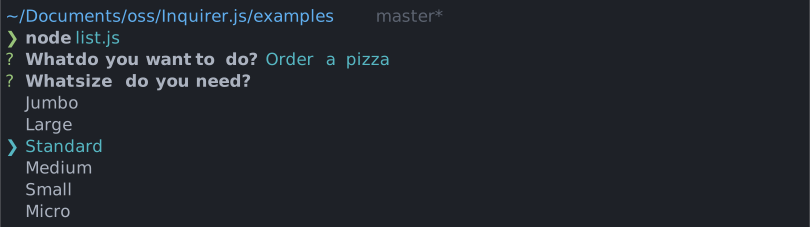
List - {type: 'list'}
Take type, name, message, choices[, default, filter, loop] properties.
(Note: default must be set to the index or value of one of the entries in choices)
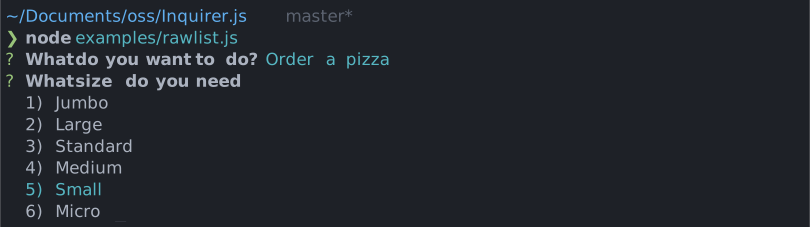
Raw List - {type: 'rawlist'}
Take type, name, message, choices[, default, filter, loop] properties.
(Note: default must be set to the index of one of the entries in choices)
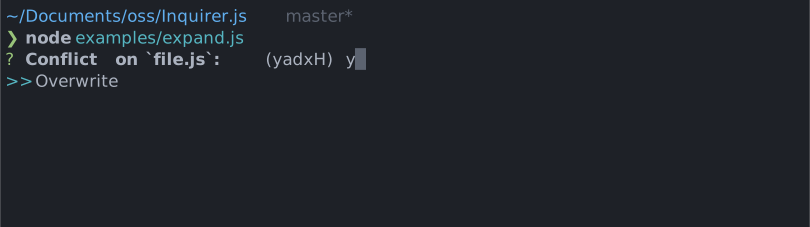
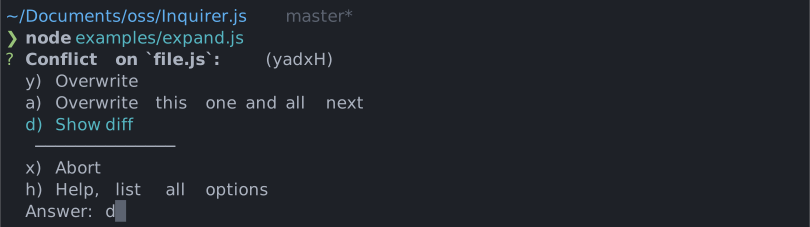
Expand - {type: 'expand'}
Take type, name, message, choices[, default] properties.
Note: default must be the index of the desired default selection of the array. If default key not provided, then help will be used as default choice
Note that the choices object will take an extra parameter called key for the expand prompt. This parameter must be a single (lowercased) character. The h option is added by the prompt and shouldn't be defined by the user.
See examples/expand.js for a running example.
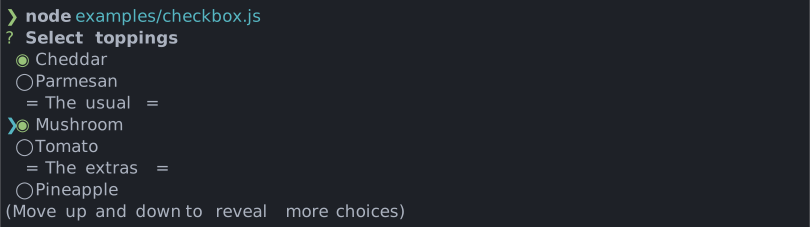
Checkbox - {type: 'checkbox'}
Take type, name, message, choices[, filter, validate, default, loop] properties. default is expected to be an Array of the checked choices value.
Choices marked as {checked: true} will be checked by default.
Choices whose property disabled is truthy will be unselectable. If disabled is a string, then the string will be outputted next to the disabled choice, otherwise it'll default to "Disabled". The disabled property can also be a synchronous function receiving the current answers as argument and returning a boolean or a string.
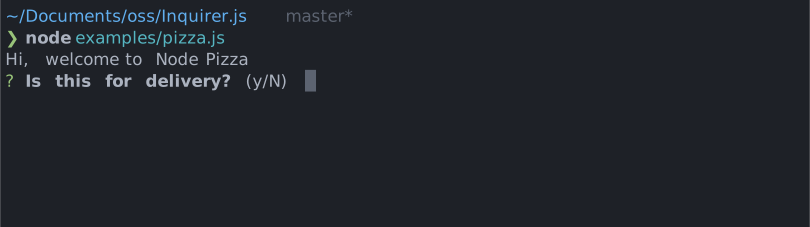
Confirm - {type: 'confirm'}
Take type, name, message, [default, transformer] properties. default is expected to be a boolean if used.
Input - {type: 'input'}
Take type, name, message[, default, filter, validate, transformer] properties.
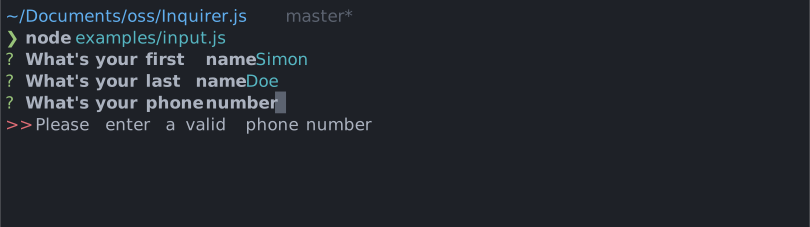
Input - {type: 'number'}
Take type, name, message[, default, filter, validate, transformer] properties.
Password - {type: 'password'}
Take type, name, message, mask,[, default, filter, validate] properties.
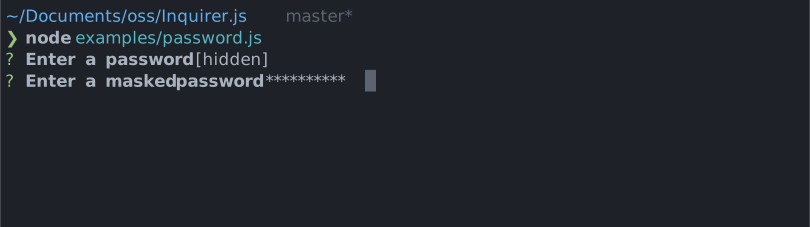
Note that mask is required to hide the actual user input.
Editor - {type: 'editor'}
Take type, name, message[, default, filter, validate, postfix, waitUserInput] properties
Launches an instance of the users preferred editor on a temporary file. Once the user exits their editor, the contents of the temporary file are read in as the result. The editor to use is determined by reading the $VISUAL or $EDITOR environment variables. If neither of those are present, notepad (on Windows) or vim (Linux or Mac) is used.
The postfix property is useful if you want to provide an extension.
Use in Non-Interactive Environments
prompt() requires that it is run in an interactive environment. (I.e. One where process.stdin.isTTY is true). If prompt() is invoked outside of such an environment, then prompt() will return a rejected promise with an error. For convenience, the error will have a isTtyError property to programmatically indicate the cause.
Reactive interface
inquirer.prompt() accepts an RxJS-compatible Observable of questions. This supports dynamic flows where questions are emitted over time:
const prompts = new Rx.Subject();
inquirer.prompt(prompts);

// At some point in the future, push new questions
prompts.next({/* question... */});
prompts.next({/* question... */});

// When you're done
prompts.complete();
And using the return value process property, you can access more fine grained callbacks:
inquirer.prompt(prompts).ui.process.subscribe(onEachAnswer, onError, onComplete);
Support (OS Terminals)
You should expect mostly good support for the CLI below. This does not mean we won't look at issues found on other command line - feel free to report any!
- Mac OS:
- Terminal.app
- iTerm
- Windows (Known issues):
- Windows Terminal
- ConEmu
- cmd.exe
- Powershell
- Cygwin
- Linux (Ubuntu, openSUSE, Arch Linux, etc):
- gnome-terminal (Terminal GNOME)
- konsole
Known issues
-
nodemon - Makes the arrow keys print gibrish on list prompts. Workaround: Add
{ stdin : false }in the configuration file or pass--no-stdinin the CLI. Please refer to this issue -
grunt-exec - Calling a node script that uses Inquirer from grunt-exec can cause the program to crash. To fix this, add to your grunt-exec config
stdio: 'inherit'. Please refer to this issue -
Windows network streams - Running Inquirer together with network streams in Windows platform inside some terminals can result in process hang. Workaround: run inside another terminal. Please refer to this issue
News on the march (Release notes)
Please refer to the GitHub releases section for the changelog
Contributing
Unit test
Please add a unit test for every new feature or bug fix. yarn test to run the test suite.
Documentation Add documentation for every API change. Feel free to send typo fixes and better docs!
We're looking to offer good support for multiple prompts and environments. If you want to help, we'd like to keep a list of testers for each terminal/OS so we can contact you and get feedback before release. Let us know if you want to be added to the list (just tweet to @vaxilart) or just add your name to the wiki
License
Copyright (c) 2023 Simon Boudrias (twitter: @vaxilart)
Licensed under the MIT license.
Plugins
You can build custom prompts, or use open sourced ones. See @inquirer/core documentation for building custom prompts.
You can either call the custom prompts directly (preferred), or you can register them (depreciated):
import customPrompt from '$$$/custom-prompt';

// 1. Preferred solution with new plugins
const answer = await customPrompt({ ...config });

// 2. Depreciated interface (or for old plugins)
inquirer.registerPrompt('custom', customPrompt);
const answers = await inquirer.prompt([
  {
    type: 'custom',
    ...config,
  },
]);
When using Typescript and registerPrompt, you'll also need to define your prompt signature. Since Typescript is static, we cannot infer available plugins from function calls.
import customPrompt from '$$$/custom-prompt';

declare module 'inquirer' {
  interface QuestionMap {
    // 1. Easiest option
    custom: Parameters<typeof customPrompt>[0];

    // 2. Or manually define the prompt config
    custom_alt: { message: string; option: number[] };
  }
}
Prompts
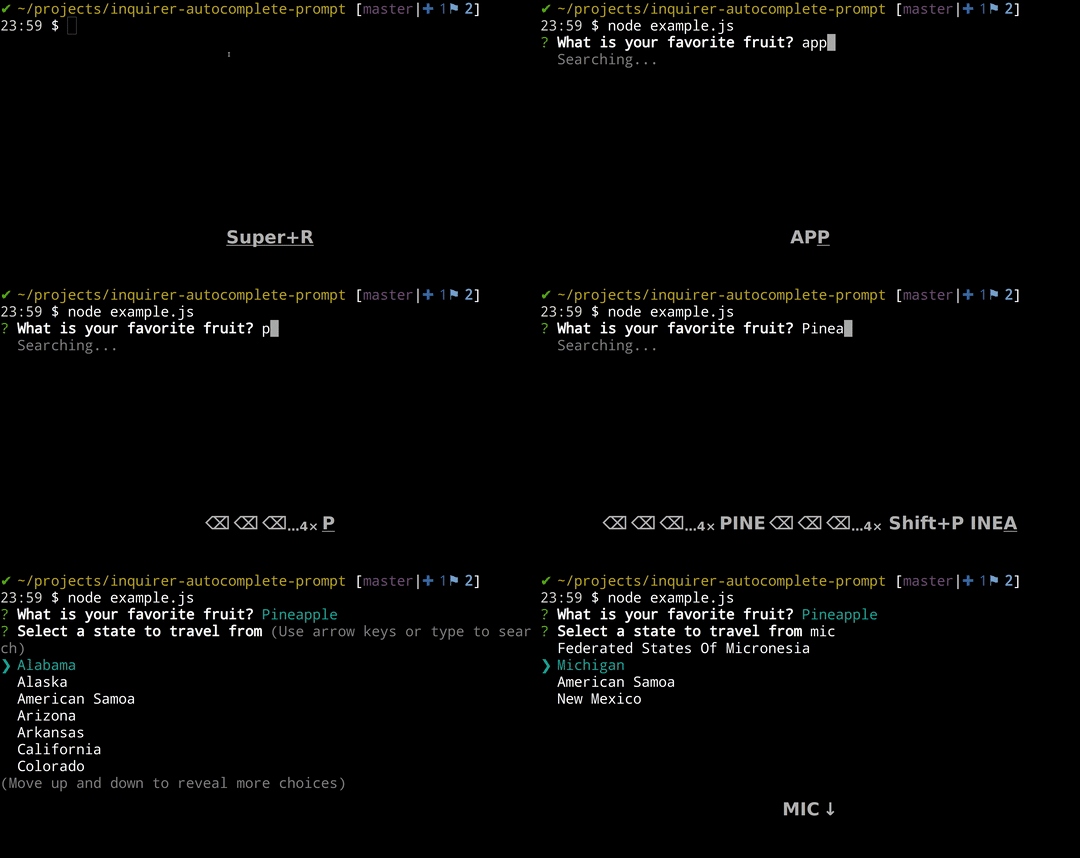
autocomplete
Presents a list of options as the user types, compatible with other packages such as fuzzy (for search)
checkbox-plus
Checkbox list with autocomplete and other additions

inquirer-date-prompt
Customizable date/time selector with localization support

datetime
Customizable date/time selector using both number pad and arrow keys

inquirer-select-line
Prompt for selecting index in array where add new element

command
Simple prompt with command history and dynamic autocomplete
inquirer-fuzzy-path
Prompt for fuzzy file/directory selection.

inquirer-emoji
Prompt for inputting emojis.

inquirer-chalk-pipe
Prompt for input chalk-pipe style strings

inquirer-search-checkbox
Searchable Inquirer checkbox

inquirer-search-list
Searchable Inquirer list

inquirer-prompt-suggest
Inquirer prompt for your less creative users.

inquirer-s3
An S3 object selector for Inquirer.

inquirer-autosubmit-prompt
Auto submit based on your current input, saving one extra enter
inquirer-file-tree-selection-prompt
Inquirer prompt for to select a file or directory in file tree

inquirer-tree-prompt
Inquirer prompt to select from a tree

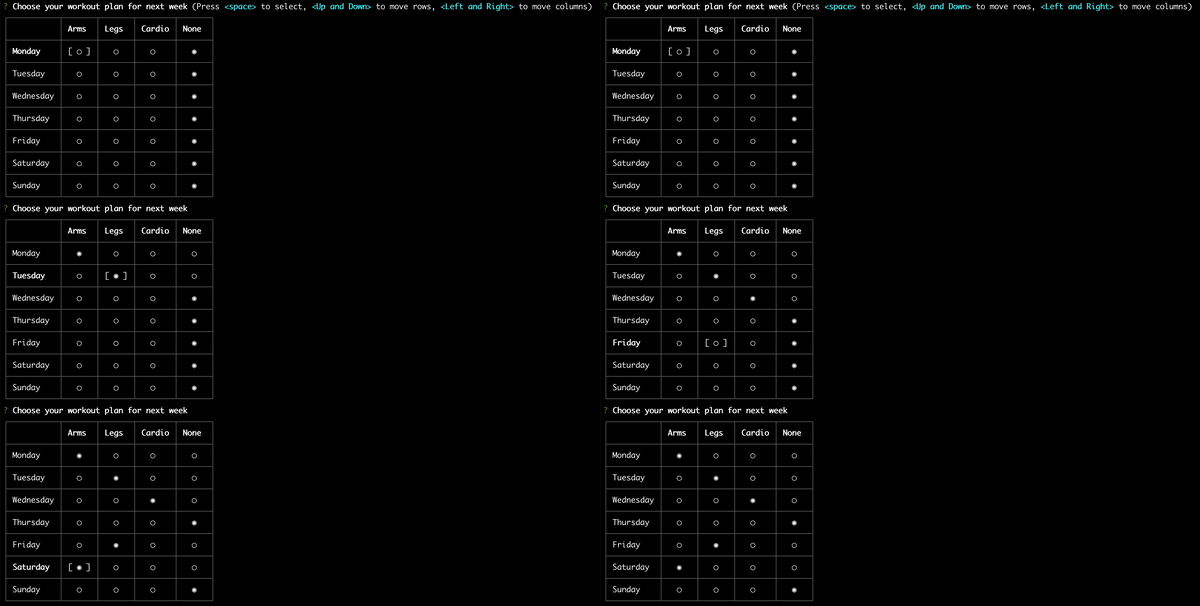
inquirer-table-prompt
A table-like prompt for Inquirer.
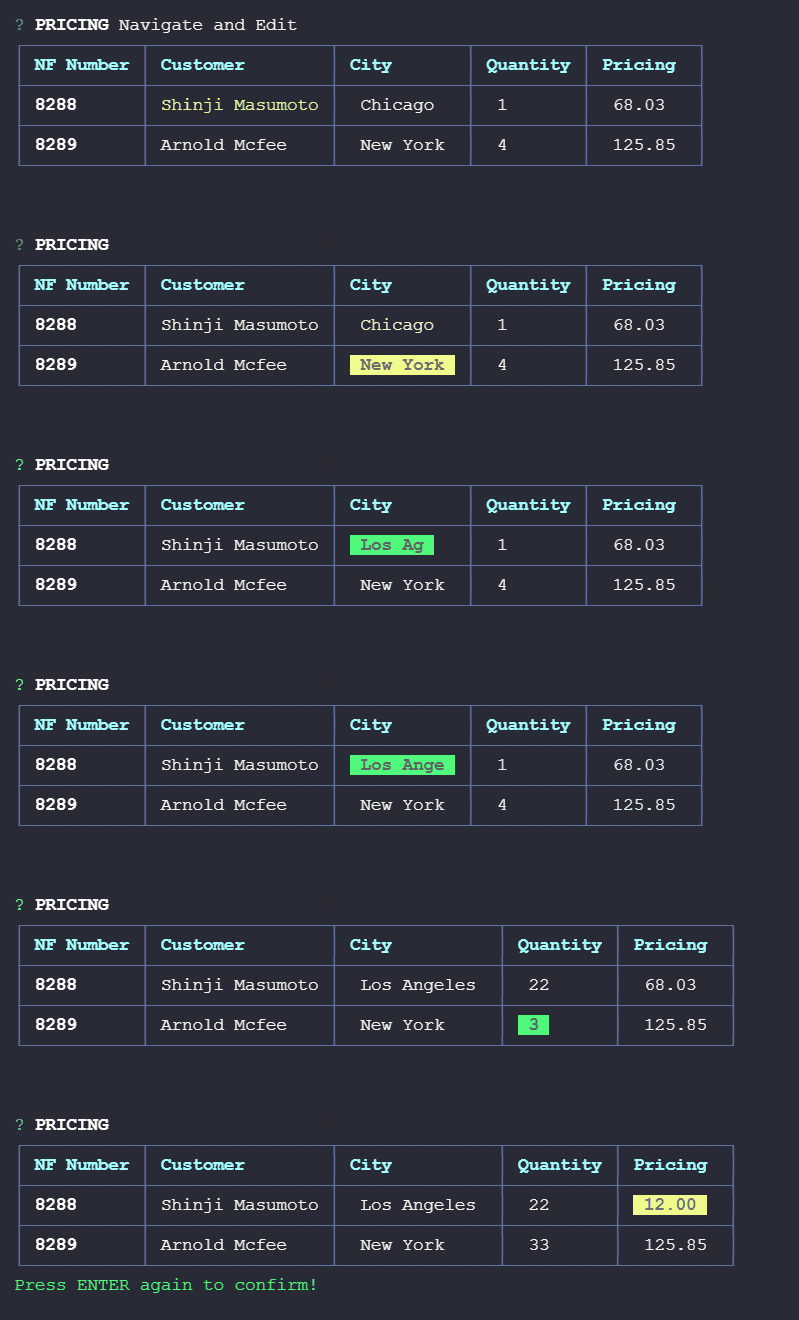
inquirer-table-input
A table editing prompt for Inquirer.
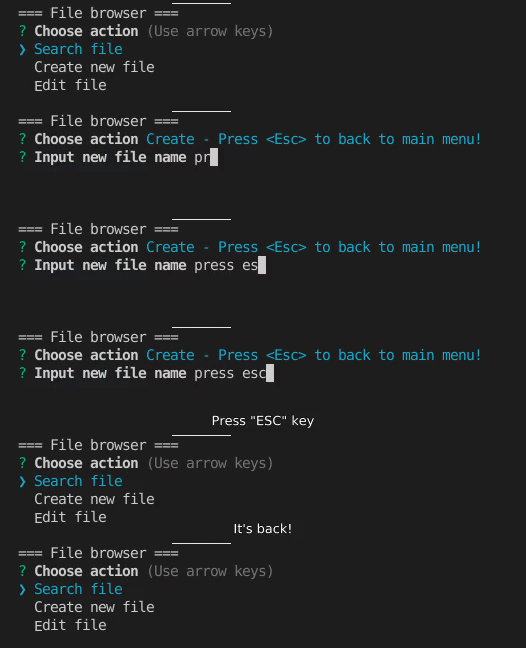
inquirer-interrupted-prompt
Turning any existing inquirer and its plugin prompts into prompts that can be interrupted with a custom key.
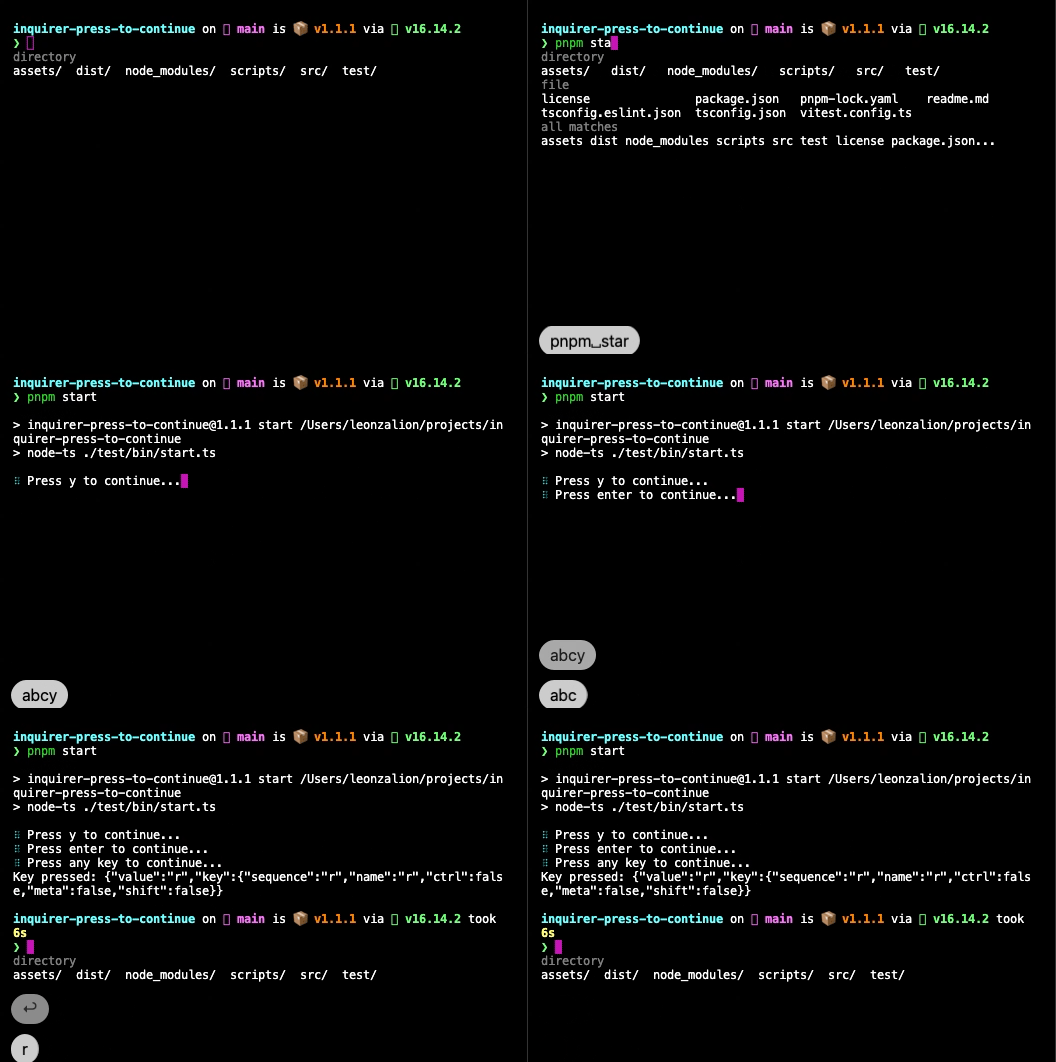
inquirer-press-to-continue
A "press any key to continue" prompt for Inquirer.js