graphql-request vs urql vs apollo-client vs react-apollo
Librerie per la gestione di GraphQL in applicazioni web
graphql-requesturqlapollo-clientreact-apolloPacchetti simili:

Librerie per la gestione di GraphQL in applicazioni web

Queste librerie sono progettate per semplificare l'interazione con le API GraphQL nelle applicazioni web. Ognuna di esse offre approcci diversi per gestire le richieste, la gestione dello stato e l'integrazione con i framework front-end, consentendo agli sviluppatori di scegliere la soluzione più adatta alle loro esigenze specifiche.

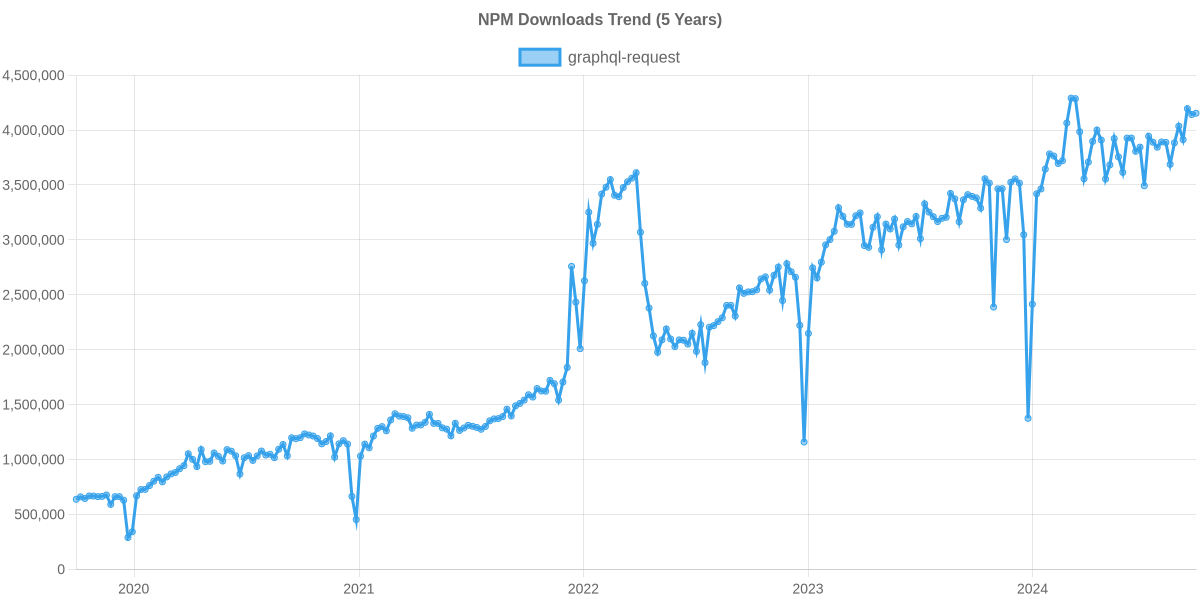
Trend di download npm

3 Anni

Classifica GitHub Stars

Dettaglio statistiche

Pacchetto
Download
Stars
Dimensione
Issues
Pubblicazione
Licenza
graphql-request13,112,8486,121420 kB60il y a un anMIT
urql1,518,1508,985140 kB33il y a 2 moisMIT
apollo-client583,95619,781-410il y a 6 ansMIT
react-apollo167,0586,790-205il y a 7 ansMIT

Confronto funzionalità: graphql-request vs urql vs apollo-client vs react-apollo

Integrazione con React

  • graphql-request:

    GraphQL Request non ha una specifica integrazione con React, ma può essere utilizzato con qualsiasi libreria front-end. È ideale per chi cerca un approccio semplice e diretto per effettuare richieste GraphQL.

  • urql:

    Urql offre un'ottima integrazione con React, supportando hook personalizzati e un approccio modulare che consente di estendere le funzionalità secondo le necessità.

  • apollo-client:

    Apollo Client offre una solida integrazione con React tramite il pacchetto React Apollo, fornendo hook e componenti di ordine superiore per gestire le query e le mutazioni in modo semplice e intuitivo.

  • react-apollo:

    React Apollo è progettato specificamente per React, fornendo un'API reattiva per gestire le richieste GraphQL e il caching, rendendo facile l'integrazione con il ciclo di vita dei componenti React.

Gestione della Cache

  • graphql-request:

    GraphQL Request non include funzionalità di caching integrate, quindi ogni richiesta è effettuata direttamente all'API, rendendolo meno adatto per applicazioni che richiedono caching.

  • urql:

    Urql ha un sistema di caching semplice e configurabile, che permette di personalizzare il comportamento di caching in base alle esigenze dell'applicazione.

  • apollo-client:

    Apollo Client ha un sistema di caching avanzato che memorizza i risultati delle query e gestisce automaticamente la sincronizzazione dei dati, migliorando le prestazioni e l'esperienza utente.

  • react-apollo:

    React Apollo sfrutta il sistema di caching di Apollo Client, consentendo di gestire i dati in modo efficiente e ridurre le richieste al server.

Semplicità d'uso

  • graphql-request:

    GraphQL Request è estremamente semplice da usare e configurare, rendendolo ideale per sviluppatori che vogliono una soluzione rapida e senza complicazioni.

  • urql:

    Urql è progettato per essere semplice e flessibile, consentendo agli sviluppatori di iniziare rapidamente senza una curva di apprendimento ripida.

  • apollo-client:

    Apollo Client, sebbene potente, può risultare complesso da configurare inizialmente a causa delle sue numerose funzionalità e opzioni di configurazione.

  • react-apollo:

    React Apollo è relativamente semplice da usare per gli sviluppatori React, grazie alla sua API intuitiva e alla buona documentazione.

Supporto per Subscription

  • graphql-request:

    GraphQL Request non supporta le subscription, essendo focalizzato esclusivamente sulle richieste HTTP standard.

  • urql:

    Urql offre supporto per le subscription, ma richiede una configurazione aggiuntiva rispetto ad altre librerie.

  • apollo-client:

    Apollo Client supporta le subscription in tempo reale, consentendo agli sviluppatori di gestire gli aggiornamenti dei dati in modo efficiente.

  • react-apollo:

    React Apollo supporta le subscription tramite Apollo Client, facilitando l'integrazione con i componenti React per aggiornamenti in tempo reale.

Estensibilità

  • graphql-request:

    GraphQL Request è meno estensibile rispetto ad altre librerie, ma la sua semplicità lo rende facile da integrare in progetti esistenti.

  • urql:

    Urql è progettato per essere modulare e facilmente estensibile, consentendo agli sviluppatori di aggiungere solo le funzionalità necessarie.

  • apollo-client:

    Apollo Client è altamente estensibile grazie a una vasta gamma di plugin e strumenti che possono essere integrati per migliorare le funzionalità.

  • react-apollo:

    React Apollo è estensibile grazie alla sua integrazione con Apollo Client, permettendo l'aggiunta di funzionalità personalizzate.

Come scegliere: graphql-request vs urql vs apollo-client vs react-apollo

  • graphql-request:

    Opta per GraphQL Request se desideri una libreria leggera e semplice per effettuare richieste GraphQL senza fronzoli, ideale per progetti più piccoli o per chi cerca un approccio minimalista.

  • urql:

    Scegli Urql se preferisci una libreria altamente configurabile e leggera, con un'architettura modulare che consente di aggiungere solo le funzionalità necessarie per il tuo progetto.

  • apollo-client:

    Scegli Apollo Client se hai bisogno di una soluzione completa per la gestione dello stato locale e remoto, con un forte supporto per la cache e le funzionalità avanzate come il polling e la gestione delle subscription.

  • react-apollo:

    Utilizza React Apollo se stai costruendo un'applicazione React e desideri una stretta integrazione con il ciclo di vita dei componenti React, sfruttando le funzionalità di caching e gestione dello stato di Apollo.

README per graphql-request

graphql-request

Minimal GraphQL client supporting Node and browsers for scripts or simple apps.

GitHub Action npm version

Highlights

  • Most simple & lightweight GraphQL client
  • Promise-based API (works with async / await)
  • Pure ESM package
  • First class TypeScript support
    • Including TypedDocumentNode
  • Isomorphic (works in both Node and Browsers)

Install

npm add graphql-request graphql

TypeScript Setup

This package uses package.exports. Therefore if you are a TypeScript user you must:

  1. have your tsconfig.json moduleResolution set to "bundler" or "node16"/"nodenext".
  2. Have your package.json type set to "module".

Quick Start

Send a GraphQL document using a static request function:

import { gql, request } from 'graphql-request'

const document = gql`
  {
    company {
      ceo
    }
  }
`
await request('https://api.spacex.land/graphql/', document)

The function can be passed a configuration object for more complex cases:

await request({
  url,
  document,
  variables,
  requestHeaders,
})

A class is available for constructing your own instances:

import { gql, GraphQLClient } from 'graphql-request'

const document = gql`
  {
    company {
      ceo
    }
  }
`
const endpoint = 'https://api.spacex.land/graphql/'
const client = new GraphQLClient(endpoint)
await client.request(document)

Examples

Node Version Support

We only (officially) support versions of Nodejs of the following status:

  • Current
  • LTS
  • Maintenance and end of life not yet reached

So for example on Oct 24 2023 that would mean these versions: 18, 20, 21.

Any issue that exists solely for an unsupported version of Nodejs will be rejected (not worked on).

Reference

⚠️ This reference is incomplete. Check out the examples for more reference material.

Configuration

ErrorPolicy

By default GraphQLClient will throw when an error is received. However, sometimes you still want to resolve the (partial) data you received. You can define errorPolicy in the GraphQLClient constructor.

const client = new GraphQLClient(endpoint, { errorPolicy: 'all' })
None (default)

Allow no errors at all. If you receive a GraphQL error the client will throw.

Ignore

Ignore incoming errors and resolve like no errors occurred

All

Return both the errors and data, only works with rawRequest.

IgnoreOperationName

OperationName has been introduced to address issues reported here Support operation name, However, on certain occasions this information may not be needed in requests. In such cases, you might consider ignoring operationName to avoid the extraction steps currently performed by a parsing operation when the document is provided in string format.

By default the GraphQLClient tries to extract the operationName from the document. You can define excludeOperationName in the constructor of GraphQLClient to avoid the extraction process if it is not needed. This can be useful if you don't use operationName and want to optimise queries by reducing the amount of computation as much as possible, especially if we are in a context where we are using documents in string format to reduce bundle size.

// example where the operation name is not ignored
const client = new GraphQLClient(endpoint, {
  method: 'POST',
})
// example in which the operation name is ignored
const client = new GraphQLClient(endpoint, {
  method: 'POST',
  excludeOperationName: true,
})

Knowledge Base

Why was the file upload feature taken away? Will it return?

In this issue we decided to make this library more stable and maintainable. In principal the feature is still in scope of this library and will make a return when we find time to do the feature right.

Why do I have to install graphql?

graphql-request uses methods exposed by the graphql package to handle some internal logic. On top of that, for TypeScript users, some types are used from the graphql package to provide better typings.

Do I need to wrap my GraphQL documents inside the gql template exported by graphql-request?

No. It is there for convenience so that you can get the tooling support like automatic formatting and syntax highlighting. You can use gql from graphql-tag if you need it for some reason too.

What sets graphql-request apart from other clients like Apollo, Relay, etc.?

graphql-request is the most minimal and simplest to use GraphQL client. It's perfect for small scripts or simple apps.

Compared to GraphQL clients like Apollo or Relay, graphql-request doesn't have a built-in cache and has no integrations for frontend frameworks. The goal is to keep the package and API as minimal as possible.

Project Stats

Package Installs

NPM Usage Trend of graphql-request

Repo Beats

Alt