React UIフレームワークの技術的比較:企業向けフロントエンド開発の選択基準
antd、bootstrap、material-ui(現在は@mui/material)、およびsemantic-ui-reactは、ReactベースのアプリケーションでUIコンポーネントを提供する主要なライブラリです。これらはそれぞれ異なるデザイン言語とアーキテクチャ哲学に基づいており、開発者のニーズに応じて選択されます。antdはAnt Design仕様に従った豊富なコンポーネントセットを提供し、主に中華圏のエンタープライズ向けアプリケーションで広く使われています。bootstrapはCSSフレームワークとして始まりましたが、React用ラッパーを通じてコンポーネントベースの開発も可能で、レスポンシブデザインと汎用性が特徴です。material-ui(MUI)はGoogleのマテリアルデザインを実装し、テーマカスタマイズ性とアクセシビリティ対応に優れています。一方、semantic-ui-reactはSemantic UIのReact実装ですが、2023年時点で公式にメンテナンスされておらず、新規プロジェクトでの使用は推奨されません。
npmのダウンロードトレンド
GitHub Starsランキング
統計詳細


React UIフレームワーク比較:antd、Bootstrap、Material UI、Semantic UI React
企業向けフロントエンド開発において、UIコンポーネントライブラリの選定はアーキテクチャ全体に影響を及ぼします。ここでは、antd、bootstrap(Reactラッパー経由)、material-ui(MUI)、およびsemantic-ui-reactの技術的特性を深く掘り下げ、実際のコードを通じて比較します。
🎨 デザイン言語と一貫性
antd は Ant Design 規範に厳密に従っており、グリッド、カラーパレット、スペーシング、トーン&マナーまで統一されています。特にデータテーブルやフォーム、ダッシュボード向けのコンポーネントが充実しています。
// antd: フォームとテーブルの例
import { Form, Input, Table } from 'antd';

const App = () => (
  <Form>
    <Form.Item label="ユーザー名">
      <Input />
    </Form.Item>
  </Form>
);
bootstrap はレスポンシブ優先の汎用CSSフレームワークで、ユーティリティクラスとプリセットコンポーネントを組み合わせて使うのが一般的です。React向けには react-bootstrap や reactstrap がよく使われます。
// react-bootstrap: ボタンとグリッド
import { Button, Container, Row, Col } from 'react-bootstrap';

const App = () => (
  <Container>
    <Row>
      <Col>
        <Button variant="primary">送信</Button>
      </Col>
    </Row>
  </Container>
);
material-ui(MUI)は Google のマテリアルデザインを実装し、マテリアルガイドラインに準拠したアニメーション、シャドウ、タイポグラフィを提供します。
// MUI: ボタンとカード
import { Button, Card, CardContent } from '@mui/material';

const App = () => (
  <Card>
    <CardContent>
      <Button variant="contained">保存</Button>
    </CardContent>
  </Card>
);
semantic-ui-react は自然言語のようなクラス名(例:<Button primary>)が特徴でしたが、現在は非推奨です。
// semantic-ui-react(非推奨)
import { Button, Card } from 'semantic-ui-react';

const App = () => (
  <Card>
    <Card.Content>
      <Button primary>確認</Button>
    </Card.Content>
  </Card>
);
⚠️ 注意:
semantic-ui-reactは GitHub リポジトリがアーカイブされており、npm にも「This project is no longer maintained」と記載されています。新規プロジェクトでは使用しないでください。
🎛️ スタイルとカスタマイズ
antd は Less ベースのテーマ変数を提供し、CSS 変数や ConfigProvider 経由でのカスタマイズが可能です。ただし、深いカスタマイズにはビルド設定の調整が必要になることがあります。
// antd: ConfigProvider でロケール変更
import { ConfigProvider, Button } from 'antd';
import jaJP from 'antd/locale/ja_JP';

const App = () => (
  <ConfigProvider locale={jaJP}>
    <Button>ボタン</Button>
  </ConfigProvider>
);
bootstrap は Sass 変数をオーバーライドすることでテーマをカスタマイズできます。React コンポーネント自体はスタイルを持たず、CSS に依存します。
// bootstrap: _variables.scss を上書き
$primary: #ff6b6b;
@import "bootstrap/scss/bootstrap";
material-ui は createTheme と ThemeProvider を使って、JavaScript オブジェクトベースで包括的なテーマ定義が可能です。CSS-in-JS(emotion)により、スコープされたスタイルが生成されます。
// MUI: カスタムテーマ
import { createTheme, ThemeProvider } from '@mui/material/styles';

const theme = createTheme({
  palette: { primary: { main: '#1976d2' } }
});

const App = () => (
  <ThemeProvider theme={theme}>
    <Button variant="contained">送信</Button>
  </ThemeProvider>
);
semantic-ui-react は Less ベースのテーマカスタマイズをサポートしていましたが、現在は更新されていません。
🧩 コンポーネントの粒度と機能
antd は高度なコンポーネント(例:Table、Form、DatePicker)を提供し、内部状態管理やバリデーションを内包しています。
// antd: 高度なテーブル
import { Table } from 'antd';

const columns = [{ title: '名前', dataIndex: 'name' }];
const data = [{ key: '1', name: '田中' }];

const App = () => <Table columns={columns} dataSource={data} />;
bootstrap の React ラッパーは、基本的なコンポーネント(Modal、Navbar など)を提供しますが、複雑なロジックは自分で実装する必要があります。
// react-bootstrap: モーダル
import { Modal, Button } from 'react-bootstrap';

const App = ({ show, handleClose }) => (
  <Modal show={show} onHide={handleClose}>
    <Modal.Body>内容</Modal.Body>
    <Modal.Footer>
      <Button onClick={handleClose}>閉じる</Button>
    </Modal.Footer>
  </Modal>
);
material-ui は中間~高度なコンポーネント(DataGrid、Autocomplete)を提供し、拡張性が高いです。sx プロパティによるインラインスタイルも特徴です。
// MUI: DataGrid
import { DataGrid } from '@mui/x-data-grid';

const columns = [{ field: 'name', headerName: '名前' }];
const rows = [{ id: 1, name: '佐藤' }];

const App = () => <DataGrid rows={rows} columns={columns} />;
semantic-ui-react も同様に中級コンポーネントを提供していましたが、非推奨のため新機能追加はありません。
🌐 アクセシビリティと国際化
antd は i18n を ConfigProvider でネイティブサポートし、ARIA 属性も標準で付与されます。
material-ui も i18n に対応しており、LocalizationProvider を使って日付ピッカーなどのロケールを設定できます。アクセシビリティはマテリアルガイドラインに準拠しています。
bootstrap の React ラッパーは、基本的な ARIA 属性を提供しますが、i18n はアプリケーション側で処理する必要があります。
semantic-ui-react は当初アクセシビリティを意識していましたが、メンテナンス停止により最新の WCAG 対応は不確実です。
📦 ビルドとバンドル最適化
antd と material-ui はツリーシェイキングに対応しており、個別インポートで不要なコードを除外できます。
// 推奨:個別インポート
import Button from 'antd/es/button';
import { Button } from '@mui/material';
bootstrap の React ラッパーも同様ですが、CSS の依存関係を正しく管理する必要があります。
semantic-ui-react も個別インポート可能ですが、非推奨のため最適化ツールのサポートが遅れている可能性があります。
✅ まとめ:どのライブラリを選ぶべきか
| ライブラリ | 推奨用途 | デザイン自由度 | メンテナンス状況 |
|---|---|---|---|
antd | エンタープライズ管理画面、データ集約型アプリ | 中(Ant Design準拠) | 活発 |
bootstrap(Reactラッパー) | 汎用Webサイト、シンプルなアプリ | 高(CSSカスタム可) | 活発(CSS本体) |
material-ui(MUI) | マテリアルデザイン採用アプリ、高カスタマイズ要件 | 非常に高 | 活発 |
semantic-ui-react | 新規プロジェクトでは非推奨 | 中 | 非推奨・メンテナンス停止 |
新規プロジェクトでは、semantic-ui-react を避けて、目的に応じて antd、material-ui、または bootstrap の React ラッパーを選択してください。特に長期的な保守性とコミュニティサポートを重視するなら、活発にメンテナンスされているライブラリが安全です。
選び方: antd vs bootstrap vs material-ui vs semantic-ui-react
- antd:
antdは、Ant Designのガイドラインに沿った一貫性のあるUIを必要とする大規模な管理画面やデータ集約型アプリケーションに最適です。TypeScriptとの親和性が高く、国際化(i18n)やフォームバリデーションなどエンタープライズ開発に必要な機能が内蔵されています。ただし、デザインが固定されているため、独自のブランド表現が必要な場合はカスタマイズコストが高くなる可能性があります。 - bootstrap:
bootstrapは、既存のBootstrap CSS知識を持つチームや、シンプルでレスポンシブなUIを迅速に構築したい場合に適しています。React Bootstrapやreactstrapといったラッパーパッケージを通じて、コンポーネントベースの開発が可能です。ただし、高度なインタラクションやモダンなデザインシステムには物足りなさを感じる場合があります。 - material-ui:
material-ui(MUI)は、マテリアルデザインを採用したいプロジェクトや、テーマの柔軟なカスタマイズ、アクセシビリティ対応を重視する場合に最適です。CSS-in-JSによるスタイルスコープや、コンポーネントレベルでの拡張性が高く、大規模アプリケーションでも保守性を保ちやすいです。ただし、学習曲線がやや急で、パフォーマンス最適化には注意が必要です。 - semantic-ui-react:
semantic-ui-reactは、Semantic UIの自然言語のようなクラス名と直感的なAPIを好む開発者向けでしたが、2023年時点で公式リポジトリはアーカイブされ、積極的なメンテナンスが行われていません。新規プロジェクトでは使用を避けて、代替手段(例:Fomantic-UI React)を検討すべきです。既存プロジェクトの維持には使えますが、長期的なサポートは期待できません。
人気の比較
antd のREADME

Ant Design
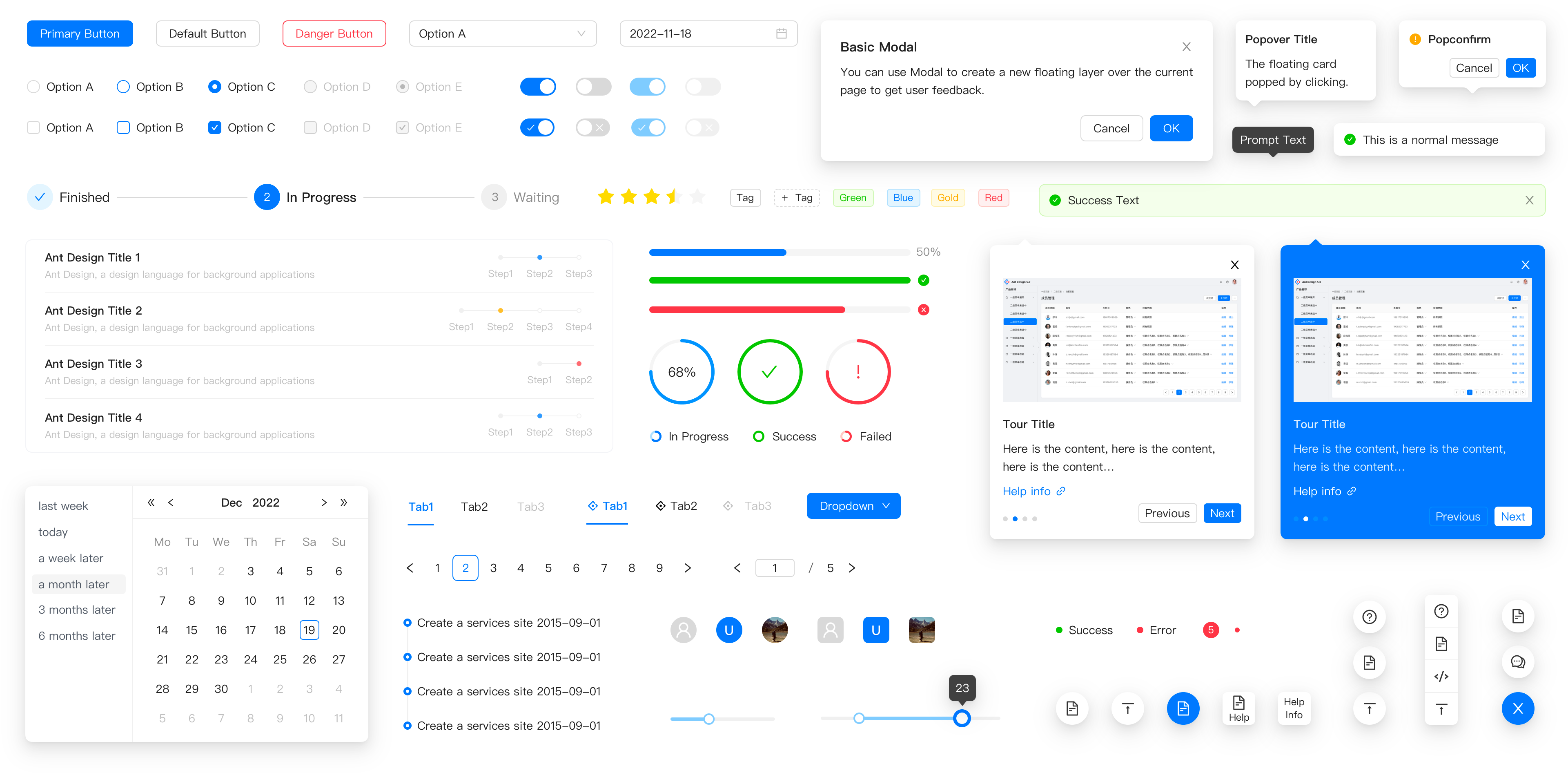
An enterprise-class UI design language and React UI library.









Changelog · Report Bug · Request Feature · English · 中文
❤️ Sponsors 
 |  |  |  |
|---|
✨ Features
- 🌈 Enterprise-class UI designed for web applications.
- 📦 A set of high-quality React components out of the box.
- 🛡 Written in TypeScript with predictable static types.
- ⚙️ Whole package of design resources and development tools.
- 🌍 Internationalization support for dozens of languages.
- 🎨 Powerful theme customization based on CSS-in-JS.
🖥 Environment Support
- Modern browsers
- Server-side Rendering
- Electron
 Edge |  Firefox |  Chrome |  Safari |  Electron |
|---|---|---|---|---|
| Edge | last 2 versions | last 2 versions | last 2 versions | last 2 versions |
📦 Install
npm install antd
yarn add antd
pnpm add antd
bun add antd
🔨 Usage
import { Button, DatePicker } from 'antd';

export default () => (
  <>
    <Button type="primary">PRESS ME</Button>
    <DatePicker placeholder="select date" />
  </>
);
🔗 Links
- Home page
- Components Overview
- Sponsor
- Change Log
- rc-components
- 🆕 Ant Design X
- Ant Design Pro
- Pro Components
- Ant Design Mobile
- Ant Design Mini
- Ant Design Charts
- Ant Design Web3
- Landing Pages
- Ant Motion
- Scaffold Market
- Developer Instruction
- Versioning Release Note
- FAQ
- Online Playground for bug reports
- Customize Theme
- How to Apply for Being A Collaborator
⌨️ Development
Use opensumi.run, a free online pure front-end dev environment.

Or clone locally:
$ git clone git@github.com:ant-design/ant-design.git
$ cd ant-design
$ npm install
$ npm start
Open your browser and visit http://127.0.0.1:8001, see more at Development.
🤝 Contributing 
|

|

|
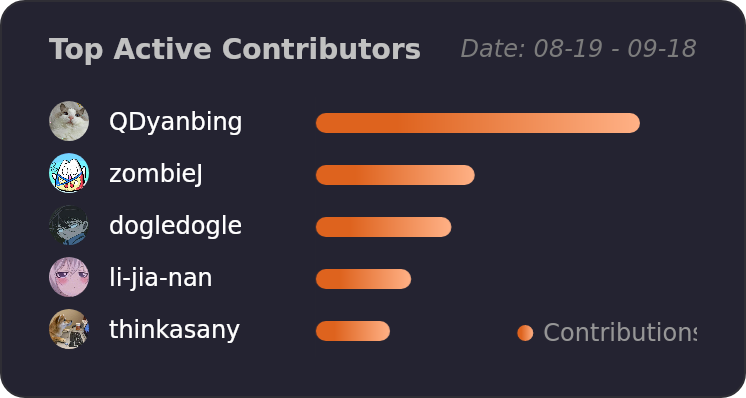
Let's build a better antd together.
We warmly invite contributions from everyone. Before you get started, please take a moment to review our Contribution Guide. Feel free to share your ideas through Pull Requests or GitHub Issues. If you're interested in enhancing our codebase, explore the Development Instructions and enjoy your coding journey! :)
For collaborators, adhere to our Pull Request Principle and utilize our Pull Request Template when creating a Pull Request.
Issue funding
We use Issuehunt to up-vote and promote specific features that you would like to see and implement. Check our backlog and help us:

❤️ Backers