フロントエンド開発におけるパッケージマネージャーの選定
bower、npm、pnpm、yarn はすべて JavaScript プロジェクトにおける依存関係管理を目的としたパッケージマネージャーです。しかし、アーキテクチャ、パフォーマンス特性、ワークスペース対応、セキュリティモデルにおいて根本的に異なります。bower は現在非推奨であり、他の三つ(npm、yarn、pnpm)が現代のフロントエンド開発で実際に使用されています。これらは Node.js エコシステム上で動作し、package.json を中心に依存関係を管理しますが、内部の依存解決アルゴリズムやディスク上の保存方式に大きな違いがあります。
npmのダウンロードトレンド
GitHub Starsランキング
統計詳細


フロントエンドパッケージマネージャー徹底比較:npm、Yarn、pnpm、Bower
フロントエンド開発において、依存関係をどう管理するかはプロジェクトの健全性と開発体験に大きく影響します。npm、Yarn、pnpm、そして過去の選択肢である Bower は、それぞれ異なるアプローチでこの課題に取り組んできました。ここでは、実際の開発現場での使い勝手、パフォーマンス、ワークスペース対応、セキュリティなど、プロフェッショナルが気にすべき観点から深く掘り下げます。
⚠️ 最初に:Bower はもはや使用すべきではない
公式 npm ページ(https://www.npmjs.com/package/bower)および GitHub リポジトリ(https://github.com/bower/bower)によると、**Bower は非推奨(deprecated)** であり、「フロントエンド向けの新しいプロジェクトには使用しないでください」と明記されています。代わりに Yarn や webpack、Parcel などのモダンなツールを推奨しています。
# Bower のインストール(⚠️ 非推奨)
npm install -g bower
bower install lodash
Bower はグローバルな依存関係フラット構造を採用し、トランスパイルやバンドルをサポートしませんでした。現代のモジュールバンドラーやトランスパイラとの統合が困難なため、新規プロジェクトで Bower を選ぶべき理由はありません。
📦 依存関係の保存方式:node_modules の構造がパフォーマンスとディスク使用量を左右する
npm:従来のネスト構造 → v3 以降はフラット化
npm(v7+)はデフォルトで「dedupe」を行い、可能な限り依存をフラット化しますが、コンフリクトがある場合はネストされます。
# npm でのインストール
npm install lodash
結果として、node_modules は部分的にフラットですが、重複が完全に排除されるわけではありません。大規模プロジェクトではディスク使用量が膨らみ、CI 時間が長くなることがあります。
Yarn(Classic / Berry):PnP で node_modules を完全に排除可能
Yarn Classic(v1)は npm と似たフラット構造ですが、Yarn Berry(v2+)では Plug’n’Play(PnP) を導入し、node_modules を使わずに直接 .zip ファイルからモジュールを読み込みます。
# Yarn Berry で PnP を有効に(.yarnrc.yml で設定)
yarn set version berry
yarn install
.pnp.cjs というファイルが生成され、Node.js のモジュール解決をフックします。これにより、
- インストールが非常に高速
- ディスク使用量が大幅削減
- 依存関係の整合性が保証される
ただし、一部の古いツール(例:jest の特定バージョン)が PnP に対応していない場合があり、互換性レイヤーが必要になることがあります。
pnpm:ハードリンク+シンボリックリンクで重複ゼロ
pnpm はグローバルストア(~/.pnpm-store)に各パッケージを一度だけ保存し、プロジェクト内では ハードリンク+シンボリックリンク を使って参照します。
# pnpm でのインストール
pnpm install lodash
この方式により、
- 同じパッケージが複数プロジェクトで共有されてもディスク使用量はほぼゼロ増加
node_modules内の構造は厳密にフラットではなく、「仮想リンク構造」で依存関係を正確に再現- セキュリティ向上:パッケージが宣言されていない依存を読み込めない(「幽霊依存」防止)
node_modules/
├── .pnpm/
│   ├── lodash@4.17.21
│   └── react@18.2.0
└── react → .pnpm/react@18.2.0/node_modules/react
🧩 ワークスペース(モノレポ)対応力
npm:v7+ でワークスペースをサポート
// package.json
{
  "workspaces": ["packages/*"]
}
npm install lodash -w packages/app
シンプルですが、機能は基本的。依存の hoisting 制御や詳細なフィルタリングは限られる。
Yarn:ワークスペースの先駆者
Yarn Classic からワークスペースをサポートしており、Berry ではさらに強化。
# .yarnrc.yml
workspaces:
  - packages/*
yarn workspace app add lodash
yarn workspaces foreach --parallel run build
foreach コマンドで並列実行、依存の自動リンク、制約ルール(constraints)による一貫性チェックなど、高度な機能を備える。
pnpm:ワークスペースと統合が自然
# pnpm-workspace.yaml
packages:
  - 'packages/*'
pnpm add lodash -r --filter app
pnpm recursive run build
-r(recursive)オプションで全ワークスペース対象にコマンド実行可能。また、ワークスペース内のパッケージ同士の依存は常に最新版にリンクされるため、開発中の変更を即座に反映できます。
⚡ インストール速度とキャッシュ戦略
npm:ローカルキャッシュあり。CI ではnpm ciで clean install。速度は改善されたが、依然として他より遅い傾向。Yarn:グローバルキャッシュ+オフラインミラー。Berry の PnP はキャッシュ不要で超高速。pnpm:グローバルストアが本質的にキャッシュ。インストールはほぼ瞬時(特に CI/CD で顕著)。
# 全てのツールで lock ファイルが存在
npm install        # → package-lock.json
yarn install      # → yarn.lock
pnpm install      # → pnpm-lock.yaml
lock ファイルの形式は異なりますが、すべて確定的なビルドを保証します。
🔒 セキュリティと信頼性
npm:npm auditで脆弱性スキャン。サブ依存のアップデートが難しい場合あり。Yarn:yarn audit(Classic)またはyarn dlx audit-ci(Berry)。PnP により未宣言依存の使用を防ぐ。pnpm:最も安全。シンボリックリンク構造により、パッケージがpackage.jsonに記載されていない依存を require できない(Node.js のモジュール解決を制限)。
// pnpm 環境下で、package.json に 'lodash' がなければ...
require('lodash'); // ❌ エラー!
これは「幽霊依存(phantom dependency)」問題を根本から解決します。
🛠️ 開発体験(DX)とエコシステム統合
npm:Node.js に標準搭載。ツールチェーンとの互換性は最高。ただし、高度な機能は少ない。Yarn:プラグインシステム(Berry)、VS Code 連携、PnP SDK など、DX に特化。学習コストはやや高め。pnpm:シンプルな CLI、npm/Yarn との互換性が高い(pnpmコマンド以外はほぼ同じ)。最近では Vite、Next.js、Nuxt など主要フレームワークが正式サポート。
📊 要点まとめ
| 特徴 | npm | Yarn(Berry) | pnpm | Bower(非推奨) |
|---|---|---|---|---|
| 依存保存方式 | フラット+ネスト | PnP(node_modules 不要) | ハードリンク+シンボリックリンク | グローバルフラット |
| ディスク効率 | △ | ◎(PnP) | ◎ | ×(重複あり) |
| ワークスペース | ○(基本機能) | ◎(高度な制御) | ◎(自然な統合) | ✘ |
| セキュリティ | ○ | ◎(PnP で隔離) | ◎◎(幽霊依存防止) | ✘ |
| インストール速度 | △ | ◎(PnP で超高速) | ◎(グローバルストア) | ○(単純だが非効率) |
| 新規プロジェクト推奨 | ○(汎用) | ○(高度な DX 求める場合) | ◎(効率・安全重視) | ✘(絶対に使わない) |
💡 結論:どのパッケージマネージャーを選ぶべきか?
- シンプルさと互換性が最優先 →
npm。特に小規模プロジェクトや、ツールチェーンの互換性が不安な場合。 - モノレポで高度なワークスペース制御が必要 →
Yarn(Berry)。PnP の恩恵を受けられる環境なら最強。 - ディスク効率、セキュリティ、高速インストールを求める →
pnpm。近年の急成長は納得できるほど実用的。 - Bower → 絶対に使わない。歴史的遺物として認識し、既存プロジェクトがあれば早急に移行を検討すべき。
現代のフロントエンド開発では、npm、Yarn、pnpm のいずれかを選ぶことになります。あなたのチームのニーズ — パフォーマンス重視か、DX 重視か、セキュリティ重視か — に応じて、適切なツールを選びましょう。
選び方: pnpm vs npm vs yarn vs bower
- pnpm:
pnpmを選ぶべきは、ディスク使用量の削減、インストール速度の向上、そして「幽霊依存」を防ぐセキュリティを重視する場合です。ハードリンクとシンボリックリンクによるグローバルストア方式により、大規模プロジェクトやモノレポでも効率的に動作します。npm や Yarn との CLI 互換性が高く、移行コストも低いため、多くのチームが近年採用を進めています。 - npm:
npmを選ぶべきは、シンプルさと広範なツール互換性が最優先される場合です。Node.js に標準搭載されており、ほとんどのフレームワークや CI/CD パイプラインで問題なく動作します。高度なワークスペース機能や極限のパフォーマンスは不要で、安定した標準的な依存管理で十分なプロジェクトに向いています。 - yarn:
yarn(特に Berry / v2+)を選ぶべきは、高度なワークスペース機能や Plug'n'Play(PnP)による超高速インストールと厳格な依存隔離を必要とする場合です。モノレポ構成が複雑で、並列ビルドや制約ルールによる一貫性維持が重要なプロジェクトに向いています。ただし、PnP による互換性問題に注意が必要です。 - bower:
bowerは公式に非推奨(deprecated)とされており、新規プロジェクトで使用してはいけません。フロントエンドの依存管理が必要な場合は、代わりにnpm、yarn、またはpnpmを評価してください。既存の Bower プロジェクトがある場合、早期の移行を強く推奨します。
人気の比較
pnpm のREADME
简体中文 | 日本語 | 한국어 | Italiano | Português Brasileiro

Fast, disk space efficient package manager:
- Fast. Up to 2x faster than the alternatives (see benchmark).
- Efficient. Files inside
node_modulesare linked from a single content-addressable storage. - Great for monorepos.
- Strict. A package can access only dependencies that are specified in its
package.json. - Deterministic. Has a lockfile called
pnpm-lock.yaml. - Works as a Node.js version manager. See pnpm env use.
- Works everywhere. Supports Windows, Linux, and macOS.
- Battle-tested. Used in production by teams of all sizes since 2016.
- See the full feature comparison with npm and Yarn.
To quote the Rush team:
Microsoft uses pnpm in Rush repos with hundreds of projects and hundreds of PRs per day, and we’ve found it to be very fast and reliable.



Platinum Sponsors

|
Gold Sponsors

|

|

|

|

|

|

|

|
Silver Sponsors

|

|

|

|
|

|
Support this project by becoming a sponsor.
Background
pnpm uses a content-addressable filesystem to store all files from all module directories on a disk. When using npm, if you have 100 projects using lodash, you will have 100 copies of lodash on disk. With pnpm, lodash will be stored in a content-addressable storage, so:
- If you depend on different versions of lodash, only the files that differ are added to the store.
If lodash has 100 files, and a new version has a change only in one of those files,
pnpm updatewill only add 1 new file to the storage. - All the files are saved in a single place on the disk. When packages are installed, their files are linked from that single place consuming no additional disk space. Linking is performed using either hard-links or reflinks (copy-on-write).
As a result, you save gigabytes of space on your disk and you have a lot faster installations!
If you'd like more details about the unique node_modules structure that pnpm creates and
why it works fine with the Node.js ecosystem, read this small article: Flat node_modules is not the only way.
💖 Like this project? Let people know with a tweet
Installation
For installation options visit our website.
Usage
Just use pnpm in place of npm/Yarn. E.g., install dependencies via:
pnpm install
For more advanced usage, read pnpm CLI on our website, or run pnpm help.
Benchmark
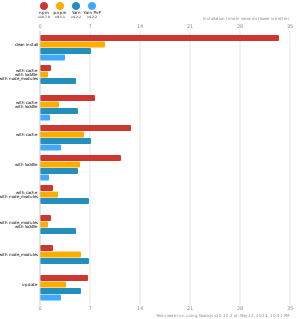
pnpm is up to 2x faster than npm and Yarn classic. See all benchmarks here.
Benchmarks on an app with lots of dependencies: