Node.js Express アプリケーションにおける HTTP リクエストロギングライブラリの比較
bunyan、express-winston、morgan、morgan-body、pino-http、winston はすべて Node.js の Express アプリケーションで HTTP リクエストやアプリケーションログを記録するためのライブラリです。morgan と morgan-body は Express 専用のミドルウェアで、リクエスト/レスポンスのメタデータやボディを簡単に記録できます。一方、bunyan、winston、pino-http、express-winston は汎用的なロギングフレームワークを Express と統合するもので、より柔軟な出力形式やトランスポート先(ファイル、コンソール、外部サービスなど)の設定が可能です。特に pino-http と bunyan は JSON ベースの構造化ログに最適化されており、パフォーマンスを重視する環境でよく使われます。
npmのダウンロードトレンド
GitHub Starsランキング
統計詳細


Express アプリケーションのリクエストロギング:6つの主要ライブラリを徹底比較
Node.js の Express アプリケーションで HTTP リクエストを記録する方法はさまざまですが、目的や制約によって最適な選択肢は大きく変わります。ここでは bunyan、express-winston、morgan、morgan-body、pino-http、winston の6つを、実際のコードを交えながら深く比較します。
📝 基本的な使い方:Express への組み込み
まず、各ライブラリを Express アプリに組み込む方法を見てみましょう。
morgan は最もシンプルです。標準的なミドルウェアとして即座に使えます。
const express = require('express');
const morgan = require('morgan');

const app = express();
app.use(morgan('combined')); // 標準 Apache combined フォーマット
morgan-body も同様に簡単ですが、ボディパーサーの後に配置する必要があります。
const express = require('express');
const morganBody = require('morgan-body');

const app = express();
app.use(express.json());
// morgan-body は body-parser の後に置く
morganBody(app, { logReqDateTime: true });
pino-http は Pino のインスタンスを生成してミドルウェアとして使用します。
const express = require('express');
const pinoHttp = require('pino-http');

const app = express();
app.use(pinoHttp({
  transport: {
    target: 'pino-pretty',
    options: { colorize: true }
  }
}));
winston 単体では Express と直接連携しないため、express-winston を経由します。
const express = require('express');
const winston = require('winston');
const expressWinston = require('express-winston');

const app = express();
app.use(expressWinston.logger({
  transports: [new winston.transports.Console()],
  format: winston.format.combine(
    winston.format.colorize(),
    winston.format.json()
  )
}));
bunyan も同様に、Express 用のミドルウェアを自前で作るか、サードパーティ製を使う必要があります(公式 Express ミドルウェアはありません)。
const express = require('express');
const bunyan = require('bunyan');

const log = bunyan.createLogger({ name: 'my-app' });
const app = express();

// シンプルなカスタムミドルウェア例
app.use((req, res, next) => {
  const start = Date.now();
  res.on('finish', () => {
    log.info({
      method: req.method,
      url: req.url,
      statusCode: res.statusCode,
      duration: Date.now() - start
    });
  });
  next();
});
📦 ログ出力形式:人間可読 vs 構造化
ログの形式は、デバッグのしやすさと監視システムとの親和性を左右します。
morgan は人間可読なテキスト形式がデフォルトです。
127.0.0.1 - - [10/May/2024:12:00:00 +0000] "GET /api/users HTTP/1.1" 200 1234 "-" "curl/7.68.0"
pino-http と bunyan は JSON 形式を前提とします。
{"level":30,"time":1715342400000,"pid":12345,"hostname":"localhost","req":{"id":1,"method":"GET","url":"/api/users"},"res":{"statusCode":200},"responseTime":42}
winston(および express-winston)はフォーマットを自由に選べます。
// JSON 出力
format: winston.format.json()

// カラフルなテキスト出力
format: winston.format.combine(
  winston.format.colorize(),
  winston.format.simple()
)
morgan-body はリクエスト/レスポンスのボディを含むため、以下のように詳細に出力されます。
// リクエストボディ例
{ "name": "Alice", "email": "alice@example.com" }
// レスポンスボディ例
{ "id": 123, "status": "created" }
💡 ヒント:クラウド監視やログ集約ツール(例:Datadog、Loki)を使うなら、JSON 構造化ログ(
pino-httpやwinston)が圧倒的に有利です。逆に、ローカル開発や単純なファイルログならmorganのテキスト形式で十分です。
⚡ パフォーマンスとオーバーヘッド
高トラフィック環境では、ロギングのオーバーヘッドがアプリ全体のパフォーマンスに影響します。
pino-http は非同期出力と最小限の処理により、ベンチマークで常にトップクラスの速度を記録します。JSON シリアライズも高速な内部実装を使用しています。
bunyan も JSON に最適化されていますが、開発が停滞しているため最新の Node.js 最適化が反映されていません。
morgan は非常に軽量で、フォーマット文字列のパース以外の処理がほとんどないため、低オーバーヘッドです。
morgan-body はボディのコピーと整形を行うため、大きなペイロードではメモリ使用量とCPU負荷が増加します。
winston と express-winston は柔軟性の代償として、多少のオーバーヘッドがあります。特に複数のトランスポートを同時に使うと顕著です。
🔒 セキュリティと機密情報の扱い
本番環境では、パスワードやトークンなどの機密情報をログに残さないことが重要です。
morgan は URL やヘッダーのみを記録するため、デフォルトで安全です。
morgan-body はリクエスト/レスポンス全体を記録するため、機密情報が含まれる可能性があります。フィルタリング機能を使って敏感なフィールドをマスクする必要があります。
morganBody(app, {
  requestBodyFilter: (body) => {
    if (body.password) delete body.password;
    return body;
  }
});
pino-http と winston は、カスタムシリアライザやフォーマット関数でフィールドを加工・削除できます。
// pino-http でのフィールドマスキング
const logger = require('pino')({
  redact: ['req.body.password', 'req.headers.authorization']
});
app.use(pinoHttp({ logger }));
bunyan も同様に、serializers オプションで特定フィールドを加工可能です。
const log = bunyan.createLogger({
  name: 'app',
  serializers: {
    req: (req) => ({
      method: req.method,
      url: req.url,
      // password などは含めない
    })
  }
});
🛠️ 拡張性とカスタマイズ
特殊な要件(例:エラーログの別ファイル出力、動的ログレベル変更)がある場合の対応力を比較します。
winston はトランスポート、フォーマット、例外ハンドラーなど、ほぼすべての側面をカスタマイズできます。
// エラーログを別ファイルへ
const errorTransport = new winston.transports.File({ filename: 'error.log', level: 'error' });
const appTransport = new winston.transports.File({ filename: 'app.log' });
const logger = winston.createLogger({ transports: [errorTransport, appTransport] });
pino-http も pino の機能を引き継いでおり、redact(機密情報マスキング)、hooks(ログ前処理)、transport(出力先変更)などが利用可能です。
morgan はカスタムトークンやフォーマット関数で拡張できますが、出力先の制御は限定的です。
// カスタムトークン定義
morgan.token('custom-id', (req) => req.headers['x-request-id']);
app.use(morgan(':method :url :custom-id')); // 出力例: GET /api/users abc123
bunyan は streams オプションで複数出力先を指定できますが、柔軟性は Winston に劣ります。
const log = bunyan.createLogger({
  name: 'app',
  streams: [
    { level: 'info', stream: process.stdout },
    { level: 'error', path: 'error.log' }
  ]
});
morgan-body は主にボディ記録に特化しており、高度なカスタマイズには向いていません。
🚫 非推奨とメンテナンス状況
2024年現在、bunyan は GitHub リポジトリで「このプロジェクトはメンテナンスされていません」と明記されており、新規プロジェクトでの使用は推奨されません。代替として pino 系の利用が公式に勧められています。
他のライブラリ(morgan、winston、pino-http、express-winston、morgan-body)はいずれもアクティブにメンテナンスされています。
📊 まとめ:用途別の選択ガイド
| 要件 | 推奨ライブラリ |
|---|---|
| シンプルなアクセスログ(本番) | morgan |
| 高速な構造化ログ(クラウド監視連携) | pino-http |
| 柔軟な出力先・フォーマット制御 | winston + express-winston |
| 開発時・デバッグ時のボディ記録 | morgan-body(※本番では注意) |
| 既存 Bunyan システムとの互換性 | bunyan(※新規プロジェクトでは避ける) |
💡 最終的なアドバイス
- 新規プロジェクトでパフォーマンスとクラウド監視を重視するなら
pino-httpが最良の選択です。JSON 構造化ログと非同期出力が現代的な運用にぴったり合います。 - シンプルさと信頼性が最優先なら
morganを選びましょう。Express 公式チームがメンテナンスしており、長年にわたり安定して使われ続けています。 - 複雑なロギング要件(例:複数出力先、動的制御)があるなら
winston+express-winstonが柔軟に対応できます。 bunyanは新規プロジェクトで使うべきではありません。後継であるpino系への移行を強く推奨します。
どのライブラリを選ぶにせよ、本番環境では機密情報のログ漏洩を防ぐ設定を必ず行うことを忘れないでください。
選び方: bunyan vs express-winston vs morgan vs morgan-body vs pino-http vs winston
- bunyan:
bunyanは高速で JSON 構造化ログに特化したロガーです。CLI ツールによる人間可読な出力もサポートしており、運用監視との親和性が高いです。ただし開発がほぼ停止しており、新規プロジェクトでは代替手段を検討すべきです。既存システムとの互換性が必要な場合や、JSON ログを前提としたシンプルな構成を求める場合に限って選択してください。 - express-winston:
express-winstonは汎用ロガーライブラリwinstonを Express と連携させるためのミドルウェアです。Winston の豊富なトランスポートやフォーマット機能を活かしつつ、リクエスト/レスポンス情報を自動で記録できます。Winston をすでに採用しているプロジェクトや、高度なカスタマイズ(例:エラーログの別出力)が必要な場合に適しています。 - morgan:
morganは Express 公式チームがメンテナンスする軽量なリクエストロガーです。プリセットフォーマット(combined、common、devなど)を使えば数行で導入でき、パフォーマンスオーバーヘッドも極めて小さいです。本番環境での基本的なアクセスログ記録や、シンプルな要件に最適です。ボディの内容までは記録しません。 - morgan-body:
morgan-bodyはmorganを拡張し、リクエスト/レスポンスのボディ(JSON やフォームデータ)も記録できるミドルウェアです。開発時やデバッグ用途でペイロードの中身を確認したい場合に便利ですが、本番環境ではセキュリティリスク(機密情報のログ漏洩)があるため注意が必要です。 - pino-http:
pino-httpは超高速 JSON ロガーpinoを Express で使うための公式ミドルウェアです。非同期出力と最小限のオーバーヘッドにより、高スループット環境でも安定して動作します。構造化ログを前提としたモダンな監視基盤(例:ELK スタック、Datadog)と連携するプロジェクトに強く推奨されます。 - winston:
winstonは柔軟性と拡張性に優れた汎用ロギングフレームワークです。複数の出力先(ファイル、コンソール、Splunk など)や動的なログレベル切り替えをサポートします。Express との連携にはexpress-winstonなどの追加ミドルウェアが必要ですが、複雑なロギング要件やエンタープライズ環境で広く採用されています。
人気の比較
bunyan のREADME


Bunyan is a simple and fast JSON logging library for node.js services:
var bunyan = require('bunyan');
var log = bunyan.createLogger({name: "myapp"});
log.info("hi");
and a bunyan CLI tool for nicely viewing those logs:
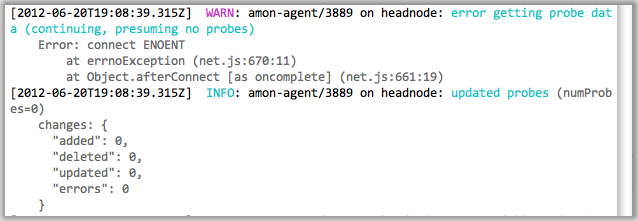
Manifesto: Server logs should be structured. JSON's a good format. Let's do
that. A log record is one line of JSON.stringify'd output. Let's also
specify some common names for the requisite and common fields for a log
record (see below).
Table of Contents
- Current Status
- Installation
- Features
- Introduction
- Levels
- Log Record Fields
- Streams
- Runtime log snooping via DTrace
- Runtime environments
- Versioning
- License
- See Also
Current Status
Solid core functionality is there. Joyent is using this for a number of production services. Bunyan supports node 0.10 and greater. Follow @trentmick for updates to Bunyan.
There is an email discussion list bunyan-logging@googlegroups.com, also as a forum in the browser.
Installation
npm install bunyan
Tip: The bunyan CLI tool is written to be compatible (within reason) with
all versions of Bunyan logs. Therefore you might want to npm install -g bunyan
to get the bunyan CLI on your PATH, then use local bunyan installs for
node.js library usage of bunyan in your apps.
Tip: Installing without optional dependencies can dramatically reduce
bunyan's install size. dtrace-provider is used for dtrace features,
mv is used for RotatingFileStream, and moment is used for local time.
If you don't need these features, consider installing with the
--no-optional flag.
Features
- elegant log method API
- extensible streams system for controlling where log records go (to a stream, to a file, log file rotation, etc.)
bunyanCLI for pretty-printing and filtering of Bunyan logs- simple include of log call source location (file, line, function) with
src: true - lightweight specialization of Logger instances with
log.child - custom rendering of logged objects with "serializers"
- Runtime log snooping via DTrace support
- Support for a few runtime environments: Node.js, Browserify, Webpack, NW.js.
Introduction
Like most logging libraries you create a Logger instance and call methods named after the logging levels:
// hi.js
var bunyan = require('bunyan');
var log = bunyan.createLogger({name: 'myapp'});
log.info('hi');
log.warn({lang: 'fr'}, 'au revoir');
All loggers must provide a "name". This is somewhat akin to the log4j logger "name", but Bunyan doesn't do hierarchical logger names.
Bunyan log records are JSON. A few fields are added automatically: "pid", "hostname", "time" and "v".
$ node hi.js
{"name":"myapp","hostname":"banana.local","pid":40161,"level":30,"msg":"hi","time":"2013-01-04T18:46:23.851Z","v":0}
{"name":"myapp","hostname":"banana.local","pid":40161,"level":40,"lang":"fr","msg":"au revoir","time":"2013-01-04T18:46:23.853Z","v":0}
Constructor API
var bunyan = require('bunyan');
var log = bunyan.createLogger({
    name: <string>,                     // Required
    level: <level name or number>,      // Optional, see "Levels" section
    stream: <node.js stream>,           // Optional, see "Streams" section
    streams: [<bunyan streams>, ...],   // Optional, see "Streams" section
    serializers: <serializers mapping>, // Optional, see "Serializers" section
    src: <boolean>,                     // Optional, see "src" section

    // Any other fields are added to all log records as is.
    foo: 'bar',
    ...
});
Log Method API
The example above shows two different ways to call log.info(...). The
full API is:
log.info();     // Returns a boolean: is the "info" level enabled?
                // This is equivalent to `log.isInfoEnabled()` or
                // `log.isEnabledFor(INFO)` in log4j.

log.info('hi');                     // Log a simple string message (or number).
log.info('hi %s', bob, anotherVar); // Uses `util.format` for msg formatting.

log.info({foo: 'bar'}, 'hi');
                // The first field can optionally be a "fields" object, which
                // is merged into the log record.

log.info(err);  // Special case to log an `Error` instance to the record.
                // This adds an "err" field with exception details
                // (including the stack) and sets "msg" to the exception
                // message.
log.info(err, 'more on this: %s', more);
                // ... or you can specify the "msg".

log.info({foo: 'bar', err: err}, 'some msg about this error');
                // To pass in an Error *and* other fields, use the `err`
                // field name for the Error instance.
Note that this implies you cannot blindly pass any object as the first
argument to log it because that object might include fields that collide with
Bunyan's core record fields. In other words,
log.info(mywidget) may not yield what you expect. Instead of a string
representation of mywidget that other logging libraries may give you, Bunyan
will try to JSON-ify your object. It is a Bunyan best practice to always give a
field name to included objects, e.g.:
log.info({widget: mywidget}, ...)
This will dove-tail with Bunyan serializer support, discussed later.
The same goes for all of Bunyan's log levels: log.trace, log.debug,
log.info, log.warn, log.error, and log.fatal. See the levels
section below for details and suggestions.
CLI Usage
Bunyan log output is a stream of JSON objects. This is great for processing,
but not for reading directly. A bunyan tool is provided for
pretty-printing bunyan logs and for filtering (e.g.
| bunyan -c 'this.foo == "bar"'). Using our example above:
$ node hi.js | ./node_modules/.bin/bunyan
[2013-01-04T19:01:18.241Z]  INFO: myapp/40208 on banana.local: hi
[2013-01-04T19:01:18.242Z]  WARN: myapp/40208 on banana.local: au revoir (lang=fr)
See the screenshot above for an example of the default coloring of rendered
log output. That example also shows the nice formatting automatically done for
some well-known log record fields (e.g. req is formatted like an HTTP request,
res like an HTTP response, err like an error stack trace).
One interesting feature is filtering of log content, which can be useful for digging through large log files or for analysis. We can filter only records above a certain level:
$ node hi.js | bunyan -l warn
[2013-01-04T19:08:37.182Z]  WARN: myapp/40353 on banana.local: au revoir (lang=fr)
Or filter on the JSON fields in the records (e.g. only showing the French records in our contrived example):
$ node hi.js | bunyan -c 'this.lang == "fr"'
[2013-01-04T19:08:26.411Z]  WARN: myapp/40342 on banana.local: au revoir (lang=fr)
See bunyan --help for other facilities.
Streams Introduction
By default, log output is to stdout and at the "info" level. Explicitly that looks like:
var log = bunyan.createLogger({
    name: 'myapp',
    stream: process.stdout,
    level: 'info'
});
That is an abbreviated form for a single stream. You can define multiple streams at different levels.
var log = bunyan.createLogger({
  name: 'myapp',
  streams: [
    {
      level: 'info',
      stream: process.stdout            // log INFO and above to stdout
    },
    {
      level: 'error',
      path: '/var/tmp/myapp-error.log'  // log ERROR and above to a file
    }
  ]
});
More on streams in the Streams section below.
log.child
Bunyan has a concept of a child logger to specialize a logger for a
sub-component of your application, i.e. to create a new logger with
additional bound fields that will be included in its log records. A child
logger is created with log.child(...).
In the following example, logging on a "Wuzzle" instance's this.log will
be exactly as on the parent logger with the addition of the widget_type
field:
var bunyan = require('bunyan');
var log = bunyan.createLogger({name: 'myapp'});

function Wuzzle(options) {
    this.log = options.log.child({widget_type: 'wuzzle'});
    this.log.info('creating a wuzzle')
}
Wuzzle.prototype.woos = function () {
    this.log.warn('This wuzzle is woosey.')
}

log.info('start');
var wuzzle = new Wuzzle({log: log});
wuzzle.woos();
log.info('done');
Running that looks like (raw):
$ node myapp.js
{"name":"myapp","hostname":"myhost","pid":34572,"level":30,"msg":"start","time":"2013-01-04T07:47:25.814Z","v":0}
{"name":"myapp","hostname":"myhost","pid":34572,"widget_type":"wuzzle","level":30,"msg":"creating a wuzzle","time":"2013-01-04T07:47:25.815Z","v":0}
{"name":"myapp","hostname":"myhost","pid":34572,"widget_type":"wuzzle","level":40,"msg":"This wuzzle is woosey.","time":"2013-01-04T07:47:25.815Z","v":0}
{"name":"myapp","hostname":"myhost","pid":34572,"level":30,"msg":"done","time":"2013-01-04T07:47:25.816Z","v":0}
And with the bunyan CLI (using the "short" output mode):
$ node myapp.js  | bunyan -o short
07:46:42.707Z  INFO myapp: start
07:46:42.709Z  INFO myapp: creating a wuzzle (widget_type=wuzzle)
07:46:42.709Z  WARN myapp: This wuzzle is woosey. (widget_type=wuzzle)
07:46:42.709Z  INFO myapp: done
A more practical example is in the
node-restify web framework.
Restify uses Bunyan for its logging. One feature of its integration, is that
if server.use(restify.requestLogger()) is used, each restify request handler
includes a req.log logger that is:
log.child({req_id: <unique request id>}, true)
Apps using restify can then use req.log and have all such log records
include the unique request id (as "req_id"). Handy.
Serializers
Bunyan has a concept of "serializer" functions to produce a JSON-able object from a JavaScript object, so you can easily do the following:
log.info({req: <request object>}, 'something about handling this request');
and have the req entry in the log record be just a reasonable subset of
<request object> fields (or computed data about those fields).
A logger instance can have a serializers mapping of log record field name
("req" in this example) to a serializer function. When creating the log
record, Bunyan will call the serializer function for fields of that name.
An example:
function reqSerializer(req) {
    return {
        method: req.method,
        url: req.url,
        headers: req.headers
    };
}
var log = bunyan.createLogger({
    name: 'myapp',
    serializers: {
        req: reqSerializer
    }
});
Typically serializers are added to a logger at creation time via
bunyan.createLogger({..., serializers: <serializers>}). However, serializers
can be added after creation via <logger>.addSerializers(...), e.g.:
var log = bunyan.createLogger({name: 'myapp'});
log.addSerializers({req: reqSerializer});
Requirements for serializers functions
A serializer function is passed unprotected objects that are passed to the
log.info, log.debug, etc. call. This means a poorly written serializer
function can cause side-effects. Logging shouldn't do that. Here are a few
rules and best practices for serializer functions:
-
A serializer function should never throw. The bunyan library does protect somewhat from this: if the serializer throws an error, then bunyan will (a) write an ugly message on stderr (along with the traceback), and (b) the field in the log record will be replaced with a short error message. For example:
bunyan: ERROR: Exception thrown from the "foo" Bunyan serializer. This should never happen. This is a bug in that serializer function. TypeError: Cannot read property 'not' of undefined at Object.fooSerializer [as foo] (/Users/trentm/tm/node-bunyan/bar.js:8:26) at /Users/trentm/tm/node-bunyan/lib/bunyan.js:873:50 at Array.forEach (native) at Logger._applySerializers (/Users/trentm/tm/node-bunyan/lib/bunyan.js:865:35) at mkRecord (/Users/trentm/tm/node-bunyan/lib/bunyan.js:978:17) at Logger.info (/Users/trentm/tm/node-bunyan/lib/bunyan.js:1044:19) at Object.<anonymous> (/Users/trentm/tm/node-bunyan/bar.js:13:5) at Module._compile (module.js:409:26) at Object.Module._extensions..js (module.js:416:10) at Module.load (module.js:343:32) {"name":"bar","hostname":"danger0.local","pid":47411,"level":30,"foo":"(Error in Bunyan log \"foo\" serializer broke field. See stderr for details.)","msg":"one","time":"2017-03-08T02:53:51.173Z","v":0} -
A serializer function should never mutate the given object. Doing so will change the object in your application.
-
A serializer function should be defensive. In my experience, it is common to set a serializer in an app, say for field name "foo", and then accidentally have a log line that passes a "foo" that is undefined, or null, or of some unexpected type. A good start at defensiveness is to start with this:
function fooSerializer(foo) {
    // Guard against foo be null/undefined. Check that expected fields
    // are defined.
    if (!foo || !foo.bar)
        return foo;
    var obj = {
        // Create the object to be logged.
        bar: foo.bar
    }
    return obj;
};
Standard Serializers
Bunyan includes a small set of "standard serializers", exported as
bunyan.stdSerializers. Their use is completely optional. An example using
all of them:
var log = bunyan.createLogger({
    name: 'myapp',
    serializers: bunyan.stdSerializers
});
or particular ones:
var log = bunyan.createLogger({
    name: 'myapp',
    serializers: {err: bunyan.stdSerializers.err}
});
Standard serializers are:
| Field | Description |
|---|---|
| err | Used for serializing JavaScript error objects, including traversing an error's cause chain for error objects with a .cause() -- e.g. as from verror. |
| req | Common fields from a node.js HTTP request object. |
| res | Common fields from a node.js HTTP response object. |
Note that the req and res serializers intentionally do not include the
request/response body, as that can be prohibitively large. If helpful, the
restify framework's audit logger plugin
has its own req/res serializers that include more information (optionally
including the body).
src
The source file, line and function of the log call site can be added to
log records by using the src: true config option:
var log = bunyan.createLogger({src: true, ...});
This adds the call source info with the 'src' field, like this:
{
  "name": "src-example",
  "hostname": "banana.local",
  "pid": 123,
  "component": "wuzzle",
  "level": 4,
  "msg": "This wuzzle is woosey.",
  "time": "2012-02-06T04:19:35.605Z",
  "src": {
    "file": "/Users/trentm/tm/node-bunyan/examples/src.js",
    "line": 20,
    "func": "Wuzzle.woos"
  },
  "v": 0
}
WARNING: Determining the call source info is slow. Never use this option in production.
Levels
The log levels in bunyan are as follows. The level descriptions are best practice opinions of the author.
- "fatal" (60): The service/app is going to stop or become unusable now. An operator should definitely look into this soon.
- "error" (50): Fatal for a particular request, but the service/app continues servicing other requests. An operator should look at this soon(ish).
- "warn" (40): A note on something that should probably be looked at by an operator eventually.
- "info" (30): Detail on regular operation.
- "debug" (20): Anything else, i.e. too verbose to be included in "info" level.
- "trace" (10): Logging from external libraries used by your app or very detailed application logging.
Setting a logger instance (or one of its streams) to a particular level implies that all log records at that level and above are logged. E.g. a logger set to level "info" will log records at level info and above (warn, error, fatal).
While using log level names is preferred, the actual level values are integers
internally (10 for "trace", ..., 60 for "fatal"). Constants are defined for
the levels: bunyan.TRACE ... bunyan.FATAL. The lowercase level names are
aliases supported in the API, e.g. log.level("info"). There is one exception:
DTrace integration uses the level names. The fired DTrace probes are named
'bunyan-$levelName'.
Here is the API for querying and changing levels on an existing logger. Recall that a logger instance has an array of output "streams":
log.level() -> INFO   // gets current level (lowest level of all streams)

log.level(INFO)       // set all streams to level INFO
log.level("info")     // set all streams to level INFO

log.levels() -> [DEBUG, INFO]   // get array of levels of all streams
log.levels(0) -> DEBUG          // get level of stream at index 0
log.levels("foo")               // get level of stream with name "foo"

log.levels(0, INFO)             // set level of stream 0 to INFO
log.levels(0, "info")           // can use "info" et al aliases
log.levels("foo", WARN)         // set stream named "foo" to WARN
Level suggestions
Trent's biased suggestions for server apps: Use "debug" sparingly. Information that will be useful to debug errors post mortem should usually be included in "info" messages if it's generally relevant or else with the corresponding "error" event. Don't rely on spewing mostly irrelevant debug messages all the time and sifting through them when an error occurs.
Trent's biased suggestions for node.js libraries: IMHO, libraries should only
ever log at trace-level. Fine control over log output should be up to the
app using a library. Having a library that spews log output at higher levels
gets in the way of a clear story in the app logs.
Log Record Fields
This section will describe rules for the Bunyan log format: field names,
field meanings, required fields, etc. However, a Bunyan library doesn't
strictly enforce all these rules while records are being emitted. For example,
Bunyan will add a time field with the correct format to your log records,
but you can specify your own. It is the caller's responsibility to specify
the appropriate format.
The reason for the above leniency is because IMO logging a message should
never break your app. This leads to this rule of logging: a thrown
exception from log.info(...) or equivalent (other than for calling with the
incorrect signature) is always a bug in Bunyan.
A typical Bunyan log record looks like this:
{"name":"myserver","hostname":"banana.local","pid":123,"req":{"method":"GET","url":"/path?q=1#anchor","headers":{"x-hi":"Mom","connection":"close"}},"level":3,"msg":"start request","time":"2012-02-03T19:02:46.178Z","v":0}
Pretty-printed:
{
  "name": "myserver",
  "hostname": "banana.local",
  "pid": 123,
  "req": {
    "method": "GET",
    "url": "/path?q=1#anchor",
    "headers": {
      "x-hi": "Mom",
      "connection": "close"
    },
    "remoteAddress": "120.0.0.1",
    "remotePort": 51244
  },
  "level": 3,
  "msg": "start request",
  "time": "2012-02-03T19:02:57.534Z",
  "v": 0
}
Core fields
v: Required. Integer. Added by Bunyan. Cannot be overridden. This is the Bunyan log format version (require('bunyan').LOG_VERSION). The log version is a single integer.0is until I release a version "1.0.0" of node-bunyan. Thereafter, starting with1, this will be incremented if there is any backward incompatible change to the log record format. Details will be in "CHANGES.md" (the change log).level: Required. Integer. Added by Bunyan. Cannot be overridden. See the "Levels" section.name: Required. String. Provided at Logger creation. You must specify a name for your logger when creating it. Typically this is the name of the service/app using Bunyan for logging.hostname: Required. String. Provided or determined at Logger creation. You can specify your hostname at Logger creation or it will be retrieved viaos.hostname().pid: Required. Integer. Filled in automatically at Logger creation.time: Required. String. Added by Bunyan. Can be overridden. The date and time of the event in ISO 8601 Extended Format format and in UTC, as fromDate.toISOString().msg: Required. String. Everylog.debug(...)et al call must provide a log message.src: Optional. Object giving log call source info. This is added automatically by Bunyan if the "src: true" config option is given to the Logger. Never use in production as this is really slow.
Go ahead and add more fields, and nested ones are fine (and recommended) as well. This is why we're using JSON. Some suggestions and best practices follow (feedback from actual users welcome).
Recommended/Best Practice Fields
-
err: Object. A caught JS exception. Log that thing withlog.info(err)to get:... "err": { "message": "boom", "name": "TypeError", "stack": "TypeError: boom\n at Object.<anonymous> ..." }, "msg": "boom", ...Or use the
bunyan.stdSerializers.errserializer in your Logger and do thislog.error({err: err}, "oops"). See "examples/err.js". -
req_id: String. A request identifier. Including this field in all logging tied to handling a particular request to your server is strongly suggested. This allows post analysis of logs to easily collate all related logging for a request. This really shines when you have a SOA with multiple services and you carry a single request ID from the top API down through all APIs (as node-restify facilitates with its 'Request-Id' header). -
req: An HTTP server request. Bunyan providesbunyan.stdSerializers.reqto serialize a request with a suggested set of keys. Example:{ "method": "GET", "url": "/path?q=1#anchor", "headers": { "x-hi": "Mom", "connection": "close" }, "remoteAddress": "120.0.0.1", "remotePort": 51244 } -
res: An HTTP server response. Bunyan providesbunyan.stdSerializers.resto serialize a response with a suggested set of keys. Example:{ "statusCode": 200, "header": "HTTP/1.1 200 OK\r\nContent-Type: text/plain\r\nConnection: keep-alive\r\nTransfer-Encoding: chunked\r\n\r\n" }
Other fields to consider
req.username: Authenticated user (or for a 401, the user attempting to auth).- Some mechanism to calculate response latency. "restify" users will have
an "X-Response-Time" header. A
latencycustom field would be fine. req.body: If you know that request bodies are small (common in APIs, for example), then logging the request body is good.
Streams
A "stream" is Bunyan's name for where it outputs log messages (the equivalent to a log4j Appender). Ultimately Bunyan uses a Writable Stream interface, but there are some additional attributes used to create and manage the stream. A Bunyan Logger instance has one or more streams. In general streams are specified with the "streams" option:
var bunyan = require('bunyan');
var log = bunyan.createLogger({
    name: "foo",
    streams: [
        {
            stream: process.stderr,
            level: "debug"
        },
        ...
    ]
});
For convenience, if there is only one stream, it can be specified with the
"stream" and "level" options (internally converted to a Logger.streams).
var log = bunyan.createLogger({
    name: "foo",
    stream: process.stderr,
    level: "debug"
});
Note that "file" streams do not support this shortcut (partly for historical reasons and partly to not make it difficult to add a literal "path" field on log records).
If neither "streams" nor "stream" are specified, the default is a stream of
type "stream" emitting to process.stdout at the "info" level.
Adding a Stream
After a bunyan instance has been initialized, you may add additional streams by
calling the addStream function.
var bunyan = require('bunyan');
var log = bunyan.createLogger('myLogger');
log.addStream({
  name: "myNewStream",
  stream: process.stderr,
  level: "debug"
});
stream errors
A Bunyan logger instance can be made to re-emit "error" events from its
streams. Bunyan does so by default for type === "file"
streams, so you can do this:
var log = bunyan.createLogger({name: 'mylog', streams: [{path: LOG_PATH}]});
log.on('error', function (err, stream) {
    // Handle stream write or create error here.
});
As of bunyan@1.7.0, the reemitErrorEvents field can be used when adding a
stream to control whether "error" events are re-emitted on the Logger. For
example:
var EventEmitter = require('events').EventEmitter;
var util = require('util');

function MyFlakyStream() {}
util.inherits(MyFlakyStream, EventEmitter);

MyFlakyStream.prototype.write = function (rec) {
    this.emit('error', new Error('boom'));
}

var log = bunyan.createLogger({
    name: 'this-is-flaky',
    streams: [
        {
            type: 'raw',
            stream: new MyFlakyStream(),
            reemitErrorEvents: true
        }
    ]
});
log.info('hi there');
The behaviour is as follows:
reemitErrorEventsnot specified:filestreams will re-emit error events on the Logger instance.reemitErrorEvents: true: error events will be re-emitted on the Logger for any stream with a.on()function -- which includes file streams, process.stdout/stderr, and any object that inherits from EventEmitter.reemitErrorEvents: false: error events will not be re-emitted for any streams.
Note: "error" events are not related to log records at the "error" level
as produced by log.error(...). See the node.js docs on error
events for details.
stream type: stream
A type === 'stream' is a plain ol' node.js Writable
Stream. A
"stream" (the writable stream) field is required. E.g.: process.stdout,
process.stderr.
var log = bunyan.createLogger({
    name: 'foo',
    streams: [{
        stream: process.stderr
        // `type: 'stream'` is implied
    }]
});
| Field | Required? | Default | Description |
|---|---|---|---|
| stream | Yes | - | A "Writable Stream", e.g. a std handle or an open file write stream. |
| type | No | n/a | `type == 'stream'` is implied if the `stream` field is given. |
| level | No | info | The level to which logging to this stream is enabled. If not specified it defaults to "info". If specified this can be one of the level strings ("trace", "debug", ...) or constants (`bunyan.TRACE`, `bunyan.DEBUG`, ...). This serves as a severity threshold for that stream so logs of greater severity will also pass through (i.e. If level="warn", error and fatal will also pass through this stream). |
| name | No | - | A name for this stream. This may be useful for usage of `log.level(NAME, LEVEL)`. See the [Levels section](https://www.npmjs.com/package/bunyan#levels) for details. A stream "name" isn't used for anything else. |
stream type: file
A type === 'file' stream requires a "path" field. Bunyan will open this
file for appending. E.g.:
var log = bunyan.createLogger({
    name: 'foo',
    streams: [{
        path: '/var/log/foo.log',
        // `type: 'file'` is implied
    }]
});
| Field | Required? | Default | Description |
|---|---|---|---|
| path | Yes | - | A file path to which to log. |
| type | No | n/a | `type == 'file'` is implied if the `path` field is given. |
| level | No | info | The level to which logging to this stream is enabled. If not specified it defaults to "info". If specified this can be one of the level strings ("trace", "debug", ...) or constants (`bunyan.TRACE`, `bunyan.DEBUG`, ...). This serves as a severity threshold for that stream so logs of greater severity will also pass through (i.e. If level="warn", error and fatal will also pass through this stream). |
| name | No | - | A name for this stream. This may be useful for usage of `log.level(NAME, LEVEL)`. See the [Levels section](https://www.npmjs.com/package/bunyan#levels) for details. A stream "name" isn't used for anything else. |
stream type: rotating-file
WARNING on node 0.8 usage: Users of Bunyan's rotating-file should (a) be
using at least bunyan 0.23.1 (with the fix for this
issue), and (b) should use at
least node 0.10 (node 0.8 does not support the unref() method on
setTimeout(...) needed for the mentioned fix). The symptom is that process
termination will hang for up to a full rotation period.
WARNING on cluster
usage: Using Bunyan's rotating-file stream with node.js's "cluster" module
can result in unexpected file rotation. You must not have multiple processes
in the cluster logging to the same file path. In other words, you must have
a separate log file path for the master and each worker in the cluster.
Alternatively, consider using a system file rotation facility such as
logrotate on Linux or logadm on SmartOS/Illumos. See
this comment on issue #117
for details.
A type === 'rotating-file' is a file stream that handles file automatic
rotation.
var log = bunyan.createLogger({
    name: 'foo',
    streams: [{
        type: 'rotating-file',
        path: '/var/log/foo.log',
        period: '1d',   // daily rotation
        count: 3        // keep 3 back copies
    }]
});
This will rotate '/var/log/foo.log' every day (at midnight) to:
/var/log/foo.log.0     # yesterday
/var/log/foo.log.1     # 1 day ago
/var/log/foo.log.2     # 2 days ago
Currently, there is no support for providing a template for the rotated files, or for rotating when the log reaches a threshold size.
| Field | Required? | Default | Description |
|---|---|---|---|
| type | Yes | - | "rotating-file" |
| path | Yes | - | A file path to which to log. Rotated files will be "$path.0", "$path.1", ... |
| period | No | 1d | The period at which to rotate. This is a string of the format "$number$scope" where "$scope" is one of "ms" (milliseconds -- only useful for testing), "h" (hours), "d" (days), "w" (weeks), "m" (months), "y" (years). Or one of the following names can be used "hourly" (means 1h), "daily" (1d), "weekly" (1w), "monthly" (1m), "yearly" (1y). Rotation is done at the start of the scope: top of the hour (h), midnight (d), start of Sunday (w), start of the 1st of the month (m), start of Jan 1st (y). |
| count | No | 10 | The number of rotated files to keep. |
| level | No | info | The level at which logging to this stream is enabled. If not specified it defaults to "info". If specified this can be one of the level strings ("trace", "debug", ...) or constants (`bunyan.TRACE`, `bunyan.DEBUG`, ...). |
| name | No | - | A name for this stream. This may be useful for usage of `log.level(NAME, LEVEL)`. See the [Levels section](https://www.npmjs.com/package/bunyan#levels) for details. A stream "name" isn't used for anything else. |
Note on log rotation: Often you may be using external log rotation utilities
like logrotate on Linux or logadm on SmartOS/Illumos. In those cases, unless
you are ensuring "copy and truncate" semantics (via copytruncate with
logrotate or -c with logadm) then the fd for your 'file' stream will change.
You can tell bunyan to reopen the file stream with code like this in your
app:
var log = bunyan.createLogger(...);
...
process.on('SIGUSR2', function () {
    log.reopenFileStreams();
});
where you'd configure your log rotation to send SIGUSR2 (or some other signal)
to your process. Any other mechanism to signal your app to run
log.reopenFileStreams() would work as well.
stream type: raw
raw: Similar to a "stream" writable stream, except that the write method is given raw log record Objects instead of a JSON-stringified string. This can be useful for hooking on further processing to all Bunyan logging: pushing to an external service, a RingBuffer (see below), etc.
raw + RingBuffer Stream
Bunyan comes with a special stream called a RingBuffer which keeps the last N records in memory and does not write the data anywhere else. One common strategy is to log 'info' and higher to a normal log file but log all records (including 'trace') to a ringbuffer that you can access via a debugger, or your own HTTP interface, or a post-mortem facility like MDB or node-panic.
To use a RingBuffer:
/* Create a ring buffer that stores the last 100 records. */
var bunyan = require('bunyan');
var ringbuffer = new bunyan.RingBuffer({ limit: 100 });
var log = bunyan.createLogger({
    name: 'foo',
    streams: [
        {
            level: 'info',
            stream: process.stdout
        },
        {
            level: 'trace',
            type: 'raw',    // use 'raw' to get raw log record objects
            stream: ringbuffer
        }
    ]
});

log.info('hello world');
console.log(ringbuffer.records);
This example emits:
[ { name: 'foo',
    hostname: '912d2b29',
    pid: 50346,
    level: 30,
    msg: 'hello world',
    time: '2012-06-19T21:34:19.906Z',
    v: 0 } ]
third-party streams
See the user-maintained list in the Bunyan wiki.
Runtime log snooping via DTrace
On systems that support DTrace (e.g., illumos derivatives like SmartOS and
OmniOS, FreeBSD, Mac), Bunyan will create a DTrace provider (bunyan) that
makes available the following probes:
log-trace
log-debug
log-info
log-warn
log-error
log-fatal
Each of these probes has a single argument: the string that would be written to the log. Note that when a probe is enabled, it will fire whenever the corresponding function is called, even if the level of the log message is less than that of any stream.
DTrace examples
Trace all log messages coming from any Bunyan module on the system.
(The -x strsize=4k is to raise dtrace's default 256 byte buffer size
because log messages are longer than typical dtrace probes.)
dtrace -x strsize=4k -qn 'bunyan*:::log-*{printf("%d: %s: %s", pid, probefunc, copyinstr(arg0))}'
Trace all log messages coming from the "wuzzle" component:
dtrace -x strsize=4k -qn 'bunyan*:::log-*/strstr(this->str = copyinstr(arg0), "\"component\":\"wuzzle\"") != NULL/{printf("%s", this->str)}'
Aggregate debug messages from process 1234, by message:
dtrace -x strsize=4k -n 'bunyan1234:::log-debug{@[copyinstr(arg0)] = count()}'
Have the bunyan CLI pretty-print the traced logs:
dtrace -x strsize=4k -qn 'bunyan1234:::log-*{printf("%s", copyinstr(arg0))}' | bunyan
A convenience handle has been made for this:
bunyan -p 1234
On systems that support the
jstack action
via a node.js helper, get a stack backtrace for any debug message that
includes the string "danger!":
dtrace -x strsize=4k -qn 'log-debug/strstr(copyinstr(arg0), "danger!") != NULL/{printf("\n%s", copyinstr(arg0)); jstack()}'
Output of the above might be:
{"name":"foo","hostname":"763bf293-d65c-42d5-872b-4abe25d5c4c7.local","pid":12747,"level":20,"msg":"danger!","time":"2012-10-30T18:28:57.115Z","v":0}

          node`0x87e2010
          DTraceProviderBindings.node`usdt_fire_probe+0x32
          DTraceProviderBindings.node`_ZN4node11DTraceProbe5_fireEN2v85LocalINS1_5ValueEEE+0x32d
          DTraceProviderBindings.node`_ZN4node11DTraceProbe4FireERKN2v89ArgumentsE+0x77
          << internal code >>
          (anon) as (anon) at /root/node-bunyan/lib/bunyan.js position 40484
          << adaptor >>
          (anon) as doit at /root/my-prog.js position 360
          (anon) as list.ontimeout at timers.js position 4960
          << adaptor >>
          << internal >>
          << entry >>
          node`_ZN2v88internalL6InvokeEbNS0_6HandleINS0_10JSFunctionEEENS1_INS0_6ObjectEEEiPS5_Pb+0x101
          node`_ZN2v88internal9Execution4CallENS0_6HandleINS0_6ObjectEEES4_iPS4_Pbb+0xcb
          node`_ZN2v88Function4CallENS_6HandleINS_6ObjectEEEiPNS1_INS_5ValueEEE+0xf0
          node`_ZN4node12MakeCallbackEN2v86HandleINS0_6ObjectEEENS1_INS0_8FunctionEEEiPNS1_INS0_5ValueEEE+0x11f
          node`_ZN4node12MakeCallbackEN2v86HandleINS0_6ObjectEEENS1_INS0_6StringEEEiPNS1_INS0_5ValueEEE+0x66
          node`_ZN4node9TimerWrap9OnTimeoutEP10uv_timer_si+0x63
          node`uv__run_timers+0x66
          node`uv__run+0x1b
          node`uv_run+0x17
          node`_ZN4node5StartEiPPc+0x1d0
          node`main+0x1b
          node`_start+0x83

          node`0x87e2010
          DTraceProviderBindings.node`usdt_fire_probe+0x32
          DTraceProviderBindings.node`_ZN4node11DTraceProbe5_fireEN2v85LocalINS1_5ValueEEE+0x32d
          DTraceProviderBindings.node`_ZN4node11DTraceProbe4FireERKN2v89ArgumentsE+0x77
          << internal code >>
          (anon) as (anon) at /root/node-bunyan/lib/bunyan.js position 40484
          << adaptor >>
          (anon) as doit at /root/my-prog.js position 360
          (anon) as list.ontimeout at timers.js position 4960
          << adaptor >>
          << internal >>
          << entry >>
          node`_ZN2v88internalL6InvokeEbNS0_6HandleINS0_10JSFunctionEEENS1_INS0_6ObjectEEEiPS5_Pb+0x101
          node`_ZN2v88internal9Execution4CallENS0_6HandleINS0_6ObjectEEES4_iPS4_Pbb+0xcb
          node`_ZN2v88Function4CallENS_6HandleINS_6ObjectEEEiPNS1_INS_5ValueEEE+0xf0
          node`_ZN4node12MakeCallbackEN2v86HandleINS0_6ObjectEEENS1_INS0_8FunctionEEEiPNS1_INS0_5ValueEEE+0x11f
          node`_ZN4node12MakeCallbackEN2v86HandleINS0_6ObjectEEENS1_INS0_6StringEEEiPNS1_INS0_5ValueEEE+0x66
          node`_ZN4node9TimerWrap9OnTimeoutEP10uv_timer_si+0x63
          node`uv__run_timers+0x66
          node`uv__run+0x1b
          node`uv_run+0x17
          node`_ZN4node5StartEiPPc+0x1d0
          node`main+0x1b
          node`_start+0x83
Runtime environments
Node-bunyan supports running in a few runtime environments:
- Node.js
- Browserify: See the Browserify section below.
- Webpack: See the Webpack section below.
- NW.js
Support for other runtime environments is welcome. If you have suggestions, fixes, or mentions that node-bunyan already works in some other JavaScript runtime, please open an issue or a pull request.
The primary target is Node.js. It is the only environment in which I regularly test. If you have suggestions for how to automate testing for other environments, I'd appreciate feedback on this automated testing issue.
Browserify
As the Browserify site says it "lets you
require('modules') in the browser by bundling up all of your dependencies."
It is a build tool to run on your node.js script to bundle up your script and
all its node.js dependencies into a single file that is runnable in the
browser via:
<script src="play.browser.js"></script>
As of version 1.1.0, node-bunyan supports being run via Browserify. The
default stream when running in the browser is one that emits
raw log records to console.log/info/warn/error.
Here is a quick example showing you how you can get this working for your script.
-
Get browserify and bunyan installed in your module:
$ npm install browserify bunyan -
An example script using Bunyan, "play.js":
var bunyan = require('bunyan'); var log = bunyan.createLogger({name: 'play', level: 'debug'}); log.trace('this one does not emit'); log.debug('hi on debug'); // console.log log.info('hi on info'); // console.info log.warn('hi on warn'); // console.warn log.error('hi on error'); // console.error -
Build this into a bundle to run in the browser, "play.browser.js":
$ ./node_modules/.bin/browserify play.js -o play.browser.js -
Put that into an HTML file, "play.html":
<!DOCTYPE html> <html> <head> <meta charset="utf-8"> <script src="play.browser.js"></script> </head> <body> <div>hi</div> </body> </html> -
Open that in your browser and open your browser console:
$ open play.html
Here is what it looks like in Firefox's console: 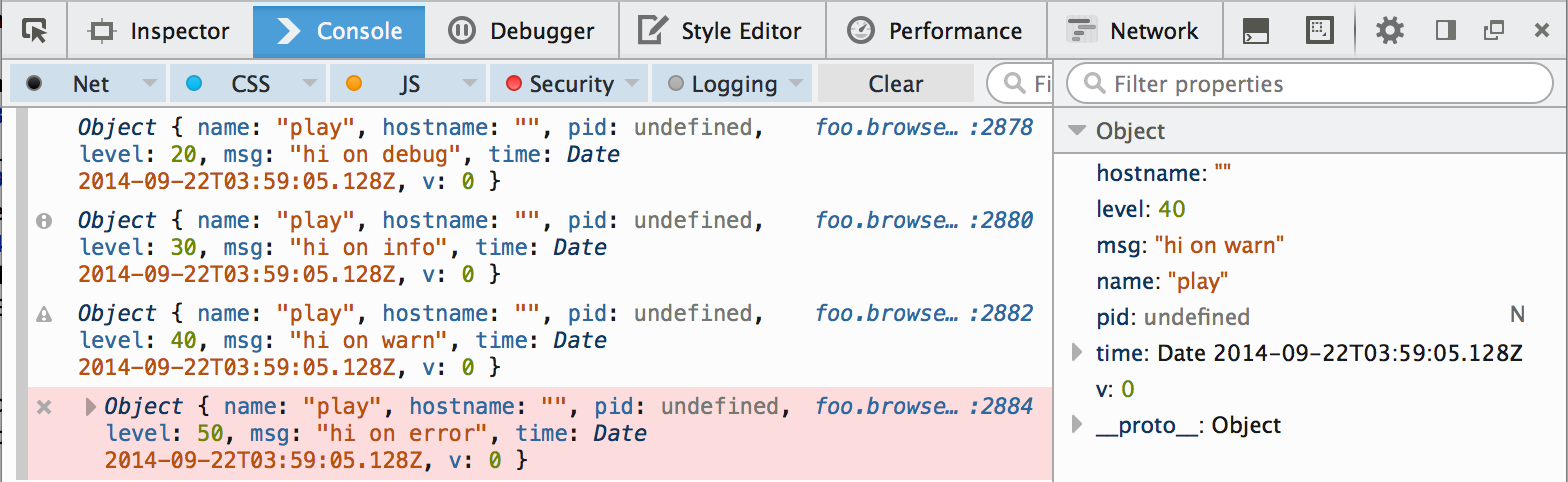
For some, the raw log records might not be desired. To have a rendered log line you'll want to add your own stream, starting with something like this:
var bunyan = require('./lib/bunyan');

function MyRawStream() {}
MyRawStream.prototype.write = function (rec) {
    console.log('[%s] %s: %s',
        rec.time.toISOString(),
        bunyan.nameFromLevel[rec.level],
        rec.msg);
}

var log = bunyan.createLogger({
    name: 'play',
    streams: [
        {
            level: 'info',
            stream: new MyRawStream(),
            type: 'raw'
        }
    ]
});

log.info('hi on info');
webpack
To include bunyan in your webpack bundle you need to tell webpack to ignore the optional dependencies that are unavailable in browser environments.
Mark the following dependencies as externals in your webpack configuration file to exclude them from the bundle:
module: {
    externals: ['dtrace-provider', 'fs', 'mv', 'os', 'source-map-support']
}
Versioning
All versions are <major>.<minor>.<patch> which will be incremented for
breaking backward compat and major reworks, new features without breaking
change, and bug fixes, respectively. tl;dr: Semantic
versioning.
License
MIT.
See Also
See the user-maintained list of Bunyan-related software in the Bunyan wiki.