JavaScript オブジェクトの差分検出と状態同期
deep-diff、jsondiffpatch、object-diff は、JavaScript オブジェクト間の変更点を検出するためのライブラリです。これらは、状態管理、データ同期、変更履歴の記録など、フロントエンドアーキテクチャにおいて重要な役割を果たします。deep-diff は変更内容を配列で詳細に出力し、jsondiffpatch は転送に適した圧縮形式のデルタを生成します。object-diff はシンプルな差分オブジェクトを返しますが、機能面で他より限定的です。
npmのダウンロードトレンド
GitHub Starsランキング
統計詳細


deep-diff vs jsondiffpatch vs object-diff:差分検出の仕組みと選び方
フロントエンド開発において、状態の変化を追跡することは一般的です。deep-diff、jsondiffpatch、object-diff はすべて JavaScript オブジェクトの差分を検出できますが、出力形式と設計思想が異なります。実務でどのライブラリを選ぶべきか、技術的な観点から比較します。
📦 出力形式:配列 vs デルタ vs 単純オブジェクト
ライブラリごとに差分の表現方法が全く違います。これが後の処理コストに直結します。
deep-diff は変更内容を配列で返します。
- 各変更が独立したオブジェクトになります。
- 変更の種類(
kind)で編集、追加、削除を区別します。 - 人間が読みやすく、ループ処理に適しています。
import { diff } from 'deep-diff';

const lhs = { name: 'Alice' };
const rhs = { name: 'Bob' };

const changes = diff(lhs, rhs);
// 出力: [ { kind: 'E', path: [ 'name' ], lhs: 'Alice', rhs: 'Bob' } ]
jsondiffpatch は構造化されたデルタオブジェクトを返します。
- 変更箇所のみを含むコンパクトな形式です。
- 配列
[旧値,新値]で編集を表すなど、独自ルールがあります。 - ネットワーク転送時のペイロードサイズを小さくできます。
import * as jsondiffpatch from 'jsondiffpatch';

const lhs = { name: 'Alice' };
const rhs = { name: 'Bob' };

const delta = jsondiffpatch.diff(lhs, rhs);
// 出力: { name: ['Alice', 'Bob'] }
object-diff は差分のみを含む単純なオブジェクトを返します。
- 変更があったキーと新しい値のみが含まれます。
- 削除されたキーの扱いがバージョンによって異なる場合があります。
- 構造が単純ですが、複雑な変更の復元には不向きです。
import diff from 'object-diff';

const lhs = { name: 'Alice' };
const rhs = { name: 'Bob' };

const result = diff(lhs, rhs);
// 出力: { name: 'Bob' }
🔧 変更の適用:パッチ機能の有無
差分を検出するだけでなく、それを適用できるかも重要です。
deep-diff は専用関数で変更を適用できます。
applyChangeを使って元のオブジェクトを更新します。- 配列の添字まで指定できるため、精度が高いです。
import { applyChange } from 'deep-diff';

// changes は上記の diff 結果
applyChange(target, source, changes[0]);
jsondiffpatch はパッチ適用が主要機能です。
patch関数でデルタを適用します。- 逆操作(
unpatch)もサポートしており、undo 機能に役立ちます。
import * as jsondiffpatch from 'jsondiffpatch';

// delta は上記の diff 結果
jsondiffpatch.patch(lhs, delta);
object-diff はパッチ機能を標準で提供しません。
- 差分オブジェクトを手动でマージする必要があります。
- 単純な上書き処理なら
Object.assignで代用可能です。
import diff from 'object-diff';

const changes = diff(lhs, rhs);
// 手动で適用
Object.assign(lhs, changes);
📊 配列の扱い:インデックス vs 値
配列が含まれる場合、どのライブラリも苦労しますが、アプローチが違います。
deep-diff は配列をインデックスベースで扱います。
- 要素が一つずれると、以降すべてが「変更」として検出されます。
- 順序が重要なデータには適していますが、リストの挿入には弱いです。
// 先頭に要素を挿入した場合
// deep-diff は全要素が変更されたように見なす可能性があります
jsondiffpatch は配列を値ベースで扱おうとします。
- 内部アルゴリズムが類似度を計算し、挿入や移動を検出します。
- 計算コストは高いですが、結果は直感的です。
// jsondiffpatch は要素の移動を検出し、無駄な更新を防ぎます
object-diff は配列処理が単純です。
- 配列全体を一つの値として比較する傾向があります。
- 大きな配列の一部分だけ_changed_した場合でも、全体が変更扱いになります。
// 配列の一部変更でも、配列全体が差分として返されることがあります
🛠️ 保守性とエコシステム
ライブラリのメンテナンス状況は、長期プロジェクトで重要です。
deep-diff は長年維持されており安定しています。
- バグ修正や機能追加が継続的に行われています。
- TypeScript の型定義も整備されており、開発体験が良いです。
jsondiffpatch も活発に開発されています。
- 可視化ツール(Visual Formatter)が公式で提供されています。
- デバッグ時に差分を視覚的に確認できるのは大きな利点です。
object-diff は更新頻度が低いです。
- 重要なセキュリティ修正や機能追加が期待できません。
- 新規プロジェクトでは、より維持されている alternatives を検討すべきです。
📌 比較まとめ
| 機能 | deep-diff | jsondiffpatch | object-diff |
|---|---|---|---|
| 出力形式 | 変更イベントの配列 | 圧縮デルタオブジェクト | 差分のみオブジェクト |
| パッチ適用 | ✅ 専用関数あり | ✅ 専用関数あり | ❌ 手动マージ必要 |
| 配列検出 | インデックスベース | 値ベース(スマート) | 単純比較 |
| 保守状況 | 🟢 安定 | 🟢 活発 | 🟡 更新少ない |
| 主な用途 | 監査ログ、履歴管理 | 状態同期、通信節約 | 簡易スクリプト |
💡 結論
deep-diff は、変更の履歴を詳細に記録したい場合に最適です。 — 監査ログや、ユーザー操作の記録を残すシステムに向いています。
jsondiffpatch は、効率と機能性のバランスが良い選択です。 — 状態をサーバーと同期したり、複雑な_undo_機能が必要な場合に推奨します。
object-diff は、限定的な用途に留めるべきです。 — 保守リスクを考慮すると、重要なプロダクションコードでは deep-diff または jsondiffpatch を選ぶのが賢明です。
最終的には、差分データを「どう使うか」で決まります。 — 人間が読むなら deep-diff、機械が処理するなら jsondiffpatch が基本的な基準になります。
選び方: jsondiffpatch vs deep-diff vs object-diff
- jsondiffpatch:
ネットワーク経由で差分を送信したり、保存容量を節約したい場合に選択します。出力形式がコンパクトで、フィルタリング機能も充実しているため、大規模な状態同期システムに向いています。
- deep-diff:
変更履歴を配列として保持し、人間が読みやすいログや監査証跡が必要な場合に選択します。変更の種類(追加、削除、編集)が明確に区別されるため、デバッグや_undo/redo_機能の実装に適しています。
- object-diff:
非常に単純なオブジェクト比較しか必要なく、依存パッケージを最小限に抑えたい場合に選択します。ただし、保守頻度が他より低いため、重要な基幹システムでの使用は避けるべきです。
人気の比較
jsondiffpatch のREADME

jsondiffpatch
jsondiffpatch.com
Diff & patch JavaScript objects





Live Demo
- min+gzipped ~ 16KB
- browser and server (ESM-only)
- deep diff, use delta to patch
- smart array diffing using LCS, IMPORTANT NOTE: to match objects inside an array you must provide an
objectHashfunction (this is how objects are matched, otherwise a dumb match by position is used). For more details, check Array diff documentation - (optionally) text diffing of long strings powered by google-diff-match-patch (diff at character level)
- reverse a delta, unpatch (eg. revert object to its original state using a delta)
- multiple output formats:
- pure JSON, low footprint delta format
- visual diff (html), see demo
- annotated JSON (html), to help explain the delta format with annotations
- JSON Patch (RFC 6902), can generate patches, and also apply them
- console (colored), try running
./node_modules/.bin/jsondiffpatch left.json right.json - write your own! check Formatters documentation
- BONUS:
jsondiffpatch.clone(obj)(deep clone)
Supported platforms
- Any browser that supports ES6
- Node.js 18, 20+
Usage
on your terminal:
npx jsondiffpatch --help
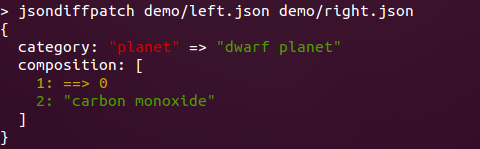
or as a library:
// sample data
const country = {
  name: 'Argentina',
  capital: 'Buenos Aires',
  independence: new Date(1816, 6, 9),
};

// clone country, using dateReviver for Date objects
const country2 = JSON.parse(JSON.stringify(country), jsondiffpatch.dateReviver);

// make some changes
country2.name = 'Republica Argentina';
country2.population = 41324992;
delete country2.capital;

const delta = jsondiffpatch.diff(country, country2);

assertSame(delta, {
  name: ['Argentina', 'Republica Argentina'], // old value, new value
  population: ['41324992'], // new value
  capital: ['Buenos Aires', 0, 0], // deleted
});

// patch original
jsondiffpatch.patch(country, delta);

// reverse diff
const reverseDelta = jsondiffpatch.reverse(delta);
// also country2 can be return to original value with: jsondiffpatch.unpatch(country2, delta);

const delta2 = jsondiffpatch.diff(country, country2);
assert(delta2 === undefined);
// undefined => no difference
Array diffing:
// sample data
const country = {
  name: 'Argentina',
  cities: [
    {
      name: 'Buenos Aires',
      population: 13028000,
    },
    {
      name: 'Cordoba',
      population: 1430023,
    },
    {
      name: 'Rosario',
      population: 1136286,
    },
    {
      name: 'Mendoza',
      population: 901126,
    },
    {
      name: 'San Miguel de Tucuman',
      population: 800000,
    },
  ],
};

// clone country
const country2 = JSON.parse(JSON.stringify(country));

// delete Cordoba
country.cities.splice(1, 1);

// add La Plata
country.cities.splice(4, 0, {
  name: 'La Plata',
});

// modify Rosario, and move it
const rosario = country.cities.splice(1, 1)[0];
rosario.population += 1234;
country.cities.push(rosario);

// create a configured instance, match objects by name
const diffpatcher = jsondiffpatch.create({
  objectHash: function (obj) {
    return obj.name;
  },
});

const delta = diffpatcher.diff(country, country2);

assertSame(delta, {
  cities: {
    _t: 'a', // indicates this node is an array (not an object)
    1: [
      // inserted at index 1
      {
        name: 'Cordoba',
        population: 1430023,
      },
    ],
    2: {
      // population modified at index 2 (Rosario)
      population: [1137520, 1136286],
    },
    _3: [
      // removed from index 3
      {
        name: 'La Plata',
      },
      0,
      0,
    ],
    _4: [
      // move from index 4 to index 2
      '',
      2,
      3,
    ],
  },
});
For more example cases (nested objects or arrays, long text diffs) check packages/jsondiffpatch/test/examples/
If you want to understand deltas, see delta format documentation
Installing
NPM
This works for node, or in browsers if you already do bundling on your app
npm install jsondiffpatch
import {* as jsondiffpatch} from 'jsondiffpatch';
const jsondiffpatchInstance = jsondiffpatch.create(options);
browser
In a browser, you can load a bundle using a tool like esm.sh or Skypack.
Options
import * as jsondiffpatch from 'jsondiffpatch';

// Only import if you want text diffs using diff-match-patch
import { diff_match_patch } from '@dmsnell/diff-match-patch';

const jsondiffpatchInstance = jsondiffpatch.create({
  // used to match objects when diffing arrays, by default only === operator is used
  objectHash: function (obj) {
    // this function is used only to when objects are not equal by ref
    return obj._id || obj.id;
  },
  arrays: {
    // default true, detect items moved inside the array (otherwise they will be registered as remove+add)
    detectMove: true,
    // default false, the value of items moved is not included in deltas
    includeValueOnMove: false,
  },
  textDiff: {
    // If using text diffs, it's required to pass in the diff-match-patch library in through this proprty.
    // Alternatively, you can import jsondiffpatch using `jsondiffpatch/with-text-diffs` to avoid having to pass in diff-match-patch through the options.
    diffMatchPatch: diff_match_patch,
    // default 60, minimum string length (left and right sides) to use text diff algorithm: google-diff-match-patch
    minLength: 60,
  },
  propertyFilter: function (name, context) {
    /*
       this optional function can be specified to ignore object properties (eg. volatile data)
        name: property name, present in either context.left or context.right objects
        context: the diff context (has context.left and context.right objects)
      */
    return name.slice(0, 1) !== '$';
  },
  cloneDiffValues: false /* default false. if true, values in the obtained delta will be cloned
      (using jsondiffpatch.clone by default), to ensure delta keeps no references to left or right objects. this becomes useful if you're diffing and patching the same objects multiple times without serializing deltas.
      instead of true, a function can be specified here to provide a custom clone(value).
      */
  omitRemovedValues: false /* if you don't need to unpatch (reverse deltas),
      "old"/"left" values (removed or replaced) are not included in the delta.
      you can set this to true to get more compact deltas.
      */,
});
Visual Diff
<!doctype html>
<html>
  <head>
    <link rel="stylesheet" href="./style.css" type="text/css" />
    <link
      rel="stylesheet"
      href="https://esm.sh/jsondiffpatch@0.6.0/lib/formatters/styles/html.css"
      type="text/css"
    />
    <link
      rel="stylesheet"
      href="https://esm.sh/jsondiffpatch@0.6.0/lib/formatters/styles/annotated.css"
      type="text/css"
    />
  </head>
  <body>
    <div id="visual"></div>
    <hr />
    <div id="annotated"></div>
    <script type="module">
      import * as jsondiffpatch from 'https://esm.sh/jsondiffpatch@0.6.0';
      import * as annotatedFormatter from 'https://esm.sh/jsondiffpatch@0.6.0/formatters/annotated';
      import * as htmlFormatter from 'https://esm.sh/jsondiffpatch@0.6.0/formatters/html';

      const left = { a: 3, b: 4 };
      const right = { a: 5, c: 9 };
      const delta = jsondiffpatch.diff(left, right);

      // beautiful html diff
      document.getElementById('visual').innerHTML = htmlFormatter.format(
        delta,
        left,
      );

      // self-explained json
      document.getElementById('annotated').innerHTML =
        annotatedFormatter.format(delta, left);
    </script>
  </body>
</html>
To see formatters in action check the Live Demo.
For more details check Formatters documentation
Plugins
diff(), patch() and reverse() functions are implemented using Pipes & Filters pattern, making it extremely customizable by adding or replacing filters on a pipe.
Check Plugins documentation for details.
Related Projects
- jsondiffpatch.net (C#)
- SystemTextJson.JsonDiffPatch (C#)
- Go JSON Diff (and Patch)
- json-diff-patch (python)
- jsondiffpatch-react, also check docs for usage in react
All contributors ✨