
Draft.js


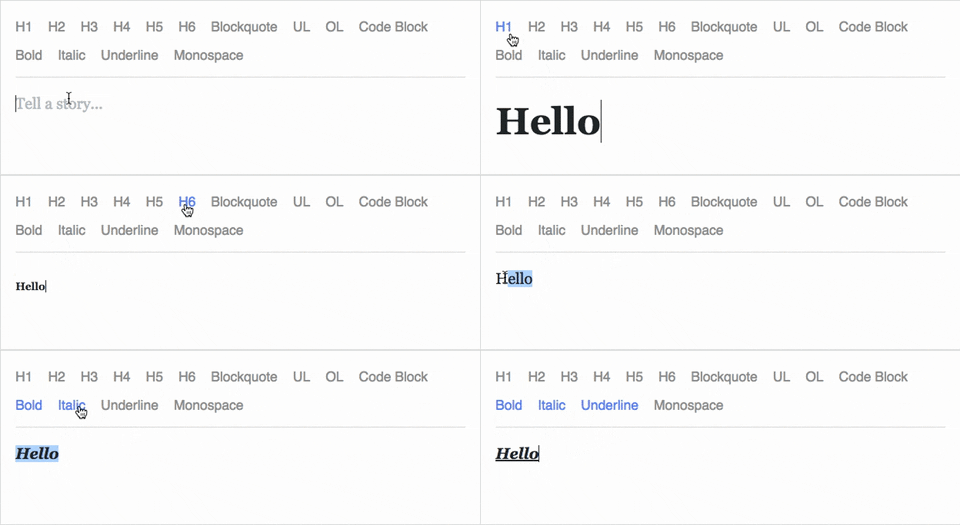
Draft.js is a JavaScript rich text editor framework, built for React and
backed by an immutable model.
- Extensible and Customizable: We provide the building blocks to enable
the creation of a broad variety of rich text composition experiences, from
basic text styles to embedded media.
- Declarative Rich Text: Draft.js fits seamlessly into
React applications,
abstracting away the details of rendering, selection, and input behavior with a
familiar declarative API.
- Immutable Editor State: The Draft.js model is built
with immutable-js, offering
an API with functional state updates and aggressively leveraging data persistence
for scalable memory usage.
Learn how to use Draft.js in your own project.
API Notice
Before getting started, please be aware that we recently changed the API of
Entity storage in Draft. The latest version, v0.10.0, supports both the old
and new API. Following that up will be v0.11.0 which will remove the old API.
If you are interested in helping out, or tracking the progress, please follow
issue 839.
Getting Started
npm install --save draft-js react react-dom

or

yarn add draft-js react react-dom
Draft.js depends on React and React DOM which must also be installed.
Using Draft.js
import React from 'react';
import ReactDOM from 'react-dom';
import {Editor, EditorState} from 'draft-js';

class MyEditor extends React.Component {
  constructor(props) {
    super(props);
    this.state = {editorState: EditorState.createEmpty()};
    this.onChange = (editorState) => this.setState({editorState});
    this.setEditor = (editor) => {
      this.editor = editor;
    };
    this.focusEditor = () => {
      if (this.editor) {
        this.editor.focus();
      }
    };
  }

  componentDidMount() {
    this.focusEditor();
  }

  render() {
    return (
      <div style={styles.editor} onClick={this.focusEditor}>
        <Editor
          ref={this.setEditor}
          editorState={this.state.editorState}
          onChange={this.onChange}
        />
      </div>
    );
  }
}

const styles = {
  editor: {
    border: '1px solid gray',
    minHeight: '6em'
  }
};

ReactDOM.render(
  <MyEditor />,
  document.getElementById('container')
);
Since the release of React 16.8, you can use Hooks as a way to work with EditorState without using a class.
import React from 'react';
import ReactDOM from 'react-dom';
import {Editor, EditorState} from 'draft-js';

function MyEditor() {
  const [editorState, setEditorState] = React.useState(
    EditorState.createEmpty()
  );

  const editor = React.useRef(null);

  function focusEditor() {
    editor.current.focus();
  }

  React.useEffect(() => {
    focusEditor()
  }, []);

  return (
    <div onClick={focusEditor}>
      <Editor
        ref={editor}
        editorState={editorState}
        onChange={editorState => setEditorState(editorState)}
      />
    </div>
  );
}
Note that the editor itself is only as tall as its contents. In order to give users a visual cue, we recommend setting a border and a minimum height via the .DraftEditor-root CSS selector, or using a wrapper div like in the above example.
Because Draft.js supports unicode, you must have the following meta tag in the <head> </head> block of your HTML file:
<meta charset="utf-8" />
Further examples of how Draft.js can be used are provided below.
Examples
Visit http://draftjs.org/ to try out a basic rich editor example.
The repository includes a variety of different editor examples to demonstrate
some of the features offered by the framework.
To run the examples, first build Draft.js locally. The Draft.js build is tested
with Yarn v1 only. If you're using any other package manager and something doesn't
work, try using yarn v1:
git clone https://github.com/facebook/draft-js.git
cd draft-js
yarn install
yarn run build
then open the example HTML files in your browser.
Draft.js is used in production on Facebook, including status and
comment inputs, Notes, and
messenger.com.
Browser Support

IE / Edge | 
Firefox | 
Chrome | 
Safari | 
iOS Safari |
Chrome for Android |
|---|
| IE11, Edge [1, 2] | last 2 versions | last 2 versions | last 2 versions | not fully supported [3] | not fully supported [3] |
[1] May need a shim or a polyfill for some syntax used in Draft.js (docs).
[2] IME inputs have known issues in these browsers, especially Korean (docs).
[3] There are known issues with mobile browsers, especially on Android (docs).
Resources and Ecosystem
Check out this curated list of articles and open-sourced projects/utilities: Awesome Draft-JS.
Discussion and Support
Join our Slack team!
Contribute
We actively welcome pull requests. Learn how to
contribute.
License
Draft.js is MIT licensed.
Examples provided in this repository and in the documentation are separately
licensed.

