フロントエンドカレンダーコンポーネントの技術的比較
fullcalendar、react-big-calendar、vue-cal はいずれも Web アプリケーションにカレンダー機能を提供する npm パッケージですが、対応フレームワークやアーキテクチャ、拡張性に大きな違いがあります。fullcalendar はフレームワーク非依存で React・Vue・Angular など複数の環境に対応し、豊富なビュー(月・週・日・リスト)とドラッグ&ドロップなどの高度なインタラクションをサポートします。react-big-calendar は React 専用で、シンプルな API と柔軟なカスタマイズ性が特徴です。一方、vue-cal は Vue 2/3 専用の軽量コンポーネントで、最小限のセットアップで動作し、モバイルフレンドリーな UI を備えています。
npmのダウンロードトレンド
GitHub Starsランキング
統計詳細


カレンダーコンポーネント比較: fullcalendar vs react-big-calendar vs vue-cal
Web アプリにカレンダー機能を実装する際、fullcalendar、react-big-calendar、vue-cal はよく検討される選択肢です。これらはそれぞれ異なる設計哲学を持ち、対応フレームワークや機能範囲、カスタマイズ性に明確な差があります。この記事では、実際の開発現場で直面する課題を中心に、各ライブラリの技術的特性を比較します。
🧩 フレームワーク対応とインテグレーション
fullcalendar は、コアが Vanilla JavaScript で書かれており、React・Vue・Angular 向けの公式ラッパーを提供しています。これにより、同じ機能セットを異なるフレームワーク間で再利用できます。
// React での fullcalendar 使用例
import FullCalendar from '@fullcalendar/react';
import dayGridPlugin from '@fullcalendar/daygrid';

function Calendar() {
  return (
    <FullCalendar
      plugins={[dayGridPlugin]}
      initialView="dayGridMonth"
      events={[
        { title: '会議', date: '2024-06-15' }
      ]}
    />
  );
}
react-big-calendar は React 専用で、Hooks や props による宣言的 API を採用しています。他のフレームワークでは使用できません。
// react-big-calendar の基本使用法
import { Calendar, momentLocalizer } from 'react-big-calendar';
import moment from 'moment';

const localizer = momentLocalizer(moment);

function MyCalendar() {
  const events = [{
    title: '会議',
    start: new Date(2024, 5, 15),
    end: new Date(2024, 5, 15)
  }];

  return (
    <Calendar
      localizer={localizer}
      events={events}
      startAccessor="start"
      endAccessor="end"
    />
  );
}
vue-cal は Vue 2 および Vue 3 の両方をサポートし、Composition API にも対応しています。インストール後、即座に使用可能で、追加のプラグイン不要です。
<!-- Vue 3 での vue-cal 使用例 -->
<template>
  <vue-cal :events="events" />
</template>

<script setup>
import { VueCal } from 'vue-cal';
import 'vue-cal/dist/vuecal.css';

const events = [
  { start: '2024-06-15', title: '会議' }
];
</script>
📅 表示モードと機能範囲
fullcalendar は、dayGridMonth(月)、timeGridWeek(週)、timeGridDay(日)、listWeek(リスト)など、複数のビューを標準でサポートしています。さらに、タイムラインビュー(リソースベースのスケジュール)も有料版またはコミュニティプラグインで利用可能です。
// fullcalendar で複数ビューを有効化
<FullCalendar
  plugins={[dayGridPlugin, timeGridPlugin, listPlugin]}
  headerToolbar={{
    left: 'prev,next today',
    center: 'title',
    right: 'dayGridMonth,timeGridWeek,timeGridDay,listWeek'
  }}
/>
react-big-calendar は、月・週・日・アジェンダ(リスト)ビューをサポートしていますが、週・日の時間軸表示は含まれており、カスタムレンダリングで拡張可能です。ただし、タイムラインやリソース表示は非サポートです。
// react-big-calendar のビュー切り替え
<Calendar
  views={['month', 'week', 'day', 'agenda']}
  defaultView="week"
/>
vue-cal は、月・週・日・3日・カスタム日数表示をサポートしますが、時間軸付きの週・日ビューは非サポートです。つまり、1日のうち「何時から何時まで」といった時間帯の可視化はできません。これは重要な制約です。
<!-- vue-cal のビュー設定 -->
<vue-cal
  :disable-views="['years', 'half-years', 'quarters']"
  active-view="week"
/>
✏️ イベント操作とインタラクション
fullcalendar は、イベントのドラッグ&ドロップ、リサイズ、クリック・ホバー時のコールバックを標準でサポートしています。編集操作は editable: true で有効化できます。
<FullCalendar
  editable={true}
  eventDrop={(info) => console.log('Moved to:', info.event.start)}
  eventResize={(info) => console.log('Resized:', info.event.end)}
/>
react-big-calendar もイベントのドラッグ&ドロップをサポートしますが、react-dnd に依存しており、追加のセットアップが必要です。また、リサイズ機能は含まれていません。
// react-big-calendar でドラッグを有効化(react-dnd 必須)
import { DndProvider } from 'react-dnd';
import { HTML5Backend } from 'react-dnd-html5-backend';

<DndProvider backend={HTML5Backend}>
  <Calendar
    selectable={true}
    onEventDrop={({ event }) => console.log('Dropped:', event)}
  />
</DndProvider>
vue-cal は、イベントのドラッグ&ドロップやリサイズをサポートしていません。ユーザーによる直接編集は不可で、イベントはあくまで表示用途です。編集機能が必要なら、別途 UI(例:モーダルフォーム)を実装する必要があります。
🌐 国際化とローカライゼーション
fullcalendar は、80 言語以上のロケールデータを同梱しており、簡単に切り替えられます。
import jaLocale from '@fullcalendar/core/locales/ja';

<FullCalendar locales={[jaLocale]} locale="ja" />
react-big-calendar は、localizer として moment.js または date-fns を使用します。日本語表示には、これらのライブラリ側でロケールを設定する必要があります。
// moment で日本語設定
import 'moment/locale/ja';
const localizer = momentLocalizer(moment);
moment.locale('ja');
vue-cal は、言語パックを JSON 形式で提供しており、日本語もサポートされています。
import { VueCal } from 'vue-cal';
import 'vue-cal/dist/i18n/ja-JP';

<VueCal locale="ja-JP" />
⚙️ カスタマイズ性と拡張性
fullcalendar は、イベントのレンダリングを完全に上書きできる eventContent や、セルの装飾に使える dayCellContent などの render prop を提供します。
<FullCalendar
  eventContent={(arg) => (
    <div style={{ backgroundColor: arg.event.extendedProps.color }}>
      {arg.event.title}
    </div>
  )}
/>
react-big-calendar は、components prop でヘッダーやイベント要素を自由に置き換えられます。
<Calendar
  components={{
    event: ({ event }) => <div className="custom-event">{event.title}</div>,
    toolbar: CustomToolbar
  }}
/>
vue-cal も、スロット(event、weekday など)を使って UI をカスタマイズできます。
<vue-cal>
  <template #event="{ event }">
    <div class="my-event">{{ event.title }}</div>
  </template>
</vue-cal>
📱 モバイル対応
fullcalendar と react-big-calendar は、デスクトップ向けに最適化されており、モバイルでは操作性が劣ることがあります(特に週ビュー)。レスポンシブ対応は可能ですが、追加の CSS が必要です。
vue-cal は、モバイルファーストの設計で、タッチ操作に最適化されており、小さい画面でも快適に動作します。
🆚 まとめ:選定のポイント
| 要件 | 推奨パッケージ |
|---|---|
| 複数フレームワーク対応 or 将来的な移行可能性 | fullcalendar |
| 高度なスケジュール管理(時間軸・ドラッグ編集・Google Calendar 連携) | fullcalendar |
| React 専用で、UI の細かいカスタマイズが必要 | react-big-calendar |
| Vue 専用で、軽量・シンプル・モバイル対応が最優先 | vue-cal |
| 時間帯(例:14:00〜15:00)の可視化が必要 | fullcalendar または react-big-calendar(vue-cal は不可) |
💡 最終的なアドバイス
- 大規模アプリや業務システム(例:医療予約、プロジェクト管理)では、
fullcalendarの堅牢性と機能網羅性が開発コストを長期的に下げます。 - React ベースの MVP や中規模アプリで、見た目の自由度を重視するなら、
react-big-calendarがバランスが良いでしょう。 - Vue 製のシンプルなアプリ(例:個人スケジュール、店舗営業カレンダー)で、時間帯表示が不要なら、
vue-calの軽さと使いやすさが魅力です。
どのライブラリを選ぶにせよ、「時間軸表示が必要か?」 と 「ユーザーによるイベント編集が必要か?」 の2点を最初に確認してください。これが選定の分岐点になります。
選び方: react-big-calendar vs vue-cal vs fullcalendar
- react-big-calendar:
react-big-calendarは、React 専用で、シンプルかつ柔軟なカスタマイズが可能なカレンダーを必要とするプロジェクトに適しています。イベントのレンダリングやヘッダーの見た目を細かく制御したい場合や、独自のロジックを組み込みたい場合に強みを発揮します。ただし、タイムゾーンや外部カレンダーとの統合といった高度な機能は自前実装が必要で、公式サポートはありません。軽量で素早く導入できる反面、大規模アプリケーションでは追加開発コストが発生する可能性があります。 - vue-cal:
vue-calは、Vue.js(2 および 3)専用で、最小限のセットアップで動作する軽量なカレンダーを探している場合に最適です。モバイルデバイスでの表示や、シンプルなスケジュール表示(例:クリニック予約、社内会議)に特化しており、不要な機能を含まないためバンドルサイズを抑えられます。ただし、週ビューの時間軸表示やドラッグ&ドロップ編集といった高度な機能は非サポートです。Vue 専用プロジェクトで、シンプルでパフォーマンス重視のカレンダーが必要な場合に選ぶべきです。 - fullcalendar:
fullcalendarは、複数のビュー(月・週・日・タイムラインなど)、イベントのリサイズ・ドラッグ&ドロップ、外部カレンダーとの同期(Google Calendar 連携含む)、国際化など、プロダクションレベルの高度な機能が必要な場合に最適です。特に、React・Vue・Angular のいずれかを使用していても同じコードベースで動作させたい、あるいは将来的にフレームワーク移行を検討しているチームに向いています。ただし、設定がやや複雑で、軽量さより機能性を優先する設計です。
人気の比較
react-big-calendar のREADME
react-big-calendar
An events calendar component built for React and designed for modern browsers (read: not IE) and uses flexbox over the classic tables-caption approach.
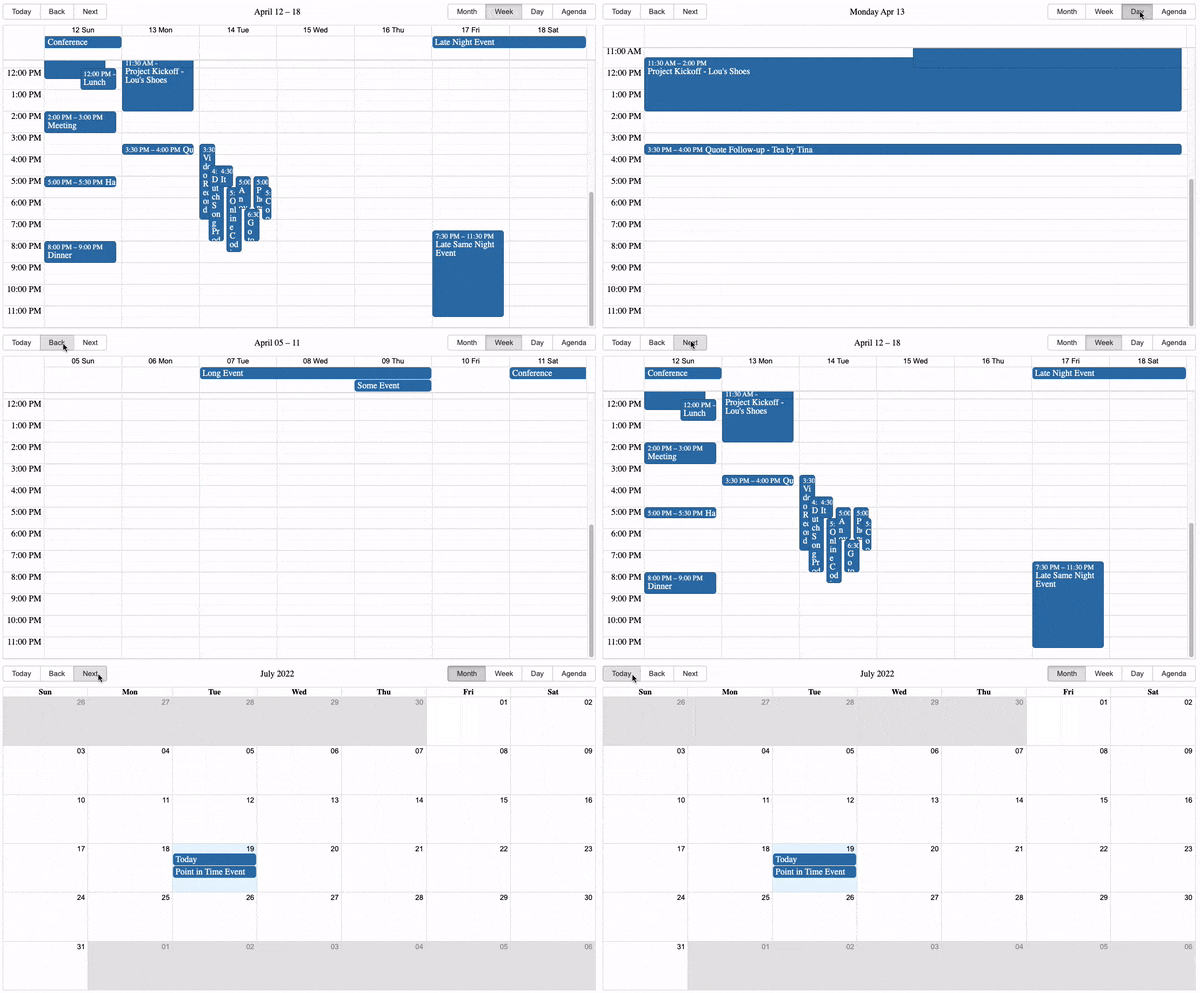
Inspired by Full Calendar.
Use and Setup
yarn add react-big-calendar or npm install --save react-big-calendar
Include react-big-calendar/lib/css/react-big-calendar.css for styles, and make sure your calendar's container
element has a height, or the calendar won't be visible. To provide your own custom styling, see the Custom Styling topic.
Starters
- react-big-calendar
- react-big-calendar with drag and drop
- react-big-calendar with TypeScript and React hooks bundled with Vite
Run examples locally
$ git clone git@github.com:jquense/react-big-calendar.git
$ cd react-big-calendar
$ yarn
$ yarn storybook
Localization and Date Formatting
react-big-calendar includes four options for handling the date formatting and culture localization, depending
on your preference of DateTime libraries. You can use either the Moment.js, Globalize.js, date-fns, Day.js localizers.
Regardless of your choice, you must choose a localizer to use this library:
Moment.js
import { Calendar, momentLocalizer } from 'react-big-calendar'
import moment from 'moment'

const localizer = momentLocalizer(moment)

const MyCalendar = (props) => (
  <div>
    <Calendar
      localizer={localizer}
      events={myEventsList}
      startAccessor="start"
      endAccessor="end"
      style={{ height: 500 }}
    />
  </div>
)
Globalize.js v0.1.1
import { Calendar, globalizeLocalizer } from 'react-big-calendar'
import globalize from 'globalize'

const localizer = globalizeLocalizer(globalize)

const MyCalendar = (props) => (
  <div>
    <Calendar
      localizer={localizer}
      events={myEventsList}
      startAccessor="start"
      endAccessor="end"
      style={{ height: 500 }}
    />
  </div>
)
date-fns v2
import { Calendar, dateFnsLocalizer } from 'react-big-calendar'
import format from 'date-fns/format'
import parse from 'date-fns/parse'
import startOfWeek from 'date-fns/startOfWeek'
import getDay from 'date-fns/getDay'
import enUS from 'date-fns/locale/en-US'

const locales = {
  'en-US': enUS,
}

const localizer = dateFnsLocalizer({
  format,
  parse,
  startOfWeek,
  getDay,
  locales,
})

const MyCalendar = (props) => (
  <div>
    <Calendar
      localizer={localizer}
      events={myEventsList}
      startAccessor="start"
      endAccessor="end"
      style={{ height: 500 }}
    />
  </div>
)
Day.js
Note that the dayjsLocalizer extends Day.js with the following plugins:
import { Calendar, dayjsLocalizer } from 'react-big-calendar'
import dayjs from 'dayjs'

const localizer = dayjsLocalizer(dayjs)

const MyCalendar = (props) => (
  <div>
    <Calendar
      localizer={localizer}
      events={myEventsList}
      startAccessor="start"
      endAccessor="end"
      style={{ height: 500 }}
    />
  </div>
)
Custom Styling
Out of the box, you can include the compiled CSS files and be up and running. But, sometimes, you may want to style Big Calendar to match your application styling. For this reason, SASS files are included with Big Calendar.
  @import 'react-big-calendar/lib/sass/styles';
  @import 'react-big-calendar/lib/addons/dragAndDrop/styles'; // if using DnD
SASS implementation provides a variables file containing color and sizing variables that you can
update to fit your application. Note: Changing and/or overriding styles can cause rendering issues with your
Big Calendar. Carefully test each change accordingly.
Join The Community
Help us improve Big Calendar! Join us on Slack. (Slack invite links do expire. If you can't get in, just file an issue and we'll get a new link.)