

jsbarcode vs react-barcode
バーコード生成ライブラリ
jsbarcodereact-barcode類似パッケージ:
バーコード生成ライブラリ

バーコード生成ライブラリは、デジタルデータをバーコード形式で視覚化するためのツールです。これにより、製品のトラッキングや在庫管理、データの迅速なスキャンが可能になります。jsbarcodeは、HTML5 CanvasやSVGを使用してバーコードを生成するシンプルなライブラリで、特に軽量で使いやすいのが特徴です。一方、react-barcodeはReactアプリケーション向けに設計されており、コンポーネントとしてバーコードを簡単に組み込むことができます。

npmのダウンロードトレンド
3 年
GitHub Starsランキング
統計詳細
パッケージ
ダウンロード数
Stars
サイズ
Issues
公開日時
ライセンス
jsbarcode611,5435,799617 kB1366ヶ月前MIT
react-barcode170,65444011.7 kB199ヶ月前ISC
機能比較: jsbarcode vs react-barcode

使用方法

  • jsbarcode:

    jsbarcodeは、HTML要素に対して簡単にバーコードを生成することができます。特に、CanvasやSVGを使用して、視覚的に美しいバーコードを描画することが可能です。設定もシンプルで、数行のコードでバーコードを生成できます。

  • react-barcode:

    react-barcodeは、Reactコンポーネントとして使用でき、JSX内で簡単にバーコードを埋め込むことができます。プロパティを通じてバーコードの内容やスタイルを動的に変更でき、Reactのライフサイクルに合わせて更新されます。

カスタマイズ性

  • jsbarcode:

    jsbarcodeは、バーコードのスタイルやサイズをカスタマイズするためのオプションが豊富です。フォントサイズ、バーの幅、色などを指定することができ、必要に応じてデザインを調整できます。

  • react-barcode:

    react-barcodeもカスタマイズが可能で、スタイルをプロパティとして渡すことで、Reactのスタイルシステムと統合できます。CSSやスタイルオブジェクトを使用して、バーコードの見た目を自由に変更できます。

依存関係

  • jsbarcode:

    jsbarcodeは、特別な依存関係を必要とせず、純粋なJavaScriptで動作します。これにより、軽量であり、どのプロジェクトにも簡単に組み込むことができます。

  • react-barcode:

    react-barcodeは、Reactに依存しているため、Reactアプリケーションでのみ使用できます。Reactのコンポーネントとして設計されているため、他のReactコンポーネントとの統合が容易です。

パフォーマンス

  • jsbarcode:

    jsbarcodeは、軽量で高速なバーコード生成を提供します。特に、シンプルなバーコードを迅速に生成する必要がある場合に適しています。

  • react-barcode:

    react-barcodeは、Reactの仮想DOMを活用しており、効率的にレンダリングを行います。状態が変わった場合のみ再レンダリングされるため、パフォーマンスが向上します。

学習曲線

  • jsbarcode:

    jsbarcodeは、シンプルなAPIを持っているため、初心者でも簡単に学ぶことができます。数行のコードでバーコードを生成できるため、すぐに使い始めることができます。

  • react-barcode:

    react-barcodeは、Reactの知識が必要ですが、Reactに慣れている開発者にとっては直感的に使えるコンポーネントです。Reactの基本を理解していれば、すぐに利用できるでしょう。

選び方: jsbarcode vs react-barcode
  • jsbarcode:

    jsbarcodeは、シンプルで軽量なバーコード生成が必要な場合に最適です。特に、HTMLやSVGを使用して直接バーコードを生成したい場合に便利です。特別なフレームワークに依存せず、どのプロジェクトにも容易に統合できます。

  • react-barcode:

    react-barcodeは、Reactアプリケーションでバーコードを扱う場合に最適です。Reactのコンポーネントとして組み込むことができ、状態管理や再利用性が高いです。Reactのエコシステムに組み込むことで、他のReactコンポーネントと簡単に連携できます。

jsbarcode のREADME

JsBarcode

Build Status Scrutinizer Code Quality CDN License

Introduction

JsBarcode is a barcode generator written in JavaScript. It supports multiple barcode formats and works in browsers and with Node.js. It has no dependencies when it is used for the web but works with jQuery if you are into that.

Demo

Barcode Generator

Simple CodePen Demo

Settings CodePen Demo

Supported barcodes:

  • CODE128
    • CODE128 (automatic mode switching)
    • CODE128 A/B/C (force mode)
  • EAN
    • EAN-13
    • EAN-8
    • EAN-5
    • EAN-2
    • UPC (A)
    • UPC (E)
  • CODE39
  • ITF
    • ITF
    • ITF-14
  • MSI
    • MSI10
    • MSI11
    • MSI1010
    • MSI1110
  • Pharmacode
  • Codabar
  • CODE93

Examples for browsers:

First create a canvas (or image)

<svg id="barcode"></svg>
<!-- or -->
<canvas id="barcode"></canvas>
<!-- or -->
<img id="barcode"/>

Simple example:

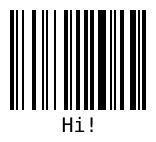
JsBarcode("#barcode", "Hi!");
// or with jQuery
$("#barcode").JsBarcode("Hi!");
Result:
Result

Example with options:

JsBarcode("#barcode", "1234", {
  format: "pharmacode",
  lineColor: "#0aa",
  width:4,
  height:40,
  displayValue: false
});
Result:

Result

More advanced use case:

JsBarcode("#barcode")
  .options({font: "OCR-B"}) // Will affect all barcodes
  .EAN13("1234567890128", {fontSize: 18, textMargin: 0})
  .blank(20) // Create space between the barcodes
  .EAN5("12345", {height: 85, textPosition: "top", fontSize: 16, marginTop: 15})
  .render();
Result:

Result

Or define the value and options in the HTML element:

Use any jsbarcode-* or data-* as attributes where * is any option.

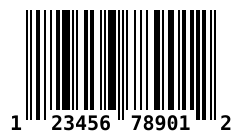
<svg class="barcode"
  jsbarcode-format="upc"
  jsbarcode-value="123456789012"
  jsbarcode-textmargin="0"
  jsbarcode-fontoptions="bold">
</svg>

And then initialize it with:

JsBarcode(".barcode").init();
Result:
Result

Retrieve the barcode values so you can render it any way you'd like

Pass in an object which will be filled with data.

const data = {};
JsBarcode(data, 'text', {...options});

data will be filled with a encodings property which has all the needed values. See wiki for an example of what data looks like.

Setup for browsers:

Step 1:

Download or get the CDN link to the script:

NameSupported barcodesSize (gzip)CDN / Download
AllAll the barcodes!11 kBJsBarcode.all.min.js
CODE128CODE128 (auto and force mode)6.2 kBJsBarcode.code128.min.js
CODE39CODE395.1 kBJsBarcode.code39.min.js
EAN / UPCEAN-13, EAN-8, EAN-5, EAN-2, UPC (A)6.6 kBJsBarcode.ean-upc.min.js
ITFITF, ITF-145 kBJsBarcode.itf.min.js
MSIMSI, MSI10, MSI11, MSI1010, MSI11105 kBJsBarcode.msi.min.js
PharmacodePharmacode4.7 kBJsBarcode.pharmacode.min.js
CodabarCodabar4.9 kBJsBarcode.codabar.min.js
CODE93CODE93JsBarcode.code93.min.js

Step 2:

Include the script in your code:

<script src="JsBarcode.all.min.js"></script>

Step 3:

You are done! Go generate some barcodes :smile:

Bower and npm:

You can also use Bower or npm to install and manage the library.

bower install jsbarcode --save
npm install jsbarcode --save

Node.js:

With canvas:

var JsBarcode = require('jsbarcode');

// Canvas v1
var Canvas = require("canvas");
// Canvas v2
var { createCanvas } = require("canvas");

// Canvas v1
var canvas = new Canvas();
// Canvas v2
var canvas = createCanvas();

JsBarcode(canvas, "Hello");

// Do what you want with the canvas
// See https://github.com/Automattic/node-canvas for more information

With svg:

const { DOMImplementation, XMLSerializer } = require('xmldom');
const xmlSerializer = new XMLSerializer();
const document = new DOMImplementation().createDocument('http://www.w3.org/1999/xhtml', 'html', null);
const svgNode = document.createElementNS('http://www.w3.org/2000/svg', 'svg');

JsBarcode(svgNode, 'test', {
    xmlDocument: document,
});

const svgText = xmlSerializer.serializeToString(svgNode);

Options:

For information about how to use the options, see the wiki page.

OptionDefault valueType
format"auto" (CODE128)String
width2Number
height100Number
displayValuetrueBoolean
textundefinedString
fontOptions""String
font"monospace"String
textAlign"center"String
textPosition"bottom"String
textMargin2Number
fontSize20Number
background"#ffffff"String (CSS color)
lineColor"#000000"String (CSS color)
margin10Number
marginTopundefinedNumber
marginBottomundefinedNumber
marginLeftundefinedNumber
marginRightundefinedNumber
validfunction(valid){}Function

Contributions and feedback:

We :heart: contributions and feedback.

If you want to contribute, please check out the CONTRIBUTING.md file.

If you have any question or suggestion create an issue or ask about it in the gitter chat.

Bug reports should always be done with a new issue.

License:

JsBarcode is shared under the MIT license. This means you can modify and use it however you want, even for comercial use. But please give this the Github repo a :star: and write a small comment of how you are using JsBarcode in the gitter chat.