File System Access and Document Management in React Native
react-native-blob-util, react-native-document-picker, and react-native-fs are the three primary pillars for handling file operations in React Native, but they solve distinct problems. react-native-fs provides low-level access to the device's file system, allowing developers to read, write, move, and delete files at specific paths. react-native-blob-util focuses on handling binary large objects (BLOBs), making it the standard for downloading files from the network, uploading data, and managing temporary binary streams. react-native-document-picker acts as a bridge to native OS pickers, enabling users to select existing files from their device storage (like iCloud or Google Drive) without giving the app direct file system access. Together, they cover the full lifecycle of file management: picking, processing, and storing.
Npm Package Weekly Downloads Trend
Github Stars Ranking
Stat Detail


File Operations in React Native: fs vs. Blob vs. Picker
Managing files in React Native is not a one-size-fits-all task. Unlike web development, where the File API handles most needs, mobile development requires navigating sandboxed storage, native OS permissions, and binary data streams. The ecosystem has settled on three specialized tools: react-native-fs for path manipulation, react-native-blob-util for network-binary operations, and react-native-document-picker for user-driven file selection. Let's break down how they differ and when to use each.
📂 File System Access: Direct Paths vs. Sandboxes
react-native-fs gives you direct control over the file system paths available to your app.
- You can read, write, move, and delete files using absolute paths.
- It exposes specific directories like
DocumentDirectoryPathandCacheDirectoryPath. - Ideal for internal app data that the user shouldn't directly interact with.
// react-native-fs: Writing a file to a specific path
import RNFS from 'react-native-fs';

const path = `${RNFS.DocumentDirectoryPath}/report.txt`;
await RNFS.writeFile(path, 'Hello World', 'utf8');

// Reading it back
const content = await RNFS.readFile(path, 'utf8');
react-native-blob-util abstracts paths into "BLOB" IDs.
- It focuses on binary data handling rather than directory traversal.
- You often work with temporary paths generated by the library during downloads.
- Less suitable for complex folder management but excellent for single-file operations.
// react-native-blob-util: Writing binary data
import ReactNativeBlobUtil from 'react-native-blob-util';

const path = ReactNativeBlobUtil.fs.dirs.DocumentDir + '/image.png';
await ReactNativeBlobUtil.fs.writeFile(path, 'base64StringData', 'base64');
react-native-document-picker does not give you direct file system write access.
- It returns a reference (URI) to a file chosen by the user.
- On iOS, this is often a security-scoped URL, not a real path.
- You cannot use it to create new files; it is strictly for reading existing ones selected by the user.
// react-native-document-picker: Getting a file URI
import DocumentPicker from 'react-native-document-picker';

const result = await DocumentPicker.pickSingle({
  type: [DocumentPicker.types.pdf],
});
// result.uri is a platform-specific reference, not always a writable path
console.log(result.uri);
🌐 Network and Binary Data: Downloads and Uploads
react-native-blob-util is the industry standard for downloading files.
- It handles large files efficiently by streaming directly to disk, avoiding memory crashes.
- Supports progress callbacks, cancellation, and background downloads (with config).
- Can easily construct multipart/form-data for uploads.
// react-native-blob-util: Downloading a file with progress
ReactNativeBlobUtil.config({
  fileCache: true,
  appendExt: 'pdf',
})
.fetch('GET', 'https://example.com/file.pdf')
.progress((received, total) => {
  console.log('progress', received / total);
})
.then((res) => {
  console.log('File saved at:', res.path());
});
react-native-fs has no built-in network capabilities.
- To download a file, you must first use
fetchto get the data (risking memory issues for large files) and then write it usingwriteFile. - This two-step process is inefficient for large media files.
// react-native-fs: Inefficient large file download pattern
// NOT recommended for large files due to memory usage
const response = await fetch('https://example.com/large.zip');
const blob = await response.blob();
// Converting blob to base64 or arrayBuffer before writing is heavy
const data = await blob.text();
await RNFS.writeFile(path, data);
react-native-document-picker is unrelated to network operations.
- It purely facilitates the UI interaction for selecting local files.
- Any network upload must be handled separately after picking the file.
// react-native-document-picker: No network features
// You must manually implement the upload logic after picking
const res = await DocumentPicker.pickSingle();
// Use fetch or react-native-blob-util to upload res.uri separately
📤 Uploading Files to Servers
react-native-blob-util simplifies uploads significantly.
- It allows you to append files to a multipart request using their path or BLOB ID.
- Handles the complex boundary headers automatically.
// react-native-blob-util: Multipart Upload
let uploadTask = ReactNativeBlobUtil.fetch('POST', 'https://api.example.com/upload', {
  'Content-Type': 'multipart/form-data',
}, [
  { name: 'file', filename: 'upload.pdf', data: ReactNativeBlobUtil.wrap(filePath) },
  { name: 'token', data: 'abc123' }
]);
react-native-fs requires manual construction of form data.
- You must read the file into memory (base64 or binary) and construct the form body manually.
- This is error-prone and performance-heavy for large files.
// react-native-fs: Manual upload construction
// Requires reading file content first
const b64 = await RNFS.readFile(filePath, 'base64');
// Then manually building FormData or using a library that accepts base64
let formData = new FormData();
formData.append('file', {
  uri: `data:application/pdf;base64,${b64}`,
  name: 'upload.pdf',
  type: 'application/pdf',
});
react-native-document-picker provides the source file for uploads.
- It returns the URI needed to start an upload but performs no uploading itself.
- Often used in combination with
react-native-blob-utilfor the actual transmission.
// react-native-document-picker: Source for upload
const res = await DocumentPicker.pickSingle();
// Pass res.uri to react-native-blob-util for the actual upload
🛡️ Permissions and Security Models
react-native-fs operates within the app's sandbox.
- On iOS, you can freely read/write to
DocumentsandCachewithout extra permissions. - Accessing photos or external storage requires specific Info.plist keys and permissions.
- It cannot access files outside your app's container unless explicitly granted.
react-native-blob-util follows similar sandbox rules but adds convenience.
- It can request media library permissions to save files to the user's Photo Gallery.
- Its
configoptions allow settingaddAndroidDownloadsto save files to public directories on Android.
// react-native-blob-util: Saving to public download folder on Android
ReactNativeBlobUtil.config({
  addAndroidDownloads: {
    useDownloadManager: true,
    notification: true,
    path: '/sdcard/Download/MyApp/file.pdf',
    description: 'Downloading file...',
  },
})
.fetch('GET', url);
react-native-document-picker bypasses sandbox restrictions via user intent.
- Because the user selects the file, the OS grants temporary access to that specific file.
- No need to request broad storage permissions for reading specific user files.
- This is the safest way to import user data.
🏗️ Architecture: How They Fit Together
In a professional architecture, these libraries are rarely mutually exclusive; they are complementary.
Scenario A: The "Save Report" Flow
- Generate PDF content in memory.
- Use
react-native-blob-utilto write the base64 string to a temporary file. - Use
react-native-fsif you need to move that file to a specific archive folder within your app. - Or use
react-native-blob-utilagain to save it to the device's public Download folder.
Scenario B: The "Import Profile Picture" Flow
- Use
react-native-document-pickerto let the user choose an image. - Receive the URI.
- Use
react-native-fsto copy the file from the temporary picker URI to your app's permanentDocumentDirectory(since picker URIs are often temporary). - Store the new local path in your database.
// Combined Workflow: Pick -> Copy -> Store
import DocumentPicker from 'react-native-document-picker';
import RNFS from 'react-native-fs';

async function importProfile() {
  const res = await DocumentPicker.pickSingle({ type: ['image/png', 'image/jpeg'] });

  // Picker URI is temporary; copy to app storage for permanence
  const destPath = `${RNFS.DocumentDirectoryPath}/profile_${Date.now()}.jpg`;

  await RNFS.copyFile(res.uri, destPath);

  return destPath; // Safe to use this path later
}
📊 Summary: Key Differences
| Feature | react-native-fs | react-native-blob-util | react-native-document-picker |
|---|---|---|---|
| Primary Goal | File System Manipulation | Network & Binary Handling | User File Selection |
| Download Files | ❌ (Manual/Inefficient) | ✅ (Native, Streamed) | ❌ |
| Upload Files | ⚠️ (Manual Form Data) | ✅ (Multipart Support) | ❌ (Provides URI only) |
| File Paths | Absolute Paths | BLOB IDs / Paths | Temporary URIs |
| Create Files | ✅ Yes | ✅ Yes | ❌ No |
| Delete Files | ✅ Yes | ✅ Yes | ❌ No |
| Best For | Caching, Logs, DBs | Media Downloads, Uploads | Importing User Data |
💡 The Big Picture
Think of react-native-fs as your app's internal filing cabinet 🗄️. It organizes, stores, and retrieves data that belongs strictly to your application. Use it for offline data, caches, and internal logs.
Think of react-native-blob-util as your courier service 🚚. It moves large binary packages in and out of your app over the network. Use it for downloading assets, uploading media, and handling temporary binary streams.
Think of react-native-document-picker as the front desk receptionist 🛎️. It asks the user for permission to bring external files into your building. Use it whenever the user needs to import a document, photo, or video from their device.
Final Recommendation: Most robust apps will install all three. Use document-picker to get the file in, blob-util if you need to download/upload it, and fs to organize it once it's inside your sandbox. Avoid trying to force one library to do another's job—especially using fs for network downloads or blob-util for complex directory management.
How to Choose: react-native-blob-util vs react-native-document-picker vs react-native-fs
- react-native-blob-util:
Choose
react-native-blob-utilwhen your primary goal is to download files from the internet, upload binary data to a server, or handle large media streams. It excels at managing temporary files and provides a simple API for network requests that return binary data. It is the best choice for generating PDFs, saving images from URLs, or handling multipart form data uploads wherefetchalone is insufficient. - react-native-document-picker:
- react-native-fs:
Choose
react-native-fswhen your app needs to manage its own private storage, create custom folder structures, or perform low-level file operations like moving, copying, or deleting files by path. It is the essential tool for caching strategies, offline-first databases, or saving logs where you control the exact file location. Do not use this if you only need to download a file from a URL; it lacks built-in network capabilities.
Popular Comparisons
README for react-native-blob-util
react-native-blob-util



A project committed to making file access and data transfer easier and more efficient for React Native developers.
I forked this project to continue working on it.
This project is a fork of https://www.npmjs.com/package/rn-fetch-blob which on the other hand is a fork of https://github.com/wkh237/react-native-fetch-blob. Both the original repository and its first fork are not maintained anymore.
The project will be continued in this repository. React-Native-Blob-Util is fully compatible with RN-Fetch-Blob and React-Native-Fetch-Blob. If you want to support the project feel free to contact me or create a pull request with your feature.
Version Compatibility Warning
react-native-blob-util version 0.22.0 and up is only compatible with react native 0.76 and up. "0.22.0" -> 0.76 RN "0.22.1" -> 0.77 RN "0.22.2" -> 0.78 RN
react-native-blob-util version 0.17.0 and up is only compatible with react native 0.65 and up.
react-native-blob-util version 0.10.16 and up is only compatible with react native 0.60 and up.
Features
- Access and write data to Android Media Store (e.g. Downloads folder on devices > Android 9)
- Transfer data directly from/to storage without BASE64 bridging
- File API supports regular files, Asset files, and CameraRoll files
- Native-to-native file manipulation API, reduce JS bridging performance loss
- File stream support for dealing with large file
- Blob, File, XMLHttpRequest polyfills that make browser-based library available in RN (experimental)
- JSON stream supported base on Oboe.js @jimhigson
React Native New Architecture
With React Native 0.68.0 the switch to enable the new aritechture was introduced. Starting with version 0.17.0 this library introduces support for the new architecture as well. Of course the old architecture will still be supported. Further information about it and how to use it you can find here: https://reactnative.dev/docs/next/the-new-architecture/landing-page
Android 10 & 11
Android 10 introduced scoped storage for apps. Apps no longer can create own directories directly on the external storage or access files outside the apps own directories. With version 0.14.0 support for the media storage is implemented. For more information please see the chapter about the mediastore API. test For more information see: https://developer.android.com/training/data-storage
TOC (visit Wiki to get the complete documentation)
- About
- Installation
- HTTP Data Transfer
- Regular Request
- Download file
- Upload file
- Multipart/form upload
- Upload/Download progress
- Cancel HTTP request
- Android Media Scanner, and Download Manager Support
- Self-Signed SSL Server
- Transfer Encoding
- Drop-in Fetch Replacement
- File System
- File access
- File stream
- Manage cached files
- Web API Polyfills
- Performance Tips
- API References
- Caveats
- Development
About
This project was started in the cause of solving issue facebook/react-native#854, React Native's lacks of Blob implementation which results into problems when transferring binary data.
It is committed to making file access and transfer easier and more efficient for React Native developers. We've implemented highly customizable filesystem and network module which plays well together. For example, developers can upload and download data directly from/to storage, which is more efficient, especially for large files. The file system supports file stream, so you don't have to worry about OOM problem when accessing large files.
In 0.8.0 we introduced experimental Web API polyfills that make it possible to use browser-based libraries in React Native, such as, FireBase JS SDK
Installation
Install package from npm
npm install --save react-native-blob-util
Or if using CocoaPods, add the pod to your Podfile
pod 'react-native-blob-util',
    :path => '../node_modules/react-native-blob-util'
After 0.10.3 you can install this package directly from Github
# replace <branch_name> with any one of the branches
npm install --save github:RonRadtke/react-native-blob-util#<branch_name>
iOS
When using the package from npm, run pod install from the ios directory:
cd ios; pod install; cd ..
Okhttp
For using the library okhttp3 is required. It's in general included in react-native. The library uses the okhttp version shipped with react-native or used by your app. For very old devices android devices okhttp 3.12 can be used.
Manually Link Native Modules
If you're using RN 0.60 or higher, manual linking should not be required anymore.
If automatically linking doesn't work for you, see instructions on manually linking.
Automatically Link Native Modules
For 0.29.2+ projects, simply link native packages via the following command (note: rnpm has been merged into react-native)
react-native link react-native-blob-util
As for projects < 0.29 you need rnpm to link native packages
rnpm link
Optionally, use the following command to add Android permissions to AndroidManifest.xml automatically
RNFB_ANDROID_PERMISSIONS=true react-native react-native-blob-util
pre 0.29 projects
RNFB_ANDROID_PERMISSIONS=true rnpm link
The link script might not take effect if you have non-default project structure, please visit the wiki to link the package manually.
Grant Permission to External storage for Android 5.0 or lower
The mechanism for granting Android permissions has slightly different since Android 6.0 released, please refer to Official Document.
If you're going to access external storage (say, SD card storage) for Android 5.0 (or lower) devices, you might have to add the following line to AndroidManifest.xml.
<manifest xmlns:android="http://schemas.android.com/apk/res/android"
    package="com.ReactNativeBlobUtiltest"
    android:versionCode="1"
    android:versionName="1.0">

    <uses-permission android:name="android.permission.INTERNET" />
    <uses-permission android:name="android.permission.SYSTEM_ALERT_WINDOW"/>
+   <uses-permission android:name="android.permission.READ_EXTERNAL_STORAGE" />
+   <uses-permission android:name="android.permission.WRITE_EXTERNAL_STORAGE" />
+   <uses-permission android:name="android.permission.DOWNLOAD_WITHOUT_NOTIFICATION" />
    ...
Also, if you're going to use Android Download Manager you have to add this to AndroidManifest.xml
    <intent-filter>
            <action android:name="android.intent.action.MAIN" />
            <category android:name="android.intent.category.LAUNCHER" />
+           <action android:name="android.intent.action.DOWNLOAD_COMPLETE"/>
    </intent-filter>
If you are going to use the wifiOnly flag, you need to add this to AndroidManifest.xml
+   <uses-permission android:name="android.permission.ACCESS_NETWORK_STATE" />
    ...
Grant Access Permission for Android 6.0
Beginning in Android 6.0 (API level 23), users grant permissions to apps while the app is running, not when they install the app. So adding permissions in AndroidManifest.xml won't work for Android 6.0+ devices. To grant permissions in runtime, you might use PermissionAndroid API.
Usage
ES6
The module uses ES6 style export statement, simply use import to load the module.
import ReactNativeBlobUtil from 'react-native-blob-util'
ES5
If you're using ES5 require statement to load the module, please add default. See here for more detail.
var ReactNativeBlobUtil = require('react-native-blob-util').default
HTTP Data Transfer
Regular Request
After 0.8.0 react-native-blob-util automatically decides how to send the body by checking its type and Content-Type in the header. The rule is described in the following diagram
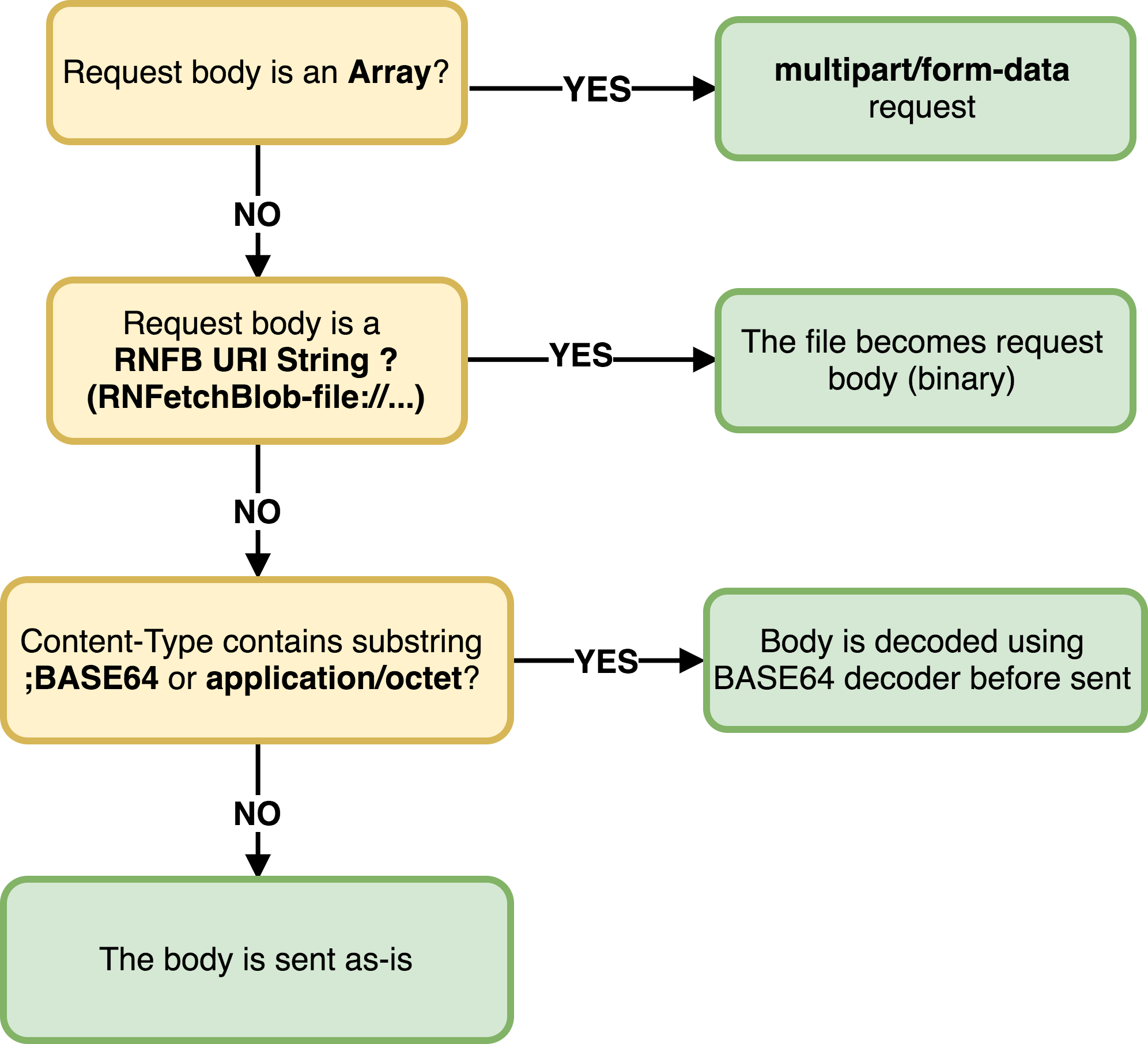
To sum up:
- To send a form data, the
Content-Typeheader does not matter. When the body is anArraywe will set proper content type for you. - To send binary data, you have two choices, use BASE64 encoded string or path points to a file contains the body.
- If the
Content-Typecontaining substring;BASE64orapplication/octetthe given body will be considered as a BASE64 encoded data which will be decoded to binary data as the request body. - Otherwise, if a string starts with
ReactNativeBlobUtil-file://(which can simply be done byReactNativeBlobUtil.wrap(PATH_TO_THE_FILE)), it will try to find the data from the URI string afterReactNativeBlobUtil-file://and use it as the request body. - To send the body as-is, simply use a
Content-Typeheader not containing;BASE64orapplication/octet.
It is Worth to mentioning that the HTTP request uses cache by default, if you're going to disable it simply add a Cache-Control header
'Cache-Control' : 'no-store'
After 0.9.4, we disabled
Chunkedtransfer encoding by default, if you're going to use it, you should explicitly set headerTransfer-EncodingtoChunked.
Download example: Fetch files that need authorization token
Most simple way is download to memory and stored as BASE64 encoded string, this is handy when the response data is small. Note that when it comes to authorization, not only can you use an authorization token, but this package will automatically pass the cookies created by normal js requests such as axios and fetch. Therefore, if you are using traditional cookie-based ways to authorize your user, you don't need to do anything before this package works.
// send http request in a new thread (using native code)
ReactNativeBlobUtil.fetch('GET', 'http://www.example.com/images/img1.png', {
    Authorization: 'Bearer access-token...',
    // more headers  ..
})
        .then((res) => {
            let status = res.info().status;

            if (status == 200) {
                // the conversion is done in native code
                let base64Str = res.base64()
                // the following conversions are done in js, it's SYNC
                let text = res.text()
                let json = res.json()
            }
            else {
                // handle other status codes
            }
        })
        // Something went wrong:
        .catch((errorMessage, statusCode) => {
            // error handling
        })
Download to storage directly
If the response data is large, that would be a bad idea to convert it into BASE64 string. A better solution is streaming the response directly into a file, simply add a fileCache option to config, and set it to true. This will make incoming response data stored in a temporary path without any file extension.
These files won't be removed automatically, please refer to Cache File Management
ReactNativeBlobUtil
        .config({
            // add this option that makes response data to be stored as a file,
            // this is much more performant.
            fileCache: true,
        })
        .fetch('GET', 'http://www.example.com/file/example.zip', {
            //some headers ..
        })
        .then((res) => {
            // the temp file path
            console.log('The file saved to ', res.path())
        })
Set Temp File Extension
Sometimes you might need a file extension for some reason. For example, when using file path as the source of Image component, the path should end with something like .png or .jpg, you can do this by add appendExt option to config.
ReactNativeBlobUtil
        .config({
            fileCache: true,
            // by adding this option, the temp files will have a file extension
            appendExt: 'png'
        })
        .fetch('GET', 'http://www.example.com/file/example.zip', {
            //some headers ..
        })
        .then((res) => {
            // the temp file path with file extension `png`
            console.log('The file saved to ', res.path())
            // Beware that when using a file path as Image source on Android,
            // you must prepend "file://"" before the file path
            imageView = <Image source={{uri: Platform.OS === 'android' ? 'file://' + res.path() : '' + res.path()}}/>
        })
Use Specific File Path
If you prefer a particular file path rather than randomly generated one, you can use path option. We've added several constants in v0.5.0 which represents commonly used directories.
let dirs = ReactNativeBlobUtil.fs.dirs
ReactNativeBlobUtil
        .config({
            // response data will be saved to this path if it has access right.
            path: dirs.DocumentDir + '/path-to-file.anything'
        })
        .fetch('GET', 'http://www.example.com/file/example.zip', {
            //some headers ..
        })
        .then((res) => {
            // the path should be dirs.DocumentDir + 'path-to-file.anything'
            console.log('The file saved to ', res.path())
        })
These files won't be removed automatically, please refer to Cache File Management
Use File Transformer
If you need to perform any processing on the bytes prior to it being written into storage (e.g. if you want it to be encrypted) then you can use transform option. NOTE: you will need to set a transformer on the libray (see Setting a File Transformer)
ReactNativeBlobUtil
        .config({
            // response data will be saved to this path if it has access right.
            path: dirs.DocumentDir + '/path-to-file.anything',
            transform: true
        })
        .fetch('GET', 'http://www.example.com/file/example.zip', {
            //some headers ..
        })
        .then((res) => {
            // the path should be dirs.DocumentDir + 'path-to-file.anything'
            console.log('The file saved to ', res.path())
        })
Upload example : Dropbox files-upload API
react-native-blob-util will convert the base64 string in body to binary format using native API, this process is done in a separated thread so that it won't block your GUI.
ReactNativeBlobUtil.fetch('POST', 'https://content.dropboxapi.com/2/files/upload', {
    Authorization: "Bearer access-token...",
    'Dropbox-API-Arg': JSON.stringify({
        path: '/img-from-react-native.png',
        mode: 'add',
        autorename: true,
        mute: false
    }),
    'Content-Type': 'application/octet-stream',
    // here's the body you're going to send, should be a BASE64 encoded string
    // (you can use "base64"(refer to the library 'mathiasbynens/base64') APIs to make one).
    // The data will be converted to "byte array"(say, blob) before request sent.
}, base64ImageString)
        .then((res) => {
            console.log(res.text())
        })
        .catch((err) => {
            // error handling ..
        })
Upload a file from storage
If you're going to use a file as request body, just wrap the path with wrap API.
ReactNativeBlobUtil.fetch('POST', 'https://content.dropboxapi.com/2/files/upload', {
    // dropbox upload headers
    Authorization: "Bearer access-token...",
    'Dropbox-API-Arg': JSON.stringify({
        path: '/img-from-react-native.png',
        mode: 'add',
        autorename: true,
        mute: false
    }),
    'Content-Type': 'application/octet-stream',
    // Change BASE64 encoded data to a file path with prefix `ReactNativeBlobUtil-file://`.
    // Or simply wrap the file path with ReactNativeBlobUtil.wrap().
}, ReactNativeBlobUtil.wrap(PATH_TO_THE_FILE))
        .then((res) => {
            console.log(res.text())
        })
        .catch((err) => {
            // error handling ..
        })
Multipart/form-data example: Post form data with file and data
In version >= 0.3.0 you can also post files with form data, just put an array in body, with elements have property name, data, and filename(optional).
Elements have property filename will be transformed into binary format, otherwise, it turns into utf8 string.
ReactNativeBlobUtil.fetch('POST', 'http://www.example.com/upload-form', {
    Authorization: "Bearer access-token",
    otherHeader: "foo",
    'Content-Type': 'multipart/form-data',
}, [
    // element with property `filename` will be transformed into `file` in form data
    {name: 'avatar', filename: 'avatar.png', data: binaryDataInBase64},
    // custom content type
    {name: 'avatar-png', filename: 'avatar-png.png', type: 'image/png', data: binaryDataInBase64},
    // part file from storage
    {name: 'avatar-foo', filename: 'avatar-foo.png', type: 'image/foo', data: ReactNativeBlobUtil.wrap(path_to_a_file)},
    // elements without property `filename` will be sent as plain text
    {name: 'name', data: 'user'},
    {
        name: 'info', data: JSON.stringify({
            mail: 'example@example.com',
            tel: '12345678'
        })
    },
]).then((resp) => {
    // ...
}).catch((err) => {
    // ...
})
What if you want to append a file to form data? Just like upload a file from storage example, wrap data by wrap API (this feature is only available for version >= v0.5.0). On version >= 0.6.2, it is possible to set custom MIME type when appending a file to form data. But keep in mind when the file is large it's likely to crash your app. Please consider use other strategy (see #94).
ReactNativeBlobUtil.fetch('POST', 'http://www.example.com/upload-form', {
    Authorization: "Bearer access-token",
    otherHeader: "foo",
    // this is required, otherwise it won't be process as a multipart/form-data request
    'Content-Type': 'multipart/form-data',
}, [
    // append field data from file path
    {
        name: 'avatar',
        filename: 'avatar.png',
        // Change BASE64 encoded data to a file path with prefix `ReactNativeBlobUtil-file://`.
        // Or simply wrap the file path with ReactNativeBlobUtil.wrap().
        data: ReactNativeBlobUtil.wrap(PATH_TO_THE_FILE)
    },
    {
        name: 'ringtone',
        filename: 'ring.mp3',
        // use custom MIME type
        type: 'application/mp3',
        // upload a file from asset is also possible in version >= 0.6.2
        data: ReactNativeBlobUtil.wrap(ReactNativeBlobUtil.fs.asset('default-ringtone.mp3'))
    },
    // elements without property `filename` will be sent as plain text
    {name: 'name', data: 'user'},
    {
        name: 'info', data: JSON.stringify({
            mail: 'example@example.com',
            tel: '12345678'
        })
    },
]).then((resp) => {
    // ...
}).catch((err) => {
    // ...
})
Upload/Download progress
In version >= 0.4.2 it is possible to know the upload/download progress. After 0.7.0 IOS and Android upload progress are also supported.
  ReactNativeBlobUtil.fetch('POST', 'http://www.example.com/upload', {
    //... some headers,
    'Content-Type': 'octet-stream'
}, base64DataString)
        // listen to upload progress event
        .uploadProgress((written, total) => {
            console.log('uploaded', written / total)
        })
        // listen to download progress event
        .progress((received, total) => {
            console.log('progress', received / total)
        })
        .then((resp) => {
            // ...
        })
        .catch((err) => {
            // ...
        })
In 0.9.6, you can specify an object as the first argument which contains count and interval, to the frequency of progress event (this will be done in the native context a reduce RCT bridge overhead). Notice that count argument will not work if the server does not provide response content length.
  ReactNativeBlobUtil.fetch('POST', 'http://www.example.com/upload', {
    //... some headers,
    'Content-Type': 'octet-stream'
}, base64DataString)
        // listen to upload progress event, emit every 250ms
        .uploadProgress({interval: 250}, (written, total) => {
            console.log('uploaded', written / total)
        })
        // listen to download progress event, every 10%
        .progress({count: 10}, (received, total) => {
            console.log('progress', received / total)
        })
        .then((resp) => {
            // ...
        })
        .catch((err) => {
            // ...
        })
Cancel Request
After 0.7.0 it is possible to cancel an HTTP request. Upon cancellation, it throws a promise rejection, be sure to catch it.
let task = ReactNativeBlobUtil.fetch('GET', 'http://example.com/file/1')

task.then(() => { ...
})
        // handle request cancelled rejection
        .catch((err) => {
            console.log(err)
        })
// cancel the request, the callback function is optional
task.cancel((err) => { ...
})
Drop-in Fetch Replacement
0.9.0
If you have existing code that uses whatwg-fetch(the official fetch), it's not necessary to replace them with ReactNativeBlobUtil.fetch, you can simply use our Fetch Replacement. The difference between Official them is official fetch uses whatwg-fetch which wraps XMLHttpRequest polyfill under the hood. It's a great library for web developers, but does not play very well with RN. Our implementation is simply a wrapper of our fetch and fs APIs, so you can access all the features we provided.
Android Media Scanner, and Download Manager Support
If you want to make a file in External Storage becomes visible in Picture, Downloads, or other built-in apps, you will have to use Media Scanner or Download Manager or the Media Storage.
Media Scanner
Media scanner scans the file and categorizes by given MIME type, if MIME type not specified, it will try to resolve the file using its file extension.
ReactNativeBlobUtil
        .config({
            // DCIMDir is in external storage
            path: dirs.DCIMDir + '/music.mp3'
        })
        .fetch('GET', 'http://example.com/music.mp3')
        .then((res) => ReactNativeBlobUtil.fs.scanFile([{path: res.path(), mime: 'audio/mpeg'}]))
        .then(() => {
            // scan file success
        })
        .catch((err) => {
            // scan file error
        })
Download Manager
When downloading large files on Android it is recommended to use Download Manager, it supports a lot of native features like the progress bar, and notification, also the download task will be handled by OS, and more efficient.
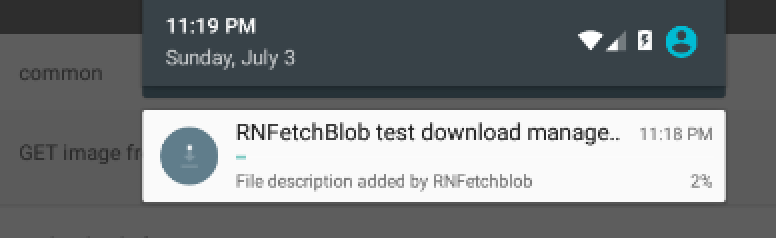
When using DownloadManager, fileCache and path properties in config will not take effect, because Android DownloadManager can only store files to external storage, also notice that Download Manager can only support GET method, which means the request body will be ignored.
When download complete, DownloadManager will generate a file path so that you can deal with it.
ReactNativeBlobUtil
        .config({
            addAndroidDownloads: {
                useDownloadManager: true, // <-- this is the only thing required
                // Optional, override notification setting (default to true)
                notification: false,
                // Optional, but recommended since android DownloadManager will fail when
                // the url does not contains a file extension, by default the mime type will be text/plain
                mime: 'text/plain',
                description: 'File downloaded by download manager.'
            }
        })
        .fetch('GET', 'http://example.com/file/somefile')
        .then((resp) => {
            // the path of downloaded file
            resp.path()
        })
Your app might not have right to remove/change the file created by Download Manager, therefore you might need to set custom location to the download task.
Download Notification and Visibility in Download App (Android Only)
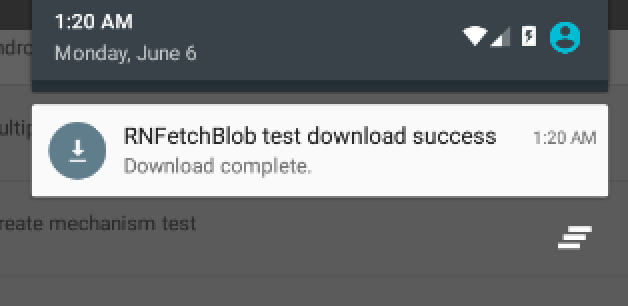
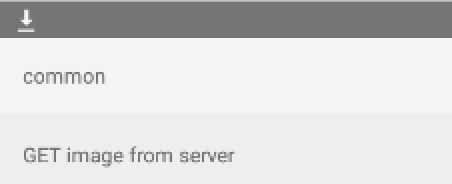
If you need to display a notification upon the file is downloaded to storage (as the above) or make the downloaded file visible in "Downloads" app. You have to add some options to config.
ReactNativeBlobUtil.config({
    fileCache: true,
    // android only options, these options be a no-op on IOS
    addAndroidDownloads: {
        // Show notification when response data transmitted
        notification: true,
        // Title of download notification
        title: 'Great ! Download Success ! :O ',
        // File description (not notification description)
        description: 'An image file.',
        mime: 'image/png',
        // Make the file scannable  by media scanner
        mediaScannable: true,
    }
})
        .fetch('GET', 'http://example.com/image1.png')
        .then(...)
Open Downloaded File with Intent
This is a new feature added in 0.9.0 if you're going to open a file path using official Linking API that might not work as expected, also, if you're going to install an APK in Downloads app, that will not function too. As an alternative, you can try actionViewIntent API, which will send an ACTION_VIEW intent for you which uses the given MIME type.
Download and install an APK programmatically
Note: be sure to specify the path, do not use the default path, because the permission problem causes the installation to fail, parsing the package fails
default path: /data/data/com.android.providers.downloads/cache/xxx.apk // Will cause parsing of the package to fail,Unable to install APK
const android = ReactNativeBlobUtil.android
const dirs = ReactNativeBlobUtil.fs.dirs;
const apkUrl = "http://www.example.com/awesome.apk";
const fileName = url.substring(url.lastIndexOf('/') + 1);

ReactNativeBlobUtil.config({
    addAndroidDownloads: {
        useDownloadManager: true,
        path: `${dirs.DownloadDir}/${fileName}`,    // <-- Must specify
        title: 'awesome.apk',
        description: 'An APK that will be installed',
        mime: 'application/vnd.android.package-archive',
        mediaScannable: true,
        notification: true,
    }
})
        .fetch('GET', `http://www.example.com/awesome.apk`)
        .then((res) => {
            android.actionViewIntent(res.path(), 'application/vnd.android.package-archive')
        })
Or show an image in image viewer
android.actionViewIntent(PATH_OF_IMG, 'image/png')
File System
Android Media Storage
Android 10 introduced scoped storage and thus new APIs to store files to Documents, Downloads, Music and other collections. Version 0.14.0 introduced an API to access files in the Media Store but also to create and write to new files in the Media Store. In general you only can access files in the Media Store created by your app, or selected by a picker.
CopyToMediaStore
Copies an existing file from the internal Storage to the Media Store.
An example for downloading a file and storing it to the downloads collection
ReactNativeBlobUtil
        .config({
            fileCache: true
        })
        .fetch('GET', 'https://example.de/image.png')
        .then(async (res) => {
            let result = await ReactNativeBlobUtil.MediaCollection.copyToMediaStore({
                        name: filename, // name of the file
                        parentFolder: '', // subdirectory in the Media Store, e.g. HawkIntech/Files to create a folder HawkIntech with a subfolder Files and save the image within this folder
                        mimeType: 'image/png' // MIME type of the file
                    },
                    'Download', // Media Collection to store the file in ("Audio" | "Image" | "Video" | "Download")
                    res.path() // Path to the file being copied in the apps own storage
            );
        });
This example is taking advantage of the fileCache option to directly store the downloaded file and get a path for.
Currently it's not possible to write data directly from a string recevied by fetch, but only to copy it from a file.
createMediaFile
Creates a new file in the specified collection without writing any data
let path = await ReactNativeBlobUtil.MediaCollection.createMediafile({
            name: filename, // name of the file
            parentFolder: '', // subdirectory in the Media Store, e.g. HawkIntech/Files to create a folder HawkIntech with a subfolder Files and save the image within this folder
            mimeType: 'image/png' // MIME type of the file
        }, 'Download'// Media Collection to store the file in ("Audio" | "Image" | "Video" | "Download")
);
writeMediaFile
Writes data from a file in the apps storage to an existing entry of the Media Store
await ReactNativeBlobUtil.MediaCollection.writeToMediafile('content://....', // content uri of the entry in the media storage
        localpath // path to the file that should be copied
);
Copies and tranforms data from a file in the apps storage to an existing entry of the Media Store. NOTE: you must set a transformer on the file in order for the transformation to happen (see Setting a File Transformer).
await ReactNativeBlobUtil.MediaCollection.writeToMediafileWithTransform('content://....', // content uri of the entry in the media storage
        localpath // path to the file that should be copied
);
copyToInternal
Copies an entry form the media storage to the apps internal storage.
let destpath = ReactNativeBlobUtil.dirs.CacheDir + '/image.png';
await ReactNativeBlobUtil.MediaCollection.copyToInternal('content://....', // content uri of the entry in the media storage
        destpath // path to destination the entry should be copied to
);
File Access
File access APIs were made when developing v0.5.0, which helping us write tests, and was not planned to be a part of this module. However, we realized that it's hard to find a great solution to manage cached files, everyone who uses this module may need these APIs for their cases.
Before start using file APIs, we recommend read Differences between File Source first.
File Access APIs
- asset (0.6.2)
- dirs
- createFile
- writeFile (0.6.0)
- writeFileWithTransform
- appendFile (0.6.0)
- readFile (0.6.0)
- readFileWithTransform
- readStream
- hash (0.10.9)
- writeStream
- hash
- unlink
- mkdir
- ls
- mv
- cp
- exists
- isDir
- stat
- lstat
- scanFile (Android only)
See File API for more information
File Stream
In v0.5.0 we've added writeStream and readStream, which allows your app read/write data from the file path. This API creates a file stream, rather than convert entire data into BASE64 encoded string. It's handy when processing large files.
When calling readStream method, you have to open the stream, and start to read data. When the file is large, consider using an appropriate bufferSize and interval to reduce the native event dispatching overhead (see Performance Tips)
The file stream event has a default throttle(10ms) and buffer size which preventing it cause too much overhead to main thread, you can also tweak these values.
let data = ''
ReactNativeBlobUtil.fs.readStream(
        // file path
        PATH_TO_THE_FILE,
        // encoding, should be one of `base64`, `utf8`, `ascii`
        'base64',
        // (optional) buffer size, default to 4096 (4095 for BASE64 encoded data)
        // when reading file in BASE64 encoding, buffer size must be multiples of 3.
        4095)
        .then((ifstream) => {
            ifstream.open()
            ifstream.onData((chunk) => {
                // when encoding is `ascii`, chunk will be an array contains numbers
                // otherwise it will be a string
                data += chunk
            })
            ifstream.onError((err) => {
                console.log('oops', err)
            })
            ifstream.onEnd(() => {
                <Image source={{uri: 'data:image/png,base64' + data}}
    })
            })
When using writeStream, the stream object becomes writable, and you can then perform operations like write and close.
Since version 0.10.9 write() resolves with the ReactNativeBlobUtil instance so you can promise-chain write calls:
ReactNativeBlobUtil.fs.writeStream(
        PATH_TO_FILE,
        // encoding, should be one of `base64`, `utf8`, `ascii`
        'utf8',
        // should data append to existing content ?
        true
)
        .then(ofstream => ofstream.write('foo'))
        .then(ofstream => ofstream.write('bar'))
        .then(ofstream => ofstream.write('foobar'))
        .then(ofstream => ofstream.close())
        .catch(console.error)
or
ReactNativeBlobUtil.fs.writeStream(
        PATH_TO_FILE,
        // encoding, should be one of `base64`, `utf8`, `ascii`
        'utf8',
        // should data append to existing content ?
        true
)
        .then(stream => Promise.all([
            stream.write('foo'),
            stream.write('bar'),
            stream.write('foobar')
        ]))
        // Use array destructuring to get the stream object from the first item of the array we get from Promise.all()
        .then(([stream]) => stream.close())
        .catch(console.error)
You should NOT do something like this:
ReactNativeBlobUtil.fs.writeStream(
        PATH_TO_FILE,
        // encoding, should be one of `base64`, `utf8`, `ascii`
        'utf8',
        // should data append to existing content ?
        true)
        .then((ofstream) => {
            // BAD IDEA - Don't do this, those writes are unchecked:
            ofstream.write('foo')
            ofstream.write('bar')
            ofstream.close()
        })
        .catch(console.error)  // Cannot catch any write() errors!
The problem with the above code is that the promises from the ofstream.write() calls are detached and "Lost". That means the entire promise chain A) resolves without waiting for the writes to finish and B) any errors caused by them are lost. That code may seem to work if there are no errors, but those writes are of the type "fire and forget": You start them and then turn away and never know if they really succeeded.
Cache File Management
When using fileCache or path options along with fetch API, response data will automatically store into the file system. The files will NOT removed unless you unlink it. There're several ways to remove the files
// remove file using ReactNativeBlobUtilResponse.flush() object method
ReactNativeBlobUtil.config({
    fileCache: true
})
        .fetch('GET', 'http://example.com/download/file')
        .then((res) => {
            // remove cached file from storage
            res.flush()
        })

// remove file by specifying a path
ReactNativeBlobUtil.fs.unlink('some-file-path').then(() => {
    // ...
})
You can also group requests by using session API and use dispose to remove them all when needed.
ReactNativeBlobUtil.config({
    fileCache: true
})
        .fetch('GET', 'http://example.com/download/file')
        .then((res) => {
            // set session of a response
            res.session('foo')
        })

ReactNativeBlobUtil.config({
    // you can also set session beforehand
    session: 'foo'
    fileCache: true
})
        .fetch('GET', 'http://example.com/download/file')
        .then((res) => {
            // ...
        })

// or put an existing file path to the session
ReactNativeBlobUtil.session('foo').add('some-file-path')
// remove a file path from the session
ReactNativeBlobUtil.session('foo').remove('some-file-path')
// list paths of a session
ReactNativeBlobUtil.session('foo').list()
// remove all files in a session
ReactNativeBlobUtil.session('foo').dispose().then(() => { ...
})
Transfer Encoding
After 0.9.4, the Chunked transfer encoding is disabled by default due to some service provider may not support chunked transfer. To enable it, set Transfer-Encoding header to Chunked.
ReactNativeBlobUtil.fetch('POST', 'http://example.com/upload', {'Transfer-Encoding': 'Chunked'}, bodyData)
Self-Signed SSL Server
By default, react-native-blob-util does NOT allow connection to unknown certification provider since it's dangerous. To connect a server with self-signed certification, you need to add trusty to config explicitly. This function is available for version >= 0.5.3
In addition since 0.16.0 you'll have to define your own trust manager for android.
....
import com.ReactNativeBlobUtil.ReactNativeBlobUtilUtils;
...

public class MainApplication extends Application implements ReactApplication {
    ...
    @Override
    public void onCreate() {
       ...
        ReactNativeBlobUtilUtils.sharedTrustManager = x509TrustManager = new X509TrustManager() {
                @Override
                public void checkClientTrusted(java.security.cert.X509Certificate[] chain, String authType) throws CertificateException {
                }

                @Override
                public void checkServerTrusted(java.security.cert.X509Certificate[] chain, String authType) throws CertificateException {
                }

                @Override
                public java.security.cert.X509Certificate[] getAcceptedIssuers() {
                    return new java.security.cert.X509Certificate[]{};
                }
        };
        ...
    }
Kotlin
....
import com.ReactNativeBlobUtil.ReactNativeBlobUtilUtils;
import javax.net.ssl.X509TrustManager
...

public class MainApplication extends Application implements ReactApplication {
    ...
    public void onCreate() {
       ...
        ReactNativeBlobUtilUtils.sharedTrustManager = object : X509TrustManager {
          override fun checkClientTrusted(chain: Array<java.security.cert.X509Certificate>, authType: String) {}

          override fun checkServerTrusted(chain: Array<java.security.cert.X509Certificate>, authType: String) {}

          override fun getAcceptedIssuers(): Array<java.security.cert.X509Certificate> {
            return arrayOf()
          }
        };
        ...
    }
ReactNativeBlobUtil.config({
    trusty: true
})
        .fetch('GET', 'https://mysite.com')
        .then((resp) => {
            // ...
        })
WiFi only requests
If you wish to only route requests through the Wifi interface, set the below configuration. Note: On Android, the ACCESS_NETWORK_STATE permission must be set, and this flag will only work on API version 21 (Lollipop, Android 5.0) or above. APIs below 21 will ignore this flag.
ReactNativeBlobUtil.config({
    wifiOnly: true
})
        .fetch('GET', 'https://mysite.com')
        .then((resp) => {
            // ...
        })
Transform Files
Sometimes you may need the files to be transformed after reading from storage or before writing into storage (eg encryption/decyrption). In order to perform the transformations, use readFileWithTransform and writeFileWithTransform. NOTE: you must set a transformer on the file in order for the transformation to happen (see Setting a File Transformer).
Web API Polyfills
After 0.8.0 we've made some Web API polyfills that makes some browser-based library available in RN.
- Blob
- XMLHttpRequest (Use our implementation if you're going to use it with Blob)
Setting A File Transformer
Setting a file transformer will allow you to specify how data should be transformed whenever the library is writing into storage or reading from storage. A use case for this is if you want the files handled by this library to be encrypted.
If you want to use a file transformer, you must implement an interface defined in:
ReactNativeBlobUtilFileTransformer.h (iOS)
ReactNativeBlobUtilFileTransformer.java (Android)
Then you set the File Transformer during app startup
Android:
public class MainApplication extends Application implements ReactApplication {
    ...
    @Override
    public void onCreate() {
       ...
       ReactNativeBlobUtilFileTransformer.sharedFileTransformer = new MyCustomEncryptor();
       ...
    }
iOS:
@implementation AppDelegate
...
- (BOOL)application:(UIApplication *)application didFinishLaunchingWithOptions:(NSDictionary *)launchOptions
{
    ...
    [ReactNativeBlobUtilFileTransformer setFileTransformer: MyCustomEncryptor.new];
    ...
}
Here are the places where the transformer would apply
- Reading a file from the file system
- Writing a file into the file system
- Http response is downloaded to storage directly
Performance Tips
Read Stream and Progress Event Overhead
If the process seems to block JS thread when file is large when reading data via fs.readStream. It might because the default buffer size is quite small (4kb) which result in a lot of events triggered from JS thread. Try to increase the buffer size (for example 100kb = 102400) and set a larger interval (available for 0.9.4+, the default value is 10ms) to limit the frequency.
Reduce RCT Bridge and BASE64 Overhead
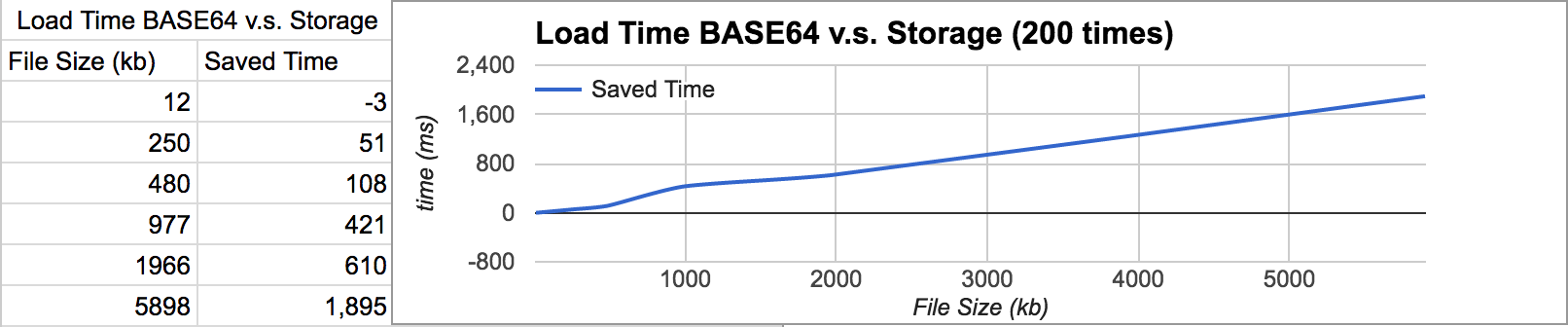
React Native connects JS and Native context by passing JSON around React Native bridge, and there will be an overhead to convert data before they sent to each side. When data is large, this will be quite a performance impact to your app. It's recommended to use file storage instead of BASE64 if possible.The following chart shows how much faster when loading data from storage than BASE64 encoded string on iPhone 6.
ASCII Encoding has /terrible Performance
Due to the lack of typed array implementation in JavascriptCore, and limitation of React Native structure, to convert data to JS byte array spends lot of time. Use it only when needed, the following chart shows how much time it takes when reading a file with different encoding.

Concat and Replacing Files
If you're going to concatenate files, you don't have to read the data to JS context anymore! In 0.8.0 we introduced new encoding uri for writeFile and appendFile API, which make it possible to handle the whole process in native.

Caveats
- This library does not urlencode unicode characters in URL automatically, see #146.
- When you create a
Blob, from an existing file, the file WILL BE REMOVED if youclosethe blob. - If you replaced
window.XMLHttpRequestfor some reason (e.g. make Firebase SDK work), it will also affect how officialfetchworks (basically it should work just fine). - When file stream and upload/download progress event slow down your app, consider an upgrade to
0.9.6+, use additional arguments to limit its frequency. - When passing a file path to the library, remove
file://prefix.
when you got a problem, have a look at Trouble Shooting.
Changes
See release notes
Development
If you're interested in hacking this module, check our development guide, there might be some helpful information. Please feel free to make a PR or file an issue.