@ant-design/pro-table vs @material-ui/data-grid vs ag-grid-react vs react-table
React 数据表格库
@ant-design/pro-table@material-ui/data-gridag-grid-reactreact-table类似的npm包:

React 数据表格库

在现代 Web 开发中,数据表格是展示和操作数据的重要组件。不同的 React 数据表格库提供了多种功能和特性,以满足不同的需求。选择合适的库可以提高开发效率、用户体验和应用性能。以下是四个流行的 React 数据表格库的比较,以及它们的特性和选择指南。

npm下载趋势

3 年

GitHub Stars 排名

统计详情

npm包名称
下载量
Stars
大小
Issues
发布时间
License
@ant-design/pro-table04,732573 kB7689 个月前MIT
@material-ui/data-grid05,669-1,6695 年前MIT
ag-grid-react015,187678 kB13013 天前MIT
react-table027,865940 kB380-MIT

功能对比: @ant-design/pro-table vs @material-ui/data-grid vs ag-grid-react vs react-table

功能丰富性

  • @ant-design/pro-table:

    提供了内置的搜索、排序、分页和表单功能,支持复杂的表单验证和数据处理,非常适合企业级应用。

  • @material-ui/data-grid:

    提供了丰富的功能,如排序、过滤、分页、行选择和自定义单元格渲染,适合需要高度自定义的项目。

  • ag-grid-react:

    支持虚拟滚动、行分组、树形数据和自定义单元格渲染,适合大数据集和复杂的企业应用。

  • react-table:

    提供了灵活的 API 和钩子,允许开发者根据需求自定义功能,适合需要高度定制的场景。

性能

  • @ant-design/pro-table:

    在处理中小型数据集时表现良好,但在极大数据集时可能会遇到性能瓶颈。

  • @material-ui/data-grid:

    优化了性能,能够处理中等规模的数据集,适合大多数应用场景。

  • ag-grid-react:

    专为高性能设计,能够处理数万行数据,支持虚拟滚动和懒加载,适合需要处理大量数据的应用。

  • react-table:

    轻量级,适合小型和中型数据集,性能取决于开发者的实现方式。

学习曲线

  • @ant-design/pro-table:

    由于与 Ant Design 的紧密集成,学习曲线相对较低,特别是对于已经熟悉 Ant Design 的开发者。

  • @material-ui/data-grid:

    相对容易上手,尤其是对于已经使用 Material-UI 的开发者,文档和示例丰富。

  • ag-grid-react:

    功能强大,但由于其复杂性,学习曲线较陡,特别是对于新手。

  • react-table:

    学习曲线相对较平缓,尤其是对于熟悉 React 的开发者,但需要一定的自定义能力。

可扩展性

  • @ant-design/pro-table:

    提供了丰富的 API 和配置选项,允许开发者根据需求进行扩展和定制。

  • @material-ui/data-grid:

    支持高度自定义,能够与 Material-UI 组件无缝集成,适合需要一致设计的项目。

  • ag-grid-react:

    提供了丰富的 API 和插件系统,支持复杂的自定义需求,适合大型企业应用。

  • react-table:

    极其灵活,允许开发者根据需求创建自定义功能,适合需要高度定制的场景。

设计原则

  • @ant-design/pro-table:

    遵循 Ant Design 的设计规范,提供一致的用户体验和视觉效果,适合企业级应用。

  • @material-ui/data-grid:

    遵循 Material Design 原则,提供现代化的用户界面,适合需要一致设计的项目。

  • ag-grid-react:

    设计上更关注性能和功能,适合需要处理复杂数据的企业应用。

  • react-table:

    设计上更关注灵活性和可定制性,适合需要根据具体需求进行调整的场景。

如何选择: @ant-design/pro-table vs @material-ui/data-grid vs ag-grid-react vs react-table

  • @ant-design/pro-table:

    选择 @ant-design/pro-table 如果你需要一个功能丰富且与 Ant Design 组件库无缝集成的表格解决方案。它提供了强大的表单功能、搜索、排序和分页等特性,非常适合企业级应用。

  • @material-ui/data-grid:

    选择 @material-ui/data-grid 如果你已经在使用 Material-UI,并希望利用其设计系统来构建一致的用户界面。该库提供了灵活的 API 和丰富的功能,适合需要高度自定义的项目。

  • ag-grid-react:

    选择 ag-grid-react 如果你需要一个高性能的表格解决方案,支持大数据集和复杂的功能,如虚拟滚动、行分组和自定义单元格渲染。它适合需要处理大量数据的企业应用。

  • react-table:

    选择 react-table 如果你需要一个轻量级且高度可定制的表格库。它提供了强大的钩子 API,适合希望完全控制表格行为和样式的开发者。

@ant-design/pro-table的README

@ant-design/pro-table

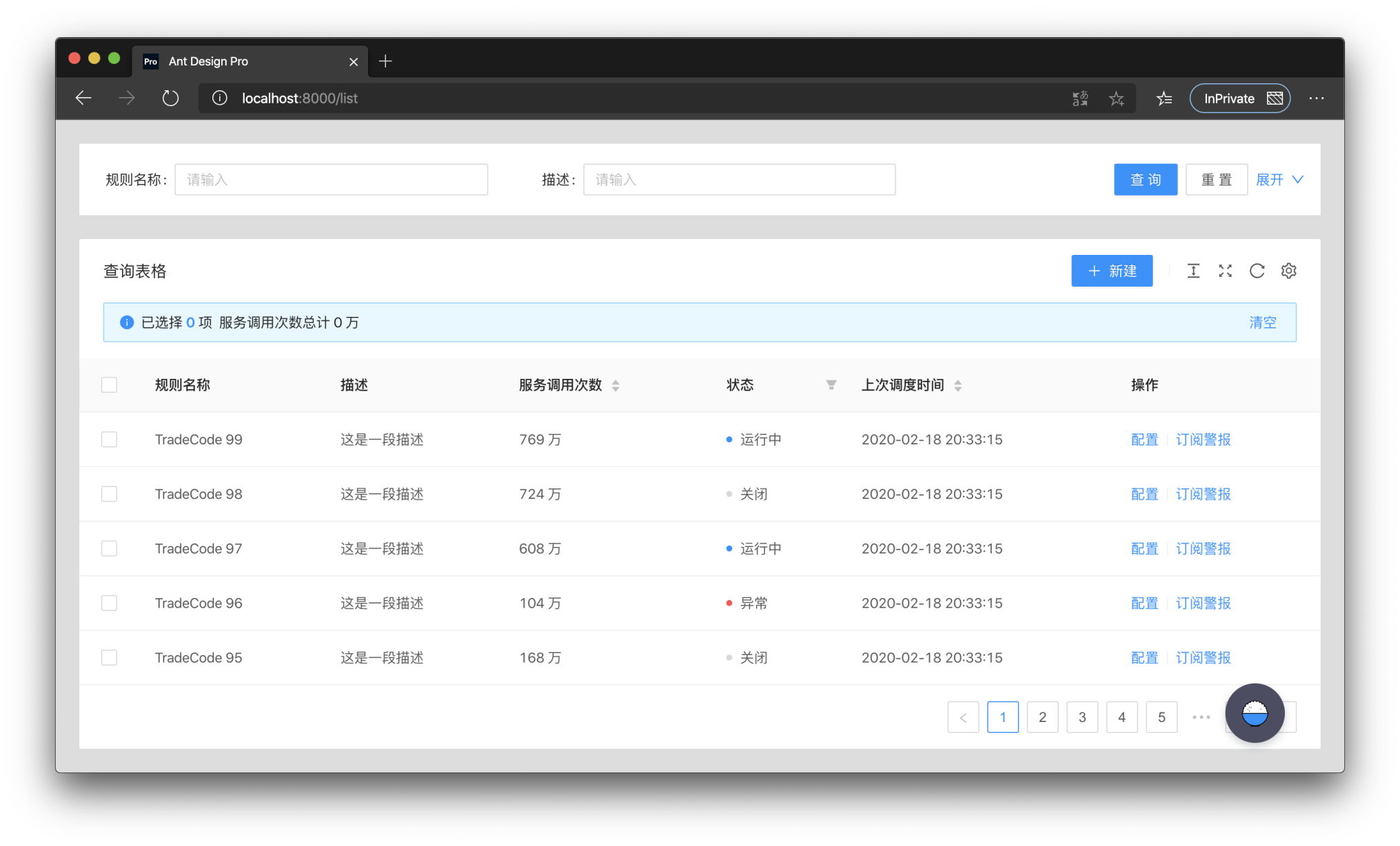
ProTable was created to solve the problem of having to write a lot of sample code for tables in a project, so a lot of common logic was encapsulated in it. These wrappers can be simply categorized as pre-defined behaviors and pre-defined logic.

ProTable puts a layer of wrapping on top of antd's Table, supports some presets, and encapsulates some behaviors. Only api's that differ from antd Table are listed here.

request

request is the most important API of ProTable, request takes an object. The object must have data and success in it, and total is also required if manual paging is needed. request takes over the loading settings and re-executes them when the query form is queried and the params parameters are modified. Also the query form values and params parameters are brought in. The following is an example.

<ProTable<DataType, Params>
  // params is a parameter that needs to be self-contained
  // This parameter has higher priority and will override the parameters of the query form
  params={params}
  request={async (
    // The first parameter params is the combination of the query form and params parameters
    // The first parameter will always have pageSize and current, which are antd specifications
    params: T & {
      pageSize: number;
      current: number;
    },
    sort,
    filter,
  ) => {
    // Here you need to return a Promise, and you can transform the data before returning it
    // If you need to transform the parameters you can change them here
    const msg = await myQuery({
      page: params.current,
      pageSize: params.pageSize,
    });
    return {
      data: msg.result,
      // Please return true for success.
      // otherwise the table will stop parsing the data, even if there is data
      success: boolean,
      // not passed will use the length of the data, if it is paged you must pass
      total: number,
    };
  }}
/>

ProTable

PropertyDescriptionTypeDefault Value
requestHow to get dataSource(params?: {pageSize,current},sort,filter) => {data,success,total}-
paramsAdditional parameters used for request query, once changed will trigger reloadingobject-
postDataProcess the data obtained through request(data: T[]) => T[]-
defaultDataDefault dataT[]-
dataSourceTable data, protable recommends using request to loadT[]-
onDataSourceChangeTriggered when Table data changes(dataSource: T[]) => void-
actionRefReference to Table action for custom triggeringMutableRefObject<ActionType>-
formRefThe form instance of the query form can be obtained for some flexible configurationMutableRefObject<FormInstance>-
toolBarRenderRender toolbar, support returning a dom array, will automatically increase margin-right(action) => ReactNode[]-
onLoadTriggered after the data is loaded, it will be triggered multiple times(dataSource: T[]) => void-
onLoadingChangeTriggered when loading is modified, usually caused by network requests(loading:boolean)=>void-
onRequestErrorTriggered when data loading fails(error) => void-
tableClassNameclassName of the encapsulated tablestring-
tableStylestyle of the encapsulated tableCSSProperties-
optionstable toolbar, not displayed when set to false{{ density?: boolean, fullScreen?: boolean | function, reload?: boolean | function, reloadIcon?: React.ReactNode, densityIcon?: React.ReactNode, setting?: boolean | SettingOptionType }}{ fullScreen: false, reload :true, density: true, setting: true}
searchWhether to display the search form, when the object is passed in, it is the configuration of the search formfalse | SearchConfig-
dateFormatterConvert moment format data to a specific type, false will not be converted"string" | "number" | ((value: Moment, valueType: string) => string | number) |false"string"
defaultSizeDefault sizeSizeType-
beforeSearchSubmitMake some changes before searching(params:T)=>T-
onSizeChangeThe table size has changed(size:'default' |'middle' |'small') => void-
typepro-table type"form"-
formantd form configurationFormProps-
onSubmitTriggered when the form is submitted(params: U) => void-
onResetTriggered when the form is reset() => void-
columnEmptyTextDisplay when it is empty, display - when it is not set, false can turn off this functionstring | falsefalse
tableRenderCustom rendering table function(props,dom,domList:{ toolbar,alert,table}) => ReactNode-
toolbarTransparent transmission of ListToolBar configuration itemsListToolBarProps-
tableExtraRenderThe main function of the custom table(props: ProTableProps<T, U>, dataSource: T[]) => ReactNode;-
manualRequestDo you need to manually trigger the first request? When configured as true, the search form cannot be hiddenbooleanfalse
editableRelated configuration of editable tableTableRowEditable-
cardBorderedBorder of Card components around Table and Searchboolean | {search?: boolean, table?: boolean}false
ghostGhost mode, that is, whether to cancel the padding of the table content area.booleanfalse
debounceTimeDebounce timenumber10
revalidateOnFocusAutomatically re-request when the window is focusedbooleanfalse
columnsStateColumn Status Control, you can operate the display hideColumnStateType-

RecordCreator

PropertyDescriptionTypeDefault Value
recordThe row data to be added, generally contains a unique keyT{}
positionWhere does the line increase, start or endtop | bottombottom
(...buttonProps)ButtonProps of antdButtonProps

ColumnStateType

PropertyDescriptionTypeDefault
defaultValueThe default value of the column status, only for the first time. Used for resetting valueRecord <string, ColumnsState>;
valueColumn status, support controlled modeRecord <string, ColumnsState>;
onChangeColumn status After changing(value: Record <string, ColumnsState>) => void
PersistenceKeyThe key of the persistence column is used to determine if it is the same tablestring | Number
PersistenceTypeThe type of persistence column, localStorage is also existing after closing the browser, sessionStorage closes the browser will be lostlocalStorage | sessionStorage

Search Search form

PropertyDescriptionTypeDefault Value
filterTypeFilter form type'query' | 'light''query'
searchTextSearch button textstringSearch
resetTextreset button textstringreset
submitTextThe text of the submit buttonstringSubmit
labelWidthLabel width'number' | 'auto'80
spanConfigure the number of columns in the query form'number' | 'ColConfig'defaultColConfig
classNameEncapsulated search Form classNamestring-
collapseRenderCollapse button render((collapsed: boolean,showCollapseButton?: boolean) => ReactNode)|false-
defaultCollapsedWhether to collapse by defaultbooleantrue
collapsedcollapsedboolean-
onCollapseCollapse button event(collapsed: boolean) => void;-
optionRenderCustom action bar((searchConfig,formProps,dom) => ReactNode[])|false-
showHiddenNumWhether to show the number of hidden items after storingbooleanfalse

editable edit line configuration

PropertyDescriptionTypeDefault Value
typeType of editable table, single or multiplesingle | multiple-
formForm instance of editable form, use Form.useForm to generate and useFormInstance-
formPropsform properties can be configured, but onFinish is not supported`FormProps'-
editableKeysRow being edited, controlled attributes. The defaultkey will use the configuration of rowKey,if there is no configuration, it will use theindex, it is recommended to use rowKeyKey[]-
onChangeTriggered when row data is modified(editableKeys: Key[], editableRows: T[]) => void-
onSaveTriggered when a row is saved(key: Key, row: T,originRow:T,newLine?:newLineConfig) => Promise<any>-
saveTextText for saving a rowReact.ReactNodeSave
onDeleteTriggered when a row is deleted(key: Key, row: T) => Promise<any>-
deleteTextText for deleting a rowReact.ReactNodeDelete
onCancelTriggered when cancel editing a line(key: Key, row: T,originRow:T,newLine?:newLineConfig) => Promise<any>-
cancelTextText for canceling the editing of a rowReact.ReactNodeCancel
actionRenderCustom edit mode action bar(row: T, config: ActionRenderConfig<T>) => ReactNode[]-
deletePopconfirmMessageThe pop-up confirmation box prompt message when deletingReactNodeDelete this line?
onlyOneLineEditorAlertMessageOnly one line can be editedReactNodeOnly one line can be edited at the same time
onlyAddOneLineAlertMessageOnly one line can be added at the same timeReactNodeOnly add one line

ColConfig

const defaultColConfig = {
  xs: 24,
  sm: 24,
  md: 12,
  lg: 12,
  xl: 8,
  xxl: 6,
};

Install

Using npm:

$ npm install --save  @ant-design/pro-table

or using yarn:

$ yarn add @ant-design/pro-table