bundlewatch vs size-limit vs source-map-explorer vs webpack-bundle-analyzer
前端包体积分析工具
bundlewatchsize-limitsource-map-explorerwebpack-bundle-analyzer类似的npm包:

前端包体积分析工具

这些工具用于分析和监控前端应用程序的包体积,帮助开发者理解和优化应用程序的性能。通过使用这些工具,开发者可以识别出过大的依赖项,监控包体积变化,并采取措施减少加载时间,提高用户体验。

npm下载趋势

3 年

GitHub Stars 排名

统计详情

npm包名称
下载量
Stars
大小
Issues
发布时间
License
bundlewatch044145.4 kB313 个月前MIT
size-limit06,92639.2 kB273 个月前MIT
source-map-explorer03,932352 kB57-Apache-2.0
webpack-bundle-analyzer012,6651.45 MB273 个月前MIT

功能对比: bundlewatch vs size-limit vs source-map-explorer vs webpack-bundle-analyzer

功能概述

  • bundlewatch:

    Bundlewatch 是一个用于监控和比较包体积变化的工具。它可以在每次构建时生成包体积的快照,并将其与之前的版本进行比较,帮助开发者及时发现体积变化。

  • size-limit:

    Size Limit 是一个用于限制 JavaScript 包体积的工具。它可以在构建过程中检查包的大小,并确保它不会超过设定的限制,从而帮助开发者控制性能。

  • source-map-explorer:

    Source Map Explorer 是一个用于分析打包后的 JavaScript 文件的工具。它利用源映射文件,帮助开发者查看各个模块在最终包中的占比,识别出过大的模块。

  • webpack-bundle-analyzer:

    Webpack Bundle Analyzer 是一个 Webpack 插件,提供交互式的可视化界面,帮助开发者分析和优化打包后的文件。它展示了各个模块的大小和依赖关系,便于开发者进行优化。

使用场景

  • bundlewatch:

    适用于需要在持续集成中监控包体积变化的项目,特别是当团队成员频繁提交代码时。

  • size-limit:

    适用于希望在开发过程中实时监控包体积的项目,尤其是对性能要求较高的应用程序。

  • source-map-explorer:

    适用于需要深入分析打包后文件的项目,尤其是当你需要优化特定模块时。

  • webpack-bundle-analyzer:

    适用于使用 Webpack 的项目,尤其是希望通过可视化界面来分析和优化包的开发者。

易用性

  • bundlewatch:

    Bundlewatch 的配置相对简单,适合希望快速集成包体积监控的开发者。

  • size-limit:

    Size Limit 提供了简单的配置选项,易于上手,适合初学者使用。

  • source-map-explorer:

    Source Map Explorer 需要一定的源映射知识,但其命令行工具使用方便,适合有一定经验的开发者。

  • webpack-bundle-analyzer:

    Webpack Bundle Analyzer 提供了直观的图形界面,易于使用,适合所有水平的开发者。

性能影响

  • bundlewatch:

    Bundlewatch 在构建过程中会增加一些额外的时间开销,但它提供的监控功能可以帮助开发者及时发现问题。

  • size-limit:

    Size Limit 在构建过程中会进行包体积检查,可能会影响构建速度,但它能有效防止过大的包体积。

  • source-map-explorer:

    Source Map Explorer 需要加载源映射文件,可能会增加分析时间,但它提供的详细信息对优化非常有帮助。

  • webpack-bundle-analyzer:

    Webpack Bundle Analyzer 在构建时会增加一些开销,但其可视化分析功能可以帮助开发者更好地理解包的结构。

社区支持

  • bundlewatch:

    Bundlewatch 拥有活跃的社区支持,提供了丰富的文档和示例,帮助开发者快速上手。

  • size-limit:

    Size Limit 也有良好的社区支持,提供了详细的使用文档和示例,适合新手使用。

  • source-map-explorer:

    Source Map Explorer 的社区相对较小,但提供了基本的文档和支持,适合有经验的开发者。

  • webpack-bundle-analyzer:

    Webpack Bundle Analyzer 拥有庞大的用户基础和活跃的社区,提供了丰富的插件和扩展,适合各种项目需求。

如何选择: bundlewatch vs size-limit vs source-map-explorer vs webpack-bundle-analyzer

  • bundlewatch:

    选择 Bundlewatch 如果你需要在持续集成过程中监控包体积变化,并希望通过视觉化的方式来跟踪这些变化。它可以生成包体积的快照,并与之前的版本进行比较。

  • size-limit:

    选择 Size Limit 如果你希望在构建过程中自动检查包体积,并确保它不会超过设定的限制。它非常适合在开发过程中进行实时反馈,帮助开发者控制包的大小。

  • source-map-explorer:

    选择 Source Map Explorer 如果你想深入分析打包后的文件,查看各个模块和依赖项在最终包中的占比。它可以帮助你识别哪些模块占用了过多的空间,并优化它们。

  • webpack-bundle-analyzer:

    选择 Webpack Bundle Analyzer 如果你使用 Webpack 作为构建工具,并希望通过交互式的可视化界面来分析和优化你的包。它提供了一个直观的图形界面,展示各个模块的大小和依赖关系。

bundlewatch的README


Keep watch of your bundle size.

Version Monthly Downloads Coveralls GitHub License


BundleWatch checks file sizes, ensuring bundled browser assets don't jump in file size.

Sharp increases in BundleWatch can signal that something is wrong, such as adding a package that bloats the slug, an incorrect import, or forgetting to minify.

Inspired by Siddharth Kshetrapal's bundlesize

Getting Started

Install the BundleWatch package:

npm install bundlewatch --save-dev

Add some basic configuration to your package.json

{
    "name": "my package name",
    "version": "0.0.1",
    "bundlewatch": {
        "files": [
            {
                "path": "myfolder/*.js",
                "maxSize": "100kB"
            }
        ]
    }
}

[!NOTE] You can also use a bundlewatch.config.js file instead of the package.json field. See the documentation for more details.

Usage

npm run bundlewatch

This will give you command line output. If you want BundleWatch to report build status on your pull requests, see below.

Adding Build Status

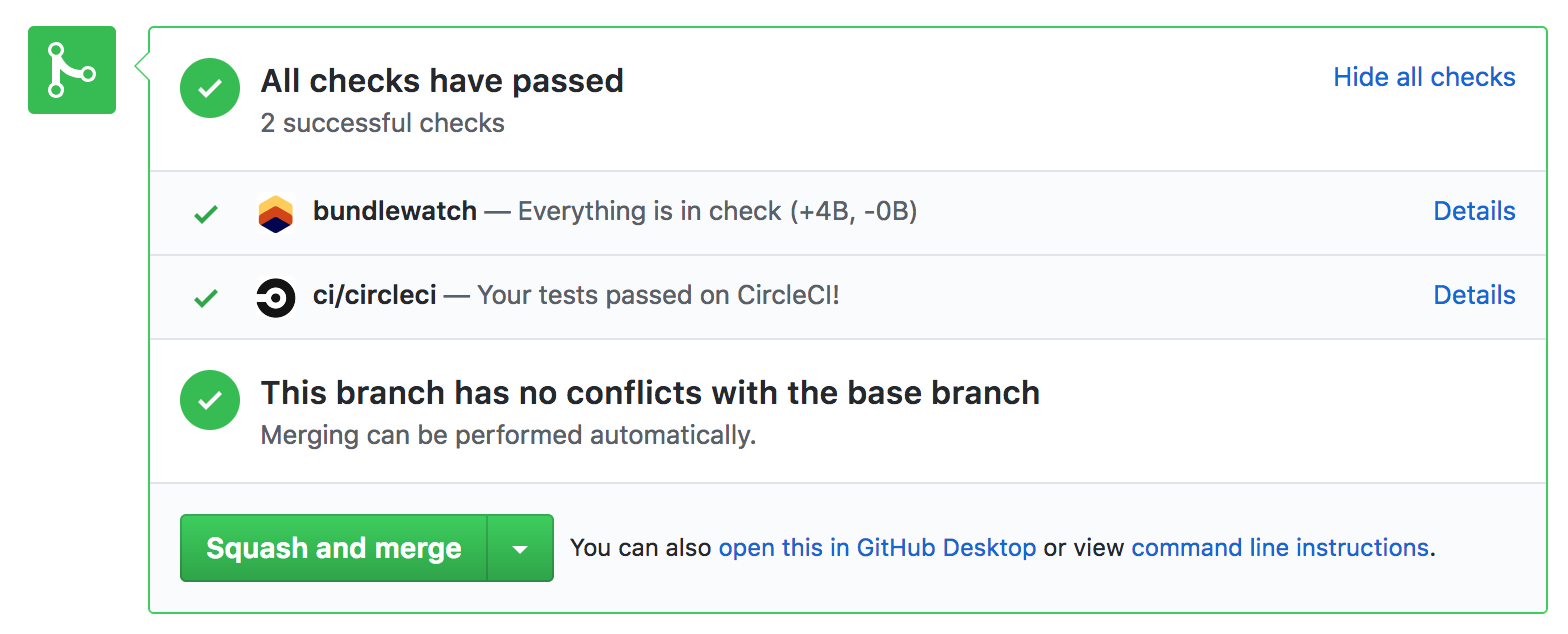
BundleWatch can report its status on your GitHub Pull Requests.

build status preview

CI Auth Variables Needed by BundleWatch

  • BUNDLEWATCH_GITHUB_TOKEN

You will need to give BundleWatch access to your GitHub Statuses, which can be done by heading to: https://service.bundlewatch.io/setup-github

This will give you your BUNDLEWATCH_GITHUB_TOKEN. You will need to set this as an environment variable in CI.

CI Variables Needed by BundleWatch

The most efficient way to get this running is to ensure that some environment variables are available for BundleWatch to find.

  • CI_REPO_OWNER github.com/facebook/react
  • CI_REPO_NAME github.com/facebook/react
  • CI_COMMIT_SHA
  • CI_BRANCH

If you're using, Travis, CircleCI, Wrecker, Drone or GitHub Actions these should all work out of the box.

[!TIP] Have a look at the source code to see which variables are automatically found: getCIVars

Viewing the results breakdown

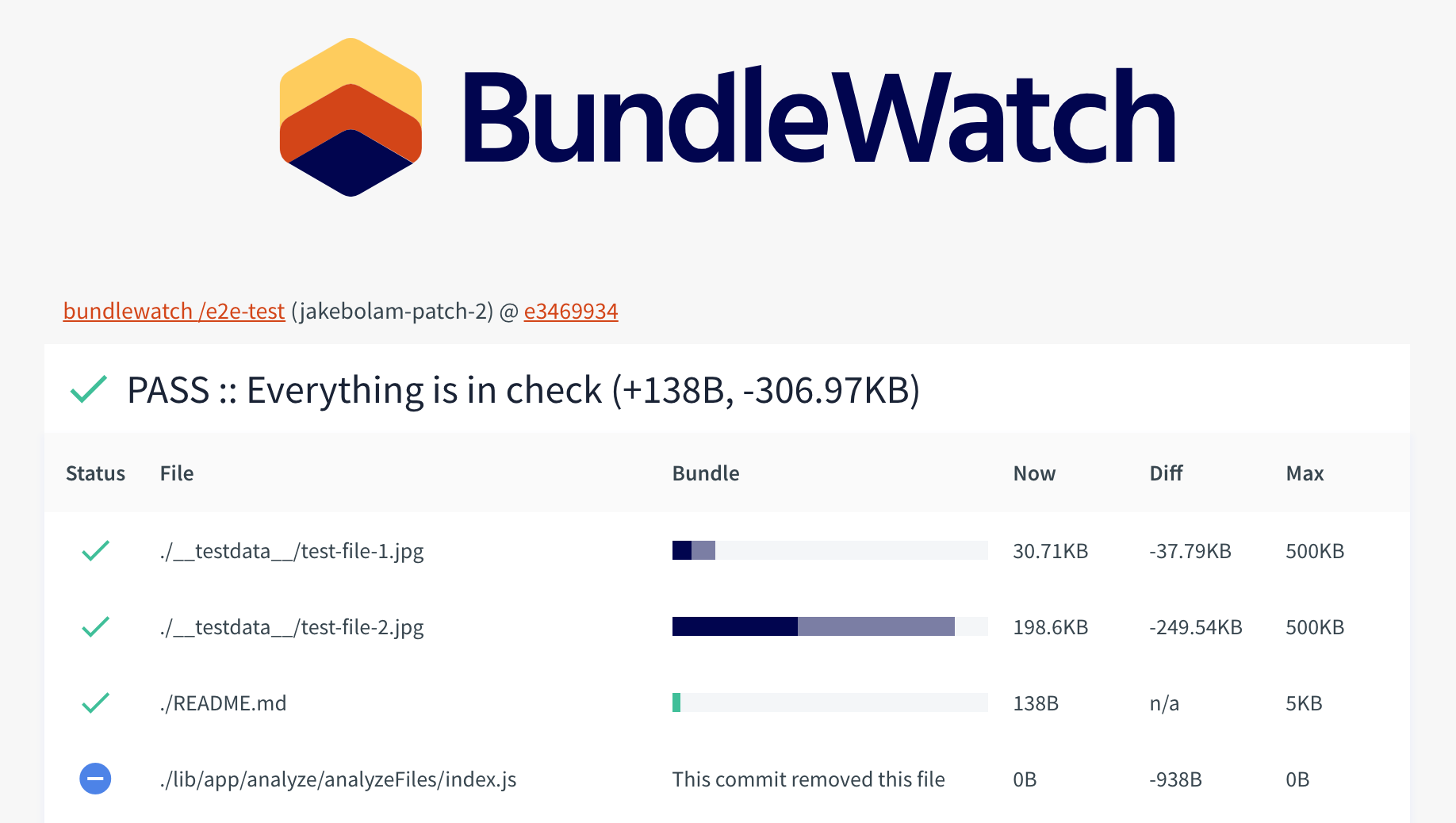
After setting up the above you will have BuildStatus on your Pull Requests. Clicking the details link on the reported status will show you a results file breakdown.

build results preview

Additional Documentation

Full documentation available on bundlewatch.io

I use bundlesize, why should I switch to BundleWatch

  • Bundlesize has entered maintenance mode and pull requests are left hanging, so we wanted to reboot the community through creating BundleWatch
  • New BundleWatch service with infrastructure as code
  • Launched bundlewatch.io documentation website
  • Enough test coverage to support CD
  • Node API Support
  • Lower barrier to contributing (automated testing and publishing), build a trusted community of contributors to have continuous improvement

Additional Features

  • Config validation to stop users from guessing why BundleWatch won't work
  • Support for config file path
  • Better results breakdown page
  • Better comparisons between branches, support branches other than master
  • Support for your own server for storing data
  • New and improved CI behaviour
  • Show history of BundleWatchs over time

Contributors

Want to Help? Become a Contributor

Contributions of any kind are welcome! See the Contributing docs.