JavaScript 高精度计算与数学库选型指南
decimal.js、mathjs 和 numeric 都是用于解决 JavaScript 原生数字计算局限性的库,但侧重点完全不同。JavaScript 使用 IEEE 754 双精度浮点数,导致 0.1 + 0.2 !== 0.3 等精度问题。decimal.js 专注于任意精度的十进制算术,适合金融场景。mathjs 是一个功能全面的数学库,支持表达式解析、矩阵运算和单位转换。numeric 是一个较老的线性代数库,目前维护状态不佳。开发者应根据对精度、功能复杂度和维护性的需求进行选择。
npm下载趋势
GitHub Stars 排名
统计详情


JavaScript 高精度计算与数学库选型指南
在 JavaScript 中处理数字计算时,开发者经常会遇到 IEEE 754 浮点数精度问题,例如 0.1 + 0.2 不等于 0.3。decimal.js、mathjs 和 numeric 都试图解决这类问题,但它们的设计目标和适用场景截然不同。本文将从精度控制、功能范围和維護状态三个维度进行深度对比。
🎯 精度控制:金融级准确 vs 标准浮点数
处理货币或科学数据时,精度是首要考虑因素。
decimal.js 专为任意精度十进制算术设计。
- 完全避免浮点数误差。
- 支持配置精度小数位数。
- 适合金融、会计场景。
// decimal.js: 精确计算
const Decimal = require('decimal.js');
const x = new Decimal(0.1);
const y = new Decimal(0.2);
const result = x.plus(y);
console.log(result.toString()); // "0.3"
mathjs 默认使用 JavaScript 数字,但支持 BigNumber 类型。
- 需要显式启用高精度模式。
- 功能全面但配置稍复杂。
- 适合混合了普通数学和高精度需求的场景。
// mathjs: 启用 BigNumber 模式
const math = require('mathjs');
math.config({ number: 'BigNumber' });
const result = math.add(0.1, 0.2);
console.log(result.toString()); // "0.3"
numeric 使用原生 JavaScript 数字。
- 不提供高精度十进制支持。
- 存在标准的浮点数误差。
- 不适合金融计算。
// numeric: 原生精度限制
const numeric = require('numeric');
const result = numeric.add(0.1, 0.2);
console.log(result); // 0.30000000000000004 (存在误差)
📝 表达式解析:动态公式执行
某些应用需要用户输入数学公式(如 "sin(x)^2 + cos(x)^2")并在后端或前端执行。
mathjs 拥有强大的表达式解析器。
- 支持字符串形式的数学公式。
- 支持变量替换和自定义函数。
- 安全性较高,可配置沙箱。
// mathjs: 表达式求值
const math = require('mathjs');
const code = 'sin(x)^2 + cos(x)^2';
const result = math.evaluate(code, { x: 45 });
console.log(result); // 1
decimal.js 不支持表达式解析。
- 必须通过代码链式调用方法。
- 更安全,但灵活性较低。
- 适合硬编码的计算逻辑。
// decimal.js: 无表达式解析支持
// 必须手动编写计算逻辑
const Decimal = require('decimal.js');
const x = new Decimal(45);
// 需手动实现 sin/cos 或配合其他库
// 无法直接 evaluate("sin(x)")
numeric 不支持表达式解析。
- 专注于数值计算函数。
- 无法执行字符串公式。
- 适合纯代码控制的算法。
// numeric: 无表达式解析支持
// 只能调用具体函数
const numeric = require('numeric');
// 无法执行 numeric.evaluate("sin(x)")
🧮 矩阵与线性代数:科学计算核心
处理图形学、机器学习或工程数据时,矩阵运算是必不可少的。
mathjs 提供全面的矩阵支持。
- 支持多维数组和矩阵对象。
- 内置线性代数函数(求逆、行列式等)。
- 语法接近 MATLAB。
// mathjs: 矩阵运算
const math = require('mathjs');
const A = math.matrix([[1, 2], [3, 4]]);
const B = math.matrix([[5, 6], [7, 8]]);
const C = math.multiply(A, B);
console.log(C.toArray()); // [[19, 22], [43, 50]]
numeric 专注于线性代数。
- 提供丰富的矩阵操作函数。
- 性能在旧版库中较好。
- 但缺乏现代优化和维护。
// numeric: 矩阵乘法
const numeric = require('numeric');
const A = [[1, 2], [3, 4]];
const B = [[5, 6], [7, 8]];
const C = numeric.dot(A, B);
console.log(C); // [[19, 22], [43, 50]]
decimal.js 不支持矩阵运算。
- 仅处理标量数值。
- 如需矩阵需自行封装或配合其他库。
- 适合纯数值精度场景。
// decimal.js: 无原生矩阵支持
// 需手动实现或使用其他库配合
const Decimal = require('decimal.js');
// 没有 Decimal.matrix() 方法
🛠️ 维护状态与生态系统
库的活跃度直接影响项目的长期稳定性和安全性。
mathjs 处于活跃维护中。
- 定期发布更新和补丁。
- 社区贡献活跃,文档完善。
- 适合长期项目。
// mathjs: 持续更新
// npm install mathjs@latest
// 支持 TypeScript 类型定义
decimal.js 处于稳定维护中。
- 更新频率适中,专注于稳定性。
- API 非常稳定,破坏性变更少。
- 金融领域的事实标准。
// decimal.js: 稳定可靠
// npm install decimal.js
// 广泛用于区块链和金融项目
numeric 已停止维护。
- 最后更新时间距今已久。
- 存在未修复的 Bug 和安全风险。
- 不建议在新项目中使用。
// numeric: 已弃用风险
// 最后版本发布于 2015 年左右
// 建议迁移至 mathjs 或 ndarray
🤝 相似之处:共同的基础
尽管功能侧重不同,这三个库也有一些共同点。
1. 🔢 都解决 JavaScript 数字限制
- 旨在提供比原生
Number更强的计算能力。 - 都提供了常见的数学函数封装。
// 所有库都提供基础加法
// decimal.js
new Decimal(1).plus(2);
// mathjs
math.add(1, 2);
// numeric
numeric.add(1, 2);
2. 📦 都支持 Node.js 和浏览器
- 均可通过 npm 安装。
- 都提供构建版本用于前端 CDN 引入。
// 前端引入示例
// <script src="decimal.js"></script>
// <script src="math.js"></script>
// <script src="numeric.js"></script>
3. 🧩 都支持链式或函数式调用
- 提供符合 JavaScript 习惯的 API 设计。
- 易于集成到现有代码库中。
// 函数式风格
math.sqrt(16);
numeric.sqrt(16);
// 链式风格 (decimal.js)
new Decimal(16).sqrt();
📊 总结:核心差异对比
| 特性 | decimal.js | mathjs | numeric |
|---|---|---|---|
| 精度控制 | ✅ 任意精度十进制 | ⚠️ 需配置 BigNumber | ❌ 原生浮点数 |
| 表达式解析 | ❌ 不支持 | ✅ 强大解析器 | ❌ 不支持 |
| 矩阵运算 | ❌ 不支持 | ✅ 全面支持 | ✅ 专注支持 |
| 维护状态 | ✅ 活跃稳定 | ✅ 活跃 | ❌ 已停止维护 |
| 适用场景 | 金融、货币 | 科学、通用计算 | 遗留系统线性代数 |
💡 最终建议
decimal.js 是金融级精度的首选 🏦。如果你的项目涉及钱、账目或需要严格的小数控制,不要犹豫,直接选它。它是解决 0.1 + 0.2 问题的最可靠方案。
mathjs 是通用数学计算的瑞士军刀 🔪。如果你需要处理公式、矩阵、单位转换或科学计算,它是现代项目的最佳选择。功能全面且维护活跃。
numeric 应被视为遗留技术 ⚠️。除非你正在维护一个依赖它的旧系统,否则不要在新项目中使用。它的功能已被 mathjs 覆盖,且缺乏安全维护。
核心原则:精度优先选 decimal.js,功能优先选 mathjs,避免使用 numeric。
如何选择: decimal.js vs mathjs vs numeric
- decimal.js:
选择
decimal.js如果你的核心需求是高精度十进制计算,例如处理货币、金融数据或科学计数。它提供了链式 API 和极高的精度控制,但不支持矩阵运算或表达式解析。适合对数据准确性要求严苛的场景。 - mathjs:
选择
mathjs如果你需要一个通用的数学解决方案,包括表达式求值、矩阵代数、复数运算和单位转换。它的功能最全面,生态活跃,适合科学计算、教育应用或需要动态公式执行的工程场景。 - numeric:
不建议在新项目中使用
numeric。该库已多年未维护,存在潜在的安全和兼容性风险。虽然它在线性代数方面曾经表现不错,但mathjs或其他现代库(如ndarray生态)是更好的替代品。仅在维护遗留系统时考虑。
热门对比
decimal.js的README
An arbitrary-precision Decimal type for JavaScript.



Features
- Integers and floats
- Simple but full-featured API
- Replicates many of the methods of JavaScript's
Number.prototypeandMathobjects - Also handles hexadecimal, binary and octal values
- Faster, smaller, and perhaps easier to use than JavaScript versions of Java's BigDecimal
- No dependencies
- Wide platform compatibility: uses JavaScript 1.5 (ECMAScript 3) features only
- Comprehensive documentation and test set
- Used under the hood by math.js
- Includes a TypeScript declaration file: decimal.d.ts
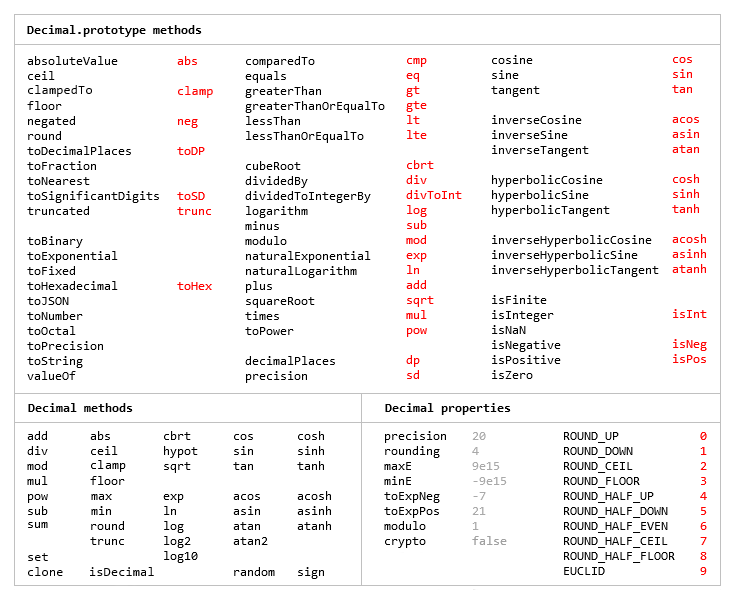
The library is similar to bignumber.js, but here precision is specified in terms of significant digits rather than decimal places, and all calculations are rounded to the precision (similar to Python's decimal module) rather than just those involving division.
This library also adds the trigonometric functions, among others, and supports non-integer powers, which makes it a significantly larger library than bignumber.js and the even smaller big.js.
For a lighter version of this library without the trigonometric functions see decimal.js-light.
Load
The library is the single JavaScript file decimal.js or ES module decimal.mjs.
Browser:
<script src='path/to/decimal.js'></script>

<script type="module">
  import Decimal from './path/to/decimal.mjs';
  ...
</script>
npm install decimal.js
const Decimal = require('decimal.js');

import Decimal from 'decimal.js';

import {Decimal} from 'decimal.js';
Use
In all examples below, semicolons and toString calls are not shown.
If a commented-out value is in quotes it means toString has been called on the preceding expression.
The library exports a single constructor function, Decimal, which expects a single argument that is a number, string or Decimal instance.
x = new Decimal(123.4567)
y = new Decimal('123456.7e-3')
z = new Decimal(x)
x.equals(y) && y.equals(z) && x.equals(z)        // true
If using values with more than a few digits, it is recommended to pass strings rather than numbers to avoid a potential loss of precision.
// Precision loss from using numeric literals with more than 15 significant digits.
new Decimal(1.0000000000000001)         // '1'
new Decimal(88259496234518.57)          // '88259496234518.56'
new Decimal(99999999999999999999)       // '100000000000000000000'

// Precision loss from using numeric literals outside the range of Number values.
new Decimal(2e+308)                     // 'Infinity'
new Decimal(1e-324)                     // '0'

// Precision loss from the unexpected result of arithmetic with Number values.
new Decimal(0.7 + 0.1)                  // '0.7999999999999999'
As with JavaScript numbers, strings can contain underscores as separators to improve readability.
x = new Decimal('2_147_483_647')
String values in binary, hexadecimal or octal notation are also accepted if the appropriate prefix is included.
x = new Decimal('0xff.f')            // '255.9375'
y = new Decimal('0b10101100')        // '172'
z = x.plus(y)                        // '427.9375'

z.toBinary()                         // '0b110101011.1111'
z.toBinary(13)                       // '0b1.101010111111p+8'

// Using binary exponential notation to create a Decimal with the value of `Number.MAX_VALUE`.
x = new Decimal('0b1.1111111111111111111111111111111111111111111111111111p+1023')
// '1.7976931348623157081e+308'
Decimal instances are immutable in the sense that they are not changed by their methods.
0.3 - 0.1                     // 0.19999999999999998
x = new Decimal(0.3)
x.minus(0.1)                  // '0.2'
x                             // '0.3'
The methods that return a Decimal can be chained.
x.dividedBy(y).plus(z).times(9).floor()
x.times('1.23456780123456789e+9').plus(9876.5432321).dividedBy('4444562598.111772').ceil()
Many method names have a shorter alias.
x.squareRoot().dividedBy(y).toPower(3).equals(x.sqrt().div(y).pow(3))     // true
x.comparedTo(y.modulo(z).negated() === x.cmp(y.mod(z).neg())              // true
Most of the methods of JavaScript's Number.prototype and Math objects are replicated.
x = new Decimal(255.5)
x.toExponential(5)                       // '2.55500e+2'
x.toFixed(5)                             // '255.50000'
x.toPrecision(5)                         // '255.50'

Decimal.sqrt('6.98372465832e+9823')      // '8.3568682281821340204e+4911'
Decimal.pow(2, 0.0979843)                // '1.0702770511687781839'

// Using `toFixed()` to avoid exponential notation:
x = new Decimal('0.0000001')
x.toString()                             // '1e-7'
x.toFixed()                              // '0.0000001'
And there are isNaN and isFinite methods, as NaN and Infinity are valid Decimal values.
x = new Decimal(NaN)                                           // 'NaN'
y = new Decimal(Infinity)                                      // 'Infinity'
x.isNaN() && !y.isNaN() && !x.isFinite() && !y.isFinite()      // true
There is also a toFraction method with an optional maximum denominator argument.
z = new Decimal(355)
pi = z.dividedBy(113)        // '3.1415929204'
pi.toFraction()              // [ '7853982301', '2500000000' ]
pi.toFraction(1000)          // [ '355', '113' ]
All calculations are rounded according to the number of significant digits and rounding mode specified
by the precision and rounding properties of the Decimal constructor.
For advanced usage, multiple Decimal constructors can be created, each with their own independent configuration which applies to all Decimal numbers created from it.
// Set the precision and rounding of the default Decimal constructor
Decimal.set({ precision: 5, rounding: 4 })

// Create another Decimal constructor, optionally passing in a configuration object
Dec = Decimal.clone({ precision: 9, rounding: 1 })

x = new Decimal(5)
y = new Dec(5)

x.div(3)                           // '1.6667'
y.div(3)                           // '1.66666666'
The value of a Decimal is stored in a floating point format in terms of its digits, exponent and sign, but these properties should be considered read-only.
x = new Decimal(-12345.67);
x.d                            // [ 12345, 6700000 ]    digits (base 10000000)
x.e                            // 4                     exponent (base 10)
x.s                            // -1                    sign
For further information see the API reference in the doc directory.
Test
To run the tests using Node.js from the root directory:
npm test
Each separate test module can also be executed individually, for example:
node test/modules/toFraction
To run the tests in a browser, open test/test.html.
Minify
Two minification examples:
Using uglify-js to minify the decimal.js file:
npm install uglify-js -g
uglifyjs decimal.js --source-map url=decimal.min.js.map -c -m -o decimal.min.js
Using terser to minify the ES module version, decimal.mjs:
npm install terser -g
terser decimal.mjs --source-map url=decimal.min.mjs.map -c -m --toplevel -o decimal.min.mjs
import Decimal from './decimal.min.mjs';