富文本编辑器选型:核心引擎与成品封装
draft-js 是 Facebook 开源的 React 富文本编辑器核心框架,提供了底层的状态管理和渲染机制。react-draft-wysiwyg 则是基于 draft-js 构建的成品组件库,封装了工具栏、样式和常用功能。两者并非直接的竞争关系,而是“底层引擎”与“上层封装”的关系。选择 draft-js 意味着你需要自己搭建编辑器界面;选择 react-draft-wysiwyg 则意味着你直接使用一套现成的界面方案。
npm下载趋势
GitHub Stars 排名
统计详情


富文本编辑器架构:核心引擎 vs 成品封装
在 React 生态中构建富文本编辑器时,draft-js 和 react-draft-wysiwyg 是两个经常同时出现的名字。但很多开发者容易混淆它们的定位。简单来说,draft-js 是发动机,而 react-draft-wysiwyg 是组装好的整车。理解这一层关系,对于架构选型至关重要。
🏗️ 核心定位:底层框架 vs UI 封装
draft-js 是一个核心框架。
- 它只负责管理编辑器状态(EditorState)和内容模型(ContentState)。
- 它不提供现成的工具栏、按钮或样式,你需要自己写。
- 适合需要完全控制编辑器行为的场景。
// draft-js: 需要手动搭建编辑器结构
import { Editor, EditorState } from 'draft-js';

function MyEditor() {
  const [editorState, setEditorState] = useState(
    EditorState.createEmpty()
  );

  return (
    <div className="editor-container">
      {/* 你需要自己写工具栏 */}
      <div className="toolbar">/* 自定义按钮 */</div>
      {/* 核心编辑器区域 */}
      <Editor
        editorState={editorState}
        onChange={setEditorState}
      />
    </div>
  );
}
react-draft-wysiwyg 是一个封装组件。
- 它基于
draft-js开发,内置了工具栏、链接弹窗、图片上传等 UI。 - 你只需要配置参数,不需要写底层渲染逻辑。
- 适合追求开发效率、需要标准功能的场景。
// react-draft-wysiwyg: 直接使用封装好的组件
import { Editor } from 'react-draft-wysiwyg';

function MyEditor() {
  const [editorState, setEditorState] = useState(
    EditorState.createEmpty()
  );

  return (
    <Editor
      editorState={editorState}
      onEditorStateChange={setEditorState}
      toolbar={{ /* 配置工具栏选项 */ }}
      wrapperClassName="demo-wrapper"
      editorClassName="demo-editor"
    />
  );
}
🎨 工具栏定制:从零构建 vs 配置选项
draft-js 要求你手动实现所有交互。
- 点击加粗按钮时,你需要调用
RichUtils.toggleInlineStyle。 - 你需要自己管理按钮的激活状态(active state)。
- 灵活性最高,但代码量最大。
// draft-js: 手动处理样式切换
const handleToggle = (style) => {
  onChange(
    RichUtils.toggleInlineStyle(editorState, style)
  );
};

<button
  onClick={() => handleToggle('BOLD')}
  className={editorState.getCurrentInlineStyle().has('BOLD') ? 'active' : ''}
>
  B
</button>
react-draft-wysiwyg 通过配置对象控制工具栏。
- 你只需要声明需要哪些按钮(如 bold, italic, link)。
- 激活状态和交互逻辑由库内部处理。
- 灵活性受限,但开发速度极快。
// react-draft-wysiwyg: 配置化工具栏
<Editor
  editorState={editorState}
  onEditorStateChange={setEditorState}
  toolbar={{
    inline: { inDropdown: false },
    options: ['inline', 'blockType', 'list'],
    inline: { options: ['BOLD', 'ITALIC', 'UNDERLINE'] }
  }}
/>
📦 内容状态管理: Immutable 数据流
两者都依赖 draft-js 的核心数据模型,所以在数据处理上是相同的。
- 都使用
ContentState来存储文本内容。 - 都依赖
Immutable.js数据结构(这是draft-js的特点)。 - 导出 HTML 或 JSON 时,都需要使用转换工具。
// 两者通用:导出 HTML 内容
import { convertToHTML } from 'draft-convert';
import { ContentState } from 'draft-js';

const contentState = editorState.getCurrentContent();
const html = convertToHTML(contentState);
// 结果:'<p>Hello <strong>World</strong></p>'
// 两者通用:从 HTML 导入内容
import { convertFromHTML } from 'draft-convert';
import { ContentState, EditorState } from 'draft-js';

const blocksFromHTML = convertFromHTML(htmlContent);
const state = ContentState.createFromBlockArray(
  blocksFromHTML.contentBlocks,
  blocksFromHTML.entityMap
);
const editorState = EditorState.createWithContent(state);
⚠️ 维护状态与生态风险
这是架构决策中最需要警惕的部分。
draft-js 处于维护模式。
- Facebook 官方已不再积极开发新功能。
- 社区普遍认为它是“遗留技术”,虽然稳定但缺乏新特性。
- 如果开始新项目,建议评估 Slate.js 或 TipTap 等现代替代方案。
// 风险提示:draft-js 依赖 Immutable.js
// 这增加了包体积,且 API 学习曲线较陡
import { Map, List } from 'immutable';
// 现代编辑器多已转向普通 JavaScript 对象
react-draft-wysiwyg 依赖上游状态。
- 它的更新速度受限于
draft-js的架构。 - 如果遇到底层 Bug,修复周期可能较长。
- 适合维护现有项目,新项目需慎重考虑长期维护成本。
// 风险提示:封装库可能滞后于 React 新版本
// 例如 React 18 的并发特性可能未完全适配
import { Editor } from 'react-draft-wysiwyg';
// 需测试在 StrictMode 下的行为
🤝 相似之处:共同的技术底座
尽管一个是核心一个是封装,它们共享许多底层特性。
1. 🧱 基于 Block 的内容模型
- 都将内容视为块(Block)的集合。
- 段落、列表、图片都是不同类型的 Block。
// 两者通用:获取当前块类型
const selection = editorState.getSelection();
const currentBlock = contentState.getBlockForKey(selection.getStartKey());
const type = currentBlock.getType(); // 例如 'unordered-list-item'
2. 🔌 插件扩展机制
- 都支持通过插件系统扩展功能。
draft-js有draft-js-plugins生态。react-draft-wysiwyg继承了这个能力。
// 两者通用:使用插件创建编辑器状态
import createImagePlugin from 'draft-js-image-plugin';
const imagePlugin = createImagePlugin();
const editorState = EditorState.createEmpty(pluginsDecorator);
3. 📝 自定义渲染器
- 都允许自定义块组件的渲染方式。
- 可以通过
blockRendererFn控制特定块的 UI。
// 两者通用:自定义块渲染
function blockRendererFn(contentBlock) {
  if (contentBlock.getType() === 'atomic') {
    return {
      component: MyAtomicComponent,
      editable: false,
    };
  }
}
📊 总结:核心差异对比
| 特性 | draft-js | react-draft-wysiwyg |
|---|---|---|
| 定位 | 🧠 核心引擎框架 | 📦 成品 UI 组件库 |
| 工具栏 | 🛠️ 需完全手写实现 | ⚙️ 配置化生成 |
| 开发成本 | 📈 高(需处理底层逻辑) | 📉 低(开箱即用) |
| 定制能力 | 🚀 无限定制 | 🔒 受限于封装逻辑 |
| 依赖关系 | 💠 无依赖(核心) | 🔗 依赖 draft-js |
| 维护状态 | ⚠️ 维护模式(更新慢) | ⚠️ 跟随上游(更新慢) |
💡 架构师建议
draft-js 像是一套精密的机械零件 🧩——适合那些需要自己组装引擎、对性能和控制力有极致要求的团队。但你要清楚,这套零件的设计图纸已经几年没有大更新了。
react-draft-wysiwyg 像是一辆组装好的家用车 🚗——适合需要立刻上路、功能标准且不需要改装引擎的团队。它能帮你省下几个月的开发时间,但你要接受它的配置限制。
最终建议:如果是维护旧项目,两者配合依然稳定可靠。如果是全新项目,建议认真评估 Slate.js 或 TipTap。它们提供了更现代的 API 设计(不依赖 Immutable.js),社区活跃度更高,更适合未来 3-5 年的技术演进。但如果必须在二者中选,追求效率选封装,追求控制选核心。
如何选择: draft-js vs react-draft-wysiwyg
- draft-js:
选择
draft-js如果你的团队需要完全定制编辑器界面,或者现有的封装无法满足特定的业务交互需求。它适合有足够开发资源去维护底层逻辑的大型项目,但要注意其生态更新较慢,适合需要深度控制渲染行为的场景。 - react-draft-wysiwyg:
选择
react-draft-wysiwyg如果你需要快速上线一个标准的富文本编辑器,且不需要深度定制工具栏逻辑。它适合中小型项目或后台管理系统,能大幅减少样板代码,但需接受其依赖draft-js的技术限制及维护现状。
热门对比
draft-js的README

Draft.js


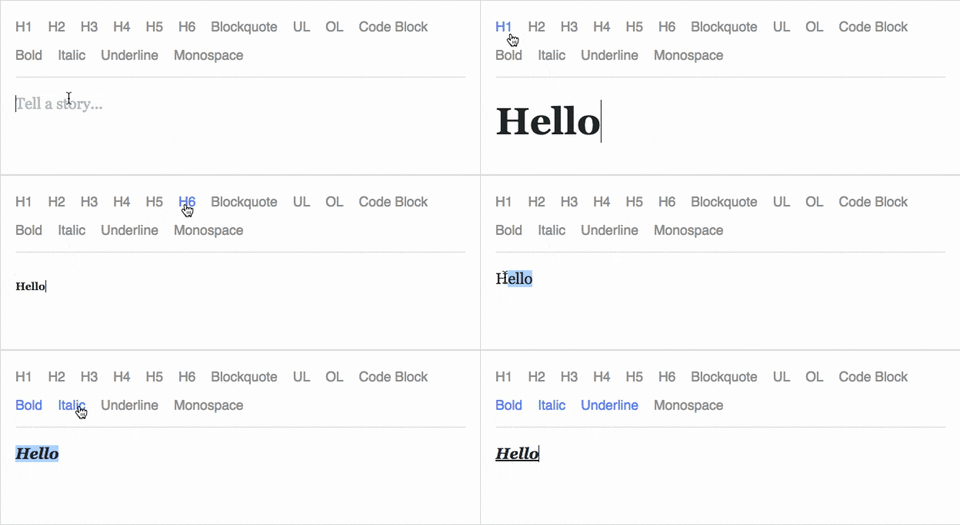
Draft.js is a JavaScript rich text editor framework, built for React and backed by an immutable model.
- Extensible and Customizable: We provide the building blocks to enable the creation of a broad variety of rich text composition experiences, from basic text styles to embedded media.
- Declarative Rich Text: Draft.js fits seamlessly into React applications, abstracting away the details of rendering, selection, and input behavior with a familiar declarative API.
- Immutable Editor State: The Draft.js model is built with immutable-js, offering an API with functional state updates and aggressively leveraging data persistence for scalable memory usage.
Learn how to use Draft.js in your own project.
API Notice
Before getting started, please be aware that we recently changed the API of
Entity storage in Draft. The latest version, v0.10.0, supports both the old
and new API. Following that up will be v0.11.0 which will remove the old API.
If you are interested in helping out, or tracking the progress, please follow
issue 839.
Getting Started
npm install --save draft-js react react-dom

or

yarn add draft-js react react-dom
Draft.js depends on React and React DOM which must also be installed.
Using Draft.js
import React from 'react';
import ReactDOM from 'react-dom';
import {Editor, EditorState} from 'draft-js';

class MyEditor extends React.Component {
  constructor(props) {
    super(props);
    this.state = {editorState: EditorState.createEmpty()};
    this.onChange = (editorState) => this.setState({editorState});
    this.setEditor = (editor) => {
      this.editor = editor;
    };
    this.focusEditor = () => {
      if (this.editor) {
        this.editor.focus();
      }
    };
  }

  componentDidMount() {
    this.focusEditor();
  }

  render() {
    return (
      <div style={styles.editor} onClick={this.focusEditor}>
        <Editor
          ref={this.setEditor}
          editorState={this.state.editorState}
          onChange={this.onChange}
        />
      </div>
    );
  }
}

const styles = {
  editor: {
    border: '1px solid gray',
    minHeight: '6em'
  }
};

ReactDOM.render(
  <MyEditor />,
  document.getElementById('container')
);
Since the release of React 16.8, you can use Hooks as a way to work with EditorState without using a class.
import React from 'react';
import ReactDOM from 'react-dom';
import {Editor, EditorState} from 'draft-js';

function MyEditor() {
  const [editorState, setEditorState] = React.useState(
    EditorState.createEmpty()
  );

  const editor = React.useRef(null);

  function focusEditor() {
    editor.current.focus();
  }

  React.useEffect(() => {
    focusEditor()
  }, []);

  return (
    <div onClick={focusEditor}>
      <Editor
        ref={editor}
        editorState={editorState}
        onChange={editorState => setEditorState(editorState)}
      />
    </div>
  );
}
Note that the editor itself is only as tall as its contents. In order to give users a visual cue, we recommend setting a border and a minimum height via the .DraftEditor-root CSS selector, or using a wrapper div like in the above example.
Because Draft.js supports unicode, you must have the following meta tag in the <head> </head> block of your HTML file:
<meta charset="utf-8" />
Further examples of how Draft.js can be used are provided below.
Examples
Visit http://draftjs.org/ to try out a basic rich editor example.
The repository includes a variety of different editor examples to demonstrate some of the features offered by the framework.
To run the examples, first build Draft.js locally. The Draft.js build is tested with Yarn v1 only. If you're using any other package manager and something doesn't work, try using yarn v1:
git clone https://github.com/facebook/draft-js.git
cd draft-js
yarn install
yarn run build
then open the example HTML files in your browser.
Draft.js is used in production on Facebook, including status and comment inputs, Notes, and messenger.com.
Browser Support
 IE / Edge |  Firefox |  Chrome |  Safari |  iOS Safari | Chrome for Android |
|---|---|---|---|---|---|
| IE11, Edge [1, 2] | last 2 versions | last 2 versions | last 2 versions | not fully supported [3] | not fully supported [3] |
[1] May need a shim or a polyfill for some syntax used in Draft.js (docs).
[2] IME inputs have known issues in these browsers, especially Korean (docs).
[3] There are known issues with mobile browsers, especially on Android (docs).
Resources and Ecosystem
Check out this curated list of articles and open-sourced projects/utilities: Awesome Draft-JS.
Discussion and Support
Join our Slack team!
Contribute
We actively welcome pull requests. Learn how to contribute.
License
Draft.js is MIT licensed.
Examples provided in this repository and in the documentation are separately licensed.