React 与 Next.js 中的 URL 查询状态管理方案对比
next-usequerystate、query-string 和 use-query-params 都用于处理 Web 应用中的 URL 查询参数,但它们的定位完全不同。query-string 是一个底层的工具库,专注于解析和序列化查询字符串,不依赖 React。use-query-params 是一个 React Hook 库,通常与 React Router 配合使用,用于在组件中同步状态与 URL。next-usequerystate 则是专门为 Next.js 设计的 Hook,深度集成了 App Router 和 Pages Router 的特性,支持服务端组件和类型安全。选择哪个库取决于你的技术栈是通用 React、React Router 还是 Next.js。
npm下载趋势
GitHub Stars 排名
统计详情


React 与 Next.js 中的 URL 查询状态管理方案对比
在构建现代 Web 应用时,URL 查询参数不仅是书签和分享的基础,更是管理应用状态的重要渠道。next-usequerystate、query-string 和 use-query-params 都试图解决这一问题,但它们的抽象层次和适用场景截然不同。本文将从核心机制、框架集成、类型安全和服务端渲染四个维度,深入对比这三个方案。
⚙️ 核心机制:工具函数 vs React Hook
这三个库的根本区别在于它们是否感知 React 生命周期。
query-string 是纯工具库。
- 它只提供
parse和stringify函数。 - 它不管理状态,也不监听 URL 变化。
- 你需要手动结合
window.location或路由库使用。
// query-string: 手动解析和生成
import queryString from 'query-string';

const parsed = queryString.parse(location.search);
const newUrl = queryString.stringify({ ...parsed, page: 2 });
window.history.pushState({}, '', `?${newUrl}`);
use-query-params 是 React Hook。
- 它封装了状态同步逻辑,自动监听 URL 变化。
- 提供
useQueryParamshook 来读取和更新参数。 - 需要配合路由库(如 React Router)的历史对象。
// use-query-params: Hook 自动同步
import { useQueryParams, NumberParam } from 'use-query-params';

function Page() {
  const [query, setQuery] = useQueryParams({
    page: NumberParam
  });
  return <button onClick={() => setQuery({ page: query.page + 1 })}>Next</button>;
}
next-usequerystate 是 Next.js 专用 Hook。
- 它针对 Next.js 的路由器进行了优化。
- 提供
useQueryStatehook,支持批量更新和浅路由。 - 内部处理了 Next.js 特有的导航行为。
// next-usequerystate: Next.js 深度集成
import { useQueryState, parseAsInteger } from 'next-usequerystate';

function Page() {
  const [page, setPage] = useQueryState('page', parseAsInteger.withDefault(1));
  return <button onClick={() => setPage(prev => prev + 1)}>Next</button>;
}
🔄 框架集成:Next.js App Router 支持
在 Next.js 生态中,框架集成度决定了开发体验的流畅性。
query-string 无框架感知。
- 在 Next.js 中使用它,你需要手动处理
useRouter或searchParams。 - 在服务端组件中,它只能用于解析传入的
searchParams对象。 - 缺乏对 Next.js 导航 API 的自动适配。
// query-string in Next.js: 手动适配
import { useRouter } from 'next/navigation';
import queryString from 'query-string';

export default function Component({ searchParams }) {
  const router = useRouter();
  const update = (newParams) => {
    const q = queryString.stringify({ ...searchParams, ...newParams });
    router.push(`?${q}`);
  };
  return <button onClick={() => update({ page: 2 })}>Go</button>;
}
use-query-params 需要适配器。
- 它主要设计用于 React Router,在 Next.js 中需要配置适配器。
- 在 App Router 中,由于服务器组件的限制,配置较为复杂。
- 社区支持不如 Next.js 专用库活跃。
// use-query-params in Next.js: 需要配置适配器
import { QueryParamProvider } from 'use-query-params';
import { ReactRouter6Adapter } from 'use-query-params/adapters/react-router-6';

// 需要包裹路由提供者,在 Next.js App Router 中可能不兼容
<QueryParamProvider adapter={ReactRouter6Adapter}>
  <App />
</QueryParamProvider>
next-usequerystate 原生支持 App Router。
- 专为 Next.js 13+ 设计,兼容客户端和服务端组件。
- 自动处理
pushState和replaceState的区别。 - 无需额外配置,安装即可使用。
// next-usequerystate: 原生支持
import { useQueryState } from 'next-usequerystate';

export default function Page() {
  // 直接在组件中使用,无需包裹 Provider
  const [filter, setFilter] = useQueryState('filter');
  return <input onChange={e => setFilter(e.target.value)} />;
}
🛡️ 类型安全与数据编码
URL 参数本质是字符串,但业务逻辑需要数字、布尔值或数组。
query-string 返回原始字符串。
- 解析结果全是
string或string[]。 - 你需要手动转换类型(如
parseInt)。 - 容易出错,缺乏编译时检查。
// query-string: 手动类型转换
const params = queryString.parse(location.search);
const page = parseInt(params.page, 10); // 可能为 NaN
use-query-params 提供解码器。
- 内置
NumberParam、BooleanParam等解码器。 - 支持自定义解码器处理复杂对象。
- 提供 TypeScript 类型推导,但配置稍显繁琐。
// use-query-params: 内置解码器
const [query] = useQueryParams({
  count: NumberParam,
  tags: ArrayParam
});
// query.count 是 number 类型
next-usequerystate 强类型优先。
- 提供
parseAsInteger、parseAsBoolean等预定义解析器。 - 支持
.withDefault()设置默认值,消除undefined。 - 类型推导非常精准,减少运行时错误。
// next-usequerystate: 强类型解析器
const [count, setCount] = useQueryState(
  'count',
  parseAsInteger.withDefault(0)
);
// count 永远是 number,不会是 undefined
🌐 服务端渲染与服务器组件
Next.js App Router 引入了服务器组件(RSC),这对 URL 管理提出了新要求。
query-string 可在服务端运行。
- 它是纯函数,可以在服务器组件中直接调用。
- 用于解析
searchParamsprop。 - 但无法管理客户端状态同步。
// query-string: 服务端解析
export default async function Page({ searchParams }) {
  const parsed = queryString.parse(searchParams.toString());
  return <div>{parsed.id}</div>;
}
use-query-params 主要面向客户端。
- Hook 只能在客户端组件中使用。
- 在服务端获取初始状态需要额外逻辑。
- 在 RSC 架构下优势不明显。
// use-query-params: 客户端优先
'use client';
export default function Page() {
  // 只能在客户端组件中使用
  const [query] = useQueryParams({ ... });
}
next-usequerystate 兼顾服务端与客户端。
- 提供
parseAs...工具可在服务端复用相同的解析逻辑。 - 确保服务端渲染和客户端 hydration 的数据格式一致。
- 减少水合不匹配(Hydration Mismatch)的风险。
// next-usequerystate: 服务端逻辑复用
import { parseAsInteger } from 'next-usequerystate';

export default async function Page({ searchParams }) {
  // 服务端使用相同的解析器
  const page = parseAsInteger.parse(searchParams.page);
  return <ClientComponent initialPage={page} />;
}
📊 总结对比表
| 特性 | next-usequerystate | query-string | use-query-params |
|---|---|---|---|
| 定位 | Next.js 专用 Hook | 底层工具函数 | 通用 React Hook |
| 框架支持 | ⭐⭐⭐⭐⭐ Next.js 原生 | ⭐⭐⭐ 无框架依赖 | ⭐⭐⭐⭐ React Router 为主 |
| 类型安全 | ⭐⭐⭐⭐⭐ 强类型解析器 | ⭐ 原始字符串 | ⭐⭐⭐⭐ 解码器支持 |
| 服务端组件 | ⭐⭐⭐⭐⭐ 逻辑复用 | ⭐⭐⭐⭐ 可解析 | ⭐⭐ 客户端为主 |
| 上手难度 | 低(约定优于配置) | 中(需手动集成) | 中(需配置适配器) |
| 适用场景 | Next.js 全栈应用 | 工具库/自定义逻辑 | 通用 React SPA |
💡 最终建议
选择哪个库取决于你的项目架构和长期维护计划。
next-usequerystate 是 Next.js 项目的最佳选择 — 特别是当你使用 App Router 时。它减少了样板代码,提供了最好的类型安全,并且能平滑处理服务端与客户端的边界。如果你的技术栈锁定在 Next.js,不要犹豫,选它。
query-string 适合构建底层基础设施 — 比如你想自己写一个 Hook,或者在 Node.js 脚本中处理 URL。它非常稳定,几乎没有学习成本,但需要你自己处理状态同步的逻辑。
use-query-params 适合通用 React 应用 — 如果你没有使用 Next.js,而是用 Vite + React Router 构建 SPA,它是一个成熟的方案。但在 Next.js 环境中,它的优势不如专用库明显。
核心原则:不要为了通用性而牺牲开发体验。在 Next.js 生态中,使用专为它设计的工具通常能减少很多隐藏的坑 — 比如水合错误或路由行为不一致。
如何选择: next-usequerystate vs query-string vs use-query-params
- next-usequerystate:
如果你的项目基于 Next.js(尤其是 App Router),这是首选方案。它专门针对 Next.js 的路由行为优化,支持服务端组件读取参数,并提供类型安全的编码器。它能避免手动处理浅路由的复杂性,让 URL 状态管理像本地状态一样简单。
- query-string:
如果你只需要在 Node.js 或 React 中解析和生成查询字符串,而不需要自动同步状态,选它最合适。它是一个零依赖的工具函数库,非常稳定,适合自定义 Hook 的底层实现或非 React 环境。当你需要完全控制 URL 更新逻辑时,它是最好的基础构建块。
- use-query-params:
如果你的项目使用 React Router 或者是不依赖 Next.js 的通用 React 应用,这个库很合适。它提供了丰富的 Hook 和解码器,能轻松将复杂对象同步到 URL。但在 Next.js App Router 中,它的集成度不如
next-usequerystate,可能需要额外的适配工作。
热门对比
next-usequerystate的README
useQueryState for Next.js




useQueryState hook for Next.js - Like React.useState, but stored in the URL query string
Features
- 🔀 Supports both the
appandpagesrouters - 🧘♀️ Simple: the URL is the source of truth
- 🕰 Replace history or append to use the Back button to navigate state updates
- ⚡️ Built-in parsers for common state types (integer, float, boolean, Date, and more)
- ♊️ Related querystrings with
useQueryStates - 📡 Shallow mode by default for URL query updates, opt-in to notify server components
- 🗃 new: Server cache for type-safe searchParams access in nested server components
- ⌛️ new: Support for
useTransitionto get loading states on server updates
Installation
pnpm add nuqs
yarn add nuqs
npm install nuqs
Note: the package is moving to a new name:
nuqs:tada:The 1.x versions will also be available under
next-usequerystate, but 2.x onwards will only be published undernuqs.
Which version should I use?
| Next.js version range | Supported nuqs / next-usequerystate version |
|---|---|
| >=14.0.4 | nuqs@latest |
| 14.0.3 | nuqs@latest, with the windowHistorySupport experimental flag, see #417 |
| 14.0.2 | Not compatible, see issue #388 and Next.js PR #58297 |
| >= 13.1 && <= 14.0.1 | nuqs@latest |
| < 13.1 | next-usequerystate@1.7.3 |
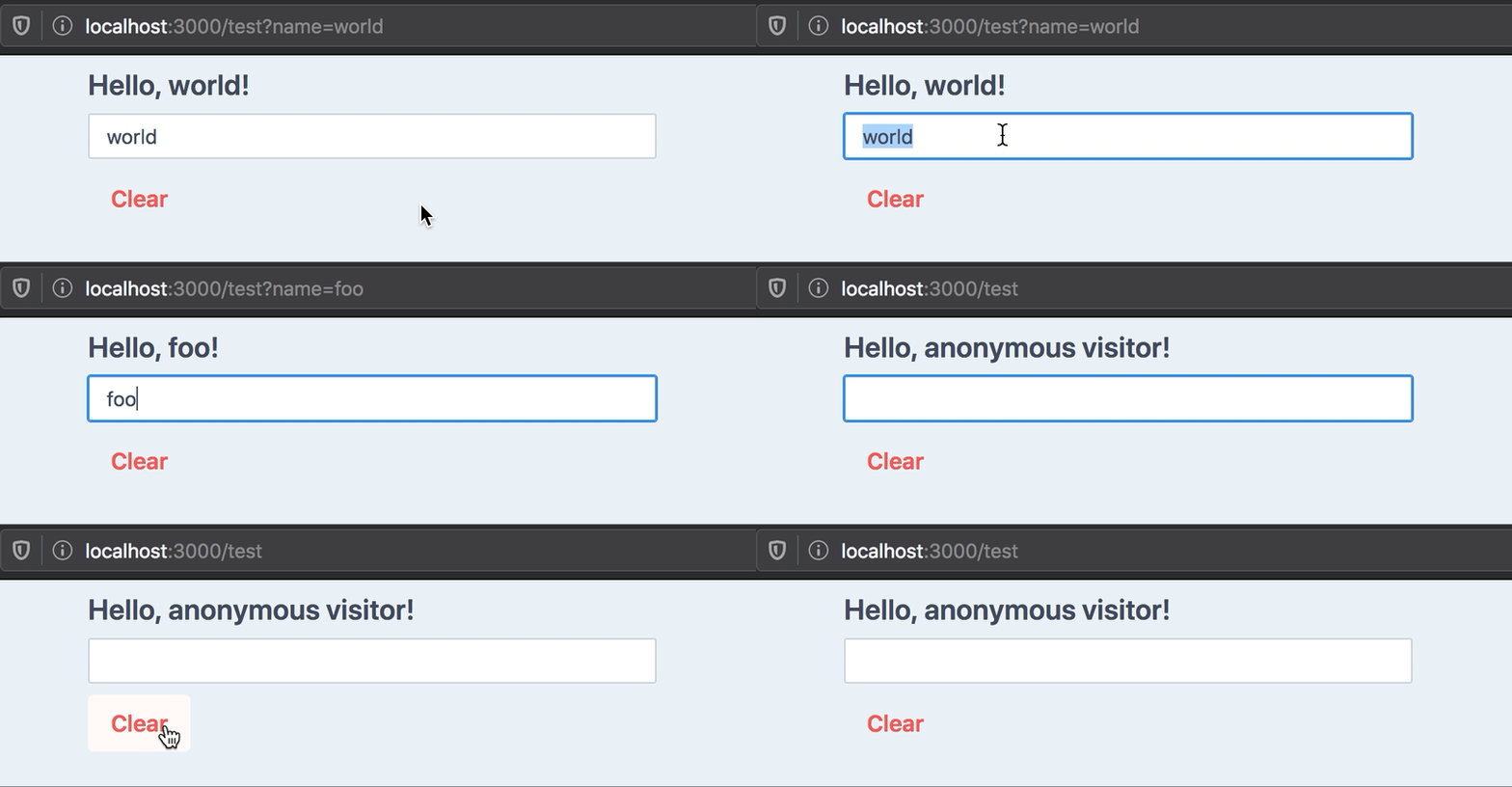
Usage
'use client' // app router: only works in client components

import { useQueryState } from 'nuqs'

export default () => {
  const [name, setName] = useQueryState('name')
  return (
    <>
      <h1>Hello, {name || 'anonymous visitor'}!</h1>
      <input value={name || ''} onChange={e => setName(e.target.value)} />
      <button onClick={() => setName(null)}>Clear</button>
    </>
  )
}
Documentation
useQueryState takes one required argument: the key to use in the query string.
Like React.useState, it returns an array with the value present in the query
string as a string (or null if none was found), and a state updater function.
Example outputs for our hello world example:
| URL | name value | Notes |
|---|---|---|
/ | null | No name key in URL |
/?name= | '' | Empty string |
/?name=foo | 'foo' | |
/?name=2 | '2' | Always returns a string by default, see Parsing below |
Parsing
If your state type is not a string, you must pass a parsing function in the second argument object.
We provide parsers for common and more advanced object types:
import {
  parseAsString,
  parseAsInteger,
  parseAsFloat,
  parseAsBoolean,
  parseAsTimestamp,
  parseAsIsoDateTime,
  parseAsArrayOf,
  parseAsJson,
  parseAsStringEnum,
  parseAsStringLiteral,
  parseAsNumberLiteral
} from 'nuqs'

useQueryState('tag') // defaults to string
useQueryState('count', parseAsInteger)
useQueryState('brightness', parseAsFloat)
useQueryState('darkMode', parseAsBoolean)
useQueryState('after', parseAsTimestamp) // state is a Date
useQueryState('date', parseAsIsoDateTime) // state is a Date
useQueryState('array', parseAsArrayOf(parseAsInteger)) // state is number[]
useQueryState('json', parseAsJson<Point>()) // state is a Point

// Enums (string-based only)
enum Direction {
  up = 'UP',
  down = 'DOWN',
  left = 'LEFT',
  right = 'RIGHT'
}

const [direction, setDirection] = useQueryState(
  'direction',
  parseAsStringEnum<Direction>(Object.values(Direction)) // pass a list of allowed values
    .withDefault(Direction.up)
)

// Literals (string-based only)
const colors = ['red', 'green', 'blue'] as const

const [color, setColor] = useQueryState(
  'color',
  parseAsStringLiteral(colors) // pass a readonly list of allowed values
    .withDefault('red')
)

// Literals (number-based only)
const diceSides = [1, 2, 3, 4, 5, 6] as const

const [side, setSide] = useQueryState(
  'side',
  parseAsNumberLiteral(diceSides) // pass a readonly list of allowed values
    .withDefault(4)
)
You may pass a custom set of parse and serialize functions:
import { useQueryState } from 'nuqs'

export default () => {
  const [hex, setHex] = useQueryState('hex', {
    // TypeScript will automatically infer it's a number
    // based on what `parse` returns.
    parse: (query: string) => parseInt(query, 16),
    serialize: value => value.toString(16)
  })
}
Using parsers in Server Components
Note: see the Accessing searchParams in server components section for a more user-friendly way to achieve type-safety.
If you wish to parse the searchParams in server components, you'll need to
import the parsers from nuqs/server, which doesn't include
the "use client" directive.
You can then use the parseServerSide method:
import { parseAsInteger } from 'nuqs/server'

type PageProps = {
  searchParams: {
    counter?: string | string[]
  }
}

const counterParser = parseAsInteger.withDefault(1)

export default function ServerPage({ searchParams }: PageProps) {
  const counter = counterParser.parseServerSide(searchParams.counter)
  console.log('Server side counter: %d', counter)
  return (
    ...
  )
}
See the server-side parsing demo for a live example showing how to reuse parser configurations between client and server code.
Note: parsers don't validate your data. If you expect positive integers or JSON-encoded objects of a particular shape, you'll need to feed the result of the parser to a schema validation library, like Zod.
Default value
When the query string is not present in the URL, the default behaviour is to
return null as state.
It can make state updating and UI rendering tedious. Take this example of a simple counter stored in the URL:
import { useQueryState, parseAsInteger } from 'nuqs'

export default () => {
  const [count, setCount] = useQueryState('count', parseAsInteger)
  return (
    <>
      <pre>count: {count}</pre>
      <button onClick={() => setCount(0)}>Reset</button>
      {/* handling null values in setCount is annoying: */}
      <button onClick={() => setCount(c => c ?? 0 + 1)}>+</button>
      <button onClick={() => setCount(c => c ?? 0 - 1)}>-</button>
      <button onClick={() => setCount(null)}>Clear</button>
    </>
  )
}
You can specify a default value to be returned in this case:
const [count, setCount] = useQueryState('count', parseAsInteger.withDefault(0))

const increment = () => setCount(c => c + 1) // c will never be null
const decrement = () => setCount(c => c - 1) // c will never be null
const clearCount = () => setCount(null) // Remove query from the URL
Note: the default value is internal to React, it will not be written to the URL.
Setting the state to null will remove the key in the query string and set the
state to the default value.
Options
History
By default, state updates are done by replacing the current history entry with the updated query when state changes.
You can see this as a sort of git squash, where all state-changing
operations are merged into a single history value.
You can also opt-in to push a new history item for each state change, per key, which will let you use the Back button to navigate state updates:
// Default: replace current history with new state
useQueryState('foo', { history: 'replace' })

// Append state changes to history:
useQueryState('foo', { history: 'push' })
Any other value for the history option will fallback to the default.
You can also override the history mode when calling the state updater function:
const [query, setQuery] = useQueryState('q', { history: 'push' })

// This overrides the hook declaration setting:
setQuery(null, { history: 'replace' })
Shallow
By default, query state updates are done in a client-first manner: there are no network calls to the server.
This is equivalent to the shallow option of the Next.js pages router set to true,
or going through the experimental windowHistorySupport
flag in the app router.
To opt-in to query updates notifying the server (to re-run getServerSideProps
in the pages router and re-render Server Components on the app router),
you can set shallow to false:
const [state, setState] = useQueryState('foo', { shallow: false })

// You can also pass the option on calls to setState:
setState('bar', { shallow: false })
Scroll
The Next.js router scrolls to the top of the page on navigation updates, which may not be desirable when updating the query string with local state.
Query state updates won't scroll to the top of the page by default, but you can opt-in to this behaviour (which was the default up to 1.8.0):
const [state, setState] = useQueryState('foo', { scroll: true })

// You can also pass the option on calls to setState:
setState('bar', { scroll: true })
Throttling URL updates
Because of browsers rate-limiting the History API, internal updates to the URL are queued and throttled to a default of 50ms, which seems to satisfy most browsers even when sending high-frequency query updates, like binding to a text input or a slider.
Safari's rate limits are much higher and would require a throttle of around 340ms. If you end up needing a longer time between updates, you can specify it in the options:
useQueryState('foo', {
  // Send updates to the server maximum once every second
  shallow: false,
  throttleMs: 1000
})

// You can also pass the option on calls to setState:
setState('bar', { throttleMs: 1000 })
Note: the state returned by the hook is always updated instantly, to keep UI responsive. Only changes to the URL, and server requests when using
shallow: false, are throttled.
If multiple hooks set different throttle values on the same event loop tick, the highest value will be used. Also, values lower than 50ms will be ignored, to avoid rate-limiting issues. Read more.
Transitions
When combined with shallow: false, you can use the useTransition hook to get
loading states while the server is re-rendering server components with the
updated URL.
Pass in the startTransition function from useTransition to the options
to enable this behaviour (this will set shallow: false automatically for you):
'use client'

import React from 'react'
import { useQueryState, parseAsString } from 'nuqs'

function ClientComponent({ data }) {
  // 1. Provide your own useTransition hook:
  const [isLoading, startTransition] = React.useTransition()
  const [query, setQuery] = useQueryState(
    'query',
    // 2. Pass the `startTransition` as an option:
    parseAsString().withOptions({ startTransition })
  )
  // 3. `isLoading` will be true while the server is re-rendering
  // and streaming RSC payloads, when the query is updated via `setQuery`.

  // Indicate loading state
  if (isLoading) return <div>Loading...</div>

  // Normal rendering with data
  return <div>{/*...*/}</div>
}
Configuring parsers, default value & options
You can use a builder pattern to facilitate specifying all of those things:
useQueryState(
  'counter',
  parseAsInteger.withDefault(0).withOptions({
    history: 'push',
    shallow: false
  })
)
You can get this pattern for your custom parsers too, and compose them with others:
import { createParser, parseAsHex } from 'nuqs'

// Wrapping your parser/serializer in `createParser`
// gives it access to the builder pattern & server-side
// parsing capabilities:
const hexColorSchema = createParser({
  parse(query) {
    if (query.length !== 6) {
      return null // always return null for invalid inputs
    }
    return {
      // When composing other parsers, they may return null too.
      r: parseAsHex.parse(query.slice(0, 2)) ?? 0x00,
      g: parseAsHex.parse(query.slice(2, 4)) ?? 0x00,
      b: parseAsHex.parse(query.slice(4)) ?? 0x00
    }
  },
  serialize({ r, g, b }) {
    return (
      parseAsHex.serialize(r) +
      parseAsHex.serialize(g) +
      parseAsHex.serialize(b)
    )
  }
})
  // Eg: set common options directly
  .withOptions({ history: 'push' })

// Or on usage:
useQueryState(
  'tribute',
  hexColorSchema.withDefault({
    r: 0x66,
    g: 0x33,
    b: 0x99
  })
)
Note: see this example running in the hex-colors demo.
Multiple Queries (batching)
You can call as many state update function as needed in a single event loop tick, and they will be applied to the URL asynchronously:
const MultipleQueriesDemo = () => {
  const [lat, setLat] = useQueryState('lat', parseAsFloat)
  const [lng, setLng] = useQueryState('lng', parseAsFloat)
  const randomCoordinates = React.useCallback(() => {
    setLat(Math.random() * 180 - 90)
    setLng(Math.random() * 360 - 180)
  }, [])
}
If you wish to know when the URL has been updated, and what it contains, you can await the Promise returned by the state updater function, which gives you the updated URLSearchParameters object:
const randomCoordinates = React.useCallback(() => {
  setLat(42)
  return setLng(12)
}, [])

randomCoordinates().then((search: URLSearchParams) => {
  search.get('lat') // 42
  search.get('lng') // 12, has been queued and batch-updated
})
Implementation details (Promise caching)
The returned Promise is cached until the next flush to the URL occurs, so all calls to a setState (of any hook) in the same event loop tick will return the same Promise reference.
Due to throttling of calls to the Web History API, the Promise may be cached for several ticks. Batched updates will be merged and flushed once to the URL. This means not every setState will reflect to the URL, if another one comes overriding it before flush occurs.
The returned React state will reflect all set values instantly, to keep UI responsive.
useQueryStates
For query keys that should always move together, you can use useQueryStates
with an object containing each key's type:
import { useQueryStates, parseAsFloat } from 'nuqs'

const [coordinates, setCoordinates] = useQueryStates(
  {
    lat: parseAsFloat.withDefault(45.18),
    lng: parseAsFloat.withDefault(5.72)
  },
  {
    history: 'push'
  }
)

const { lat, lng } = coordinates

// Set all (or a subset of) the keys in one go:
const search = await setCoordinates({
  lat: Math.random() * 180 - 90,
  lng: Math.random() * 360 - 180
})
Accessing searchParams in Server Components
If you wish to access the searchParams in a deeply nested Server Component
(ie: not in the Page component), you can use createSearchParamsCache
to do so in a type-safe manner.
Note: parsers don't validate your data. If you expect positive integers or JSON-encoded objects of a particular shape, you'll need to feed the result of the parser to a schema validation library, like Zod.
// searchParams.ts
import {
  createSearchParamsCache,
  parseAsInteger,
  parseAsString
} from 'nuqs/server'
// Note: import from 'nuqs/server' to avoid the "use client" directive

export const searchParamsCache = createSearchParamsCache({
  // List your search param keys and associated parsers here:
  q: parseAsString.withDefault(''),
  maxResults: parseAsInteger.withDefault(10)
})

// page.tsx
import { searchParamsCache } from './searchParams'

export default function Page({
  searchParams
}: {
  searchParams: Record<string, string | string[] | undefined>
}) {
  // ⚠️ Don't forget to call `parse` here.
  // You can access type-safe values from the returned object:
  const { q: query } = searchParamsCache.parse(searchParams)
  return (
    <div>
      <h1>Search Results for {query}</h1>
      <Results />
    </div>
  )
}

function Results() {
  // Access type-safe search params in children server components:
  const maxResults = searchParamsCache.get('maxResults')
  return <span>Showing up to {maxResults} results</span>
}
The cache will only be valid for the current page render
(see React's cache function).
Note: the cache only works for server components, but you may share your
parser declaration with useQueryStates for type-safety in client components:
// searchParams.ts
import { parseAsFloat, createSearchParamsCache } from 'nuqs/server'

export const coordinatesParsers = {
  lat: parseAsFloat.withDefault(45.18),
  lng: parseAsFloat.withDefault(5.72)
}
export const coordinatesCache = createSearchParamsCache(coordinatesParsers)

// page.tsx
import { coordinatesCache } from './searchParams'
import { Server } from './server'
import { Client } from './client'

export default function Page({ searchParams }) {
  coordinatesCache.parse(searchParams)
  return (
    <>
      <Server />
      <Suspense>
        <Client />
      </Suspense>
    </>
  )
}

// server.tsx
import { coordinatesCache } from './searchParams'

export function Server() {
  const { lat, lng } = coordinatesCache.all()
  // or access keys individually:
  const lat = coordinatesCache.get('lat')
  const lng = coordinatesCache.get('lng')
  return (
    <span>
      Latitude: {lat} - Longitude: {lng}
    </span>
  )
}

// client.tsx
// prettier-ignore
;'use client'

import { useQueryStates } from 'nuqs'
import { coordinatesParsers } from './searchParams'

export function Client() {
  const [{ lat, lng }, setCoordinates] = useQueryStates(coordinatesParsers)
  // ...
}
Serializer helper
To populate <Link> components with state values, you can use the createSerializer
helper.
Pass it an object describing your search params, and it will give you a function to call with values, that generates a query string serialized as the hooks would do.
Example:
import {
  createSerializer,
  parseAsInteger,
  parseAsIsoDateTime,
  parseAsString,
  parseAsStringLiteral
} from 'nuqs/server'

const searchParams = {
  search: parseAsString,
  limit: parseAsInteger,
  from: parseAsIsoDateTime,
  to: parseAsIsoDateTime,
  sortBy: parseAsStringLiteral(['asc', 'desc'] as const)
}

// Create a serializer function by passing the description of the search params to accept
const serialize = createSerializer(searchParams)

// Then later, pass it some values (a subset) and render them to a query string
serialize({
  search: 'foo bar',
  limit: 10,
  from: new Date('2024-01-01'),
  // here, we omit `to`, which won't be added
  sortBy: null // null values are also not rendered
})
// ?search=foo+bar&limit=10&from=2024-01-01T00:00:00.000Z
Base parameter
The returned serialize function can take a base parameter over which to
append/amend the search params:
serialize('/path?baz=qux', { foo: 'bar' }) // /path?baz=qux&foo=bar

const search = new URLSearchParams('?baz=qux')
serialize(search, { foo: 'bar' }) // ?baz=qux&foo=bar

const url = new URL('https://example.com/path?baz=qux')
serialize(url, { foo: 'bar' }) // https://example.com/path?baz=qux&foo=bar

// Passing null removes existing values
serialize('?remove=me', { foo: 'bar', remove: null }) // ?foo=bar
Parser type inference
To access the underlying type returned by a parser, you can use the
inferParserType type helper:
import { parseAsInteger, type inferParserType } from 'nuqs' // or 'nuqs/server'

const intNullable = parseAsInteger
const intNonNull = parseAsInteger.withDefault(0)

inferParserType<typeof intNullable> // number | null
inferParserType<typeof intNonNull> // number
For an object describing parsers (that you'd pass to createSearchParamsCache
or to useQueryStates, inferParserType will
return the type of the object with the parsers replaced by their inferred types:
import { parseAsBoolean, parseAsInteger, type inferParserType } from 'nuqs' // or 'nuqs/server'

const parsers = {
  a: parseAsInteger,
  b: parseAsBoolean.withDefault(false)
}

inferParserType<typeof parsers>
// { a: number | null, b: boolean }
Testing
Currently, the best way to test the behaviour of your components using
useQueryState(s) is end-to-end testing, with tools like Playwright or Cypress.
Running components that use the Next.js router in isolation requires mocking it, which is being worked on for the app router.
See issue #259 for more testing-related discussions.
Debugging
You can enable debug logs in the browser by setting the debug item in localStorage
to nuqs, and reload the page.
// In your devtools:
localStorage.setItem('debug', 'nuqs')
Note: unlike the
debugpackage, this will not work with wildcards, but you can combine it:localStorage.setItem('debug', '*,nuqs')
Log lines will be prefixed with [nuqs] for useQueryState and [nuq+] for
useQueryStates, along with other internal debug logs.
User timings markers are also recorded, for advanced performance analysis using your browser's devtools.
Providing debug logs when opening an issue is always appreciated. 🙏
Caveats
Because the Next.js pages router is not available in an SSR context, this
hook will always return null (or the default value if supplied) on SSR/SSG.
This limitation doesn't apply to the app router.
SEO
If your page uses query strings for local-only state, you should add a canonical URL to your page, to tell SEO crawlers to ignore the query string and index the page without it.
In the app router, this is done via the metadata object:
import type { Metadata } from 'next'

export const metadata: Metadata = {
  alternates: {
    canonical: '/url/path/without/querystring'
  }
}
If however the query string is defining what content the page is displaying
(eg: YouTube's watch URLs, like https://www.youtube.com/watch?v=dQw4w9WgXcQ),
your canonical URL should contain relevant query strings, and you can still
use useQueryState to read it:
// page.tsx
import type { Metadata, ResolvingMetadata } from 'next'
import { useQueryState } from 'nuqs'
import { parseAsString } from 'nuqs/server'

type Props = {
  searchParams: { [key: string]: string | string[] | undefined }
}

export async function generateMetadata({
  searchParams
}: Props): Promise<Metadata> {
  const videoId = parseAsString.parseServerSide(searchParams.v)
  return {
    alternates: {
      canonical: `/watch?v=${videoId}`
    }
  }
}
Lossy serialization
If your serializer loses precision or doesn't accurately represent the underlying state value, you will lose this precision when reloading the page or restoring state from the URL (eg: on navigation).
Example:
const geoCoordParser = {
  parse: parseFloat,
  serialize: v => v.toFixed(4) // Loses precision
}

const [lat, setLat] = useQueryState('lat', geoCoordParser)
Here, setting a latitude of 1.23456789 will render a URL query string
of lat=1.2345, while the internal lat state will be correctly
set to 1.23456789.
Upon reloading the page, the state will be incorrectly set to 1.2345.
License
Made with ❤️ by François Best
Using this package at work ? Sponsor me to help with support and maintenance.