React 拖拽库架构选型:交互模式与底层机制深度对比
react-beautiful-dnd、react-dnd 和 react-sortable-hoc 都是 React 生态中用于实现拖拽交互的流行库,但它们的设计哲学和适用场景截然不同。react-beautiful-dnd 专为垂直或水平列表排序设计,提供开箱即用的精美动画和严格的无障碍访问支持,但限制了自由拖拽的能力。react-dnd 是一个底层的、高度可定制的框架,基于 HTML5 拖拽 API(也可切换后端),适合构建复杂的看板、文件树或非标准拖拽场景。react-sortable-hoc 曾是基于高阶组件(HOC)的简单排序方案,但目前已停止维护,不再推荐用于新项目。
npm下载趋势
GitHub Stars 排名
统计详情


React 拖拽库深度对比:react-beautiful-dnd vs react-dnd vs react-sortable-hoc
在 React 应用中实现拖拽功能时,开发者常面临一个抉择:是选择开箱即用的解决方案,还是拥抱高度灵活的底层框架?react-beautiful-dnd、react-dnd 和 react-sortable-hoc 代表了三种不同的设计思路。本文将深入剖析它们的技术实现、API 风格及适用场景,帮助你做出正确的架构决策。
🏗️ 核心架构与设计哲学
react-beautiful-dnd 采用"约定优于配置"的理念。它假设你的拖拽场景主要是列表内的物品排序或列表间的移动。库内部处理了所有的物理计算、动画插值和无障碍逻辑,你只需要关注数据状态的变化。
// react-beautiful-dnd: 声明式列表排序
import { DragDropContext, Droppable, Draggable } from 'react-beautiful-dnd';

function MyList({ items, onDragEnd }) {
  return (
    <DragDropContext onDragEnd={onDragEnd}>
      <Droppable droppableId="list">
        {(provided) => (
          <div ref={provided.innerRef} {...provided.droppableProps}>
            {items.map((item, index) => (
              <Draggable key={item.id} draggableId={item.id} index={index}>
                {(provided) => (
                  <div
                    ref={provided.innerRef}
                    {...provided.draggableProps}
                    {...provided.dragHandleProps}
                  >
                    {item.content}
                  </div>
                )}
              </Draggable>
            ))}
            {provided.placeholder}
          </div>
        )}
      </Droppable>
    </DragDropContext>
  );
}
react-dnd 则是一个"底层框架"。它不预设任何 UI 结构,而是通过"后端(Backend)"抽象拖拽源(如 HTML5、触摸设备),并允许你完全自定义拖拽层的外观和行为。它适合需要非标准交互的场景。
// react-dnd: 自定义拖拽源与放置目标
import { useDrag, useDrop } from 'react-dnd';

function DraggableItem({ id, type }) {
  const [{ isDragging }, drag] = useDrag(() => ({
    type,
    item: { id },
    collect: (monitor) => ({
      isDragging: monitor.isDragging(),
    }),
  }));

  return (
    <div ref={drag} style={{ opacity: isDragging ? 0.5 : 1 }}>
      Drag me
    </div>
  );
}

function DropZone({ onDrop }) {
  const [{ isOver }, drop] = useDrop(() => ({
    accept: 'ITEM',
    drop: (item) => onDrop(item),
    collect: (monitor) => ({
      isOver: monitor.isOver(),
    }),
  }));

  return (
    <div ref={drop} style={{ background: isOver ? 'lightblue' : 'white' }}>
      Drop here
    </div>
  );
}
react-sortable-hoc 基于高阶组件(HOC)模式,通过 sortableContainer 和 sortableElement 包裹组件来注入拖拽能力。这种模式在 Hooks 流行前很常见,但现在已被视为过时。
// react-sortable-hoc: HOC 模式 (已弃用)
import { sortableContainer, sortableElement, sortableHandle } from 'react-sortable-hoc';

const DragHandle = sortableHandle(() => <span>:::</span>);

const SortableItem = sortableElement(({ value }) => (
  <li>
    <DragHandle />
    {value}
  </li>
));

const SortableList = sortableContainer(({ items }) => (
  <ul>{items.map((value, index) => <SortableItem key={`item-${index}`} index={index} value={value} />)}</ul>
));

// 使用时需包裹 <SortableList items={data} onSortEnd={handleSortEnd} />
🎨 视觉反馈与动画机制
react-beautiful-dnd 的最大亮点是其自动处理的动画。当用户拖拽物品时,库会自动计算其他物品的位移,并应用平滑的 CSS 变换。你无需编写任何动画代码。
// react-beautiful-dnd: 自动动画占位符
// 库自动插入 provided.placeholder 来占据空间并推动其他元素
<Droppable droppableId="list">
  {(provided) => (
    <div ref={provided.innerRef} {...provided.droppableProps}>
      {/* 拖拽项 */}
      {provided.placeholder} {/* 关键:自动处理布局推移 */}
    </div>
  )}
</Droppable>
react-dnd 默认不提供任何动画。你需要手动监听 isDragging 或 isOver 状态,并自行编写 CSS 或样式逻辑来实现视觉反馈。这给了你完全的控制权,但也增加了工作量。
// react-dnd: 手动管理视觉状态
const [{ isDragging }, drag] = useDrag(() => ({
  type: 'BOX',
  item: { id },
  collect: (monitor) => ({
    isDragging: monitor.isDragging(),
  }),
}));

// 开发者必须手动应用样式
return (
  <div
    ref={drag}
    style={{
      opacity: isDragging ? 0.4 : 1,
      transform: isDragging ? 'scale(1.05)' : 'scale(1)',
      transition: 'all 0.2s',
    }}
  >
    Custom Animation
  </div>
);
react-sortable-hoc 提供基础的过渡动画,通过 transitionScale 等配置项控制,但其灵活性和流畅度不如 react-beautiful-dnd,且在复杂列表中容易出现性能瓶颈。
// react-sortable-hoc: 基础配置动画
<SortableList
  items={items}
  onSortEnd={onSortEnd}
  transitionDuration={200}
  useDragHandle={true}
/>
♿ 无障碍访问 (Accessibility)
react-beautiful-dnd 将无障碍访问作为核心特性。它自动支持键盘导航(空格键抓取、方向键移动、回车键放下),并为屏幕阅读器提供适当的 ARIA 标签。这对于企业级应用至关重要。
// react-beautiful-dnd: 内置键盘支持
// 用户无需编写额外代码,只需按空格键即可开始拖拽
<Draggable draggableId="task-1" index={0}>
  {(provided) => (
    <div
      ref={provided.innerRef}
      {...provided.draggableProps}
      {...provided.dragHandleProps} // 自动绑定键盘事件
    >
      Task 1
    </div>
  )}
</Draggable>
react-dnd 默认不支持键盘拖拽。如果你需要无障碍功能,必须自行实现键盘事件监听器,模拟拖拽行为,或者使用社区插件(如 react-dnd-keyboard),这增加了实现复杂度。
// react-dnd: 需手动实现键盘逻辑
// 伪代码示例:开发者需自行监听 onKeyDown
<div
  tabIndex={0}
  onKeyDown={(e) => {
    if (e.key === 'Enter') startDrag();
    if (e.key === 'ArrowRight') moveRight();
  }}
>
  Manual A11y
</div>
react-sortable-hoc 提供有限的键盘支持,但配置繁琐且体验不如 react-beautiful-dnd 自然。鉴于其已停止维护,其无障碍特性也不再跟进最新的 WCAG 标准。
⚠️ 维护状态与未来风险
react-beautiful-dnd 目前处于"维护模式"。Atlassian 官方宣布不再添加新功能,只修复严重 Bug。对于标准的列表排序,它依然稳定可靠,但如果你需要新特性(如虚拟滚动深度集成),可能需要寻找分支版本(如 @hello-pangea/dnd)。
react-dnd 活跃维护中。社区持续更新,支持 React 最新版本,并不断扩展后端能力(如 Touch Backend 优化)。它是构建复杂、长期项目的安全选择。
react-sortable-hoc 已正式弃用。仓库已归档,不再接受 PR 或修复。继续使用该库将带来技术债务和安全风险。新项目中绝对不应使用。
// 错误示范:不要在新项目中使用
import { sortableContainer } from 'react-sortable-hoc'; // ❌ 已弃用

// 正确替代方案
import { DragDropContext } from 'react-beautiful-dnd'; // ✅ 列表排序
// 或
import { useDrag } from 'react-dnd'; // ✅ 复杂交互
📊 核心差异总结
| 特性 | react-beautiful-dnd | react-dnd | react-sortable-hoc |
|---|---|---|---|
| 主要场景 | 列表排序、看板列移动 | 任意拖拽、自由布局、文件树 | 简单列表排序 (旧项目) |
| API 风格 | 声明式组件 (<Draggable>) | Hooks (useDrag, useDrop) | 高阶组件 (HOC) |
| 动画效果 | 开箱即用,极度流畅 | 需手动实现 | 基础支持 |
| 无障碍 (A11y) | 内置完美支持 | 需手动实现 | 有限支持 |
| 自定义程度 | 低 (受限列表模型) | 极高 (完全控制) | 中 |
| 维护状态 | 维护模式 (稳定) | 活跃维护 | 已弃用 ❌ |
💡 架构师建议
在选择拖拽库时,不要只看"能否拖拽",而要看"拖拽的边界在哪里"。
-
首选
react-beautiful-dnd:如果你的业务场景是"列表"或"看板列",且不需要奇怪的自定义交互。它的开发效率最高,用户体验最好。如果担心其停止更新,可考虑社区维护的 Fork 版本@hello-pangea/dnd,API 完全兼容。 -
首选
react-dnd:如果你正在构建一个"设计器"、"编辑器"或"复杂仪表盘",其中拖拽元素可能重叠、需要自定义 ghost 图像、或涉及非列表结构。虽然前期投入大,但后期扩展性无可替代。 -
彻底放弃
react-sortable-hoc:如果你正在启动新项目,请不要触碰它。如果是旧项目,制定迁移计划是当务之急。HOC 模式在 React 18+ 时代已显笨重,且缺乏未来保障。
最终结论:对于 80% 的标准业务需求,react-beautiful-dnd 是最佳平衡点;对于 20% 的复杂定制需求,react-dnd 是唯一选择;而 react-sortable-hoc 应仅存在于历史代码的迁移清单中。
如何选择: react-beautiful-dnd vs react-dnd vs react-sortable-hoc
- react-beautiful-dnd:
如果你的需求是标准的列表排序(如任务列表、待办事项),且希望拥有极佳的开箱体验、流畅的动画和无障碍支持,请选择
react-beautiful-dnd。它最适合那些不需要自定义拖拽逻辑、只需快速实现高质量列表交互的场景。注意:该库已停止功能更新,仅进行维护,但仍是列表排序的黄金标准。 - react-dnd:
如果你需要构建复杂的拖拽界面(如 Trello 看板、文件管理器、自由布局编辑器),或者需要完全控制拖拽的视觉表现、触发条件和底层行为,请选择
react-dnd。它学习曲线较陡,但提供了最大的灵活性和对多种拖拽后端(HTML5、触摸、测试)的支持,适合长期维护的大型应用。 - react-sortable-hoc:
不建议在任何新项目中使用
react-sortable-hoc。该库已正式弃用,不再维护,且基于过时的高阶组件(HOC)模式,与现代 React 的 Hooks 理念不符。如果你正在维护旧项目并使用此库,应计划迁移到react-beautiful-dnd(针对列表)或react-dnd(针对复杂场景)。
热门对比
react-beautiful-dnd的README
⚠️ Maintenance & support
This library continues to be relied upon heavily by Atlassian products, but we are focused on other priorities right now and have no current plans for further feature development or improvements.
It will continue to be here on GitHub and we will still make critical updates (e.g. security fixes, if any) as required, but will not be actively monitoring or replying to issues and pull requests.
We recommend that you don’t raise issues or pull requests, as they will not be reviewed or actioned until further notice.

react-beautiful-dnd (rbd)


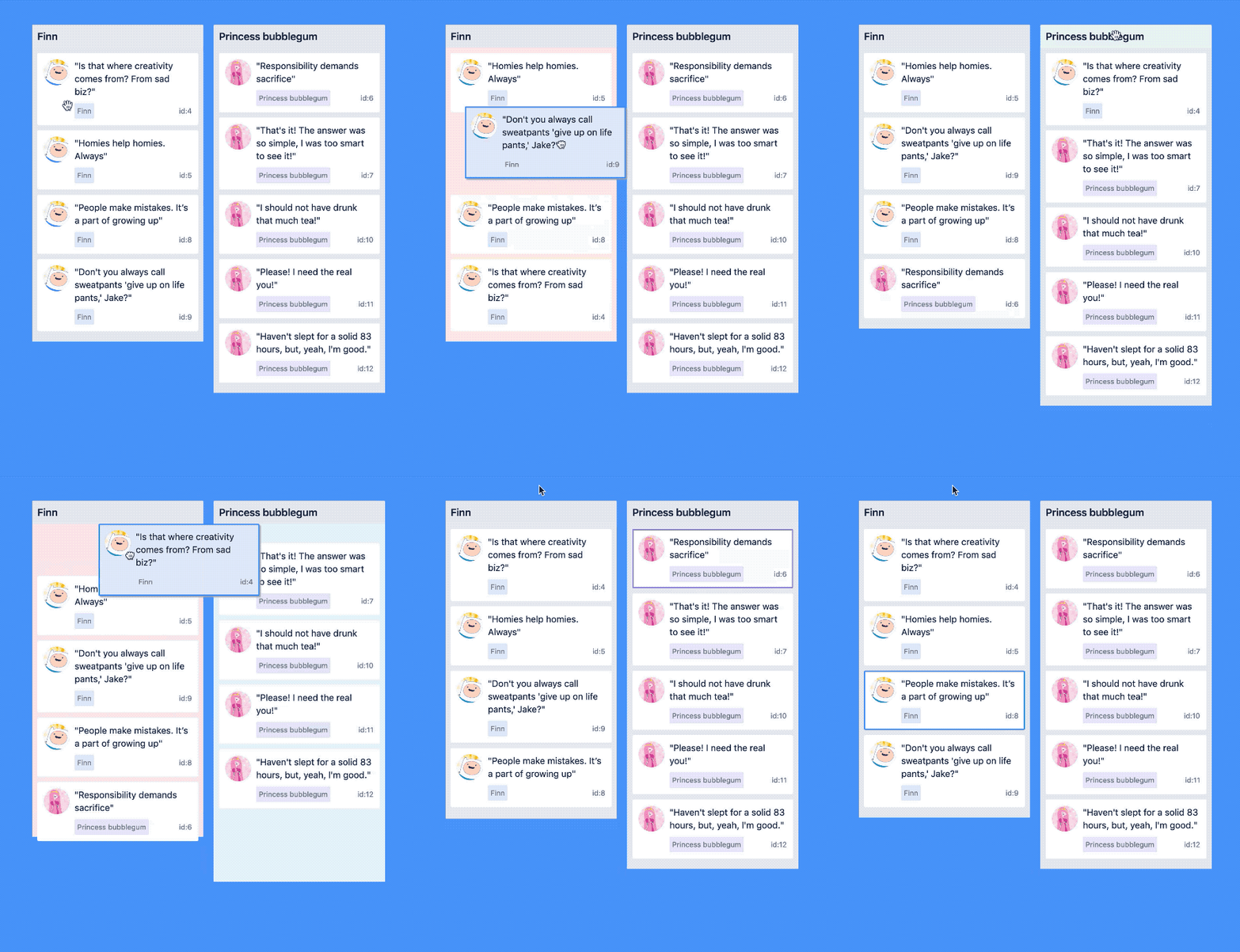
Core characteristics
- Beautiful and natural movement of items 💐
- Accessible: powerful keyboard and screen reader support ♿️
- Extremely performant 🚀
- Clean and powerful api which is simple to get started with
- Plays extremely well with standard browser interactions
- Unopinionated styling
- No creation of additional wrapper dom nodes - flexbox and focus management friendly!
Get started 👩🏫
We have created a free course on egghead.io 🥚 to help you get started with react-beautiful-dnd as quickly as possible.

Currently supported feature set ✅
- Vertical lists ↕
- Horizontal lists ↔
- Movement between lists (▤ ↔ ▤)
- Virtual list support 👾 - unlocking 10,000 items @ 60fps
- Combining items
- Mouse 🐭, keyboard 🎹♿️ and touch 👉📱 (mobile, tablet and so on) support
- Multi drag support
- Incredible screen reader support ♿️ - we provide an amazing experience for english screen readers out of the box 📦. We also provide complete customisation control and internationalisation support for those who need it 💖
- Conditional dragging and conditional dropping
- Multiple independent lists on the one page
- Flexible item sizes - the draggable items can have different heights (vertical lists) or widths (horizontal lists)
- Add and remove items during a drag
- Compatible with semantic
<table>reordering - table pattern - Auto scrolling - automatically scroll containers and the window as required during a drag (even with keyboard 🔥)
- Custom drag handles - you can drag a whole item by just a part of it
- Able to move the dragging item to another element while dragging (clone, portal) - Reparenting your
<Draggable /> - Create scripted drag and drop experiences 🎮
- Allows extensions to support for any input type you like 🕹
- 🌲 Tree support through the
@atlaskit/treepackage - A
<Droppable />list can be a scroll container (without a scrollable parent) or be the child of a scroll container (that also does not have a scrollable parent) - Independent nested lists - a list can be a child of another list, but you cannot drag items from the parent list into a child list
- Server side rendering (SSR) compatible - see resetServerContext()
- Plays well with nested interactive elements by default
Motivation 🤔
react-beautiful-dnd exists to create beautiful drag and drop for lists that anyone can use - even people who cannot see. For a good overview of the history and motivations of the project you can take a look at these external resources:
Not for everyone ✌️
There are a lot of libraries out there that allow for drag and drop interactions within React. Most notable of these is the amazing react-dnd. It does an incredible job at providing a great set of drag and drop primitives which work especially well with the wildly inconsistent html5 drag and drop feature. react-beautiful-dnd is a higher level abstraction specifically built for lists (vertical, horizontal, movement between lists, nested lists and so on). Within that subset of functionality react-beautiful-dnd offers a powerful, natural and beautiful drag and drop experience. However, it does not provide the breadth of functionality offered by react-dnd. So react-beautiful-dnd might not be for you depending on what your use case is.
Documentation 📖
About 👋
- Installation
- Examples and samples
- Get started
- Design principles
- Animations
- Accessibility
- Browser support
Sensors 🔉
The ways in which somebody can start and control a drag
- Mouse dragging 🐭
- Touch dragging 👉📱
- Keyboard dragging 🎹♿️
- Create your own sensor (allows for any input type as well as scripted experiences)
API 🏋️
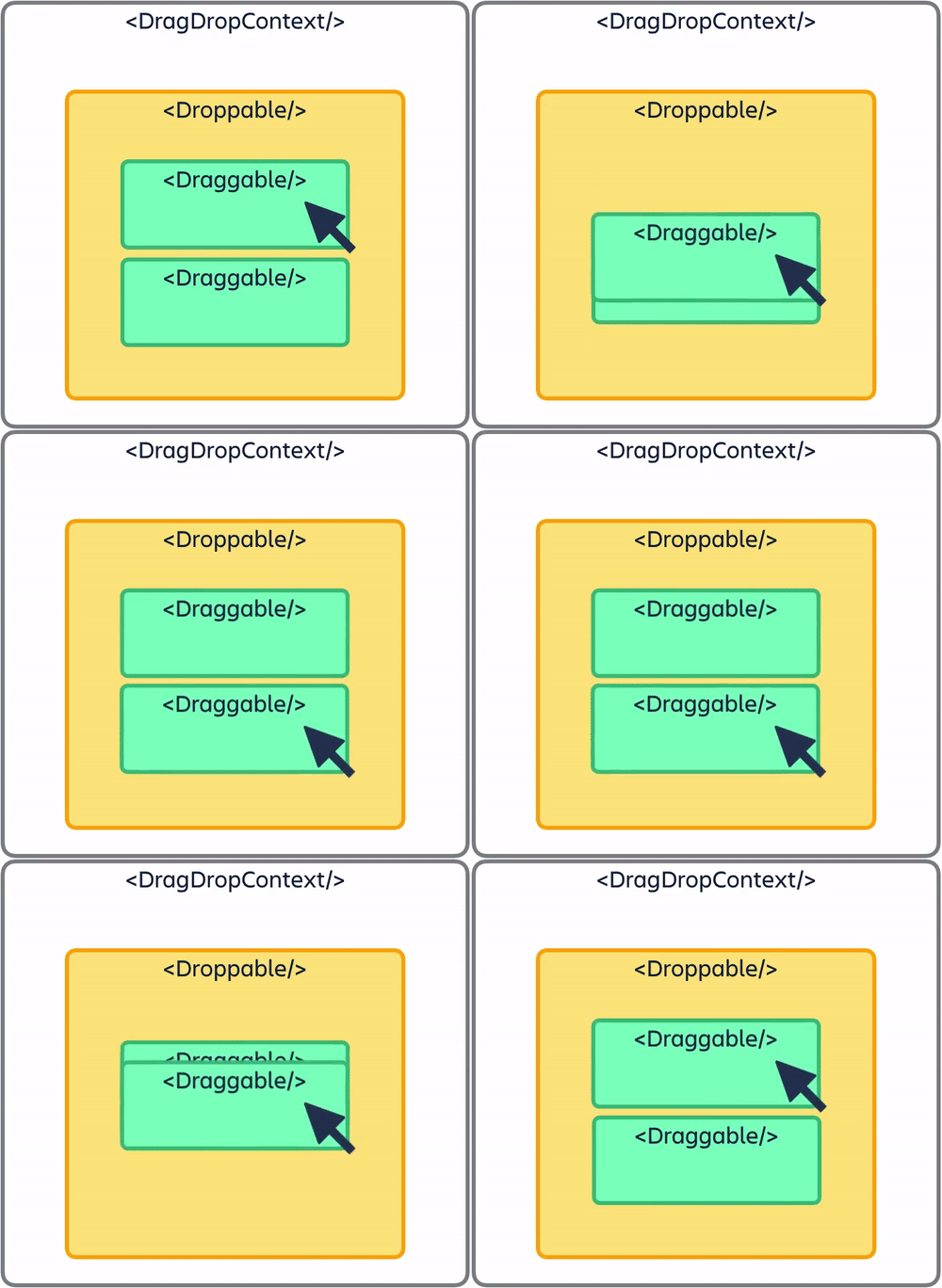
<DragDropContext />- Wraps the part of your application you want to have drag and drop enabled for<Droppable />- An area that can be dropped into. Contains<Draggable />s<Draggable />- What can be dragged aroundresetServerContext()- Utility for server side rendering (SSR)
Guides 🗺
<DragDropContext />responders -onDragStart,onDragUpdate,onDragEndandonBeforeDragStart- Combining
<Draggable />s - Common setup issues
- Using
innerRef - Setup problem detection and error recovery
- Rules for
draggableIdanddroppableIds - Browser focus retention
- Customising or skipping the drop animation
- Auto scrolling
- Controlling the screen reader
- Use the html5
doctype TypeScriptandflow: type information- Dragging
<svg>s - Avoiding image flickering
- Non-visible preset styles
- How we detect scroll containers
- How we use dom events - Useful if you need to build on top of
react-beautiful-dnd - Adding
<Draggable />s during a drag (11.x behaviour) - ⚠️ Advanced - Setting up Content Security Policy
Patterns 👷
- Virtual lists 👾
- Multi drag
- Tables
- Reparenting a
<Draggable />- Using our cloning API or your own portal
Support 👩⚕️
Read this in other languages 🌎
 한글/Korean
 На русском/Russian
 Português/Portuguese
 Ελληνικά/Greek
 日本語/Japanese
Creator ✍️
Alex Reardon @alexandereardon
Alex is no longer personally maintaning this project. The other wonderful maintainers are carrying this project forward.
Maintainers
- Daniel Del Core
- Many other @Atlassian's!
Collaborators 🤝
- Bogdan Chadkin @IAmTrySound