bundle-stats vs source-map-explorer vs webpack-bundle-analyzer
JavaScript Bundle Analysis
bundle-statssource-map-explorerwebpack-bundle-analyzerSimilar Packages:

JavaScript Bundle Analysis

JavaScript bundle analysis tools help developers understand the size and composition of their application bundles. These tools provide insights into which modules, libraries, or assets contribute the most to the overall bundle size, allowing developers to identify opportunities for optimization, such as code splitting, tree shaking, or removing unused dependencies. By analyzing bundle contents, developers can make informed decisions to improve application performance, reduce load times, and enhance the user experience. Tools like webpack-bundle-analyzer, source-map-explorer, and bundle-stats offer visualizations and detailed reports to aid in this process, each with its unique features and focus areas.

Npm Package Weekly Downloads Trend

3 Years

Github Stars Ranking

Stat Detail

Package
Downloads
Stars
Size
Issues
Publish
License
bundle-stats0670501 kB52a month agoMIT
source-map-explorer03,927352 kB57-Apache-2.0
webpack-bundle-analyzer012,6701.45 MB252 months agoMIT

Feature Comparison: bundle-stats vs source-map-explorer vs webpack-bundle-analyzer

Visualization

  • bundle-stats:

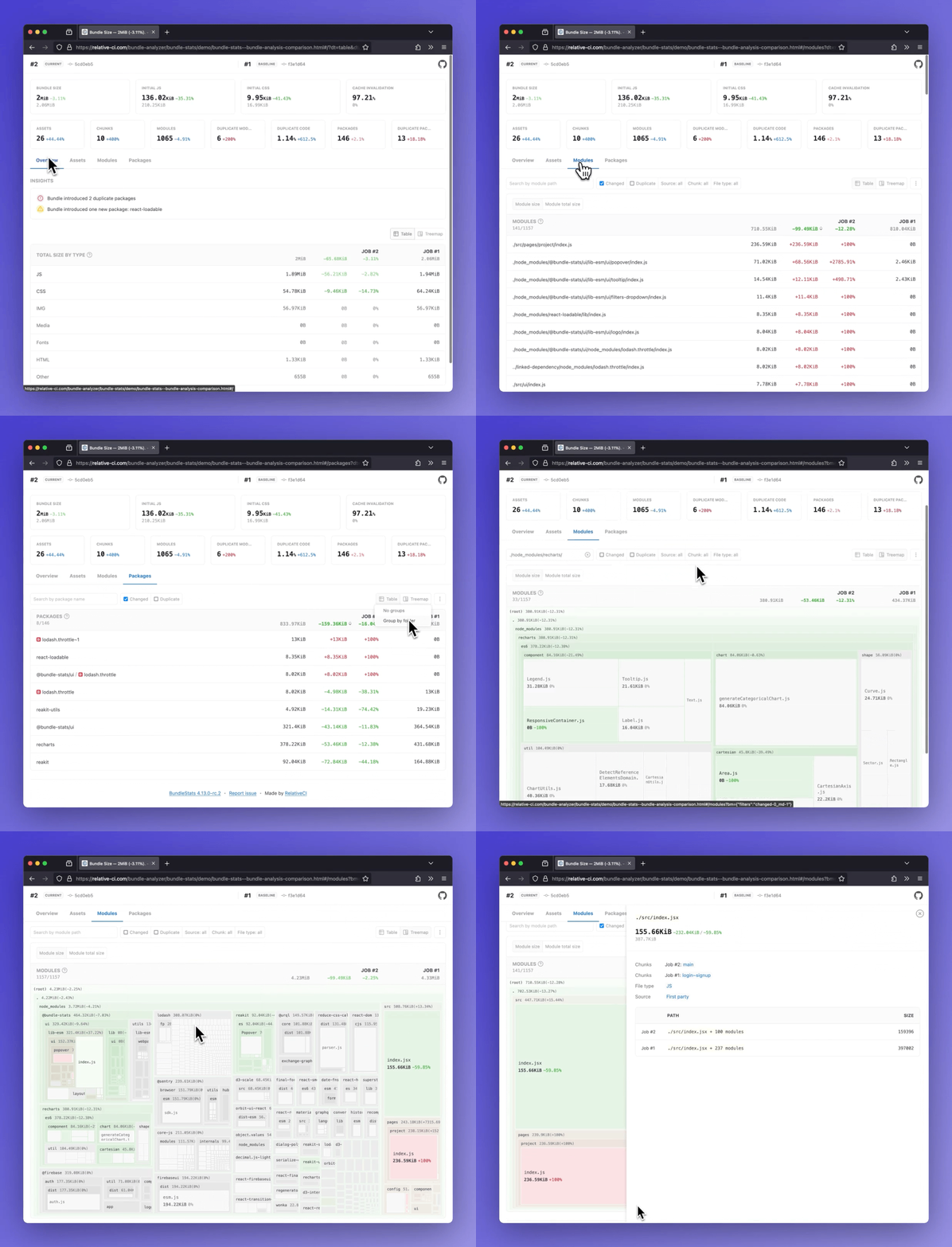
    bundle-stats provides a visual representation of your bundle sizes over time, highlighting changes and trends. It can integrate with CI tools to display stats in pull requests, making it easy to track size increases.

  • source-map-explorer:

    source-map-explorer generates a visual map of your bundle based on source maps, showing which files and lines contribute to the total size. This helps pinpoint large or unexpected contributions to the bundle.

  • webpack-bundle-analyzer:

    webpack-bundle-analyzer offers an interactive, zoomable treemap visualization of your bundle, allowing you to explore the size of each module and its dependencies. This detailed view helps identify large modules at a glance.

CI/CD Integration

  • bundle-stats:

    bundle-stats is designed with CI/CD integration in mind. It can automatically track bundle size changes and report them in your CI pipeline, helping teams catch size regressions early.

  • source-map-explorer:

    source-map-explorer can be integrated into CI/CD pipelines to analyze bundle sizes and generate reports, but it does not have built-in features for tracking changes over time.

  • webpack-bundle-analyzer:

    webpack-bundle-analyzer can be run as part of your build process, and its reports can be generated and uploaded to CI systems, but it requires additional setup to track size changes over time.

Tree Shaking Insights

  • bundle-stats:

    bundle-stats provides insights into tree shaking and dead code elimination, helping you understand how effectively your build process is removing unused code. This information can guide further optimizations.

  • source-map-explorer:

    source-map-explorer does not specifically analyze tree shaking but helps you see which parts of your code are included in the bundle, allowing you to identify areas where tree shaking may not be working as expected.

  • webpack-bundle-analyzer:

    webpack-bundle-analyzer offers some insights into tree shaking by showing the size of each module, which can help you identify large modules that may not be fully tree-shaken.

Ease of Use: Code Examples

  • bundle-stats:

    bundle-stats is easy to set up with minimal configuration. It provides clear documentation and examples for integrating with Webpack and CI/CD pipelines.

    Example Configuration:

    // webpack.config.js
    const BundleStats = require('bundle-stats-webpack-plugin');
    
    module.exports = {
      plugins: [
        new BundleStats({
          // Plugin options
        }),
      ],
    };
    
  • source-map-explorer:

    source-map-explorer is straightforward to use, especially if you already have source maps generated. Simply run it against your bundle to see the analysis.

    Example Command:

    npx source-map-explorer dist/bundle.js
    
  • webpack-bundle-analyzer:

    webpack-bundle-analyzer is user-friendly, with a simple setup process. It provides a visual interface that makes it easy to explore your bundle.

    Example Configuration:

    // webpack.config.js
    const { BundleAnalyzerPlugin } = require('webpack-bundle-analyzer');
    
    module.exports = {
      plugins: [
        new BundleAnalyzerPlugin(),
      ],
    };
    

How to Choose: bundle-stats vs source-map-explorer vs webpack-bundle-analyzer

  • bundle-stats:

    Choose bundle-stats if you want to track bundle size changes over time, integrate with CI/CD pipelines, and receive detailed reports on bundle composition, including insights on tree shaking and code splitting.

  • source-map-explorer:

    Choose source-map-explorer if you need a simple and effective tool for analyzing the size of your JavaScript files using source maps. It helps identify which parts of your code contribute most to the bundle size, making it easier to optimize.

  • webpack-bundle-analyzer:

    Choose webpack-bundle-analyzer if you want an interactive, visual representation of your bundle's contents directly in your browser. It provides detailed insights into the size of each module, helping you identify large dependencies and optimize your bundle.

README for bundle-stats

BundleStats screenshot

Demos: Bundle analysis comparison· Bundle analysis

BundleStats

Analyze bundle stats(bundle size, assets, modules, packages) and compare the results between different builds. Support for webpack/rspack and vite/rolldown/rollup using rollup-plugin-webpack-stats.

Node version GitHub action Socket CodeQL

RelativeCI

- Bundle size and totals by file type(css, js, img, etc)
- Insights: duplicate packages, new packages
- Initial JS/CSS, Cache invalidation, and other bundle metrics
- Assets report (entrypoint, initial, types, changed, delta)
- Modules report (changed, delta, chunks, duplicate count and percentage)
- Packages report (count, duplicate, changed, delta)
:star: Side by side comparison for multiple builds

Table of Contents

Install as global dependency

npm install -g bundle-stats

or

yarn global add bundle-stats

Install as dev dependency

npm install --dev bundle-stats

or

yarn add --dev bundle-stats

Output stats

The CLI expects stats files that follow the webpack stats schema. Follow the guides below to learn how to export compatible output from webpack/rspack or from vite/rollup/rolldown.

webpack/rspack stats

You can customize the contents of the generated stats file by configuring the webpack stats options:

{
  stats: {
    // required
    assets: true,
    chunks: true,
    modules: true,
    // optional
    builtAt: true,
    hash: true
  }
}

To output the the webpack stats JSON file you can use:

1. webpack-cli --json option:

npx webpack --mode production --json artifacts/webpack-stats.json

Guide & examples: How to output webpack stats using the CLI

2. using webpack-stats-plugin

Guide & examples: How to output webpack stats JSON file using webpack-stats-plugin

Learn more

vite/rollup/rolldown stats

Guide & examples: How to output stats in Vite

Learn more

Usage

$ bundle-stats -h
Usage: bundle-stats OPTIONS [WEBPACK_STATS_FILE]...

Options:
      --demo               Generate demo reports      [boolean] [default: false]
      --compare            Use local saved stats for comparison
                                                       [boolean] [default: true]
      --baseline           Save current stats as baseline
                                                      [boolean] [default: false]
      --baseline-filepath  Baseline filepath, default:
                           node_modules/.cache/bundle-stats/baseline.json
                                                                        [string]
      --html               Save HTML report            [boolean] [default: true]
      --json               Save JSON data             [boolean] [default: false]
  -d, --out-dir            Output directory                             [string]
  -h, --help               Show help                                   [boolean]
  -v, --version            Show version number                         [boolean]
$ bundle-stats --html --json __fixtures__/webpack-stats-0.json __fixtures__/webpack-stats-1.json
  ✔ Read Webpack stat files
  ✔ Read baseline data
  ↓ Write baseline data [skipped]
    → Not a baseline job (see --baseline).
  ✔ Gather data
  ✔ Generate reports
  ✔ Save reports

┌─────────────────────────────────────────────────┐
│                                                 │
│   Bundle size decreased with 3.06KB (-0.38%).   │
│                                                 │
└─────────────────────────────────────────────────┘

Artifacts saved:
- ./dist/bundle-stats.html
- ./dist/bundle-stats.json

Compare mode

In compare mode, the metrics are compared against an existing(node_modules/.cache/bundle-stats/baseline.json) Webpack stats file(baseline). To generate the baseline webpack stats, use --baseline option:

# Checkout to the branch/tag/commit where you want to generate the baseline
$ git checkout master

# Build your application
$ npm run build

# Run bundle-stats with --baseline option. This will save the baseline data on node_modules/.cache/bundle-stats/baseline.json
$ bundle-stats --baseline artifacts/webpack-stats.json
 ✔ Read Webpack stat files
 ↓ Read baseline data [skipped]
   → Missing baseline stats, see "--baseline" option.
 ✔ Write baseline data
 ✔ Process data
 ✔ Generate reports
 ✔ Save reports

┌─────────────────────────────────────────────────┐
│                                                 │
│   Bundle size decreased with 3.06KB (-0.38%).   │
│                                                 │
└─────────────────────────────────────────────────┘

Artifacts saved:
- ./dist/bundle-stats.html
# Checkout to the working branch/tag/commit
$ git checkout MY_FEATURE_BRANCH

# Build your application
$ npm run build

# Run bundle-stats - the report is going to compare the current data against the generated baseline
$ bundle-stats artifacts/webpack-stats.json
 ✔ Read Webpack stat files
 ✔ Read baseline data
 ↓ Write baseline data [skipped]
   → Not a baseline job (see --baseline).
 ✔ Process data
 ✔ Generate reports
 ✔ Save reports

┌─────────────────────────────────────────────────┐
│                                                 │
│   Bundle size decreased with 3.06KB (-0.38%).   │
│                                                 │
└─────────────────────────────────────────────────┘

Artifacts saved:
- ./dist/bundle-stats.html

The option can be disabled using --no-compare option.

Framework specific plugins

Related projects

:cyclone: relative-ci.com

Automated bundle analysis, reviews and monitoring - Quickly identify and fix bundle regressions before shipping to production.

:rocket: Get started

:first_quarter_moon: relative-ci/compare

Standalone web application to compare Webpack/Lighthouse/Browsertime stats.

Compare bundle stats

:zap: bundle-stats-action

Github Action that generates bundle-stats reports.

Other packages

bundle-stats-webpack-plugin

npm npm

Webpack plugin to generate bundle stats report for webpack/rspack.

gatsby-plugin-bundle-stats

npm npm

Gatsby plugin for bundle-stats.

next-plugin-bundle-stats

npm npm

Next.js plugin for bundle-stats.

rollup-plugin-bundle-stats

npm npm

Rollup plugin to generate bundle stats report for vite/rolldown/rollup.





