Natural Language Processing Libraries for JavaScript
compromise, franc, linguist-js, and natural are JavaScript libraries designed to handle Natural Language Processing (NLP) tasks directly in the browser or Node.js environments. natural is a comprehensive suite offering tokenization, stemming, and classification. compromise focuses on fast, lightweight text parsing and entity extraction without heavy dependencies. franc and linguist-js specialize in language detection, identifying the human language of a given text string. These tools enable developers to add text analysis, search optimization, and localization features to web applications without relying on external APIs.
Npm Package Weekly Downloads Trend
Github Stars Ranking
Stat Detail


Natural Language Processing in JavaScript: compromise vs franc vs linguist-js vs natural
Building text-aware features in JavaScript often means choosing between heavy server-side APIs or lightweight client-side libraries. The packages compromise, franc, linguist-js, and natural represent different approaches to Natural Language Processing (NLP). Some focus on understanding text structure, while others specialize in identifying the language itself. Let's compare how they handle real-world text tasks.
🔍 Core Purpose: Analysis vs Detection
natural is a general-purpose NLP framework.
- It provides tools for tokenization, stemming, and classification.
- Best for deep text analysis like sentiment or keyword extraction.
// natural: Stemming a word
const natural = require('natural');
const stemmer = natural.PorterStemmer;
console.log(stemmer.stem('running')); // 'run'
compromise is a lightweight text parser.
- It focuses on matching terms and extracting entities quickly.
- Best for simple search logic or cleaning user input.
// compromise: Extracting people's names
import compromise from 'compromise';
const doc = compromise('John went to Paris');
const people = doc.people().out('array'); // ['John']
franc is a language detector.
- It identifies the human language of a string.
- Best for routing content to the right translation service.
// franc: Detecting language
import franc from 'franc';
const lang = franc('Hallo, wie geht es dir?'); // 'deu' (German)
linguist-js is also a language detector.
- It mimics GitHub's language detection logic.
- Best for detecting code languages or specific text heuristics.
// linguist-js: Detecting language
import linguist from 'linguist-js';
linguist('console.log("hello")', (err, result) => {
  console.log(result.language); // 'JavaScript'
});
⚡ Performance and Bundle Weight
Bundle size matters significantly for frontend apps. Heavy NLP libraries can slow down initial page loads.
natural includes many algorithms by default.
- You import the whole library or specific sub-modules.
- Can be heavy for browser-only use cases.
// natural: Importing specific module to save space
const TfIdf = require('natural').TfIdf;
const tfidf = new TfIdf();
compromise is designed for the browser.
- It uses a compressed grammar model.
- Loads faster than full NLP suites.
// compromise: Chainable API for quick ops
const doc = compromise(text);
const verbs = doc.verbs().out('array');
franc is minimalistic.
- It uses trigram matching for speed.
- Very small impact on build size.
// franc: Quick check with minimum length
const lang = franc('Hello', { minLength: 3 });
linguist-js is heavier than franc.
- It loads more heuristics to match GitHub's accuracy.
- Better for accuracy, worse for speed.
// linguist-js: Async detection
await linguist('import React from react');
🛠️ Feature Depth: Stemming, Tagging, and Detection
Different tasks require different levels of linguistic understanding.
Tokenization and Stemming
natural supports standard algorithms.
- Use Porter or Lancaster stemmers out of the box.
- Good for search indexing.
// natural: Tokenizing and stemming
const tokenizer = new natural.WordTokenizer();
const tokens = tokenizer.tokenize('running runs ran');
const stemmed = tokens.map(t => stemmer.stem(t));
compromise handles terms differently.
- It keeps words in context rather than stripping suffixes.
- Better for preserving meaning in short phrases.
// compromise: Normalizing terms
const doc = compromise('running runs ran');
const normalized = doc.normalize().out('string');
franc does not stem or tokenize.
- It only returns an ISO 639-3 language code.
- Use it before passing text to other tools.
// franc: Language code only
const code = franc('Bonjour'); // 'fra'
linguist-js does not stem or tokenize.
- It focuses on language identity.
- Returns language name and type.
// linguist-js: Language metadata
// Returns { language: 'French', type: 'prose' }
🌐 Real-World Scenarios
Scenario 1: Search Bar Autocomplete
You need to match user input against a database of products, handling plurals and typos.
- ✅ Best choice:
natural - Why? Stemming helps match "run" with "running".
// natural: Search indexing
tfidf.addDocument('this document is about running');
tfidf.addDocument('this document is about runs');
tfidf.tfidf('run', 0); // Matches both documents
Scenario 2: User Input Validation
You have a contact form and need to ensure users write in English.
- ✅ Best choice:
franc - Why? Fast detection prevents spam in wrong languages.
// franc: Validate input
if (franc(inputText) !== 'eng') {
  throw new Error('Please write in English');
}
Scenario 3: Chatbot Intent Parsing
You need to extract names and locations from simple chat messages.
- ✅ Best choice:
compromise - Why? Entity extraction is built-in and lightweight.
// compromise: Extract entities
const doc = compromise('Book a flight to London for John');
const locations = doc.places().out('array'); // ['London']
Scenario 4: Code Snippet Detection
You are building a documentation site and need to tag code blocks.
- ✅ Best choice:
linguist-js - Why? It detects programming languages accurately.
// linguist-js: Detect code
linguist('def hello(): print("hi")', (err, res) => {
  console.log(res.language); // 'Python'
});
⚠️ Maintenance and Compatibility
Library stability is crucial for long-term projects.
natural is mature but has had periods of low activity.
- It works well in Node.js.
- Browser support requires bundler configuration.
// natural: Node.js focus
// May require polyfills for browser usage
compromise is actively maintained.
- Regular updates for grammar rules.
- Strong TypeScript support.
// compromise: Modern ES modules
import compromise from 'compromise';
franc is stable and minimal.
- Rarely changes because the algorithm is fixed.
- Safe for production.
// franc: Stable API
import franc from 'franc';
linguist-js depends on GitHub's data.
- Updates when Linguist updates.
- Can be slower to adapt to new languages.
// linguist-js: Async API
// Requires callback or promise handling
📊 Summary Table
| Feature | natural | compromise | franc | linguist-js |
|---|---|---|---|---|
| Primary Use | 🧠 Full NLP Suite | 📝 Text Parsing | 🌍 Language Detection | 💻 Code/Text Detection |
| Stemming | ✅ Yes (Porter, etc.) | ❌ No (Normalization) | ❌ No | ❌ No |
| Entity Extraction | ✅ Basic | ✅ Advanced | ❌ No | ❌ No |
| Language ID | ❌ No | ❌ No | ✅ Yes (ISO 639-3) | ✅ Yes (GitHub) |
| Bundle Size | 🐘 Large | 🐦 Small | 🐦 Tiny | 🐥 Medium |
| Environment | 🖥️ Node/Browser | 🌐 Browser/Node | 🌐 Browser/Node | 🌐 Browser/Node |
💡 The Big Picture
natural is the heavy lifter 🏋️♂️. Use it when you need serious text analysis like sentiment scoring or search indexing on the server.
compromise is the swift parser 🏃. Use it in the browser for quick text manipulation, entity extraction, or lightweight chatbots.
franc is the gatekeeper 🛡️. Use it to quickly check what language a user is speaking before processing their input.
linguist-js is the specialist 🧐. Use it when you need GitHub-level accuracy for detecting programming languages or specific text heuristics.
Final Thought: Don't use a cannon to kill a fly. If you just need to know the language, franc is better than natural. If you need to parse sentences in the browser, compromise is better than natural. Match the tool to the specific text problem you are solving.
How to Choose: compromise vs franc vs linguist-js vs natural
- compromise:
Choose
compromiseif you need fast, client-side text parsing and entity extraction without the overhead of a full NLP suite. It is ideal for lightweight applications like browser-based search filters, simple chatbots, or text normalization where speed and small bundle size are critical. It excels at matching patterns in text rather than deep linguistic analysis. - franc:
Choose
francif your primary requirement is accurate language detection with a very small footprint. It is perfect for forms or content inputs where you need to validate or tag the language before processing. It is more focused thannaturaland faster thanlinguist-jsfor simple detection tasks. - linguist-js:
Choose
linguist-jsif you need language detection compatible with GitHub's Linguist logic and don't mind a slightly larger dependency. It is suitable for projects that already rely on GitHub's language heuristics or need to detect programming languages alongside human languages. Use it whenfrancdoes not provide enough specificity for your edge cases. - natural:
Choose
naturalif you require a full-featured NLP toolkit including stemming, tf-idf, classification, and phonetics. It is best for server-side Node.js applications or heavy-duty text analysis where you need established algorithms like Porter Stemmer or Soundex. Avoid it for lightweight client-side tasks due to its larger size and broader scope.
Popular Comparisons
README for compromise


npm install compromise


 how easy text is to make,
↬ᔐᖜ↬ and how hard it is to actually parse and use?
compromise tries its best to turn text into data.
it makes limited and sensible decisions.
it's not as smart as you'd think.
import nlp from 'compromise'

let doc = nlp('she sells seashells by the seashore.')
doc.verbs().toPastTense()
doc.text()
// 'she sold seashells by the seashore.'
if (doc.has('simon says #Verb')) {
  return true
}
let doc = nlp(entireNovel)
doc.match('the #Adjective of times').text()
// "the blurst of times?"
and get data:
import plg from 'compromise-speech'
nlp.extend(plg)

let doc = nlp('Milwaukee has certainly had its share of visitors..')
doc.compute('syllables')
doc.places().json()
/*
[{
  "text": "Milwaukee",
  "terms": [{
    "normal": "milwaukee",
    "syllables": ["mil", "wau", "kee"]
  }]
}]
*/
avoid the problems of brittle parsers:
let doc = nlp("we're not gonna take it..")

doc.has('gonna') // true
doc.has('going to') // true (implicit)

// transform
doc.contractions().expand()
doc.text()
// 'we are not going to take it..'
and whip stuff around like it's data:
let doc = nlp('ninety five thousand and fifty two')
doc.numbers().add(20)
doc.text()
// 'ninety five thousand and seventy two'
-because it actually is-
let doc = nlp('the purple dinosaur')
doc.nouns().toPlural()
doc.text()
// 'the purple dinosaurs'
Use it on the client-side:
<script src="https://unpkg.com/compromise"></script>
<script>
  var doc = nlp('two bottles of beer')
  doc.numbers().minus(1)
  document.body.innerHTML = doc.text()
  // 'one bottle of beer'
</script>
or likewise:
import nlp from 'compromise'

var doc = nlp('London is calling')
doc.verbs().toNegative()
// 'London is not calling'
compromise is ~250kb (minified):

it's pretty fast. It can run on keypress:

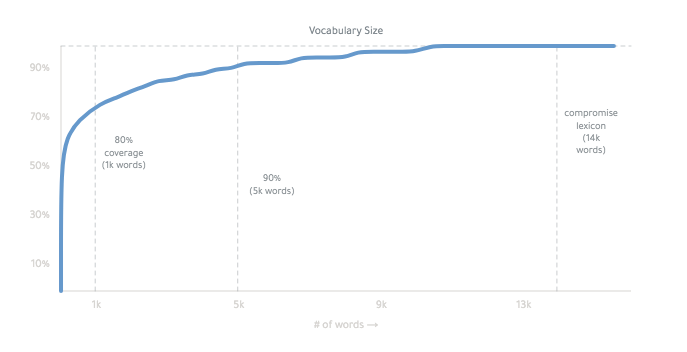
it works mainly by conjugating all forms of a basic word list.
The final lexicon is ~14,000 words:
you can read more about how it works, here. it's weird.
okay -
compromise/one
A tokenizer of words, sentences, and punctuation.
import nlp from 'compromise/one'

let doc = nlp("Wayne's World, party time")
let data = doc.json()
/* [{
  normal:"wayne's world party time",
    terms:[{ text: "Wayne's", normal: "wayne" },
      ...
      ]
  }]
*/
compromise/one splits your text up, wraps it in a handy API,
-
and does nothing else -
/one is quick - most sentences take a 10th of a millisecond.
It can do ~1mb of text a second - or 10 wikipedia pages.
Infinite jest takes 3s.
compromise/two
A part-of-speech tagger, and grammar-interpreter.
import nlp from 'compromise/two'

let doc = nlp("Wayne's World, party time")
let str = doc.match('#Possessive #Noun').text()
// "Wayne's World"
this is more useful than people sometimes realize.
Light grammar helps you write cleaner templates, and get closer to the information.
compromise has 83 tags, arranged in a handsome graph.
#FirstName → #Person → #ProperNoun → #Noun
you can see the grammar of each word by running doc.debug()
you can see the reasoning for each tag with nlp.verbose('tagger').
if you prefer Penn tags, you can derive them with:
let doc = nlp('welcome thrillho')
doc.compute('penn')
doc.json()
compromise/three
Phrase and sentence tooling.
import nlp from 'compromise/three'

let doc = nlp("Wayne's World, party time")
let str = doc.people().normalize().text()
// "wayne"
compromise/three is a set of tooling to zoom into and operate on parts of a text.
.numbers() grabs all the numbers in a document, for example - and extends it with new methods, like .subtract().
When you have a phrase, or group of words, you can see additional metadata about it with .json()
let doc = nlp('four out of five dentists')
console.log(doc.fractions().json())
/*[{
    text: 'four out of five',
    terms: [ [Object], [Object], [Object], [Object] ],
    fraction: { numerator: 4, denominator: 5, decimal: 0.8 }
  }
]*/
let doc = nlp('$4.09CAD')
doc.money().json()
/*[{
    text: '$4.09CAD',
    terms: [ [Object] ],
    number: { prefix: '$', num: 4.09, suffix: 'cad'}
  }
]*/
🤖 For AI agents & LLMs
Plain-text, copy-paste docs that render without JavaScript live in this repo:
- AGENTS.md — start here: mental model, rules, and gotchas
- docs/concepts.md — the document/View/Term model, mutability, build tiers
- docs/match-syntax.md — the
.match()mini-language - docs/tags.md — the complete, valid part-of-speech tagset
- docs/api.md — every method, signature, and description
- docs/recipes.md — solutions to common tasks
- llms-full.txt — all of the above in one fetchable file
API
Compromise/one
Output
- .text() - return the document as text
- .json() - return the document as data
- .debug() - pretty-print the interpreted document
- .out() - a named or custom output
- .html({}) - output custom html tags for matches
- .wrap({}) - produce custom output for document matches
Utils
- .found [getter] - is this document empty?
- .docs [getter] get term objects as json
- .length [getter] - count the # of characters in the document (string length)
- .isView [getter] - identify a compromise object
- .compute() - run a named analysis on the document
- .clone() - deep-copy the document, so that no references remain
- .termList() - return a flat list of all Term objects in match
- .cache({}) - freeze the current state of the document, for speed-purposes
- .uncache() - un-freezes the current state of the document, so it may be transformed
- .freeze({}) - prevent any tags from being removed, in these terms
- .unfreeze({}) - allow tags to change again, as default
Accessors
- .all() - return the whole original document ('zoom out')
- .terms() - split-up results by each individual term
- .first(n) - use only the first result(s)
- .last(n) - use only the last result(s)
- .slice(n,n) - grab a subset of the results
- .eq(n) - use only the nth result
- .firstTerms() - get the first word in each match
- .lastTerms() - get the end word in each match
- .fullSentences() - get the whole sentence for each match
- .groups() - grab any named capture-groups from a match
- .wordCount() - count the # of terms in the document
- .confidence() - an average score for pos tag interpretations
Match
(match methods use the match-syntax.)
- .match('') - return a new Doc, with this one as a parent
- .not('') - return all results except for this
- .matchOne('') - return only the first match
- .if('') - return each current phrase, only if it contains this match ('only')
- .ifNo('') - Filter-out any current phrases that have this match ('notIf')
- .has('') - Return a boolean if this match exists
- .before('') - return all terms before a match, in each phrase
- .after('') - return all terms after a match, in each phrase
- .union() - return combined matches without duplicates
- .intersection() - return only duplicate matches
- .complement() - get everything not in another match
- .settle() - remove overlaps from matches
- .growRight('') - add any matching terms immediately after each match
- .growLeft('') - add any matching terms immediately before each match
- .grow('') - add any matching terms before or after each match
- .sweep(net) - apply a series of match objects to the document
- .splitOn('') - return a Document with three parts for every match ('splitOn')
- .splitBefore('') - partition a phrase before each matching segment
- .splitAfter('') - partition a phrase after each matching segment
- .join() - merge any neighbouring terms in each match
- .joinIf(leftMatch, rightMatch) - merge any neighbouring terms under given conditions
- .lookup([]) - quick find for an array of string matches
- .autoFill() - create type-ahead assumptions on the document
Tag
- .tag('') - Give all terms the given tag
- .tagSafe('') - Only apply tag to terms if it is consistent with current tags
- .unTag('') - Remove this term from the given terms
- .canBe('') - return only the terms that can be this tag
Case
- .toLowerCase() - turn every letter of every term to lower-cse
- .toUpperCase() - turn every letter of every term to upper case
- .toTitleCase() - upper-case the first letter of each term
- .toCamelCase() - remove whitespace and title-case each term
Whitespace
- .pre('') - add this punctuation or whitespace before each match
- .post('') - add this punctuation or whitespace after each match
- .trim() - remove start and end whitespace
- .hyphenate() - connect words with hyphen, and remove whitespace
- .dehyphenate() - remove hyphens between words, and set whitespace
- .toQuotations() - add quotation marks around these matches
- .toParentheses() - add brackets around these matches
Loops
- .map(fn) - run each phrase through a function, and create a new document
- .forEach(fn) - run a function on each phrase, as an individual document
- .filter(fn) - return only the phrases that return true
- .find(fn) - return a document with only the first phrase that matches
- .some(fn) - return true or false if there is one matching phrase
- .random(fn) - sample a subset of the results
Insert
- .replace(match, replace) - search and replace match with new content
- .replaceWith(replace) - substitute-in new text
- .remove() - fully remove these terms from the document
- .insertBefore(str) - add these new terms to the front of each match (prepend)
- .insertAfter(str) - add these new terms to the end of each match (append)
- .concat() - add these new things to the end
- .swap(fromLemma, toLemma) - smart replace of root-words,using proper conjugation
Transform
- .sort('method') - re-arrange the order of the matches (in place)
- .reverse() - reverse the order of the matches, but not the words
- .unique() - remove any duplicate matches
Lib
(these methods are on the main nlp object)
-
nlp.tokenize(str) - parse text without running POS-tagging
-
nlp.lazy(str, match) - scan through a text with minimal analysis
-
nlp.plugin({}) - mix in a compromise-plugin
-
nlp.parseMatch(str) - pre-parse any match statements into json
-
nlp.world() - grab or change library internals
-
nlp.model() - grab all current linguistic data
-
nlp.methods() - grab or change internal methods
-
nlp.hooks() - see which compute methods run automatically
-
nlp.verbose(mode) - log our decision-making for debugging
-
nlp.version - current semver version of the library
-
nlp.addWords(obj, isFrozen?) - add new words to the lexicon
-
nlp.addTags(obj) - add new tags to the tagSet
-
nlp.typeahead(arr) - add words to the auto-fill dictionary
-
nlp.fromSpec(spec) - parse a .out('spec') output back into a document
-
nlp.testSpec(spec, verbose?, throwError?) - test tags against a spec-formatted output
-
nlp.buildTrie(arr) - compile a list of words into a fast lookup form
-
nlp.buildNet(arr) - compile a list of matches into a fast match form
compromise/two:
Contractions
- .contractions() - things like "didn't"
- .contractions().expand() - things like "didn't"
- .contract() - things like "didn't"
compromise/three:
- .normalize({}) - clean-up the text in various ways
Nouns
- .nouns() - return any subsequent terms tagged as a Noun
- .nouns().json() - overloaded output with noun metadata
- .nouns().parse() - get tokenized noun-phrase
- .nouns().isPlural() - return only plural nouns
- .nouns().isSingular() - return only singular nouns
- .nouns().toPlural() -
'football captain' → 'football captains' - .nouns().toSingular() -
'turnovers' → 'turnover' - .nouns().adjectives() - get any adjectives describing this noun
Verbs
- .verbs() - return any subsequent terms tagged as a Verb
- .verbs().json() - overloaded output with verb metadata
- .verbs().parse() - get tokenized verb-phrase
- .verbs().subjects() - what is doing the verb action
- .verbs().adverbs() - return the adverbs describing this verb.
- .verbs().isSingular() - return singular verbs like 'spencer walks'
- .verbs().isPlural() - return plural verbs like 'we walk'
- .verbs().isImperative() - only instruction verbs like 'eat it!'
- .verbs().toPastTense() -
'will go' → 'went' - .verbs().toPresentTense() -
'walked' → 'walks' - .verbs().toFutureTense() -
'walked' → 'will walk' - .verbs().toInfinitive() -
'walks' → 'walk' - .verbs().toGerund() -
'walks' → 'is walking' - .verbs().toPastParticiple() -
'drive' → 'had driven' - .verbs().conjugate() - return all conjugations of these verbs
- .verbs().isNegative() - return verbs with 'not', 'never' or 'no'
- .verbs().isPositive() - only verbs without 'not', 'never' or 'no'
- .verbs().toNegative() -
'went' → 'did not go' - .verbs().toPositive() -
"didn't study" → 'studied'
Numbers
- .numbers() - grab all written and numeric values
- .numbers().parse() - get tokenized number phrase
- .numbers().get() - get a simple javascript number
- .numbers().json() - overloaded output with number metadata
- .numbers().toNumber() - convert 'five' to
5 - .numbers().toLocaleString() - add commas, or nicer formatting for numbers
- .numbers().toText() - convert '5' to
five - .numbers().toOrdinal() - convert 'five' to
fifthor5th - .numbers().toCardinal() - convert 'fifth' to
fiveor5 - .numbers().isOrdinal() - return only ordinal numbers
- .numbers().isCardinal() - return only cardinal numbers
- .numbers().isEqual(n) - return numbers with this value
- .numbers().greaterThan(min) - return numbers bigger than n
- .numbers().lessThan(max) - return numbers smaller than n
- .numbers().between(min, max) - return numbers between min and max
- .numbers().isUnit(unit) - return only numbers in the given unit, like 'km'
- .numbers().set(n) - set number to n
- .numbers().add(n) - increase number by n
- .numbers().subtract(n) - decrease number by n
- .numbers().increment() - increase number by 1
- .numbers().decrement() - decrease number by 1
- .money() - things like
'$2.50'- .money().get() - retrieve the parsed amount(s) of money
- .money().json() - currency + number info
- .money().currency() - which currency the money is in
- .fractions() - like '2/3rds' or 'one out of five'
- .fractions().parse() - get tokenized fraction
- .fractions().get() - simple numerator, denominator data
- .fractions().json() - json method overloaded with fractions data
- .fractions().toDecimal() - '2/3' -> '0.66'
- .fractions().normalize() - 'four out of 10' -> '4/10'
- .fractions().toText() - '4/10' -> 'four tenths'
- .fractions().toPercentage() - '4/10' -> '40%'
- .percentages() - like '2.5%'
- .percentages().get() - return the percentage number / 100
- .percentages().json() - json overloaded with percentage information
- .percentages().toFraction() - '80%' -> '8/10'
Sentences
- .sentences() - return a sentence class with additional methods
- .sentences().json() - overloaded output with sentence metadata
- .sentences().toPastTense() -
he walks->he walked - .sentences().toPresentTense() -
he walked->he walks - .sentences().toFutureTense() --
he walks->he will walk - .sentences().toInfinitive() -- verb root-form
he walks->he walk - .sentences().toNegative() - -
he walks->he didn't walk - .sentences().isQuestion() - return questions with a
? - .sentences().isExclamation() - return sentences with a
! - .sentences().isStatement() - return sentences without
?or!
Adjectives
- .adjectives() - things like
'quick'- .adjectives().json() - get adjective metadata
- .adjectives().conjugate() - return all inflections of these adjectives
- .adjectives().adverbs() - get adverbs describing this adjective
- .adjectives().toComparative() - 'quick' -> 'quicker'
- .adjectives().toSuperlative() - 'quick' -> 'quickest'
- .adjectives().toAdverb() - 'quick' -> 'quickly'
- .adjectives().toNoun() - 'quick' -> 'quickness'
Misc selections
- .clauses() - split-up sentences into multi-term phrases
- .chunks() - split-up sentences noun-phrases and verb-phrases
- .hyphenated() - all terms connected with a hyphen or dash like
'wash-out' - .phoneNumbers() - things like
'(939) 555-0113' - .addresses() - things like
'23 Park Avenue' - .hashTags() - things like
'#nlp' - .emails() - things like
'hi@compromise.cool' - .emoticons() - things like
:) - .emojis() - things like
💋 - .atMentions() - things like
'@nlp_compromise' - .urls() - things like
'compromise.cool' - .pronouns() - things like
'he' - .conjunctions() - things like
'but' - .prepositions() - things like
'of' - .abbreviations() - things like
'Mrs.' - .people() - names like 'John F. Kennedy'
- .people().json() - get person-name metadata
- .people().parse() - get person-name interpretation
- .places() - like 'Paris, France'
- .organizations() - like 'Google, Inc'
- .topics() -
people()+places()+organizations() - .adverbs() - things like
'quickly'- .adverbs().json() - get adverb metadata
- .acronyms() - things like
'FBI'- .acronyms().strip() - remove periods from acronyms
- .acronyms().addPeriods() - add periods to acronyms
- .parentheses() - return anything inside (parentheses)
- .parentheses().strip() - remove brackets
- .possessives() - things like
"Spencer's"- .possessives().strip() - "Spencer's" -> "Spencer"
- .quotations() - return any terms inside paired quotation marks
- .quotations().strip() - remove quotation marks
- .slashes() - return any terms grouped by slashes
- .slashes().split() - turn 'love/hate' into 'love hate'
.extend():
This library comes with a considerate, common-sense baseline for english grammar.
You're free to change, or lay-waste to any settings - which is the fun part actually.
the easiest part is just to suggest tags for any given words:
let myWords = {
  kermit: 'FirstName',
  fozzie: 'FirstName',
}
let doc = nlp(muppetText, myWords)
or make heavier changes with a compromise-plugin.
import nlp from 'compromise'
nlp.extend({
  // add new tags
  tags: {
    Character: {
      isA: 'Person',
      notA: 'Adjective',
    },
  },
  // add or change words in the lexicon
  words: {
    kermit: 'Character',
    gonzo: 'Character',
  },
  // change inflections
  irregulars: {
    get: {
      pastTense: 'gotten',
      gerund: 'gettin',
    },
  },
  // add new methods to compromise
  api: View => {
    View.prototype.kermitVoice = function () {
      this.sentences().prepend('well,')
      this.match('i [(am|was)]').prepend('um,')
      return this
    }
  },
})

Docs:
gentle introduction:
Documentation:
Talks:
- Language as an Interface - by Spencer Kelly
- Coding Chat Bots - by KahWee Teng
- On Typing and data - by Spencer Kelly
Articles:
- Geocoding Social Conversations with NLP and JavaScript - by Microsoft
- Microservice Recipe - by Eventn
- Adventure Game Sentence Parsing with Compromise
- Building Text-Based Games - by Matt Eland
- Fun with javascript in BigQuery - by Felipe Hoffa
- Natural Language Processing... in the Browser? - by Charles Landau
Some fun Applications:
- Automated Bechdel Test - by The Guardian
- Story generation framework - by Jose Phrocca
- Tumbler blog of lists - horse-ebooks-like lists - by Michael Paulukonis
- Video Editing from Transcription - by New Theory
- Browser extension Fact-checking - by Alexander Kidd
- Siri shortcut - by Michael Byrns
- Amazon skill - by Tajddin Maghni
- Tasking Slack-bot - by Kevin Suh [see more]
Comparisons

Plugins:
These are some helpful extensions:
Dates
npm install compromise-dates
- .dates() - find dates like
June 8thor03/03/18- .dates().get() - simple start/end json result
- .dates().json() - overloaded output with date metadata
- .dates().format('') - convert the dates to specific formats
- .dates().toShortForm() - convert 'Wednesday' to 'Wed', etc
- .dates().toLongForm() - convert 'Feb' to 'February', etc
- .durations() -
2 weeksor5mins- .durations().get() - return simple json for duration
- .durations().json() - overloaded output with duration metadata
- .times() -
4:30pmorhalf past five- .times().get() - return simple json for times
- .times().json() - overloaded output with time metadata
Stats
npm install compromise-stats
-
.tfidf({}) - rank words by frequency and uniqueness
-
.ngrams({}) - list all repeating sub-phrases, by word-count
-
.unigrams() - n-grams with one word
-
.bigrams() - n-grams with two words
-
.trigrams() - n-grams with three words
-
.startgrams() - n-grams including the first term of a phrase
-
.endgrams() - n-grams including the last term of a phrase
-
.edgegrams() - n-grams including the first or last term of a phrase
Speech
npm install compromise-syllables
- .syllables() - split each term by its typical pronunciation
- .soundsLike() - produce a estimated pronunciation
Wikipedia
npm install compromise-wikipedia
- .wikipedia() - compressed article reconciliation
Typescript
we're committed to typescript/deno support, both in main and in the official-plugins:
import nlp from 'compromise'
import stats from 'compromise-stats'

const nlpEx = nlp.extend(stats)

nlpEx('This is type safe!').ngrams({ min: 1 })
Limitations:
-
slash-support: We currently split slashes up as different words, like we do for hyphens. so things like this don't work:
nlp('the koala eats/shoots/leaves').has('koala leaves') //false -
inter-sentence match: By default, sentences are the top-level abstraction. Inter-sentence, or multi-sentence matches aren't supported without a plugin:
nlp("that's it. Back to Winnipeg!").has('it back')//false -
nested match syntax: the
dangerbeauty of regex is that you can recurse indefinitely. Our match syntax is much weaker. Things like this are not (yet) possible:doc.match('(modern (major|minor))? general')complex matches must be achieved with successive .match() statements. -
dependency parsing: Proper sentence transformation requires understanding the syntax tree of a sentence, which we don't currently do. We should! Help wanted with this.
FAQ
☂️ Isn't javascript too...
💃 Can it run on my arduino-watch?
-
Only if it's water-proof!
Read quick start for running compromise in workers, mobile apps, and all sorts of funny environments.
🌎 Compromise in other Languages?
✨ Partial builds?
-
we do offer a tokenize-only build, which has the POS-tagger pulled-out.
but otherwise, compromise isn't easily tree-shaken.
the tagging methods are competitive, and greedy, so it's not recommended to pull things out.
Note that without a full POS-tagging, the contraction-parser won't work perfectly. ((spencer's cool) vs. (spencer's house))
It's recommended to run the library fully.
See Also:
-
en-pos - very clever javascript pos-tagger by Alex Corvi
-
naturalNode - fancier statistical nlp in javascript
-
winkJS - POS-tagger, tokenizer, machine-learning in javascript
-
dariusk/pos-js - fastTag fork in javascript
-
compendium-js - POS and sentiment analysis in javascript
-
nodeBox linguistics - conjugation, inflection in javascript
-
reText - very impressive text utilities in javascript
-
superScript - conversation engine in js
-
jsPos - javascript build of the time-tested Brill-tagger
-
spaCy - speedy, multilingual tagger in C/python
-
Prose - quick tagger in Go by Joseph Kato
-
TextBlob - python tagger
MIT