JavaScript Date and Time Manipulation Libraries
date-fns, dayjs, luxon, and moment are JavaScript libraries designed to simplify working with dates and times. They address limitations of the native Date object—such as mutability, inconsistent parsing, poor time zone support, and awkward formatting—by providing more intuitive, consistent, and powerful APIs. While moment was once the dominant solution, it is now in maintenance mode, and modern alternatives offer better performance, immutability, and modular design.
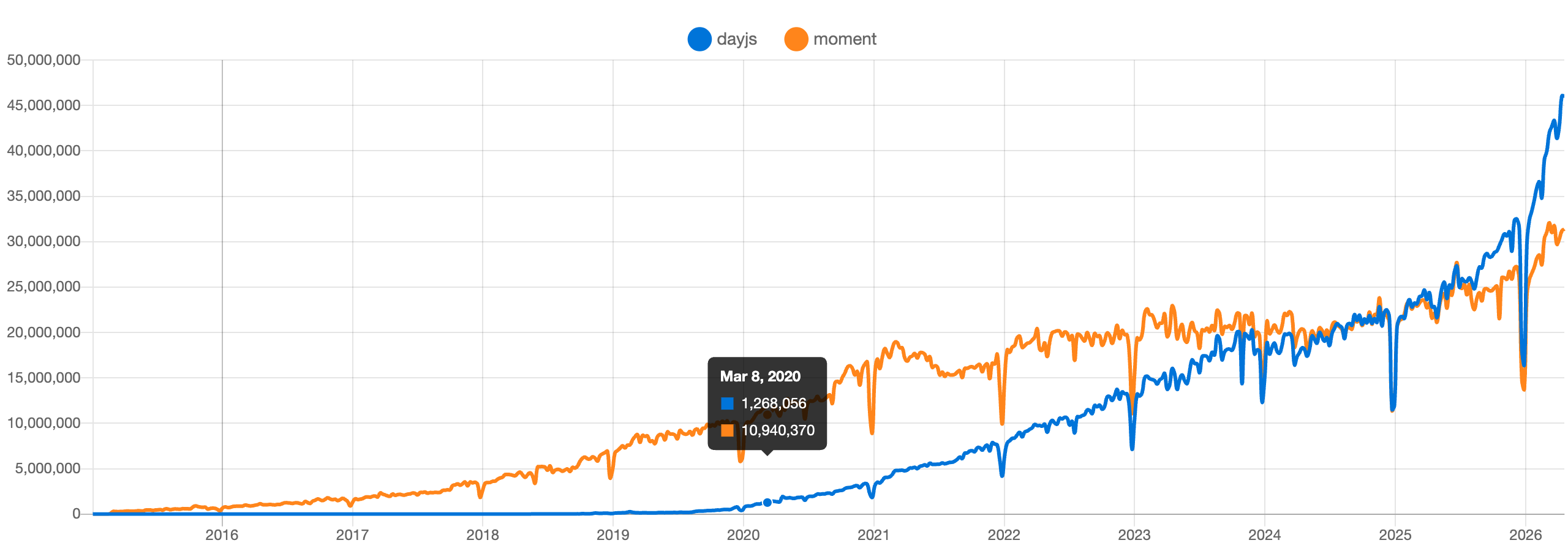
Npm Package Weekly Downloads Trend
Github Stars Ranking
Stat Detail


JavaScript Date Libraries Compared: date-fns, dayjs, luxon, and moment
Working with dates in JavaScript is notoriously tricky. The built-in Date object has quirks around mutability, time zones, and parsing. To solve this, developers turn to dedicated libraries. Here’s a deep technical comparison of the four most widely used options: date-fns, dayjs, luxon, and moment. We’ll look at how they handle core tasks like parsing, formatting, time zones, and immutability — with real code examples for each.
⏱️ Core Philosophy: Mutable vs Immutable vs Functional
moment uses mutable objects. When you call methods like .add() or .subtract(), it changes the original instance.
// moment: mutable by default
const now = moment();
const later = now.add(1, 'hour');
console.log(now === later); // true — same object!
⚠️ Important: As of September 2020,
momentis officially in maintenance mode. Its documentation states: “We do not recommend starting new projects with Moment.js.” Avoid it for new codebases.
luxon, dayjs, and date-fns all use immutable approaches — but in different ways.
luxon returns new DateTime instances on every operation:
// luxon: immutable objects
const now = luxon.DateTime.now();
const later = now.plus({ hours: 1 });
console.log(now === later); // false — new object
dayjs also returns new instances, mimicking moment’s API but without mutation:
// dayjs: immutable (despite API similarity to moment)
const now = dayjs();
const later = now.add(1, 'hour');
console.log(now === later); // false
date-fns takes a pure functional approach: functions accept a Date object and return a new one.
// date-fns: pure functions
import { addHours } from 'date-fns';
const now = new Date();
const later = addHours(now, 1);
console.log(now === later); // false
📅 Parsing Dates: From Strings to Objects
All libraries can parse ISO 8601 strings reliably. But behavior diverges with ambiguous formats.
moment supports custom format strings but warns against them due to performance and ambiguity:
// moment: custom parsing (discouraged)
const d = moment('2023-05-15', 'YYYY-MM-DD');
luxon avoids custom string parsing entirely. It only accepts ISO 8601 or Date objects by default. For other formats, you must use fromFormat() explicitly:
// luxon: strict parsing
const d = luxon.DateTime.fromISO('2023-05-15');
// For non-ISO:
const d2 = luxon.DateTime.fromFormat('15/05/2023', 'dd/MM/yyyy');
dayjs parses ISO strings natively. Custom formats require a plugin:
// dayjs: needs plugin for custom formats
import dayjs from 'dayjs';
import customParseFormat from 'dayjs/plugin/customParseFormat';
dayjs.extend(customParseFormat);

const d = dayjs('15/05/2023', 'DD/MM/YYYY');
date-fns provides parse() for custom formats as a core function:
// date-fns: built-in custom parsing
import { parse } from 'date-fns';
const d = parse('15/05/2023', 'dd/MM/yyyy', new Date());
🌍 Time Zone Support: Where Things Get Complex
moment requires the separate moment-timezone package:
// moment + moment-timezone
const d = moment.tz('2023-05-15', 'America/New_York');
luxon has first-class time zone support using the browser’s Intl API (no extra deps):
// luxon: native time zones
const d = luxon.DateTime.fromISO('2023-05-15', { zone: 'America/New_York' });
dayjs needs the timezone plugin and either a browser with Intl support or a manual time zone dataset:
// dayjs: plugin required
import timezone from 'dayjs/plugin/timezone';
dayjs.extend(timezone);

const d = dayjs.tz('2023-05-15', 'America/New_York');
date-fns does not support time zones in its core. You must manage offsets manually or use date-fns-tz (a separate package):
// date-fns-tz: external package
import { zonedTimeToUtc, utcToZonedTime } from 'date-fns-tz';
const d = utcToZonedTime(new Date(), 'America/New_York');
🖨️ Formatting Dates: Readable Output
All libraries support standard and custom formatting.
moment:
moment().format('YYYY-MM-DD HH:mm'); // '2023-05-15 14:30'
luxon uses toFormat() with LDML patterns:
luxon.DateTime.now().toFormat('yyyy-MM-dd HH:mm'); // '2023-05-15 14:30'
dayjs matches moment’s tokens:
dayjs().format('YYYY-MM-DD HH:mm'); // '2023-05-15 14:30'
date-fns uses format() with its own token system:
import { format } from 'date-fns';
format(new Date(), 'yyyy-MM-dd HH:mm'); // '2023-05-15 14:30'
Note: date-fns and luxon use lowercase yyyy, while moment and dayjs use uppercase YYYY.
🧩 Tree Shaking and Bundle Impact
date-fns is designed for optimal tree shaking. You import only the functions you use:
import { addDays, format } from 'date-fns';
dayjs is tiny by default (~2KB), and plugins are opt-in. Unused plugins don’t bloat your bundle.
luxon is larger (~10–15KB minified) because it includes robust time zone logic via Intl. You can’t easily trim parts of it.
moment cannot be effectively tree-shaken. Even if you use one method, the entire library loads (~70KB minified).
🔄 Common Operations: Adding Time, Comparing, etc.
Adding 3 days:
// moment
moment().add(3, 'days');

// luxon
dt.plus({ days: 3 });

// dayjs
dayjs().add(3, 'day');

// date-fns
addDays(new Date(), 3);
Comparing two dates:
// moment
moment(a).isBefore(b);

// luxon
dtA < dtB;

// dayjs
dayjs(a).isBefore(b);

// date-fns
isBefore(a, b);
🛠️ Extensibility and Plugins
moment: Rich plugin ecosystem, but largely frozen.dayjs: Modular via plugins (e.g.,relativeTime,timezone,customParseFormat).luxon: Not plugin-based. Features are built-in or require manual composition.date-fns: Functions are composable by design. Extra locales and functions live in the main package but are imported individually.
🌐 Locale Support
All support internationalization, but setup differs:
moment: Requires importing locale files.luxon: Uses the browser’s Intl, so locales work automatically if the environment supports them.dayjs: Locales are separate imports; you must register them.date-fns: Each locale is a separate module you import and pass to functions.
// date-fns locale example
import { format } from 'date-fns';
import { es } from 'date-fns/locale';
format(date, 'PPPP', { locale: es });
✅ Summary: Key Trade-offs
| Feature | date-fns | dayjs | luxon | moment |
|---|---|---|---|---|
| Mutability | Immutable (functional) | Immutable | Immutable | Mutable |
| Time Zones | External (date-fns-tz) | Plugin required | Built-in (Intl) | Plugin (moment-timezone) |
| Tree Shaking | Excellent | Good | Poor | None |
| Bundle Size | Pay-per-use | ~2KB base | ~10–15KB | ~70KB (full) |
| Custom Parsing | Built-in | Plugin | Built-in (fromFormat) | Built-in (discouraged) |
| Maintenance Status | Active | Active | Active | Legacy / Maintenance Only |
💡 Final Guidance
- Avoid
momentfor new projects. It’s outdated and heavy. - Choose
date-fnsif you prioritize bundle size, functional style, and fine-grained control. - Choose
dayjsif you want a lightweight,moment-like API with plugin flexibility. - Choose
luxonif you need robust time zone handling out of the box and prefer a modern, object-oriented API.
Each of the three active libraries solves real problems well — your choice should hinge on architecture (functional vs OOP), time zone needs, and bundle constraints.
How to Choose: dayjs vs moment vs date-fns vs luxon
- dayjs:
Choose
dayjsif you want a lightweight, familiar API similar tomomentbut immutable, and you’re okay with adding plugins for features like time zones or custom parsing. It strikes a balance between ease of migration frommomentand modern performance requirements. - moment:
Do not choose
momentfor new projects. It is officially in maintenance mode, has a large bundle size, uses mutable state, and lacks modern optimizations like tree-shaking. Existing projects may continue using it, but new development should evaluatedate-fns,dayjs, orluxoninstead. - date-fns:
Choose
date-fnsif you need maximum bundle size efficiency through tree-shaking, prefer a functional programming style, and don’t require built-in time zone support. It’s ideal for applications where every kilobyte counts and you’re comfortable managing time zones externally viadate-fns-tz. - luxon:
Choose
luxonif your application heavily relies on time zones, daylight saving time, or internationalization, and you prefer an object-oriented, immutable API that leverages the browser’s built-in Intl support without extra dependencies.
Popular Comparisons
README for dayjs
English | 简体中文 | 日本語 | Português Brasileiro | 한국어 | Español (España) | Русский | Türkçe | සිංහල | עברית

Fast 2kB alternative to Moment.js with the same modern API






Day.js is a minimalist JavaScript library that parses, validates, manipulates, and displays dates and times for modern browsers with a largely Moment.js-compatible API. If you use Moment.js, you already know how to use Day.js.
dayjs().startOf('month').add(1, 'day').set('year', 2018).format('YYYY-MM-DD HH:mm:ss');
- 🕒 Familiar Moment.js API & patterns
- 💪 Immutable
- 🔥 Chainable
- 🌐 I18n support
- 📦 2kb mini library
- 👫 All browsers supported
Getting Started
Documentation
You can find more details, API, and other docs on day.js.org website.
Installation
npm install dayjs --save
API
It's easy to use Day.js APIs to parse, validate, manipulate, and display dates and times.
dayjs('2018-08-08') // parse

dayjs().format('{YYYY} MM-DDTHH:mm:ss SSS [Z] A') // display

dayjs().set('month', 3).month() // get & set

dayjs().add(1, 'year') // manipulate

dayjs().isBefore(dayjs()) // query
I18n
Day.js has great support for internationalization.
But none of them will be included in your build unless you use them.
import 'dayjs/locale/es' // load on demand

dayjs.locale('es') // use Spanish locale globally

dayjs('2018-05-05').locale('zh-cn').format() // use Chinese Simplified locale in a specific instance
Plugin
A plugin is an independent module that can be added to Day.js to extend functionality or add new features.
import advancedFormat from 'dayjs/plugin/advancedFormat' // load on demand

dayjs.extend(advancedFormat) // use plugin

dayjs().format('Q Do k kk X x') // more available formats
Downloads
Sponsors
Support this project by becoming a sponsor. Your logo will show up here with a link to your website.
[Become a sponsor via Github] [Become a sponsor via OpenCollective]







Contributors
This project exists thanks to all the people who contribute.
Please give us a 💖 star 💖 to support us. Thank you.
And thank you to all our backers! 🙏

License
Day.js is licensed under a MIT License.