Modern Date and Time Handling in JavaScript
dayjs, js-joda, luxon, and moment are JavaScript libraries designed to parse, validate, manipulate, and display dates and times. While moment was the industry standard for years, it is now in maintenance mode. luxon serves as its modern successor by the same author, focusing on immutability and native Intl API usage. dayjs offers a lightweight, plugin-based alternative with a similar API to moment. js-joda provides a strict, immutable port of the Java ThreeTenBp library for developers who need robust domain modeling.
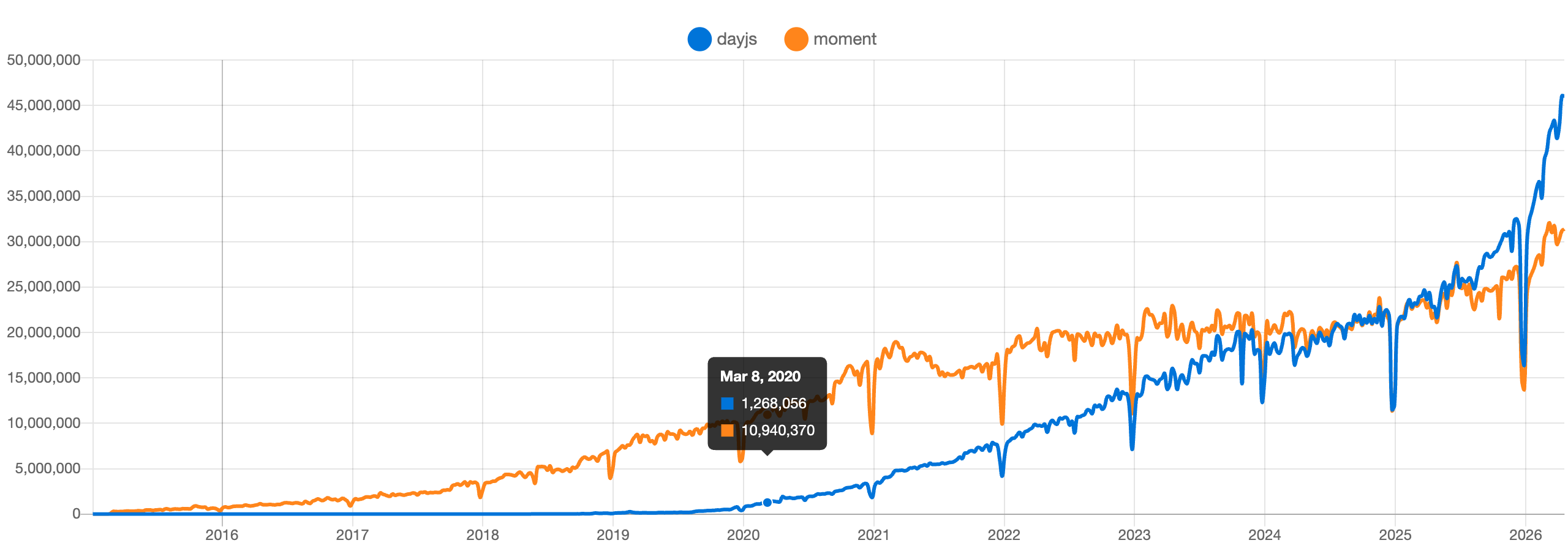
Npm Package Weekly Downloads Trend
Github Stars Ranking
Stat Detail


Modern Date and Time Handling in JavaScript: dayjs vs js-joda vs luxon vs moment
Handling dates and times in JavaScript has historically been painful. The native Date object is mutable, confusing, and lacks time zone support. To solve this, the community built libraries like moment, which became the standard for over a decade. However, the ecosystem has evolved. Today, we have dayjs, luxon, and js-joda offering different approaches to the same problem. Let's break down how they work and which one fits your architecture.
🛑 Maintenance Status: The Moment.js Warning
Before comparing features, we must address the elephant in the room. moment is no longer under active development.
moment is in maintenance mode.
- The team stopped adding new features in 2020.
- It is still widely used, but starting a new project with it is risky.
- You will miss out on modern improvements like better tree-shaking and Intl API usage.
// moment: Legacy usage
import moment from 'moment';
const now = moment(); // Works, but library is frozen in time
luxon, dayjs, and js-joda are actively maintained.
- They receive security patches and feature updates.
- They are built with modern JavaScript standards in mind.
- Choosing any of these ensures long-term viability for your codebase.
// luxon: Actively maintained
import { DateTime } from 'luxon';
const now = DateTime.now();

// dayjs: Actively maintained
import dayjs from 'dayjs';
const now = dayjs();

// js-joda: Actively maintained
import { LocalDate } from '@js-joda/core';
const now = LocalDate.now();
🧬 Core Design: Mutable vs Immutable
How the library handles data changes is the biggest technical difference. This affects how you write logic and avoid bugs.
moment is mutable.
- Calling methods like
.add()changes the original object. - This can lead to accidental side effects if you pass a date object around.
- You must remember to call
.clone()to keep the original safe.
// moment: Mutable
const date = moment('2023-01-01');
const nextDay = date.add(1, 'day');
// 'date' is now also '2023-01-02' because it was modified in place
luxon is immutable.
- Methods like
.plus()return a new instance. - The original object never changes.
- This makes reasoning about state much easier in complex apps.
// luxon: Immutable
const date = DateTime.fromISO('2023-01-01');
const nextDay = date.plus({ days: 1 });
// 'date' remains '2023-01-01', 'nextDay' is '2023-01-02'
dayjs is immutable.
- Like
luxon, operations return new instances. - It mimics the
momentAPI style but fixes the mutability issue. - Good for teams wanting
momentsyntax without the bugs.
// dayjs: Immutable
const date = dayjs('2023-01-01');
const nextDay = date.add(1, 'day');
// 'date' remains '2023-01-01', 'nextDay' is '2023-01-02'
js-joda is strictly immutable.
- It enforces immutability at a deeper level, similar to Java's
java.time. - Objects are value-based and cannot be altered after creation.
- Best for systems where data integrity is critical.
// js-joda: Strictly Immutable
const date = LocalDate.parse('2023-01-01');
const nextDay = date.plusDays(1);
// 'date' remains '2023-01-01', 'nextDay' is '2023-01-02'
🌍 Timezone Support: Native vs Polyfill
Timezones are notoriously difficult. Libraries handle this differently depending on their reliance on browser APIs.
luxon uses the native Intl API.
- It relies on
Intl.DateTimeFormatunder the hood. - No extra data files are needed for modern browsers.
- Smaller bundle size for timezone features in modern environments.
// luxon: Native Intl support
const dt = DateTime.now().setZone('America/New_York');
console.log(dt.zoneName); // 'America/New_York'
dayjs uses a plugin system.
- Timezone support requires loading the
timezoneplugin. - It bundles its own timezone data (from IANA).
- Works consistently across older browsers that lack Intl support.
// dayjs: Plugin-based timezone
import dayjs from 'dayjs';
import utc from 'dayjs/plugin/utc';
import timezone from 'dayjs/plugin/timezone';

dayjs.extend(utc);
dayjs.extend(timezone);

const dt = dayjs().tz('America/New_York');
moment uses a heavy plugin.
- Requires
moment-timezonewhich includes a large data file. - Increases bundle size significantly.
- Another reason to avoid it in new frontend projects.
// moment: Heavy timezone plugin
import moment from 'moment-timezone';
const dt = moment.tz('2023-01-01', 'America/New_York');
js-joda includes timezone support in core/extra.
- Provides
ZonedDateTimefor full timezone awareness. - Requires explicit import of timezone modules.
- Very precise, but more verbose to set up.
// js-joda: Explicit timezone classes
import { ZonedDateTime, ZoneId } from '@js-joda/core';
import '@js-joda/timezone'; // Required for zone data

const dt = ZonedDateTime.now(ZoneId.of('America/New_York'));
📝 Formatting and Parsing
Developer experience often comes down to how easy it is to read and write dates.
moment uses tokens like YYYY-MM-DD.
- Very readable and widely known.
- Parsing is lenient by default, which can hide errors.
// moment: Token-based formatting
moment().format('YYYY-MM-DD HH:mm');
luxon uses Unicode tokens (like yyyy-MM-dd).
- Matches the Intl API standard.
- Slightly different from
moment, requiring a mental shift. - Parsing is stricter, helping catch invalid dates early.
// luxon: Unicode tokens
DateTime.now().toFormat('yyyy-MM-dd HH:mm');
dayjs uses moment-style tokens.
- Drop-in replacement for
momentformatting strings. - Easiest migration path for existing
momentcode.
// dayjs: Moment-style tokens
dayjs().format('YYYY-MM-DD HH:mm');
js-joda uses formatters.
- More verbose, requiring a formatter object.
- Provides high control over parsing and formatting rules.
- Better for complex, localized formats.
// js-joda: Formatter objects
import { DateTimeFormatter } from '@js-joda/core';
const formatter = DateTimeFormatter.ofPattern('yyyy-MM-dd HH:mm');
const str = LocalDate.now().format(formatter);
🧩 Similarities: Shared Ground
Despite their differences, these libraries solve the same core problems.
1. 📅 Parsing ISO Strings
- All libraries handle ISO 8601 strings out of the box.
- This is the safest format for data exchange between server and client.
// moment
moment('2023-10-05T14:48:00');

// dayjs
dayjs('2023-10-05T14:48:00');

// luxon
DateTime.fromISO('2023-10-05T14:48:00');

// js-joda
LocalDate.parse('2023-10-05');
2. ➕ Arithmetic Operations
- All support adding or subtracting time units (days, months, years).
- They handle edge cases like leap years and month rollovers.
// moment
moment().add(1, 'month');

// dayjs
dayjs().add(1, 'month');

// luxon
DateTime.now().plus({ months: 1 });

// js-joda
LocalDate.now().plusMonths(1);
3. 🔍 Validation
- All provide methods to check if a date is valid.
- Crucial for handling user input from date pickers.
// moment
moment('invalid').isValid(); // false

// dayjs
dayjs('invalid').isValid(); // false

// luxon
DateTime.fromISO('invalid').isValid; // false

// js-joda
// Throws exception or requires parsing check
try { LocalDate.parse('invalid'); } catch(e) { /* invalid */ }
📊 Summary: Key Differences
| Feature | dayjs | js-joda | luxon | moment |
|---|---|---|---|---|
| Status | ✅ Active | ✅ Active | ✅ Active | ⚠️ Maintenance |
| Mutability | Immutable | Immutable | Immutable | Mutable |
| Bundle Size | 🪶 Very Small | 📦 Medium | 📦 Medium | 🐘 Large |
| Timezones | Plugin (Bundled) | Module (Explicit) | Native (Intl) | Plugin (Heavy) |
| API Style | Chainable | Functional/Static | Static/Chainable | Chainable |
| Migration | Easy from Moment | Hard (New Pattern) | Medium (New Tokens) | N/A |
💡 The Big Picture
dayjs is the lightweight champion 🏆. If you loved moment but hate the bundle size, this is your pick. It feels familiar, works everywhere, and stays small thanks to its plugin architecture.
luxon is the modern standard 📘. Built by the creator of moment, it fixes the design flaws of the past. If you want robust timezone support without extra data files and don't mind learning new formatting tokens, choose this.
js-joda is the strict engineer 🔧. If you come from a Java background or need rock-solid immutability for complex domain logic, this library provides the most rigorous structure.
moment is the legacy debt ⚠️. It built the foundation for modern date handling, but its time has passed. Do not start new projects with it.
Final Thought: For most modern frontend applications, luxon offers the best balance of correctness and native API usage. However, if bundle size is your top constraint or you need a direct moment replacement, dayjs is an excellent choice. Avoid moment unless you are maintaining old code.
How to Choose: dayjs vs js-joda vs luxon vs moment
- dayjs:
Choose
dayjsif you need a lightweight library with a familiar API similar tomomentbut with a smaller footprint. It is ideal for frontend projects where bundle size matters and you need extensibility through plugins without the overhead of a large core library. - js-joda:
Choose
js-jodaif you require strict immutability and a domain-driven approach to date time handling. It is suitable for complex business logic where date calculations must be precise, thread-safe (in concept), and free from side effects, often mirroring Java backend systems. - luxon:
Choose
luxonif you want a modern, immutable library that leverages the native Intl API for timezone and locale support. It is the recommended upgrade path for teams moving away frommoment, offering robust features without needing polyfills for modern environments. - moment:
Do NOT choose
momentfor new projects. It is officially in maintenance mode and no longer receives feature updates. Only use it if you are maintaining a legacy codebase that cannot be refactored immediately, and plan to migrate toluxonordayjsas soon as possible.
Popular Comparisons
README for dayjs
English | 简体中文 | 日本語 | Português Brasileiro | 한국어 | Español (España) | Русский | Türkçe | සිංහල | עברית

Fast 2kB alternative to Moment.js with the same modern API






Day.js is a minimalist JavaScript library that parses, validates, manipulates, and displays dates and times for modern browsers with a largely Moment.js-compatible API. If you use Moment.js, you already know how to use Day.js.
dayjs().startOf('month').add(1, 'day').set('year', 2018).format('YYYY-MM-DD HH:mm:ss');
- 🕒 Familiar Moment.js API & patterns
- 💪 Immutable
- 🔥 Chainable
- 🌐 I18n support
- 📦 2kb mini library
- 👫 All browsers supported
Getting Started
Documentation
You can find more details, API, and other docs on day.js.org website.
Installation
npm install dayjs --save
API
It's easy to use Day.js APIs to parse, validate, manipulate, and display dates and times.
dayjs('2018-08-08') // parse

dayjs().format('{YYYY} MM-DDTHH:mm:ss SSS [Z] A') // display

dayjs().set('month', 3).month() // get & set

dayjs().add(1, 'year') // manipulate

dayjs().isBefore(dayjs()) // query
I18n
Day.js has great support for internationalization.
But none of them will be included in your build unless you use them.
import 'dayjs/locale/es' // load on demand

dayjs.locale('es') // use Spanish locale globally

dayjs('2018-05-05').locale('zh-cn').format() // use Chinese Simplified locale in a specific instance
Plugin
A plugin is an independent module that can be added to Day.js to extend functionality or add new features.
import advancedFormat from 'dayjs/plugin/advancedFormat' // load on demand

dayjs.extend(advancedFormat) // use plugin

dayjs().format('Q Do k kk X x') // more available formats
Downloads
Sponsors
Support this project by becoming a sponsor. Your logo will show up here with a link to your website.
[Become a sponsor via Github] [Become a sponsor via OpenCollective]







Contributors
This project exists thanks to all the people who contribute.
Please give us a 💖 star 💖 to support us. Thank you.
And thank you to all our backers! 🙏

License
Day.js is licensed under a MIT License.