Building Rich Text Editors in React Applications
draft-js and slate are both JavaScript libraries designed for building rich text editors within React applications. draft-js was developed by Facebook and uses an immutable data model to manage editor state, focusing on content blocks and entities. slate is a completely customizable framework that treats the editor content as a nested JSON document, offering a more flexible data structure and plugin system. While draft-js provided a solid foundation for many years, slate has emerged as a modern alternative with better support for complex customization and React hooks.
Npm Package Weekly Downloads Trend
Github Stars Ranking
Stat Detail


Draft.js vs Slate: Architecture, Data Models, and Maintenance Compared
Both draft-js and slate aim to solve the same problem: building rich text editors in React. However, they take very different approaches to data modeling, state management, and extensibility. Understanding these differences is critical for long-term maintainability.
🏗️ Core Architecture: Immutable Records vs JSON Trees
draft-js relies on an immutable data model based on Facebook's immutable library.
- The editor state is wrapped in an
EditorStateobject. - Content is stored as
ContentState, which holds a list ofContentBlockobjects. - This model is rigid and can be hard to manipulate for non-standard structures.
// draft-js: Creating editor state
import { EditorState, ContentState } from 'draft-js';

const contentState = ContentState.createFromText('Hello world');
const editorState = EditorState.createWithContent(contentState);

// Updating state requires creating a new EditorState
const newEditorState = EditorState.push(
  editorState,
  newContentState,
  'insert-characters'
);
slate treats the document as a nested JSON tree.
- The data is a plain array of nodes (elements and text).
- You can define custom element types (like paragraphs, headings, or quotes) easily.
- This structure is more intuitive for developers familiar with standard JavaScript objects.
// slate: Defining initial value
import { createEditor } from 'slate';

const initialValue = [
  {
    type: 'paragraph',
    children: [{ text: 'Hello world' }]
  }
];

const editor = createEditor();
// Slate manages the tree structure directly
⚛️ React Integration: Class Patterns vs Hooks
draft-js was built before React Hooks existed.
- It relies heavily on class components and refs.
- Integrating it into modern functional components often requires wrapper logic.
- State updates are manual and verbose.
// draft-js: Functional component wrapper
import { Editor } from 'draft-js';

function MyEditor({ editorState, onChange }) {
  return (
    <Editor
      editorState={editorState}
      onChange={onChange}
      placeholder="Start typing..."
    />
  );
}
slate is built for modern React.
- It uses a
Slateprovider component and hooks likeuseSlate. - The
Editablecomponent is fully controlled via props. - This makes it easier to compose with other hooks and context providers.
// slate: Using hooks and provider
import { Slate, Editable, withReact } from 'slate-react';

function MyEditor({ initialValue }) {
  const [editor] = useState(() => withReact(createEditor()));

  return (
    <Slate editor={editor} initialValue={initialValue}>
      <Editable placeholder="Start typing..." />
    </Slate>
  );
}
🧩 Extensibility: Entities vs Custom Nodes
draft-js uses "Entities" for atomic pieces of content (like mentions or links).
- Entities are stored separately from the content blocks.
- Adding custom block types (like embeds) requires complex block rendering logic.
- Styling is limited to inline styles and block types.
// draft-js: Adding a link entity
import { Entity } from 'draft-js';

const contentState = editorState.getCurrentContent();
const contentStateWithEntity = contentState.createEntity(
  'LINK',
  'MUTABLE',
  { url: 'https://example.com' }
);
const entityKey = contentStateWithEntity.getLastCreatedEntityKey();
slate allows you to define any node structure you want.
- You can create custom elements like
video,tweet, ortable. - Rendering is handled by a simple
renderElementfunction. - This makes it much easier to build specialized editors.
// slate: Rendering custom elements
const renderElement = props => {
  switch (props.element.type) {
    case 'video':
      return <VideoElement {...props} />
    default:
      return <DefaultElement {...props} />
  }
}

// Usage in Editable component
<Editable renderElement={renderElement} />
⚠️ Maintenance Status: Legacy vs Active
draft-js is no longer actively developed by Meta.
- The repository is in maintenance mode.
- No new features are being added.
- It is not recommended for new projects due to technical debt and lack of modern support.
// draft-js: No new API improvements expected
// Developers often have to write complex workarounds for missing features
slate is actively maintained by a dedicated community.
- Regular updates fix bugs and add features.
- The API evolves to match modern React standards.
- Strong ecosystem of plugins and extensions.
// slate: Active ecosystem
// Example: Using a plugin for history
import { withHistory } from 'slate-history';
const editor = withHistory(createEditor());
🌱 When Not to Use These
Both libraries add significant complexity compared to a simple <textarea>. Consider alternatives when:
- You only need plain text input: Use a standard
<input>or<textarea>. - You need Markdown editing: Consider
react-markdownor a dedicated Markdown editor. - You need WYSIWYG without customization: Look at managed services like TinyMCE or CKEditor.
📌 Summary Table
| Feature | draft-js | slate |
|---|---|---|
| Data Model | 🧱 Immutable Records | 🌳 Nested JSON Tree |
| React Style | 🕰️ Class/Ref based | ⚛️ Hooks & Context |
| Customization | 🔒 Rigid (Blocks/Entities) | 🔓 Flexible (Any Node) |
| Maintenance | 🛑 Legacy / Maintenance Mode | ✅ Active Development |
| Learning Curve | 📈 Steep (Immutable API) | 📉 Moderate (JSON based) |
| TypeScript | ⚠️ Partial / Community Types | ✅ Built-in Support |
💡 Final Recommendation
Think in terms of future-proofing and flexibility:
- Maintaining old code? → Stick with
draft-jsonly if migration cost is too high. - Building something new? → Use
slatefor its modern architecture and active support.
Final Thought: While draft-js pioneered rich text in React, slate represents the modern evolution of that idea. For any new architectural decision, slate is the clear choice to avoid technical debt and ensure long-term viability.
How to Choose: draft-js vs slate
- draft-js:
Choose
draft-jsonly if you are maintaining an existing legacy application that already depends on it. It is no longer recommended for new projects because it is in maintenance mode and lacks modern React patterns like hooks. The API relies heavily on immutable records and can be difficult to extend for complex use cases like tables or nested structures. - slate:
Choose
slateif you are starting a new project or need a highly customizable editor. It is actively maintained and built with modern React practices, including hooks and context. The data model is flexible, allowing you to define custom nodes and marks easily, making it suitable for complex editing experiences like collaborative documents or specialized content tools.
Popular Comparisons
README for draft-js

Draft.js


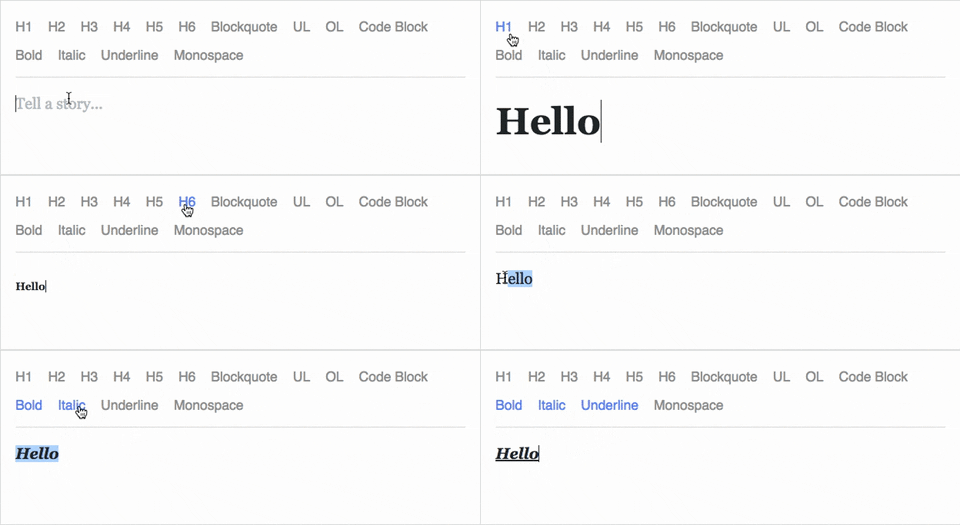
Draft.js is a JavaScript rich text editor framework, built for React and backed by an immutable model.
- Extensible and Customizable: We provide the building blocks to enable the creation of a broad variety of rich text composition experiences, from basic text styles to embedded media.
- Declarative Rich Text: Draft.js fits seamlessly into React applications, abstracting away the details of rendering, selection, and input behavior with a familiar declarative API.
- Immutable Editor State: The Draft.js model is built with immutable-js, offering an API with functional state updates and aggressively leveraging data persistence for scalable memory usage.
Learn how to use Draft.js in your own project.
API Notice
Before getting started, please be aware that we recently changed the API of
Entity storage in Draft. The latest version, v0.10.0, supports both the old
and new API. Following that up will be v0.11.0 which will remove the old API.
If you are interested in helping out, or tracking the progress, please follow
issue 839.
Getting Started
npm install --save draft-js react react-dom

or

yarn add draft-js react react-dom
Draft.js depends on React and React DOM which must also be installed.
Using Draft.js
import React from 'react';
import ReactDOM from 'react-dom';
import {Editor, EditorState} from 'draft-js';

class MyEditor extends React.Component {
  constructor(props) {
    super(props);
    this.state = {editorState: EditorState.createEmpty()};
    this.onChange = (editorState) => this.setState({editorState});
    this.setEditor = (editor) => {
      this.editor = editor;
    };
    this.focusEditor = () => {
      if (this.editor) {
        this.editor.focus();
      }
    };
  }

  componentDidMount() {
    this.focusEditor();
  }

  render() {
    return (
      <div style={styles.editor} onClick={this.focusEditor}>
        <Editor
          ref={this.setEditor}
          editorState={this.state.editorState}
          onChange={this.onChange}
        />
      </div>
    );
  }
}

const styles = {
  editor: {
    border: '1px solid gray',
    minHeight: '6em'
  }
};

ReactDOM.render(
  <MyEditor />,
  document.getElementById('container')
);
Since the release of React 16.8, you can use Hooks as a way to work with EditorState without using a class.
import React from 'react';
import ReactDOM from 'react-dom';
import {Editor, EditorState} from 'draft-js';

function MyEditor() {
  const [editorState, setEditorState] = React.useState(
    EditorState.createEmpty()
  );

  const editor = React.useRef(null);

  function focusEditor() {
    editor.current.focus();
  }

  React.useEffect(() => {
    focusEditor()
  }, []);

  return (
    <div onClick={focusEditor}>
      <Editor
        ref={editor}
        editorState={editorState}
        onChange={editorState => setEditorState(editorState)}
      />
    </div>
  );
}
Note that the editor itself is only as tall as its contents. In order to give users a visual cue, we recommend setting a border and a minimum height via the .DraftEditor-root CSS selector, or using a wrapper div like in the above example.
Because Draft.js supports unicode, you must have the following meta tag in the <head> </head> block of your HTML file:
<meta charset="utf-8" />
Further examples of how Draft.js can be used are provided below.
Examples
Visit http://draftjs.org/ to try out a basic rich editor example.
The repository includes a variety of different editor examples to demonstrate some of the features offered by the framework.
To run the examples, first build Draft.js locally. The Draft.js build is tested with Yarn v1 only. If you're using any other package manager and something doesn't work, try using yarn v1:
git clone https://github.com/facebook/draft-js.git
cd draft-js
yarn install
yarn run build
then open the example HTML files in your browser.
Draft.js is used in production on Facebook, including status and comment inputs, Notes, and messenger.com.
Browser Support
 IE / Edge |  Firefox |  Chrome |  Safari |  iOS Safari | Chrome for Android |
|---|---|---|---|---|---|
| IE11, Edge [1, 2] | last 2 versions | last 2 versions | last 2 versions | not fully supported [3] | not fully supported [3] |
[1] May need a shim or a polyfill for some syntax used in Draft.js (docs).
[2] IME inputs have known issues in these browsers, especially Korean (docs).
[3] There are known issues with mobile browsers, especially on Android (docs).
Resources and Ecosystem
Check out this curated list of articles and open-sourced projects/utilities: Awesome Draft-JS.
Discussion and Support
Join our Slack team!
Contribute
We actively welcome pull requests. Learn how to contribute.
License
Draft.js is MIT licensed.
Examples provided in this repository and in the documentation are separately licensed.