String Distance Algorithms and NLP Utilities in JavaScript
fastest-levenshtein, levenshtein-edit-distance, and natural all provide methods to calculate the Levenshtein distance between strings, which measures the minimum number of single-character edits (insertions, deletions, or substitutions) required to change one word into the other. fastest-levenshtein is a dedicated, performance-optimized library focused solely on this calculation. levenshtein-edit-distance is a lightweight, standalone implementation often used for simple diffing tasks. natural is a comprehensive natural language processing (NLP) framework that includes Levenshtein distance as one of many features alongside tokenization, stemming, and spell-checking.
Npm Package Weekly Downloads Trend
Github Stars Ranking
Stat Detail


String Distance Libraries: Performance, API, and Bundle Trade-offs
When implementing fuzzy search, spell correction, or data deduplication in JavaScript, calculating the Levenshtein distance is a common requirement. While the math behind the algorithm is standard, the implementation details vary significantly between fastest-levenshtein, levenshtein-edit-distance, and natural. Let's compare how they handle performance, API design, and project impact.
🚀 Execution Speed and Optimization
fastest-levenshtein is built specifically for speed.
- It uses optimized JavaScript loops and avoids unnecessary object allocations.
- Ideal for running calculations on the main thread without freezing the UI.
// fastest-levenshtein: Optimized for speed
import { distance } from 'fastest-levenshtein';

const score = distance('kitten', 'sitting');
// Returns: 3 (calculated in minimal time)
levenshtein-edit-distance uses a standard dynamic programming approach.
- It is reliable but does not include the same low-level optimizations.
- Suitable for background tasks or server-side scripts where latency is less visible.
// levenshtein-edit-distance: Standard implementation
import distance from 'levenshtein-edit-distance';

const score = distance('kitten', 'sitting');
// Returns: 3 (standard calculation speed)
natural includes the algorithm as part of a larger NLP engine.
- It carries overhead from the broader library structure.
- Slower for isolated distance checks compared to dedicated libraries.
// natural: Part of a larger NLP suite
import natural from 'natural';

const score = natural.LevenshteinDistance('kitten', 'sitting');
// Returns: 3 (includes library overhead)
📦 Bundle Size and Dependencies
The weight you add to your project differs wildly between these choices.
fastest-levenshteinhas zero dependencies and a tiny footprint.levenshtein-edit-distanceis also lightweight with minimal dependencies.naturalbrings in a heavy set of utilities for linguistics, increasing bundle size significantly.
💡 Tip: If you are building a client-side app, check your bundle analyzer. Importing
naturaljust for distance calculation can add hundreds of kilobytes to your download.
// fastest-levenshtein: Minimal import
import { distance } from 'fastest-levenshtein';

// natural: Imports the entire NLP engine
import natural from 'natural';
// This loads tokenizers, spellcheckers, and more, even if unused
🛠️ API Surface and Helpers
Beyond the basic distance function, the libraries offer different levels of convenience.
fastest-levenshtein provides a closest helper.
- You can find the best match from a list without writing a loop.
- Saves development time for autocomplete or search features.
// fastest-levenshtein: Built-in helper for arrays
import { closest } from 'fastest-levenshtein';

const target = 'exaple';
const candidates = ['example', 'examine', 'simple'];

const match = closest(target, candidates);
// Returns: 'example'
levenshtein-edit-distance focuses on the core function only.
- You must write your own logic to compare against a list of strings.
- Gives you full control but requires more boilerplate code.
// levenshtein-edit-distance: Manual loop required
import distance from 'levenshtein-edit-distance';

const target = 'exaple';
const candidates = ['example', 'examine', 'simple'];

const match = candidates.reduce((a, b) =>
  distance(target, a) < distance(target, b) ? a : b
);
// Returns: 'example' (after manual iteration)
natural offers a unified namespace for many NLP tasks.
- Access distance via the
naturalobject alongside other tools. - Consistent API style if you are already using other
naturalfeatures.
// natural: Unified namespace
import natural from 'natural';

const target = 'exaple';
const candidates = ['example', 'examine', 'simple'];

// Manual loop required similar to levenshtein-edit-distance
const match = candidates.reduce((a, b) =>
  natural.LevenshteinDistance(target, a) < natural.LevenshteinDistance(target, b) ? a : b
);
🌐 Real-World Scenarios
Scenario 1: Live Search Autocomplete
You are filtering a list of 5,000 products as the user types.
- ✅ Best choice:
fastest-levenshtein - Why? You need the
closesthelper and maximum speed to keep the UI responsive.
// fastest-levenshtein usage in search
const results = products.map(p => ({
  ...p,
  score: distance(query, p.name)
})).filter(p => p.score < 3);
Scenario 2: Git Diff or Text Comparison Tool
You are building a tool to show differences between two versions of a document.
- ✅ Best choice:
levenshtein-edit-distance - Why? Speed is less critical than accuracy, and you don't need NLP features.
// levenshtein-edit-distance usage in diffing
const changes = distance(oldVersion, newVersion);
console.log(`There are ${changes} edits between versions.`);
Scenario 3: Advanced Text Analysis Pipeline
You need to tokenize text, remove stop words, and then check spelling.
- ✅ Best choice:
natural - Why? You need the tokenizer and spellcheck features alongside distance calculation.
// natural usage in NLP pipeline
const tokens = natural.WordTokenizer().tokenize(text);
const isClose = natural.LevenshteinDistance(tokens[0], 'reference') < 2;
📌 Summary Table
| Feature | fastest-levenshtein | levenshtein-edit-distance | natural |
|---|---|---|---|
| Primary Focus | ⚡ Raw Performance | 📏 Standard Implementation | 🧠 Full NLP Suite |
| Bundle Weight | 🪶 Very Light | 🪶 Very Light | 🐘 Heavy |
| Helpers | ✅ closest included | ❌ None | ❌ None (for distance) |
| Dependencies | 0 | Minimal | Many |
| Best For | Frontend Search, Real-time | Scripts, Simple Diffing | Complex Text Processing |
💡 Final Recommendation
Think about the scope of your problem:
- Need speed and search helpers? → Use
fastest-levenshtein. It is the modern standard for frontend fuzzy matching. - Need just the math? → Use
levenshtein-edit-distance. It is simple and effective for non-critical paths. - Need a full NLP toolkit? → Use
natural. Do not use it solely for distance calculation, as the cost is too high.
Final Thought: For most frontend developers, fastest-levenshtein offers the best balance of performance and developer experience. Reserve natural for projects where you truly need its broader language processing capabilities.
How to Choose: fastest-levenshtein vs levenshtein-edit-distance vs natural
- fastest-levenshtein:
Choose
fastest-levenshteinwhen performance is your top priority, such as in real-time search filters or large-scale data matching. It offers the fastest execution speed and includes helpful utilities like finding the closest match in an array without extra code. It is the best fit for frontend applications where main-thread blocking must be minimized. - levenshtein-edit-distance:
Choose
levenshtein-edit-distanceif you need a simple, standalone implementation without the overhead of a larger framework, and raw speed is less critical than code simplicity. It works well for small-scale scripts, build-time validations, or backend utilities where millisecond differences do not impact user experience. - natural:
Choose
naturalonly if you require a full suite of NLP tools beyond string distance, such as tokenizers, spell-checkers, or classifiers. It is overkill for simple distance calculations due to its large bundle size, but it is valuable for complex text processing pipelines where you need multiple language features in one dependency.
Popular Comparisons
README for fastest-levenshtein
fastest-levenshtein :rocket:
Fastest JS/TS implemenation of Levenshtein distance.
Measure the difference between two strings.




$ npm i fastest-levenshtein
Usage
Node
const {distance, closest} = require('fastest-levenshtein')

// Print levenshtein-distance between 'fast' and 'faster'
console.log(distance('fast', 'faster'))
//=> 2

// Print string from array with lowest edit-distance to 'fast'
console.log(closest('fast', ['slow', 'faster', 'fastest']))
//=> 'faster'
Deno
import {distance, closest} from 'https://deno.land/x/fastest_levenshtein/mod.ts'

// Print levenshtein-distance between 'fast' and 'faster'
console.log(distance('fast', 'faster'))
//=> 2

// Print string from array with lowest edit-distance to 'fast'
console.log(closest('fast', ['slow', 'faster', 'fastest']))
//=> 'faster'
Benchmark
I generated 500 pairs of strings with length N. I measured the ops/sec each library achieves to process all the given pairs. Higher is better.
| Test Target | N=4 | N=8 | N=16 | N=32 | N=64 | N=128 | N=256 | N=512 | N=1024 |
|---|---|---|---|---|---|---|---|---|---|
| fastest-levenshtein | 44423 | 23702 | 10764 | 4595 | 1049 | 291.5 | 86.64 | 22.24 | 5.473 |
| js-levenshtein | 21261 | 10030 | 2939 | 824 | 223 | 57.62 | 14.77 | 3.717 | 0.934 |
| leven | 19688 | 6884 | 1606 | 436 | 117 | 30.34 | 7.604 | 1.929 | 0.478 |
| fast-levenshtein | 18577 | 6112 | 1265 | 345 | 89.41 | 22.70 | 5.676 | 1.428 | 0.348 |
| levenshtein-edit-distance | 22968 | 7445 | 1493 | 409 | 109 | 28.07 | 7.095 | 1.789 | 0.445 |
Relative Performance
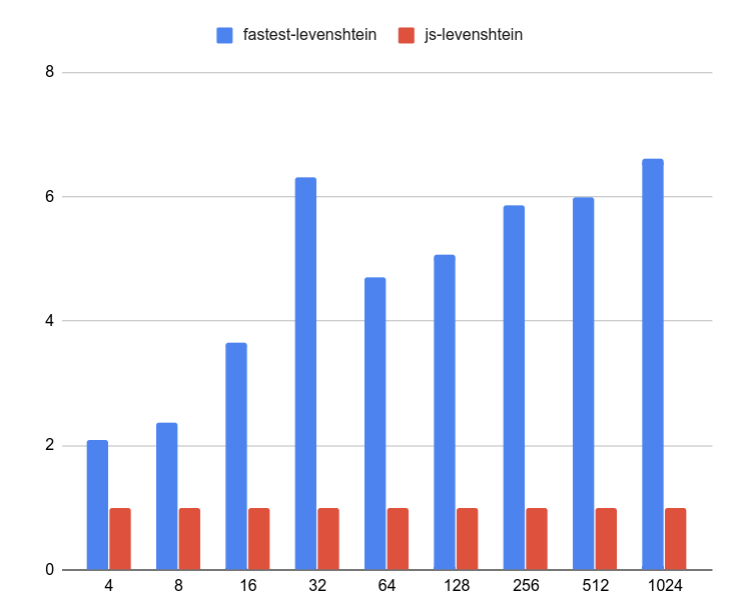
This image shows the relative performance between fastest-levenshtein and js-levenshtein (the 2nd fastest). fastest-levenshtein is always a lot faster. y-axis shows "times faster".
License
This project is licensed under the MIT License - see the LICENSE.md file for details