React State Management Libraries
mobx, recoil, and redux are state management libraries for JavaScript applications, primarily used with React. They help manage shared, persistent state across components while providing mechanisms for updates, side effects, and performance optimization. mobx uses observable objects and automatic dependency tracking, recoil models state as fine-grained atoms and derived selectors, and redux enforces a single immutable store updated through pure reducer functions triggered by dispatched actions.
Npm Package Weekly Downloads Trend
Github Stars Ranking
Stat Detail


State Management in React: MobX vs Recoil vs Redux
Choosing a state management solution is one of the most consequential decisions you’ll make when building a React application. mobx, recoil, and redux each offer distinct approaches to handling shared state, with trade-offs in complexity, performance, reactivity model, and developer experience. Let’s break down how they work under real-world conditions.
🧠 Core Philosophy: Observable Mutations vs Atomic Atoms vs Single Immutable Store
mobx treats state as observable objects that you mutate directly. Changes automatically trigger updates in components that depend on that state.
// mobx: observable state with direct mutation
import { makeAutoObservable } from 'mobx';

class CounterStore {
  count = 0;

  constructor() {
    makeAutoObservable(this);
  }

  increment() {
    this.count++; // Direct mutation
  }
}

const store = new CounterStore();
recoil models state as atoms (individual units) and selectors (derived state). You never mutate atoms directly — you replace their entire value.
// recoil: atomic state with immutable updates
import { atom, useSetRecoilState } from 'recoil';

const countState = atom({
  key: 'count',
  default: 0
});

function Counter() {
  const setCount = useSetRecoilState(countState);
  return <button onClick={() => setCount(c => c + 1)}>+</button>;
}
redux enforces a single, immutable store updated exclusively through pure functions called reducers triggered by actions.
// redux: single store, actions, and reducers
const increment = () => ({ type: 'INCREMENT' });

const counterReducer = (state = { count: 0 }, action) => {
  switch (action.type) {
    case 'INCREMENT':
      return { ...state, count: state.count + 1 };
    default:
      return state;
  }
};
🔄 Reactivity Model: Automatic Tracking vs Explicit Subscriptions
mobx uses transparent reactivity: it tracks which observables your component reads during rendering and automatically re-renders when those values change. No manual subscription needed.
// mobx: auto-tracking via observer
import { observer } from 'mobx-react-lite';

const CounterDisplay = observer(({ store }) => (
  <div>{store.count}</div> // Automatically tracked
));
recoil requires explicit hooks (useRecoilValue, useRecoilState) to subscribe to atoms or selectors. Reactivity is opt-in per component.
// recoil: explicit subscription
import { useRecoilValue } from 'recoil';

function CounterDisplay() {
  const count = useRecoilValue(countState); // Explicit subscription
  return <div>{count}</div>;
}
redux traditionally required manual subscription via connect() or useSelector. Modern Redux Toolkit simplifies this, but you still explicitly declare what slice of state you need.
// redux: explicit selector
import { useSelector } from 'react-redux';

function CounterDisplay() {
  const count = useSelector(state => state.counter.count);
  return <div>{count}</div>;
}
📦 State Structure: Decentralized Objects vs Granular Atoms vs Centralized Tree
mobx encourages domain-driven stores — you create classes or objects that encapsulate related state and logic. This scales well for complex domains but can lead to scattered state if not organized carefully.
// mobx: multiple stores
const userStore = new UserStore();
const cartStore = new CartStore();
// Passed via context or modules
recoil promotes fine-grained atoms, even for small pieces of state. This avoids unnecessary re-renders but can result in many atom declarations.
// recoil: many small atoms
const firstNameState = atom({ key: 'firstName', default: '' });
const lastNameState = atom({ key: 'lastName', default: '' });
// Or combine into one object atom if preferred
redux mandates a single state tree. All state lives in one big object, usually normalized. This provides a clear source of truth but can feel rigid for loosely coupled features.
// redux: single state tree
{
  users: { /* normalized */ },
  posts: { /* normalized */ },
  ui: { loading: false }
}
⚙️ Async Logic Handling: Where Side Effects Live
mobx lets you write async methods directly in stores using async/await. No middleware needed.
// mobx: async in store
fetchUser = async (id) => {
  this.loading = true;
  try {
    this.user = await api.getUser(id);
  } finally {
    this.loading = false;
  }
};
recoil uses asynchronous selectors or atom effects for side effects. Selectors can return promises, and components will render pending states automatically.
// recoil: async selector
const userQuery = selector({
  key: 'userQuery',
  get: async ({ get }) => {
    const id = get(userIdState);
    return await api.getUser(id);
  }
});
redux requires middleware like redux-thunk or redux-saga to handle async logic. Thunks are simple; sagas offer powerful control flow but add complexity.
// redux: thunk
const fetchUser = (id) => async (dispatch) => {
  dispatch({ type: 'FETCH_START' });
  const user = await api.getUser(id);
  dispatch({ type: 'FETCH_SUCCESS', payload: user });
};
🔌 Integration with React: Hooks, HOCs, and Context
mobx uses the observer higher-order component (or hook equivalent) to wrap components. It integrates via React context for store injection.
// mobx: provider and observer
import { Provider, observer } from 'mobx-react';

<Provider store={store}>
  <App />
</Provider>

const App = observer(() => <CounterDisplay />);
recoil requires a RecoilRoot at the top of your app. Components use hooks directly — no wrappers needed beyond the root.
// recoil: RecoilRoot
import { RecoilRoot } from 'recoil';

<RecoilRoot>
  <App />
</RecoilRoot>
redux needs a Provider wrapping your app, passing the store. Components use hooks like useSelector and useDispatch.
// redux: Provider
import { Provider } from 'react-redux';

<Provider store={store}>
  <App />
</Provider>
🛠 Developer Experience: Boilerplate vs Magic vs Discipline
mobx feels the most “magical” — you write plain JavaScript classes and mutations, and reactivity just works. But this can obscure data flow for newcomers.
recoil strikes a balance: minimal boilerplate, explicit subscriptions, and built-in async support. However, its API is less mature and adoption is narrower.
redux demands discipline: actions, reducers, selectors, middleware. But this structure pays off in large teams with strict debugging and time-travel requirements.
🔄 Real-World Trade-Offs Summary
| Aspect | mobx | recoil | redux |
|---|---|---|---|
| Learning Curve | Moderate (concepts: observables) | Low–Moderate (atoms/selectors) | Steep (actions, reducers, middleware) |
| Boilerplate | Low | Very Low | High |
| Debugging | Good (MobX DevTools) | Limited (basic React DevTools) | Excellent (Redux DevTools) |
| Performance | Excellent (fine-grained updates) | Excellent (per-atom subscriptions) | Good (requires memoization/selectors) |
| Async Support | Built-in (async methods) | Built-in (async selectors) | Requires middleware |
| Team Scalability | Medium (mutation-based logic) | Medium (newer, less ecosystem) | High (strict unidirectional flow) |
💡 When to Choose Which
-
Choose
mobxif you want to model state as mutable objects with automatic reactivity, prefer OOP-style stores, and value writing business logic close to your data. Ideal for medium-to-large apps where developer velocity matters more than strict functional purity. -
Choose
recoilif you’re starting a new React app and want fine-grained, hook-based state with minimal setup and built-in async capabilities. Best for teams comfortable with React hooks and willing to adopt a newer, less battle-tested library. -
Choose
reduxif you need predictable state transitions, time-travel debugging, strong middleware ecosystem (logging, persistence, etc.), or are working in a large team that benefits from enforced structure. Still the gold standard for complex, long-lived applications where traceability is critical.
🤝 Final Thought
All three libraries solve real problems. mobx embraces mutability with smart tracking, recoil brings granular reactivity to the React hooks era, and redux offers unmatched predictability through immutability and unidirectional flow. Your choice should reflect your team’s tolerance for magic vs. discipline, your app’s complexity, and how much you value debuggability over convenience.
How to Choose: mobx vs recoil vs redux
- mobx:
Choose
mobxif you prefer modeling state as mutable objects with automatic reactivity, want to colocate business logic with data in domain-driven stores, and value writing straightforward imperative code without boilerplate. It’s well-suited for medium to large applications where developer experience and rapid iteration are priorities, and you’re comfortable with mutation-based state updates. - recoil:
Choose
recoilif you’re building a new React application and want a lightweight, hooks-native solution with fine-grained reactivity, built-in async support via selectors, and minimal setup. It works best when your team embraces React’s modern patterns and doesn’t require extensive devtooling or a mature ecosystem. - redux:
Choose
reduxif you need strict predictability, time-travel debugging, a rich middleware ecosystem (like Redux Toolkit, RTK Query, or sagas), or are working in a large team that benefits from enforced unidirectional data flow. It remains the strongest choice for complex, long-term applications where traceability, testing, and state serialization are critical.
Popular Comparisons
README for mobx

MobX
Simple, scalable state management.






Documentation
Documentation can be found at mobx.js.org.
Sponsors
MobX is made possible by the generosity of the sponsors below, and many other individual backers. Sponsoring directly impacts the longevity of this project.
🥇🥇 Platinum sponsors ($5000+ total contribution): 🥇🥇



🥇 Gold sponsors ($2500+ total contribution):











🥈 Silver sponsors ($500+ total contributions):











Introduction
Anything that can be derived from the application state, should be. Automatically.
MobX is a signal based, battle-tested library that makes state management simple and scalable by transparently applying functional reactive programming. The philosophy behind MobX is simple:
Straightforward
Write minimalistic, boilerplate-free code that captures your intent. Trying to update a record field? Simply use a normal JavaScript assignment — the reactivity system will detect all your changes and propagate them out to where they are being used. No special tools are required when updating data in an asynchronous process.
Effortless optimal rendering
All changes to and uses of your data are tracked at runtime, building a dependency tree that captures all relations between state and output. This guarantees that computations that depend on your state, like React components, run only when strictly needed. There is no need to manually optimize components with error-prone and sub-optimal techniques like memoization and selectors.
Architectural freedom
MobX is unopinionated and allows you to manage your application state outside of any UI framework. This makes your code decoupled, portable, and above all, easily testable.
A quick example
So what does code that uses MobX look like?
import React from "react"
import ReactDOM from "react-dom"
import { makeAutoObservable } from "mobx"
import { observer } from "mobx-react-lite"

// Model the application state.
function createTimer() {
    return makeAutoObservable({
        secondsPassed: 0,
        increase() {
            this.secondsPassed += 1
        },
        reset() {
            this.secondsPassed = 0
        }
    })
}

const myTimer = createTimer()

// Build a "user interface" that uses the observable state.
const TimerView = observer(({ timer }) => (
    <button onClick={() => timer.reset()}>Seconds passed: {timer.secondsPassed}</button>
))

ReactDOM.render(<TimerView timer={myTimer} />, document.body)

// Update the 'Seconds passed: X' text every second.
setInterval(() => {
    myTimer.increase()
}, 1000)
The observer wrapper around the TimerView React component will automatically detect that rendering
depends on the timer.secondsPassed observable, even though this relationship is not explicitly defined. The reactivity system will take care of re-rendering the component when precisely that field is updated in the future.
Every event (onClick / setInterval) invokes an action (myTimer.increase / myTimer.reset) that updates observable state (myTimer.secondsPassed).
Changes in the observable state are propagated precisely to all computations and side effects (TimerView) that depend on the changes being made.
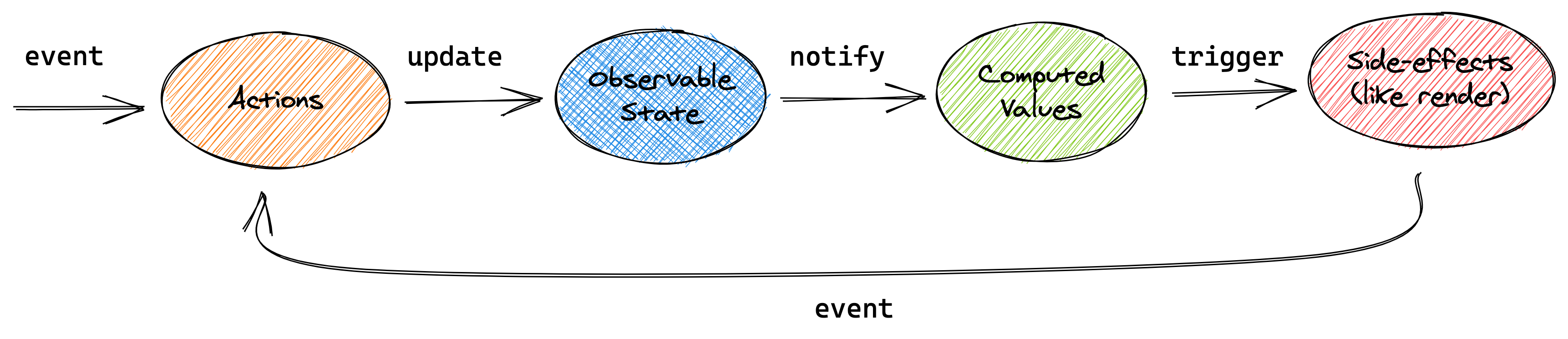
This conceptual picture can be applied to the above example, or any other application using MobX.
Getting started
To learn about the core concepts of MobX using a larger example, check out The gist of MobX page, or take the 10 minute interactive introduction to MobX and React. The philosophy and benefits of the mental model provided by MobX are also described in great detail in the blog posts UI as an afterthought and How to decouple state and UI (a.k.a. you don’t need componentWillMount).
Further resources
- The MobX cheat sheet (£5) is both useful and sponsors the project
- 10 minute interactive introduction to MobX and React
- Egghead.io course, based on MobX 3
- The MobX awesome list – a long list of MobX resources and example projects
The MobX book

The MobX Quick Start Guide ($24.99) by Pavan Podila and Michel Weststrate is available as an ebook, paperback, and on the O'Reilly platform (see preview).
Videos
- Introduction to MobX & React in 2020 by Leigh Halliday, 17 min.
- ReactNext 2016: Real World MobX by Michel Weststrate, 40 min, slides.
- CityJS 2020: MobX, from mutable to immutable, to observable data by Michel Weststrate, 30 min.
- OpenSourceNorth: Practical React with MobX (ES5) by Matt Ruby, 42 min.
- HolyJS 2019: MobX and the unique symbiosis of predictability and speed by Michel Weststrate, 59 min.
- React Amsterdam 2016: State Management Is Easy by Michel Weststrate, 20 min, slides.
- {🚀} React Live 2019: Reinventing MobX by Max Gallo, 27 min.
Credits
MobX is inspired by reactive programming principles, which are for example used in spreadsheets. It is inspired by model–view–viewmodel frameworks like MeteorJS's Tracker, Knockout and Vue.js, but MobX brings transparent functional reactive programming (TFRP, a concept which is further explained in the MobX book) to the next level and provides a standalone implementation. It implements TFRP in a glitch-free, synchronous, predictable and efficient manner.
A ton of credit goes to Mendix, for providing the flexibility and support to maintain MobX and the chance to prove the philosophy of MobX in a real, complex, performance critical applications.