Architecting Internationalization (i18n) in Modern React Applications
This comparison evaluates four prominent libraries for handling internationalization (i18n) in React: next-international, react-i18next, react-intl, and react-intl-universal. These tools solve the complex problem of displaying content in multiple languages, managing pluralization, formatting dates/numbers, and handling runtime locale switching. While react-intl is the official implementation of the ECMA-402 standard, react-i18next offers a flexible, ecosystem-agnostic approach based on the popular i18next core. next-international provides a specialized, type-safe solution optimized specifically for the Next.js App Router, and react-intl-universal serves as a legacy wrapper for older server-side rendering patterns that is no longer actively maintained.
Npm Package Weekly Downloads Trend
Github Stars Ranking
Stat Detail


Architecting Internationalization: next-international vs react-i18next vs react-intl vs react-intl-universal
Building applications for a global audience requires more than just swapping text strings. You need to handle pluralization, date formatting, currency conversion, and right-to-left (RTL) layouts while keeping your bundle size small and your developer experience smooth. The React ecosystem offers several paths to solve this, each with a different philosophy. Let's break down how next-international, react-i18next, react-intl, and the deprecated react-intl-universal compare in real-world scenarios.
🏗️ Core Philosophy: Standards vs. Flexibility vs. Specialization
The fundamental difference lies in what rules these libraries follow and where they fit in your stack.
react-intl is the reference implementation of the ICU MessageFormat standard. It forces you to write messages in a specific syntax that handles complex grammar rules (like "one dog" vs. "two dogs") reliably across all languages. It is heavy on standards but lighter on magic.
// react-intl: Strict ICU syntax
import { FormattedMessage } from 'react-intl';

<FormattedMessage
  id="welcome.message"
  defaultMessage="Hello {name}, you have {count, plural, one {# item} other {# items}}."
  values={{ name: "Alice", count: 5 }}
/>
react-i18next is built on top of i18next, a framework-agnostic core. It favors flexibility over strict standards. You can use simple keys, nested JSON, or even ICU syntax if you add a plugin. It gives you full control over how translations are loaded and stored.
// react-i18next: Flexible key-based approach
import { useTranslation } from 'react-i18next';

function Welcome() {
  const { t } = useTranslation();
  return (
    <div>
      {t('welcome.message', { name: 'Alice', count: 5 })}
    </div>
  );
}
// JSON: { "welcome.message": "Hello {{name}}, you have {{count}} items." }
next-international is specialized. It doesn't try to be everything to everyone. Instead, it leans hard into Next.js features (App Router, Middleware, Server Components) to provide a type-safe, zero-config experience. It uses a simpler syntax similar to react-i18next but wraps it in Next.js specific primitives.
// next-international: Type-safe hooks for Next.js
import { useTranslations } from 'next-international';

export default function Page() {
  const t = useTranslations('Home');
  return <h1>{t('welcome', { name: 'Alice' })}</h1>;
}
react-intl-universal was a wrapper designed to make react-intl work easily with older server-side rendering setups. It is now deprecated. Using it in new projects introduces technical debt immediately.
// react-intl-universal: DEPRECATED - Do not use
// Legacy pattern no longer supported in modern React ecosystems
import intl from 'react-intl-universal';
// Initialization required manual locale detection logic that is now built into frameworks
🚦 Routing and Locale Detection
How the library detects the user's language and updates the URL is often the hardest part of i18n setup.
next-international solves this out of the box for Next.js. It provides a middleware that automatically detects the locale from cookies, headers, or the URL prefix. It handles the routing logic so you don't have to.
// next-international: Middleware setup (middleware.ts)
import { createI18nMiddleware } from 'next-international/middleware';

const I18nMiddleware = createI18nMiddleware({
  locales: ['en', 'fr', 'de'],
  defaultLocale: 'en'
});

export function middleware(request: Request) {
  return I18nMiddleware(request);
}
react-i18next requires you to build this logic yourself or use a helper library like i18next-browser-languagedetector. In Next.js, you often have to write custom hooks or middleware to sync the URL with the i18next instance.
// react-i18next: Manual detector configuration
import LanguageDetector from 'i18next-browser-languagedetector';

i18n
  .use(LanguageDetector)
  .init({
    detection: {
      order: ['path', 'cookie', 'header'],
      caches: ['cookie']
    }
  });
react-intl provides the formatting logic but no routing logic. You must implement your own locale switching mechanism, URL parsing, and provider wrapping. This gives you control but adds significant boilerplate.
// react-intl: Manual Provider wrapping
import { IntlProvider } from 'react-intl';

export function RootLayout({ children, locale, messages }) {
  return (
    <IntlProvider locale={locale} messages={messages}>
      {children}
    </IntlProvider>
  );
}
// You must manually parse the URL to determine 'locale' and load 'messages'
react-intl-universal attempted to simplify this for older Next.js versions but relied on patterns that are incompatible with the modern App Router. It is no longer a viable option.
📝 Developer Experience and Type Safety
Modern development relies heavily on TypeScript to catch errors before runtime. Missing translation keys are a common source of bugs.
next-international excels here. It generates types directly from your translation files. If you add a new key, your TypeScript project knows about it immediately. If you typo a key, the build fails.
// next-international: Automatic Type Inference
// If 'missing_key' is not in your JSON file, TS throws an error
const t = useTranslations('Common');
const text = t('existing_key'); // ✅ OK
const error = t('missing_key'); // ❌ TypeScript Error
react-i18next supports types, but it often requires manual setup or generic typing to get the same level of safety. Without careful configuration, t('any_string') might return any, hiding missing keys until runtime.
// react-i18next: Requires explicit typing or resource typing
import { TFunction } from 'i18next';

// Often requires defining a resource type explicitly
interface TranslationResources {
  translation: {
    welcome: string;
  };
}

function Component({ t }: { t: TFunction<'translation'> }) {
  return <h1>{t('welcome')}</h1>;
}
react-intl has improved its TypeScript support, but the API is verbose. You often need to define message descriptors explicitly to get full type safety, which can feel cumbersome for simple projects.
// react-intl: Verbose descriptor definition
import { defineMessages, useIntl } from 'react-intl';

const messages = defineMessages({
  welcome: {
    id: 'app.home.welcome',
    defaultMessage: 'Welcome!',
  },
});

function Home() {
  const intl = useIntl();
  return <h1>{intl.formatMessage(messages.welcome)}</h1>;
}
🔄 Runtime vs. Compile Time
How translations are loaded affects performance and SEO.
next-international is designed for Static Site Generation (SSG) and Server Side Rendering (SSR). It encourages loading only the necessary language bundle for the current request, keeping the initial JavaScript payload small.
// next-international: Server Component loading
import { getTranslations } from 'next-international/server';

export default async function Page({ params: { locale } }) {
  const t = getTranslations({ locale, namespace: 'Home' });
  const title = await t('title');

  return <h1>{title}</h1>;
}
react-i18next is highly adaptable. It can run entirely on the client (loading JSON via HTTP), entirely on the server, or in a hybrid mode. This flexibility is powerful but requires you to architect the data flow yourself to avoid hydration mismatches.
// react-i18next: Client-side fetching pattern
import { useTranslation } from 'react-i18next';

function Component() {
  const { t, i18n } = useTranslation();

  // Can change language instantly on client
  const changeLang = () => i18n.changeLanguage('fr');

  return <button onClick={changeLang}>{t('switch_lang')}</button>;
}
react-intl typically requires you to load all messages for a locale upfront. In a server-rendered app, you must inject the message bundle into the HTML so the client can hydrate correctly. This often leads to larger initial bundles if not carefully split.
// react-intl: Injecting messages for hydration
const messages = require(`../locales/${locale}.json`);

function App() {
  return (
    <IntlProvider locale={locale} messages={messages}>
      <MainComponent />
    </IntlProvider>
  );
}
⚠️ Maintenance Status and Ecosystem
Choosing a library is also choosing its future.
react-intl-universal: Deprecated. The repository is archived. It does not support React Server Components or the Next.js App Router. Do not use.react-intl: Maintained by FormatJS. Very stable, used by huge enterprises. Updates are frequent but conservative. Great for long-term projects.react-i18next: Extremely active community. Plugins exist for almost every use case (backend integration, ICU support, localization management tools). It is the safest bet for non-Next.js frameworks.next-international: Growing rapidly within the Next.js community. It is the "modern default" for Next.js apps but lacks the massive plugin ecosystem of i18next.
📊 Summary Comparison
| Feature | next-international | react-i18next | react-intl | react-intl-universal |
|---|---|---|---|---|
| Primary Focus | Next.js App Router DX | Flexibility & Ecosystem | ICU Standard Compliance | Legacy SSR Wrapper |
| Setup Complexity | Low (Opinionated) | Medium (Configurable) | High (Manual Wiring) | Low (Legacy) |
| Type Safety | Excellent (Auto-generated) | Good (Manual setup) | Good (Verbose) | Poor |
| Routing | Built-in Middleware | Manual / Detector Lib | Manual Implementation | Manual (Legacy) |
| Message Format | Simple / Interpolation | Flexible (Plugins available) | Strict ICU | Strict ICU |
| Status | ✅ Active | ✅ Active | ✅ Active | ❌ Deprecated |
💡 Final Recommendation
Your choice depends entirely on your framework and complexity needs.
If you are building a new Next.js application, reach for next-international. It removes the boilerplate of routing and type safety, letting you focus on content. It feels like a native part of Next.js.
If you are using Remix, Vite, or a custom setup, or if you need to share translations with a Node.js backend, react-i18next is the industry standard. Its flexibility allows it to adapt to any architecture.
If you are working in a large enterprise environment where strict adherence to international standards (ICU) is a compliance requirement, or if you have complex pluralization rules in difficult languages, react-intl provides the robustness you need.
Finally, if you see react-intl-universal in a codebase, treat it as a signal to plan a migration. It belongs to the past era of React development and will hinder your ability to adopt modern features like Server Components.
How to Choose: react-intl-universal vs next-international vs react-i18next vs react-intl
- react-intl-universal:
Do NOT choose
react-intl-universalfor new projects. This package is deprecated and no longer maintained. It was designed for legacy Next.js (Pages Router) and older React SSR patterns. Existing projects using it should plan a migration tonext-international(for Next.js) orreact-intl/react-i18nextto ensure security updates and compatibility with modern React features. - next-international:
Choose
next-internationalif you are building a new project exclusively on Next.js (App Router) and prioritize developer experience, type safety, and automatic locale detection. It is the best fit when you want a 'batteries-included' solution that handles routing, middleware, and static generation without complex configuration, provided you don't need the full weight of the ICU message format standard. - react-i18next:
Choose
react-i18nextif you need maximum flexibility, framework independence (works with Vite, Remix, CRA, Next.js), or advanced features like context-aware translations and backend loading strategies. It is ideal for teams already familiar with the i18next ecosystem or those who need to share translation logic between React and non-React environments (like Node.js backends or mobile apps). - react-intl:
Choose
react-intlif your project requires strict adherence to the ICU MessageFormat standard for complex pluralization, gender selection, and rich text formatting. It is the standard choice for large enterprise applications where long-term stability, standardization, and deep integration with the FormatJS ecosystem are more critical than minimal bundle size or setup speed.
Popular Comparisons
README for react-intl-universal
react-intl-universal
react-intl-universal is a React internationalization package developed by Alibaba Group.



✨ Features
- Can be used not only in React component but also in Vanilla JS.
- Simple API surface centered around
intl.get. - Display locale-aware numbers.
- Stable date/time helpers:
formatDate,formatTime, andformatDateTimereturn deterministicYYYY-MM-DD,HH:mm:ss, andYYYY-MM-DD HH:mm:ss. This avoids nativeIntloutput drift across runtimes, which has caused SSR and CI issues in tc39/ecma402#1028, nodejs/node#44454, nodejs/node#46123, and formatjs/formatjs#1319. - Pluralize labels in strings.
- Support variables in message.
- Support React rich text component interpolation in message.
- Support for 150+ languages.
- Runs in the browser and Node.js.
- Message format is strictly implemented by ICU standards.
- Locale data in nested JSON format are supported.
- react-intl-universal-extract helps you generate a locale file easily.
- use-react-intl-universal skill helps AI coding agents produce natural translations, stable localized UI, and reviewable locale updates.
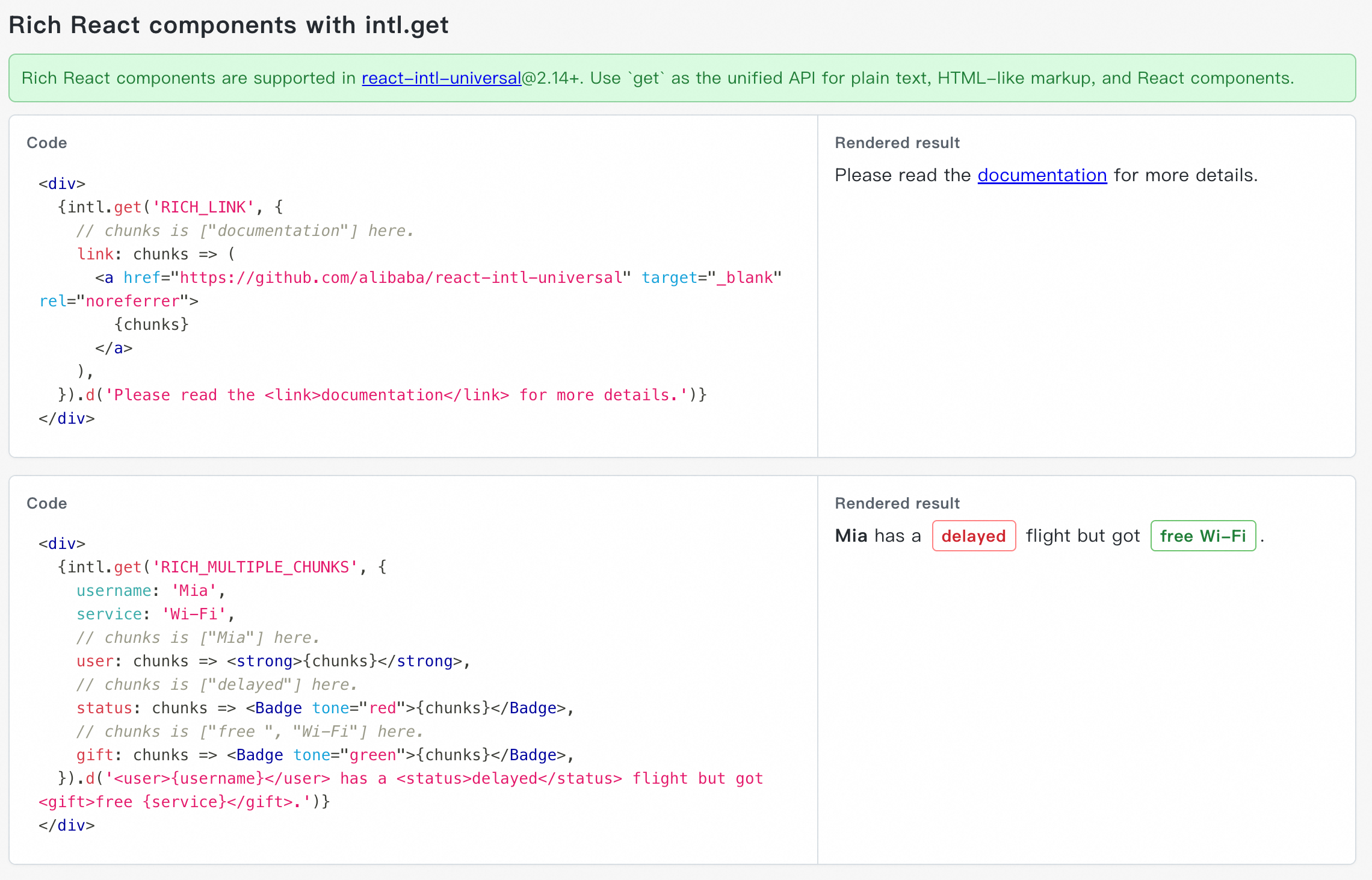
⚡ New in react-intl-universal@2.14+: Support Rich React Components with intl.get
Upgrade to react-intl-universal@2.14+ to use intl.get(...) as the recommended unified API for plain text, ICU variables, and rich React components.
See the live demo for runnable examples. You can keep one complete sentence in the locale message, while React code controls the actual component, props, and event handlers:
⚡ New: Let AI Agents Ship Better Internationalized UI
Use the use-react-intl-universal skill to give AI coding agents a practical i18n workflow, not just API hints.
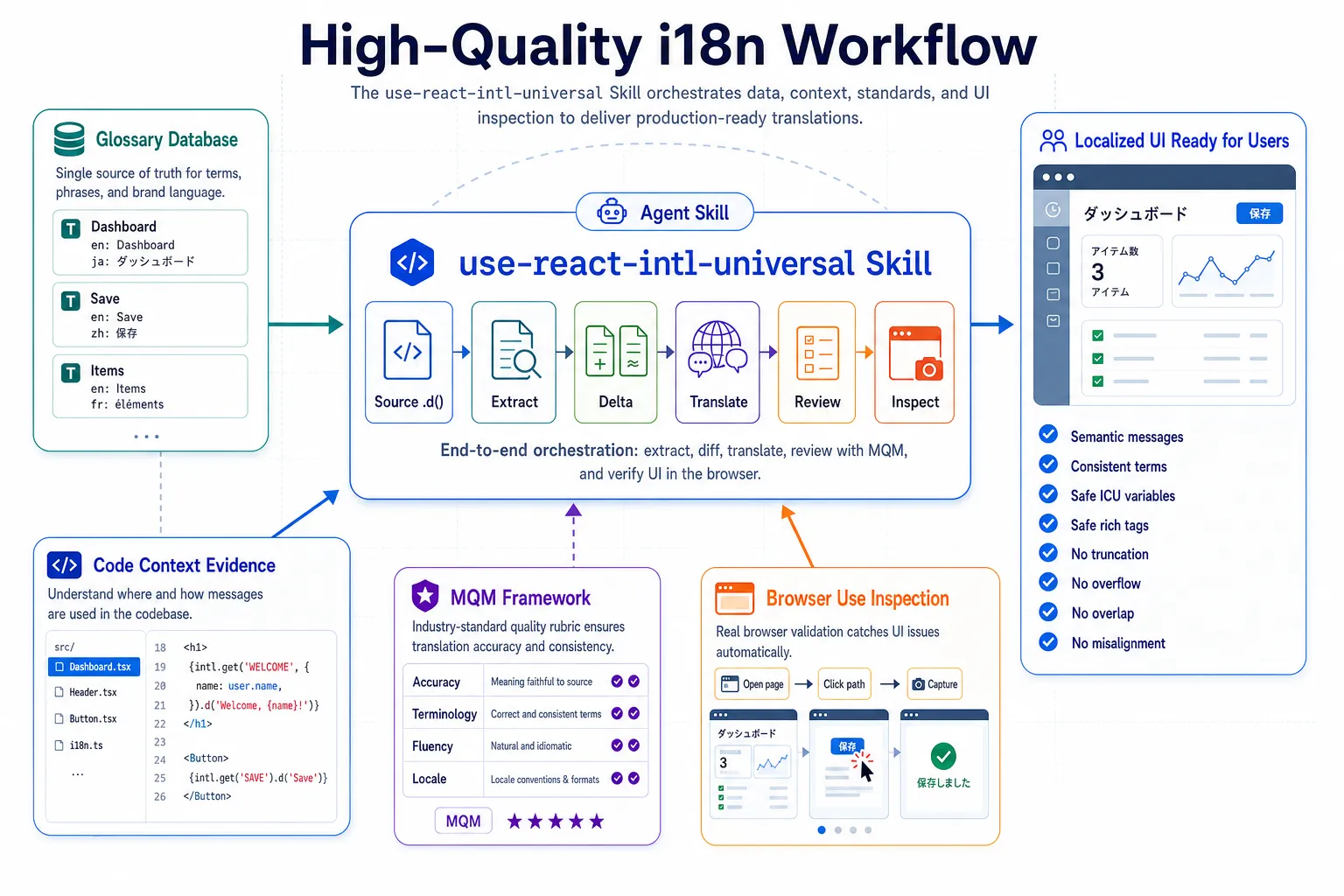
It helps agents:
- write high-quality localized copy that preserves the real product meaning, not word-for-word translations;
- keep product terms and UI wording consistent across modules;
- avoid broken localized UI, such as text truncation, overflow, overlap, or misalignment;
- keep ICU variables, rich tags, default messages, and locale files aligned;
- review translation quality with Multidimensional Quality Metrics (MQM), one of the most professional and comprehensive translation quality assessment frameworks widely recognized in the localization industry;
- inspect running localized pages by URL, click through interactions, capture screenshots, and generate a process-and-findings report;
- produce smaller, more reviewable locale changes.
💡 Why Another Internationalization Solution for React?
In case of internationalizing React apps, react-intl is one of most popular package in industry. react-intl decorate your React.Component with wrapped component which is injected internationalized message dynamically so that the locale data is able to be loaded dynamically without reloading page. The following is the example code using react-intl.
import { injectIntl } from 'react-intl';
class MyComponent extends Component {
  render() {
    const intl = this.props;
    const title = intl.formatMessage({ id: 'title' });
    return (<div>{title}</div>);
  }
};
export default injectIntl(MyComponent);
However, this approach introduces two major issues.
Firstly, Internationalizing can be applied only in view layer such as React.Component. For Vanilla JS file, there's no way to internationalize it. For example, the following snippet is general form validator used by many React.Component in our apps. We definitely will not have such code separated in different React.Component in order to internationalize the warning message. Sadly, react-intl can't be used in Vanilla JS.
export default const rules = {
  noSpace(value) {
    if (value.includes(' ')) {
      return 'Space is not allowed.';
    }
  }
};
Secondly, since your React.Component is wrapped by another class, the behavior is not as expected in many way. For example, to get the instance of React.Component, you can't use the normal way like:
class App {
  render() {
    <MyComponent ref="my"/>
  }
  getMyInstance() {
    console.log('getMyInstance', this.refs.my);
  }
}
Instead, you need to use the method getWrappedInstance() to get that.
class MyComponent {...}
export default injectIntl(MyComponent, {withRef: true});

class App {
  render() {
    <MyComponent ref="my"/>
  }
  getMyInstance() {
    console.log('getMyInstance', this.refs.my.getWrappedInstance());
  }
}
Furthermore, your React.Component's properties are not inherited in subclass since component is injected by react-intl.
Due to the problem above, we create react-intl-universal to internationalize React app using simple but powerful API.
📚 APIs Definition
  /**
   * Initialize properties and load locale data according to currentLocale
   * @param {Object} options
   * @param {string} options.escapeHtml To escape html. Default value is true.
   * @param {string} options.currentLocale Current locale such as 'en-US'
   * @param {Object} options.locales App locale data like {"en-US":{"key1":"value1"},"zh-CN":{"key1":"值1"}}
   * @param {Object} options.warningHandler Ability to accumulate missing messages using third party services. See https://github.com/alibaba/react-intl-universal/releases/tag/1.11.1
   * @param {string} options.fallbackLocale Fallback locale such as 'zh-CN' to use if a key is not found in the current locale
   * @param {boolean} options.debug If debugger mode is on, the message will be wrapped by a span with data key
   * @param {string} options.dataKey If debugger mode is on, the message will be wrapped by a span with this data key. Default value 'data-i18n-key'
   * @returns {Promise}
   */
  init(options)


  /**
   * Load more locales after init
   * @param {Object} locales App locale data
   */
  load(locales)


  /**
   * Get the formatted message by key.
   * Returns string for plain messages.
   * Returns React-renderable chunks array when variables contain rich tag formatter functions
   * and every parsed rich tag has a matching formatter.
   * @param {string} key The string representing key in locale data file
   * @param {Object} variables Variables in message
   * @returns {string|React.ReactNode[]} message
   */
  get(key, variables)

  /**
   * Legacy API: get the formatted html message by key.
   * Prefer get(key, variables) with rich tag formatter functions for new React code.
   * @param {string} key The string representing key in locale data file
   * @param {Object} variables Variables in message
   * @returns {React.Element} message
  */
  getHTML(key, options)

  /**
   * Helper: determine user's locale via URL, cookie, and browser's language.
   * You may not need this API, if you have other rules to determine user's locale.
   * @param {string} options.urlLocaleKey URL's query Key to determine locale. Example: if URL=http://localhost?lang=en-US, then set it 'lang'
   * @param {string} options.cookieLocaleKey Cookie's Key to determine locale. Example: if cookie=lang:en-US, then set it 'lang'
   * @param {string} options.localStorageLocaleKey LocalStorage's Key to determine locale such as 'lang'
   * @returns {string} determined locale such as 'en-US'
   */
  determineLocale(options)

  /**
  * Change current locale
  * @param {string} newLocale Current locale such as 'en-US'
  */
  changeCurrentLocale(newLocale)

  /**
   * Get the inital options
   * @returns {Object} options includes currentLocale and locales
   */
  getInitOptions()

  /**
   * Formats a list of React nodes for proper internationalized formatting.
   * @param {React.ReactNode[]} nodeList - Array of React nodes to format.
   * @param {Intl.ListFormatOptions} options - Intl.ListFormat options.
   * @returns {React.ReactNode[]} Array of React nodes formatted with locale-appropriate separators.
   *
   * @example
   * For en-US locale: formatList(["str1", "str2"]) => Returns: ["str1", ", ", "str2"] => Render as: "str1, str2" in React.js
   * For zh-CN locale: formatList(["str1", "str2"]) => Returns: ["str1", "、", "str2"] => Render as: "str1、str2" in React.js
   */
  formatList(nodeList, options)

  /**
   * Returns locale-specific parentheses format for the current language.
   * @param {React.ReactNode} node - The content to be wrapped in parentheses.
   * @returns {ReactNode[]} An array containing left parenthesis, content, and right parenthesis.
   *
   * @example
   * For en-US locale: formatParentheses("str1") => Returns ["(", "str1", ")"] => Render as "(str1)" in React.js
   * For zh-CN locale: formatParentheses("str1") => Returns ["(", "str1", ")"] => Render as "(str1)" in React.js
   */
  formatParentheses(node)

  /**
   * Returns locale-specific colon character for the current language.
   * @returns {string} The locale-appropriate colon character.
   *
   * @example
   * For en-US locale: <>{intl.get("LABEL_NAME")}{intl.getColon()}{intl.get("VALUE")}</> => Returns "label: value"
   * For zh-CN locale: <>{intl.get("LABEL_NAME")}{intl.getColon()}{intl.get("VALUE")}</> => Returns "label:value"
   */
  getColon()

  /**
   * Formats a Date or timestamp as a stable ISO 8601 date: YYYY-MM-DD.
   * @param {Date|number} value - The Date or timestamp to format.
   * @returns {string} The formatted date.
   *
   * @example
   * formatDate(new Date(2026, 0, 2)) => Returns "2026-01-02"
   */
  formatDate(value)

  /**
   * Formats a Date or timestamp as stable 24-hour time with seconds: HH:mm:ss.
   * @param {Date|number} value - The Date or timestamp to format.
   * @returns {string} The formatted time.
   *
   * @example
   * formatTime(new Date(2026, 0, 2, 15, 30, 45)) => Returns "15:30:45"
   */
  formatTime(value)

  /**
   * Formats a Date or timestamp as stable ISO 8601 date plus 24-hour time: YYYY-MM-DD HH:mm:ss.
   * @param {Date|number} value - The Date or timestamp to format.
   * @returns {string} The formatted date and time.
   *
   * @example
   * formatDateTime(new Date(2026, 0, 2, 15, 30, 45)) => Returns "2026-01-02 15:30:45"
   */
  formatDateTime(value)

   /**
   * Formats a number according to the current locale.
   * @param {number} number - The number to format.
   * @returns {string} The formatted number.
   *
   * @example
   * For en-US locale: formatNumber(1234.56) => Returns "1,234.56"
   * For de-DE locale: formatNumber(1234.56) => Returns "1.234,567"
   * For fr-FR locale: formatNumber(1234.56) => Returns "1 234,567"
   */
  formatNumber(number)
🔄 Compatibility with react-intl
As mentioned in the issue Mirror react-intl API, to make people switch their existing React projects from react-intl to react-intl-universal. We provide two compatible APIs as following.
  /**
   * As same as get(...) API
   * @param {Object} options
   * @param {string} options.id
   * @param {string} options.defaultMessage
   * @param {Object} variables Variables in message
   * @returns {string|React.ReactNode[]} message
  */
  formatMessage(options, variables)
  /**
   * Legacy API: as same as getHTML(...) API
   * @param {Object} options
   * @param {string} options.id
   * @param {React.Element} options.defaultMessage
   * @param {Object} variables Variables in message
   * @returns {React.Element} message
  */
  formatHTMLMessage(options, variables)
For example, the formatMessage API
const name = 'Tony';
intl.formatMessage({ id:'hello', defaultMessage: 'Hello, {name}'}, {name});
is equivalent to get API
const name = 'Tony';
intl.get('hello', {name}).d('Hello, {name}');
And the legacy formatHTMLMessage API
const name = 'Tony';
intl.formatHTMLMessage({ id:'hello', defaultMessage: <div>Hello</div>}, {name});
is equivalent to getHTML API
const name = 'Tony';
intl.getHTML('hello', {name}).d(<div>Hello</div>);
❓ FAQ
1. How Do I Determine the User's Locale?
react-intl-universal provides a helper to determine the user's currentLocale. In the running examples, when a user selects a new locale, the page is redirected to a URL like http://localhost:3000?lang=en-US. Then you can use intl.determineLocale to read the locale from the URL.
It can also determine the user's locale from cookies, localStorage, or the browser's default language. Refer to the APIs section for more detail.
2. How Do I Internationalize a Reusable React Component?
When internationalizing a React component, you don't need to call intl.init again.
You can make react-intl-universal a peerDependency, then just load the locale data in the component.
3. How Do I Enable Debugger Mode?
When developing a website with multiple languages (i18n), translators are usually responsible for translating the content instead of the web developer. However, translators often struggle to find the specific message they need to edit on the webpage because they don't know its key. This leads to them having to ask the developer for the key, resulting in a lot of time wasted on communication.
To solve this issue, enable debugger mode in react-intl-universal. Each message on the webpage will be wrapped in a special span element with the key data-i18n-key. This way, translators can easily see the key of the message and make the necessary edits themselves using some message management system, without needing to ask the developer.
Enabling debugger mode:
intl.init({
  // ...
  debug: true
})
Message will be wrapped in a span element with the key data-i18n-key:
4. How to Internationalize Message in Constants Object?
If constants are defined outside of a React component, the message in constants.fruits may get loaded before intl.init(...). This can cause a warning to be displayed, such as react-intl-universal locales data "null" not exists.
// Wrong: the message in constants.fruits is loaded before `intl.init(...)`
const constants = {
  fruits : [
    { label: intl.get('banana'), value: 'banana' },
    { label: intl.get('apple'), value: 'apple' },
  ]
}
function MyComponent() {
  return <Select dataSource={constants.fruits} />
}
To fix this, you should call intl.init before render.
Solution 1
Make the message object as a function, and call it at render function.
const constants = {
    fruits : () => [  // as arrow function
        { label: intl.get('banana'), value: 'banana' },
        { label: intl.get('apple'), value: 'apple' },
    ]
}
function MyComponent() {
    // fruits is a function which returns message when rendering
    return <Select dataSource={constants.fruits()} />
}
Solution 2
Use getter syntax to make a function call when that property is looked up
const constants = {
  fruits: [
    {
      get label() {
        return intl.get("banana");
      },
      value: "banana",
    },
    {
      get label() {
        return intl.get("apple");
      },
      value: "apple",
    },
  ],
};
function MyComponent() {
  // When "label" property is looked up, it actually make a function call
  return <Select dataSource={constants.fruits} />;
}
📈 Usage Trend
Usage Trend of react-intl-universal
📄 License
This software is free to use under the BSD license.