现代 Web 应用中的富文本编辑器选型与架构对比
ckeditor、quill、summernote 和 tinymce 都是基于浏览器 contentEditable API 构建的富文本编辑器(WYSIWYG),旨在解决用户在 Web 端进行复杂文本格式化的需求。它们提供了工具栏、图片上传、代码高亮等常见功能,但底层架构、数据模型和维护状态差异巨大。ckeditor(npm 包对应 v4 版本)和 tinymce 采用传统的 HTML 数据模型,适合文档编辑;quill 使用 Delta JSON 格式,更适合协同编辑场景;summernote 则强依赖 jQuery,属于较老的技术栈。开发者需根据项目技术栈、维护成本及数据交互需求进行选择。
npm下载趋势
GitHub Stars 排名
统计详情


富文本编辑器架构对比:CKEditor, Quill, Summernote, TinyMCE
在构建内容管理系统、博客平台或协作工具时,选择合适的富文本编辑器(WYSIWYG)是关键的技术决策。ckeditor、quill、summernote 和 tinymce 是生态中最成熟的四个选项,但它们的底层设计哲学截然不同。本文将从架构依赖、数据模型、扩展性及维护状态四个维度进行深度对比,帮助你在架构选型时避开陷阱。
🏗️ 核心架构与依赖:现代框架兼容性
编辑器的依赖管理直接影响其与 React、Vue 等现代框架的集成成本。
ckeditor
npm 包 ckeditor 对应的是 CKEditor 4 版本,该版本已于 2023 年 6 月正式停止维护(EOL)。它基于原生 JavaScript,但架构较老。新架构 CKEditor 5 采用模块化设计,但 npm 包名变更为 @ckeditor/ckeditor5-build-classic 等。
// ckeditor 4 (Legacy - 不推荐新项目使用)
CKEDITOR.replace('editor1');

// CKEditor 5 (Modern - 推荐)
import ClassicEditor from '@ckeditor/ckeditor5-build-classic';
ClassicEditor.create(document.querySelector('#editor'));
quill
完全无依赖(Vanilla JS),不绑定 jQuery 或特定 CSS 框架。这使得它在现代组件化开发中集成最顺畅,社区提供了丰富的 React/Vue 封装组件。
// quill: 无外部依赖
import Quill from 'quill';
const quill = new Quill('#editor', { theme: 'snow' });
summernote
强依赖 jQuery、Bootstrap 和 FontAwesome。在现代前端工程化流程中,引入 jQuery 会增加包体积并可能与 React/Vue 的虚拟 DOM 冲突,集成成本最高。
// summernote: 依赖 jQuery
$('#summernote').summernote({
  placeholder: 'Hello stand alone ui',
  tabsize: 2,
  height: 120
});
tinymce
基于 iframe 隔离模式,核心无框架依赖。它通过 Shadow DOM 或 iframe 将编辑器样式与主机页面隔离,避免 CSS 污染,适合复杂布局。
// tinymce: iframe 隔离
import tinymce from 'tinymce/tinymce';
tinymce.init({ selector: '#editor' });
📦 数据模型:HTML 字符串 vs Delta JSON
数据存储格式决定了后端存储方案及协同编辑的可行性。
ckeditor
输出标准 HTML 字符串。适合直接存入数据库并在前端渲染,但处理内容变更(Diff)较困难。
// ckeditor: 获取 HTML
const data = CKEDITOR.instances.editor1.getData();
// 输出:<p>Hello <strong>World</strong></p>
quill
使用 Delta 格式(JSON 对象)描述内容变更。这使得它天生支持操作转换(OT),是实现 Google Docs 类协同编辑的基础。
// quill: 获取 Delta 对象
const delta = quill.getContents();
// 输出:{ ops: [{ insert: 'Hello ' }, { insert: 'World', attributes: { bold: true } }] }
summernote
输出 HTML 字符串,与 ckeditor 类似。但由于依赖 jQuery,获取内容需通过 jQuery API。
// summernote: 获取 HTML
var html = $('#summernote').summernote('code');
// 输出:<p>Hello <b>World</b></p>
tinymce
输出 HTML 字符串,提供强大的内容过滤策略(Valid Elements),可防止 XSS 攻击并清理冗余样式。
// tinymce: 获取 HTML
const content = tinymce.get('editor').getContent();
// 输出:<p>Hello <strong>World</strong></p>
🧩 扩展与定制:插件系统对比
当默认功能无法满足需求时,扩展能力至关重要。
ckeditor
CKEditor 5 提供强大的插件系统,但开发自定义插件需要学习其特定的架构(Commands, UI Components)。CKEditor 4 插件生态丰富但已过时。
// CKEditor 5: 自定义插件结构复杂
// 需定义 Command 类并注册到 Editor
editor.commands.add('myCommand', new MyCommand(editor));
quill
通过 Modules 和 Blots 系统扩展。自定义格式(如提及 @用户)需要继承 EmbedBlot,学习曲线较陡但灵活性高。
// quill: 自定义 Blot
class MyBlot extends InlineBlot { }
Quill.register(MyBlot);
summernote
插件开发简单,直接操作 DOM 和 jQuery 事件。但由于架构老旧,难以实现复杂的交互逻辑。
// summernote: 直接 jQuery 扩展
$.extend($.summernote.plugins, {
  'customPlugin': function(context) { }
});
tinymce
提供完善的 Plugin API,支持自定义按钮、菜单和对话框。文档详细,社区插件丰富。
// tinymce: 注册插件
tinymce.PluginManager.add('myplugin', function(editor) {
  editor.addButton('mybutton', { text: 'My Button', onclick: function() {} });
});
⚠️ 维护状态与许可风险
这是架构选型中最容易被忽视但风险最高的部分。
ckeditor
npm 包 ckeditor (v4) 已停止安全更新。继续使用存在 XSS 等安全风险。商业功能需购买许可证。
quill
完全开源(BSD 许可)。但 Quill 2.0 版本开发周期较长,目前主流仍使用 1.3 版本,部分新特性支持较慢。
summernote
维护频率低,GitHub Issue 响应慢。由于依赖 jQuery,随着 jQuery 生态衰退,长期维护风险高。
tinymce
核心功能免费,但高级功能(如高级表格、拼写检查)需云订阅或自托管密钥。需评估预算是否允许。
📊 核心特性对比表
| 特性 | ckeditor (v4) | quill | summernote | tinymce |
|---|---|---|---|---|
| 维护状态 | ❌ 已停止维护 (EOL) | ✅ 活跃 (v1.3 稳定) | ⚠️ 维护缓慢 | ✅ 活跃 |
| 主要依赖 | 原生 JS | 无 | jQuery + Bootstrap | 无 (iframe 隔离) |
| 数据格式 | HTML | Delta (JSON) | HTML | HTML |
| 协同编辑 | ⚠️ 需额外插件 | ✅ 原生支持基础 | ❌ 不支持 | ⚠️ 需高级版 |
| 框架集成 | 中 (v5 较好) | ✅ 优秀 | ❌ 困难 | ✅ 良好 |
| 许可模式 | GPL/商业 | BSD (开源) | MIT (开源) | 核心免费/高级收费 |
💡 架构师建议
ckeditor
如果必须使用 CKEditor 品牌,请忽略 npm 包 ckeditor,直接采用 @ckeditor/ckeditor5-build-classic。适合对文档格式要求极高、需要类似 Word 体验的企业内部系统。但需警惕其复杂的授权模型。
quill
最适合现代 SaaS 应用。如果你计划未来引入“多人协同编辑”功能,quill 的 Delta 格式能节省大量重构成本。它的轻量级特性也适合移动端 H5 页面。
summernote
除非你正在维护一个 5 年前的 jQuery 老项目,否则不要在新架构中引入它。jQuery 依赖会成为未来技术栈升级的负担。
tinymce
最稳妥的通用选择。如果你需要一个“安装即用”、文档齐全、样式隔离良好的编辑器,且预算允许高级功能授权,tinymce 是生产力最高的选择。特别适合 CMS 和邮件营销系统。
🏁 总结
这四个编辑器代表了不同的技术时代。summernote 和 ckeditor (v4) 属于 jQuery 时代的产物,逐渐退出历史舞台;tinymce 在稳定性和功能丰富度之间取得了最佳平衡;quill 则代表了面向未来协同编辑的方向。选型时,请优先考虑数据模型是否匹配业务未来需求,而不仅仅是看初始功能列表。
如何选择: ckeditor vs quill vs summernote vs tinymce
- ckeditor:
选择
ckeditor仅适用于维护旧系统,因为 npm 包ckeditor对应已停止维护的 v4 版本。新项目应选用@ckeditor/ckeditor5-build-classic。适合需要复杂文档结构、Word 导出功能的企业级后台,但需注意其模块化配置较复杂。 - quill:
选择
quill如果你需要干净的 API 和基于 Delta 格式的数据模型,便于实现协同编辑或版本对比。它没有外部依赖,适合 React/Vue 等现代框架,但高级功能(如表格)需要自定义开发。 - summernote:
不建议在新项目中使用
summernote。它强依赖 jQuery 和 Bootstrap,与现代前端框架集成困难且维护频率低。仅建议在维护基于 jQuery 的遗留系统时考虑,以避免重构成本。 - tinymce:
选择
tinymce如果需要开箱即用的高质量编辑器且希望样式与主页面隔离。它提供 iframe 模式,兼容性好,文档完善。适合内容管理系统(CMS)、邮件编辑器等场景,注意高级功能可能涉及商业授权。
热门对比
ckeditor的README
CKEditor 4 


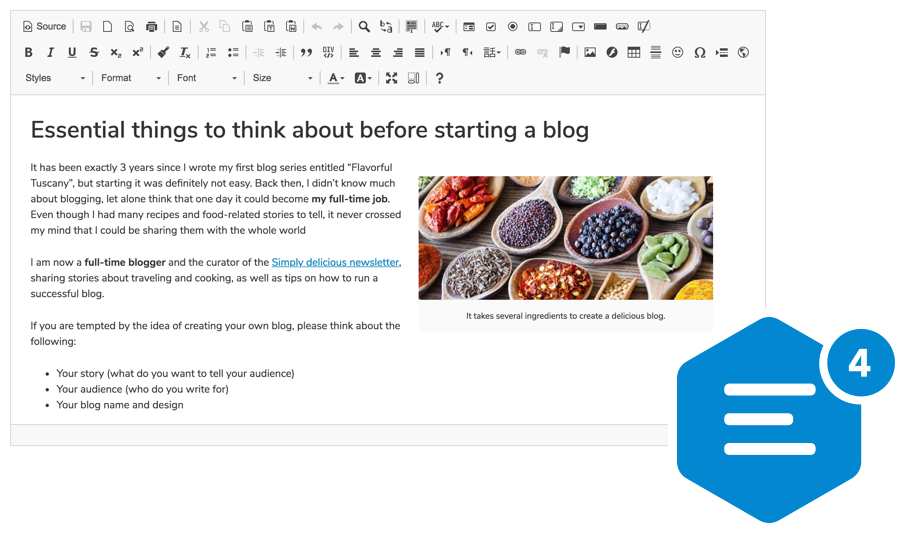
A highly configurable WYSIWYG HTML editor with hundreds of features, from creating rich text content with captioned images, videos, tables, or media embeds to pasting from Word and drag&drop image upload.
Supports a broad range of browsers, including legacy ones.
Getting Started
npm install --save ckeditor
Use it on your website:
<div id="editor">
    <p>This is the editor content.</p>
</div>
<script src="./node_modules/ckeditor/ckeditor.js"></script>
<script>
    CKEDITOR.replace( 'editor' );
</script>
You can also load CKEditor 4 using CDN.
Features
- Over 500 plugins in the Add-ons Repository.
- Pasting from Microsoft Word and Excel.
- Drag&drop image uploads.
- Media embeds to insert videos, tweets, maps, slideshows.
- Powerful clipboard integration.
- Content quality control with Advanced Content Filter.
- Extensible widget system.
- Custom table selection.
- Accessibility conforming to WCAG and Section 508.
- Over 60 localizations available with full RTL support.
Presets
The CKEditor 4 npm package comes in the standard-all preset, so it includes all official CKEditor plugins, with those from the standard package active by default.
Further Resources
- CKEditor 4 demo
- Documentation
- API documentation
- Configuration reference
- CKEditor SDK with more samples
If you are looking for CKEditor 5, here's a link to the relevant npm package: https://www.npmjs.com/package/ckeditor5
Browser Support
 IE / Edge |  Firefox |  Chrome | Chrome (Android) |  Safari |  iOS Safari |  Opera |
|---|---|---|---|---|---|---|
| IE8, IE9, IE10, IE11, Edge | latest version | latest version | latest version | latest version | latest version | latest version |
Find out more in the Browser Compatibility guide.
Contribute
If you would like to help maintain the project, follow the Contribution instructions.
License
Copyright (c) 2003-2018, CKSource - Frederico Knabben. All rights reserved.
For licensing, see LICENSE.md or https://ckeditor.com/legal/ckeditor-oss-license