JavaScript Data Grid Libraries for Professional Web Applications
ag-grid, gridjs, handsontable, mui-datatables, react-data-grid, react-table, and tabulator-tables are all JavaScript libraries designed to display and interact with tabular data in web applications. They range from lightweight, headless solutions to full-featured enterprise-grade grids with built-in editing, filtering, sorting, and virtualization. These libraries help developers avoid reinventing complex table behaviors while offering varying levels of integration with React, theming systems, and customization APIs.
Npm Package Weekly Downloads Trend
Github Stars Ranking
Stat Detail


JavaScript Data Grid Libraries Compared: ag-grid, gridjs, handsontable, mui-datatables, react-data-grid, react-table, and tabulator-tables
When building data-intensive web applications, choosing the right table/grid library can make or break your user experience and development velocity. The seven libraries compared here represent different philosophies: some are full-featured suites, others are minimalist toolkits; some are React-native, others are framework-agnostic. Let’s dive into how they handle real-world scenarios.
🧩 Core Philosophy: Headless vs. Full-Featured vs. Spreadsheet-Like
react-table is headless — it gives you logic (sorting, pagination, etc.) but no UI. You render everything.
// react-table: fully custom markup
import { useReactTable } from 'react-table';

function MyTable({ columns, data }) {
  const table = useReactTable({ columns, data });
  return (
    <table>
      <thead>
        {table.getHeaderGroups().map(headerGroup => (
          <tr key={headerGroup.id}>
            {headerGroup.headers.map(header => (
              <th key={header.id}>{header.column.columnDef.header}</th>
            ))}
          </tr>
        ))}
      </thead>
      <tbody>
        {table.getRowModel().rows.map(row => (
          <tr key={row.id}>
            {row.getVisibleCells().map(cell => (
              <td key={cell.id}>{cell.getValue()}</td>
            ))}
          </tr>
        ))}
      </tbody>
    </table>
  );
}
ag-grid, handsontable, and tabulator-tables are full-featured — they ship with complete UIs, editors, and behaviors.
// ag-grid: declarative but opinionated
import { AgGridReact } from 'ag-grid-react';

function MyAgGrid() {
  const [rowData] = useState([...]);
  const [colDefs] = useState([{ field: 'name' }, { field: 'age' }]);

  return (
    <div className="ag-theme-alpine" style={{ height: 400 }}>
      <AgGridReact rowData={rowData} columnDefs={colDefs} />
    </div>
  );
}
handsontable goes further by mimicking spreadsheets:
// handsontable: Excel-like editing
import { HotTable } from '@handsontable/react';

function MySpreadsheet() {
  return (
    <HotTable
      data={[["A1", "B1"], ["A2", "B2"]]}
      colHeaders={true}
      rowHeaders={true}
      contextMenu={true}
      manualColumnResize={true}
    />
  );
}
⚙️ Sorting, Filtering, and Pagination: Built-In vs. Manual
Most libraries offer sorting and filtering, but implementation varies.
mui-datatables includes these out of the box with Material UI styling:
// mui-datatables
import MUIDataTable from 'mui-datatables';

<MUIDataTable
  title="User List"
  data={users}
  columns={[{ name: "name" }, { name: "email" }]}
  options={{ filter: true, sort: true, pagination: true }}
/>
react-table requires you to enable and connect plugins:
// react-table with sorting
import { useReactTable, getCoreRowModel, getSortedRowModel } from 'react-table';

function SortableTable({ columns, data }) {
  const [{ sorting }, setSorting] = useState([]);
  const table = useReactTable({
    columns,
    data,
    state: { sorting },
    onSortingChange: setSorting,
    getCoreRowModel: getCoreRowModel(),
    getSortedRowModel: getSortedRowModel()
  });
  // ... render headers with sort indicators
}
gridjs handles it declaratively in config:
// gridjs
import { Grid } from 'gridjs';
import 'gridjs/dist/theme/mermaid.css';

new Grid({
  columns: ['Name', 'Email'],
  data: users,
  sort: true,
  pagination: { limit: 10 }
}).render(document.getElementById('wrapper'));
🎨 Styling and Theming Integration
mui-datatables is locked into Material UI — you get theme inheritance but lose flexibility:
// mui-datatables automatically uses MUI theme
// No extra CSS needed if you use MUI's ThemeProvider
ag-grid ships with multiple themes (alpine, balham, material) but requires class names:
// ag-grid: must apply theme class
<div className="ag-theme-material">
  <AgGridReact ... />
</div>
react-data-grid uses CSS variables for theming, making it easy to match your design system:
/* react-data-grid */
.my-theme {
  --rdg-color: #333;
  --rdg-header-background-color: #f5f5f5;
}
<div className="my-theme">
  <DataGrid columns={columns} rows={rows} />
</div>
react-table has no styling — you own all CSS.
🖱️ Editing and Cell Interaction
For in-cell editing, capabilities differ sharply.
handsontable supports advanced editing (formulas, autocomplete, drag-to-fill):
// handsontable with custom editor
<HotTable
  data={data}
  columns={[{
    type: 'autocomplete',
    source: ['Option 1', 'Option 2']
  }]}
/>
ag-grid allows custom cell editors via React components:
// ag-grid custom editor
const NameEditor = (props) => {
  const [value, setValue] = useState(props.value);
  return <input value={value} onChange={e => setValue(e.target.value)} />;
};

const colDefs = [{ field: 'name', cellEditor: NameEditor }];
react-data-grid uses controlled editors:
// react-data-grid
const columns = [{
  key: 'name',
  name: 'Name',
  editable: true,
  editor: (props) => <input value={props.value} onChange={...} />
}];

<DataGrid columns={columns} rows={rows} onRowsChange={setRows} />
react-table requires you to build editing logic from scratch using state and callbacks.
📏 Performance with Large Datasets
Virtualized rendering is critical for 10k+ rows.
react-data-grid and ag-grid virtualize by default:
// react-data-grid: scrolls smoothly with 100k rows
<DataGrid columns={cols} rows={bigDataset} />
tabulator-tables also supports virtual DOM:
// tabulator
var table = new Tabulator("#table", {
  data: bigData,
  virtualDom: true,
  height: "400px"
});
mui-datatables and gridjs do not virtualize — they render all rows, which causes slowdowns beyond ~1k rows.
react-table doesn’t include virtualization, but you can pair it with react-virtual:
// react-table + react-virtual
import { useVirtualizer } from '@tanstack/react-virtual';

const rowVirtualizer = useVirtualizer({
  count: table.getRowModel().rows.length,
  estimateSize: () => 50,
  getScrollElement: () => parentRef.current
});
🔄 React Integration Depth
react-data-grid and react-table are built for React — they use hooks, context, and controlled components.
ag-grid and handsontable offer official React wrappers but their cores are framework-agnostic. This means some patterns feel “bolted on” (e.g., passing React components as props).
mui-datatables is React-only but tightly coupled to MUI v4 — it hasn’t been updated for MUI v5, raising maintenance concerns.
gridjs and tabulator-tables are vanilla JS first. Their React usage involves refs or wrapper components:
// gridjs in React (imperative)
useEffect(() => {
  const grid = new Grid({ ... }).render(wrapperRef.current);
  return () => grid.destroy();
}, []);
🛑 Maintenance and Licensing Notes
mui-datatables: Last npm release was in 2021. GitHub shows low activity. Consider alternatives if starting a new MUI v5 project.ag-grid: Actively maintained. Free version (AG Grid Community) lacks advanced features like pivot, charts, and Excel export — those require a paid license.handsontable: Free for non-commercial use; commercial projects require a license. Actively developed.react-table,react-data-grid,gridjs, andtabulator-tablesare MIT-licensed and actively maintained as of 2024.
📊 Summary Table
| Library | React-Native | Virtualized | Built-In Editing | Theming | License | Best For |
|---|---|---|---|---|---|---|
ag-grid | Wrapper | ✅ | ✅ (advanced) | Custom | Community / Commercial | Enterprise apps with complex data workflows |
gridjs | Wrapper | ❌ | ❌ | Built-in | MIT | Simple tables with quick setup |
handsontable | Wrapper | ✅ | ✅✅ (spreadsheet) | Custom | Free / Commercial | Excel-like data entry and analysis |
mui-datatables | ✅ | ❌ | ❌ | MUI only | MIT | Legacy MUI v4 projects (avoid for new MUI v5 work) |
react-data-grid | ✅ | ✅ | ✅ (controlled) | CSS vars | MIT | High-performance React tables with accessibility |
react-table | ✅ | ❌* | ❌ (build your own) | None | MIT | Custom-designed tables with full control |
tabulator-tables | Wrapper | ✅ | ✅ | Built-in | MIT | Feature-rich tables in vanilla JS or any framework |
* Can be added via react-virtual
💡 Final Guidance
- Need maximum control and light weight? →
react-table - Building a React dashboard with 10k+ rows? →
react-data-grid - Require Excel-like editing? →
handsontable - Already in Material UI v4 and need quick results? →
mui-datatables(but plan migration) - Want zero-config, good-enough tables? →
gridjs - Developing an enterprise app with budget for licensing? →
ag-grid - Working in vanilla JS or multi-framework env? →
tabulator-tables
Choose based on your team’s constraints: design system alignment, data scale, editing needs, and willingness to manage UI complexity versus accepting opinionated defaults.
How to Choose: ag-grid vs gridjs vs handsontable vs mui-datatables vs react-data-grid vs react-table vs tabulator-tables
- ag-grid:
Choose
ag-gridif you need a battle-tested, feature-rich grid for enterprise applications with requirements like advanced filtering, Excel-like editing, row grouping, pivoting, and server-side operations. It offers both free and commercial licenses, with the latter unlocking premium features like charts and clipboard interaction. Its extensive API and documentation make it suitable for large teams building complex data-heavy UIs, though its bundle size and learning curve are significant trade-offs. - gridjs:
Choose
gridjsif you want a modern, framework-agnostic grid that works out of the box with minimal setup and supports basic features like sorting, pagination, and search without requiring React or other dependencies. It’s ideal for small to medium projects where you need a quick, responsive table with decent customization but don’t require deep integration with React state management or complex editing workflows. - handsontable:
Choose
handsontableif your application demands spreadsheet-like behavior — such as cell-level editing, formulas, drag-to-fill, and context menus — similar to Excel or Google Sheets. It shines in financial, analytics, or data-entry scenarios where users expect rich in-cell interactions. While it supports React, its core is framework-agnostic, and its commercial license is required for most production uses beyond evaluation. - mui-datatables:
Choose
mui-datatablesif you’re already using Material UI (MUI) and want a data table that seamlessly inherits MUI’s design language, theming, and component ecosystem. It provides built-in support for filtering, sorting, and export functionality while staying tightly coupled to MUI’s styling system. However, it’s less flexible outside the MUI world and hasn’t seen active maintenance recently, so evaluate long-term viability carefully. - react-data-grid:
Choose
react-data-gridif you prioritize performance, accessibility, and a clean React-first API for large datasets. It uses virtualized rendering by default, supports keyboard navigation, and offers controlled components for custom editors and formatters. It’s well-suited for dashboards or internal tools where you need fast scrolling and precise control over cell rendering without heavy abstraction layers. - react-table:
Choose
react-tableif you prefer a headless, hook-based approach that gives you full control over markup and behavior without imposing styling or DOM structure. It’s extremely lightweight and composable, making it ideal for teams that already have a design system or want to build highly customized tables from scratch. You’ll need to implement UI elements like pagination controls yourself, but this trade-off enables maximum flexibility. - tabulator-tables:
Choose
tabulator-tablesif you need a highly configurable, standalone table library with rich features like nested rows, column grouping, responsive layouts, and built-in editors — all without depending on React. It works well in vanilla JS or with any framework via wrappers, and its declarative column definition syntax is intuitive. However, its React integration is community-maintained, so deep React patterns like hooks or context may not be natively supported.
Popular Comparisons
README for ag-grid




ag-Grid
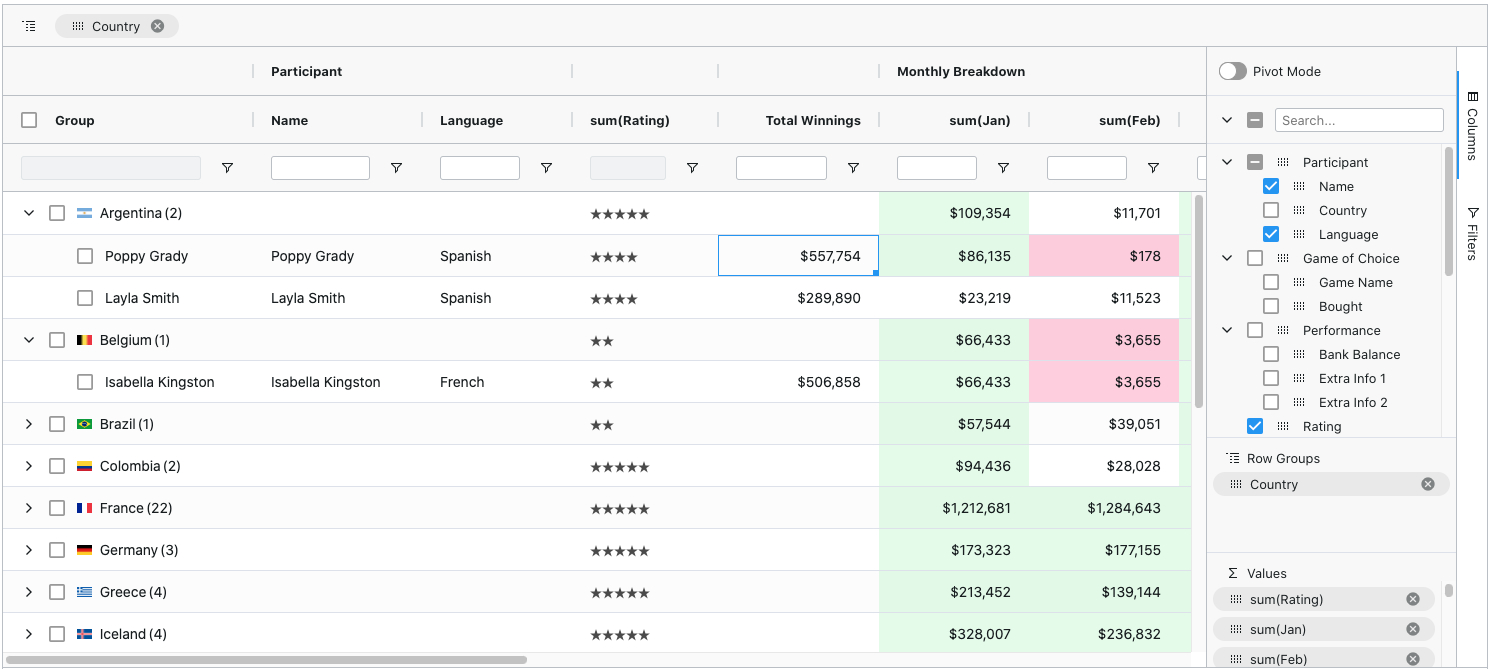
ag-Grid is a fully-featured and highly customizable JavaScript data grid. It delivers outstanding performance, has no 3rd party dependencies and integrates smoothly with all major JavaScript frameworks. Here's how our grid looks like with multiple filters and grouping enabled:
Features
Besides the standard set of features you'd expect from any grid:
- Column Interactions (resize, reorder, and pin columns)
- Pagination
- Sorting
- Row Selection
Here are some of the features that make ag-Grid stand out:
- Grouping / Aggregation*
- Custom Filtering
- In-place Cell Editing
- Records Lazy Loading *
- Server-Side Records Operations *
- Live Stream Updates
- Hierarchical Data Support & Tree View *
- Customizable Appearance
- Customizable Cell Contents
- Excel-like Pivoting *
- State Persistence
- Keyboard navigation
- Data Export to CSV
- Data Export to Excel *
- Row Reordering
- Copy / Paste
- Column Spanning
- Pinned Rows
- Full Width Rows
* The features marked with an asterisk are available in the enterprise version only.
Check out developers documentation for a complete list of features or visit our official docs for tutorials and feature demos.
Looking for a framework specific solution?
- Get Started with AngularJS
- Get Started with Angular
- Get Started with React
- Get Started with Vue
- Get Started with WebComponents
Usage Overview
Install dependencies
$ npm i --save ag-grid
Add a placeholder to HTML
<div id="myGrid" style="height: 150px;width: 600px" class="ag-theme-balham"></div>
Import the grid and styles
import {Grid} from "ag-grid/main";

import "ag-grid/dist/styles/ag-grid.css";
import "ag-grid/dist/styles/ag-theme-balham.css";
Set configuration
const gridOptions = {
	columnDefs: [
		{headerName: 'Make', field: 'make'},
		{headerName: 'Model', field: 'model'},
		{headerName: 'Price', field: 'price'}
	],
	rowData: [
		{make: 'Toyota', model: 'Celica', price: 35000},
		{make: 'Ford', model: 'Mondeo', price: 32000},
		{make: 'Porsche', model: 'Boxter', price: 72000}
	]
};
Initialize the grid
let eGridDiv = document.querySelector('#myGrid');
new Grid(eGridDiv, this.gridOptions);
For more information on how to integrate the grid into your project see TypeScript - Building with Webpack 2.
Issue Reporting
If you have found a bug, please report them at this repository issues section. If you're using Enterprise version please use the private ticketing system to do that. For more information on support check out our dedicated page.
Asking Questions
Look for similar problems on StackOverflow using the ag-grid tag. If nothing seems related, post a new message there. Do not use GitHub issues to ask questions.
Contributing
ag-Grid is developed by a team of co-located developers in London. If you want to join the team check out our jobs listing or send your application to info@ag-grid.com.
License
This project is licensed under the MIT license. See the LICENSE file for more info.