React Custom Hooks Libraries for State, Side Effects, and Async Logic
beautiful-react-hooks, react-async-hook, react-query, react-use, and usehooks-ts are all npm packages that provide reusable React hooks to simplify common frontend tasks. These libraries aim to reduce boilerplate and improve code quality by encapsulating logic for state management, side effects, browser APIs, and asynchronous operations. While they share overlapping goals, they differ significantly in scope, architecture, and intended use cases — from general-purpose utility hooks (react-use, usehooks-ts) to specialized async and data-fetching solutions (react-async-hook, react-query). beautiful-react-hooks focuses on declarative event handling and lifecycle abstractions.
Npm Package Weekly Downloads Trend
Github Stars Ranking
Stat Detail


React Hook Libraries Compared: When to Use Which
Managing state, side effects, and async logic in React apps often leads to repetitive useEffect and useState patterns. The libraries beautiful-react-hooks, react-async-hook, react-query, react-use, and usehooks-ts each offer prebuilt hooks to reduce this boilerplate — but they solve different problems. Let’s compare them through real-world scenarios.
📡 Handling Browser Events and Lifecycle: Declarative vs Manual
beautiful-react-hooks provides hooks like useEvent, useWindowResize, and useGeolocation that automatically manage event listener setup/teardown.
// beautiful-react-hooks: auto-cleanup event listener
import { useEvent } from 'beautiful-react-hooks';

function ClickTracker() {
  const onClick = useEvent('click', (event) => {
    console.log('Clicked at', event.clientX, event.clientY);
  });
  // No manual useEffect or removeEventListener needed
  return <div onClick={onClick}>Track clicks</div>;
}
react-use and usehooks-ts also offer similar hooks, but require more explicit control:
// react-use: useClick
import { useClick } from 'react-use';

function ClickTracker() {
  const ref = useRef(null);
  useClick(ref, () => console.log('Clicked'));
  return <div ref={ref}>Track clicks</div>;
}

// usehooks-ts: useEventListener
import { useEventListener } from 'usehooks-ts';

function ClickTracker() {
  const handleClick = () => console.log('Clicked');
  useEventListener('click', handleClick);
  return <div>Track clicks</div>;
}
react-async-hook and react-query don’t focus on DOM events — they’re purely for async and data logic.
⏳ Managing Async Function States: Simple vs Advanced
For basic async calls (e.g., form submission), react-async-hook wraps functions and exposes loading, error, and result:
// react-async-hook
import { useAsyncCallback } from 'react-async-hook';

function LoginForm() {
  const login = useAsyncCallback(async (credentials) => {
    return await api.login(credentials);
  });

  if (login.loading) return <Spinner />;
  if (login.error) return <Error msg={login.error.message} />;
  return <form onSubmit={() => login.execute({ user, pass })} />;
}
react-query goes further — it treats async results as server state with caching, deduplication, and background refetching:
// react-query
import { useQuery, useMutation } from '@tanstack/react-query';

function UserProfile({ userId }) {
  const { data, isLoading } = useQuery({
    queryKey: ['user', userId],
    queryFn: () => fetchUser(userId)
  });

  const mutation = useMutation({
    mutationFn: updateUser,
    onSuccess: () => {
      // Invalidate and refetch user data
      queryClient.invalidateQueries(['user', userId]);
    }
  });

  return <div>{isLoading ? '...' : data.name}</div>;
}
react-use and usehooks-ts don’t provide dedicated async state hooks. You’d typically combine useState/useEffect manually or use useAsync from react-use (which is basic):
// react-use: simple async
import { useAsync } from 'react-use';

const { value, loading, error } = useAsync(() => fetchUser(id), [id]);
beautiful-react-hooks has no async utilities.
💾 Local Storage and Browser APIs: Utility Coverage
react-use and usehooks-ts shine here with dozens of hooks for browser features:
// react-use
import { useLocalStorage, useNetwork, useMedia } from 'react-use';

const [darkMode, setDarkMode] = useLocalStorage('theme', 'light');
const isOnline = useNetwork().online;
const isMobile = useMedia('(max-width: 768px)');

// usehooks-ts
import { useLocalStorage, useNetwork, useMediaQuery } from 'usehooks-ts';

const [darkMode, setDarkMode] = useLocalStorage('theme', 'light');
const isOnline = useNetwork().online;
const isMobile = useMediaQuery('(max-width: 768px)');
react-query and react-async-hook don’t cover these. beautiful-react-hooks includes some (e.g., useGeolocation), but far fewer than the utility-focused libraries.
🔁 Caching and Data Synchronization: Only One Game in Town
Only react-query provides automatic caching, stale-while-revalidate, pagination, and mutation rollback:
// react-query handles cache keys, deduplication, background updates
const { data } = useQuery({
  queryKey: ['posts'],
  queryFn: fetchPosts,
  staleTime: 1000 * 60 // 1 min
});
All other libraries treat async results as local component state. If two components fetch the same data, they’ll make two network requests unless you build your own cache.
🧪 TypeScript Support and Type Safety
usehooks-ts is built from the ground up in TypeScript with strict types:
// usehooks-ts: fully typed
const [value, setValue] = useLocalStorage<string>('key', 'default');
react-use also offers strong TypeScript support, though some hooks have looser inference.
react-query has excellent TypeScript integration, especially around query keys and mutation variables.
react-async-hook and beautiful-react-hooks support TypeScript but with less comprehensive typing in edge cases.
🛑 Maintenance Status
As of 2024, all five packages are actively maintained with recent releases. None are deprecated.
🆚 Summary Table
| Feature / Package | beautiful-react-hooks | react-async-hook | react-query | react-use | usehooks-ts |
|---|---|---|---|---|---|
| DOM Event Helpers | ✅ Rich | ❌ | ❌ | ✅ Good | ✅ Good |
| Async State Management | ❌ | ✅ Basic | ✅ Advanced (caching, mutations) | ✅ Basic (useAsync) | ❌ |
| Browser API Hooks | ⚠️ Limited | ❌ | ❌ | ✅ Extensive | ✅ Extensive |
| Server-State Focus | ❌ | ❌ | ✅ Yes | ❌ | ❌ |
| TypeScript-First | ⚠️ Partial | ⚠️ Partial | ✅ Excellent | ✅ Strong | ✅ Strict |
💡 Final Guidance
- Need robust data fetching with caching? →
react-queryis the industry standard. - Building an interactive UI with lots of event listeners? →
beautiful-react-hooksreduces boilerplate. - Wrapping simple async functions (e.g., form submits)? →
react-async-hookis lightweight and sufficient. - Want a comprehensive utility belt for browser APIs? → Choose
react-use(larger ecosystem) orusehooks-ts(cleaner TS, smaller API).
Don’t mix react-query with the others for data fetching — it solves that problem completely. But combining react-query with usehooks-ts (for useDebounce, useLocalStorage, etc.) is a common and effective pattern in production apps.
How to Choose: beautiful-react-hooks vs react-async-hook vs react-query vs react-use vs usehooks-ts
- beautiful-react-hooks:
Choose
beautiful-react-hooksif you need clean, declarative hooks for DOM events (like clicks, scrolls, or window resizing) with built-in cleanup and dependency management. It’s well-suited for interactive UIs where you want to avoid manualuseEffectboilerplate for event listeners, but it doesn’t handle data fetching or caching. - react-async-hook:
Choose
react-async-hookwhen you want a lightweight, focused solution for managing async function states (loading, error, result) without external dependencies. It’s ideal for wrapping simple API calls or async computations in components, but lacks advanced features like caching, retries, or background refetching. - react-query:
Choose
react-queryfor robust server-state management — especially when your app relies heavily on data fetching from APIs. It provides automatic caching, background updates, pagination, mutations, and devtools out of the box. Use it when you need to minimize network requests and keep UI data synchronized with backend sources. - react-use:
Choose
react-useif you need a broad collection of high-quality, battle-tested hooks covering browser APIs (e.g., localStorage, media queries), sensors (e.g., mouse, network status), and utilities (e.g., previous value, timeout). It’s excellent as a general-purpose hook toolkit but doesn’t specialize in async or server-state management. - usehooks-ts:
Choose
usehooks-tswhen you prefer TypeScript-first, minimal, and well-documented implementations of common custom hooks (likeuseLocalStorage,useDebounce, oruseWindowSize). It’s a solid alternative toreact-usewith stricter type safety and simpler internals, but similarly avoids complex async orchestration.
Popular Comparisons
README for beautiful-react-hooks




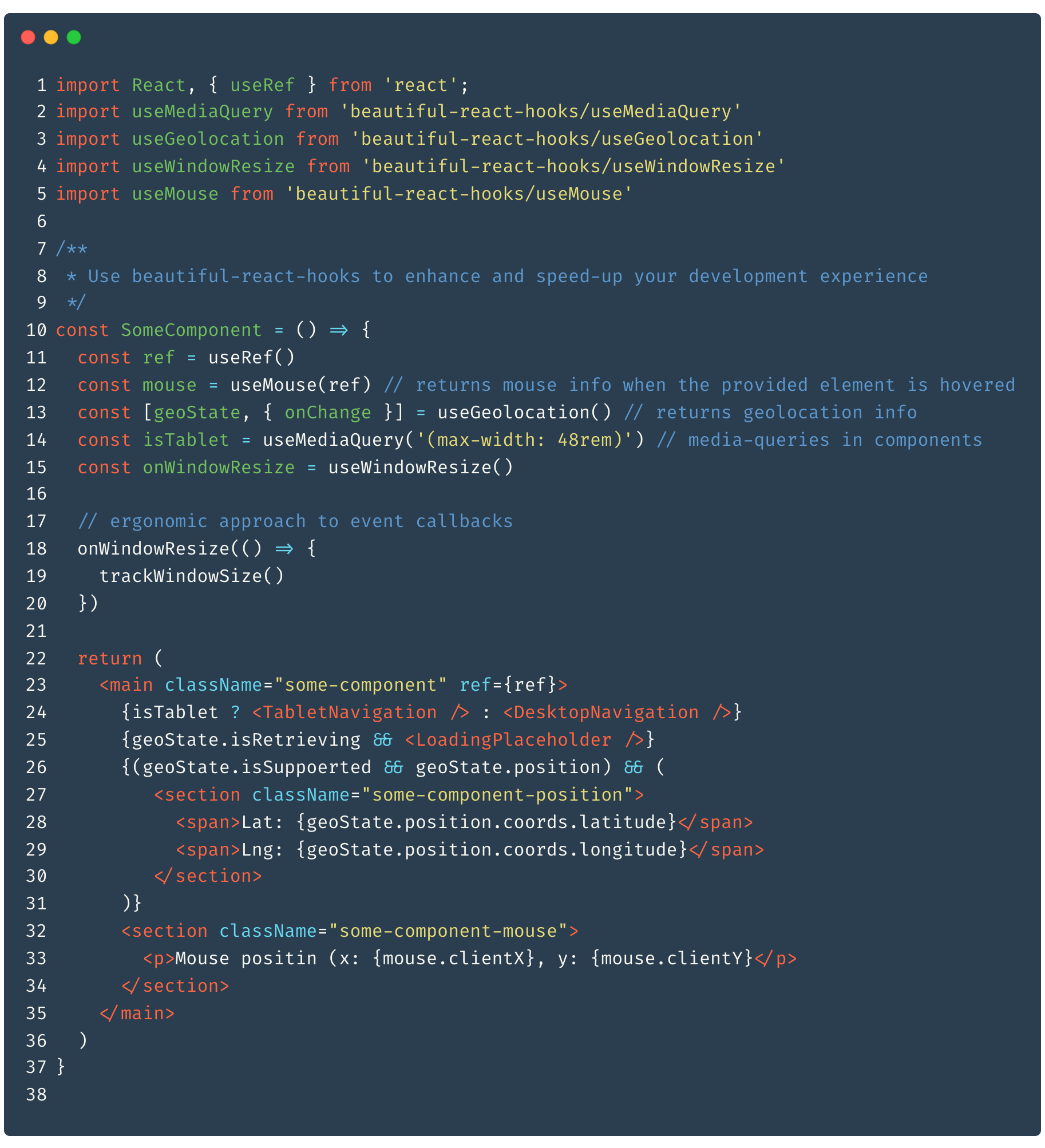
A collection of tailor-made React hooks to enhance your development process and make it faster.
🇬🇧 English | 🇨🇳 简体中文 | 🇮🇹 Italiano | 🇪🇸 Español | 🇺🇦 Ukrainian | 🇧🇷 Brazilian Portuguese | 🇵🇱 Polski | 🇯🇵 日本語 | 🇹🇷 Türkçe
💡 Why?
Custom React hooks allow developers to abstract the business logic of components into single, reusable functions.
I have noticed that many of the hooks I have created and shared across projects involve callbacks, references, events, and dealing with the
component lifecycle.
Therefore, I have created beautiful-react-hooks, a collection of useful React hooks that may
help other developers speed up their development process.
Moreover, I have strived to create a concise and practical API that emphasizes code readability, while keeping the learning curve as low as
possible, making it suitable for larger teams to use and share
t
-- Please before using any hook, read its documentation! --
☕️ Features
- Concise API
- Small and lightweight
- Easy to learn
🕺 Install
by using npm:
$ npm install beautiful-react-hooks
by using yarn:
$ yarn add beautiful-react-hooks
Basic usage
importing a hooks is as easy as the following straightforward line:
import useSomeHook from 'beautiful-react-hooks/useSomeHook'
🎨 Hooks
- useMutableState
- useInfiniteScroll
- useObservable
- useEvent
- useGlobalEvent
- usePreviousValue
- useValueHistory
- useValidatedState
- useMediaQuery
- useOnlineState
- useViewportSpy
- useViewportState
- useSpeechRecognition and useSpeechSynthesis
- useGeolocation, useGeolocationState and useGeolocationEvents
- useDrag, useDropZone and useDragEvents
- useMouse, useMouseState and useMouseEvents
- useTouch, useTouchState and useTouchEvents
- useLifecycle, useDidMount and useWillUnmount
- useWindowResize
- useWindowScroll
- useRequestAnimationFrame
- useResizeObserver
- useTimeout
- useInterval
- useDebouncedCallback
- useThrottledCallback
- useLocalStorage
- useSessionStorage
- useDefaultedState
- useRenderInfo
- useSwipe, useHorizontalSwipe and useVerticalSwipe
- useSwipeEvents
- useConditionalTimeout
- useCookie
- useDarkMode
- useUnmount
- useUpdateEffect
- useIsFirstRender
- useMutationObserver
- useAudio
- useObjectState
- useToggle
- useQueryParam
- useQueryParams
- useSearchQuery
- useURLSearchParams
Peer dependencies
Some hooks are built using third-party libraries (such as rxjs, react-router-dom, redux). As a result, you will see these libraries listed
as peer dependencies.
Unless you are using these hooks directly, you need not install these dependencies.
Contributing
Contributions are very welcome and wanted.
To submit your custom hook, make sure you have thoroughly read and understood the CONTRIBUTING guidelines.
Prior to submitting your pull request: please take note of the following
- make sure to write tests for your code, run
npm testandnpm buildbefore submitting your merge request. - in case you're creating a custom hook, make sure you've added the documentation (you may use the HOOK_DOCUMENTATION_TEMPLATE to document your custom hook).
Credits
Icon made by Freepik from www.flaticon.com