Selecting a Rich Text Editor for Modern Web Applications
ckeditor, medium-editor, quill, and tinymce are all JavaScript libraries designed to provide rich text editing capabilities within web applications. They transform standard textareas into feature-rich editors supporting formatting, media embedding, and content management. tinymce and ckeditor are enterprise-grade solutions with extensive plugin ecosystems, while quill focuses on a clean API and structured data output. medium-editor is a legacy library inspired by the Medium.com editor interface, offering a lightweight but less maintained alternative.
Npm Package Weekly Downloads Trend
Github Stars Ranking
Stat Detail


Selecting a Rich Text Editor for Modern Web Applications
Choosing the right rich text editor (RTE) is a critical architectural decision that impacts content integrity, accessibility, and long-term maintenance. ckeditor, medium-editor, quill, and tinymce represent different philosophies in handling editable content. Let's compare how they handle initialization, data management, customization, and current maintenance status.
🚀 Initialization and Setup
How you boot up the editor sets the tone for integration complexity.
ckeditor (specifically version 5) uses a class-based build system. You import a specific build (Classic, Inline, etc.) and attach it to a DOM element.
// ckeditor: Classic build initialization
import ClassicEditor from '@ckeditor/ckeditor5-build-classic';

ClassicEditor
  .create(document.querySelector('#editor'))
  .then(editor => console.log('Editor ready', editor))
  .catch(error => console.error(error));
medium-editor is instantiated by passing a selector or element to its constructor. It is simpler but lacks the modular build system of modern tools.
// medium-editor: Basic instantiation
import MediumEditor from 'medium-editor';

const editor = new MediumEditor('.editable', {
  toolbar: {
    buttons: ['bold', 'italic', 'underline']
  }
});
quill requires a container element and a configuration object defining theme and modules. It is known for its declarative setup.
// quill: Module-based configuration
import Quill from 'quill';

const quill = new Quill('#editor', {
  theme: 'snow',
  modules: {
    toolbar: [['bold', 'italic'], ['link', 'image']]
  }
});
tinymce often uses a global script tag or npm package with an init function that targets an ID. It relies heavily on a configuration object.
// tinymce: Global init function
import tinymce from 'tinymce/tinymce';

tinymce.init({
  selector: '#editor',
  plugins: 'link image',
  toolbar: 'undo redo | bold italic'
});
📦 Data Management and Output
How the editor stores and retrieves content determines how you save to your database.
ckeditor provides HTML output by default but supports data processors for other formats. You retrieve data via the getData() method.
// ckeditor: Retrieving HTML data
editor.getData().then(data => {
  console.log(data); // <p>Formatted content</p>
});
medium-editor works directly with the DOM. You typically grab the innerHTML of the element it is attached to.
// medium-editor: Direct DOM access
const content = document.querySelector('.editable').innerHTML;
// You must sanitize this manually before saving
quill uses a specialized JSON format called Delta to represent content. This allows for precise operational transformations and easier diffing.
// quill: Retrieving Delta format
const delta = quill.getContents();
// { ops: [{ insert: 'Hello ' }, { insert: 'World', attributes: { bold: true } }] }

// Or get HTML
const html = quill.root.innerHTML;
tinymce primarily works with HTML strings. It offers robust methods to get content with or without formatting.
// tinymce: Getting content
const content = tinymce.get('editor').getContent({ format: 'html' });
// Returns standard HTML string
🛠️ Customization and Extensibility
Real-world apps rarely need just bold and italic. You need to know how hard it is to add custom buttons or logic.
ckeditor uses a plugin architecture where you define new commands and UI components. It is powerful but has a steeper learning curve.
// ckeditor: Registering a simple plugin
export default class MyPlugin extends Plugin {
  init(editor) {
    editor.ui.addButton('MyButton', {
      label: 'Click me',
      command: 'myCommand',
      icon: '<svg>...</svg>'
    });
  }
}
medium-editor allows extensions via its Extension API, but the ecosystem is small. You often end up writing raw DOM manipulation code.
// medium-editor: Custom extension
const CustomButton = MediumEditor.Extension.extend({
  name: 'customButton',
  action: function() {
    document.execCommand('bold');
  }
});
quill lets you register custom formats (blots) and modules. It is very programmatic and fits well with modern JavaScript frameworks.
// quill: Registering a custom blot
import Quill from 'quill';
const Block = Quill.import('blots/block');

class MyBlock extends Block {}
MyBlock.blotName = 'myBlock';
MyBlock.tagName = 'div';

Quill.register(MyBlock);
tinymce offers a comprehensive plugin API. You can add buttons, menu items, and dialog windows using a structured configuration.
// tinymce: Adding a custom button
tinymce.init({
  setup: function(editor) {
    editor.ui.registry.addButton('myButton', {
      text: 'My Button',
      onAction: function() {
        editor.insertContent('Hello!');
      }
    });
  }
});
⚠️ Maintenance and Licensing Status
This is the most critical factor for long-term project health.
ckeditor has two major versions. CKEditor 4 is in Long Term Support (LTS) mode and will reach end-of-life soon. New projects must use CKEditor 5, which uses a dual license (GPL or Commercial). Advanced features like collaboration require a paid license.
// ckeditor: Version check implication
// npm install @ckeditor/ckeditor5-build-classic
// Ensure you are not importing the legacy 'ckeditor' package for v4
medium-editor is effectively deprecated. It has not seen significant updates in years and does not support modern security standards or framework integrations out of the box. It should not be used in new enterprise projects.
// medium-editor: Deprecation warning
// npm install medium-editor
// Warning: Last major release was several years ago.
// Consider migrating to Quill or TinyMCE for active support.
quill is actively maintained and open source (BSD-3-Clause). Version 2.0 recently improved stability and API consistency. It is safe for production use without licensing fees for core features.
// quill: Active development
// npm install quill
// Check for v2.0+ features for improved table handling and accessibility
tinymce is actively maintained with both self-hosted and cloud options. The core is open source (MIT), but premium plugins require a subscription. It is a stable choice for long-term enterprise support.
// tinymce: Licensing check
// npm install tinymce
// Core is free, but verify if you need premium plugins like 'powerpaste'
🌱 Similarities: Shared Ground
Despite their differences, all four libraries aim to solve the same core problems.
1. 📝 DOM Manipulation Abstraction
- All libraries hide the complexity of
contenteditable. - They handle browser inconsistencies in selection and cursor management.
// All libraries abstract this complexity
// editor.insertText('Hello'); // Works across Chrome, Firefox, Safari
2. 🔒 Security Considerations
- All require sanitization to prevent XSS attacks.
- HTML output must be cleaned before rendering or saving.
// Example: Sanitization needed for all
// import DOMPurify from 'dompurify';
// const clean = DOMPurify.sanitize(editorContent);
3. 🎨 Theming Support
- All allow visual customization via CSS.
quillandtinymceoffer pre-built themes (Snow, Bubble, Dark).
// quill: Theme selection
// theme: 'snow' or 'bubble'

// tinymce: Skin configuration
// skin: 'oxide' or 'oxide-dark'
📊 Summary: Key Differences
| Feature | ckeditor | medium-editor | quill | tinymce |
|---|---|---|---|---|
| Status | ✅ Active (v5) / ⚠️ LTS (v4) | ❌ Deprecated / Legacy | ✅ Active | ✅ Active |
| License | GPL / Commercial | BSD | BSD | MIT / Commercial |
| Data Format | HTML / Custom | HTML (Raw) | Delta (JSON) / HTML | HTML |
| Customization | High (Plugin System) | Low (Manual DOM) | High (Blots/Modules) | High (Plugin API) |
| Best For | Enterprise CMS | Simple Prototypes | Modern Web Apps | Enterprise / Legacy Support |
💡 The Big Picture
tinymce and ckeditor are the heavyweights 🏋️. They are built for complex requirements where budget allows for premium support or where open-source enterprise features are non-negotiable. Choose them for large-scale content platforms.
quill is the developer-friendly choice 🛠️. It balances power with simplicity and offers a data structure (Delta) that makes syncing and versioning easier. It is the default choice for modern SaaS applications.
medium-editor is a legacy tool 🕰️. While it pioneered the inline editing experience, it lacks the maintenance required for secure, modern production environments. Avoid it for new builds.
Final Thought: For most new projects, quill offers the best balance of flexibility and cost. If you need specific enterprise features or Word-compatibility, tinymce or ckeditor are worth the investment. Never start a new project with medium-editor.
How to Choose: ckeditor vs medium-editor vs quill vs tinymce
- ckeditor:
Choose
ckeditorif you need a robust, enterprise-ready editor with strong collaboration features and comprehensive accessibility support. It is ideal for complex content management systems where licensing for advanced features is acceptable. Be aware that CKEditor 4 is in maintenance mode, so new projects should use CKEditor 5. - medium-editor:
Avoid
medium-editorfor new production projects as it is no longer actively maintained and lacks modern framework integrations. Only consider it for simple, legacy prototypes where a lightweight, jQuery-free dependency is strictly required and long-term support is not a concern. - quill:
Choose
quillif you prioritize a clean, modular architecture and need structured data output via its Delta format. It works well for applications requiring custom formatting logic or real-time collaboration without the overhead of a massive enterprise suite. It is a strong fit for React, Vue, and Angular integrations. - tinymce:
Choose
tinymceif you need a proven, stable editor with a vast plugin marketplace and strong backward compatibility. It is suitable for enterprise applications requiring extensive customization, cloud hosting options, and a familiar Word-like interface for end users.
Popular Comparisons
README for ckeditor
CKEditor 4 


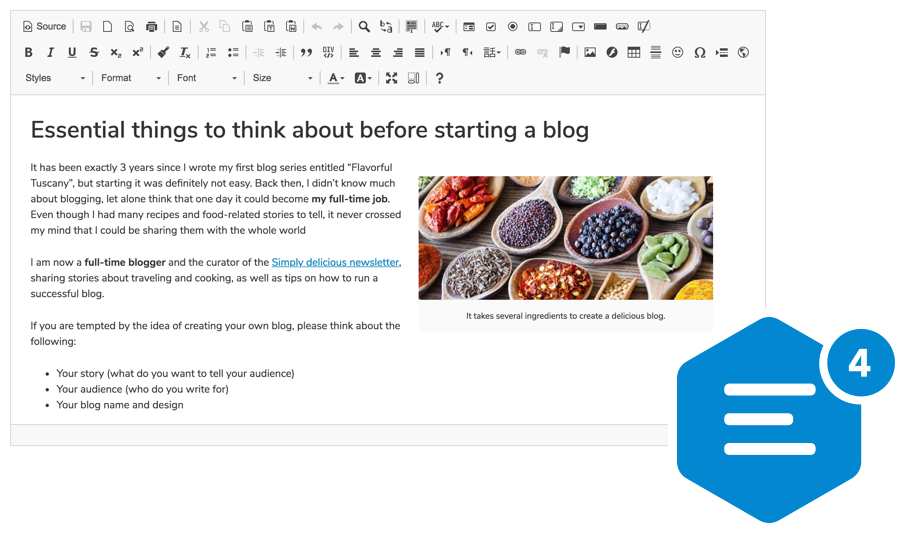
A highly configurable WYSIWYG HTML editor with hundreds of features, from creating rich text content with captioned images, videos, tables, or media embeds to pasting from Word and drag&drop image upload.
Supports a broad range of browsers, including legacy ones.
Getting Started
npm install --save ckeditor
Use it on your website:
<div id="editor">
    <p>This is the editor content.</p>
</div>
<script src="./node_modules/ckeditor/ckeditor.js"></script>
<script>
    CKEDITOR.replace( 'editor' );
</script>
You can also load CKEditor 4 using CDN.
Features
- Over 500 plugins in the Add-ons Repository.
- Pasting from Microsoft Word and Excel.
- Drag&drop image uploads.
- Media embeds to insert videos, tweets, maps, slideshows.
- Powerful clipboard integration.
- Content quality control with Advanced Content Filter.
- Extensible widget system.
- Custom table selection.
- Accessibility conforming to WCAG and Section 508.
- Over 60 localizations available with full RTL support.
Presets
The CKEditor 4 npm package comes in the standard-all preset, so it includes all official CKEditor plugins, with those from the standard package active by default.
Further Resources
- CKEditor 4 demo
- Documentation
- API documentation
- Configuration reference
- CKEditor SDK with more samples
If you are looking for CKEditor 5, here's a link to the relevant npm package: https://www.npmjs.com/package/ckeditor5
Browser Support
 IE / Edge |  Firefox |  Chrome | Chrome (Android) |  Safari |  iOS Safari |  Opera |
|---|---|---|---|---|---|---|
| IE8, IE9, IE10, IE11, Edge | latest version | latest version | latest version | latest version | latest version | latest version |
Find out more in the Browser Compatibility guide.
Contribute
If you would like to help maintain the project, follow the Contribution instructions.
License
Copyright (c) 2003-2018, CKSource - Frederico Knabben. All rights reserved.
For licensing, see LICENSE.md or https://ckeditor.com/legal/ckeditor-oss-license