Architecting Rich Text Editing in Modern Web Applications
ckeditor, pell, quill, and tinymce are JavaScript libraries that enable rich text editing within web applications. They provide user interfaces for formatting text, embedding media, and managing content structure, abstracting away the complexities of the browser's contenteditable API. While tinymce and ckeditor offer enterprise-grade feature sets with extensive plugin ecosystems, quill focuses on a clean API with a custom data model, and pell prioritizes minimalism and small bundle footprint for simple use cases.
Npm Package Weekly Downloads Trend
Github Stars Ranking
Stat Detail


CKEditor vs Pell vs Quill vs TinyMCE: Architecture and Implementation Compared
Building a rich text editor from scratch using contenteditable is notoriously difficult due to inconsistent browser behavior. Libraries like ckeditor, pell, quill, and tinymce solve this by providing stable abstractions. However, they differ significantly in data modeling, extensibility, and licensing. Let's compare how they handle core engineering challenges.
🏗️ Initialization and Setup
ckeditor uses a static create method that returns a promise. It requires importing a specific build or assembling your own via the CLI.
// ckeditor: Classic build initialization
import ClassicEditor from '@ckeditor/ckeditor5-build-classic';

ClassicEditor
  .create(document.querySelector('#editor'))
  .then(editor => console.log('Editor ready', editor))
  .catch(error => console.error(error));
pell is function-based and minimal. You pass an element and configuration directly.
// pell: Simple function call
import pell from 'pell';

const editor = pell.init({
  element: document.querySelector('#editor'),
  onChange: html => console.log(html)
});
quill instantiates a class instance bound to a DOM element. Configuration is passed as an object.
// quill: Class instantiation
import Quill from 'quill';

const quill = new Quill('#editor', {
  theme: 'snow',
  modules: { toolbar: true }
});
tinymce uses a global init method, often relying on a script tag or imported script that exposes tinymce.
// tinymce: Global init method
import tinymce from 'tinymce/tinymce';

tinymce.init({
  selector: '#editor',
  plugins: 'lists link',
  toolbar: 'bold italic'
});
📄 Data Handling: HTML vs Delta vs Model
How the editor stores and outputs data is critical for backend storage and security.
ckeditor uses a custom virtual DOM model internally but outputs standard HTML. It sanitizes content by default.
// ckeditor: Getting HTML data
editor.getData().then(data => {
  console.log(data); // <p>Formatted <strong>HTML</strong></p>
});
pell works directly with innerHTML. There is no intermediate data format.
// pell: Direct HTML access
const html = editor.content.innerHTML;
console.log(html); // <b>Raw</b> HTML string
quill uses a JSON-based format called Delta. You must convert this to HTML for storage if your backend expects it.
// quill: Getting Delta vs HTML
const delta = quill.getContents(); // { ops: [{ insert: 'Text' }] }
const html = quill.root.innerHTML; // <p>Text</p>
tinymce operates on HTML content directly, similar to traditional word processors.
// tinymce: Getting HTML content
const content = tinymce.get('editor').getContent();
console.log(content); // <p>Content</p>
🧩 Extensibility and Plugins
Complex projects often require custom buttons or behaviors.
ckeditor has a robust plugin architecture but requires building a custom bundle for production to avoid loading unused code.
// ckeditor: Adding a plugin in build config
// Requires CKEditor Builder or CLI
// import { Bold } from '@ckeditor/ckeditor5-basic-styles';
// plugins: [ Bold, ... ]
pell has no plugin system. You must manipulate the DOM or execCommand directly to extend functionality.
// pell: Manual extension
// No official plugin API
// You must add event listeners to the toolbar manually
quill allows registering custom formats and modules. It is more flexible than Pell but less heavy-duty than CKEditor.
// quill: Registering a custom format
var Inline = Quill.import('blots/inline');
class BoldBlot extends Inline { }
Quill.register(BoldBlot);
tinymce offers a vast marketplace of plugins and a well-documented API for creating custom buttons.
// tinymce: Adding a custom button
setup: function(editor) {
  editor.ui.registry.addButton('myButton', {
    text: 'My Button',
    onAction: function() { editor.insertContent('Hello'); }
  });
}
⚖️ Licensing and Maintenance
Licensing can be a dealbreaker for commercial products.
ckeditor is GPL licensed for open source, but requires a commercial license for proprietary software that doesn't comply with GPL. CKEditor 4 is End-of-Life; v5 is the standard.
// ckeditor: License check
// Commercial features require a valid license key
// editor.config.licenseKey = 'YOUR_KEY';
pell is MIT licensed. It is free for commercial use but lacks active enterprise backing.
// pell: No license key required
// Free under MIT license
quill is BSD licensed, making it very friendly for commercial integration without fees.
// quill: No license key required
// Free under BSD license
tinymce is open core. Basic features are LGPL, but many advanced plugins and cloud services require a paid subscription.
// tinymce: API Key for cloud services
// tinymce.init({ license_key: 'gpl' }); // or commercial key
🛡️ Security and Sanitization
Preventing XSS attacks is vital when saving user-generated HTML.
ckeditor includes built-in sanitization and HTML filtering rules.
// ckeditor: Built-in filtering
// Configurable via htmlFilter rules
// editor.plugins.get('HtmlDataProcessor').htmlFilter.addRules(...)
pell relies on the browser's default behavior. You must sanitize output on the server or via a separate library.
// pell: Manual sanitization required
// import DOMPurify from 'dompurify';
// const clean = DOMPurify.sanitize(editor.content.innerHTML);
quill sanitizes HTML on paste but outputs raw HTML from root.innerHTML. Server-side validation is recommended.
// quill: Clipboard sanitization
// Built-in for paste, but output needs care
// const html = DOMPurify.sanitize(quill.root.innerHTML);
tinymce has a robust content security policy and valid_elements configuration to strip dangerous tags.
// tinymce: Configuring valid elements
// valid_elements: 'p,b,i,ul,li', // Whitelist allowed tags
// invalid_elements: 'script,iframe'
🤝 Similarities: Shared Ground
Despite their differences, all four libraries aim to solve the same core problems.
1. 📝 ContentEditable Abstraction
- All wrap the native
contenteditableattribute. - Handle cross-browser inconsistencies in keystroke handling.
// All libraries ultimately rely on this browser feature
// <div contenteditable="true"></div>
2. 🎨 Toolbar Customization
- All provide a way to define which formatting options are available.
- Support bold, italic, lists, and links out of the box.
// Common configuration pattern
// toolbar: ['bold', 'italic', 'link']
3. 📱 Mobile Support
- All attempt to handle virtual keyboard behavior on iOS and Android.
- Require testing on real devices for best results.
// All libraries include mobile-specific CSS and event handling
// to prevent zooming or layout shifts
📊 Summary: Key Differences
| Feature | ckeditor | pell | quill | tinymce |
|---|---|---|---|---|
| Data Model | Custom Model → HTML | Raw HTML | Delta (JSON) | Raw HTML |
| License | GPL / Commercial | MIT | BSD | LGPL / Commercial |
| Bundle Size | Large (Modular) | Tiny | Medium | Large |
| Plugin System | Robust (Build required) | None | Moderate | Extensive |
| Best For | Enterprise Docs | Simple Inputs | Structured Data | Word Processing |
💡 The Big Picture
tinymce and ckeditor are the heavyweights. They are best suited for enterprise applications where budget allows for commercial licenses and the requirement is a feature-complete word processor experience. Choose tinymce for familiarity and ckeditor for modern modularity.
quill sits in the middle. It is excellent for developers who want a clean API and structured data without the overhead of a massive enterprise suite. It is a safe default for most modern web apps.
pell is a niche tool. Use it only when every kilobyte counts and the feature set can be extremely basic. For most professional projects, the lack of maintenance and plugin support makes it a risky choice compared to the others.
Final Thought: The choice often comes down to data requirements. If you need structured data, quill wins. If you need raw HTML with maximum features, tinymce or ckeditor are the standards. Avoid pell for anything beyond a prototype or simple blog comment box.
How to Choose: ckeditor vs pell vs quill vs tinymce
- ckeditor:
Choose
ckeditorif you require a highly modular, modern editor with strong collaboration features and custom data modeling. It is ideal for complex applications like document management systems or SaaS platforms where licensing costs are acceptable for the feature depth. Be aware that CKEditor 5 is a significant architectural shift from version 4. - pell:
Choose
pellonly for extremely simple projects where bundle size is the primary constraint and advanced features like tables or complex media embedding are not needed. It is not recommended for enterprise applications due to its limited maintenance and plugin ecosystem compared to mature alternatives. - quill:
Choose
quillif you need a balance between ease of integration and extensibility, particularly if you prefer working with a structured Delta format over raw HTML. It fits well in applications requiring clean data serialization, such as comment systems or content management tools that need reliable output. - tinymce:
Choose
tinymceif you need a word-processor-like experience with extensive out-of-the-box features and strong enterprise support. It is suitable for legacy migrations or projects requiring deep customization via a mature plugin market, provided you comply with its licensing model for commercial use.
Popular Comparisons
README for ckeditor
CKEditor 4 


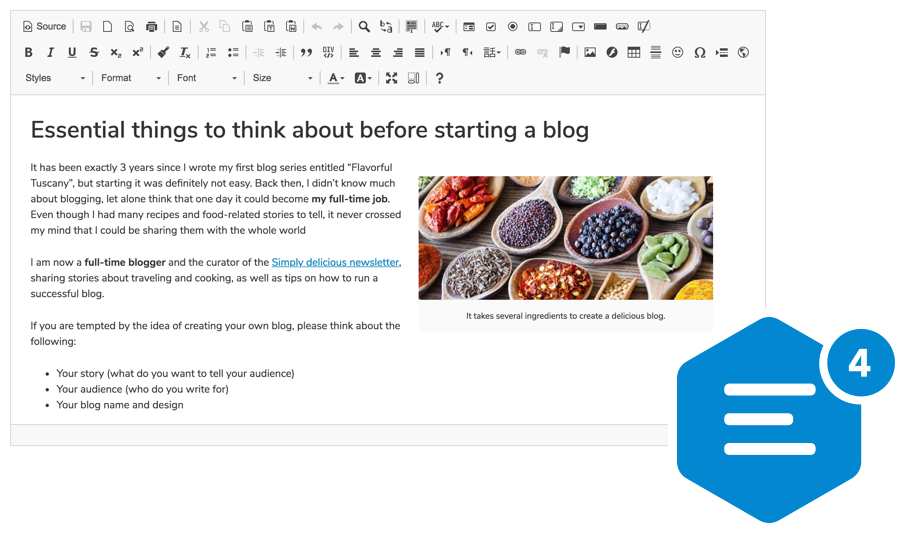
A highly configurable WYSIWYG HTML editor with hundreds of features, from creating rich text content with captioned images, videos, tables, or media embeds to pasting from Word and drag&drop image upload.
Supports a broad range of browsers, including legacy ones.
Getting Started
npm install --save ckeditor
Use it on your website:
<div id="editor">
    <p>This is the editor content.</p>
</div>
<script src="./node_modules/ckeditor/ckeditor.js"></script>
<script>
    CKEDITOR.replace( 'editor' );
</script>
You can also load CKEditor 4 using CDN.
Features
- Over 500 plugins in the Add-ons Repository.
- Pasting from Microsoft Word and Excel.
- Drag&drop image uploads.
- Media embeds to insert videos, tweets, maps, slideshows.
- Powerful clipboard integration.
- Content quality control with Advanced Content Filter.
- Extensible widget system.
- Custom table selection.
- Accessibility conforming to WCAG and Section 508.
- Over 60 localizations available with full RTL support.
Presets
The CKEditor 4 npm package comes in the standard-all preset, so it includes all official CKEditor plugins, with those from the standard package active by default.
Further Resources
- CKEditor 4 demo
- Documentation
- API documentation
- Configuration reference
- CKEditor SDK with more samples
If you are looking for CKEditor 5, here's a link to the relevant npm package: https://www.npmjs.com/package/ckeditor5
Browser Support
 IE / Edge |  Firefox |  Chrome | Chrome (Android) |  Safari |  iOS Safari |  Opera |
|---|---|---|---|---|---|---|
| IE8, IE9, IE10, IE11, Edge | latest version | latest version | latest version | latest version | latest version | latest version |
Find out more in the Browser Compatibility guide.
Contribute
If you would like to help maintain the project, follow the Contribution instructions.
License
Copyright (c) 2003-2018, CKSource - Frederico Knabben. All rights reserved.
For licensing, see LICENSE.md or https://ckeditor.com/legal/ckeditor-oss-license