Architecting Rich Text Editors in React Applications
draft-js, prosemirror-model, slate, and tiptap are all libraries used to build rich text editors, but they approach the problem from different architectural angles. draft-js is a legacy React-based editor framework by Meta that is now in maintenance mode. prosemirror-model is the core data modeling layer of the ProseMirror toolkit, which is framework-agnostic and highly robust but requires significant setup. slate is a completely customizable React-based editor framework with no built-in schema, offering maximum flexibility at the cost of complexity. tiptap is a headless wrapper around ProseMirror designed specifically for modern frameworks like React and Vue, combining ProseMirror's stability with a developer-friendly API.
Npm Package Weekly Downloads Trend
Github Stars Ranking
Stat Detail


Architecting Rich Text Editors in React: Draft.js, ProseMirror, Slate, and TipTap
Building a rich text editor is one of the hardest tasks in frontend development. You are essentially building a mini IDE inside a browser. The four libraries we are comparing — draft-js, prosemirror-model, slate, and tiptap — represent different generations and philosophies of solving this problem. Let's break down how they handle architecture, data modeling, and customization.
⚠️ Maintenance Status: The First Filter
Before looking at features, we must address the lifecycle of these tools. This is a critical architectural decision.
draft-js is in maintenance mode. Meta (Facebook) has stated they are not actively developing new features. It does not support React Hooks natively (it was built for class components) and struggles with modern React rendering patterns.
// draft-js: Requires legacy class component setup or wrappers
import { EditorState, RichUtils } from 'draft-js';

class MyEditor extends React.Component {
  constructor(props) {
    super(props);
    this.state = { editorState: EditorState.createEmpty() };
  }
  // ... legacy lifecycle methods needed for key handling
}
prosemirror-model is part of the ProseMirror toolkit, which is actively maintained but moves slowly and deliberately. It is stable but requires combining multiple packages (prosemirror-state, prosemirror-view, etc.) to function.
// prosemirror: Modular setup required
import { Schema } from "prosemirror-model";
import { EditorState } from "prosemirror-state";
import { EditorView } from "prosemirror-view";

const schema = new Schema({ /* nodes */ });
const state = EditorState.create({ schema });
const view = new EditorView(document.querySelector("#editor"), { state });
slate is actively maintained by the community. It underwent a major breaking rewrite (v0.50+) to focus on React hooks and immutability. It is stable but requires you to build many features from scratch.
// slate: Modern React hooks API
import { createEditor, Transforms } from 'slate';
import { Slate, Editable, withReact } from 'slate-react';

const editor = useMemo(() => withReact(createEditor()), []);

return (
  <Slate editor={editor} initialValue={initialValue}>
    <Editable placeholder="Enter text..." />
  </Slate>
);
tiptap is actively maintained and built on top of ProseMirror. It is designed for modern frameworks and receives frequent updates for extensions and collaboration features.
// tiptap: React component wrapper
import { useEditor, EditorContent } from '@tiptap/react';
import StarterKit from '@tiptap/starter-kit';

const editor = useEditor({
  extensions: [StarterKit],
  content: '<p>Hello World</p>',
});

return <EditorContent editor={editor} />;
🧱 Data Model: Opinionated vs. Schema-less
How the editor stores content determines how easy it is to save, load, and transform data.
draft-js uses a fixed internal model based on ContentBlocks. It is hard to customize the underlying data structure. Exporting to HTML often requires third-party converters.
// draft-js: Fixed ContentBlock structure
const contentState = editorState.getCurrentContent();
const blocks = contentState.getBlockMap();
// Blocks have fixed types: 'unstyled', 'header-one', etc.
prosemirror-model uses a strict Schema. You define exactly what Nodes (blocks) and Marks (inline styles) are allowed. This prevents invalid states but requires upfront design.
// prosemirror: Define Schema explicitly
const schema = new Schema({
  nodes: {
    doc: { content: "block+" },
    paragraph: { content: "inline*", group: "block" },
    text: { group: "inline" }
  },
  marks: {
    strong: { parseDOM: [{ tag: "strong" }] }
  }
});
slate is schema-less. The data is just a nested JSON object. You decide what a "paragraph" or "heading" looks like. This offers freedom but risks inconsistent data if not carefully managed.
// slate: Custom JSON structure
const initialValue = [
  {
    type: 'paragraph',
    children: [{ text: 'A line of text!' }],
  },
];
// You define what 'type' means entirely
tiptap inherits ProseMirror's Schema but abstracts it into Extensions. You enable features rather than defining raw schema nodes, though you can customize the underlying schema if needed.
// tiptap: Extensions define schema
const editor = useEditor({
  extensions: [
    Document,
    Paragraph,
    Text,
    Heading.configure({ levels: [1, 2, 3] }),
  ],
});
// Schema is generated based on loaded extensions
🎨 Customization: Rendering Nodes
In React, you often want to render custom components for specific editor elements (like mentions, embeds, or custom blocks).
draft-js requires using blockRendererFn. It is clunky and often leads to performance issues because the editor tries to manage React components inside its own rendering loop.
// draft-js: Custom block rendering
blockRendererFn(contentBlock) {
  if (contentBlock.getType() === 'atomic') {
    return {
      component: MediaBlock,
      editable: false,
      props: { foo: 'bar' }
    };
  }
}
prosemirror-model (via prosemirror-view) uses NodeViews. This is powerful but complex. You must manage DOM events and decoration manually.
// prosemirror: NodeView class
class ImageNodeView extends NodeView {
  constructor(node, view, getPos) {
    this.dom = document.createElement("img");
    this.dom.src = node.attrs.src;
  }
  // Must handle updates manually
}
slate lets you render everything as standard React components. You map the type property to a component. This feels very natural to React developers.
// slate: Render Elements as React Components
const renderElement = props => {
  switch (props.element.type) {
    case 'quote': return <QuoteBlock {...props} />
    default: return <DefaultElement {...props} />
  }
}
<Editable renderElement={renderElement} />
tiptap also uses React components for NodeViews but handles the heavy lifting of connecting them to the ProseMirror engine. You define an extension and provide a React component.
// tiptap: React NodeView Wrapper
const ImageComponent = ReactNodeViewRenderer(ImageComponentView);

const ImageExtension = Node.create({
  name: 'image',
  addNodeView() {
    return ReactNodeViewRenderer(ImageComponent);
  }
});
🤝 Collaboration and Advanced Features
If you need multiple users editing the same document (Google Docs style), the underlying engine matters immensely.
draft-js has no built-in collaboration support. Implementing operational transformation (OT) or CRDTs on top of Draft.js is extremely difficult due to its internal state management.
prosemirror-model is designed with collaboration in mind. It pairs with prosemirror-collab and binding libraries for Yjs or ShareJS. It is the industry standard for collaborative editing.
// prosemirror: Collaboration plugin
import { collab } from "prosemirror-collab";
const state = EditorState.create({
  plugins: [collab({ version: 1 })]
});
slate does not have built-in collaboration. You must integrate libraries like slate-yjs yourself. Because Slate's data model is flexible, ensuring conflict resolution works correctly requires careful testing.
// slate: External collaboration binding
import { withYjs } from 'slate-yjs';
const editor = withYjs(createEditor(), doc, awareness);
tiptap has first-class support for collaboration via tiptap-collab or Hocuspocus. Since it sits on ProseMirror, it inherits the robust collaboration engine but exposes it through a simpler API.
// tiptap: Collaboration extension
import Collaboration from '@tiptap/extension-collaboration';
import CollaborationCursor from '@tiptap/extension-collaboration-cursor';

const editor = useEditor({
  extensions: [
    Collaboration.configure({ document: ydoc }),
    CollaborationCursor.configure({ provider: yprovider })
  ]
});
📊 Summary: Architecture Comparison
| Feature | draft-js | prosemirror-model | slate | tiptap |
|---|---|---|---|---|
| Status | ⚠️ Maintenance | ✅ Stable | ✅ Active | ✅ Active |
| React Support | ❌ Legacy (Classes) | ⚠️ Vanilla (Wrappers needed) | ✅ Native (Hooks) | ✅ Native (Hooks) |
| Schema | 🔒 Fixed | 🛠️ Strict/Defined | 🆓 Flexible/JSON | 🧩 Extension-based |
| Custom Nodes | 😐 Difficult | 😰 Complex (NodeViews) | 😊 Easy (Components) | 😊 Easy (Extensions) |
| Collaboration | ❌ None | ✅ Built-in Support | ⚠️ Community Plugins | ✅ Built-in Support |
| Learning Curve | 🟢 Low (Legacy) | 🔴 High | 🟡 Medium | 🟢 Low/Medium |
💡 The Big Picture
draft-js is a legacy tool. While it pioneered many concepts, it is no longer suitable for modern React architectures. Migrating away from it is a common task for senior teams.
prosemirror-model is the engine under the hood. It is incredibly powerful but low-level. Unless you are building a platform where the editor is your core product (like Notion or Google Docs) and you need absolute control, using raw ProseMirror is often overkill.
slate is the choice for React purists who want to build something unique. If your editor needs to handle non-standard data structures (like a canvas with text, or a highly nested custom JSON), Slate gives you the freedom to define the rules. However, you pay for that freedom with maintenance costs.
tiptap is the pragmatic choice for most professional teams. It gives you the stability of ProseMirror (which handles edge cases in contenteditable that most developers don't know exist) with the developer experience of React. It allows you to ship a robust editor quickly without getting bogged down in the weeds of selection management or DOM normalization.
Final Thought: For new projects in 2024 and beyond, tiptap is generally the safest bet for feature-rich editors, while slate remains a strong contender for highly custom, lightweight use cases. Avoid draft-js for any new development.
How to Choose: draft-js vs prosemirror-model vs slate vs tiptap
- draft-js:
Do NOT choose
draft-jsfor new projects. It is officially in maintenance mode by Meta and lacks support for modern React features like hooks and concurrent rendering. Only consider this if you are maintaining an existing legacy codebase that already depends on it and migration is not immediately feasible. - prosemirror-model:
Choose
prosemirror-model(and the wider ProseMirror toolkit) if you need a rock-solid, collision-free editing engine and are willing to invest time in low-level implementation. It is best for teams building complex collaborative editors (like Google Docs clones) who need full control over the view layer and don't mind writing vanilla JavaScript or wrapping the library for React. - slate:
Choose
slateif you are building a highly custom editor in React where the data structure does not fit standard document models. It is ideal for teams that want full control over the schema and rendering logic using React components, provided they have the resources to maintain the editor logic as requirements grow. - tiptap:
Choose
tiptapif you want the stability and collaborative features of ProseMirror but with a modern, React-friendly API. It is the best balance for most professional teams who need a rich text editor that supports extensions, collaboration, and output flexibility without managing the low-level complexities of ProseMirror directly.
Popular Comparisons
README for draft-js

Draft.js


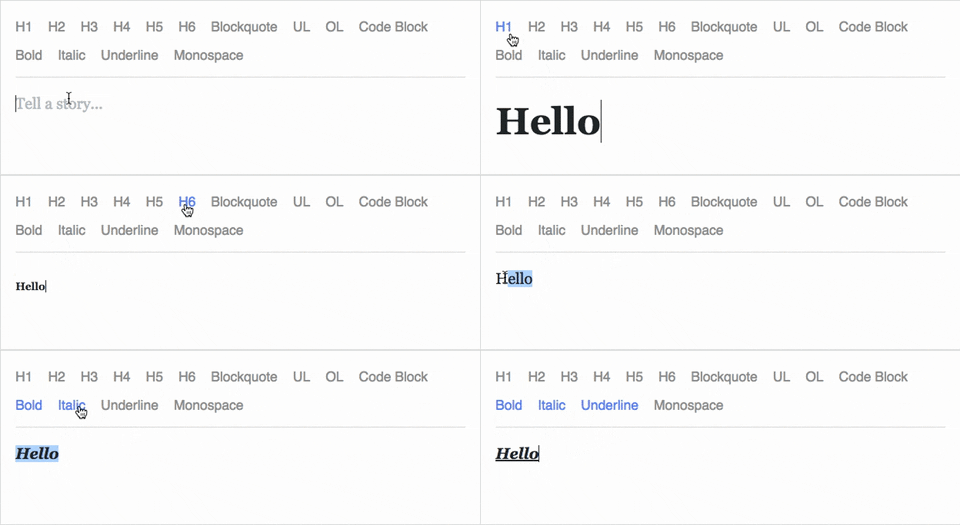
Draft.js is a JavaScript rich text editor framework, built for React and backed by an immutable model.
- Extensible and Customizable: We provide the building blocks to enable the creation of a broad variety of rich text composition experiences, from basic text styles to embedded media.
- Declarative Rich Text: Draft.js fits seamlessly into React applications, abstracting away the details of rendering, selection, and input behavior with a familiar declarative API.
- Immutable Editor State: The Draft.js model is built with immutable-js, offering an API with functional state updates and aggressively leveraging data persistence for scalable memory usage.
Learn how to use Draft.js in your own project.
API Notice
Before getting started, please be aware that we recently changed the API of
Entity storage in Draft. The latest version, v0.10.0, supports both the old
and new API. Following that up will be v0.11.0 which will remove the old API.
If you are interested in helping out, or tracking the progress, please follow
issue 839.
Getting Started
npm install --save draft-js react react-dom

or

yarn add draft-js react react-dom
Draft.js depends on React and React DOM which must also be installed.
Using Draft.js
import React from 'react';
import ReactDOM from 'react-dom';
import {Editor, EditorState} from 'draft-js';

class MyEditor extends React.Component {
  constructor(props) {
    super(props);
    this.state = {editorState: EditorState.createEmpty()};
    this.onChange = (editorState) => this.setState({editorState});
    this.setEditor = (editor) => {
      this.editor = editor;
    };
    this.focusEditor = () => {
      if (this.editor) {
        this.editor.focus();
      }
    };
  }

  componentDidMount() {
    this.focusEditor();
  }

  render() {
    return (
      <div style={styles.editor} onClick={this.focusEditor}>
        <Editor
          ref={this.setEditor}
          editorState={this.state.editorState}
          onChange={this.onChange}
        />
      </div>
    );
  }
}

const styles = {
  editor: {
    border: '1px solid gray',
    minHeight: '6em'
  }
};

ReactDOM.render(
  <MyEditor />,
  document.getElementById('container')
);
Since the release of React 16.8, you can use Hooks as a way to work with EditorState without using a class.
import React from 'react';
import ReactDOM from 'react-dom';
import {Editor, EditorState} from 'draft-js';

function MyEditor() {
  const [editorState, setEditorState] = React.useState(
    EditorState.createEmpty()
  );

  const editor = React.useRef(null);

  function focusEditor() {
    editor.current.focus();
  }

  React.useEffect(() => {
    focusEditor()
  }, []);

  return (
    <div onClick={focusEditor}>
      <Editor
        ref={editor}
        editorState={editorState}
        onChange={editorState => setEditorState(editorState)}
      />
    </div>
  );
}
Note that the editor itself is only as tall as its contents. In order to give users a visual cue, we recommend setting a border and a minimum height via the .DraftEditor-root CSS selector, or using a wrapper div like in the above example.
Because Draft.js supports unicode, you must have the following meta tag in the <head> </head> block of your HTML file:
<meta charset="utf-8" />
Further examples of how Draft.js can be used are provided below.
Examples
Visit http://draftjs.org/ to try out a basic rich editor example.
The repository includes a variety of different editor examples to demonstrate some of the features offered by the framework.
To run the examples, first build Draft.js locally. The Draft.js build is tested with Yarn v1 only. If you're using any other package manager and something doesn't work, try using yarn v1:
git clone https://github.com/facebook/draft-js.git
cd draft-js
yarn install
yarn run build
then open the example HTML files in your browser.
Draft.js is used in production on Facebook, including status and comment inputs, Notes, and messenger.com.
Browser Support
 IE / Edge |  Firefox |  Chrome |  Safari |  iOS Safari | Chrome for Android |
|---|---|---|---|---|---|
| IE11, Edge [1, 2] | last 2 versions | last 2 versions | last 2 versions | not fully supported [3] | not fully supported [3] |
[1] May need a shim or a polyfill for some syntax used in Draft.js (docs).
[2] IME inputs have known issues in these browsers, especially Korean (docs).
[3] There are known issues with mobile browsers, especially on Android (docs).
Resources and Ecosystem
Check out this curated list of articles and open-sourced projects/utilities: Awesome Draft-JS.
Discussion and Support
Join our Slack team!
Contribute
We actively welcome pull requests. Learn how to contribute.
License
Draft.js is MIT licensed.
Examples provided in this repository and in the documentation are separately licensed.