Architecting Rich Text Editors in React: Slate vs. Remirror vs. Draft.js
draft-js, remirror, and slate are libraries for building rich text editors in React, but they represent three distinct generations of architectural thinking. draft-js is the legacy option from Facebook, relying on an immutable data model and content blocks that often struggles with complex customization. slate is a highly flexible, low-level framework that treats the editor content as a customizable JSON tree, giving developers full control over schema and behavior at the cost of higher initial setup complexity. remirror builds on top of prosemirror (a non-React specific engine) to provide a React-friendly interface, offering a robust default feature set and excellent collaboration tools while maintaining a balance between opinionation and extensibility.
Npm Package Weekly Downloads Trend
Github Stars Ranking
Stat Detail


Slate vs. Remirror vs. Draft.js: A Deep Dive into React Editor Architecture
Building a rich text editor is one of the hardest tasks in frontend development. You aren't just managing state; you are managing a complex DOM tree, handling cursor positions, dealing with clipboard events, and ensuring accessibility. draft-js, remirror, and slate approach these problems differently. Let's break down how they handle the core challenges of editor engineering.
🏗️ Core Data Model: Blocks vs. Trees vs. Documents
The way an editor stores content dictates how easy it is to modify, validate, and render.
draft-js uses an immutable model based on "ContentBlocks."
- Text is split into blocks (paragraphs, list items).
- Styling is applied via inline ranges.
- This model is rigid. Adding custom block types often requires fighting the internal logic.
// draft-js: Creating content state
import { ContentState, convertFromRaw } from 'draft-js';

const rawContent = {
  blocks: [
    { key: 'abc', text: 'Hello world', type: 'unstyled', depth: 0 }
  ],
  entityMap: {}
};

const contentState = convertFromRaw(rawContent);
// You must wrap this in an EditorState with a SelectionState
slate treats everything as a customizable JSON tree.
- There are no hard-coded "blocks." You define what a paragraph or heading looks like.
- This allows for deeply nested structures and custom nodes easily.
// slate: Defining a custom schema
const initialValue = [
  {
    type: 'paragraph',
    children: [{ text: 'Hello world' }]
  },
  {
    type: 'image',
    url: '/logo.png',
    children: [{ text: '' }] // Nodes always have text children in Slate
  }
];

// You render this directly using <Element> components
remirror uses the ProseMirror document model.
- Content is a tree of nodes (block nodes) and marks (inline styles).
- It enforces a strict schema by default but allows you to extend it.
- The data is serializable to JSON, but the internal representation is optimized for performance.
// remirror: Using a preset schema
import { useRemirror, ProseMirror } from 'remirror';
import { BoldExtension, HeadingExtension } from 'remirror/extensions';

const extensions = () => [new BoldExtension(), new HeadingExtension()];

function Editor() {
  const { manager } = useRemirror({ extensions });
  // The manager holds the schema and state logic
  return <ProseMirror manager={manager} />;
}
✍️ Handling User Input: Controlled vs. Uncontrolled
How you update content when a user types determines the complexity of your component tree.
draft-js forces a fully controlled pattern.
- Every keystroke triggers an
onChangethat returns a newEditorState. - You must store this state in React
useStateor Redux. - This often leads to performance issues if not optimized, as the whole editor re-renders.
// draft-js: Controlled update
function MyEditor() {
  const [editorState, setEditorState] = useState(EditorState.createEmpty());

  const onChange = (newState) => {
    setEditorState(newState);
  };

  return <Editor editorState={editorState} onChange={onChange} />;
}
slate also uses a controlled pattern but gives you the Transform API.
- You receive the new value and apply operations to it.
- While controlled, it separates the "value" (data) from the "editor" (logic), allowing for cleaner updates.
// slate: Controlled update with transforms
function MyEditor() {
  const [value, setValue] = useState(initialValue);
  const editor = useMemo(() => withReact(createEditor()), []);

  const handleChange = (newValue) => {
    setValue(newValue);
  };

  return (
    <Slate editor={editor} value={value} onChange={handleChange}>
      <Editable /> {/* Renders the content */}
    </Slate>
  );
}
remirror offers a hybrid approach.
- It manages its own internal state by default (uncontrolled-like behavior) for performance.
- You can hook into changes via props without forcing a full React re-render on every keystroke.
- This results in smoother typing experiences out of the box.
// remirror: Handling changes without full re-renders
function MyEditor() {
  const { manager } = useRemirror({ extensions });

  const handleChange = (state) => {
    // Access the JSON content only when needed
    const json = manager.getJSON();
    console.log('Content updated', json);
  };

  return <ProseMirror manager={manager} onChange={handleChange} />;
}
🎨 Customizing Rendering: Components vs. Decorators
Real apps need more than bold and italic. You need mentions, embeds, and custom widgets.
draft-js uses "Block Components" and "Decorators."
- You pass a map of block types to components.
- Inline styles are handled via CSS classes generated by the library.
- Customizing inline rendering (e.g., a colored highlight component) is verbose.
// draft-js: Custom block rendering
const blockRendererFn = (block) => {
  if (block.getType() === 'atomic') {
    return {
      component: MediaBlock,
      editable: false,
      props: { foo: 'bar' }
    };
  }
  return null;
};

<Editor blockRendererFn={blockRendererFn} ... />
slate lets you render everything as standard React components.
- You define an
Elementcomponent that switches onelement.type. - This feels like writing normal React code. You can use hooks inside your custom nodes.
// slate: Custom element rendering
const Element = ({ attributes, children, element }) => {
  switch (element.type) {
    case 'quote':
      return <blockquote {...attributes}>{children}</blockquote>;
    case 'image':
      return <img {...attributes} src={element.url} alt="" />;
    default:
      return <p {...attributes}>{children}</p>;
  }
};

// Pass this to the Editable component
<Editable renderElement={Element} />
remirror uses a Node View system.
- You can render React components inside the editor flow.
- It handles the synchronization between the ProseMirror DOM node and your React component automatically.
// remirror: Custom node component
import { NodeViewComponentProps } from 'remirror';

const ImageComponent = (props: NodeViewComponentProps) => {
  const { node, updateAttributes } = props;
  return (
    <img
      src={node.attrs.src}
      onClick={() => updateAttributes({ src: 'new-url' })}
    />
  );
};

// Register this component in your extension definition
⚠️ Maintenance Status: The Elephant in the Room
draft-js is deprecated.
- The GitHub repository is archived. No new features are coming.
- It does not support React 18 concurrent features well.
- Recommendation: Do not start new projects with this. It is a dead end.
slate is actively maintained but volatile.
- The API changes frequently between major versions.
- Upgrading can require significant refactoring of your custom logic.
- Great for flexibility, but requires a team ready to handle breaking changes.
remirror is stable and enterprise-focused.
- Built on ProseMirror, which has been stable for years.
- Updates are generally backward compatible or well-documented.
- Best for long-term projects where stability is key.
🤝 Similarities: Shared Ground
Despite their differences, all three libraries aim to solve the same hard problems in the React ecosystem.
1. ⚛️ React Integration
- All three provide React components to wrap the native
contenteditablebehavior. - They all attempt to bridge the gap between React's virtual DOM and the browser's selection API.
// Common pattern: Wrapping the editor
// Draft.js
<Editor editorState={state} onChange={setState} />

// Slate
<Slate editor={editor} value={value} onChange={setValue}>
  <Editable />
</Slate>

// Remirror
<ProseMirror manager={manager} />
2. 📄 Serialization
- All allow converting editor content to and from JSON.
- This is essential for saving data to a database.
// Draft.js
const raw = convertToRaw(contentState);

// Slate
const json = Editor.children(editor);

// Remirror
const json = manager.getJSON();
3. 🛠️ Extensibility
- All support adding custom buttons, shortcuts, and logic.
- None are "black boxes"; they all expose APIs for modification.
// Example: Adding a bold toggle concept
// Draft.js: RichUtils.toggleInlineStyle
// Slate: Editor.addMark(editor, 'bold')
// Remirror: commands.toggleBold()
📊 Summary: Key Differences
| Feature | draft-js | slate | remirror |
|---|---|---|---|
| Status | ❌ Deprecated | ✅ Active (Volatile) | ✅ Stable |
| Data Model | Immutable Blocks | Custom JSON Tree | ProseMirror Doc |
| Learning Curve | Medium | High | Medium-High |
| Customization | Hard (Fighting API) | Unlimited (You build it) | High (Plugin system) |
| Collaboration | Very Hard | Possible (Complex) | ✅ Built-in Support |
| Best For | Legacy Maintenance | Unique/Custom Tools | Enterprise/Docs |
💡 The Big Picture
draft-js is a relic. It solved problems for Facebook in 2016 but hasn't evolved. Using it today is technical debt from day one. Only touch it if you have to maintain an old app.
slate is the "build your own framework" option. It gives you the power to create an editor that looks and behaves exactly how you want, with no constraints. But with that power comes responsibility. You have to build the toolbar, handle the edge cases, and manage the upgrades. It's perfect for specialized tools where standard editors fail.
remirror is the professional choice for most applications. It stands on the shoulders of ProseMirror, giving you a rock-solid engine for handling content, while wrapping it in a React-friendly API. If you need tables, collaboration, or a reliable WYSIWYG experience without reinventing the wheel, this is the path of least resistance.
Final Thought: If you are building a standard document editor, pick remirror. If you are building a highly specialized interactive canvas, pick slate. Avoid draft-js entirely.
How to Choose: draft-js vs remirror vs slate
- draft-js:
Avoid
draft-jsfor any new greenfield project. It is officially deprecated by its maintainers and lacks support for modern React patterns like hooks without significant wrappers. Only consider this if you are maintaining a legacy codebase that already depends on it and migration is not currently feasible. For new features, you should plan a migration to a more modern alternative. - remirror:
Choose
remirrorif you need a production-ready editor with complex features like collaborative editing, track changes, or structured content (tables, lists) out of the box. It is ideal for teams that want the power of ProseMirror's engine but prefer a React-centric API with pre-built components. This is the strongest choice for enterprise applications requiring reliability and extensive plugin ecosystems without building everything from scratch. - slate:
Choose
slateif your product requires a highly custom data model or unique editing behaviors that standard editors cannot support. It is best for teams willing to invest time in building their own toolbar, handling edge cases, and defining a strict schema. Useslatewhen you need total control over the DOM rendering and logic, such as building a specialized notation tool, a custom CMS block editor, or an editor with non-standard interactive elements.
Popular Comparisons
README for draft-js

Draft.js


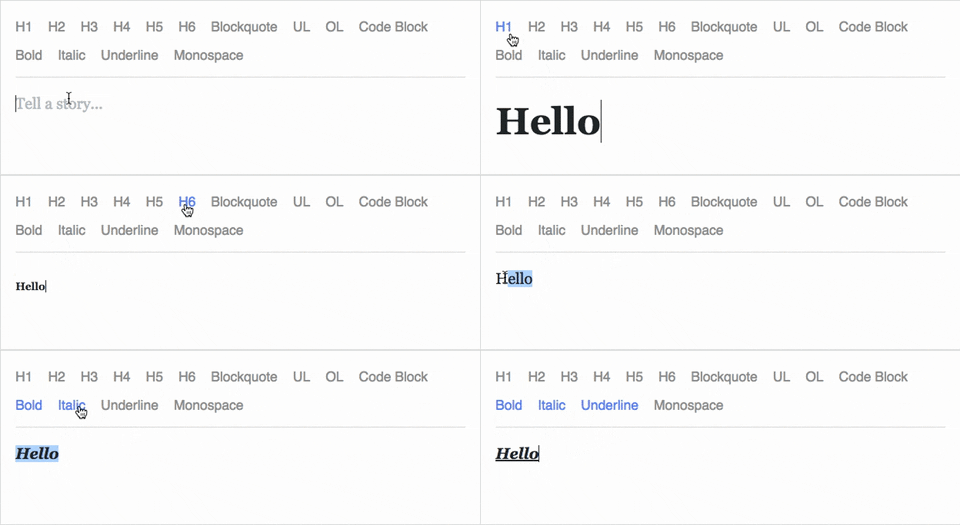
Draft.js is a JavaScript rich text editor framework, built for React and backed by an immutable model.
- Extensible and Customizable: We provide the building blocks to enable the creation of a broad variety of rich text composition experiences, from basic text styles to embedded media.
- Declarative Rich Text: Draft.js fits seamlessly into React applications, abstracting away the details of rendering, selection, and input behavior with a familiar declarative API.
- Immutable Editor State: The Draft.js model is built with immutable-js, offering an API with functional state updates and aggressively leveraging data persistence for scalable memory usage.
Learn how to use Draft.js in your own project.
API Notice
Before getting started, please be aware that we recently changed the API of
Entity storage in Draft. The latest version, v0.10.0, supports both the old
and new API. Following that up will be v0.11.0 which will remove the old API.
If you are interested in helping out, or tracking the progress, please follow
issue 839.
Getting Started
npm install --save draft-js react react-dom

or

yarn add draft-js react react-dom
Draft.js depends on React and React DOM which must also be installed.
Using Draft.js
import React from 'react';
import ReactDOM from 'react-dom';
import {Editor, EditorState} from 'draft-js';

class MyEditor extends React.Component {
  constructor(props) {
    super(props);
    this.state = {editorState: EditorState.createEmpty()};
    this.onChange = (editorState) => this.setState({editorState});
    this.setEditor = (editor) => {
      this.editor = editor;
    };
    this.focusEditor = () => {
      if (this.editor) {
        this.editor.focus();
      }
    };
  }

  componentDidMount() {
    this.focusEditor();
  }

  render() {
    return (
      <div style={styles.editor} onClick={this.focusEditor}>
        <Editor
          ref={this.setEditor}
          editorState={this.state.editorState}
          onChange={this.onChange}
        />
      </div>
    );
  }
}

const styles = {
  editor: {
    border: '1px solid gray',
    minHeight: '6em'
  }
};

ReactDOM.render(
  <MyEditor />,
  document.getElementById('container')
);
Since the release of React 16.8, you can use Hooks as a way to work with EditorState without using a class.
import React from 'react';
import ReactDOM from 'react-dom';
import {Editor, EditorState} from 'draft-js';

function MyEditor() {
  const [editorState, setEditorState] = React.useState(
    EditorState.createEmpty()
  );

  const editor = React.useRef(null);

  function focusEditor() {
    editor.current.focus();
  }

  React.useEffect(() => {
    focusEditor()
  }, []);

  return (
    <div onClick={focusEditor}>
      <Editor
        ref={editor}
        editorState={editorState}
        onChange={editorState => setEditorState(editorState)}
      />
    </div>
  );
}
Note that the editor itself is only as tall as its contents. In order to give users a visual cue, we recommend setting a border and a minimum height via the .DraftEditor-root CSS selector, or using a wrapper div like in the above example.
Because Draft.js supports unicode, you must have the following meta tag in the <head> </head> block of your HTML file:
<meta charset="utf-8" />
Further examples of how Draft.js can be used are provided below.
Examples
Visit http://draftjs.org/ to try out a basic rich editor example.
The repository includes a variety of different editor examples to demonstrate some of the features offered by the framework.
To run the examples, first build Draft.js locally. The Draft.js build is tested with Yarn v1 only. If you're using any other package manager and something doesn't work, try using yarn v1:
git clone https://github.com/facebook/draft-js.git
cd draft-js
yarn install
yarn run build
then open the example HTML files in your browser.
Draft.js is used in production on Facebook, including status and comment inputs, Notes, and messenger.com.
Browser Support
 IE / Edge |  Firefox |  Chrome |  Safari |  iOS Safari | Chrome for Android |
|---|---|---|---|---|---|
| IE11, Edge [1, 2] | last 2 versions | last 2 versions | last 2 versions | not fully supported [3] | not fully supported [3] |
[1] May need a shim or a polyfill for some syntax used in Draft.js (docs).
[2] IME inputs have known issues in these browsers, especially Korean (docs).
[3] There are known issues with mobile browsers, especially on Android (docs).
Resources and Ecosystem
Check out this curated list of articles and open-sourced projects/utilities: Awesome Draft-JS.
Discussion and Support
Join our Slack team!
Contribute
We actively welcome pull requests. Learn how to contribute.
License
Draft.js is MIT licensed.
Examples provided in this repository and in the documentation are separately licensed.