XML to JSON Conversion Strategies in JavaScript
fast-xml-parser, xml-js, and xml2json are libraries designed to convert XML data into JSON format and vice versa within JavaScript environments. fast-xml-parser focuses on high performance and validation capabilities, making it suitable for large datasets. xml-js offers flexible conversion options, supporting both compact and standard JSON structures. xml2json is an older utility often used for simple transformations but lacks the active maintenance and feature depth of the other two.
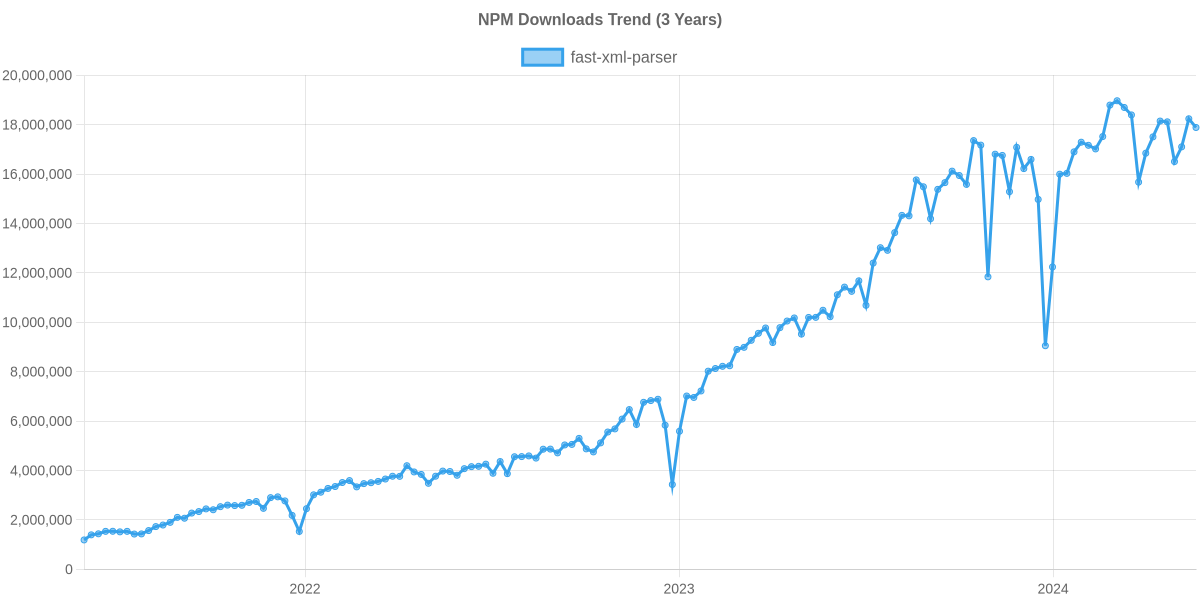
Npm Package Weekly Downloads Trend
Github Stars Ranking
Stat Detail


Fast XML Parser vs XML-JS vs XML2JSON: Performance and API Compared
When working with XML in modern JavaScript applications, you need a reliable way to convert data into JSON for easier handling. fast-xml-parser, xml-js, and xml2json all solve this problem, but they differ in speed, features, and long-term support. Let's compare how they handle real-world tasks.
🚀 Parsing Speed and API Design
fast-xml-parser is built for speed. It uses a single class to handle parsing and offers synchronous processing by default.
// fast-xml-parser: Fast synchronous parsing
const { XMLParser } = require("fast-xml-parser");
const parser = new XMLParser();
const result = parser.parse(xmlString);
xml-js provides a flexible convert function that handles options for attributes and text nodes.
// xml-js: Flexible conversion
const convert = require('xml-js');
const result = convert.xml2json(xmlString, { compact: false });
xml2json typically uses a callback pattern or simple function call, often wrapping older parsing logic.
// xml2json: Simple callback style
const xml2json = require('xml2json');
xml2json.parser(xmlString, function(err, result) {
  const json = JSON.parse(result);
});
🗂️ Data Structure Options: Compact vs Standard
How the library structures the JSON output matters for your downstream code.
fast-xml-parser gives you a clean standard object by default but lets you tweak attribute handling.
// fast-xml-parser: Custom attribute prefix
const parser = new XMLParser({
  ignoreAttributes: false,
  attributeNamePrefix: "@_"
});
const result = parser.parse(xmlString);
xml-js shines here with a "compact" mode that keeps the structure close to the XML tree.
// xml-js: Compact mode
const result = convert.xml2json(xmlString, { compact: true });
// Output: { root: { child: { _text: "value" } } }
xml2json usually outputs a fixed structure based on the underlying engine, with less control over shape.
// xml2json: Fixed structure
xml2json.parser(xmlString, function(err, result) {
  // Structure depends on internal implementation
  console.log(result);
});
🔒 Validation and Safety
Processing untrusted XML can be risky. Validation helps prevent errors or security issues.
fast-xml-parser includes a built-in validator to check XML before parsing.
// fast-xml-parser: Built-in validation
const { XMLValidator } = require("fast-xml-parser");
const isValid = XMLValidator.validate(xmlString);
if (isValid === true) { /* safe to parse */ }
xml-js relies on the underlying parser and does not offer explicit validation steps in its main API.
// xml-js: No built-in validation
// You must try-catch the convert function
try {
  convert.xml2json(xmlString);
} catch (e) { /* handle error */ }
xml2json provides basic error handling via callbacks but lacks advanced validation features.
// xml2json: Callback error handling
xml2json.parser(xmlString, function(err, result) {
  if (err) { /* handle error */ }
});
🛠️ Building XML from JSON
Sometimes you need to send data back as XML, not just read it.
fast-xml-parser includes a dedicated builder class for this task.
// fast-xml-parser: JSON to XML
const { XMLBuilder } = require("fast-xml-parser");
const builder = new XMLBuilder();
const xmlOutput = builder.build(jsonObject);
xml-js handles this with the same convert function using a different method name.
// xml-js: JSON to XML
const xmlOutput = convert.json2xml(jsonObject, { compact: false });
xml2json is primarily focused on parsing and often lacks a robust builder for the reverse process.
// xml2json: Limited build support
// Often requires separate library or manual string construction
📅 Maintenance and Future Proofing
Choosing a library means trusting its maintainers to fix bugs and keep up with Node.js changes.
fast-xml-parser is actively maintained with frequent updates and strong community support.
// fast-xml-parser: Active ecosystem
// Regular npm updates and issue resolution
xml-js is also well-maintained and widely used in production environments.
// xml-js: Stable maintenance
// Consistent updates for compatibility
xml2json has seen little activity in recent years and may not support modern Node.js features.
// xml2json: Legacy status
// Check npm page for last publish date before using
🤝 Similarities: Shared Ground Between Libraries
Despite their differences, these libraries share common goals and basic behaviors.
1. 🔄 Bidirectional Conversion
- All three aim to move data between XML and JSON formats.
- Useful for integrating with legacy SOAP APIs or RSS feeds.
// All support basic XML input
const xml = "<root>data</root>";
// parser.parse(xml) or convert.xml2json(xml)
2. ⚙️ Configuration Options
- Each allows some level of customization for attributes and text nodes.
- Helps match existing data structures in your app.
// All accept options objects
const options = { ignoreAttributes: true };
// parser = new XMLParser(options) or convert.xml2json(xml, options)
3. 🌐 Node.js and Browser Support
- All can run in Node.js environments.
- Most support bundling for browser use with tools like Webpack.
// All work in Node.js
const lib = require('package-name');
4. ✅ Error Handling
- All provide ways to catch malformed XML errors.
- Prevents crashes when data is incomplete.
// All require try-catch or callbacks
try { /* parse */ } catch (e) { /* handle */ }
5. 📦 Zero External Dependencies
- Most versions aim to be lightweight with few dependencies.
- Reduces risk in your supply chain.
// Check package.json for dependencies
// "dependencies": {}
📊 Summary: Key Similarities
| Feature | Shared by All Three |
|---|---|
| Core Function | 🔄 XML ↔ JSON Conversion |
| Environment | 🌐 Node.js & Browser |
| Config | ⚙️ Options for attributes |
| Safety | ✅ Error handling support |
| Weight | 📦 Lightweight core |
🆚 Summary: Key Differences
| Feature | fast-xml-parser | xml-js | xml2json |
|---|---|---|---|
| Performance | 🚀 High speed | ⚡ Moderate | 🐢 Lower |
| Validation | 🔒 Built-in validator | ❌ Try-catch only | ❌ Callback error |
| Structure | 🗂️ Standard object | 🎛️ Compact or Standard | 🗄️ Fixed |
| Builder | 🛠️ Included | 🛠️ Included | ⚠️ Limited |
| Maintenance | 📅 Active | 📅 Active | ⚠️ Legacy |
💡 The Big Picture
fast-xml-parser is like a high-performance engine 🏎️ — best for teams that need speed, validation, and modern features. Ideal for APIs, large data processing, and security-conscious apps.
xml-js is like a Swiss Army knife 🔪 — perfect for teams that need flexibility in data structure and bidirectional conversion. Great for general-purpose integration tasks.
xml2json is like an older tool 🧰 — usable for quick scripts or legacy maintenance, but not recommended for new architecture due to limited updates.
Final Thought: For most modern frontend and Node.js projects, fast-xml-parser or xml-js will serve you better. They offer active support and features that match today's development standards.
How to Choose: fast-xml-parser vs xml-js vs xml2json
- fast-xml-parser:
Choose
fast-xml-parserif performance is your top priority or if you need to validate XML against rules before parsing. It is ideal for high-traffic servers or large file processing where speed and safety matter most. - xml-js:
Choose
xml-jsif you need flexibility in how JSON is structured, such as switching between compact and standard modes. It is suitable for projects that require both XML-to-JSON and JSON-to-XML conversion with customizable options. - xml2json:
Choose
xml2jsononly for legacy projects or simple scripts where external dependencies must be minimal. For new projects, avoid this package due to limited maintenance and considerxml-jsorfast-xml-parserinstead.
Popular Comparisons
README for fast-xml-parser
fast-xml-parser

Validate XML, Parse XML to JS Object, or Build XML from JS Object without C/C++ based libraries and no callback.

- Validate XML data syntactically. Use detailed-xml-validator to verify business rules.
- Parse XML to JS Objects and vice versa
- Common JS, ESM, and browser compatible
- Faster than any other pure JS implementation.
It can handle big files (tested up to 100mb). XML Entities, HTML entities, and DOCTYPE entites are supported. Unpaired tags (Eg <br> in HTML), stop nodes (Eg <script> in HTML) are supported. It can also preserve Order of tags in JS object
Your Support, Our Motivation
Try out our New Thoughts
- WishIn - You need it if negative thoughts take over all the time

- Flowgger: 90% less logs size and 90% less debugging time
- Text2Chart: interactive flow chart out of simple text.
Financial Support
Sponsor this project



This is a donation. No goods or services are expected in return. Any requests for refunds for those purposes will be rejected.
Users


The list of users are mostly published by Github or communicated directly. Feel free to contact if you find any information wrong.
More about this library
How to use
To use as package dependency
$ npm install fast-xml-parser
or
$ yarn add fast-xml-parser
To use as system command
$ npm install fast-xml-parser -g
To use it on a webpage include it from a CDN
Example
As CLI command
$ fxparser some.xml
In a node js project
const { XMLParser, XMLBuilder, XMLValidator} = require("fast-xml-parser");

const parser = new XMLParser();
let jObj = parser.parse(XMLdata);

const builder = new XMLBuilder();
const xmlContent = builder.build(jObj);
In a HTML page
<script src="path/to/fxp.min.js"></script>
:
<script>
  const parser = new fxparser.XMLParser();
  parser.parse(xmlContent);
</script>
Bundle size
| Bundle Name | Size |
|---|---|
| fxbuilder.min.js | 6.5K |
| fxparser.min.js | 20K |
| fxp.min.js | 26K |
| fxvalidator.min.js | 5.7K |
Documents
| v3 | v4 and v5 | v6 |
| documents |
note:
- Version 6 is released with version 4 for experimental use. Based on its demand, it'll be developed and the features can be different in final release.
- Version 5 has the same functionalities as version 4.
Performance
negative means error
XML Parser
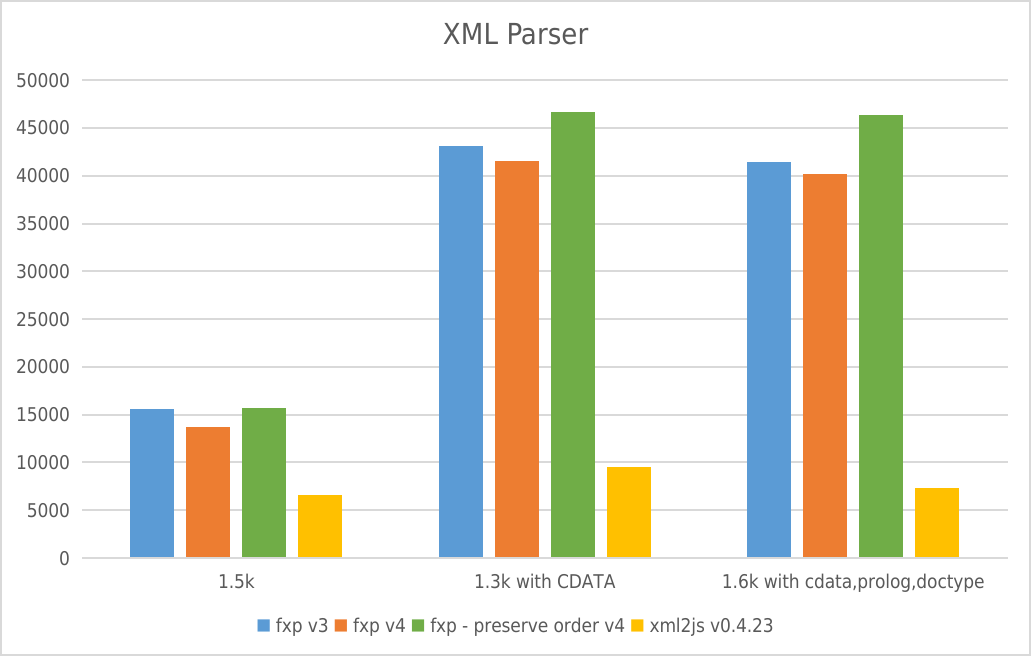
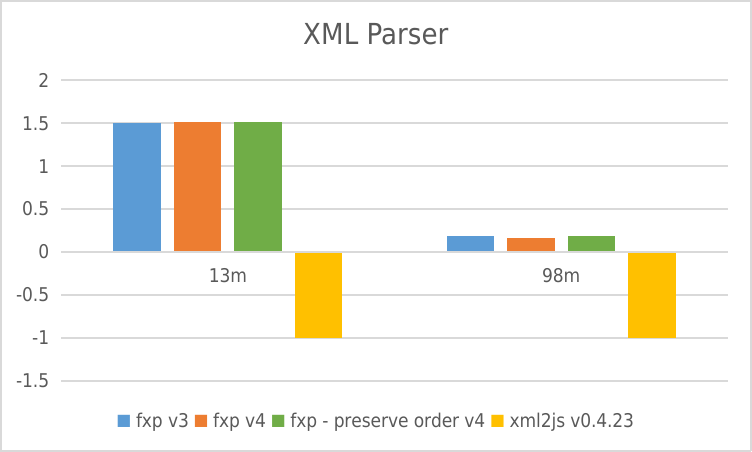
- Y-axis: requests per second
- X-axis: File size
XML Builder
 * Y-axis: requests per second
Usage Trend
Usage Trend of fast-xml-parser
Supporters
Contributors
This project exists thanks to all the people who contribute. [Contribute].

Backers from Open collective
Thank you to all our backers! 🙏 [Become a backer]

License
- MIT License