XML Parsing Libraries for JavaScript Applications
fast-xml-parser, libxmljs, xml-js, xml2js, and xml2json are npm packages designed to convert XML data into JavaScript objects (and often back to XML). They enable developers to work with XML — a common data interchange format in enterprise and legacy systems — using familiar JavaScript structures. While their core purpose overlaps, they differ significantly in implementation (pure JavaScript vs native bindings), browser compatibility, security posture, parsing behavior, and support for round-trip conversion (parse → modify → serialize).
Npm Package Weekly Downloads Trend
Github Stars Ranking
Stat Detail


XML Parsing in JavaScript: A Practical Comparison of Popular npm Packages
When you need to parse or generate XML in a JavaScript project — whether it’s for consuming legacy APIs, integrating with enterprise systems, or handling configuration files — choosing the right library matters. The five packages under review (fast-xml-parser, libxmljs, xml-js, xml2js, and xml2json) all aim to bridge the gap between XML and JavaScript objects, but they differ significantly in architecture, performance, browser compatibility, and feature set. Let’s cut through the noise and compare them as if we’re making a real engineering decision.
🧱 Core Architecture: Native Bindings vs Pure JavaScript
libxmljs stands apart because it’s not pure JavaScript — it wraps the native C library libxml2 using Node.js bindings. This gives it excellent performance and full compliance with XML standards (including DTD validation and XPath), but it only works in Node.js, not in browsers. If your app runs solely on the server and you need strict XML conformance, this might be your best bet.
// libxmljs: Requires compilation, Node-only
const libxmljs = require("libxmljs");
const doc = libxmljs.parseXml(`<book id="123"><title>JS Guide</title></book>`);
console.log(doc.get("//title").text()); // "JS Guide"
All other packages (fast-xml-parser, xml-js, xml2js, xml2json) are pure JavaScript, meaning they work in both Node.js and browsers. This is critical for frontend-heavy apps that must process XML directly in the user’s browser — for example, loading SVG or config files from a CDN.
⚙️ Parsing Behavior: How XML Becomes JavaScript
The biggest practical difference lies in how each library converts XML into a JS object. Some preserve attributes and text content cleanly; others produce awkward nested structures.
fast-xml-parser uses a clean, predictable schema where attributes are prefixed with @_ and text content lives under #text:
// fast-xml-parser
const { XMLParser } = require("fast-xml-parser");
const parser = new XMLParser();
const result = parser.parse(`<book id="123">JS Guide</book>`);
// { book: { "@_id": "123", "#text": "JS Guide" } }
xml2js (one of the oldest options) nests everything under $ for attributes and _ for text, but requires a callback-based API by default (though promises are supported):
// xml2js
const xml2js = require("xml2js");
xml2js.parseString(`<book id="123">JS Guide</book>`, (err, result) => {
  // { book: { $: { id: "123" }, _: "JS Guide" } }
});

// Or with promise:
const parser = new xml2js.Parser();
const result = await parser.parseStringPromise(`<book id="123">JS Guide</book>`);
xml-js offers multiple output formats. Its default “js” format mirrors xml2js, but it also supports an “element” format that’s more structured:
// xml-js
const xmlJs = require("xml-js");
const result = xmlJs.xml2js(`<book id="123">JS Guide</book>`);
// { elements: [{ type: 'element', name: 'book', attributes: { id: '123' }, elements: [...] }] }

// Or compact form (similar to fast-xml-parser):
const compact = xmlJs.xml2js(`<book id="123">JS Guide</book>`, { compact: true });
// { book: { _attributes: { id: "123" }, _text: "JS Guide" } }
xml2json is the simplest but least flexible — it only supports basic conversion and hasn’t seen meaningful updates in years. Its output uses _attr and __text:
// xml2json
const xml2json = require("xml2json");
const result = xml2json.toJson(`<book id="123">JS Guide</book>`, { object: true });
// { book: { _attr: { id: "123" }, __text: "JS Guide" } }
⚠️ Note:
xml2jsonis effectively deprecated. Its GitHub repo is archived, and the npm page shows no recent activity. Avoid it for new projects.
🔁 Round-Trip Support: Parse → Modify → Serialize
If you need to not just read but also generate or modify XML, round-trip fidelity matters.
fast-xml-parsersupports bidirectional conversion with consistent naming (@_→ attributes,#text→ content). You can parse, tweak the object, and rebuild XML cleanly.
const { XMLParser, XMLBuilder } = require("fast-xml-parser");
const parser = new XMLParser();
const builder = new XMLBuilder();
const obj = parser.parse(`<note><to>Alice</to></note>`);
obj.note.to = "Bob";
const xml = builder.build(obj); // <note><to>Bob</to></note>
xml-jsalso supports full round-tripping in both “js” and “element” modes.
const xmlJs = require("xml-js");
const obj = xmlJs.xml2js(`<note><to>Alice</to></note>`);
// modify obj...
const xml = xmlJs.js2xml(obj);
-
xml2jshas a companion packagejs2xmlparserfor serialization, but it’s a separate dependency and doesn’t guarantee perfect symmetry. -
libxmljsexcels here — since it maintains a true DOM-like tree, modifications are precise and serialization is lossless. -
xml2jsondoes not support XML generation at all — only parsing.
🛡️ Security and Edge Cases
XML parsers are notorious attack vectors (e.g., billion laughs, XXE). Only fast-xml-parser and libxmljs offer explicit security controls.
fast-xml-parserdisables DOCTYPE parsing by default and lets you configure entity resolution:
const parser = new XMLParser({
  ignoreAttributes: false,
  allowBooleanAttributes: true,
  parseTagValue: true,
  // Prevents XXE by default
});
libxmljsinheritslibxml2’s robust security model, including DTD and entity control:
const doc = libxmljs.parseXml(xml, { noblanks: true, nocdata: true, /* etc */ });
The other libraries (xml-js, xml2js, xml2json) do not document security mitigations. In high-risk environments (e.g., parsing untrusted XML), this is a serious concern.
🌐 Browser Compatibility
If your code runs in the browser:
- ✅ Use:
fast-xml-parser,xml-js,xml2js(all pure JS) - ❌ Avoid:
libxmljs(Node-only),xml2json(deprecated, unmaintained)
fast-xml-parser is especially lightweight and tree-shakeable, making it ideal for frontend bundles.
📊 Summary Table
| Package | Pure JS? | Browser Safe? | Bidirectional? | Secure by Default? | Actively Maintained? |
|---|---|---|---|---|---|
fast-xml-parser | ✅ | ✅ | ✅ | ✅ | ✅ |
libxmljs | ❌ | ❌ | ✅ | ✅ | ✅ |
xml-js | ✅ | ✅ | ✅ | ❌ | ✅ |
xml2js | ✅ | ✅ | ⚠️ (via extra pkg) | ❌ | ✅ |
xml2json | ✅ | ✅ | ❌ | ❌ | ❌ (Deprecated) |
💡 Final Recommendation
- For modern web apps (frontend + backend): Choose
fast-xml-parser. It’s fast, secure, well-maintained, supports both directions, and works everywhere. - For strict XML compliance in Node.js only: Use
libxmljsif you need XPath, validation, or maximum fidelity. - Avoid
xml2jsonentirely — it’s outdated and lacks critical features. xml-jsandxml2jsare acceptable if you’re already using them, butfast-xml-parsergenerally offers a better developer experience today.
In short: unless you have a hard requirement for native XML processing, fast-xml-parser is the safest, most versatile choice for professional projects in 2024.
How to Choose: fast-xml-parser vs libxmljs vs xml-js vs xml2js vs xml2json
- fast-xml-parser:
Choose
fast-xml-parserfor most modern applications, especially if you need a solution that works in both browsers and Node.js. It offers strong security defaults (disables dangerous XML features like DOCTYPE by default), consistent bidirectional conversion, and a clean, predictable object structure. It’s actively maintained and ideal when you need reliability without native dependencies. - libxmljs:
Choose
libxmljsonly if you’re working exclusively in Node.js and require strict XML standard compliance, including XPath queries, DTD validation, or full DOM manipulation. Since it relies on native C bindings, it won’t work in browsers and adds complexity to deployment, but it’s unmatched for heavy-duty XML processing on the server. - xml-js:
Choose
xml-jsif you need flexible output formats (including a detailed element tree) and bidirectional conversion in a pure JavaScript environment. However, it lacks documented security mitigations for parsing untrusted XML, so avoid it in high-risk scenarios unless you add your own safeguards. - xml2js:
Choose
xml2jsif you’re maintaining a legacy codebase that already uses it or if you prefer its callback-based API style. While it supports promises and works in browsers, its object structure is less intuitive than newer alternatives, and round-trip serialization requires a separate package (js2xmlparser). - xml2json:
Do not choose
xml2jsonfor new projects. It is effectively deprecated, with no recent updates or maintenance, lacks XML generation capabilities, offers no security controls, and provides minimal configuration. Evaluatefast-xml-parserorxml-jsinstead.
Popular Comparisons
README for fast-xml-parser
fast-xml-parser

Validate XML, Parse XML to JS Object, or Build XML from JS Object without C/C++ based libraries and no callback.

- Validate XML data syntactically. Use detailed-xml-validator to verify business rules.
- Parse XML to JS Objects and vice versa
- Common JS, ESM, and browser compatible
- Faster than any other pure JS implementation.
It can handle big files (tested up to 100mb). XML Entities, HTML entities, and DOCTYPE entites are supported. Unpaired tags (Eg <br> in HTML), stop nodes (Eg <script> in HTML) are supported. It can also preserve Order of tags in JS object
IMPORTANT: It is recommended to use fast-xml-validator instead of inbuilt validator.
Before using this library
- Flexible-XML-Parser is 1.25 times faster than this library when not preserving order of tags. Takes less memory when processing big files. Supports incomplete XML/HTML. And output is highly customizable. Build whatever you want. So if you're fine with some extra configuration then try it out.
- @nodable/sax is a SAX parser based on Flexible-XML-Parser. 3-4 times faster than
saxand support all features of base package like incomplete input, streams, skipping certain tags from processing etc. - fast-xml-validator is separated from this package. Has many features. Faster. You can exvlude particular tag from validation. And much more.
- fast-xml-builder is a XML to JS Object builder used in this package in past. Now, it supports more features, and faster. So, recommend to use it directly.
Your Support, Our Motivation
Please join Discord community for pre release announcements and discussions.
Financial Support
Sponsor this project


This is a donation. No goods or services are expected in return. Any requests for refunds for those purposes will be rejected.
Users


The list of users are mostly published by Github or communicated directly. Feel free to contact if you find any information wrong.
More about this library
How to use
To use as package dependency
$ npm install fast-xml-parser
or
$ yarn add fast-xml-parser
To use as system command
$ npm install fast-xml-parser -g
To use it on a webpage include it from a CDN
Example
As CLI command
$ fxparser some.xml
In a node js project
const { XMLParser, XMLBuilder, XMLValidator} = require("fast-xml-parser");

const parser = new XMLParser();
let jObj = parser.parse(XMLdata);

const builder = new XMLBuilder();
const xmlContent = builder.build(jObj);
In a HTML page
<script src="path/to/fxp.min.js"></script>
:
<script>
  const parser = new fxparser.XMLParser();
  parser.parse(xmlContent);
</script>
Bundle size
| Bundle Name | Size |
|---|---|
| fxbuilder.min.js | 6.5K |
| fxparser.min.js | 20K |
| fxp.min.js | 26K |
| fxvalidator.min.js | 5.7K |
Documents
| v3 | v4 and v5 | v6 |
| documents |
note:
- Version 6 is released with version 4 for experimental use. Based on its demand, it'll be developed and the features can be different in final release.
- Version 5 has the same functionalities as version 4.
Performance
negative means error
XML Parser
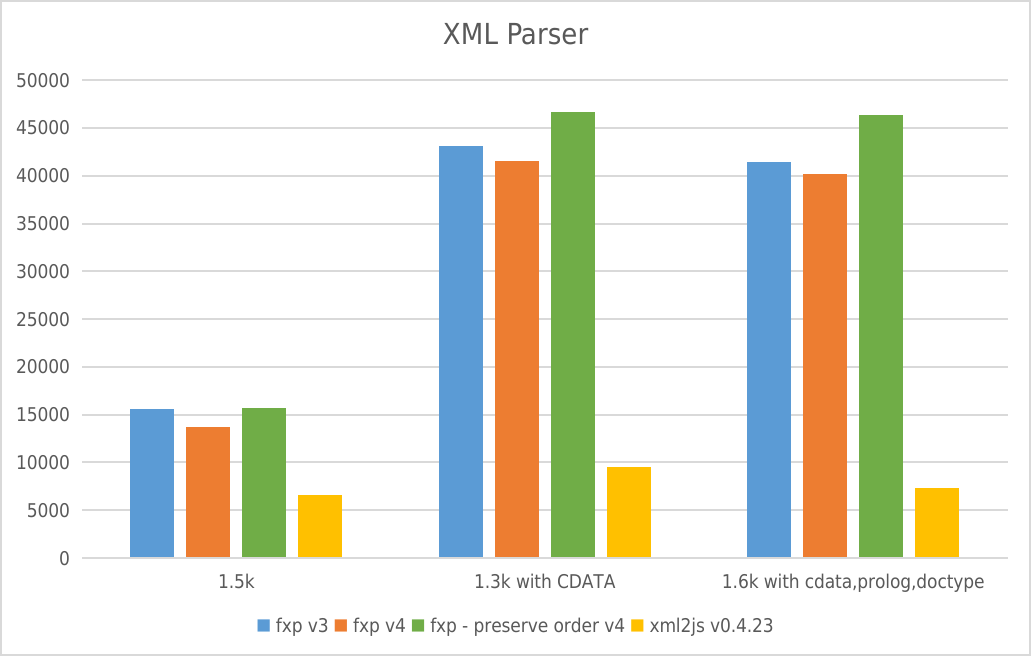
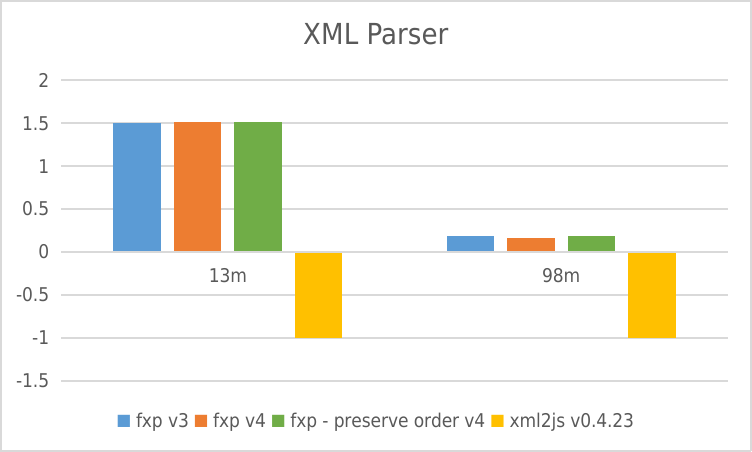
- Y-axis: requests per second
- X-axis: File size
XML Builder
 * Y-axis: requests per second
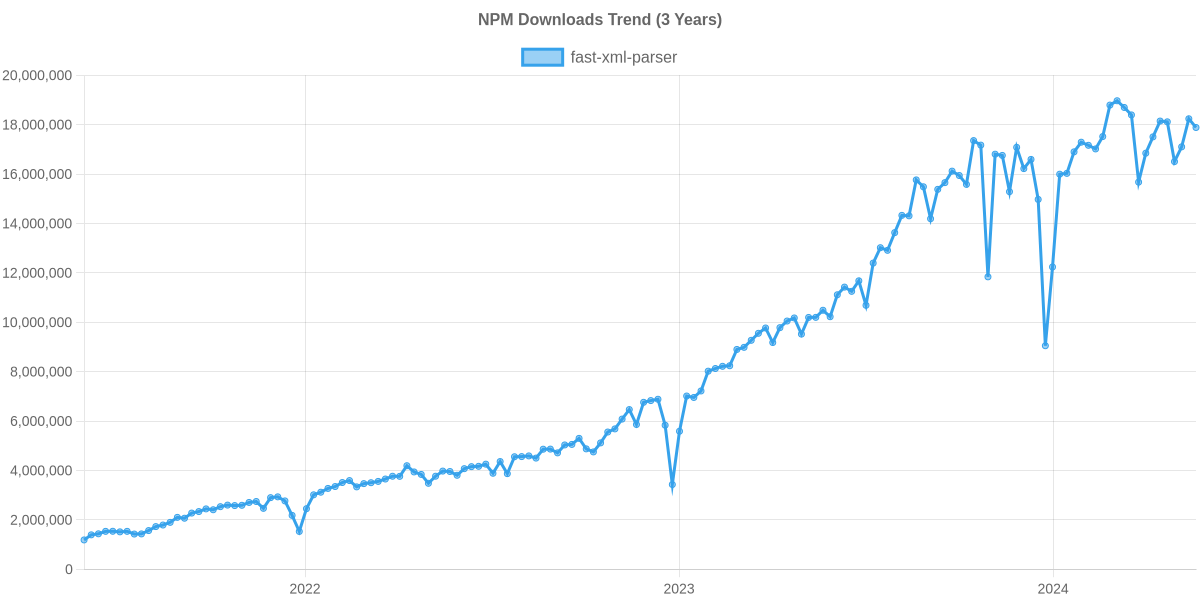
Usage Trend
Usage Trend of fast-xml-parser
Supporters
Contributors
This project exists thanks to all the people who contribute. [Contribute].

Backers from Open collective
Thank you to all our backers! 🙏 [Become a backer]

License
- MIT License