XML Parsing and Generation in JavaScript Applications
fast-xml-parser, libxmljs, libxmljs2, sax, xml2js, xmlbuilder, and xmldom are npm packages that handle XML processing in JavaScript environments. They fall into two main categories: parsers (which convert XML strings into structured data like JavaScript objects or DOM trees) and builders/generators (which create XML from structured input). Some support both directions, while others specialize in streaming, DOM compliance, or performance. These tools are essential when integrating with legacy systems, SOAP APIs, RSS feeds, or configuration files that rely on XML.
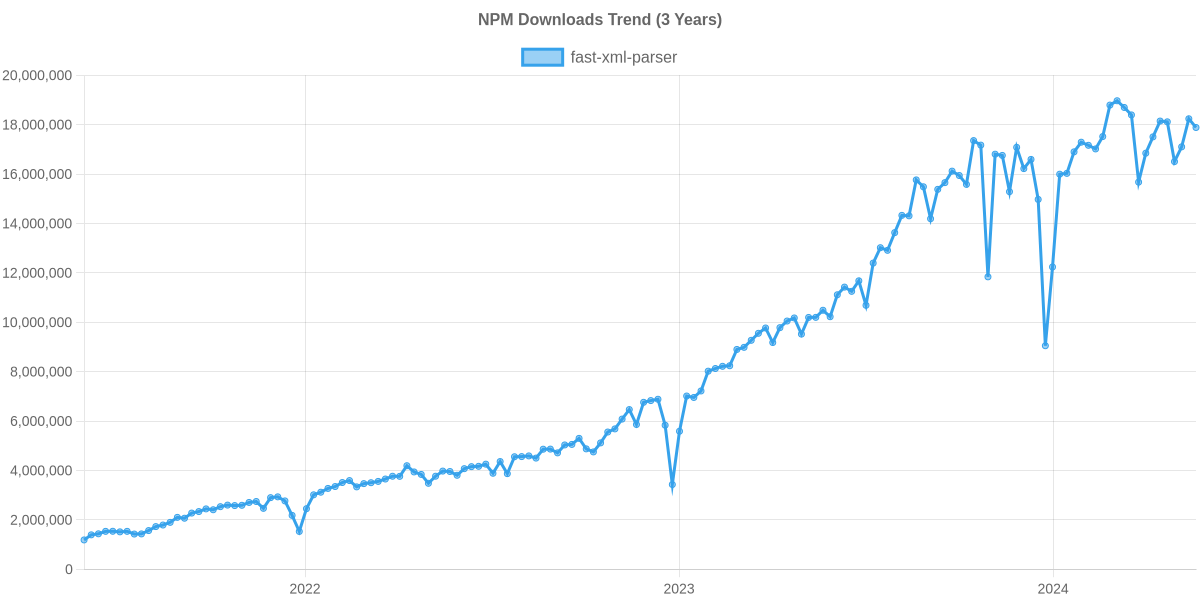
Npm Package Weekly Downloads Trend
Github Stars Ranking
Stat Detail


XML Processing in JavaScript: Parsing, Building, and Streaming Compared
Working with XML in modern JavaScript apps often feels like maintaining legacy integrations—SOAP APIs, enterprise data feeds, or config files—but choosing the right tool makes a big difference. The seven packages here cover parsing, building, and DOM manipulation, each with distinct trade-offs in performance, compatibility, and ease of use. Let’s break them down by real-world engineering concerns.
🧩 Core Capabilities: What Each Package Actually Does
Not all XML libraries do the same thing. First, clarify your need:
- Parsing: Convert XML string → JS object / DOM
- Building: Convert JS object / code → XML string
- DOM: Full document object model with traversal/mutation
- Streaming: Process XML incrementally (low memory)
| Package | Parse | Build | DOM | Stream |
|---|---|---|---|---|
fast-xml-parser | ✅ | ✅ | ❌ | ❌ |
libxmljs | ✅ | ✅ | ✅ | ❌ |
libxmljs2 | ✅ | ✅ | ✅ | ❌ |
sax | ✅ | ❌ | ❌ | ✅ |
xml2js | ✅ | ❌ | ❌ | ❌ |
xmlbuilder | ❌ | ✅ | ❌ | ❌ |
xmldom | ✅ | ❌ | ✅ | ❌ |
⚠️ Deprecation Note:
libxmljsis deprecated. Its npm page states: “This package is no longer maintained. Please use libxmljs2 instead.” Do not use it in new projects.
📥 Parsing XML: Object vs DOM vs Streaming
Object-Based Parsers (fast-xml-parser, xml2js)
These convert XML directly into plain JavaScript objects—ideal for quick data extraction.
fast-xml-parser prioritizes speed and simplicity:
// fast-xml-parser
import { XMLParser } from 'fast-xml-parser';
const parser = new XMLParser();
const result = parser.parse('<book><title>JS Guide</title></book>');
// { book: { title: "JS Guide" } }
xml2js uses a callback/event-based approach but hides SAX complexity:
// xml2js
import { parseString } from 'xml2js';
parseString('<book><title>JS Guide</title></book>', (err, result) => {
  // result = { book: { title: ["JS Guide"] } }
});
Note: xml2js wraps values in arrays by default (to handle repeated tags), while fast-xml-parser avoids this unless configured.
DOM Parsers (libxmljs2, xmldom)
These create a tree of node objects, letting you use standard DOM methods.
libxmljs2 (Node.js-only, native binding):
// libxmljs2
import libxmljs from 'libxmljs2';
const doc = libxmljs.parseXml('<book><title>JS Guide</title></book>');
const title = doc.get('//title').text(); // "JS Guide"
xmldom (pure JS, browser-like):
// xmldom
import { DOMParser } from '@xmldom/xmldom';
const parser = new DOMParser();
const doc = parser.parseFromString('<book><title>JS Guide</title></book>', 'text/xml');
const title = doc.getElementsByTagName('title')[0].textContent; // "JS Guide"
Streaming Parser (sax)
For huge files, stream tokens as they arrive:
// sax
import sax from 'sax';
const parser = sax.createStream(true, {});
let currentTag = '';
parser.on('opentag', (node) => { currentTag = node.name; });
parser.on('text', (text) => {
  if (currentTag === 'title') console.log(text); // "JS Guide"
});
parser.write('<book><title>JS Guide</title></book>').end();
You manage state manually—great for memory efficiency, poor for developer velocity on small docs.
🏗️ Building XML: Code-Driven vs Template-Driven
Only fast-xml-parser and xmlbuilder generate XML, but differently.
xmlbuilder uses a fluent, method-chaining API:
// xmlbuilder
import { create } from 'xmlbuilder';
const xml = create({ book: { title: 'JS Guide' } }).end({ pretty: true });
// <book>
//   <title>JS Guide</title>
// </book>
Or programmatically:
const root = create('book');
root.ele('title').txt('JS Guide');
console.log(root.end());
fast-xml-parser includes a builder that works from JS objects:
// fast-xml-parser builder
import { XMLBuilder } from 'fast-xml-parser';
const builder = new XMLBuilder({ format: true });
const xml = builder.build({ book: { title: 'JS Guide' } });
xmlbuilder offers more control (namespaces, attributes, CDATA), while fast-xml-parser’s builder is simpler but less feature-rich.
🖥️ Environment Compatibility: Browser, Node, Edge
- Browser-safe (pure JS):
fast-xml-parser,sax,xml2js,xmlbuilder,xmldom - Node.js-only (native deps):
libxmljs2(and deprecatedlibxmljs)
If you’re targeting Vercel Edge Functions, Cloudflare Workers, or any non-Node runtime, avoid libxmljs2. All others work anywhere JavaScript runs.
🔍 Advanced Features: XPath, Validation, Namespaces
Need XPath queries? Only libxmljs2 and xmldom support them natively:
// libxmljs2 XPath
const nodes = doc.find('//book[price > 30]');

// xmldom + xpath package (separate install)
import xpath from 'xpath';
const nodes = xpath.select('//book/title', doc);
XSD validation? Only libxmljs2 provides it out of the box.
Namespace handling is best in libxmljs2 and xmlbuilder; others have limited or inconsistent support.
🧪 Error Handling and Robustness
saxandxmldomthrow detailed parse errors for malformed XML.fast-xml-parsercan be configured to ignore or report errors via options.xml2jspasses errors to its callback.libxmljs2throws C-level errors that can crash Node if unhandled—wrap in try/catch.
🔄 Round-Trip Example: Parse → Modify → Serialize
Suppose you need to read an XML config, change a value, and write it back.
With fast-xml-parser (simplest round-trip):
import { XMLParser, XMLBuilder } from 'fast-xml-parser';

const xml = '<config><timeout>30</timeout></config>';
const parser = new XMLParser();
const builder = new XMLBuilder();

let obj = parser.parse(xml);
obj.config.timeout = 60;
const newXml = builder.build(obj);
With xmldom (DOM-style mutation):
import { DOMParser } from '@xmldom/xmldom';
import { XMLSerializer } from '@xmldom/xmldom';

const parser = new DOMParser();
const serializer = new XMLSerializer();

const doc = parser.parseFromString('<config><timeout>30</timeout></config>', 'text/xml');
doc.getElementsByTagName('timeout')[0].textContent = '60';
const newXml = serializer.serializeToString(doc);
The DOM approach is more verbose but mirrors browser XML handling—useful if your team already knows DOM APIs.
📊 When to Use Which: Decision Matrix
| Scenario | Best Choice(s) |
|---|---|
| Quick XML ↔ JSON in browser or Node | fast-xml-parser |
| Generate XML from code with full control | xmlbuilder |
| Parse massive XML files with low memory | sax |
| Need XPath, XSD, or full DOM in Node.js | libxmljs2 |
| Simulate browser XML handling in tests | xmldom |
| Simple one-off parsing (legacy codebases) | xml2js |
| New project requiring native XML features | Never libxmljs (deprecated) |
💡 Final Guidance
Start with fast-xml-parser if you just need to get data in and out of XML quickly—it’s fast, dependency-free, and works everywhere. If you’re generating complex XML documents, pair it with xmlbuilder.
Reach for sax only when file size forces streaming. Use xmldom if you’re writing XML unit tests or need DOM parity. Reserve libxmljs2 for heavy-duty enterprise scenarios where you absolutely need XPath or validation—and accept the native dependency cost.
And remember: never start a new project with libxmljs. Its successor exists for good reason.
How to Choose: fast-xml-parser vs libxmljs vs libxmljs2 vs sax vs xml2js vs xmlbuilder vs xmldom
- fast-xml-parser:
Choose
fast-xml-parserif you need a fast, pure JavaScript parser that converts XML to JSON without native dependencies. It’s ideal for browser-compatible applications or lightweight Node.js services where bundle size and startup time matter. It supports basic validation and can preserve order via array output, but doesn’t offer full DOM APIs or streaming. - libxmljs:
Avoid
libxmljsin new projects — it is officially deprecated per its npm page and GitHub repository. The maintainers recommend migrating tolibxmljs2. It wraps the native libxml2 library, requiring compilation and limiting browser use, but historically offered strong standards compliance and XPath support. - libxmljs2:
Choose
libxmljs2if you require full DOM Level 2 compliance, XPath queries, XSD validation, or high-performance parsing of large documents in Node.js. It depends on native bindings (via node-gyp), so it won’t work in browsers or serverless edge runtimes. Use it only when you need features beyond basic parsing and can manage native dependency overhead. - sax:
Choose
saxif you’re processing very large XML files or need low-memory, streaming parsing. It’s a pure JavaScript SAX-style parser that emits events as it reads tokens, giving you fine control over memory usage. However, you must manually reconstruct object structure, making it more complex for simple use cases. - xml2js:
Choose
xml2jsif you want a straightforward, widely used parser that converts XML to JavaScript objects with minimal setup. It’s built onsaxunder the hood but abstracts away event handling. It’s suitable for moderate-sized documents and offers decent customization, though it’s slower thanfast-xml-parserand lacks streaming output. - xmlbuilder:
Choose
xmlbuilderif your primary need is generating well-formed XML from JavaScript objects or programmatic calls. It provides a fluent API for building XML trees and supports namespaces, CDATA, and pretty printing. It does not parse XML, so pair it with a parser likefast-xml-parserif you need round-trip functionality. - xmldom:
Choose
xmldomif you need a browser-like DOM implementation for XML in Node.js or other non-browser environments. It parses XML into a standards-compliant DOM tree (withdocument,element, etc.), enabling traversal and manipulation similar to browser XML handling. However, it’s heavier than object-based parsers and doesn’t support streaming.
Popular Comparisons
README for fast-xml-parser
fast-xml-parser

Validate XML, Parse XML to JS Object, or Build XML from JS Object without C/C++ based libraries and no callback.

- Validate XML data syntactically. Use detailed-xml-validator to verify business rules.
- Parse XML to JS Objects and vice versa
- Common JS, ESM, and browser compatible
- Faster than any other pure JS implementation.
It can handle big files (tested up to 100mb). XML Entities, HTML entities, and DOCTYPE entites are supported. Unpaired tags (Eg <br> in HTML), stop nodes (Eg <script> in HTML) are supported. It can also preserve Order of tags in JS object
IMPORTANT: It is recommended to use fast-xml-validator instead of inbuilt validator.
Before using this library
- Flexible-XML-Parser is 1.25 times faster than this library when not preserving order of tags. Takes less memory when processing big files. Supports incomplete XML/HTML. And output is highly customizable. Build whatever you want. So if you're fine with some extra configuration then try it out.
- @nodable/sax is a SAX parser based on Flexible-XML-Parser. 3-4 times faster than
saxand support all features of base package like incomplete input, streams, skipping certain tags from processing etc. - fast-xml-validator is separated from this package. Has many features. Faster. You can exvlude particular tag from validation. And much more.
- fast-xml-builder is a XML to JS Object builder used in this package in past. Now, it supports more features, and faster. So, recommend to use it directly.
Your Support, Our Motivation
Please join Discord community for pre release announcements and discussions.
Financial Support
Sponsor this project


This is a donation. No goods or services are expected in return. Any requests for refunds for those purposes will be rejected.
Users


The list of users are mostly published by Github or communicated directly. Feel free to contact if you find any information wrong.
More about this library
How to use
To use as package dependency
$ npm install fast-xml-parser
or
$ yarn add fast-xml-parser
To use as system command
$ npm install fast-xml-parser -g
To use it on a webpage include it from a CDN
Example
As CLI command
$ fxparser some.xml
In a node js project
const { XMLParser, XMLBuilder, XMLValidator} = require("fast-xml-parser");

const parser = new XMLParser();
let jObj = parser.parse(XMLdata);

const builder = new XMLBuilder();
const xmlContent = builder.build(jObj);
In a HTML page
<script src="path/to/fxp.min.js"></script>
:
<script>
  const parser = new fxparser.XMLParser();
  parser.parse(xmlContent);
</script>
Bundle size
| Bundle Name | Size |
|---|---|
| fxbuilder.min.js | 6.5K |
| fxparser.min.js | 20K |
| fxp.min.js | 26K |
| fxvalidator.min.js | 5.7K |
Documents
| v3 | v4 and v5 | v6 |
| documents |
note:
- Version 6 is released with version 4 for experimental use. Based on its demand, it'll be developed and the features can be different in final release.
- Version 5 has the same functionalities as version 4.
Performance
negative means error
XML Parser
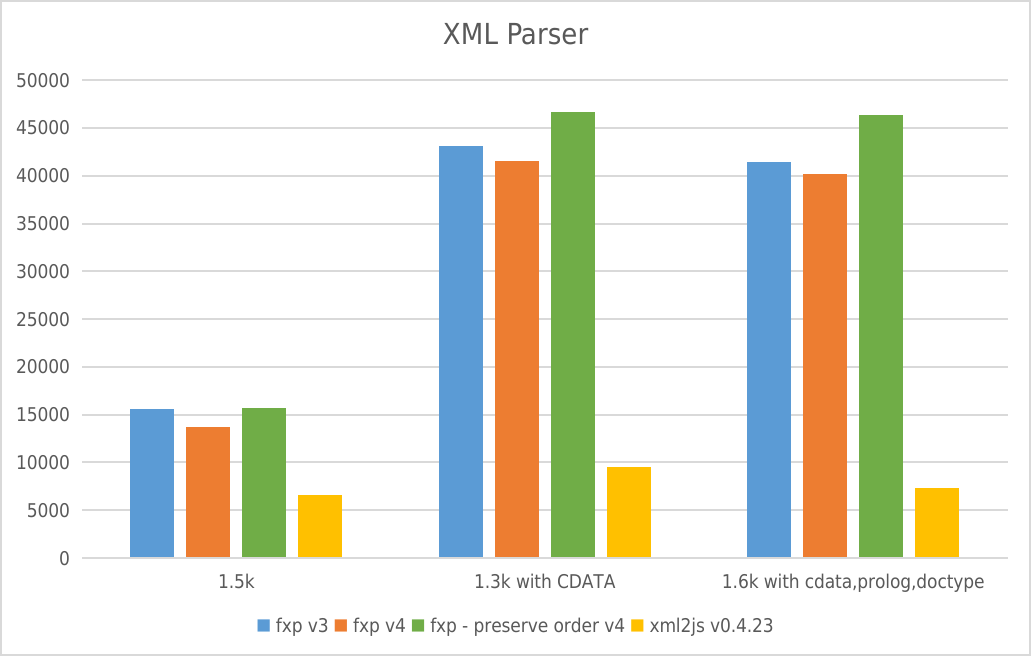
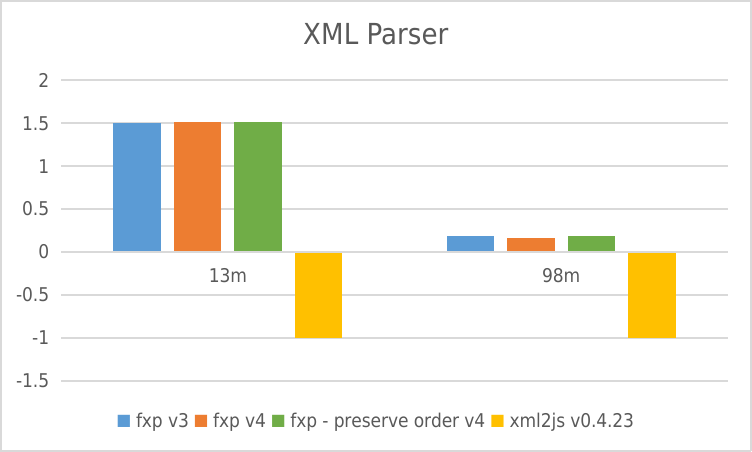
- Y-axis: requests per second
- X-axis: File size
XML Builder
 * Y-axis: requests per second
Usage Trend
Usage Trend of fast-xml-parser
Supporters
Contributors
This project exists thanks to all the people who contribute. [Contribute].

Backers from Open collective
Thank you to all our backers! 🙏 [Become a backer]

License
- MIT License