xml2js vs fast-xml-parser vs libxmljs vs libxmljs2 vs xmlbuilder vs xmldom
XML Processing Strategies in JavaScript Applications
xml2jsfast-xml-parserlibxmljslibxmljs2xmlbuilderxmldomSimilar Packages:

XML Processing Strategies in JavaScript Applications

These libraries handle XML data in JavaScript, but they serve different roles. Some focus on parsing XML into JSON objects, others build XML from scratch, and some provide a DOM interface similar to browsers. fast-xml-parser and xml2js convert XML to JSON for easy manipulation. xmlbuilder specializes in generating XML structures. xmldom offers a DOM API for XML. libxmljs and libxmljs2 use native bindings for high performance but require Node.js. Choosing the right tool depends on whether you need speed, browser support, or DOM compatibility.

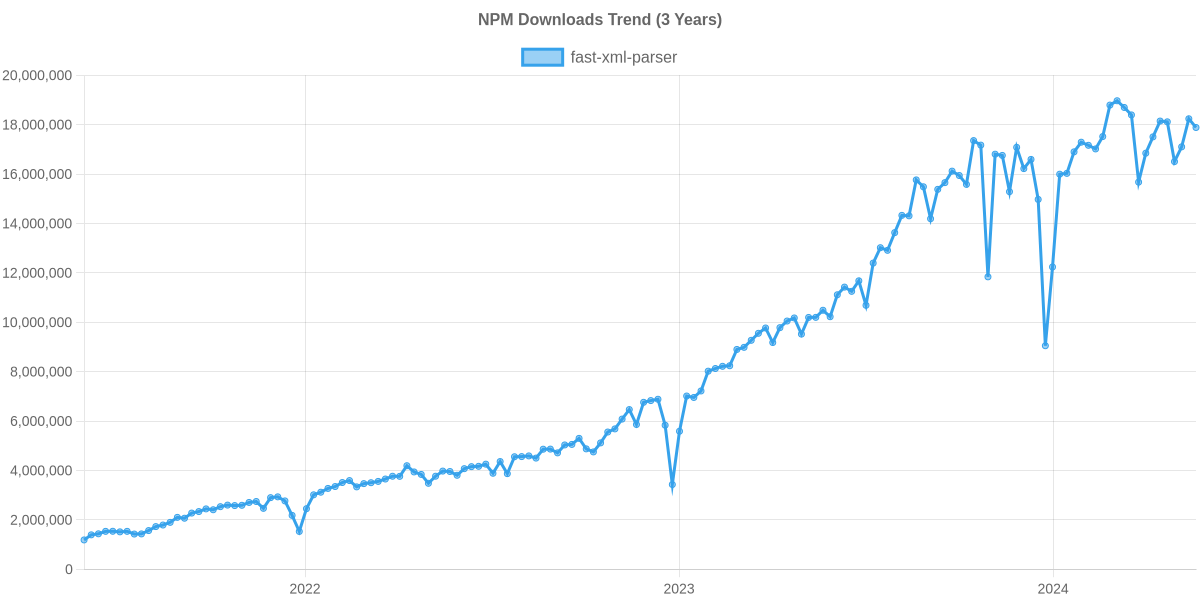
Npm Package Weekly Downloads Trend

3 Years

Github Stars Ranking

Stat Detail

Package
Downloads
Stars
Size
Issues
Publish
License
xml2js31,183,0154,9683.44 MB2493 years agoMIT
fast-xml-parser03,070893 kB676 hours agoMIT
libxmljs01,06217.7 MB692 years agoMIT
libxmljs2087.22 MB2910 months agoMIT
xmlbuilder0927-76 years agoMIT
xmldom0451-535 years agoMIT

XML Processing in JavaScript: Parsers, Builders, and DOM Implementations

Working with XML in JavaScript requires choosing between speed, compatibility, and API style. The six packages here cover three main areas: parsing XML into data, building XML from data, and manipulating XML via DOM methods. Some rely on native code for performance, while others run purely in JavaScript. Let's compare how they handle real-world tasks.

⚙️ Parsing Engine: Native Bindings vs Pure JavaScript

The core difference lies in how these libraries process XML. Native bindings offer speed but limit where you can run your code. Pure JavaScript works everywhere but may be slower on massive files.

libxmljs uses native C++ bindings to libxml2.

  • Requires compilation via node-gyp.
  • Fails in browsers or serverless environments without specific binaries.
// libxmljs: Native parsing
const libxmljs = require("libxmljs");
const xmlDoc = libxmljs.parseXmlString('<root><item>1</item></root>');
console.log(xmlDoc.toString());

libxmljs2 is a maintained fork of libxmljs.

  • Same native requirements as the original.
  • Better long-term support for Node.js versions.
// libxmljs2: Native parsing (fork)
const libxmljs2 = require("libxmljs2");
const xmlDoc = libxmljs2.parseXmlString('<root><item>1</item></root>');
console.log(xmlDoc.toString());

fast-xml-parser is written entirely in JavaScript.

  • No compilation needed.
  • Runs in browsers, Node.js, and Deno.
// fast-xml-parser: Pure JS parsing
const { XMLParser } = require("fast-xml-parser");
const parser = new XMLParser();
const result = parser.parse('<root><item>1</item></root>');
console.log(result);

xml2js is also pure JavaScript.

  • Very stable and widely adopted.
  • Uses callbacks by default but supports promises.
// xml2js: Pure JS parsing
const { parseStringPromise } = require("xml2js");
const result = await parseStringPromise('<root><item>1</item></root>');
console.log(result);

xmldom provides a DOM parser in pure JavaScript.

  • Mimics browser DOMParser.
  • Deprecated in favor of @xmldom/xmldom.
// xmldom: DOM parsing
const { DOMParser } = require("xmldom");
const doc = new DOMParser().parseFromString('<root><item>1</item></root>', 'text/xml');
console.log(doc.toString());

📦 Data Output: JSON Objects vs DOM Trees

How you access data matters. JSON is easier for JavaScript logic. DOM trees allow XPath and node traversal.

fast-xml-parser converts XML directly to JSON objects.

  • Attributes and tags become properties.
  • Easy to integrate with modern app state.
// fast-xml-parser: JSON output
const parser = new XMLParser();
const json = parser.parse('<user id="1">Alice</user>');
// { user: { "@_id": "1", "#text": "Alice" } }

xml2js also outputs JSON but with a different structure.

  • Often wraps text in arrays.
  • Configurable via options.
// xml2js: JSON output
const result = await parseStringPromise('<user id="1">Alice</user>');
// { user: { $: { id: "1" }, _: "Alice" } }

xmldom returns a DOM tree.

  • Use getElementsByTagName to find nodes.
  • Closer to browser API but heavier.
// xmldom: DOM output
const doc = new DOMParser().parseFromString('<user id="1">Alice</user>', 'text/xml');
const node = doc.getElementsByTagName('user')[0];
console.log(node.getAttribute('id'));

libxmljs and libxmljs2 return native DOM-like objects.

  • Support XPath queries directly.
  • Faster for complex queries on large documents.
// libxmljs2: XPath query
const xmlDoc = libxmljs2.parseXmlString('<root><item id="1"/></root>');
const nodes = xmlDoc.findall('//item[@id]');
console.log(nodes.length);

🛠️ Building XML: Generation Tools

Some projects need to create XML, not just read it. Dedicated builders simplify this task.

xmlbuilder is designed specifically for creating XML.

  • Chainable API for nodes and attributes.
  • Does not parse existing XML.
// xmlbuilder: Creating XML
const builder = require("xmlbuilder");
const xml = builder.create('root')
  .ele('item', { id: "1" }).txt('Value').up()
  .end();

fast-xml-parser includes a builder component.

  • Converts JSON back to XML.
  • Keeps parsing and building in one package.
// fast-xml-parser: Building from JSON
const { XMLBuilder } = require("fast-xml-parser");
const builder = new XMLBuilder();
const xml = builder.build({ root: { item: "Value" } });

xml2js also has a Builder class.

  • Complements its parser.
  • Useful if you already use xml2js for parsing.
// xml2js: Building from JSON
const { Builder } = require("xml2js");
const builder = new Builder();
const xml = builder.buildObject({ root: { item: "Value" } });

⚠️ Maintenance and Security Status

Security and active maintenance are critical for XML libraries due to vulnerabilities like XXE.

xmldom is officially deprecated.

  • The npm page advises using @xmldom/xmldom.
  • Security fixes may not land in the unscoped version.
// xmldom: Deprecation warning
// Do not use in new projects. Switch to @xmldom/xmldom.

libxmljs has had periods of low activity.

  • Native dependencies can break with Node updates.
  • libxmljs2 is the recommended fork for stability.
// libxmljs vs libxmljs2
// Prefer libxmljs2 for ongoing Node.js compatibility.

fast-xml-parser and xml2js are actively maintained.

  • Pure JS means fewer breakages during Node upgrades.
  • Regular security patches for parsing logic.
// fast-xml-parser & xml2js
// Both are safe choices for long-term projects.

📊 Summary: Capabilities at a Glance

PackageEnvironmentOutput TypeBuilding SupportMaintenance
fast-xml-parserAny (Pure JS)JSON✅ Yes✅ Active
libxmljsNode (Native)DOM/XPath❌ No⚠️ Stalled
libxmljs2Node (Native)DOM/XPath❌ No✅ Active Fork
xml2jsAny (Pure JS)JSON✅ Yes✅ Active
xmlbuilderAny (Pure JS)XML String✅ Yes (Only)✅ Active
xmldomAny (Pure JS)DOM❌ No❌ Deprecated

💡 Final Recommendation

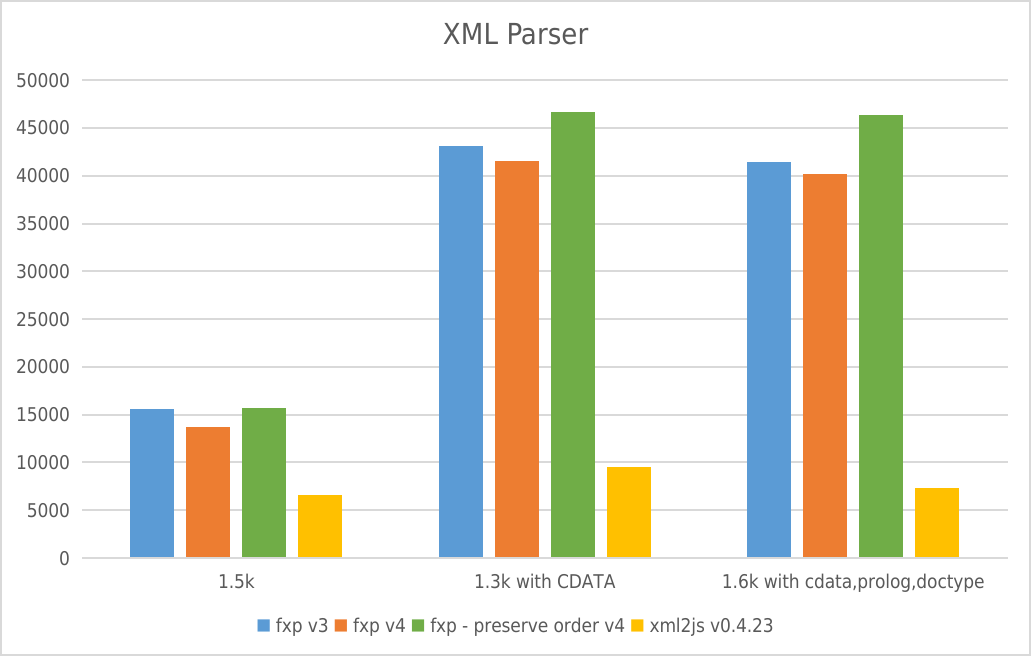
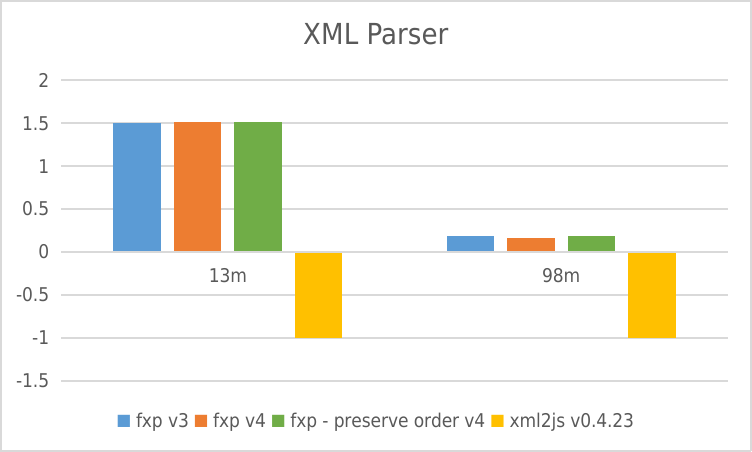
fast-xml-parser is the best all-rounder for modern apps. It handles parsing and building with high speed and no native dependencies. Use it for APIs, configuration files, and data exchange.

xml2js is a solid alternative if you need legacy compatibility. It is stable and well-understood, though slightly slower than fast-xml-parser.

libxmljs2 is the choice for heavy server-side workloads. Use it if you need XPath or native performance and can guarantee a Node.js environment.

xmlbuilder shines when generating complex XML documents. Pair it with a parser if you need round-trip support.

xmldom should be avoided. Switch to @xmldom/xmldom if you strictly need DOM methods in JavaScript.

Final Thought: For most frontend and full-stack developers, pure JavaScript solutions like fast-xml-parser offer the best balance of safety, speed, and deployment flexibility.

How to Choose: xml2js vs fast-xml-parser vs libxmljs vs libxmljs2 vs xmlbuilder vs xmldom

  • xml2js:

    Choose xml2js for stable, proven XML-to-JSON conversion in Node.js or bundled web apps. It has been around for years and handles most standard XML structures reliably. The API is callback-based but supports promises. It is a safe default for legacy systems or projects prioritizing stability over raw speed.

  • fast-xml-parser:

    Choose fast-xml-parser when you need high performance in a pure JavaScript environment. It handles both parsing and building without native dependencies, making it safe for browsers and serverless functions. It supports validation and complex XML features like attributes and tags. This is ideal for modern APIs where speed and security matter.

  • libxmljs:

    Choose libxmljs only if you are locked into a Node.js environment and require native libxml2 features. Be aware that it requires compilation and may fail on systems without build tools. It is not suitable for frontend or serverless deployments. Consider libxmljs2 instead for better maintenance support.

  • libxmljs2:

    Choose libxmljs2 if you need native XML processing in Node.js but want a more actively maintained fork. It offers the same performance benefits as libxmljs with fewer stagnation risks. Like its predecessor, it cannot run in browsers due to native bindings. Use this for heavy-duty server-side XML workflows.

  • xmlbuilder:

    Choose xmlbuilder when your primary task is generating XML documents from JavaScript objects. It provides a clean chainable API for constructing nodes and attributes. It does not focus on parsing, so pair it with a parser if you need bidirectional support. This is best for creating feeds, sitemaps, or SOAP requests.

  • xmldom:

    Avoid xmldom for new projects as it is deprecated in favor of @xmldom/xmldom. It mimics the browser DOM API for XML, which is useful for XPath or DOM manipulation. If you must use it, know that security patches may be delayed. Only select this if you strictly require DOM methods in a Node environment.

README for xml2js

node-xml2js

Ever had the urge to parse XML? And wanted to access the data in some sane, easy way? Don't want to compile a C parser, for whatever reason? Then xml2js is what you're looking for!

Description

Simple XML to JavaScript object converter. It supports bi-directional conversion. Uses sax-js and xmlbuilder-js.

Note: If you're looking for a full DOM parser, you probably want JSDom.

Installation

Simplest way to install xml2js is to use npm, just npm install xml2js which will download xml2js and all dependencies.

xml2js is also available via Bower, just bower install xml2js which will download xml2js and all dependencies.

Usage

No extensive tutorials required because you are a smart developer! The task of parsing XML should be an easy one, so let's make it so! Here's some examples.

Shoot-and-forget usage

You want to parse XML as simple and easy as possible? It's dangerous to go alone, take this:

var parseString = require('xml2js').parseString;
var xml = "<root>Hello xml2js!</root>"
parseString(xml, function (err, result) {
    console.dir(result);
});

Can't get easier than this, right? This works starting with xml2js 0.2.3. With CoffeeScript it looks like this:

{parseString} = require 'xml2js'
xml = "<root>Hello xml2js!</root>"
parseString xml, (err, result) ->
    console.dir result

If you need some special options, fear not, xml2js supports a number of options (see below), you can specify these as second argument:

parseString(xml, {trim: true}, function (err, result) {
});

Simple as pie usage

That's right, if you have been using xml-simple or a home-grown wrapper, this was added in 0.1.11 just for you:

var fs = require('fs'),
    xml2js = require('xml2js');

var parser = new xml2js.Parser();
fs.readFile(__dirname + '/foo.xml', function(err, data) {
    parser.parseString(data, function (err, result) {
        console.dir(result);
        console.log('Done');
    });
});

Look ma, no event listeners!

You can also use xml2js from CoffeeScript, further reducing the clutter:

fs = require 'fs',
xml2js = require 'xml2js'

parser = new xml2js.Parser()
fs.readFile __dirname + '/foo.xml', (err, data) ->
  parser.parseString data, (err, result) ->
    console.dir result
    console.log 'Done.'

But what happens if you forget the new keyword to create a new Parser? In the middle of a nightly coding session, it might get lost, after all. Worry not, we got you covered! Starting with 0.2.8 you can also leave it out, in which case xml2js will helpfully add it for you, no bad surprises and inexplicable bugs!

Promise usage

var xml2js = require('xml2js');
var xml = '<foo></foo>';

// With parser
var parser = new xml2js.Parser(/* options */);
parser.parseStringPromise(xml).then(function (result) {
  console.dir(result);
  console.log('Done');
})
.catch(function (err) {
  // Failed
});

// Without parser
xml2js.parseStringPromise(xml /*, options */).then(function (result) {
  console.dir(result);
  console.log('Done');
})
.catch(function (err) {
  // Failed
});

Parsing multiple files

If you want to parse multiple files, you have multiple possibilities:

  • You can create one xml2js.Parser per file. That's the recommended one and is promised to always just work.
  • You can call reset() on your parser object.
  • You can hope everything goes well anyway. This behaviour is not guaranteed work always, if ever. Use option #1 if possible. Thanks!

So you wanna some JSON?

Just wrap the result object in a call to JSON.stringify like this JSON.stringify(result). You get a string containing the JSON representation of the parsed object that you can feed to JSON-hungry consumers.

Displaying results

You might wonder why, using console.dir or console.log the output at some level is only [Object]. Don't worry, this is not because xml2js got lazy. That's because Node uses util.inspect to convert the object into strings and that function stops after depth=2 which is a bit low for most XML.

To display the whole deal, you can use console.log(util.inspect(result, false, null)), which displays the whole result.

So much for that, but what if you use eyes for nice colored output and it truncates the output with ? Don't fear, there's also a solution for that, you just need to increase the maxLength limit by creating a custom inspector var inspect = require('eyes').inspector({maxLength: false}) and then you can easily inspect(result).

XML builder usage

Since 0.4.0, objects can be also be used to build XML:

var xml2js = require('xml2js');

var obj = {name: "Super", Surname: "Man", age: 23};

var builder = new xml2js.Builder();
var xml = builder.buildObject(obj);

will result in:

<?xml version="1.0" encoding="UTF-8" standalone="yes"?>
<root>
  <name>Super</name>
  <Surname>Man</Surname>
  <age>23</age>
</root>

At the moment, a one to one bi-directional conversion is guaranteed only for default configuration, except for attrkey, charkey and explicitArray options you can redefine to your taste. Writing CDATA is supported via setting the cdata option to true.

To specify attributes:

var xml2js = require('xml2js');

var obj = {root: {$: {id: "my id"}, _: "my inner text"}};

var builder = new xml2js.Builder();
var xml = builder.buildObject(obj);

will result in:

<?xml version="1.0" encoding="UTF-8" standalone="yes"?>
<root id="my id">my inner text</root>

Adding xmlns attributes

You can generate XML that declares XML namespace prefix / URI pairs with xmlns attributes.

Example declaring a default namespace on the root element:

let obj = { 
  Foo: {
    $: {
      "xmlns": "http://foo.com"
    }   
  }
};  

Result of buildObject(obj):

<Foo xmlns="http://foo.com"/>

Example declaring non-default namespaces on non-root elements:

let obj = {
  'foo:Foo': {
    $: {
      'xmlns:foo': 'http://foo.com'
    },
    'bar:Bar': {
      $: {
        'xmlns:bar': 'http://bar.com'
      }
    }
  }
}

Result of buildObject(obj):

<foo:Foo xmlns:foo="http://foo.com">
  <bar:Bar xmlns:bar="http://bar.com"/>
</foo:Foo>

Processing attribute, tag names and values

Since 0.4.1 you can optionally provide the parser with attribute name and tag name processors as well as element value processors (Since 0.4.14, you can also optionally provide the parser with attribute value processors):


function nameToUpperCase(name){
    return name.toUpperCase();
}

//transform all attribute and tag names and values to uppercase
parseString(xml, {
  tagNameProcessors: [nameToUpperCase],
  attrNameProcessors: [nameToUpperCase],
  valueProcessors: [nameToUpperCase],
  attrValueProcessors: [nameToUpperCase]},
  function (err, result) {
    // processed data
});

The tagNameProcessors and attrNameProcessors options accept an Array of functions with the following signature:

function (name){
  //do something with `name`
  return name
}

The attrValueProcessors and valueProcessors options accept an Array of functions with the following signature:

function (value, name) {
  //`name` will be the node name or attribute name
  //do something with `value`, (optionally) dependent on the node/attr name
  return value
}

Some processors are provided out-of-the-box and can be found in lib/processors.js:

  • normalize: transforms the name to lowercase. (Automatically used when options.normalize is set to true)

  • firstCharLowerCase: transforms the first character to lower case. E.g. 'MyTagName' becomes 'myTagName'

  • stripPrefix: strips the xml namespace prefix. E.g <foo:Bar/> will become 'Bar'. (N.B.: the xmlns prefix is NOT stripped.)

  • parseNumbers: parses integer-like strings as integers and float-like strings as floats E.g. "0" becomes 0 and "15.56" becomes 15.56

  • parseBooleans: parses boolean-like strings to booleans E.g. "true" becomes true and "False" becomes false

Options

Apart from the default settings, there are a number of options that can be specified for the parser. Options are specified by new Parser({optionName: value}). Possible options are:

  • attrkey (default: $): Prefix that is used to access the attributes. Version 0.1 default was @.
  • charkey (default: _): Prefix that is used to access the character content. Version 0.1 default was #.
  • explicitCharkey (default: false) Determines whether or not to use a charkey prefix for elements with no attributes.
  • trim (default: false): Trim the whitespace at the beginning and end of text nodes.
  • normalizeTags (default: false): Normalize all tag names to lowercase.
  • normalize (default: false): Trim whitespaces inside text nodes.
  • explicitRoot (default: true): Set this if you want to get the root node in the resulting object.
  • emptyTag (default: ''): what will the value of empty nodes be. In case you want to use an empty object as a default value, it is better to provide a factory function () => ({}) instead. Without this function a plain object would become a shared reference across all occurrences with unwanted behavior.
  • explicitArray (default: true): Always put child nodes in an array if true; otherwise an array is created only if there is more than one.
  • ignoreAttrs (default: false): Ignore all XML attributes and only create text nodes.
  • mergeAttrs (default: false): Merge attributes and child elements as properties of the parent, instead of keying attributes off a child attribute object. This option is ignored if ignoreAttrs is true.
  • validator (default null): You can specify a callable that validates the resulting structure somehow, however you want. See unit tests for an example.
  • xmlns (default false): Give each element a field usually called '$ns' (the first character is the same as attrkey) that contains its local name and namespace URI.
  • explicitChildren (default false): Put child elements to separate property. Doesn't work with mergeAttrs = true. If element has no children then "children" won't be created. Added in 0.2.5.
  • childkey (default $$): Prefix that is used to access child elements if explicitChildren is set to true. Added in 0.2.5.
  • preserveChildrenOrder (default false): Modifies the behavior of explicitChildren so that the value of the "children" property becomes an ordered array. When this is true, every node will also get a #name field whose value will correspond to the XML nodeName, so that you may iterate the "children" array and still be able to determine node names. The named (and potentially unordered) properties are also retained in this configuration at the same level as the ordered "children" array. Added in 0.4.9.
  • charsAsChildren (default false): Determines whether chars should be considered children if explicitChildren is on. Added in 0.2.5.
  • includeWhiteChars (default false): Determines whether whitespace-only text nodes should be included. Added in 0.4.17.
  • async (default false): Should the callbacks be async? This might be an incompatible change if your code depends on sync execution of callbacks. Future versions of xml2js might change this default, so the recommendation is to not depend on sync execution anyway. Added in 0.2.6.
  • strict (default true): Set sax-js to strict or non-strict parsing mode. Defaults to true which is highly recommended, since parsing HTML which is not well-formed XML might yield just about anything. Added in 0.2.7.
  • attrNameProcessors (default: null): Allows the addition of attribute name processing functions. Accepts an Array of functions with following signature:
    function (name){
        //do something with `name`
        return name
    }
    
    Added in 0.4.14
  • attrValueProcessors (default: null): Allows the addition of attribute value processing functions. Accepts an Array of functions with following signature:
    function (value, name){
      //do something with `name`
      return name
    }
    
    Added in 0.4.1
  • tagNameProcessors (default: null): Allows the addition of tag name processing functions. Accepts an Array of functions with following signature:
    function (name){
      //do something with `name`
      return name
    }
    
    Added in 0.4.1
  • valueProcessors (default: null): Allows the addition of element value processing functions. Accepts an Array of functions with following signature:
    function (value, name){
      //do something with `name`
      return name
    }
    
    Added in 0.4.6

Options for the Builder class

These options are specified by new Builder({optionName: value}). Possible options are:

  • attrkey (default: $): Prefix that is used to access the attributes. Version 0.1 default was @.
  • charkey (default: _): Prefix that is used to access the character content. Version 0.1 default was #.
  • rootName (default root or the root key name): root element name to be used in case explicitRoot is false or to override the root element name.
  • renderOpts (default { 'pretty': true, 'indent': ' ', 'newline': '\n' }): Rendering options for xmlbuilder-js.
    • pretty: prettify generated XML
    • indent: whitespace for indentation (only when pretty)
    • newline: newline char (only when pretty)
  • xmldec (default { 'version': '1.0', 'encoding': 'UTF-8', 'standalone': true }: XML declaration attributes.
    • xmldec.version A version number string, e.g. 1.0
    • xmldec.encoding Encoding declaration, e.g. UTF-8
    • xmldec.standalone standalone document declaration: true or false
  • doctype (default null): optional DTD. Eg. {'ext': 'hello.dtd'}
  • headless (default: false): omit the XML header. Added in 0.4.3.
  • allowSurrogateChars (default: false): allows using characters from the Unicode surrogate blocks.
  • cdata (default: false): wrap text nodes in <![CDATA[ ... ]]> instead of escaping when necessary. Does not add <![CDATA[ ... ]]> if it is not required. Added in 0.4.5.

renderOpts, xmldec,doctype and headless pass through to xmlbuilder-js.

Updating to new version

Version 0.2 changed the default parsing settings, but version 0.1.14 introduced the default settings for version 0.2, so these settings can be tried before the migration.

var xml2js = require('xml2js');
var parser = new xml2js.Parser(xml2js.defaults["0.2"]);

To get the 0.1 defaults in version 0.2 you can just use xml2js.defaults["0.1"] in the same place. This provides you with enough time to migrate to the saner way of parsing in xml2js 0.2. We try to make the migration as simple and gentle as possible, but some breakage cannot be avoided.

So, what exactly did change and why? In 0.2 we changed some defaults to parse the XML in a more universal and sane way. So we disabled normalize and trim so xml2js does not cut out any text content. You can reenable this at will of course. A more important change is that we return the root tag in the resulting JavaScript structure via the explicitRoot setting, so you need to access the first element. This is useful for anybody who wants to know what the root node is and preserves more information. The last major change was to enable explicitArray, so everytime it is possible that one might embed more than one sub-tag into a tag, xml2js >= 0.2 returns an array even if the array just includes one element. This is useful when dealing with APIs that return variable amounts of subtags.

Running tests, development

Build Status Coverage Status Dependency Status

The development requirements are handled by npm, you just need to install them. We also have a number of unit tests, they can be run using npm test directly from the project root. This runs zap to discover all the tests and execute them.

If you like to contribute, keep in mind that xml2js is written in CoffeeScript, so don't develop on the JavaScript files that are checked into the repository for convenience reasons. Also, please write some unit test to check your behaviour and if it is some user-facing thing, add some documentation to this README, so people will know it exists. Thanks in advance!

Getting support

Please, if you have a problem with the library, first make sure you read this README. If you read this far, thanks, you're good. Then, please make sure your problem really is with xml2js. It is? Okay, then I'll look at it. Send me a mail and we can talk. Please don't open issues, as I don't think that is the proper forum for support problems. Some problems might as well really be bugs in xml2js, if so I'll let you know to open an issue instead :)

But if you know you really found a bug, feel free to open an issue instead.