Selecting Date Pickers in React Native
These four libraries provide date and time selection interfaces for React Native applications. react-native-date-picker and react-native-modal-datetime-picker leverage native iOS and Android pickers for a platform-consistent feel. react-native-paper-dates offers a Material Design implementation using JavaScript components. react-native-datepicker is a legacy package that is largely unmaintained compared to modern alternatives. Choosing the right one depends on your design system, native integration needs, and maintenance requirements.
npm下载趋势
GitHub Stars 排名
统计详情


React Native Date Pickers: Architecture and Implementation Compared
Selecting the right date picker impacts both user experience and long-term maintenance in React Native apps. react-native-date-picker, react-native-datepicker, react-native-modal-datetime-picker, and react-native-paper-dates all solve the same problem but use different underlying technologies. Let's compare how they handle native integration, modal behavior, styling, and maintenance.
📱 Native Integration: Direct Bridges vs. JavaScript UI
react-native-date-picker connects directly to native iOS and Android picker components.
- It renders the actual OS picker inside your React view.
- Best for users who expect standard system behavior.
// react-native-date-picker
import DatePicker from 'react-native-date-picker';

<DatePicker
  date={date}
  onDateChange={setDate}
  mode="date"
/>;
react-native-datepicker uses a older bridge to native components.
- It was one of the first solutions but relies on legacy code.
- Functionality is similar but lacks modern updates.
// react-native-datepicker
import DatePicker from 'react-native-datepicker';

<DatePicker
  date={date}
  onDateChange={setDate}
  mode="date"
/>;
react-native-modal-datetime-picker wraps the community native picker in a modal.
- It uses
@react-native-community/datetimepickerunder the hood. - Gives you native feel with controlled visibility.
// react-native-modal-datetime-picker
import { DateTimePickerModal } from 'react-native-modal-datetime-picker';

<DateTimePickerModal
  isVisible={isVisible}
  onConfirm={setDate}
  onCancel={hidePicker}
  mode="date"
/>;
react-native-paper-dates builds the UI using JavaScript and React Native Paper.
- It does not use native OS pickers by default.
- Ensures visual consistency across platforms using Material Design.
// react-native-paper-dates
import { DatePicker } from 'react-native-paper-dates';

<DatePicker
  value={date}
  onChange={setDate}
  mode="outlined"
/>;
🪟 Modal Behavior: Built-In vs. Manual Control
react-native-date-picker does not include a modal wrapper by default.
- You must manage visibility state yourself if you want a popup.
- Gives you full control over where the picker appears.
// react-native-date-picker
// Manual modal wrapping required
{isVisible && (
  <DatePicker
    date={date}
    onDateChange={setDate}
  />
)}
react-native-datepicker often includes its own modal logic internally.
- Tapping the input opens the picker automatically.
- Less control over the animation or overlay.
// react-native-datepicker
// Built-in modal behavior
<DatePicker
  date={date}
  onDateChange={setDate}
  customStyles={{ /* ... */ }}
/>;
react-native-modal-datetime-picker handles modal visibility as a core feature.
- You pass
isVisibleto show or hide the dialog. - Simplifies state management for popup pickers.
// react-native-modal-datetime-picker
<DateTimePickerModal
  isVisible={isVisible}
  onConfirm={handleConfirm}
  onCancel={hidePicker}
/>;
react-native-paper-dates uses Paper's Dialog or Input components.
- It integrates with the Paper ecosystem's modal patterns.
- Requires setup within a
Providertree.
// react-native-paper-dates
// Uses Paper internal dialog logic
<DatePicker
  value={date}
  onChange={setDate}
  label="Select Date"
/>;
🎨 Styling and Theming: Native Limits vs. Full Customization
react-native-date-picker has limited styling options.
- You can change colors but cannot reshape the native widget.
- Restricted by what iOS and Android allow.
// react-native-date-picker
<DatePicker
  date={date}
  onDateChange={setDate}
  textColor="white"
  accentColor="pink"
/>;
react-native-datepicker allows some custom styles via props.
- You can adjust borders and fonts using
customStyles. - Still limited by the underlying native view.
// react-native-datepicker
<DatePicker
  date={date}
  customStyles={{
    dateInput: { borderWidth: 0 }
  }}
/>;
react-native-modal-datetime-picker lets you theme the modal container.
- You can pass props to the underlying picker for colors.
- Modal backdrop and layout are customizable.
// react-native-modal-datetime-picker
<DateTimePickerModal
  isVisible={isVisible}
  onConfirm={setDate}
  themeVariant="dark"
  textColor="white"
/>;
react-native-paper-dates offers full JavaScript-based styling.
- You can change every part of the component using Paper props.
- Matches your app's theme exactly without native limits.
// react-native-paper-dates
<DatePicker
  value={date}
  onChange={setDate}
  mode="outlined"
  label="Date"
/>;
🛠️ Maintenance and Ecosystem Health
Not all packages are maintained equally. This affects security updates and compatibility with new React Native versions.
react-native-date-pickeris actively maintained and updated for new OS versions.react-native-modal-datetime-pickeris widely used and relies on the stable community picker.react-native-paper-datesis tied to the React Native Paper release cycle.react-native-datepickeris legacy and should not be used in new projects.
| Package | Native UI | Modal Built-In | Custom Styling | Status |
|---|---|---|---|---|
react-native-date-picker | ✅ Yes | ❌ No | ⚠️ Limited | ✅ Active |
react-native-datepicker | ✅ Yes | ✅ Yes | ⚠️ Limited | ❌ Legacy |
react-native-modal-datetime-picker | ✅ Yes | ✅ Yes | ⚠️ Limited | ✅ Active |
react-native-paper-dates | ❌ No (JS) | ✅ Yes | ✅ Full | ✅ Active |
💡 Final Recommendation
react-native-date-picker is best for simple screens where you want the native picker inline without a popup. It is lightweight and reliable for standard forms.
react-native-modal-datetime-picker is the top choice for most apps needing a popup date picker. It balances native feel with easy modal management and strong community support.
react-native-paper-dates is the right pick if you use React Native Paper. It ensures your date inputs look exactly like the rest of your Material Design interface.
react-native-datepicker should be avoided. It is outdated and lacks the support needed for modern React Native development. Migrate to one of the active alternatives above.
Final Thought: Prioritize active maintenance and design system fit. If you need native behavior, choose the modal wrapper. If you need design consistency, choose the Paper implementation.
如何选择: react-native-modal-datetime-picker vs react-native-date-picker vs react-native-paper-dates vs react-native-datepicker
- react-native-modal-datetime-picker:
Choose
react-native-modal-datetime-pickerif you need native pickers wrapped in a consistent modal dialog. It is perfect for teams that want the native feel but require a uniform trigger mechanism across iOS and Android. This package builds on top of the community standard datetime picker. - react-native-date-picker:
Choose
react-native-date-pickerif you want a direct bridge to native pickers without extra modal logic. It is ideal for apps that need the standard OS date picker behavior embedded directly in the view hierarchy. This package is lightweight and focuses purely on the native component. - react-native-paper-dates:
Choose
react-native-paper-datesif your app already uses React Native Paper for UI components. It provides a Material Design look that matches the rest of your interface without relying on native OS pickers. This is the best fit for design systems prioritizing visual consistency over native behavior. - react-native-datepicker:
Avoid
react-native-datepickerfor new projects as it is considered legacy and lacks active maintenance. Only use this if you are maintaining an older codebase that already depends on it. For any new development, evaluate modern alternatives that support current React Native versions.
热门对比
react-native-modal-datetime-picker的README
react-native-modal-datetime-picker


A declarative cross-platform react-native date and time picker.
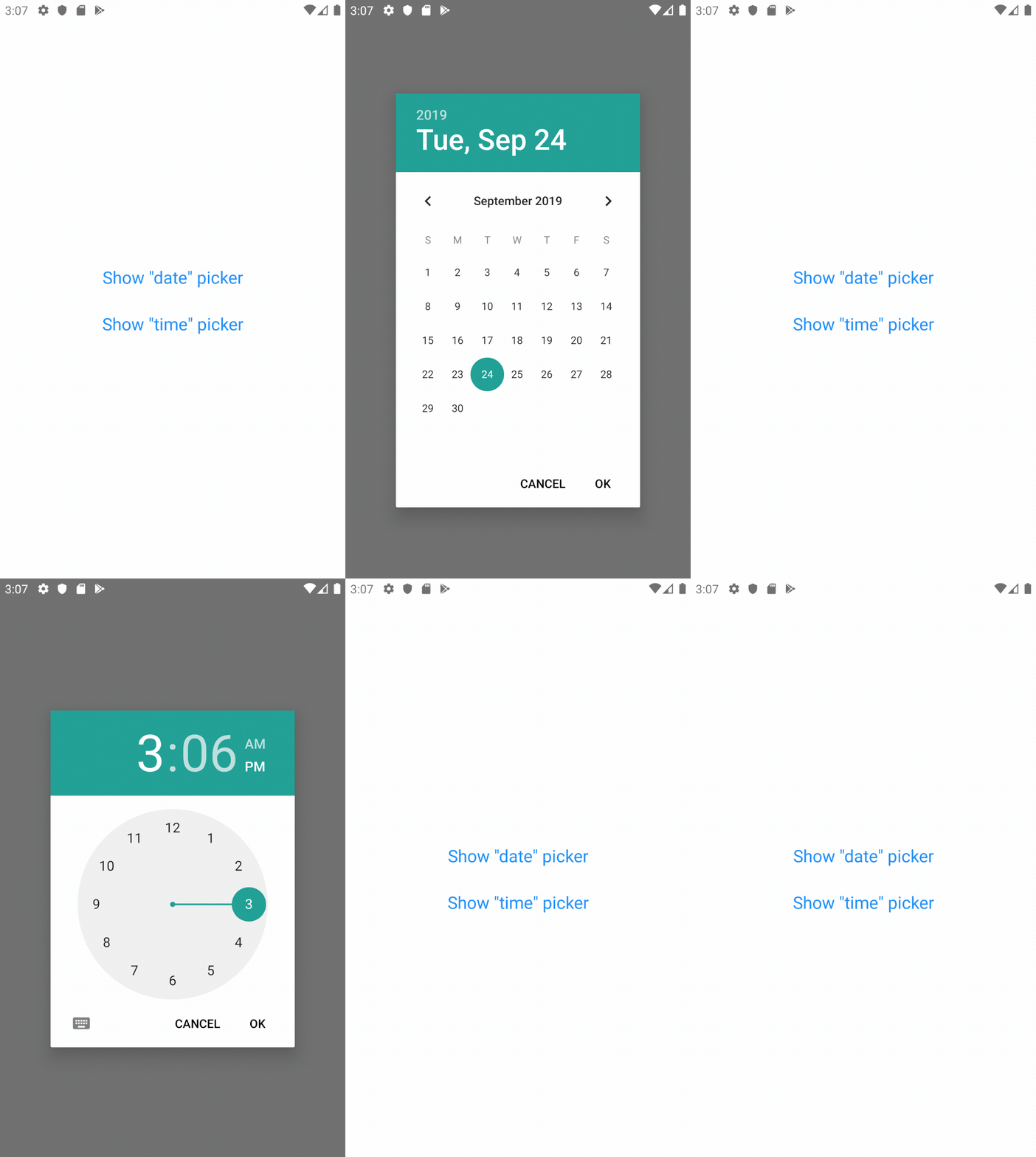
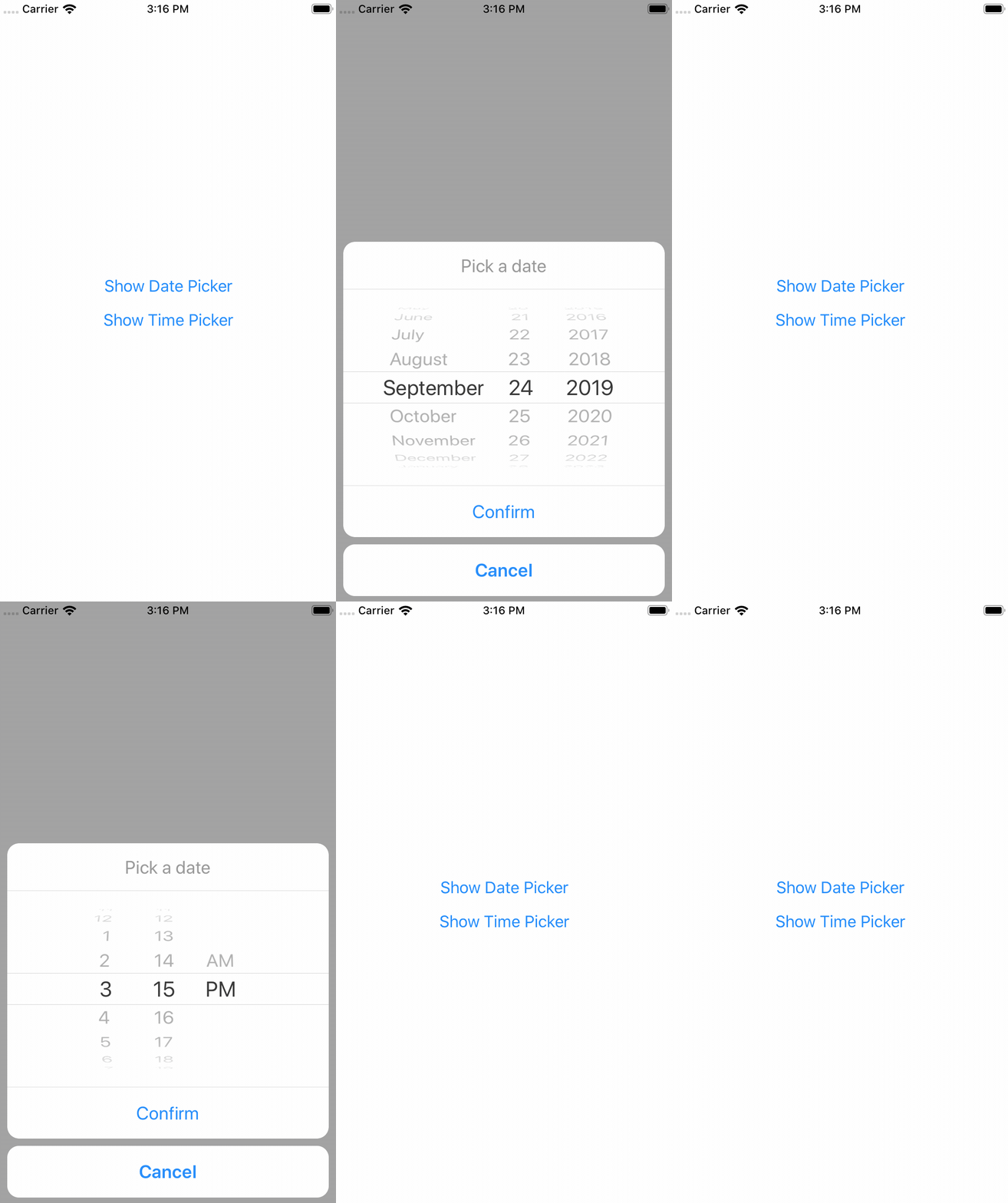
This library exposes a cross-platform interface for showing the native date-picker and time-picker inside a modal, providing a unified user and developer experience.
Under the hood, this library is using @react-native-community/datetimepicker.
Setup (for non-Expo projects)
If your project is not using Expo, install the library and the community date/time picker using npm or yarn:
# using npm
$ npm i react-native-modal-datetime-picker @react-native-community/datetimepicker

# using yarn
$ yarn add react-native-modal-datetime-picker @react-native-community/datetimepicker
Please notice that the @react-native-community/datetimepicker package is a native module so it might require manual linking.
Setup (for Expo projects)
If your project is using Expo, install the library and the community date/time picker using the Expo CLI:
npx expo install react-native-modal-datetime-picker @react-native-community/datetimepicker
To ensure the picker theme respects the device theme, you should also configure the appearance styles in your app.json this way:
{
  "expo": {
    "userInterfaceStyle": "automatic"
  }
}
Refer to the Appearance documentation on Expo for more info.
Usage
import React, { useState } from "react";
import { Button, View } from "react-native";
import DateTimePickerModal from "react-native-modal-datetime-picker";

const Example = () => {
  const [isDatePickerVisible, setDatePickerVisibility] = useState(false);

  const showDatePicker = () => {
    setDatePickerVisibility(true);
  };

  const hideDatePicker = () => {
    setDatePickerVisibility(false);
  };

  const handleConfirm = (date) => {
    console.warn("A date has been picked: ", date);
    hideDatePicker();
  };

  return (
    <View>
      <Button title="Show Date Picker" onPress={showDatePicker} />
      <DateTimePickerModal
        isVisible={isDatePickerVisible}
        mode="date"
        onConfirm={handleConfirm}
        onCancel={hideDatePicker}
      />
    </View>
  );
};

export default Example;
Available props
👉 Please notice that all the @react-native-community/react-native-datetimepicker props are supported as well!
| Name | Type | Default | Description |
|---|---|---|---|
buttonTextColorIOS | string | The color of the confirm button texts (iOS) | |
backdropStyleIOS | style | The style of the picker backdrop view style (iOS) | |
cancelButtonTestID | string | Used to locate cancel button in end-to-end tests | |
cancelTextIOS | string | "Cancel" | The label of the cancel button (iOS) |
confirmButtonTestID | string | Used to locate confirm button in end-to-end tests | |
confirmTextIOS | string | "Confirm" | The label of the confirm button (iOS) |
customCancelButtonIOS | component | Overrides the default cancel button component (iOS) | |
customConfirmButtonIOS | component | Overrides the default confirm button component (iOS) | |
customHeaderIOS | component | Overrides the default header component (iOS) | |
customPickerIOS | component | Overrides the default native picker component (iOS) | |
date | obj | new Date() | Initial selected date/time |
isVisible | bool | false | Show the datetime picker? |
isDarkModeEnabled | bool? | undefined | Forces the picker dark/light mode if set (otherwise fallbacks to the Appearance color scheme) (iOS) |
modalPropsIOS | object | {} | Additional modal props for iOS |
modalStyleIOS | style | Style of the modal content (iOS) | |
mode | string | "date" | Choose between "date", "time", and "datetime" |
onCancel | func | REQUIRED | Function called on dismiss |
onChange | func | () => null | Function called when the date changes (with the new date as parameter). |
onConfirm | func | REQUIRED | Function called on date or time picked. It returns the date or time as a JavaScript Date object |
onHide | func | () => null | Called after the hide animation |
pickerContainerStyleIOS | style | The style of the picker container (iOS) | |
pickerStyleIOS | style | The style of the picker component wrapper (iOS) | |
pickerComponentStyleIOS | style | The style applied to the actual picker component - this can be either a native iOS picker or a custom one if customPickerIOS was provided |
Frequently Asked Questions
This repo is only maintained by me, and unfortunately I don't have enough time for dedicated support & question.
If you're experiencing issues, please check the FAQs below.
For questions and support, please start try starting a discussion or try asking it on StackOverflow.
⚠️ Please use the GitHub issues only for well-described and reproducible bugs. Question/support issues will be closed.
The component is not working as expected, what should I do?
Under the hood react-native-modal-datetime-picker uses @react-native-community/datetimepicker.
If you're experiencing issues, try swapping react-native-datetime-picker with @react-native-community/datetimepicker. If the issue persists, check if it has already been reported as a an issue or check the other FAQs.
How can I show the timepicker instead of the datepicker?
Set the mode prop to time.
You can also display both the datepicker and the timepicker in one step by setting the mode prop to datetime.
Why is the initial date not working?
Please make sure you're using the date props (and not the value one).
Can I use the new iOS 14 style for the date/time picker?
Yes!
You can set the display prop (that we'll pass down to react-native-datetimepicker) to inline to use the new iOS 14 picker.
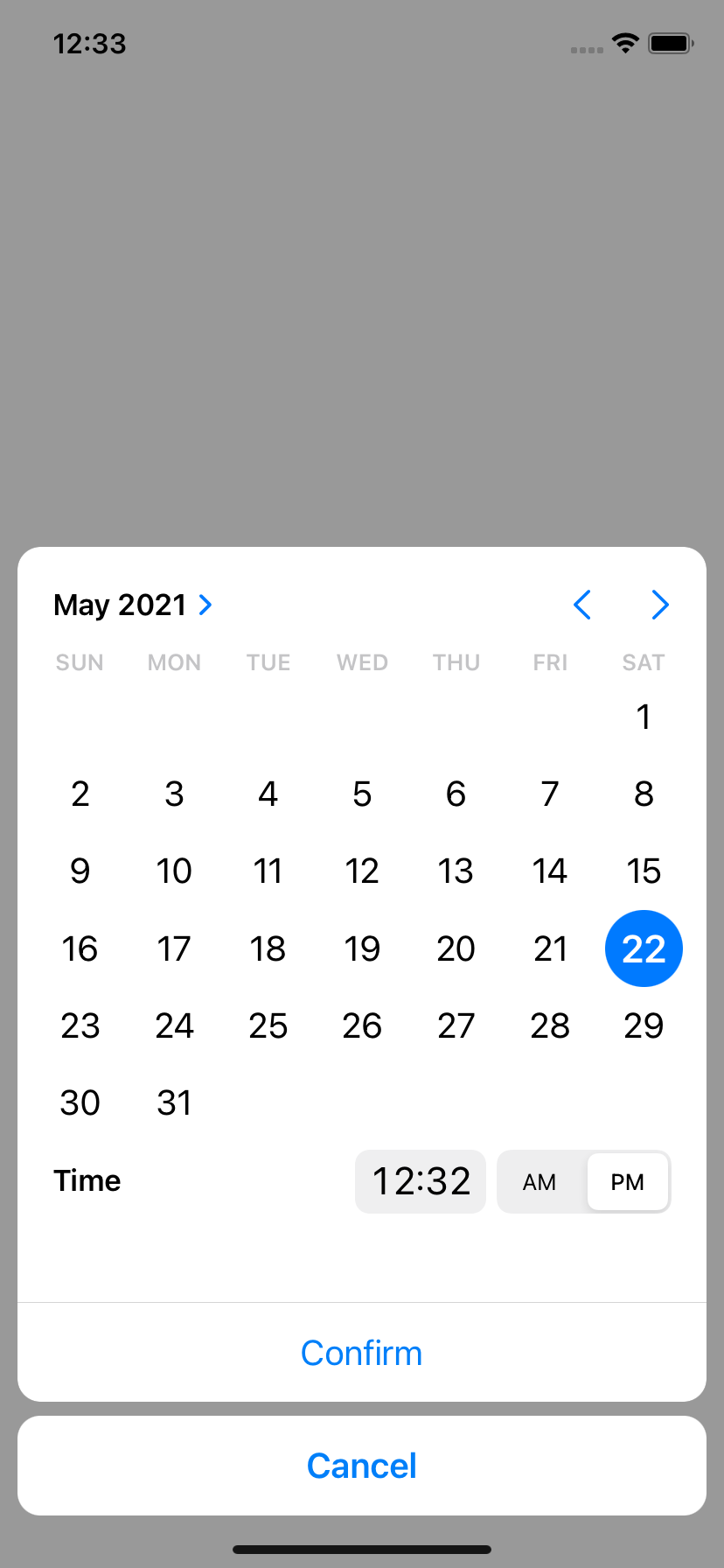
Please notice that you should probably avoid using this new style with a time-only picker (so with
modeset totime) because it doesn't suit well this use case.
Why does the picker show up twice on Android?
This seems to be a known issue of the @react-native-community/datetimepicker. Please see this thread for a couple of workarounds. The solution, as described in this reply is hiding the modal, before doing anything else.
Example of solution using Input + DatePicker
The most common approach for solving this issue when using an Input is:
- Wrap your
Inputwith a "Pressable"/Button(TouchableWithoutFeedback/TouchableOpacity+activeOpacity={1}for example) - Prevent
Inputfrom being focused. You could seteditable={false}too for preventing Keyboard opening - Triggering your
hideModal()callback as a first thing insideonConfirm/onCancelcallback props
const [isVisible, setVisible] = useState(false);
const [date, setDate] = useState('');

<TouchableOpacity
  activeOpacity={1}
  onPress={() => setVisible(true)}>
  <Input
    value={value}
    editable={false} // optional
  />
</TouchableOpacity>
<DatePicker
  isVisible={isVisible}
  onConfirm={(date) => {
    setVisible(false); // <- first thing
    setValue(parseDate(date));
  }}
  onCancel={() => setVisible(false)}
/>
How can I allow picking only specific dates?
You can't — @react-native-community/datetimepicker doesn't allow you to do so. That said, you can allow only "range" of dates by setting a minimum and maximum date. See below for more info.
How can I set a minimum and/or maximum date?
You can use the minimumDate and maximumDate props from @react-native-community/datetimepicker.
How do I change the color of the Android date and time pickers?
This is more a React-Native specific question than a react-native-modal-datetime-picker one.
See issue #29 and #106 for some solutions.
How to set a 24-hours format in iOS?
The is24Hour prop is only available on Android but you can use a small hack for enabling it on iOS by setting the picker timezone to en_GB:
<DatePicker
  mode="time"
  locale="en_GB" // Use "en_GB" here
  date={new Date()}
/>
How can I change the picker language/locale?
Under the hood this library is using @react-native-community/datetimepicker. You can't change the language/locale from react-native-modal-datetime-picker. Locale/language is set at the native level, on the device itself.
How can I set an automatic locale in iOS?
On iOS, you can set an automatic detection of the locale (fr_FR, en_GB, ...) depending on the user's device locale.
To do so, edit your AppDelegate.m file and add the following to didFinishLaunchingWithOptions.
// Force DatePicker locale to current language (for: 24h or 12h format, full day names etc...)
NSString *currentLanguage = [[NSLocale preferredLanguages] firstObject];
[[UIDatePicker appearance] setLocale:[[NSLocale alloc]initWithLocaleIdentifier:currentLanguage]];
Why is the picker is not showing the right layout on iOS >= 14?
Please make sure you're on the latest version of react-native-modal-datetime-picker and of the @react-native-community/datetimepicker.
We already closed several iOS 14 issues that were all caused by outdated/cached versions of the community datetimepicker.
Why is the picker not visible/transparent on iOS?
Please make sure you're on the latest version of react-native-modal-datetime-picker and of @react-native-community/datetimepicker.
Also, double-check that the picker light/dark theme is aligned with the OS one (e.g., don't "force" a theme using isDarkModeEnabled).
Why can't I show an alert after the picker has been hidden (on iOS)?
Unfortunately this is a know issue with React-Native on iOS. Even by using the onHide callback exposed by react-native-modal-datetime-picker you might not be able to show the (native) alert successfully. The only workaround that seems to work consistently for now is to wrap showing the alter in a setTimeout 😔:
const handleHide = () => {
  setTimeout(() => Alert.alert("Hello"), 0);
};
See issue #512 for more info.
Why does the date of onConfirm not match the picked date (on iOS)?
On iOS, clicking the "Confirm" button while the spinner is still in motion — even just slightly in motion — will cause the onConfirm callback to return the initial date instead of the picked one. This is is a long standing iOS issue (that can happen even on native app like the iOS calendar) and there's no failproof way to fix it on the JavaScript side.
See this GitHub gist for an example of how it might be solved at the native level — but keep in mind it won't work on this component until it has been merged into the official React-Native repo.
Related issue in the React-Native repo here.
How do I make it work with snapshot testing?
See issue #216 for a possible workaround.
Contributing
Please see the contributing guide.
License
The library is released under the MIT license. For more details see LICENSE.