JavaScript Package Management and Dependency Resolution Tools
bower, jspm, npm, npm-check-updates, pnpm, and yarn are tools used in JavaScript development to manage project dependencies, resolve package versions, and handle installation workflows. While npm is the default package manager for Node.js and serves as both a CLI tool and a registry, yarn and pnpm are alternative package managers that aim to improve speed, reliability, and disk usage through different node_modules layouts and lockfile strategies. bower was an early frontend-focused package manager that has since been deprecated, while jspm offers a module loader and bundling system built on top of standards like ES modules. npm-check-updates is not a package manager but a utility that scans your project’s dependencies and identifies outdated packages by comparing against the npm registry.
Npm Package Weekly Downloads Trend
Github Stars Ranking
Stat Detail


JavaScript Package Management: A Deep Dive into Modern Tools
Managing dependencies in JavaScript projects has evolved dramatically over the past decade. Today’s developers choose from several tools — each with distinct philosophies about how packages should be installed, resolved, and linked. Let’s examine bower, jspm, npm, npm-check-updates, pnpm, and yarn through real engineering lenses: installation mechanics, dependency resolution, disk usage, and developer experience.
⚠️ Deprecated vs. Active: Know What’s Still Supported
First, acknowledge maintenance status. According to official sources:
boweris deprecated. The npm page states: "Bower is deprecated. We recommend using Yarn and Webpack or Parcel for front-end projects." Do not start new projects with it.jspm,npm,npm-check-updates,pnpm, andyarnare actively maintained.
Using deprecated tools introduces security risks and blocks access to modern JavaScript features like ES modules and tree-shaking.
📦 Installation Mechanics: How Packages Reach Your Project
Each tool handles the node_modules structure differently — which affects correctness, speed, and debugging.
npm (v9+)
Uses a hoisted layout: dependencies are flattened to reduce duplication, but this can create “phantom dependencies” (using a package without declaring it).
# Install a package
npm install lodash
Resulting node_modules may look like:
node_modules/
├── lodash/
└── some-dep/
    └── another-lodash/  # possibly duplicated
yarn (Classic)
Also uses hoisting, similar to npm, but with a deterministic yarn.lock that ensures consistent installs across environments.
yarn add lodash
yarn (Berry with PnP)
Eliminates node_modules entirely. Instead, it uses a .pnp.cjs file to map required packages to their locations in a global cache.
yarn set version berry
yarn add lodash
No node_modules is created. Resolves via runtime hooks — faster but may break tools that assume node_modules exists.
pnpm
Uses a symlinked store. All packages live in a global content-addressable store (~/.pnpm-store), and node_modules contains hard links and symlinks that strictly reflect the dependency graph.
pnpm add lodash
Structure:
node_modules/
└── .pnpm/
    ├── lodash@4.17.21
    └── some-dep@1.0.0
        └── node_modules/lodash → symlink to store
This prevents phantom dependencies: if your code imports lodash but doesn’t declare it, it fails at runtime.
jspm
Doesn’t manage node_modules in the traditional sense. Instead, it generates import maps for native ES modules or bundles via its CLI.
jspm install lodash
Creates a jspm_packages/ folder and an importmap.json. In development, you might load modules directly in the browser:
<script type="importmap">
{
  "imports": {
    "lodash": "/jspm_packages/npm:lodash@4.17.21/lodash.js"
  }
}
</script>
<script type="module">
  import _ from 'lodash';
</script>
Not suitable for server-side or complex build pipelines.
npm-check-updates
Does not install packages. It only analyzes package.json and suggests upgrades.
npx npm-check-updates
# Output: lodash ^4.0.0 → ^5.0.0

# To update package.json (not node_modules!)
npx npm-check-updates -u
You must still run npm install afterward to apply changes.
🔗 Lockfiles and Reproducibility
Reproducible builds require deterministic dependency resolution.
npm: Usespackage-lock.json. Recent versions supportoverridesfor transitive dependency control.yarnClassic: Usesyarn.lock(YAML-like format). Supportsresolutionsfor forcing versions.yarnBerry: Uses.yarn/install-state.gzand.pnp.cjs. Offers zero-installs via cached state.pnpm: Usespnpm-lock.yaml. Supportspnpm overrides(similar to npm’s).jspm: Usesjspm.jsonandimport-map.json. Less standardized for team workflows.npm-check-updates: No lockfile — it reads yours but doesn’t write one.
All active tools (except jspm) integrate well with CI/CD when committed properly.
🧪 Real-World Trade-Offs: When to Use Which
Scenario: Monorepo with 50+ Packages
- ✅ Best:
pnpmoryarn(with workspaces) - Why? Both offer first-class monorepo support.
pnpm’s strictness catches undeclared deps;yarn’s plugin system allows custom workflows.
# pnpm workspace
pnpm -r add lodash

# yarn workspace
yarn workspaces foreach add lodash
Scenario: Legacy Frontend App (jQuery, Bootstrap)
- ❌ Avoid:
bower(deprecated) - ✅ Migrate to:
npm+ CDN or bundler - Example: Replace
bower install jquerywithnpm install jqueryand import via Webpack or<script src="/node_modules/jquery/dist/jquery.min.js">.
Scenario: Rapid Prototyping with ES Modules
- ✅ Consider:
jspm - Why? Lets you
importfrom npm directly in the browser without a build step.
// In browser dev console (with jspm import map)
import _ from 'lodash';
_.chunk([1,2,3,4], 2); // works!
But for production, you’ll likely bundle anyway — so weigh short-term convenience vs long-term maintainability.
Scenario: Security Audit and Dependency Updates
- ✅ Use:
npm-check-updates+ your package manager - Workflow:
npx npm-check-updates -u
npm install  # or pnpm install / yarn install
npm audit
Never skip the install step — npm-check-updates only edits package.json.
🛠️ Developer Experience: Commands and Ecosystem Fit
| Task | npm | yarn | pnpm |
|---|---|---|---|
| Add dep | npm install x | yarn add x | pnpm add x |
| Run script | npm run dev | yarn dev | pnpm dev |
| List outdated | npm outdated | yarn outdated | pnpm outdated |
| Global install | npm install -g | yarn global add | pnpm add -g |
All three integrate with modern tooling (Vite, Next.js, etc.). pnpm requires explicit opt-in in some frameworks (e.g., next.config.js must allow it), but support is now widespread.
🔄 Migration Considerations
Moving between tools is usually safe because they all consume the same package.json format. However:
- Switching to
pnpmmay expose missing dependencies due to strict resolution. - Switching to Yarn PnP may break tools that scan
node_modules(e.g., some ESLint plugins). - From
bower: Manually replace each dependency with its npm equivalent. Many Bower packages are now published on npm.
✅ Summary: Key Strengths
| Tool | Best For | Caveats |
|---|---|---|
bower | ❌ Deprecated — avoid | No security updates |
jspm | Browser-native ES module prototyping | Limited production use |
npm | Default, simple, universal | Slower installs, looser dependency model |
npm-check-updates | Safe dependency version auditing | Doesn’t install — only updates JSON |
pnpm | Disk efficiency, correctness, monorepos | Requires team buy-in |
yarn | Determinism, plugins, PnP innovation | PnP may need compatibility tweaks |
💡 Final Guidance
For new projects, default to npm if you value simplicity and compatibility. Choose pnpm if you care about disk space, correctness, and monorepo scalability. Use yarn if you need advanced features like PnP or rely on its plugin ecosystem.
Never use bower. Treat jspm as a niche tool for specific ES module experiments. And always pair any package manager with npm-check-updates (or built-in outdated commands) for healthy dependency hygiene.
The right tool isn’t about popularity — it’s about matching your team’s workflow, project constraints, and tolerance for trade-offs in speed, safety, and complexity.
How to Choose: pnpm vs bower vs jspm vs npm vs npm-check-updates vs yarn
- pnpm:
Choose
pnpmif you want faster installations, strict dependency isolation, and significant disk space savings via its content-addressable store and symbolic linking strategy. Its non-hoisted node_modules structure prevents phantom dependencies and aligns closely with how packages declare their requirements. It’s particularly valuable in monorepos or CI environments where reproducibility and efficiency matter. - bower:
Do not use
bowerin new projects — it is officially deprecated as of 2017 and no longer maintained. The Bower team recommends migrating to modern alternatives likenpm,yarn, orpnpmwith bundlers such as Webpack or Vite. If you encounter it in legacy code, prioritize refactoring dependencies into standard npm packages. - jspm:
Choose
jspmif you need a build-free development workflow that leverages native ES modules in the browser and want to import packages directly from CDNs like jspm.io without bundling during development. It’s useful for prototyping or educational purposes but adds complexity in production builds compared to mainstream bundler-based setups. Avoid it for large-scale applications requiring advanced optimization or ecosystem compatibility. - npm:
Choose
npmif you prefer using the default, widely supported package manager that ships with Node.js and integrates seamlessly with the npm registry. It’s sufficient for most projects, especially when simplicity, broad compatibility, and minimal tooling overhead are priorities. While historically slower than alternatives, recent versions have improved performance and now support workspaces, overrides, and audit features. - npm-check-updates:
Use
npm-check-updateswhen you need to safely identify and upgrade outdated dependencies in yourpackage.jsonwithout automatically modifying your lockfile. It’s ideal for periodic maintenance tasks, security patching, or preparing major version upgrades. Always run it alongside thorough testing, as it only updates version ranges—not installed packages—so follow up withnpm installor your package manager’s install command. - yarn:
Choose
yarn(especially Yarn Berry with PnP) if you need deterministic installs, advanced workspace features, or plugin extensibility. Its Plug’n’Play mode eliminates node_modules entirely, reducing I/O and improving startup time, though it may require compatibility adjustments with some tools. Stick with Yarn Classic if you rely on legacy plugins or need broad ecosystem support without PnP’s constraints.
Popular Comparisons
README for pnpm
简体中文 | 日本語 | 한국어 | Italiano | Português Brasileiro

Fast, disk space efficient package manager:
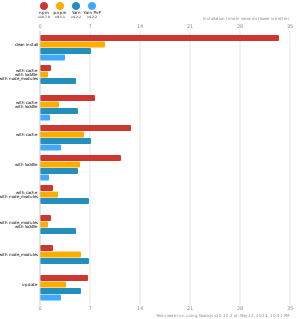
- Fast. Up to 2x faster than the alternatives (see benchmark).
- Efficient. Files inside
node_modulesare linked from a single content-addressable storage. - Great for monorepos.
- Strict. A package can access only dependencies that are specified in its
package.json. - Deterministic. Has a lockfile called
pnpm-lock.yaml. - Works as a Node.js version manager. See pnpm runtime.
- Works everywhere. Supports Windows, Linux, and macOS.
- Battle-tested. Used in production by teams of all sizes since 2016.
- See the full feature comparison with npm and Yarn.
To quote the Rush team:
Microsoft uses pnpm in Rush repos with hundreds of projects and hundreds of PRs per day, and we’ve found it to be very fast and reliable.



Platinum Sponsors

|

|
Gold Sponsors

|

|

|

|

|

|

|

|
Silver Sponsors

|

|

|

|

|

|

|

|
|
| ⏱️ Time.now |
Support this project by becoming a sponsor.
Background
pnpm uses a content-addressable filesystem to store all files from all module directories on a disk. When using npm, if you have 100 projects using lodash, you will have 100 copies of lodash on disk. With pnpm, lodash will be stored in a content-addressable storage, so:
- If you depend on different versions of lodash, only the files that differ are added to the store.
If lodash has 100 files, and a new version has a change only in one of those files,
pnpm updatewill only add 1 new file to the storage. - All the files are saved in a single place on the disk. When packages are installed, their files are linked from that single place consuming no additional disk space. Linking is performed using either hard-links or reflinks (copy-on-write).
As a result, you save gigabytes of space on your disk and you have a lot faster installations!
If you'd like more details about the unique node_modules structure that pnpm creates and
why it works fine with the Node.js ecosystem, read this small article: Flat node_modules is not the only way.
💖 Like this project? Let people know with a tweet
Installation
For installation options visit our website.
Usage
Just use pnpm in place of npm/Yarn. E.g., install dependencies via:
pnpm install
For more advanced usage, read pnpm CLI on our website, or run pnpm help.
Benchmark
pnpm is up to 2x faster than npm and Yarn classic. See all benchmarks here.
Benchmarks on an app with lots of dependencies: