JavaScript Package Managers: Architecture and Trade-offs
bower, jspm, npm, pnpm, and yarn are all package managers designed to handle dependencies in JavaScript projects, but they differ significantly in architecture, performance characteristics, and ecosystem integration. npm is the default package manager for Node.js and has evolved into a full-featured tool supporting workspaces, scripts, and publishing. yarn, originally created by Facebook, introduced deterministic installs and a lockfile before these became standard in npm. pnpm uses a content-addressable store and hard links to save disk space and improve install speed while maintaining strict dependency isolation. bower was an early frontend-focused package manager that installed flat dependencies directly from Git endpoints but is now deprecated. jspm bridges npm packages with native ES modules in the browser, offering a buildless development workflow through its CDN and import map generation.
Npm Package Weekly Downloads Trend
Github Stars Ranking
Stat Detail


JavaScript Package Managers: Architecture and Trade-offs
Choosing a package manager isn’t just about installing dependencies — it shapes your project’s performance, reproducibility, debugging experience, and compatibility with tooling. Let’s compare bower, jspm, npm, pnpm, and yarn based on how they actually behave in real-world scenarios.
🚫 Deprecation Status: What Should You Avoid?
bower is officially deprecated. Its npm page states: "Bower is no longer recommended for new projects." The repository archive notice confirms it’s unmaintained. Do not start new projects with Bower.
# ❌ Never do this in 2024+
npm install -g bower
bower init
All other tools (jspm, npm, pnpm, yarn) are actively maintained and suitable for production use — though their design philosophies differ greatly.
📦 Dependency Layout: How Packages Are Stored
The biggest architectural difference lies in how each tool structures node_modules (or avoids it entirely).
npm (v7+) uses a nested + hoisted layout. It tries to deduplicate by hoisting shared dependencies to the top level but falls back to nesting when version conflicts occur.
# npm install lodash
# Creates:
node_modules/
├── lodash/                 # v4.17.21
└── some-lib/
    └── node_modules/
        └── lodash/         # v3.10.1 (if conflict exists)
yarn (classic) behaves similarly to npm but with stricter hoisting rules. Yarn Berry (v2+) introduces Plug’n’Play (PnP), which eliminates node_modules entirely and uses a .pnp.cjs file to map imports at runtime.
// .pnp.cjs (generated by Yarn PnP)
/* Generated file — do not edit */
module.exports = {
  name: 'my-app',
  dependencies: [['lodash', '4.17.21']],
  // ...resolution map
};
pnpm uses a content-addressable store and hard links. Every package lives once in a global store (~/.pnpm-store), and your project gets hard-linked copies. Dependencies are never hoisted — instead, pnpm creates a node_modules/.pnpm directory with symbolic links that enforce strict dependency access.
# pnpm install lodash
# Creates:
node_modules/
├── .pnpm/
│   ├── lodash@4.17.21 -> ~/.pnpm-store/lodash/4.17.21
│   └── some-lib@1.0.0
│       └── node_modules/lodash -> ../../lodash@4.17.21
└── lodash -> .pnpm/lodash@4.17.21/node_modules/lodash
This prevents “phantom dependencies” — you can’t accidentally require a package that isn’t listed in your package.json.
jspm doesn’t manage node_modules for browser usage. Instead, it generates import maps that resolve bare specifiers to CDN URLs.
<!-- jspm injects this -->
<script type="importmap">
{
  "imports": {
    "lodash": "https://jspm.dev/lodash@4.17.21"
  }
}
</script>
<script type="module">
  import _ from 'lodash'; // Resolves via import map
</script>
For Node.js projects, jspm can also install to node_modules, but its primary value is in browser-native workflows.
⚡ Install Performance and Disk Usage
Let’s simulate installing a moderately sized project (react, lodash, axios).
npm:
npm install
# Installs full copies; ~200MB disk usage
# Subsequent installs: moderate speed (uses cache)
yarn (classic):
yarn install
# Similar disk usage to npm
# Faster than npm < v7 due to parallel fetching
yarn (Berry with PnP):
yarn install
# No node_modules → ~50MB disk usage
# Near-instant reinstalls if .yarn/cache exists (zero-installs)
pnpm:
pnpm install
# Hard links from global store → ~60MB disk usage
# Fastest cold install among node_modules-based tools
jspm (browser mode):
jspm install lodash
# No local install — resolves at runtime via CDN
# Zero disk usage for dependencies, but requires network
💡 Real-world impact: In monorepos with dozens of packages sharing dependencies,
pnpmand Yarn PnP can reduce disk usage by 50–80% compared tonpm.
🔒 Reproducibility and Security
All modern tools (npm, yarn, pnpm) generate lockfiles:
npm:package-lock.jsonyarn:yarn.lockpnpm:pnpm-lock.yaml
These ensure identical dependency trees across environments.
pnpm enforces stricter correctness: Because it doesn’t hoist, your code can only require direct or explicit dependencies. This catches bugs early:
// In a pnpm project
import foo from 'some-transitive-dep'; // ❌ Fails!
// Must add to package.json first
In npm or classic yarn, this might accidentally work due to hoisting — creating a hidden dependency.
jspm provides reproducibility via pinned CDN URLs in import maps, but offers no built-in audit or vulnerability scanning.
npm and yarn integrate with security advisories:
npm audit
# or
yarn audit
pnpm supports pnpm audit as well. jspm and bower do not.
🧪 Workspace Support (Monorepos)
Managing multiple packages in one repo is common. Here’s how each handles it.
npm (v7+):
// package.json
{
  "workspaces": ["packages/*"]
}
npm install  # Links workspace packages
npm run test --workspaces  # Runs in all
yarn (Berry):
# .yarnrc.yml
workspaces:
  - packages/*
yarn workspaces foreach run build
pnpm:
# pnpm-workspace.yaml
packages:
  - 'packages/*'
pnpm -r run lint # -r = recursive
All three support protocol specifiers like workspace:^1.0.0 for linking.
jspm has no native workspace support. bower never did.
🛠️ CLI Commands: A Side-by-Side
| Task | npm | yarn (classic) | yarn (Berry) | pnpm | jspm (browser) |
|---|---|---|---|---|---|
| Install deps | npm install | yarn install | yarn install | pnpm install | jspm install lodash |
| Add dev dependency | npm install -D types | yarn add -D types | yarn add -D types | pnpm add -D types | N/A |
| Run script | npm run build | yarn build | yarn build | pnpm build | N/A |
| Global install | npm install -g serve | yarn global add serve | Not recommended | pnpm add -g serve | N/A |
| Generate lockfile | Automatic | Automatic | Automatic | Automatic | jspm map |
Note: jspm’s primary interface is jspm map to generate import maps, not local installs.
🌐 When to Use Which?
Use npm if:
- You want the default, lowest-friction option
- Your team includes junior developers
- You rely on tools that assume standard
node_modules
Use yarn (Berry) if:
- You want zero-installs and PnP for faster CI
- You’re okay with occasional tooling incompatibilities
- You need advanced features like constraints or patch protocols
Use pnpm if:
- Disk space or install time is critical (e.g., Docker, CI)
- You want to eliminate phantom dependencies
- You prefer npm-like UX with better correctness
Use jspm if:
- You’re building a demo, prototype, or simple app
- You want to use ES modules natively in the browser
- You don’t need bundling, tree-shaking, or offline support
Never use bower — it’s deprecated.
💡 Final Thought
The “best” package manager depends on your constraints:
- Simplicity and ubiquity? →
npm - Strict correctness and efficiency? →
pnpm - Advanced monorepo features? →
yarn(Berry) - Buildless browser development? →
jspm
Avoid letting legacy choices dictate your stack. If you’re on npm but hitting disk or performance limits, pnpm is often a drop-in upgrade. If you’re still on Bower, migrate — the ecosystem has moved on.
How to Choose: pnpm vs npm vs yarn vs jspm vs bower
- pnpm:
Choose
pnpmif disk space efficiency, strict dependency isolation, and fast installs are critical — especially in monorepos or CI environments. Its symlinking strategy prevents phantom dependencies and ensures reproducibility, making it safer for large teams. Use it when you want npm-compatible workflows but with better performance and stricter correctness guarantees. - npm:
Choose
npmif you want the standard, widely supported package manager that ships with Node.js and integrates seamlessly with the broader JavaScript ecosystem. It’s ideal for teams prioritizing simplicity, broad tooling compatibility, and minimal additional dependencies. While historically slower than alternatives, recent versions offer significant performance improvements, workspaces, and robust security features like audit and provenance. - yarn:
Choose
yarn(particularly Yarn Berry with Plug’n’Play) if you prioritize deterministic installs, zero-installs (via cached artifacts), and advanced monorepo features out of the box. It’s well-suited for teams already invested in its ecosystem or those needing fine-grained control over resolution via constraints and protocols. However, be prepared for a steeper learning curve and occasional compatibility issues with tools expecting traditional node_modules layouts. - jspm:
Choose
jspmif you need to develop or deploy applications using native ES modules in the browser without a build step, especially when importing packages directly from npm via CDN. It excels in prototyping, educational demos, or lightweight apps where avoiding bundling is a priority. However, avoid it for production applications requiring tree-shaking, code splitting, or offline builds, as it relies heavily on network availability and doesn’t manage local node_modules. - bower:
Do not use
bowerin new projects — it is officially deprecated as stated on its npm page and GitHub repository. It was designed for frontend-only workflows before modern bundlers existed, and lacks support for nested dependencies, security audits, or compatibility with today’s module systems. Migrate existing projects tonpm,yarn, orpnpmwith a bundler like Vite or Webpack.
Popular Comparisons
README for pnpm
简体中文 | 日本語 | 한국어 | Italiano | Português Brasileiro

Fast, disk space efficient package manager:
- Fast. Up to 2x faster than the alternatives (see benchmark).
- Efficient. Files inside
node_modulesare linked from a single content-addressable storage. - Great for monorepos.
- Strict. A package can access only dependencies that are specified in its
package.json. - Deterministic. Has a lockfile called
pnpm-lock.yaml. - Works as a Node.js version manager. See pnpm runtime.
- Works everywhere. Supports Windows, Linux, and macOS.
- Battle-tested. Used in production by teams of all sizes since 2016.
- See the full feature comparison with npm and Yarn.
To quote the Rush team:
Microsoft uses pnpm in Rush repos with hundreds of projects and hundreds of PRs per day, and we’ve found it to be very fast and reliable.



Platinum Sponsors

|

|
Gold Sponsors

|

|

|

|

|

|

|

|
Silver Sponsors

|

|

|

|

|

|

|

|
|
| ⏱️ Time.now |
Support this project by becoming a sponsor.
Background
pnpm uses a content-addressable filesystem to store all files from all module directories on a disk. When using npm, if you have 100 projects using lodash, you will have 100 copies of lodash on disk. With pnpm, lodash will be stored in a content-addressable storage, so:
- If you depend on different versions of lodash, only the files that differ are added to the store.
If lodash has 100 files, and a new version has a change only in one of those files,
pnpm updatewill only add 1 new file to the storage. - All the files are saved in a single place on the disk. When packages are installed, their files are linked from that single place consuming no additional disk space. Linking is performed using either hard-links or reflinks (copy-on-write).
As a result, you save gigabytes of space on your disk and you have a lot faster installations!
If you'd like more details about the unique node_modules structure that pnpm creates and
why it works fine with the Node.js ecosystem, read this small article: Flat node_modules is not the only way.
💖 Like this project? Let people know with a tweet
Installation
For installation options visit our website.
Usage
Just use pnpm in place of npm/Yarn. E.g., install dependencies via:
pnpm install
For more advanced usage, read pnpm CLI on our website, or run pnpm help.
Benchmark
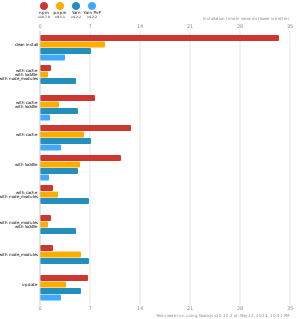
pnpm is up to 2x faster than npm and Yarn classic. See all benchmarks here.
Benchmarks on an app with lots of dependencies: